
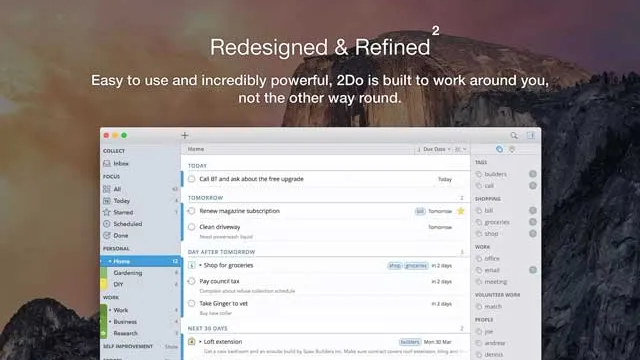
Setapp includes the Mac edition of 2Do, a task manager that focuses on flexible planning rather than forcing one productivity method. 2Do also offers separate iPhone and iPad apps; those mobile licenses are not included with Setapp. It works well if your tasks span projects, checklists, reminders, tags, Calendar scheduling, and location-based alerts, and you want a system that can scale from daily errands to more structured project planning.
This page may include affiliate links.
But I only share apps and services that I use, love, and believe in.
To get the best deal and the latest pricing on SetApp, be sure to use our link to support this blog & the work we do.
2Do on Setapp Overview
On Setapp, 2Do is listed as version 2.9.77 for macOS 11.5 or later, with a 147.6 MB app size, support for 16 languages, and a 93% rating from 393 ratings. Its main value is control: you can organize work by lists, projects, subtasks, checklists, tags, color-coded categories, smart lists, custom groups, and recurring schedules. It also supports quick task entry from the menu bar, desktop notifications, audio alarms, automatic backups, cloud-based syncing, flexible password protection, and shortcuts or hotkeys.
| Best for | Mac users who want a flexible task manager through Setapp, People managing multiple projects, lists, subtasks, and checklists, Users who rely on tags, search, smart lists, and custom views |
|---|---|
| Platforms | Mac through Setapp; separate iPhone and iPad apps are available from the App Store |
| Setapp version | 2.9.77 |
| Requirement | macOS 11.5 or later |
| Setapp signal | 93% Setapp rating from 393 ratings |
Quick Take
- Setapp includes 2Do Mac. Separate iPhone and iPad apps are available from the App Store and can sync through a supported service.
- It supports practical scheduling features, including daily and weekly recurring tasks, Calendar sync, batch scheduling, durations, reminders, and nagging.
- Quick add from the menu bar is useful because tasks can be added even when 2Do is not running.
- Location and Nearby alerts make it stronger for errands, calls, places, and context-based reminders.
- It may be more app than you need if you only want a very simple checklist.
Project and Task Organization
2Do is built for people who do not want every task to live in one flat list. You can organize work into lists, projects, subtasks, checklists, custom groups, smart lists, and color-coded categories. That makes it useful for separating personal tasks, client work, errands, recurring maintenance, and longer-running projects without losing the ability to search across everything. The app also supports tags, advanced search, sorting by tags, and smart lists, which helps if your task system depends on context, priority, location, project stage, or recurring workflows.
Scheduling, Reminders, and Recurring Work
The Setapp listing positions 2Do around scheduling tasks and reminders, and that is where the app feels especially practical. It supports scheduling across multiple projects, subtasks, recurring daily or weekly tasks, durations, reminders, desktop notifications, audio alarms, and nagging. You can focus on individual days when you need a tight plan, or use a wider view when you are planning ahead. Batch scheduling and Calendar sync are useful if you already think in calendar blocks or need to move groups of tasks at once.
Fast Capture and Daily Workflow
A task manager only works if adding tasks is low friction. 2Do supports menu bar quick-add, including adding tasks even when the app is not running. That makes it easier to capture something quickly before it disappears into a note, browser tab, or email thread. The official 2Do feature set also includes a GTD Inbox, shortcuts and hotkeys, Quick Look, focus filters, project view toggles, printing, and dark mode, all of which point to an app designed for repeated daily use rather than occasional list-making.
Context, Locations, and Actions
2Do goes beyond standard text-based tasks by supporting locations, Nearby alerts, contact information, and actions for URLs, addresses, searches, messages, and calls. That is useful for tasks that depend on where you are or what kind of action you need to take next. The utility panel for tags and Nearby items can help keep context visible without turning every task into a long note.
Sync, Backups, and Protection
Setapp covers 2Do Mac only; the iPhone and iPad apps are separate App Store purchases. For cross-device use, configure the same supported sync method and account on each device. 2Do recommends iCloud for the most complete sync across Mac, iPhone, and iPad, and also documents Dropbox, Apple Reminders, Todoist, Toodledo, iCloud CalDAV, and custom CalDAV, with method-specific limits. Automatic backups and password protection remain separate safeguards. See 2Do's Setapp and mobile licensing FAQ and sync-method guide.
Verdict
Best for
- Mac users who want a flexible task manager through Setapp
- People managing multiple projects, lists, subtasks, and checklists
- Users who rely on tags, search, smart lists, and custom views
- Anyone who wants recurring tasks, reminders, Calendar sync, and batch scheduling
- People who benefit from location-based alerts, Nearby reminders, and quick task capture
Skip it if
- You only need a basic one-list checklist
- You want the iPhone or iPad app included with Setapp; those mobile apps are sold separately
- You prefer a task app with very few settings or planning options
- You do not need projects, tags, smart lists, or recurring schedules
- You are looking for non-Setapp standalone pricing details
Source checked against the current Setapp listing: 2Do on Setapp.

About the Author
Joseph Nilo has been reviewing, blogging, podcasting, and creating video content about Mac Apps for over 20 years.
Both on a consumer / Mac fan level for his various podcasts and blogs about Apple, and professionally as the cofounder of HiLo Media, the premiere video production company for app developers.
He as created thousands of videos, blog posts, podcasts, and reviews about Mac Apps in his 20+ year career.