

Quick answer: Skystra may suit a WordPress owner who wants the host to handle more of the server setup and routine platform work. I would not call it “affordable” until I compared the full renewal cost, backup access, staging, migrations, support boundaries, and the exact resources included in the live plan.
Checked August 10, 2026. I reviewed Skystra's current site and help documentation. Plans and included services can change, so verify the live offer before buying.
A low introductory number is not the same thing as inexpensive hosting.
The better question is whether the plan removes work you would otherwise pay for or handle yourself. This guide focuses on that decision rather than repeating “fast, secure, reliable” promises every hosting company makes.
Disclosure: This page contains sponsored Skystra affiliate links. If you buy through one, I may earn a commission at no extra cost to you.
First things first-- this page has affiliate links. But we only promote products and services we believe in.
⭐⭐⭐⭐⭐
If you'd like to support this blog and get the best deal on Skystra Web Hosting packages, use our link.
Learn More About Skystra
Table of contents
- Quick answer
- Site fit
- Total cost
- Security
- Backups
- Staging
- Support questions
- Who should consider it
- FAQ
- Bottom line
Start with the WordPress site you actually run
Write down the site's monthly traffic, storage, plugins, ecommerce or membership features, email setup, backup needs, staging needs, and who will maintain WordPress. A five-page brochure site and a busy WooCommerce store should not be judged with the same checklist.
Skystra's getting-started documentation covers its account and service setup. I would use that as a preview of the normal workflow: where domains live, how a website gets created, where DNS changes happen, and which jobs still belong to you.
| Question | Why it matters |
|---|---|
| What happens at renewal? | Introductory pricing can hide the real yearly cost. |
| How many sites and resources are included? | “WordPress hosting” does not define CPU, memory, storage, or limits. |
| Can I restore backups myself? | A backup is less useful if recovery is slow or inaccessible. |
| Is staging included? | Updates are safer when you can test outside production. |
| Who handles malware and plugin problems? | Managed hosting boundaries vary widely. |
| How does cancellation or migration work? | You should know how to leave before you arrive. |
Calculate total cost, not the headline price
Include renewal pricing, taxes, domain registration, email, premium backups, security add-ons, migration work, developer time, and any overage or upgrade risk. Then compare that total with a cheaper host plus the tools and labor required to manage it.
The current Skystra site is the right place to confirm today's plans. I avoid copying a price table here because promotions and billing periods age quickly.
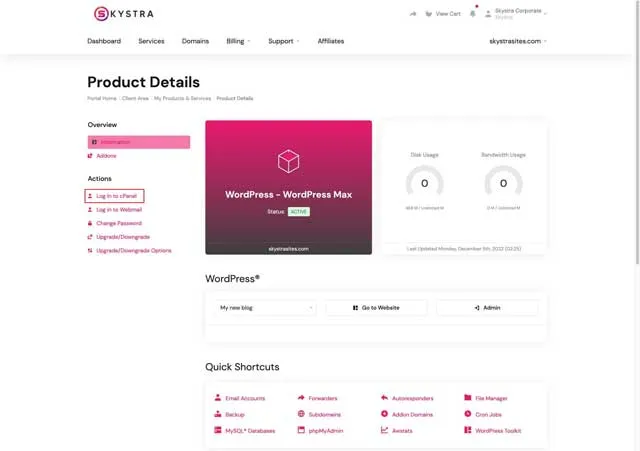
Security needs specific answers
Skystra documents how to check SSL status and offers an optional advanced security product. That distinction matters: do not assume every security feature mentioned somewhere on a host's site is included in your base plan.
Ask who patches the server, who updates WordPress and plugins, what malware cleanup includes, how account access is protected, and how you are notified about an incident. You still own strong passwords, two-factor authentication where available, careful plugin choices, and timely application updates unless the plan says otherwise.
Backups should be restorable, not merely advertised
Skystra's backup documentation describes its current daily-backup product and access. Confirm whether it is included or paid, how long copies are retained, whether database and files can be restored separately, and how quickly a real recovery can happen.
For a business site, I would also keep an independent backup outside the hosting account. That protects against account lockout, billing trouble, a provider-side incident, or a mistake that affects the primary backup system.
Use staging for changes that can break the site
Skystra documents a staging workflow. Test plugin updates, theme changes, PHP compatibility, checkout behavior, and forms there before touching production. Confirm how data moves between staging and live; copying an old staging database over a store can erase recent orders.
Choosing Skystra for WordPress hosting should come down to whether this complete workflow fits your site—not whether the sales page uses the word “managed.”

Questions to ask support before buying
- Will you migrate my current WordPress site, and what is excluded?
- Which performance and security services are included in this exact plan?
- Can I restore backups myself, and what is the retention period?
- Does staging count against plan limits?
- Who diagnoses a slow plugin, database query, or checkout problem?
- What happens to my website and backups after cancellation?
Send one or two real technical questions before committing. The usefulness and specificity of the answers tell you more than a generic promise of round-the-clock support.
Who should consider Skystra WordPress hosting?
It may fit if:
- you want a WordPress-focused hosting workflow;
- the live plan includes the resources and support your site needs;
- staging, backups, and security responsibilities are clear; and
- the total renewal cost is reasonable for the work it removes.
I would keep shopping if:
- you mainly need the lowest possible price;
- the plan limits or add-ons are hard to explain;
- you need hands-on application support the host does not promise; or
- you cannot get a clear migration and exit path.
Skystra WordPress hosting FAQ
Is Skystra WordPress hosting cheap?
That depends on the current renewal price and which backups, security, email, migration, and support services you would otherwise buy separately.
Does Skystra include backups?
Skystra documents a daily-backup product, but confirm current plan inclusion, retention, restore access, and any extra charge before purchasing.
Does Skystra provide staging?
Skystra documents staging for supported website services. Confirm plan access and understand how files and databases move between staging and production.
Is SSL enough to secure WordPress?
No. SSL protects data in transit. WordPress security also depends on account protection, updates, plugins, server controls, monitoring, backups, and incident response.
Will managed hosting maintain my whole WordPress site?
Not necessarily. Ask exactly who handles server maintenance, WordPress core, plugins, themes, malware, performance, and application-level problems.
Should I move an ecommerce site to Skystra?
Test a copy first and use my Skystra ecommerce-hosting checklist for checkout, caching, backups, staging, security, and recovery questions.
My bottom line
Skystra may be a sensible WordPress host if its current plan matches your site and its managed services replace work you genuinely need. Verify the boundaries, calculate the renewal-year total, test support, and keep an independent backup. That is a better decision than buying whichever plan sounds most effortless.

About the Author
Joseph Nilo is an experienced web developer, specializing in Python and Django development and SEO.
He's been creating websites, content, podcasts, and videos for the web for over 25 years.
Skystra Web Hosting Related Posts:
Affordable WordPress Hosting with Skystra
Fast and Reliable Web Hosting Services by Skystra
Secure and Scalable Hosting Solutions with Skystra
Secure and Scalable Hosting Solutions with Skystra
Skystra Web Hosting for Beginners: A Comprehensive Guide
Skystra: Best Hosting Provider for E-commerce Websites
Table of contents
- Quick answer
- Site fit
- Total cost
- Security
- Backups
- Staging
- Support questions
- Who should consider it
- FAQ
- Bottom line
Skystra Web Hosting Related Posts:
Affordable WordPress Hosting with Skystra
Fast and Reliable Web Hosting Services by Skystra
Secure and Scalable Hosting Solutions with Skystra
Secure and Scalable Hosting Solutions with Skystra
Skystra Web Hosting for Beginners: A Comprehensive Guide
Skystra: Best Hosting Provider for E-commerce Websites