

First things first-- this page has affiliate links. But we only promote products and services we believe in.
⭐⭐⭐⭐⭐
If you'd like to support this blog and get the best deal on Skystra Web Hosting packages, use our link.
Learn More About Skystra
Table of contents
- Quick answer
- Store fit
- Performance test
- Security
- Backups
- Support
- Migration
- Pricing
- Decision checklist
- FAQ
- Bottom line
Quick answer: Skystra can be a reasonable low-cost host for a small WooCommerce, PrestaShop, or OpenCart store, especially if you value a simple control panel, included SSL, email, and a free migration. I would not call it the best ecommerce host without testing your exact catalog, checkout, plugins, traffic, and recovery plan.
Checked August 10, 2026. This is a specs-and-support-docs review, not a claim that I have load-tested a live store on Skystra.
Hosting matters more for a store than it does for a brochure site. A slow product page is annoying; a broken cart, failed payment callback, or lost order is business damage.
The old version of this page made sweeping promises without explaining how to evaluate them. I do not think that helps anyone. Here is what Skystra actually documents, where it looks useful, and what I would test before moving a store.
Disclosure: This page contains sponsored affiliate links. If you buy through one, I may earn a commission at no extra cost to you.
Check the current Skystra plans

What kind of ecommerce store fits Skystra?
Skystra's current hosting page lists WordPress, PrestaShop, and OpenCart among the PHP/MySQL apps it supports. That makes a small WooCommerce store the most obvious fit. It does not prove that every theme, extension, payment gateway, or high-traffic catalog will perform well.
| Store | My take | Test first |
|---|---|---|
| Small WooCommerce shop | Reasonable candidate | Cart, checkout, email, plugin load |
| PrestaShop or OpenCart | Supported app family | Version, extensions, cron jobs |
| Large or spiky catalog | Needs proof | Load test and resource limits |
| Mission-critical store | Compare managed options | Recovery, monitoring, escalation |
| Magento/Adobe Commerce | Not a claim I would make here | Get written compatibility guidance |
See Skystra's current hosting offer
How I would test performance
I would build a staging copy with the real theme, product count, plugins, images, taxes, shipping rules, and payment sandbox. Then I would test an uncached product page, category filters, search, add-to-cart, checkout, account pages, and webhook handling.
Do not judge a store only by its cached homepage. Checkout and account pages usually bypass cache. Track server response time, PHP errors, database queries, failed cron jobs, and resource use during a small load test. If the host cannot show you the relevant limits or logs, that uncertainty belongs in the decision.

Security: useful basics, optional layers
Skystra says SSL certificates install automatically after DNS is pointed and propagated; its SSL guide also explains that you still need to force HTTPS and clean up mixed content. The main plan page says a web application firewall is enabled on all plans.
That is a useful baseline, not a complete ecommerce security program. Skystra's advanced security with daily malware scanning and removal is an add-on. I would also keep WordPress, WooCommerce, themes, and plugins patched; require strong unique passwords and MFA where available; restrict admin accounts; and use a payment provider that keeps card data off your server.
Before launch, verify SSL on product, cart, checkout, account, and callback URLs. Run a test order, refund, password reset, and transactional email. Security claims are not useful if the actual workflow is misconfigured.
Compare Skystra's current plan details
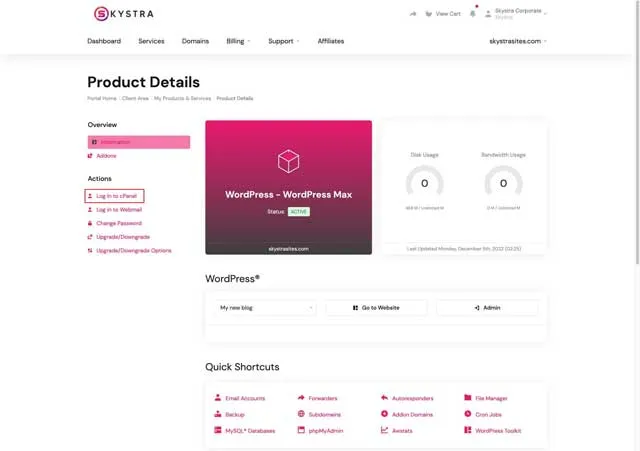
Backups and recovery are the biggest caveat
Skystra keeps disaster-recovery backups, but its customer-accessible backup-and-restore service is a paid option. The documented daily backup service maintains a 14-day version history for files, databases, email, DNS zones, FTP accounts, and cron jobs.
For a store, I would budget for user-accessible backups or maintain an independent backup outside the hosting account. More importantly, I would test a restore. A backup you have never restored is a hope, not a recovery plan.
Think about recovery point and recovery time separately. If the database rolls back twelve hours, how many orders disappear? If the site takes half a day to restore, what is the cost? A busy store may need more frequent database or order-level protection than a daily snapshot.
Skystra also documents a complimentary WordPress staging tool, but the built-in workflow is limited to hosting accounts under 2 GB and can have builder/plugin caveats. That is useful for smaller sites; it is not a universal one-click safety net.
Check current Skystra availability

What support looks like
Skystra's getting-started guide routes service management, billing, and online support requests through the customer portal. Its public site emphasizes in-house support and a free website-and-email transfer.
I would test support before a store depends on it. Open a real pre-sales question about PHP limits, WooCommerce cron, backup restore timing, or a payment webhook. Note how specific the answer is, how long it takes, and whether the escalation path fits the hours when your customers buy.
Support from a host also has boundaries. A host may help with the server and migration while sending a WooCommerce extension conflict back to the plugin developer. Decide who owns application troubleshooting before launch.
A migration checklist
- Make an independent full backup and verify it.
- Lower DNS TTL before the move when appropriate.
- Clone the store and keep the existing site live.
- Test products, search, cart, checkout, tax, shipping, coupons, accounts, email, cron, and webhooks.
- Pause or reconcile orders during the final database sync.
- Switch DNS, confirm SSL, and monitor logs and transactions.
- Keep the old host available until the new store has survived real orders and a rollback window.
Ask Skystra about your migration

Pricing: read past the headline
At the time of this check, Skystra's public site lists a one-site plan with 10 GB SSD storage and a five-site plan with 50 GB. It also advertises a limited introductory period and says hosting renews on a prepaid 12-month cycle. Prices, promotions, taxes, add-ons, and renewal terms can change, so use the live checkout as the source of truth.
For a store, total cost includes customer-accessible backups, advanced malware scanning if wanted, domain renewal, premium plugins, transactional email, monitoring, and developer help. A cheap base plan can still be the right choice; it just is not the entire operating cost.
Review Skystra's live pricing and terms
My decision checklist
- Does the plan support the exact application and version?
- Are storage, memory, CPU, processes, database, and email limits clear enough?
- Can the real checkout pass a small load test?
- Who monitors uptime, errors, expiring SSL, failed cron jobs, and payments?
- How often is order data backed up, and how quickly can it be restored?
- Are security and backup add-ons included in the real budget?
- Can support meet the store's busiest hours and escalation needs?
Skystra ecommerce FAQ
Is Skystra good for WooCommerce?
It can be a reasonable candidate for a small WooCommerce store, but test your real theme, extensions, checkout, traffic, and resource use before moving production.
Does Skystra include SSL?
Skystra says SSL certificates install automatically after DNS is pointed and propagated. You still need to force HTTPS and fix mixed-content issues.
Are daily backups included?
Skystra documents disaster-recovery backups, while the customer-accessible daily backup and restore platform is a paid service with a documented 14-day history.
Does Skystra include malware scanning?
The standard service includes a web application firewall according to Skystra. Daily malware scanning and removal is an optional advanced-security add-on.
Does Skystra support Magento?
I would not assume it. The current public hosting page names WordPress, PrestaShop, OpenCart, and other PHP apps but does not specifically promise Magento support. Ask for written guidance for your version and requirements.
Can Skystra migrate an existing store?
Skystra advertises a free website-and-email transfer. An ecommerce migration still needs a plan for the final database sync, orders during cutover, payment callbacks, DNS, SSL, testing, and rollback.
Is Skystra the best ecommerce host?
There is no universal best host. Skystra looks like a simple, affordable candidate for a smaller store; a high-volume or mission-critical shop should compare managed ecommerce hosts and prove performance and recovery first.
My bottom line
I would shortlist Skystra for a smaller WooCommerce, PrestaShop, or OpenCart project when the budget is tight and the simple hosting/email bundle is useful. I would not move a revenue-producing store until the actual checkout, resource limits, backups, restore process, security add-ons, and support response have all been tested.

About the Author
Joseph Nilo is an experienced web developer, specializing in Python and Django development and SEO.
He's been creating websites, content, podcasts, and videos for the web for over 25 years.
Skystra Web Hosting Related Posts:
Affordable WordPress Hosting with Skystra
Fast and Reliable Web Hosting Services by Skystra
Secure and Scalable Hosting Solutions with Skystra
Secure and Scalable Hosting Solutions with Skystra
Skystra Web Hosting for Beginners: A Comprehensive Guide
Skystra: Best Hosting Provider for E-commerce Websites
Table of contents
- Quick answer
- Store fit
- Performance test
- Security
- Backups
- Support
- Migration
- Pricing
- Decision checklist
- FAQ
- Bottom line
Skystra Web Hosting Related Posts:
Affordable WordPress Hosting with Skystra
Fast and Reliable Web Hosting Services by Skystra
Secure and Scalable Hosting Solutions with Skystra
Secure and Scalable Hosting Solutions with Skystra
Skystra Web Hosting for Beginners: A Comprehensive Guide
Skystra: Best Hosting Provider for E-commerce Websites