
Updated October 3, 2026. Originally published July 20, 2026. The firsthand test below used Multilingual v2; this update explains v4 product changes.
Quick answer
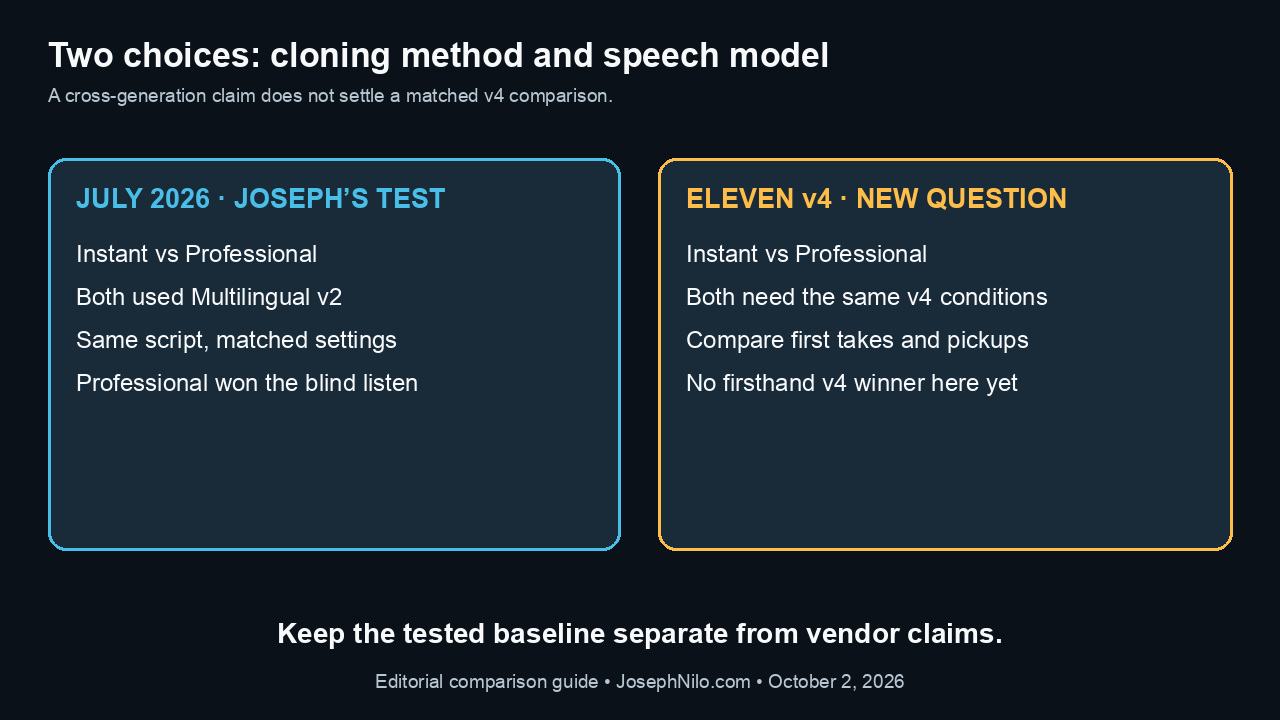
Professional won my original blind comparison using Eleven Multilingual v2. Eleven v4 changes the buying question, but this update does not contain a hands-on v4 comparison or a tested v4 pickup edit.
If an Instant clone passes your script and correction test, you may have little reason to spend more time preparing a Professional clone. If it struggles with likeness or repeatable delivery, Professional is worth comparing on the same model before you commit to a production workflow.
Affiliate disclosure: This article includes an ElevenLabs affiliate link. If you subscribe through it, I may earn a commission at no extra cost to you.
Why the model matters as much as the clone
Imagine changing one product name after a tutorial is already cut. The replacement sentence has to fit the existing narration: the same speaker, similar energy, believable pauses, and enough room for the picture edit. A convincing voice demo only answers part of that problem.
ElevenLabs launched Eleven v4 and v4 Turbo on September 28, 2026. Its announcement describes improvements in voice identity across regenerated lines and in joining longer passages. Those are vendor claims with a direct production use: fewer corrections that sound like they came from a different recording session. Eleven v4 launch announcement
ElevenLabs also makes a striking claim: its v4 Instant clones outperform Professional clones on Multilingual v2. That compares two cloning methods and two model generations at once. It does not tell us whether Instant or Professional wins when both use v4. Eleven v4 product FAQ
Instant and Professional still require different preparation
According to ElevenLabs, Instant uses reference audio during generation without fine-tuning model weights. Professional fine-tunes a model on a larger set of recordings. The setup difference remains relevant even when the underlying speech model improves. How voice cloning works
The v4 announcement says Instant can capture a voice from ten seconds of audio. The general Instant guide still recommends one to two minutes of clean, consistent speech and warns that going beyond three minutes may not help. A short sample and a recommended recording are different things. For a meaningful comparison, keep the source clean and representative of the delivery you need. Instant Voice Cloning guide
The Professional guide calls 30 minutes a minimum, recommends at least an hour, and prefers roughly two to three hours for the most accurate result. It requires voice verification and a training wait. Its FAQ currently estimates three to six hours, so the shorter wait in my original test should not be treated as a promise. Professional Voice Cloning guide
What to check before moving an existing clone to v4
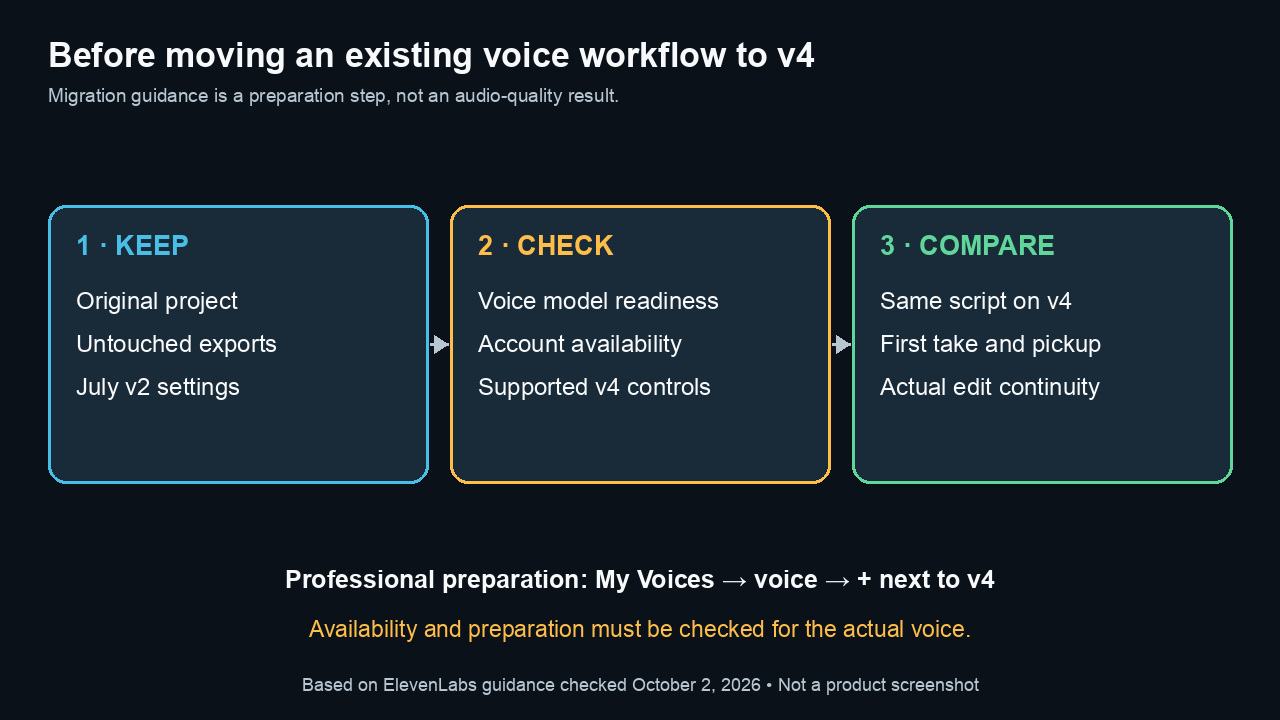
The v4 product FAQ says Instant and Professional clones created before launch need to be retrained with v4 to work effectively. It points to the plus button that appears when hovering over a voice. Check the model preparation for your actual voice rather than assuming that selecting a new model finishes the migration. Migration guidance
There is also a rollout caveat. The dedicated v4 documentation says Professional support is rolling out, even though the launch material describes it as supported. Confirm that your account can use the intended clone with v4 before setting aside time for a comparison. That account-level check has not been completed for this update. Eleven v4 documentation
v4 uses Stability and Similarity controls; its documentation says Style and Speed sliders are unavailable and SSML is unsupported. Directions such as pauses or changes in delivery use audio tags. A fresh test needs its own settings record rather than copying every Multilingual v2 parameter and calling the conditions identical. v4 controls
For this article’s narration workflow, the relevant starting point is Eleven v4. ElevenLabs positions v4 Turbo for real-time agents and interactive speech. Its low-latency figures do not measure how quickly an editor gets an acceptable finished narration track. Model documentation
Can a regenerated pickup fit a real edit
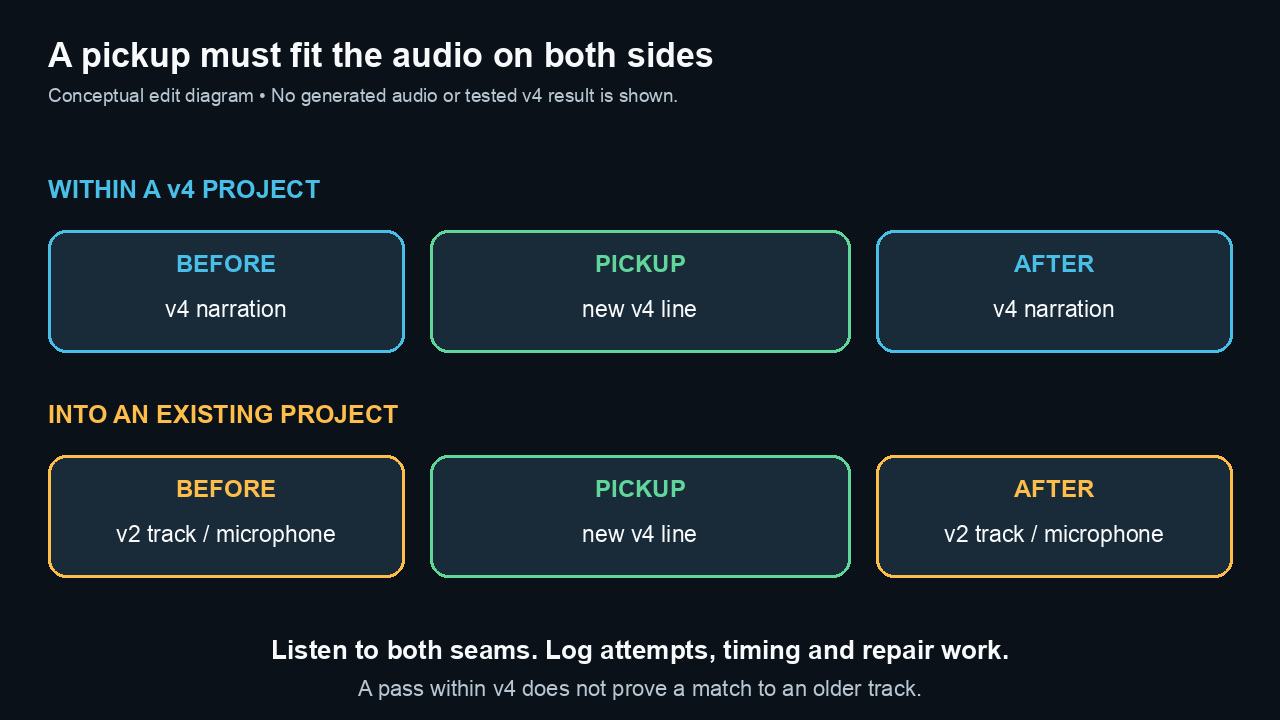
There is no verified v4 answer here yet. A useful test has to include the audio on both sides of the replacement, not just an isolated sentence that sounds good.
Two comparisons are worth keeping separate:
- A v4 pickup inserted into narration generated with the same v4 clone. This checks continuity within the new workflow
- A v4 pickup inserted into an older Multilingual v2 track or an original microphone recording. This checks whether the new output fits an existing project
A pass in the first comparison would not guarantee a pass in the second. Preserve the original project and audio so that a model change does not remove a working version.
Request stitching is relevant here. ElevenLabs documents a way to provide surrounding generation context to help continuity, and its current example uses eleven_v4. The guide says prior request IDs must be no more than two hours old. That is useful to know before assuming an old narration session can be resumed with the same context. Request stitching guide
For a fair edit test, keep the first complete take from each clone, then make the same specific correction. Listen to the seam at normal playback speed with the preceding and following sentences. Match playback loudness for the comparison while preserving untouched exports. Log any added EQ, timing changes, fades, or other repairs separately.
The useful result would include how many attempts were needed, how much editing the chosen line required, whether it fit the available picture duration, and whether the splice remained audible. A voice can resemble its speaker and still take too much work to fit a particular edit.
What the original comparison established
The July 2026 test used a 90-second sample for Instant and 36 files totaling 2:01:37 for Professional. Both read the same 1,132-character script through Multilingual v2, with matched settings and no repairs before the randomized blind comparison.
- Instant: 69.567 seconds of audio, including 4.179 seconds of detected silence
- Professional: 83.453 seconds of audio, including 18.460 seconds of detected silence
Professional won my blind listen. It also paused more; the silence measurements alone do not establish quality. Its fine-tuning wait was about 32 minutes after preparation and verification.
These results compare two first passes. They do not demonstrate a successful regenerated pickup, lower editing time, or a winner on v4.
July 2026 Multilingual v2 test details
How I Ran the July Test
Both July clones used my own voice and were kept private in my ElevenLabs account. I did not submit either voice to the Voice Library.
The Instant clone was created from one continuous 90-second recording. The Professional clone uses 36 clean English tutorial-narration files totaling 2 hours, 1 minute, and 37 seconds. I excluded pickups, revision takes, on-camera audio, generated speech, foreign-language recordings, and multi-speaker material.
Both first-pass generations used Eleven Multilingual v2 with stability 0.50, similarity 0.75, style 0, speaker boost on, speed 1.0, text normalization on, a fixed seed, and 44.1 kHz/192 kbps MP3 output.
I kept the first complete take from each mode. That matters because comparing a first-pass Instant clip with a heavily regenerated Professional clip would measure editing persistence as much as voice quality.
In the blind listen, I paid attention to:
- Overall likeness.
- Natural pacing.
- Technical-name pronunciation.
- Numbers and currency.
- Consonant clarity.
- Emotional transition.
- Breath and mouth-noise realism.
- Sentence-to-sentence consistency.
- Pickup-line usefulness.
- Whether I would use the result in a paid tutorial.
The Source Audio I Used
| Input | Instant Voice Cloning | Professional Voice Cloning |
|---|---|---|
| Source duration | 90 seconds | 2:01:37 |
| Files | 1 | 36 |
| Format before upload | 48 kHz mono FLAC | 48 kHz mono FLAC |
| Delivery style | Software-tutorial narration | Software-tutorial narration |
| Background-noise processing | Off | Off |
| Multiple speakers | No | No |
| Voice sharing | Off | Off |
ElevenLabs currently recommends roughly one to two minutes of consistent, clean audio for Instant cloning and warns that adding more than three minutes may not help. Its Professional guide names 30 minutes as the bare minimum, recommends at least an hour, and says two to three hours is preferable for the most accurate result.
The recording style matters as much as duration. A calm tutorial corpus is useful for testing tutorials, courses, and client narration; it would not prove that the same clone can perform character acting, singing, or an aggressive advertisement.
Original source-audio preparation illustration retained from the July 2026 Multilingual v2 article; not a v4 test screenshot.
Why the Test Script Is Deliberately Awkward
A flattering demo sentence is easy. Production narration is not.
The same-script passage includes DaVinci Resolve, Adobe After Effects, FFmpeg, Wagtail, “structured spectral strategy,” a time, a price, and a percentage. It also moves from a routine client request into a quiet emotional turn.
That lets the comparison reveal several failure modes at once:
- Whether technical names need pronunciation fixes.
- Whether consonant-heavy phrases stay clear.
- Whether numbers sound natural.
- How the script’s short correction line sounds within the first complete take; a separately regenerated pickup was not tested.
- Whether the voice can change emphasis without becoming a different person.
- Whether longer sentences keep a believable pace.
What the Instant First Pass Measured
The 1,132-character Instant request returned in 10.415 seconds and produced 69.567 seconds of audio. I used the first take without a pronunciation dictionary, audio tags, manual timing, post-processing, or regeneration.
The file measured -18.9 LUFS integrated loudness, 1.7 LU of loudness range, and a -2.3 dBFS true peak. A silence check found 19 pauses of at least 0.15 seconds below -40 dB, totaling 4.179 seconds.
Those measurements describe the file; they do not prove likeness or quality. The blind listen remains the meaningful test for pacing, identity, technical terms, and production usability.
What the Professional First Pass Measured
The matched 1,132-character Professional request returned in 13.683 seconds and produced 83.453 seconds of audio. Like the Instant sample, it is the first complete take with no pronunciation dictionary, audio tags, manual timing, post-processing, or regeneration.
The file measured -18.3 LUFS integrated loudness, 2.2 LU of loudness range, and a -1.5 dBFS true peak. The same silence check found 39 pauses totaling 18.460 seconds.
That objective difference is notable: the Professional take is 13.886 seconds longer and contains substantially more detected silence. It is not a quality verdict on its own; the blind preference is what determines whether the extra space worked for this narration.
The Blind Result
I randomized untouched copies of both first passes as Clip A and Clip B and listened without opening the identity mapping. Clip B was the clear winner. Only after making that choice did I reveal that Clip B was the Professional Voice Clone.
That matters more than choosing the file I expected to win. The comparison was not labeled “Instant” and “Professional,” neither take was regenerated, and neither file was normalized, trimmed, or repaired before the decision.
| Result | Instant Voice Cloning | Professional Voice Cloning |
|---|---|---|
| Blind identity | Clip A | Clip B |
| Blind preference | Not selected | Clear winner |
| Generation time | 10.415 seconds | 13.683 seconds |
| Audio duration | 69.567 seconds | 83.453 seconds |
| Integrated loudness | -18.9 LUFS | -18.3 LUFS |
| Detected silence | 4.179 seconds | 18.460 seconds |
| Regenerations before comparison | 0 | 0 |
| Pronunciation or timing edits before comparison | 0 | 0 |
The correction log is intentionally conservative: zero means I did not regenerate or edit either first pass before listening. It does not mean every word and pause in both files was flawless.
Original blind-listening illustration retained from the July 2026 Multilingual v2 comparison.
The Setup Difference Is Already Significant
Instant setup required one short, consistent reference recording. The private clone was available without a fine-tuning wait, and the same-script first pass could be generated immediately.
Professional setup required preparing and validating more than two hours of source audio, uploading 36 files, reaching ElevenLabs’ two-hour “Perfect” marker, completing a live voice-verification recording, and waiting approximately 32 minutes for the monitored fine-tuning run.
That extra work is not automatically a disadvantage. The decision turns on whether it reduces corrections and produces a more stable production voice afterward.
The roughly 32-minute wait was this July run’s result, not a current training-time guarantee. The current Professional guide estimates three to six hours.
Starter or Creator
On October 3, 2026, the monthly pricing page listed Starter at $6 and Creator at $22 before tax. Starter includes Instant Voice Cloning; Creator adds Professional Voice Cloning. Introductory discounts were displayed separately. Use the regular monthly price when deciding whether the workflow is affordable beyond the first month. Current ElevenLabs pricing
The $16 monthly difference is only part of the decision. Include the time spent preparing training audio, comparing outputs, regenerating lines, and repairing the edit. If Instant already meets the project’s standard, Professional’s longer setup needs a specific benefit to justify it. If likeness or repeated pickups are falling short, that is a concrete reason to compare Professional.
For a broader plan breakdown, see the ElevenLabs pricing and plans guide.
Consent and production review
ElevenLabs’ Professional guide limits creating a Professional clone to your own voice and requires verification. Another speaker must create and verify their own clone before sharing it through the supported process. Having access to someone’s recordings is not a substitute for that workflow. Professional cloning requirements
Keep training recordings and account identifiers out of public examples. Review the exact exported clip before sharing it. An audio example should also state which model and cloning method produced it so readers can judge the relevant evidence.
The decision for now
The original Professional result remains useful for Multilingual v2. v4 introduces enough changes to justify a fresh, matched comparison. Its launch claims are encouraging for voice likeness and regenerated lines, but a successful edit needs audible evidence.
For a new project, a short Instant trial can reveal whether there is a problem Professional needs to solve. For an existing production, check the replacement line against the actual track before migrating the workflow. The result that matters is an acceptable edit with a reasonable amount of repair.
Check current ElevenLabs plans
Frequently Asked Questions
Did Professional win on Eleven v4?
No v4 comparison has been completed for this update. Professional won Joseph’s original randomized blind comparison when both clones used Multilingual v2. That July result does not establish a v4 winner.
Does Instant Voice Cloning train a custom model?
ElevenLabs describes Instant as using reference audio during generation without fine-tuning model weights. Professional fine-tunes a model on a larger set of recordings.
Is ten seconds enough for an Instant clone?
The v4 launch announcement says Instant can capture a voice from ten seconds. The general Instant guide recommends one to two minutes of clean, consistent speech and warns that going beyond three minutes may not help. A short sample and a recommended recording are different things.
How much audio and waiting time does Professional need?
The Professional guide calls 30 minutes a minimum, recommends at least an hour, and prefers roughly two to three hours for the most accurate result. Its FAQ estimates three to six hours of training. The roughly 32-minute fine-tuning wait in Joseph’s July test is not a promise for future runs.
What should I check before moving an older clone to v4?
The v4 product FAQ directs older Instant and Professional clones through v4 preparation. For a Professional clone, the documentation says to open My Voices, hover over the voice and click the plus button next to Eleven v4 to start fine-tuning. Professional support is still described as rolling out, so confirm readiness and availability for your actual voice.
Which controls does v4 support?
The v4 documentation lists Stability and Similarity. Style and Speed sliders are unavailable, and SSML is unsupported. Audio tags provide directions such as pauses and changes in delivery; keep a separate settings record for a fresh v4 comparison.
Will a v4 pickup match an older narration track?
There is no verified answer in this article yet. Test a pickup within v4 narration separately from a v4 line inserted into Multilingual v2 narration or a microphone recording. Listen to the preceding and following sentences and log repairs. Request-stitching IDs should be no older than two hours, according to ElevenLabs.
Do I need Starter or Creator for voice cloning?
On October 3, 2026, regular monthly prices were $6 for Starter and $22 for Creator before tax. Starter includes Instant Voice Cloning; Creator adds Professional Voice Cloning. Introductory offers are separate. Include audio preparation and editing time in the comparison.
Can I make a Professional clone from another speaker’s recordings?
The Professional guide limits creating a Professional clone to your own voice and requires verification. Another speaker must create and verify their own clone before sharing it through the supported process. Access to their recordings does not replace that workflow.

About the Author
Joseph Nilo has been working professionally in all aspects of audio and video production for over twenty years. His day-to-day work finds him working as a video editor, 2D and 3D motion graphics designer, voiceover artist and audio engineer, and colorist for corporate projects and feature films.