

Adobe Firefly AI Assistant is not simply another text-to-image box. It is Adobe's attempt to turn a creative brief into an organized, multi-step production workflow inside the Firefly web app.
This is an official-feature assessment rather than a hands-on performance test. Adobe still labels the product beta, so the useful question is not whether it can replace a creative professional. It is whether its orchestration can remove enough repetitive setup work to earn a place in a real workflow.
Quick verdict
| Best for | Solopreneurs, social creators, photographers, and small teams turning a brief or small asset set into multiple coordinated deliverables. |
|---|---|
| Skip for now if | You need mobile access, precise specialist control from the first step, or a mission-critical unattended production pipeline. |
| Main advantage | Workflow orchestration: it can plan steps, select tools, and move across image, design, audio, and short-video tasks. |
| Main caution | It is a beta, model selection can vary, and every output still needs human review. |
This page may include affiliate links.
I only recommend software I would seriously evaluate for real creator or production workflows.
⭐⭐⭐⭐⭐
I pay for Adobe Creative Cloud and have used it every day in my 20-year career as a video editor, producer, and colorist.
Use the Adobe link below to check the current Creative Cloud offer. It can support this site and helps me keep these guides updated. Check current Adobe Creative Cloud offer.
Get Adobe Creative Cloud Now!What Adobe Firefly AI Assistant Actually Is
Firefly AI Assistant is a conversational layer inside the Firefly web app. You describe the outcome you want, and the assistant interprets the request, breaks it into steps, selects relevant tools, and proposes or executes a workflow.
That is a different job from a single image generator. The assistant is designed to connect tasks such as image cleanup, background removal, vectorization, social resizing, brand development, storyboarding, and short-video assembly.
Adobe says users can inspect steps, accept or reject suggestions, redirect the workflow, or take over manually. Completed assets can be downloaded, saved to Creative Cloud storage, or opened in other Adobe applications for deeper editing.
How the Conversational Workflow Works
A useful prompt describes an outcome rather than one isolated command. For example, a creator might ask for a set of inconsistent product photos to be normalized, placed into a coherent visual identity, resized for social platforms, and assembled into a short promotional sequence.
The assistant can then combine capabilities associated with Photoshop, Lightroom, Illustrator, Premiere, Firefly, and other Adobe tools. Adobe said the rolling beta would draw from more than 60 tools, including Auto Tone, Generative Fill, Remove Background, Vectorize, Generative Expand, image generation, and video transcoding.
The important distinction is control. The assistant may propose the route, but the creator still decides whether the route, model, asset, and final result are appropriate.
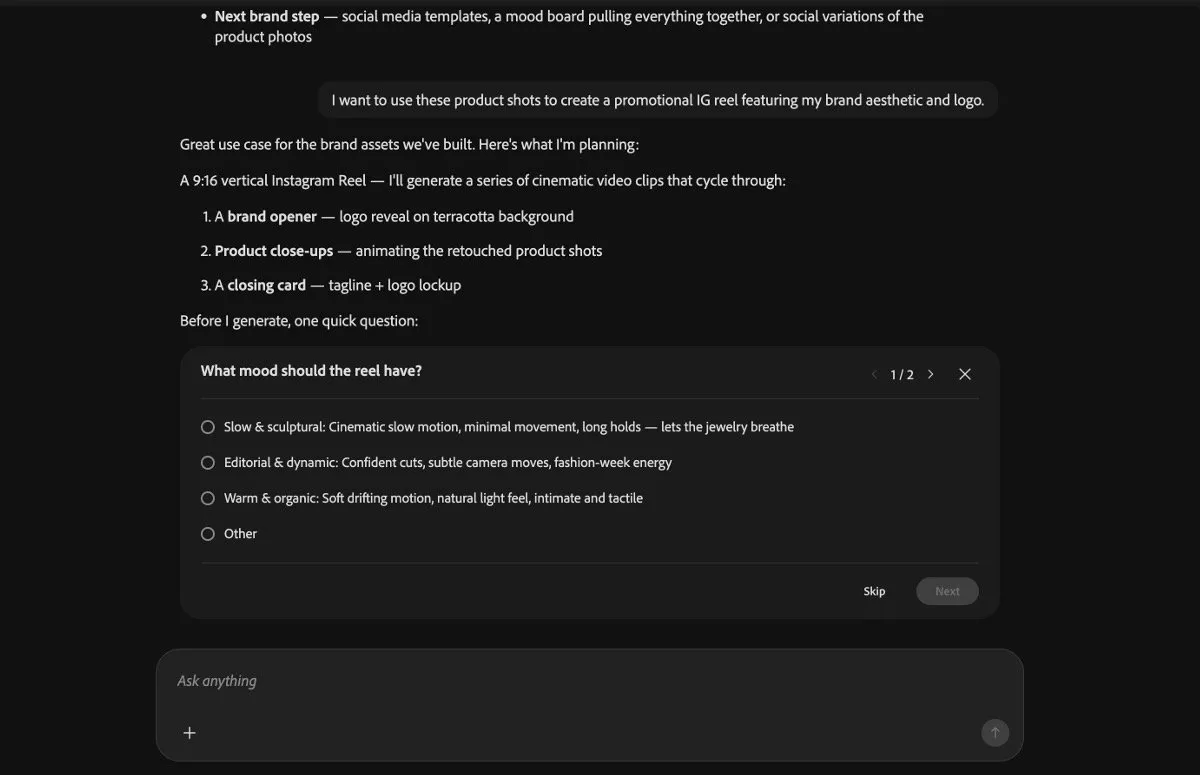
Firefly AI Assistant proposes a multistep product-video workflow and asks for creative direction before generation. Source: Adobe HelpX. Interface shown during beta and may change.
Creative Skills Are the Most Practical Part
Creative Skills are prebuilt workflows for repeated tasks. Adobe documents examples such as portrait retouching, product-photo preparation, social variations, mockup creation, moodboards, and batch photo editing.
This is where the product may save the most time. A repeatable production recipe is often more valuable than a spectacular one-off generation because it reduces setup across every asset in a campaign.
Custom Creative Skills are not currently available, so users are working with Adobe's existing skills and the assistant's conversational planning rather than building a fully custom automation library.
Brand Kits, Storyboards, and Short Product Videos
Adobe's June expansion added several creator-focused workflows: brand-kit creation, short product-video creation, storyboard generation, storyboard-to-video, semantic asset search, and Quick Cut.
A documented brand workflow can retouch product photos, develop colors and typography, generate identity materials, create packaging mockups, and assemble a promotional reel within one conversation. That makes the assistant especially relevant to creators who need a coordinated campaign rather than one isolated image.
Do not confuse a generated brand kit with a finished brand strategy. Logo originality, trademark conflicts, accessibility, licensing, and production consistency still require deliberate review.

Generated packaging variations remain inside the conversation, where the creator can review, redirect, or continue the workflow. Source: Adobe HelpX. Interface shown during beta and may change.
Firefly AI Assistant vs Video Editor vs Premiere Pro
The AI Assistant owns planning and orchestration. The separate Firefly Video Editor owns browser-based timeline work, Quick Cut, transcript editing, audio enhancement, titles, transitions, and export.
Premiere Pro AI Assistant is another distinct beta focused on work inside Premiere. It does not turn the general Firefly web assistant into a Premiere timeline editor.
For video professionals, the sensible path is to use the assistant for ideation, storyboards, asset preparation, and a first assembly, then use Premiere for detailed timing, managed color, audio mixing, motion graphics, and delivery.
Eligible Plans and Beta Credits
Adobe's current HelpX FAQ lists Creative Cloud Pro and Firefly Standard, Pro, Pro Plus, and Premium among eligible subscriptions. Account type, region, and beta rollout can affect access, so confirm eligibility inside the current Firefly account rather than buying from an old feature list.
During beta, eligible users receive a separate daily credit allotment that refreshes at midnight GMT. Adobe does not publish one universal daily amount, and the beta allotment is separate from the normal paid generative-credit balance.
For the broader plan decision, see my Adobe Firefly pricing and generative credits guide.
Commercial Use and Partner-Model Caveats
Adobe positions output from its own Firefly models for commercial use and says customer content is not used to train its generative AI models. Those points are useful, but they do not remove the need to check source-asset rights, client agreements, likenesses, trademarks, and marketplace rules.
The assistant may automatically choose between Adobe and partner models unless the user specifies one. Adobe's Firefly-model guidance should not be applied automatically to every partner model; model availability and terms can also differ by region.
For production work, record which model created an important asset and keep the source material, prompt, and human approvals with the project.
Current Limitations
The general Firefly AI Assistant currently runs in the Firefly web app rather than the Firefly mobile app or Adobe desktop applications. Adobe lists English, French, German, and Japanese as optimized languages, with additional account-type restrictions.
Preferences are user-level rather than project-level, and there is no centralized preferences screen. Custom Creative Skills are unavailable, the exact beta credit amount is not universal, and beta software may change or fail.
Adobe's newer unified generation-and-editing workspace, including Elements and Projects, remains a separate private beta. Do not assume every previewed studio feature is part of the currently accessible Assistant.
Who Should Use It—and Who Should Wait
Firefly AI Assistant is most promising for people producing families of related assets: product images, social crops, storyboards, brand materials, and short promotional videos. Its value is coordination and repetition more than any claim that one model is always best.
Mobile-only creators, specialists who want granular control immediately, and teams with strict approval or archival requirements may prefer to stay inside native tools until the beta matures.
My practical rule is simple: let the assistant organize the first pass, but keep the creative decision, quality check, and professional finishing in human hands.
Official Sources
- Adobe Firefly AI Assistant overview
- Adobe Firefly AI Assistant FAQ
- Adobe public-beta announcement
- Adobe June 2026 Firefly expansion
- Adobe partner-model guidance
Frequently Asked Questions
What is Adobe Firefly AI Assistant?
Firefly AI Assistant is a conversational beta inside the Firefly web app. You describe an outcome, and the assistant can break the work into steps, select tools, and guide or execute a multi-step creative workflow.
Is Firefly AI Assistant free?
Adobe currently provides eligible beta users with a separate daily credit allotment. Eligibility depends on the account and plan, and Adobe does not publish one universal daily amount, so check the current Firefly account screen before planning production work.
Which plans include Firefly AI Assistant?
Adobe's current HelpX FAQ lists Creative Cloud Pro and several Firefly plans, including Standard, Pro, Pro Plus, and Premium. Access rules can change during beta and may vary by account type.
Does Firefly AI Assistant use my normal generative credits?
During the beta, Adobe says eligible users receive a separate daily allotment that refreshes at midnight GMT. It is distinct from the normal paid generative-credit balance.
Can Firefly AI Assistant make videos?
Yes. Adobe documents short product-video creation, storyboards that can become generated video, and Quick Cut workflows. For detailed timeline editing, use the separate Firefly Video Editor or Premiere Pro.
Is Firefly AI Assistant available in desktop or mobile apps?
The general Firefly AI Assistant currently runs in the Firefly web app. It is separate from the specialist AI Assistants being tested inside Premiere, Photoshop, Illustrator, InDesign, and Frame.io.
Can I commercially use Firefly AI Assistant output?
Adobe positions outputs from its own Firefly models for commercial use. If the assistant selects or you choose a partner model, review that model's terms and suitability rather than assuming Adobe's Firefly-model guidance applies.
Does Adobe train Firefly on my uploaded content?
Adobe states that it does not train its generative AI models on customer content. Keep normal client-confidentiality and asset-rights checks in place when uploading production material.
Is Firefly AI Assistant still in beta?
Yes. Treat it as an assisted production tool, keep originals, review every output, and avoid making it the only path for deadline-critical work.

About the Author
Joseph Nilo has been working professionally in all aspects of audio and video production for over twenty years. His day-to-day work finds him working as a video editor, 2D and 3D motion graphics designer, voiceover artist and audio engineer, and colorist for corporate projects and feature films.