
L2 is a peak limiter and an IDR dither/word-length processor. Lowering Threshold increases gain into limiting; Out Ceiling sets the maximum output sample peak in L2's documented workflow.
Release and ARC govern recovery. Quantize, Dither and Shaping address the final digital word length, not the amount of peak limiting.
Waves' current channel-component chart lists both mono and stereo components, although its older manual and product copy still say stereo-only.
It can be the last processing step for a stereo master, after EQ, dynamics and sample-rate decisions. A ceiling setting alone is not proof of a true-peak or LUFS delivery target, and further processing can raise peaks again. This guide is based on Waves documentation, not a fresh listening comparison.
About this guide: a documentation-based explanation, not a new listening test or product-performance ranking. The cover is an AI-generated editorial illustration; the interface image is official Waves artwork.
A conservative first pass
- Finish edits, EQ, dynamics and sample-rate conversion upstream. Insert the L2 component matching the path; check your host's available components. The older Waves guide says stereo-only, but Waves' current chart also lists mono.
- Begin with modest limiting. Lower Threshold while watching Atten and the held attenuation value. The manual's 4–6 dB example is historical guidance, not a universal target; stop where the particular material and delivery requirements warrant.
- Set Out Ceiling for the required margin and verify a rendered file with a modern loudness/true-peak meter. The manual's CD example of -0.3 dB is not a universal streaming specification.
- Leave ARC on initially; if switching it off, adjust Release deliberately and check the full passage. Choose Quantize to match the actual final PCM word length. If another final-stage dither will be applied, plan the chain so word-length reduction is not duplicated accidentally.
- Choose Dither and Shaping for that final output. Recheck the exported file; L2's meters do not establish integrated LUFS, codec behavior or inter-sample peaks.
Every L2 control and readout
Threshold: how hard the limiter works
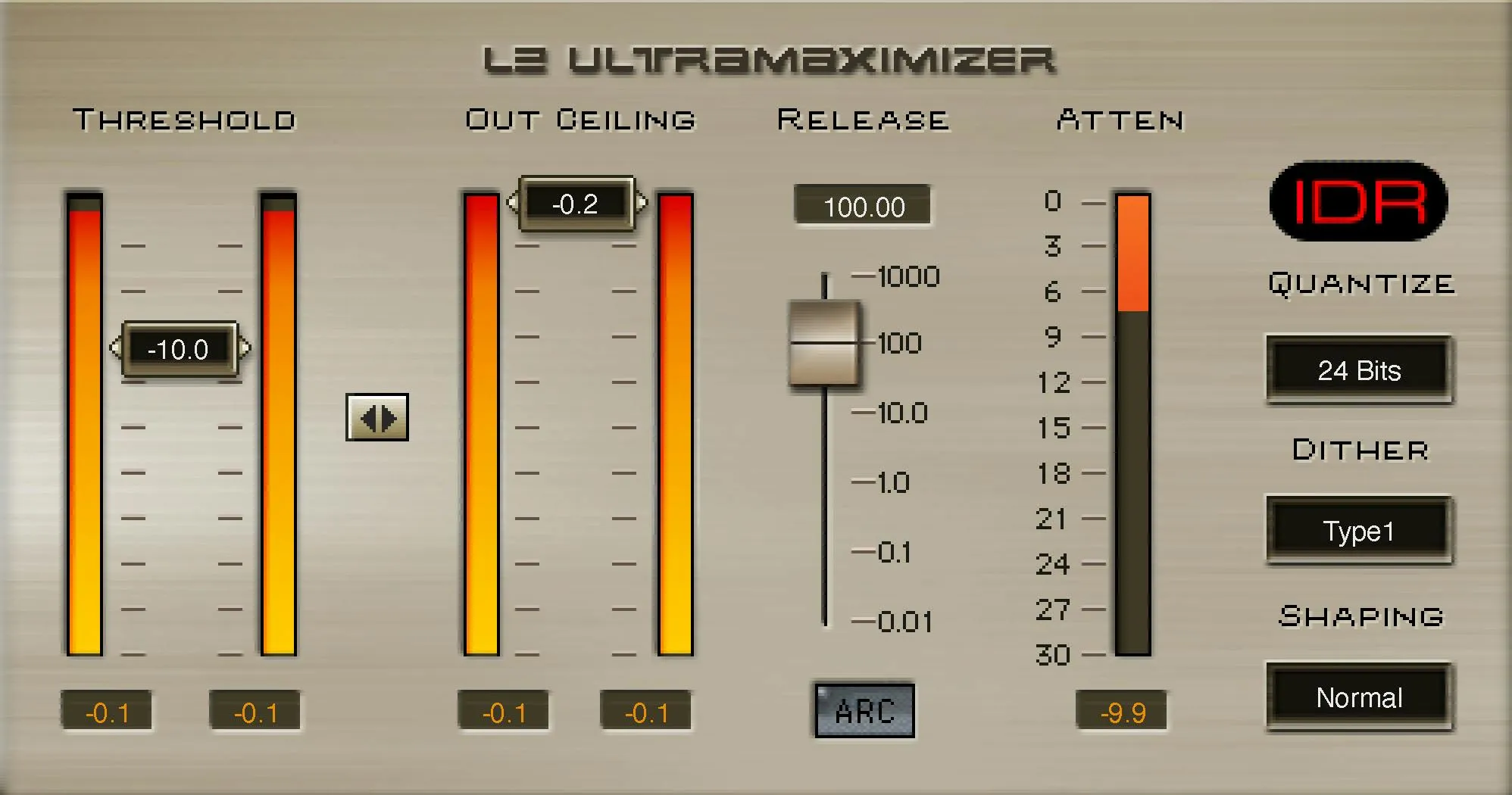
Drag the Threshold control down to bring more of the signal above the limiting threshold. L2 also raises signal below that point by the difference between Threshold and Out Ceiling, so lowering it can make the output louder, not merely clip off peaks.
Watch the attenuation meter and compare at matched playback level. The manual gives examples but does not specify the full control range, increment or factory default; do not infer them from the pictured -10.0 value.
Out Ceiling: output sample-peak ceiling
Out Ceiling determines the maximum peak of the limited output in the manual's digital-sample sense. The guide mentions a maximum of 0.0 dB and an example -0.3 dB for CD; it does not document a full range, step or factory default.
Do not treat that old CD example as a current platform rule or a true-peak guarantee. Subsequent EQ, sample-rate conversion or encoding can create higher peaks.
Threshold–Out Ceiling Link: move both together
The small control between the two faders moves Threshold and Out Ceiling together. Waves describes it as a way to compare processing at a less biased playback level.
It is a coupled adjustment, not stereo channel linking. Recheck the actual ceiling after using it; moving both controls changes the output target as well as the limiting threshold.
No independent range, step or default is specified.
Release and ARC: recovery after limiting
Release controls how quickly limiting recovers. The displayed release scale in the official product image is marked from 0.01 to 1000 (milliseconds in the guide's release discussion), but the manual does not state a formal continuous range, increment or default. ARC switches adaptive Auto-Release Control on or off.
With ARC engaged, the algorithm varies recovery according to program material; when off, the Release control supplies a fixed setting. A fast fixed release can create pumping or distortion; the manual recommends ARC for normal use.
Reassess loud and sustained passages after either change.
Input and output meters
In the pictured stereo interface, two columns by Threshold show input level and two by Out Ceiling show output level. The mono component may present differently.
Numeric fields under the columns are visible in the official image, but the old guide does not fully define their hold and reset behavior. They are not integrated loudness or true-peak meters.
Do not assume a reset gesture for those numbers based on another Waves plugin.
Atten and peak hold
The Atten bar shows limiter attenuation; the numeric field beneath holds a maximum reduction so a brief event is not missed. The illustrated scale runs 0 to 30 dB attenuation. The manual does not state a factory initial reading or a reset gesture for this field. Large held values invite checking where the event occurred, not judging the entire song from one number.
Quantize: final output word length
The IDR Quantize button selects 24, 22, 20, 18 or 16 bits. Match it to the intended final PCM output. The guide describes clicking to cycle or using its documented option-click-hold menu; exact modifier behavior can differ by host. The manual does not identify a factory default. The “24 Bits” in the official picture is one pictured state, not proof of your installed default.
Dither: Type1, Type2 or none
Type1 targets no nonlinear low-level distortion with more added dither noise; Type2 uses less dither noise with some low-level distortion; None/Off disables dither. These are choices for requantization, not dynamics flavors.
The guide generally recommends Type1 for high-quality mastering, but the destination and any later processing matter. Avoid adding another final dither without a deliberate reason.
The manual does not state a factory default.
Shaping: Off, Moderate, Normal or Ultra
Noise shaping redistributes quantization noise across frequency. Moderate applies the lightest of the three curves; Normal is the manual's general-purpose recommendation; Ultra applies the strongest shaping and is described for a final master that will not be edited or processed again. Off/None disables shaping. Ultra's high-frequency noise can be a poor fit before further processing or edits.
These options do not replace a loudness or peak check. No factory default is stated.
Components, IDR and toolbar
The older manual says stereo only, but Waves' current channel-component chart lists mono and stereo. Component availability can depend on host and installation; verify the actual insert menu.
Its IDR stage is integrated with the limiter, not an independent “make louder” switch. Waves' shared toolbar supplies presets, save, A/B setting comparison, copy, undo/redo, sizing and help; these are not L2 dynamics controls.
The V15 WaveSystem guide and V17 preset update describe different preset-menu presentations. Host bypass is not a plugin parameter.
Best for—and skip if
Best for a final PCM stage where peak control and a planned bit-depth reduction belong together. Set its controls against the actual destination and confirm the exported result with independent metering.
Skip treating it as an automatic streaming-compliance solution: L2 does not measure integrated loudness or guarantee true peak after encoding. Do not put another EQ, gain stage or sample-rate conversion after a final IDR pass without rechecking peaks and word length.
Related plugins
- L1 Ultramaximizer is an earlier limiter in the family; compare its manual before transferring settings.
- L3 Ultramaximizer is a multiband alternative when frequency-dependent limiting is the need.
- WLM Plus Loudness Meter addresses loudness measurement that L2's meters do not provide.
Bottom line
Threshold and Out Ceiling control the limiting relationship; Release and ARC control recovery; Quantize, Dither and Shaping control word-length reduction. Keep L2 last when using IDR for final delivery, and verify the rendered file rather than assuming one ceiling number proves compliance.
Sources: L2 User's Guide, official product page, WaveSystem V15 guide, V17 preset update, image-use condition.
Frequently Asked Questions
What happens when you lower the Threshold in Waves L2?
Lowering Threshold sends more of the signal into limiting. L2 also raises signal below the threshold by the difference between Threshold and Out Ceiling, so the output can become louder as the threshold moves down.
Does L2 Out Ceiling guarantee a streaming true-peak target?
No. Out Ceiling controls the output sample peak in L2's documented workflow, not integrated loudness or encoded true peak. Later EQ, sample-rate conversion or encoding can raise peaks, so verify the finished file independently.
What does ARC do in Waves L2?
ARC automatically varies the limiter's release according to the program material. With ARC off, Release supplies a fixed recovery time that can pump or distort if it is too fast for the signal.
When should L2 Quantize be used?
Use Quantize when L2 is performing the planned final PCM word-length reduction, choosing 24, 22, 20, 18 or 16 bits to match the destination. Finish EQ, dynamics and sample-rate conversion first, and avoid an accidental second dither stage.
What is the difference between L2 Type1 and Type2 dither?
Type1 is designed to avoid nonlinear low-level distortion but adds more dither noise. Type2 uses a lower dither level at the cost of some low-level distortion, so the choice depends on the final output plan.
When should L2 Ultra noise shaping be avoided?
Ultra applies the strongest shaping and is intended for a final master that will not be edited or processed again. Use a lighter option when more digital editing or processing is expected, because Ultra moves more noise energy into high frequencies.

About the Author
Joseph Nilo has been working professionally in all aspects of audio and video production for over twenty years. His day-to-day work finds him working as a video editor, 2D and 3D motion graphics designer, voiceover artist and audio engineer, and colorist for corporate projects and feature films.