
Start with Waves Essential when its included tools cover your recurring work. Choose Ultimate when you can name an Ultimate-only processor or workflow that earns the extra cost.
A bigger plugin menu is not a better recording.
For voiceover, tutorials and straightforward stereo video, a focused toolkit may be all you need. The useful question is which job the larger plan would do that your current tools cannot.
This is a comparison of documented plan contents and buying choices. It is not a claim that every included plugin has been tested against its alternatives.
Compare the current Waves plans — affiliate link.
Current plan comparison
| Waves Essential | Waves Ultimate | |
|---|---|---|
| Monthly public price | $14.99 | $24.99 |
| Annual public price | $149.99 | $249.99 |
| Public marketing catalog | 120+ plugins | 240+ plugins |
| Difference on the same billing period | — | $10/month or $100/year more |
| Buying question | Does the included toolkit cover recurring work? | Does an Ultimate-only capability earn the difference? |
Prices and catalogs change. The public plan pages and embedded catalog were checked on September 8, 2026. The dated parser recorded 123 Essential entries, 250 Ultimate entries, and 127 Ultimate-only entries; the table keeps Waves’ public 120+ / 240+ marketing labels rather than presenting the parser count as a permanent catalog promise.
My short version
Start with the plan whose included tools cover recurring work. Upgrade for a named Ultimate-only need, not a larger menu.
What both plans include
Essential and Ultimate use the same subscription framework.
At the current snapshot, both plans include:
- ongoing software updates for the included plugins;
- two simultaneous license activations;
- personal technical support;
- Waves Stream;
- StudioVerse access; and
- new plugin additions over time.
Waves says new plugins are added to both plans, but they are added more frequently to Ultimate.
Both plans can be billed monthly or annually.
Waves currently offers a seven-day trial.
You can also move between Essential and Ultimate through your Waves account.
Both plans install a large Waves environment
A large plugin catalog can create friction.
Your NLE or DAW may scan many Waves components even when you use only a small group.
Create a Favorites collection for the plugins you actually use.
A useful subscription is not the one with the largest number in the product grid.
It is the one that keeps the right tools easy to find.
Why Essential is enough for many video editors
Most video editors do not need 240 audio plugins.
They need reliable tools for a short list of recurring problems:
- clean up background noise;
- reduce room sound;
- remove low-frequency rumble;
- control harsh frequencies;
- even out dialogue;
- reduce sibilance;
- bring quiet words forward;
- prevent peaks;
- hit a loudness target; and
- save settings with the project.
Essential includes documented tools for those categories. That is different from a claim that it will suit every source or workflow.

A focused recording workflow benefits more from a short, familiar toolkit than a larger plugin menu.
Essential is not the “beginner” plan
The current Essential catalog includes professional tools such as:
- Clarity Vx;
- Clarity Vx DeReverb;
- NS1;
- Z-Noise;
- WLM Plus Loudness Meter;
- Renaissance Compressor;
- Renaissance Equalizer;
- Renaissance Vox;
- Renaissance DeEsser;
- F6 Dynamic EQ;
- C4 Multiband Compressor;
- H-Comp;
- CLA-76;
- Sibilance;
- DeBreath;
- Vocal Rider;
- MV2;
- L1 and L2;
- SSL E-Channel;
- PuigTec EQs; and
- Kramer Master Tape.
Catalog checked: September 8, 2026. The dated public parser found 123 Essential entries and 250 Ultimate entries, including 127 Ultimate-only entries.
That list is already deeper than the audio toolkit built into many NLEs.
The price difference is not large—but it is recurring
At the current public prices, Ultimate costs:
- $10 more each month, or
- $100 more each year.
That is a modest difference for a working professional.
It is still wasted money when the extra plugins remain unopened.
Do not justify a subscription with theoretical access.
Justify it with work you actually complete.
The Essential plugins that matter most
Dialogue noise and room cleanup
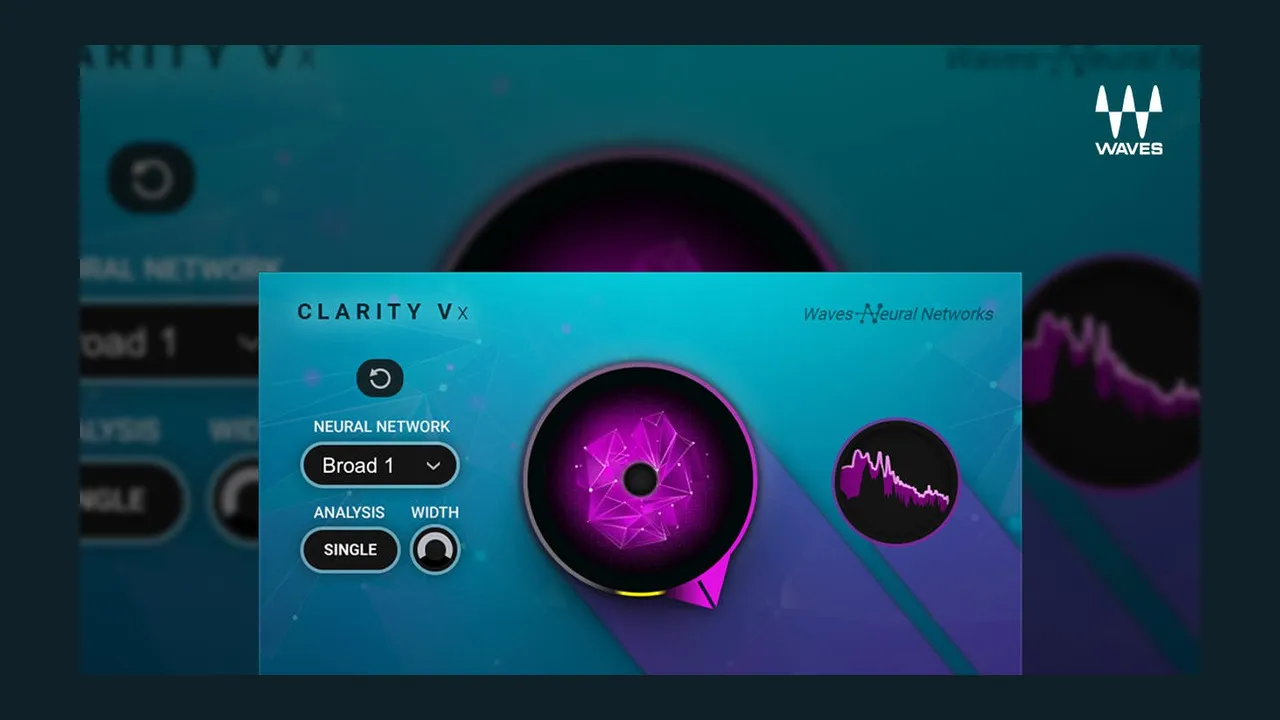
Official Waves product image. Standard Clarity Vx is a documented Essential entry at this dated snapshot.
Clarity Vx is the fast voice-versus-noise option.
Clarity Vx DeReverb addresses room sound with a focused control set.
NS1 provides simple adaptive suppression.
Z-Noise offers a more traditional noise-reduction workflow.
Those standard tools already cover many interviews, tutorials, podcasts, and voiceover recordings.
Ultimate is not required merely to get useful dialogue cleanup.
EQ and dynamic control
For normal dialogue shaping, Essential includes several strong options:
- Renaissance EQ for familiar tonal correction;
- F6 for dynamic problem frequencies;
- C4 for multiband control;
- H-Comp and Renaissance Compressor for general compression;
- CLA-76 for fast FET behavior;
- Renaissance Vox for simple voice leveling; and
- MV2 for raising low-level detail while controlling peaks.
That is a documented set of options for a voice chain; the source, settings, and listening judgment still determine the result.
Sibilance, breaths, and level riding
Essential currently includes:
- DeEsser;
- Renaissance DeEsser;
- Sibilance;
- DeBreath; and
- Vocal Rider.
You do not need Ultimate simply to control esses, breaths, or uneven phrases.
Limiting and loudness
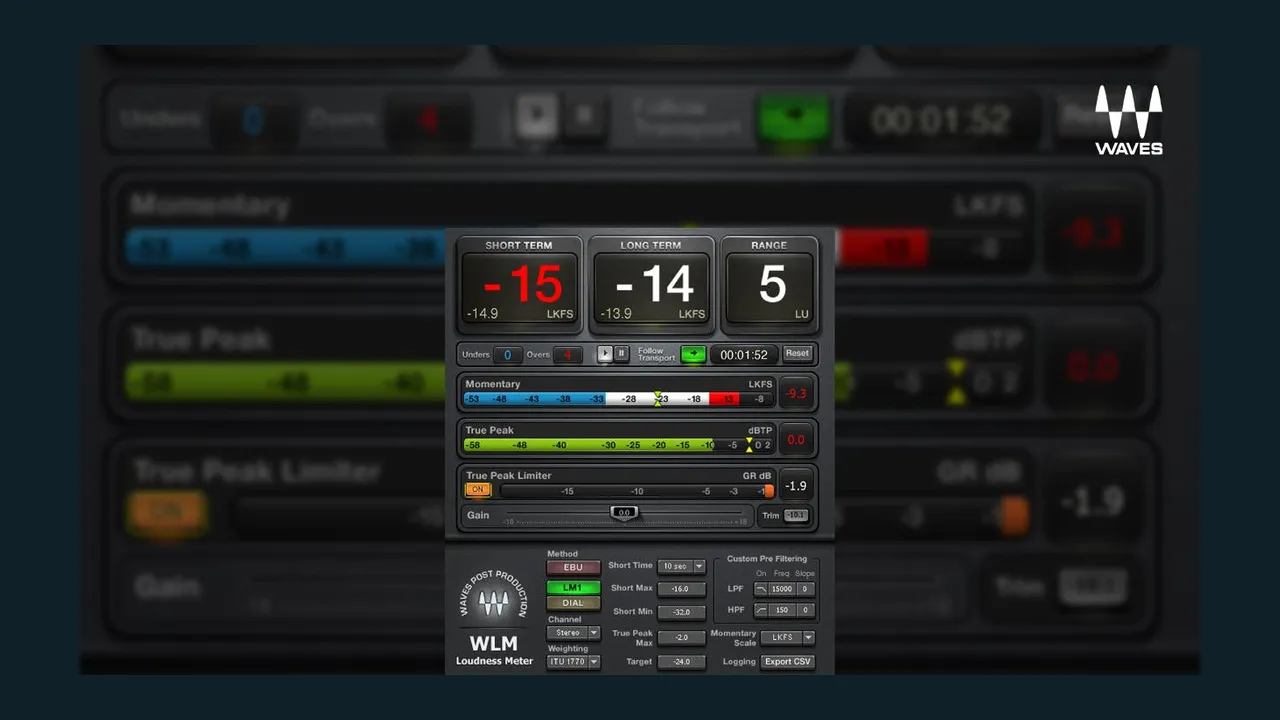
Official Waves product image. WLM Plus is a documented Essential entry at this dated snapshot.
Essential currently includes:
- L1;
- L2; and
- WLM Plus Loudness Meter.
That means a basic broadcast, web-video, podcast, or corporate-delivery chain can be measured and limited without upgrading.
Do not upgrade only because you need LUFS metering. WLM Plus is currently in Essential.
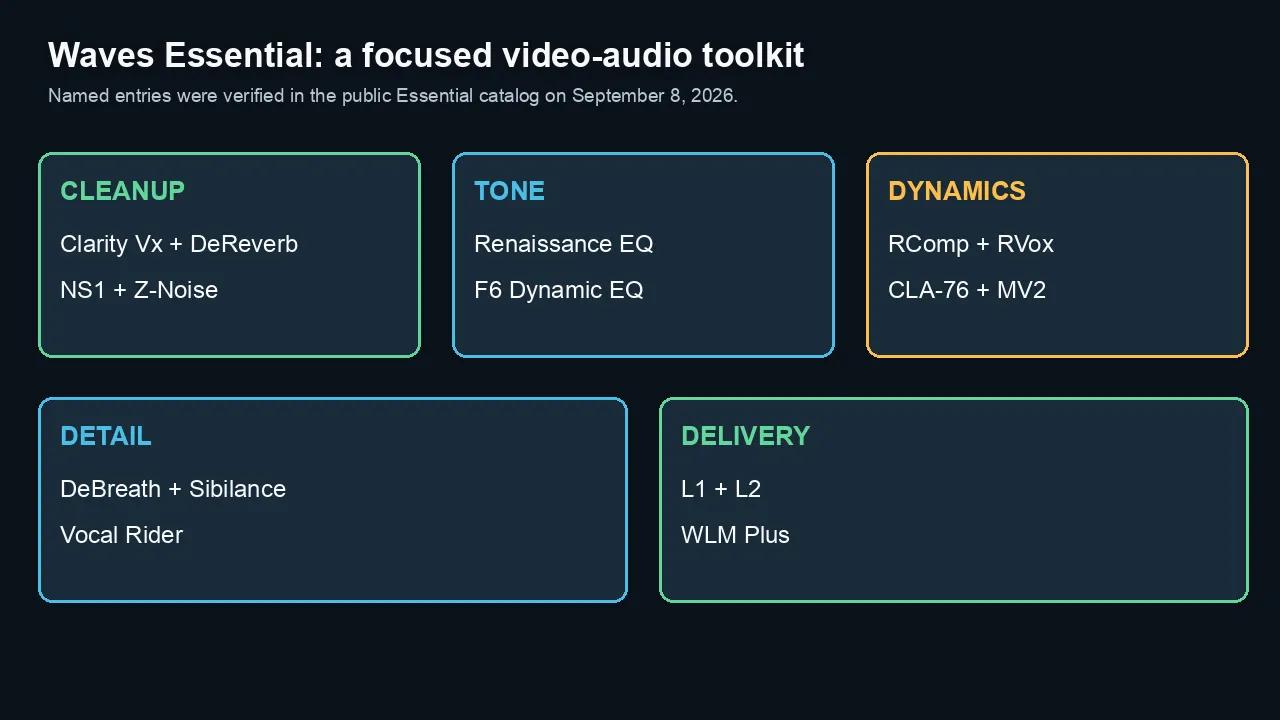
Named entries are a dated catalog snapshot, not a claim that any tool is right for every source.
What Ultimate adds
Ultimate is positioned as the complete Waves catalog.
The current plan contains more than 240 plugins, including every plugin shown in Essential plus a large set of additional processors, instruments, analog models, immersive tools, and specialty effects.
For video editors, the useful difference is not “120 more plugins.”
It is access to several categories that Essential only partly covers.
Advanced dialogue and restoration
Ultimate currently adds tools including:
- Clarity Vx Pro;
- Clarity Vx DeReverb Pro;
- WNS Noise Suppressor;
- W43 Noise Reduction;
- X-Noise;
- X-Hum;
- X-Click; and
- X-Crackle.
These tools matter when dialogue repair is a recurring paid service—not an occasional emergency.
Additional compression and channel color
Ultimate currently adds:
- CLA-2A;
- CLA-3A;
- Abbey Road RS124;
- API 2500;
- dbx 160;
- PuigChild;
- Scheps Omni Channel 2;
- SSL EV2; and
- several additional console and signature processors.
These are not automatically “better” than Renaissance Compressor or CLA-76.
They provide different envelopes, harmonic behavior, control layouts, and workflows.
Advanced mastering and delivery
Ultimate currently adds tools such as:
- L3 Multimaximizer;
- L3-16;
- L3-LL;
- L4;
- Linear Phase EQ;
- Linear Phase Multiband;
- Abbey Road TG Mastering Chain; and
- additional surround limiting and metering tools.
For spoken-word web delivery, L2 and WLM Plus are documented Essential entries; decide whether a more complex processor is needed for the programme rather than the catalog size.
The advanced tools matter when you master music-heavy content, trailers, broadcast material, or complex mixes.
More monitoring, reverb, sound design, and immersive tools
Ultimate also expands:
- control-room and headphone-monitoring environments;
- H-Reverb, IR1, Abbey Road plates, and other spaces;
- Doppler and specialized sound-design processors;
- Ambisonics, surround, and immersive processors;
- Spherix immersive dynamics; and
- broader instrument and music-production options.
These categories may be valuable to a full-service post facility.
They may add little to a creator who mainly edits mono dialogue over music.
The Ultimate-only tools that matter to video editors
1. Clarity Vx Pro
The standard Clarity Vx is already in Essential.
Clarity Vx Pro is the reason to consider Ultimate when dialogue cleanup is central to your work.
Waves currently positions Pro with:
- multiple neural networks;
- multiband control;
- independent band monitoring and gain;
- reflections restoration;
- an ambience gate;
- width control;
- a limiter; and
- deeper automation.
The Pro version earns its place when one global control cannot clean the recording without damaging part of the voice.
It is unnecessary when standard Clarity Vx produces a natural result quickly.
2. Clarity Vx DeReverb Pro
Standard Clarity Vx DeReverb is already in Essential.
The Pro version is for more demanding location dialogue and voiceover recorded in poor rooms.
It matters when room reduction requires more control than a simple global amount.
Do not assume the Pro version is always more natural. Test it on the same reverberant source.
3. WNS, W43, and the X restoration plugins
Ultimate contains several older but specialized post-production tools.
WNS is designed for dialogue noise reduction in film and broadcast.
W43 is modeled around a classic film-post noise-suppression workflow.
X-Noise, X-Hum, X-Click, and X-Crackle address more specific restoration problems.
These may be valuable when you receive damaged archives, hiss, electrical hum, clicks, or difficult location audio.
They do not replace a complete modern spectral-repair suite.
4. CLA-2A and CLA-3A
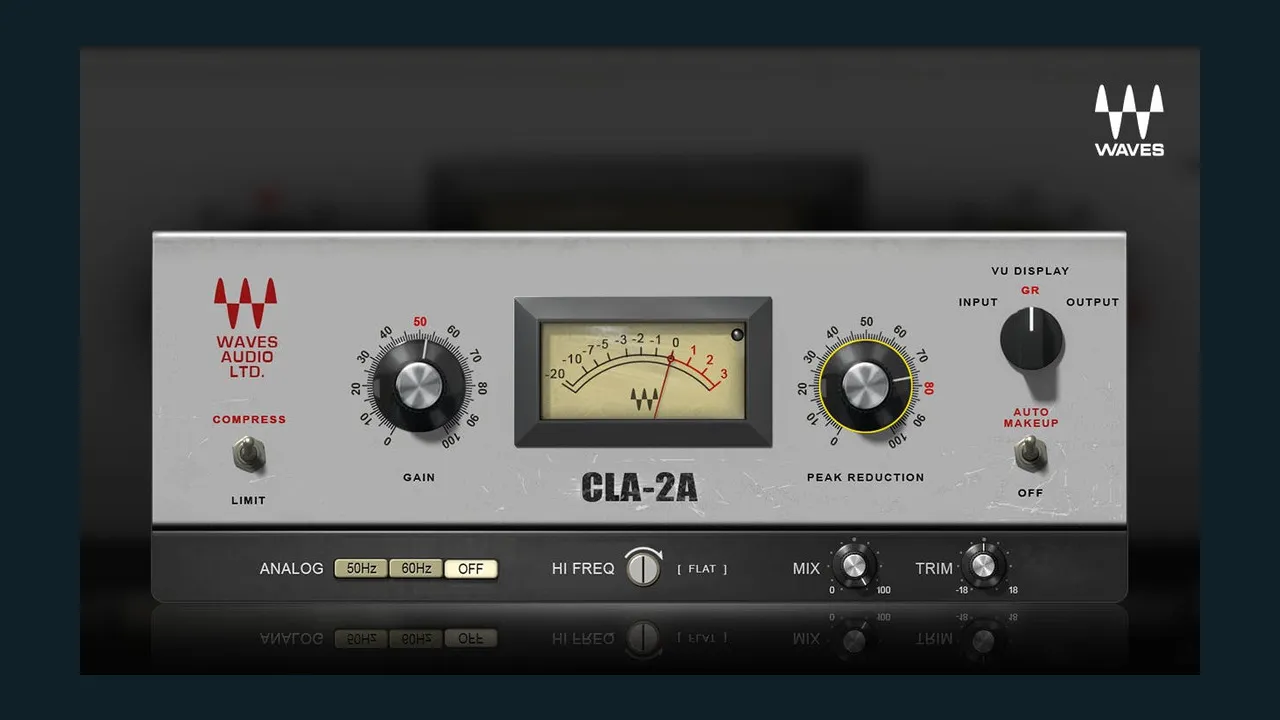
Official Waves product image. CLA-2A is an Ultimate-only example at this dated snapshot.
Essential includes CLA-76.
Ultimate adds two classic leveling-amplifier styles:
- CLA-2A for slower, smoother optical behavior; and
- CLA-3A for a faster solid-state optical character.
For voiceover, the difference is not simply “vintage tone.”
It is how the compressor handles phrases, consonants, breaths, and recovery.
These are useful creative alternatives to Renaissance Compressor—not mandatory upgrades.
5. Scheps Omni Channel 2
Scheps Omni Channel 2 combines:
- filtering;
- saturation;
- de-essing;
- compression;
- gating;
- EQ; and
- flexible channel-strip routing.
It can replace several separate inserts in a fast voice or dialogue chain.
The value comes from workflow consolidation.
If you already prefer dedicated processors, it may not replace them.
6. L4 and the advanced mastering family
Essential already provides L1, L2, and WLM Plus.
Ultimate adds more complex mastering options.
L4 currently adds true-peak and LUFS-aware features alongside adaptive clipping and release behavior.
The L3 and linear-phase tools expand multiband control.
Use them when the programme material needs them.
Do not make spoken dialogue more complicated merely because the plugin is available.
7. Immersive, surround, and specialty post tools
Ultimate is the clear choice when your work includes:
- 5.1 or surround;
- Ambisonics or 360 video;
- Dolby Atmos beds;
- immersive dynamics;
- surround upmixing;
- cinema or broadcast post; or
- specialized system calibration.
Essential is designed mainly around common stereo production.
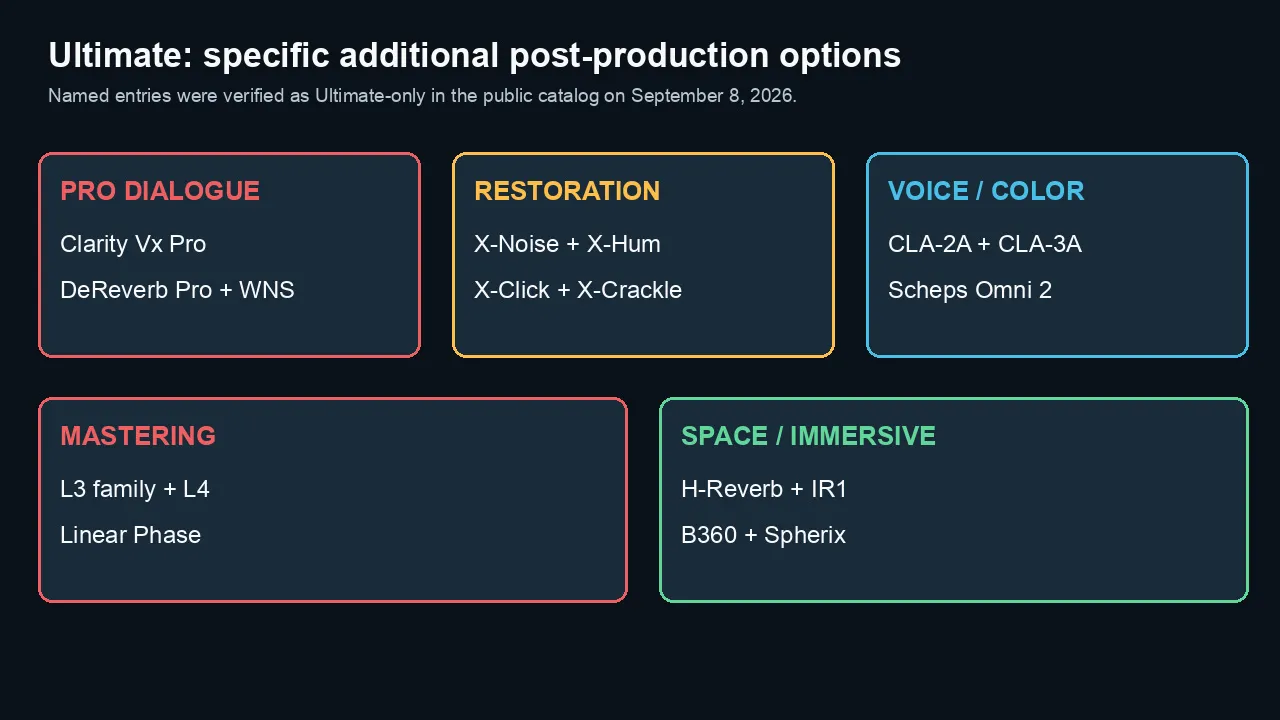
Ultimate expands particular categories; it does not replace the Essential core by default.
What does not require Ultimate
Several common upgrade assumptions are wrong at the current catalog snapshot.
“I need Ultimate for Clarity Vx”
No.
Standard Clarity Vx is in Essential.
Upgrade only when you need the Pro controls or the wider restoration catalog.
“I need Ultimate for dereverb”
No.
Standard Clarity Vx DeReverb is in Essential.
Ultimate adds the Pro version.
“I need Ultimate for loudness”
No.
WLM Plus is in Essential.
“I need Ultimate for my basic voiceover chain”
Usually not.
A core chain built around Renaissance Compressor, Renaissance EQ, MV2, and L2 does not require Ultimate by tier membership alone. The dated catalog also lists F6, CLA-76, de-essing, breath-control, and loudness tools in Essential.
“Ultimate sounds better”
A subscription tier does not have a sound.
The result depends on:
- the source recording;
- the plugin chosen;
- the settings;
- the gain structure;
- the rest of the chain;
- the editor's judgment; and
- the delivery format.
A well-used Essential chain will beat a random Ultimate chain.
Which plan fits your workflow?
Voiceover artist
Start with Essential.
It already covers cleanup, EQ, de-essing, compression, level control, limiting, and loudness.
Choose Ultimate when you specifically want:
- Clarity Vx Pro or DeReverb Pro;
- CLA-2A or CLA-3A;
- Scheps Omni Channel 2;
- advanced restoration; or
- a broader analog palette.
Software-tutorial and corporate-video editor
Choose Essential for most work.
These projects usually need:
- clean voice;
- stable levels;
- simple music balance;
- light room repair;
- intelligibility; and
- predictable delivery loudness.
Ultimate becomes useful when poor client audio and location interviews are frequent.
Podcast editor
Choose Essential for clean recorded podcasts.
Choose Ultimate when the business regularly receives:
- untreated-room recordings;
- changing background noise;
- remote guests with damaged audio;
- archival material; or
- projects that need several advanced repair paths.
Documentary, reality, or location-dialogue editor

A location-dialogue workflow can justify a higher tier only when a specific additional capability recurs.
Ultimate is easier to justify.
The Pro dialogue tools, WNS/W43, restoration processors, advanced automation, and broader post catalog are reasons to compare the tier against the actual recurring work.
A full spectral-repair suite may still be necessary. Why noise reduction can make a voice sound robotic covers the separate artifact-diagnosis question.
Music-heavy video and trailer editor
Ultimate may be worthwhile for:
- advanced bus compression;
- mastering;
- analog color;
- reverb;
- sound design; and
- a wider collection of creative effects.
Immersive or surround mixer
Choose Ultimate.
The relevant surround, Ambisonics, immersive, and upmixing tools are part of the expanded catalog.
Occasional user
Consider:
- Essential;
- a short Ultimate subscription for one project;
- a seven-day trial; or
- perpetual licenses for the few tools you use.
Do not maintain Ultimate as an insurance policy against problems you rarely encounter.
Tier and license model
Choosing a tier and choosing a license model are different decisions.
Essential may cover most of a workflow while an individually owned plugin fills one gap. Ultimate may be simpler when several different requirements recur. Neither is automatically cheaper without pricing the actual toolkit and billing period.
The Waves subscription-versus-perpetual guide explains update coverage, cancellation and project-recall planning. Use this comparison to choose a tier, not to repeat that entire ownership decision.
Before changing tiers
One regularly needed Ultimate-only tool can justify the upgrade. Ten unused ones cannot.
Write down the missing capability, how often you need it, and what you currently use instead. Then compare the higher subscription cost with the purchase alternative and the work that capability would actually replace.
Do not turn a longer feature list into a claim about time saved. That needs a real comparison on your own project.
Before downgrading, identify the Ultimate-only plugins used in projects you may need to reopen.
Check what licenses will remain available after the change and preserve suitable rendered fallbacks alongside editable sources. A project opening successfully does not prove that every original processor remains licensed or that its sound is unchanged.
Confirm the current billing and change timing with Waves before committing. This checklist is preparation advice, not a report of a new cross-version session test.
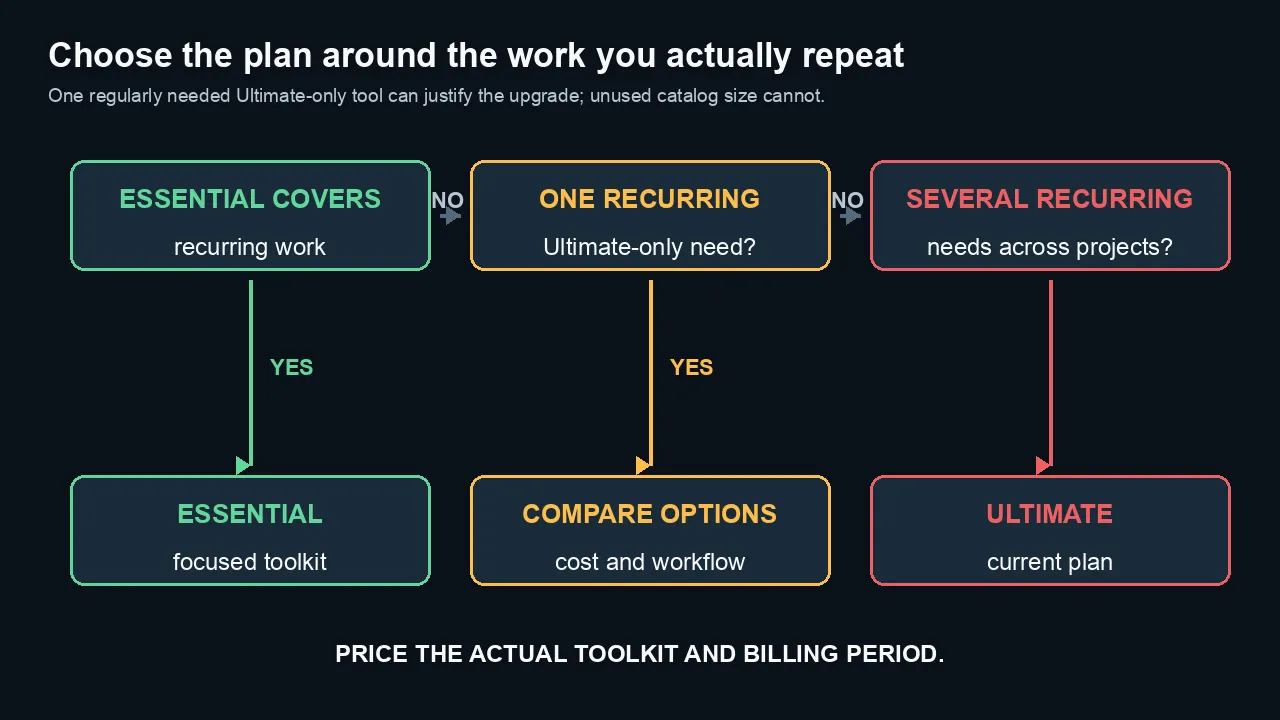
Start with recurring work and the one missing capability, then price the actual toolkit and billing period.
Recommendation
Essential is the first tier to check for a focused spoken-word workflow. Ultimate is worth considering when its additional tools solve a specific recurring need.
Check the named plugins, verify your host, and compare the cost against what you already own. Do not pay for a larger catalog just to avoid making that shortlist.
Compare the current Waves plans — affiliate link.
Frequently asked questions
What is the difference between Waves Essential and Ultimate?
Waves Essential currently includes more than 120 plugins covering core mixing and production. Waves Ultimate currently includes more than 240 plugins and is positioned as the complete Waves catalog. Ultimate adds advanced dialogue, restoration, analog, mastering, immersive, instrument, and specialty tools.
How much more does Waves Ultimate cost?
At the September 8, 2026 public price snapshot, Essential costs $14.99 monthly or $149.99 annually. Ultimate costs $24.99 monthly or $249.99 annually. The difference is $10 monthly or $100 annually on matching public billing periods. Verify current prices before subscribing.
Is Waves Essential enough for voiceover?
Yes, for many voiceover workflows. It currently includes Clarity Vx, Clarity Vx DeReverb, NS1, Renaissance Compressor, Renaissance EQ, Renaissance Vox, de-essers, Sibilance, DeBreath, Vocal Rider, MV2, L2, and WLM Plus. Ultimate adds more advanced and alternative tools.
Is Clarity Vx included in Waves Essential?
Yes, standard Clarity Vx is currently included in Essential. Clarity Vx Pro is currently an Ultimate-only plugin. Verify the live catalog because plan membership can change.
Is Clarity Vx DeReverb included in Essential?
The standard Clarity Vx DeReverb is currently included in Essential. Clarity Vx DeReverb Pro is currently Ultimate-only.
Is WLM Plus included in Waves Essential?
Yes, WLM Plus Loudness Meter is currently listed in Essential. You do not need Ultimate only to measure LUFS and true peak.
Which Ultimate-only plugins matter most for dialogue editing?
The strongest current candidates are Clarity Vx Pro, Clarity Vx DeReverb Pro, WNS, W43, X-Noise, X-Hum, X-Click, and X-Crackle. The right tool depends on whether the problem is changing noise, reverb, hum, clicks, or another repair class.
Is Waves Ultimate worth it for video editing?
It is worth considering when an Ultimate-only capability solves a specific recurring need. Compare the documented tier membership, the actual billing period, an individual purchase alternative, and the work you would genuinely replace.
Can I buy Waves plugins without a subscription?
Yes. Waves currently continues to sell perpetual plugin and bundle licenses alongside Creative Access. Compare the long-term cost when you need only one or two Ultimate-only products.
Can I switch from Ultimate back to Essential?
Before changing tiers, confirm the current billing and change timing with Waves. Identify projects that use Ultimate-only plugins and preserve appropriate rendered fallbacks alongside editable sources.
Do both plans include two licenses?
The current plan pages advertise two license activations for both Essential and Ultimate. Confirm the current user and activation terms before relying on them in a team workflow.
Does Ultimate make my audio sound better?
Not automatically. Ultimate provides more tools. Sound quality still depends on the source, plugin choice, settings, gain staging, listening judgment, and delivery workflow.
Official sources reviewed
- Waves Essential plan page
- Waves Ultimate plan page
- Waves Creative Access comparison page
- Waves Creative Access FAQ
- dated public catalog parser, September 8, 2026

About the Author
Joseph Nilo has been working professionally in all aspects of audio and video production for over twenty years. His day-to-day work finds him working as a video editor, 2D and 3D motion graphics designer, voiceover artist and audio engineer, and colorist for corporate projects and feature films.