
Plan guidance checked September 14, 2026
Adobe Creative Cloud Standard vs Pro is now primarily an AI-capacity and workflow decision. Both plans sit inside the Creative Cloud family, but Adobe's current documentation gives Pro unlimited access to standard generative features plus 4,000 monthly credits for premium generations, while Standard has 25 monthly generative credits. That difference matters much more to a working creator than the plan names alone.
Editing in Premiere Pro, building graphics in After Effects, and making thumbnails in Photoshop does not by itself require Pro. Compare Standard with the apps you need, then consider Pro when its extra AI allowance or web and mobile features are useful to your work.
Quick answer
Choose Standard when its desktop apps and 25 monthly generative credits cover your work. If a particular premium video or audio feature matters, read the source note below before buying or switching.
Consider Pro if you regularly need more AI generations or fuller web and mobile features. It includes unlimited standard generations and 4,000 monthly credits for premium generations. Several desktop apps alone are not a reason to upgrade.
Affiliate disclosure
Compare current Adobe plans
I may earn a commission if you buy through this link. Check Adobe's current Standard and Pro terms before you choose a plan.
Check current Adobe plansMore official plan paths: Adobe Creative Cloud plans page, Adobe Creative Cloud plans, and Adobe Firefly plans.
The three-job decision test
Before comparing plans, write down the next three real Adobe jobs you expect to finish. Include the application, the source material, the output, and whether generative AI is essential or merely convenient. A photographer might list a batch of raw images, one Generative Fill cleanup, and a campaign export. A video editor might list a Premiere timeline, an After Effects title, and a translated social cut. The answers usually make the plan boundary clearer than a feature grid.
Then mark the first point where the work could stop: a credit limit, a premium-feature lock, a collaborator's entitlement, or a renewal term. If none of those points appear in the next month, Standard may be the disciplined choice. If one of them can delay paid work, Pro is worth pricing against that risk. Keep the exercise honest; a hypothetical future project should not outweigh the work your business actually ships.

Adobe's Photoshop generative-AI guide uses this before-and-after image to illustrate a generated edit inside the Photoshop workflow. Source: Adobe. Interface shown as documented by Adobe and may change.
The current AI-credit difference
Standard includes 25 monthly generative credits. Pro includes unlimited standard generations.
Plan-source note — September 15, 2026: Adobe's credits FAQ and Standard product page list premium generative access, but its older plan-comparison table excludes it.
Before buying or switching for a particular video or audio feature, confirm that it is included in the plan you intend to use. A temporary trial or another subscription is not the same as ongoing access through Standard.
Generative credits measure how much you can generate, not which features your plan includes. Premium generative AI, premium web/mobile app features, and Adobe Express Premium are separate benefits.
Pro also includes 4,000 monthly credits for premium generations. Adobe describes premium work as higher-compute features such as generating video or audio, translating video or audio, and Premiere Pro Generative Extend. The credit number is useful, but the more important distinction is the type of work: a creator doing a few image edits is not in the same buying situation as a creator generating or translating media every week.
Credits renew monthly on the paid plan's billing date and generally do not turn into an unlimited bank of unused capacity. Adobe says that if a plan without premium access reaches its credit limit, a user can wait for the reset or add a Firefly or credit plan. Check the current account page for your exact entitlement before promising a client a feature or changing plans.
Creative Cloud Standard vs Pro: the practical comparison
| Decision area | Creative Cloud Standard | Creative Cloud Pro |
|---|---|---|
| Core app workflow | 20+ desktop apps; a fit when the included features cover your work. | 20+ desktop apps, with more AI generation capacity and fuller web/mobile features. |
| Standard generative features | 25 monthly generative credits. | Unlimited access to standard generations, according to Adobe's current credits FAQ. |
| Premium generations | Adobe's pages disagree. Confirm that the specific feature is included before buying. | 4,000 monthly credits for premium generations on the individual plan documented by Adobe. |
| Video and audio AI | Do not assume premium video or audio access; verify the current plan or add-on. | More appropriate when premium video/audio generation or translation is part of the workflow. |
| Buying risk | Lower recurring cost can win if you rarely use AI and mostly work in familiar apps. | Higher recurring cost can be justified when running out of credits or changing plans disrupts delivery. |
Availability can vary by plan, app, region, model, and release. Before switching, confirm the feature is included in the destination plan. Using it today in a higher-tier account or through another subscription does not prove it will remain available after the switch.

Generative Expand extends the canvas beyond the original image; the exact model, credit use, and availability depend on the signed-in plan and release. Source: Adobe. Interface shown as documented by Adobe and may change.
Which workflow fits your work?
Video and audio creators
Standard can cover editing and graphics across several desktop apps. Compare Pro when the extra AI allowance would help you finish the work. For a particular video generation, audio translation, or Generative Extend feature, confirm access in the plan you intend to use.
Standard can still be enough for a video editor who mainly cuts footage, uses Photoshop for thumbnails, and treats generative AI as an occasional convenience. In that case, compare Standard with a single-app plan and with the cost of a separate Firefly plan. Do not pay for a broad capacity you will not use.
Designers and photographers
Designers and photographers often get substantial value from standard Photoshop and Illustrator AI features without needing premium video or audio capacity. If your actual work is background cleanup, Generative Fill, object removal, variations, or a few Firefly concepts, Standard may be adequate. Pro becomes more useful when image generation regularly exceeds the smaller allowance. Paying for extra capacity makes sense only if you will use it.
Creative teams and freelancers
Teams should calculate from the busiest legitimate workflow, not the quietest seat. Ask who generates, who reviews, and whether credits are pooled or assigned. Adobe's plan documentation distinguishes individual and team entitlements, so do not infer that an individual Pro allowance automatically applies to a team plan. Keep a simple monthly record of the jobs that used AI and the points where the workflow paused.
When Creative Cloud Standard is enough
Standard is a reasonable starting point when the Adobe subscription is mainly a dependable home for existing work.
- You mostly use Photoshop, Illustrator, Premiere Pro, Lightroom, InDesign, or Acrobat in established workflows.
- Generative AI helps with occasional cleanup or ideation rather than recurring deliverables.
- You do not need premium generative video or audio features from this subscription.
- You are willing to wait for a monthly credit reset when a rare experiment reaches its limit.
- Your clients and collaborators do not depend on a plan-specific feature you have not tested.
Before downgrading, inventory your shared libraries, documents, storage, apps, and generative features. Check what the destination plan includes before committing to the change; a successful test under your current subscription does not establish access after a downgrade.
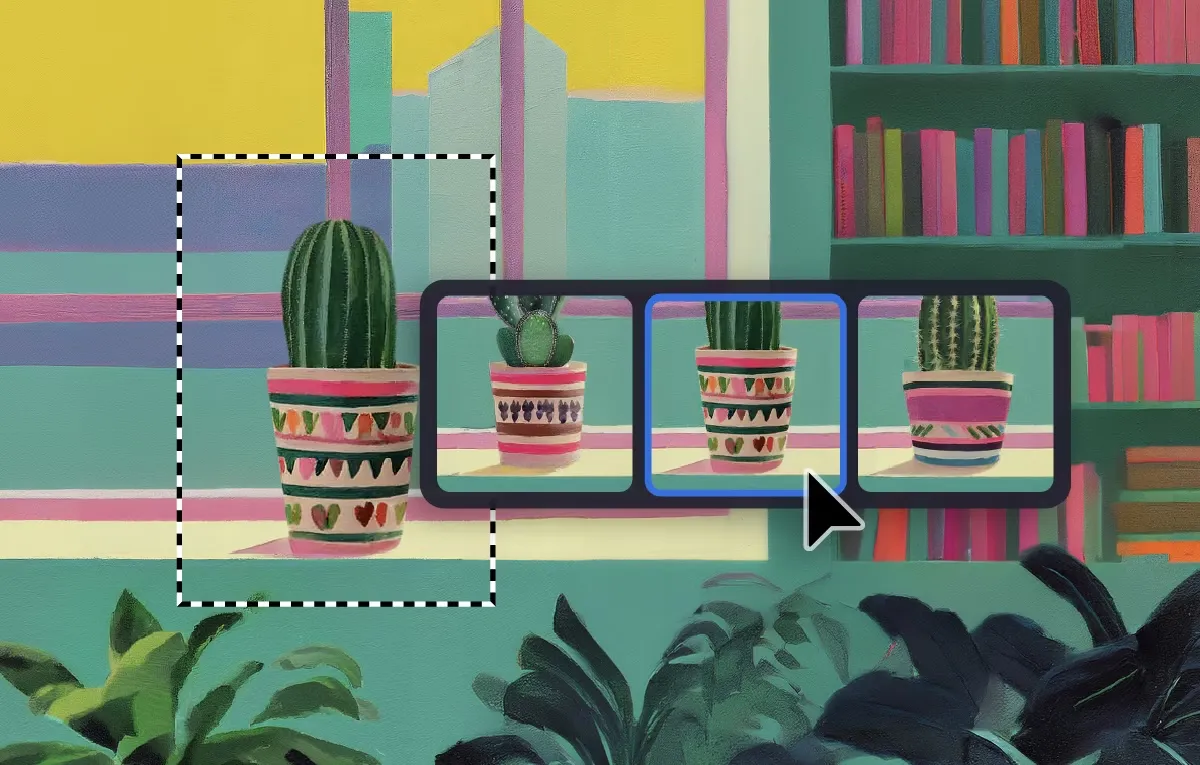
Adobe's current Photoshop documentation shows the Remove workflow with generated variations, a useful example of standard AI work versus premium video and audio generation. Source: Adobe. Interface shown as documented by Adobe and may change.
When Creative Cloud Pro is worth it
Pro is easier to justify when AI capacity is connected to paid output. A creator who produces weekly social campaigns, product variations, motion concepts, short-form video, or multilingual clips may spend more time managing limits than the plan difference is worth.
- You need a Pro-specific feature or access level that Standard does not cover.
- You regularly use Firefly or Photoshop generative tools and do not want standard-generation limits to shape the work.
- You expect premium video/audio generation, translation, or Premiere Pro Generative Extend to matter.
- You need predictable headroom for client revisions, alternate versions, and campaign batches.
- You can measure the plan against deliverables instead of treating “unlimited” as a reason to experiment without a production goal.
Pro is not automatically the best value. If the project only needs a handful of image edits, a less expensive plan or a separate Firefly plan may be more efficient. The useful question is whether the extra capacity changes what you can finish on time.
Pricing, renewals, and switching checks
Adobe's public prices, promotions, regions, and billing terms can change. I avoid hard-coding a temporary monthly price here because the renewal amount is usually more important than the first checkout screen. Review whether the offer is annual billed monthly, annual prepaid, or month-to-month; check the renewal amount; and read cancellation terms before switching.
Also compare the plan against single-app paths and the separate Firefly plans. Someone who only needs Photoshop and occasional standard generations may not need the full bundle. Someone who needs premium video generation may discover that a Firefly plan or an individual Pro plan fits better than a Standard subscription plus ad hoc add-ons.
For related buying context, read the Adobe Creative Cloud pricing guide, Adobe Firefly pricing and credits guide, and Photoshop price guide. Those pages should be checked against Adobe's current checkout before a purchase decision.
Official sources checked
Frequently Asked Questions
What is the difference between Creative Cloud Standard and Pro?
Standard is the lower-capacity individual plan for creators who mainly need established Creative Cloud apps and occasional generative use. Pro currently includes unlimited standard generations and 4,000 monthly credits for premium generations, according to Adobe's Generative credits FAQ.
How many generative credits does Creative Cloud Standard include?
Adobe's current Generative credits FAQ lists 25 monthly generative credits for Creative Cloud Standard. Credit use and feature access can vary by operation, app, model, and plan, so verify the signed-in account before relying on a number.
Does Creative Cloud Pro include unlimited AI?
Adobe currently says Creative Cloud Pro includes unlimited access to standard generations, while premium generations use the plan's 4,000 monthly credits. Unlimited standard generations does not mean every video or audio feature is unlimited.
Is Creative Cloud Pro worth it for video editors?
Compare Pro if you regularly need more AI generations or fuller web and mobile features. Standard may cover editing and graphics across several desktop apps. For a smaller job, the software you already have may be enough.
Do generative credits roll over?
Adobe says paid-plan generative credits renew monthly on the billing date; do not assume unused capacity becomes a permanent bank. Check Adobe's current account terms for the exact plan.
Should I choose Standard or a single Adobe app?
Compare Standard when you need several desktop apps and do not need premium generative access from this plan. If one application covers the work, compare its plan with relevant bundles and what you already own.
Can I use Firefly features with Creative Cloud Standard?
Standard includes 25 monthly generative credits, but Adobe's pages disagree about premium generative access. Before buying or switching for a specific feature, confirm it is included in Standard. Access through a trial or another subscription does not establish ongoing access through Standard.
Where should I check current Adobe pricing?
Use Adobe's current Creative Cloud plans page and HelpX plan-change and generative-credit documentation immediately before buying, switching, or downgrading.

About the Author
Joseph Nilo has been working professionally in all aspects of audio and video production for over twenty years. His day-to-day work finds him working as a video editor, 2D and 3D motion graphics designer, voiceover artist and audio engineer, and colorist for corporate projects and feature films.