
Plan features checked July 9, 2026. Verify current limits before subscribing.
| Best for | Fast dialogue cleanup, browser-based remote recording, transcription-based editing, and preparing a usable voice track. |
|---|---|
| Use Audition when | You need spectral repair, precision mixing, advanced restoration, or a full multitrack post-production environment. |
| Start with | Test the Free plan on three real recordings before paying for longer limits, video support, bulk processing, and strength controls. |
| Main caution | Keep every original and reduce enhancement strength if the processed voice loses its natural character. |
Disclosure: This page contains affiliate links. If you subscribe through one, I may earn a commission at no additional cost to you.
Test Adobe Podcast on your own recordings
Use a clean voice, a noisy interview, and a typical video file to compare the current Free and Premium workflows.
Check Adobe Podcast plansAdobe Podcast is one of the fastest ways to clean up spoken audio, record a remote conversation, and edit dialogue from a transcript without opening a traditional audio workstation.
Its standout tool is Enhance Speech. You upload an audio or video file, Adobe reduces noise and echo, balances the voice, and returns a cleaner result. The Premium plan adds more control, video support, bulk processing, and longer project limits.
Adobe Podcast is worth testing if dialogue is the main thing you need to fix. It is not a complete replacement for Adobe Audition or Premiere Pro when a project needs detailed repair, music mixing, sound design, or precise control over every edit.
What Is Adobe Podcast?
Adobe Podcast is a web-based set of recording and audio-production tools. The main components are:
- Enhance Speech, which cleans up voice recordings and reduces noise and echo.
- Studio, which records remote conversations and supports transcript-based editing.
- Mic Check, which analyzes a microphone setup before recording.
Because it runs in a browser, Adobe Podcast removes much of the setup that makes traditional audio software intimidating. A creator can record, transcribe, trim, enhance, and export without first learning tracks, buses, effects chains, or restoration panels.
That simplicity is the product's biggest advantage. It is also the reason to understand its limits: Adobe Podcast makes many technical decisions for you.
What Enhance Speech Actually Does
Enhance Speech is designed around a common production problem: the words are good, but the recording is not.
Typical examples include:
- A remote guest recorded in an untreated room.
- A voiceover with steady computer or air-conditioning noise.
- Camera audio with too much room echo.
- A phone recording that needs clearer dialogue.
- A video clip where speech is competing with ambience or music.
The basic workflow is simple. Upload the file, let Adobe process it, compare the enhanced result with the original, and download the version that works.
The Premium controls matter because full-strength processing is not always the best result. A lower enhancement strength can keep more of the speaker's natural tone and room character while still improving intelligibility.
My practical rule is to judge Enhance Speech in the context of the finished program. A voice that sounds impressive in isolation may sound too dry or processed once music, ambience, and other speakers are added.
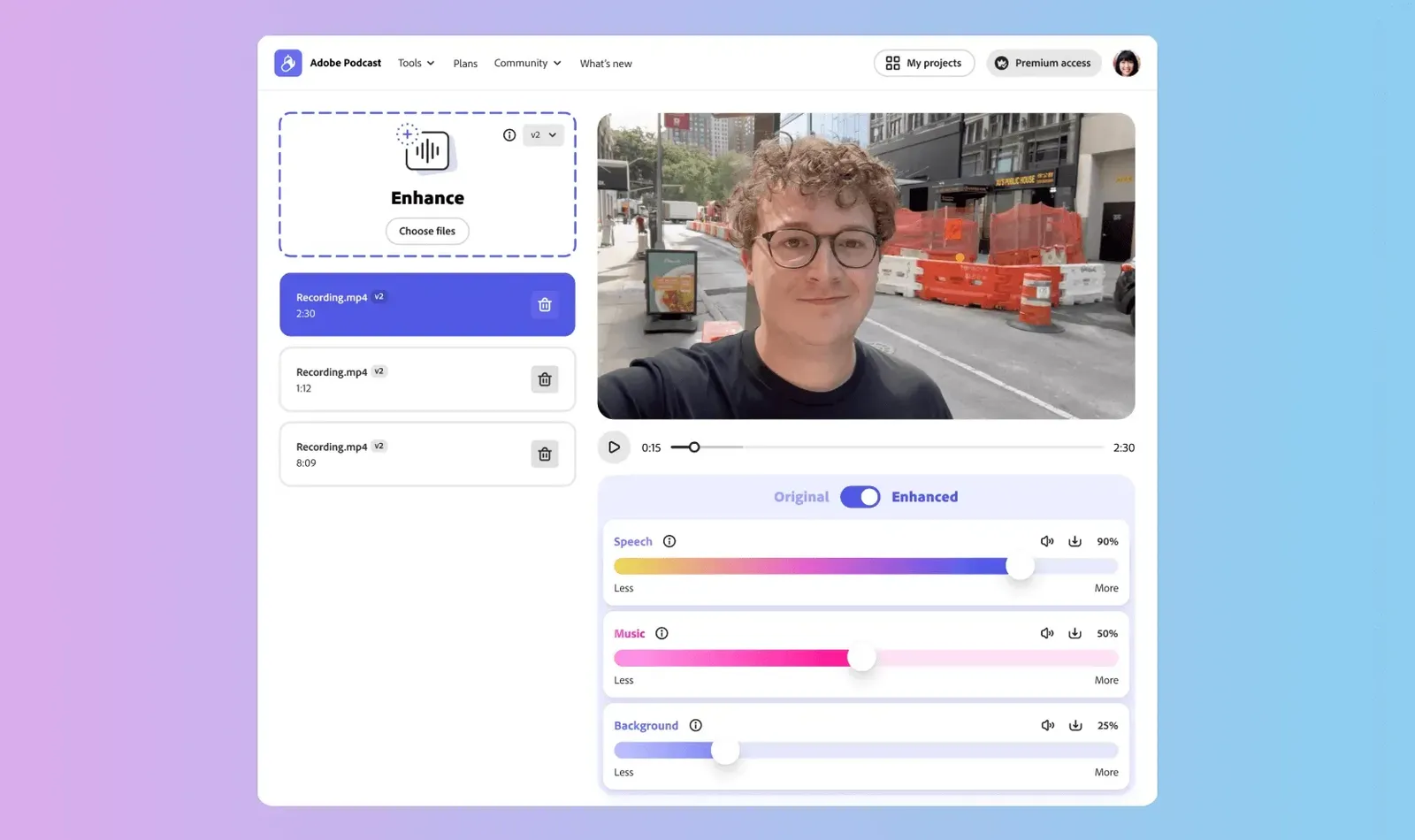
Enhance Speech v2 adds separate speech, music, and background controls instead of one all-or-nothing enhancement slider. Source: Adobe. Interface shown as documented by Adobe and may change.
What Changed In March 2026
Adobe's March 2026 update made Enhance Speech more useful for real post-production work. Premium users gained advanced source-separation controls for speech, background noise, and music, plus the ability to download isolated stems.
That changes the workflow from a simple before-and-after cleanup into a more flexible handoff:
- Upload the problem recording.
- Adjust speech, background, and music independently.
- Download the cleaned mix when it is sufficient.
- Download separate stems when the project needs more work in Premiere Pro or Audition.
Adobe also expanded Studio with remote video recording and broader multitrack editing workflows. For interview producers, that makes Adobe Podcast relevant before and after the recording, not only as a repair tool.
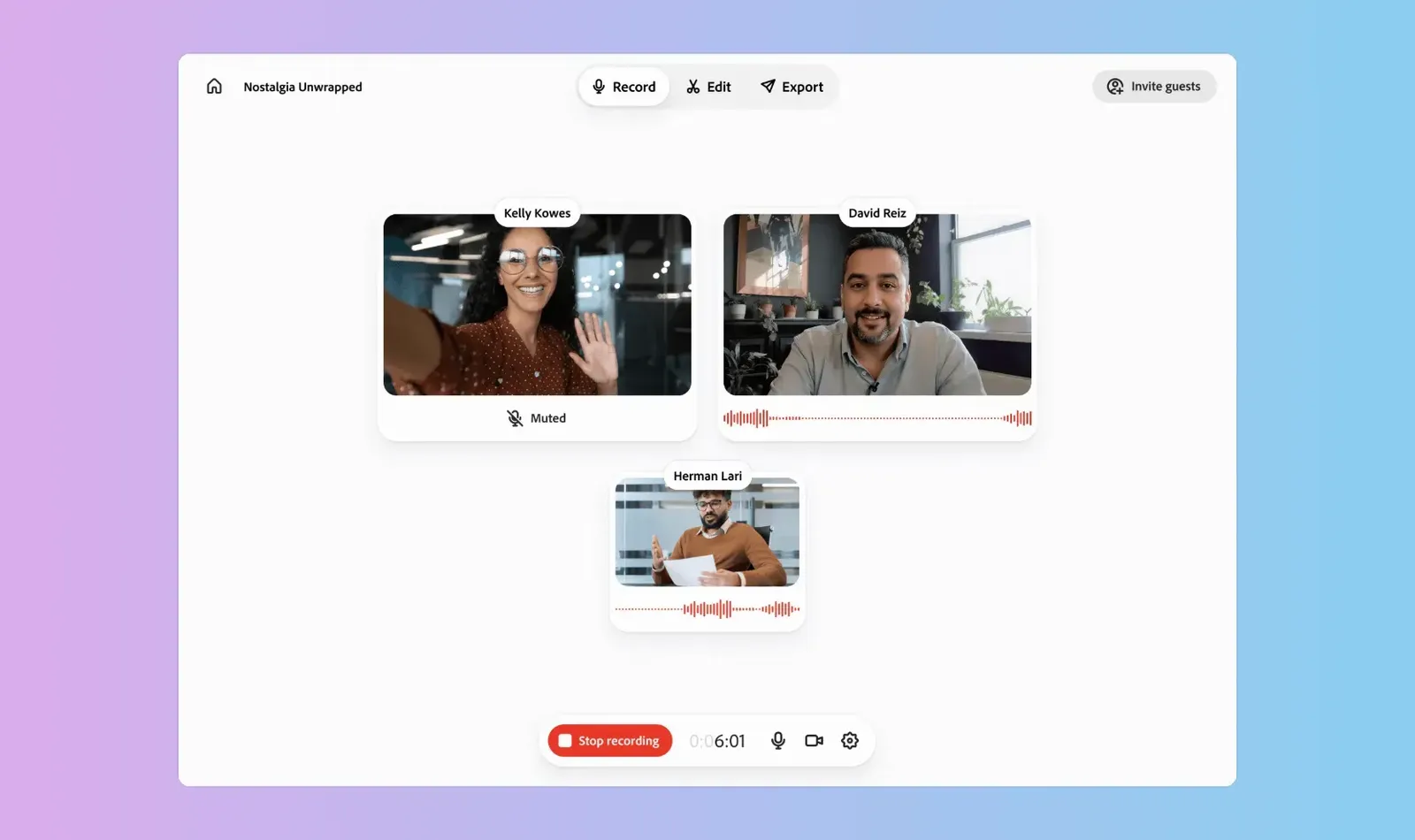
Adobe's March 2026 Studio update added video recording to the same browser workspace used for remote podcast production. Source: Adobe. Interface shown as documented by Adobe and may change.
Adobe Podcast Free vs Premium
Adobe changes plan terms and limits, so check the official Adobe Podcast features page before subscribing. The comparison below was verified on July 9, 2026.
| Capability | Free | Premium |
|---|---|---|
| Enhance Speech media | Audio | Audio and video |
| Upload workflow | One file at a time | Bulk upload available |
| Enhancement strength | Fixed | Adjustable |
| Maximum uploaded file size | 500 MB | 1 GB |
| Maximum Enhance Speech file duration | 30 minutes | 2 hours |
| Daily Enhance Speech allowance | 1 hour | 4 hours |
| Studio project duration | 30 minutes | 2 hours |
| Studio downloads | 2 projects per day | Unlimited |
| Original speaker-separated recordings | No | Yes |
| Adobe-branded audiograms | Yes | Branding can be removed |
| Adobe Express Premium | No | Included according to the current plan page |
The Free plan is enough to answer the most important buying question: does Enhance Speech improve your actual recordings without making them sound artificial?
Premium becomes easier to justify when you process video, work with long interviews, clean several files at once, need speaker-separated originals, or use Adobe Podcast every week.
A Practical Adobe Podcast Workflow
For a podcast or remote interview, I would use this sequence:
- Run Mic Check before recording whenever possible.
- Record each speaker on a separate track.
- Keep an untouched copy of every original file.
- Test Enhance Speech on the weakest recording first.
- Reduce enhancement strength if the voice loses character.
- Export stems when noise or music still needs manual control.
- Finish loudness, music, transitions, and delivery in Audition or Premiere Pro when the program is more than a simple spoken-word edit.
For video, use Adobe Podcast as a dialogue-preparation step. Clean or separate the speech, then return to the video timeline for picture edits, captions, music, effects, and final loudness.
This avoids forcing one browser tool to do every job.
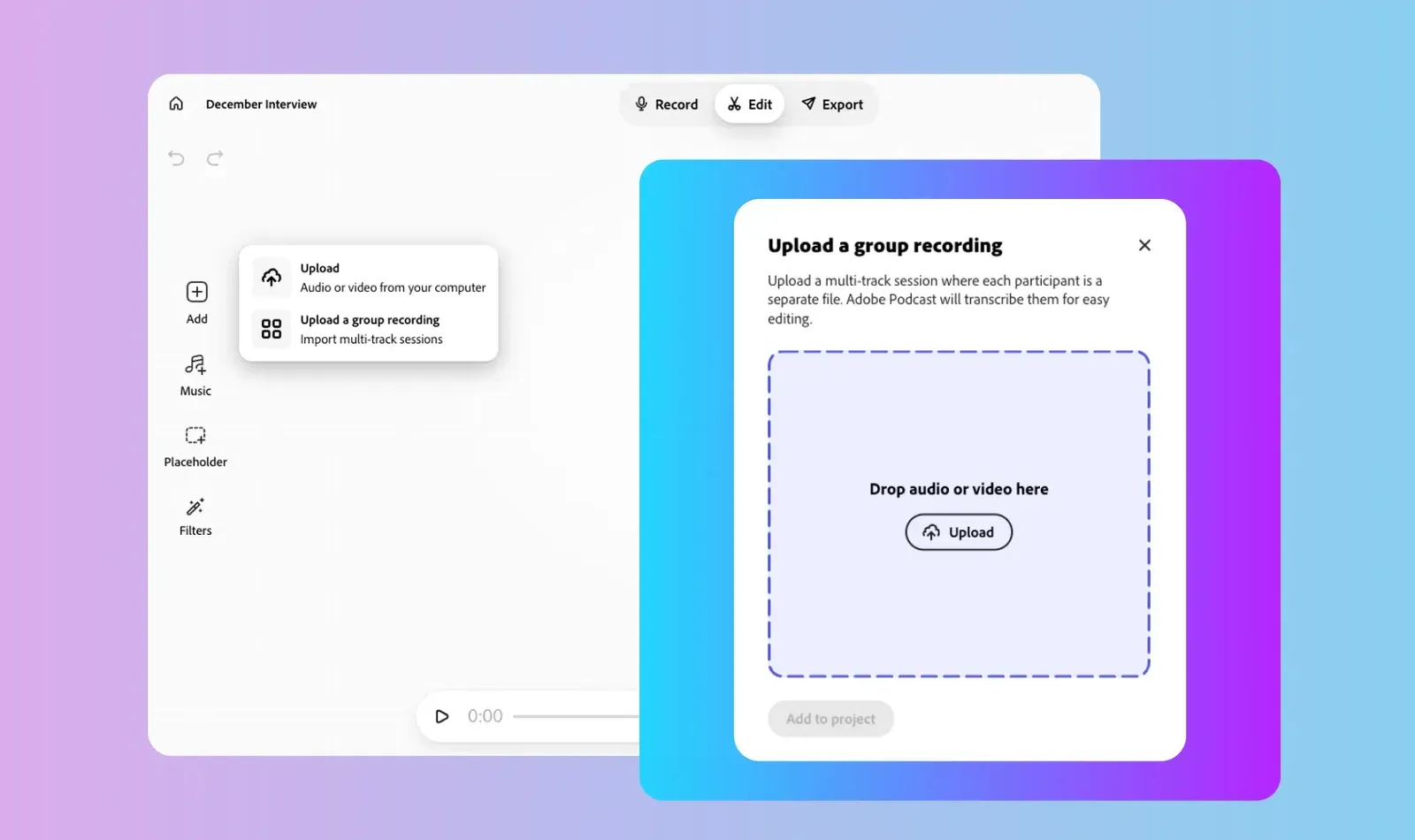
The current Studio workflow exposes separate speaker tracks, supporting more deliberate dialogue edits than a single flattened recording. Source: Adobe. Interface shown as documented by Adobe and may change.
Adobe Podcast vs Premiere Pro Enhance Speech
Adobe Podcast and Premiere Pro can overlap, but they fit different working styles.
Adobe Podcast is better when:
- You want a browser-based upload and cleanup workflow.
- You need to repair a file before it reaches the edit.
- A producer or assistant who does not edit video needs to prepare dialogue.
- You want transcript-based editing or remote recording in the same tool.
- You need source separation and downloadable stems from a problem recording.
Premiere Pro is better when:
- The dialogue is already in an active video sequence.
- You need to hear the voice against music, effects, and other clips.
- Timing changes must follow picture edits.
- Captions, color, graphics, and delivery are part of the same session.
The tools can complement each other. The decision is less about which algorithm wins and more about where the media is in the production pipeline.
Adobe Podcast vs Adobe Audition
Adobe Podcast is faster. Adobe Audition is deeper.
Use Adobe Podcast for:
- One-click or lightly adjusted voice cleanup.
- Remote browser recording.
- Transcript-based rough edits.
- Quick turnaround on interviews, social clips, and voice tracks.
- Preparing cleaner stems for another editor.
Use Audition for:
- Spectral repair and precise noise removal.
- Detailed EQ, compression, de-essing, and dynamics.
- Complex multitrack mixes.
- Music, ambience, and sound-design work.
- Broadcast or client delivery that needs repeatable metering and control.
If a recording is important, keep the original and compare both workflows. Automated cleanup is valuable, but it should not erase the option to repair the source manually.
Who Should Pay For Adobe Podcast Premium?
Premium makes sense for a creator who can identify a repeated production bottleneck.
Good fits include:
- A YouTuber cleaning talking-head or field-recorded dialogue every week.
- A podcast producer processing multiple guest tracks.
- A remote interview show that wants recording, transcript editing, and enhancement in one browser tool.
- A small team that needs non-specialists to prepare usable audio.
- A video editor who regularly receives noisy client or guest recordings.
The Free plan is probably enough when you only clean an occasional short audio file or are still deciding whether the processed sound fits your voice.
Premium is a weaker purchase if you already solve the same problem quickly with a trusted Audition, Premiere, iZotope, or Resolve workflow and do not need Adobe Podcast's browser recording features.
Is Adobe Podcast Worth It?
Adobe Podcast is worth using when speed and accessibility matter more than fine-grained audio control. Enhance Speech can rescue dialogue that would otherwise take much longer to repair, and Studio lowers the barrier to remote recording and transcript-based editing.
The best buying test is not a demo file. Upload three real samples:
- A clean voice recording.
- A noisy or echo-heavy recording.
- A typical video or interview file from your weekly work.
Compare intelligibility, natural tone, processing artifacts, and time saved. If Premium reliably turns those files into usable material faster, the subscription has a practical job. If you keep reopening every result in another audio tool to undo the processing, stay with the Free plan or use the deeper tool first.
Where To Go Next
- Use Adobe Podcast Enhance Speech step by step
- Set up an Adobe Podcast remote recording
- Compare Adobe Podcast vs Adobe Audition
- Compare Adobe Podcast vs Premiere Pro
Use the Adobe Audition podcast and voiceover guide when you need detailed editing and mixing.
Use the Premiere Pro Essential Sound guide when the dialogue is already in a video timeline.
Use the Premiere Pro transcription guide when captions and text-based video editing are the main goal.
Compare podcast interfaces and hosting platforms when recording quality or distribution is the actual bottleneck.
FAQ
Is Adobe Podcast free?
Adobe Podcast has a Free plan with Enhance Speech, Studio, and Mic Check access under tighter file, duration, processing, and download limits. Adobe can change limits, so verify the current features page before starting a large project.
What does Adobe Enhance Speech do?
Enhance Speech improves spoken audio by reducing noise and echo, balancing voices, and making dialogue clearer. Premium controls can adjust the result and separate speech, background noise, and music.
Can Adobe Podcast enhance video?
The current Premium plan supports video files such as MP4 and MOV. The Free plan's Enhance Speech access is audio-only according to Adobe's current comparison.
Is Adobe Podcast included with Creative Cloud?
Do not assume that a Creative Cloud subscription includes every Adobe Podcast Premium feature. Check the current Adobe Podcast plan page and the entitlements shown in your Adobe account before buying.
Is Adobe Podcast better than Audition?
Adobe Podcast is faster for browser-based recording and automated dialogue cleanup. Audition is better for detailed repair, mixing, restoration, and repeatable audio engineering control.
Does Adobe Podcast replace Premiere Pro's Essential Sound tools?
No. Adobe Podcast can prepare or clean dialogue before editing, while Premiere's audio tools let you make decisions inside the finished video sequence with music, effects, captions, and picture timing.

About the Author
Joseph Nilo has been working professionally in all aspects of audio and video production for over twenty years. His day-to-day work finds him working as a video editor, 2D and 3D motion graphics designer, voiceover artist and audio engineer, and colorist for corporate projects and feature films.