

Creative Cloud Teams is not a different edition of Photoshop, Premiere Pro, or Illustrator. It is a business layer around the same creative apps: centralized licenses, company-controlled assets, shared libraries, longer history, and support.
That distinction matters because the Teams premium is substantial. This guide compares the regular US prices and the operating value checked on July 31, 2026, so a freelancer or small studio can decide whether the extra control solves a real problem.
Quick verdict
| Choose Individual | One person owns the work, manages one subscription, and does not need business asset control or centralized administration. |
|---|---|
| Choose Teams | A company needs to assign licenses, consolidate billing, protect business files, standardize libraries, or offboard staff without losing supported cloud assets. |
| Regular US price checked | Individual Creative Cloud Pro: $69.99/month. Creative Cloud Pro for teams: $99.99 per license/month. Both figures use annual contracts billed monthly. |
| My rule | Do not pay the Teams premium merely to put two creators on Adobe apps. Pay it when administration, ownership, continuity, or support has measurable value. |
This page may include affiliate links.
I only recommend software I would seriously evaluate for real creator or production workflows.
⭐⭐⭐⭐⭐
I pay for Adobe Creative Cloud and have used it every day in my 20-year career as a video editor, producer, and colorist.
Use the Adobe link below to check the current Creative Cloud offer. It can support this site and helps me keep these guides updated. Check current Adobe Creative Cloud offer.
Get Adobe Creative Cloud Now!Creative Cloud Teams vs Individual Pricing
Adobe listed regular US Creative Cloud Pro for individuals at $69.99 per month and Creative Cloud Pro for teams at $99.99 per license per month on July 31, 2026. Both are annual plans billed monthly, before tax.
That makes the straightforward Teams premium $30 per person each month, or $360 per person each year. Two regular individual subscriptions total $139.98 per month; two Teams licenses total $199.98.
| Regular US list price | Individual | Teams |
|---|---|---|
| One Creative Cloud Pro seat | $69.99/month | $99.99/month |
| Two creators | $139.98/month | $199.98/month |
| Five creators | $349.95/month | $499.95/month |
| Incremental annual cost per creator | — | $360 |
Do not compare a short introductory individual offer with the regular Teams rate and call the difference permanent. Use renewal prices for budgeting and verify the live Adobe checkout in your region.
What Stays the Same
Adobe says Teams Single App and Creative Cloud Pro plans provide the same core applications as their individual equivalents. A Teams license does not unlock a secret professional version of Photoshop or make Premiere export faster.
The creative worker still signs in with an Adobe identity, installs desktop apps, uses cloud services, and receives the app features included with that plan. The purchase decision is therefore about the system around the apps.
Generative credits and plan packaging can change. Compare the current product pages if Firefly volume, Adobe Stock, or a specific premium service is central to the purchase rather than assuming every all-apps offer is identical.
Admin Console, Billing, and Seat Assignment
Teams gives the organization an Adobe Admin Console. An admin can add users, assign products, remove licenses, monitor the plan, and keep billing under one contract instead of reimbursing or tracking personal memberships.
This is useful when roles change. Adobe documents removing a license from the current user and assigning the product to an existing or new user.
There is an important 2026 caveat: Adobe applies monthly limits to license assignments and reassignments. Teams is manageable, but it is not an unlimited concurrent or floating-license pool that can be swapped among dozens of occasional users every day.
For a small team with fewer than 20 people, Adobe also documents basic license management from the Creative Cloud desktop app. The Admin Console remains the clearer source of truth for formal onboarding and offboarding.
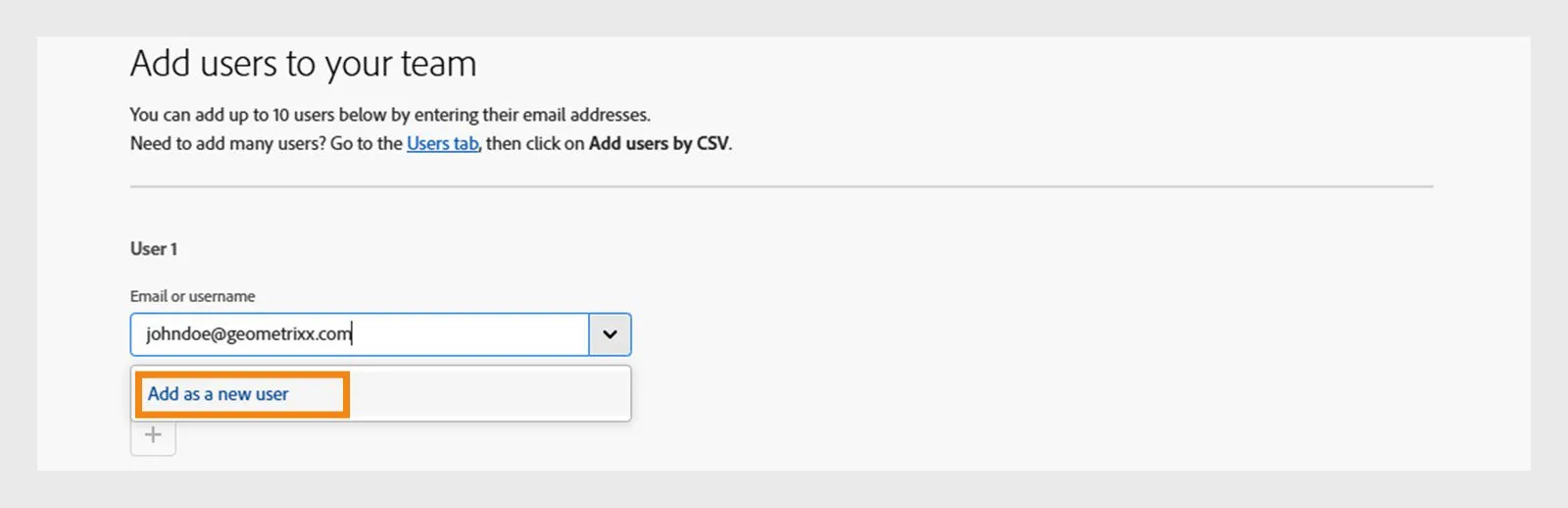
The Admin Console turns license assignment into an administrator-controlled workflow rather than a collection of personal subscriptions. Source: Adobe. Interface shown as documented by Adobe and may change.
Company Asset Ownership and Offboarding
The strongest reason to buy Teams is often continuity, not convenience. With Adobe storage for business, the organization owns the business profiles and associated content instead of leaving important cloud documents tied only to a departing employee's personal plan.
When a user is removed, an administrator can reclaim supported assets and transfer them to a designated person. Adobe lists Creative Cloud files, Libraries, several cloud-document types, and qualifying Adobe Express files among the supported archive contents.
The protection is not universal. Adobe's current exclusions include deleted assets, Lightroom files, some published documents, Behance and Portfolio assets, and other categories. A studio still needs a deliberate offboarding checklist and independent project backups.
For a one-person business, individual ownership may be exactly right. For an agency with client source files, templates, brand libraries, and contractors, an extra $360 per creator per year can be inexpensive insurance against a messy departure.
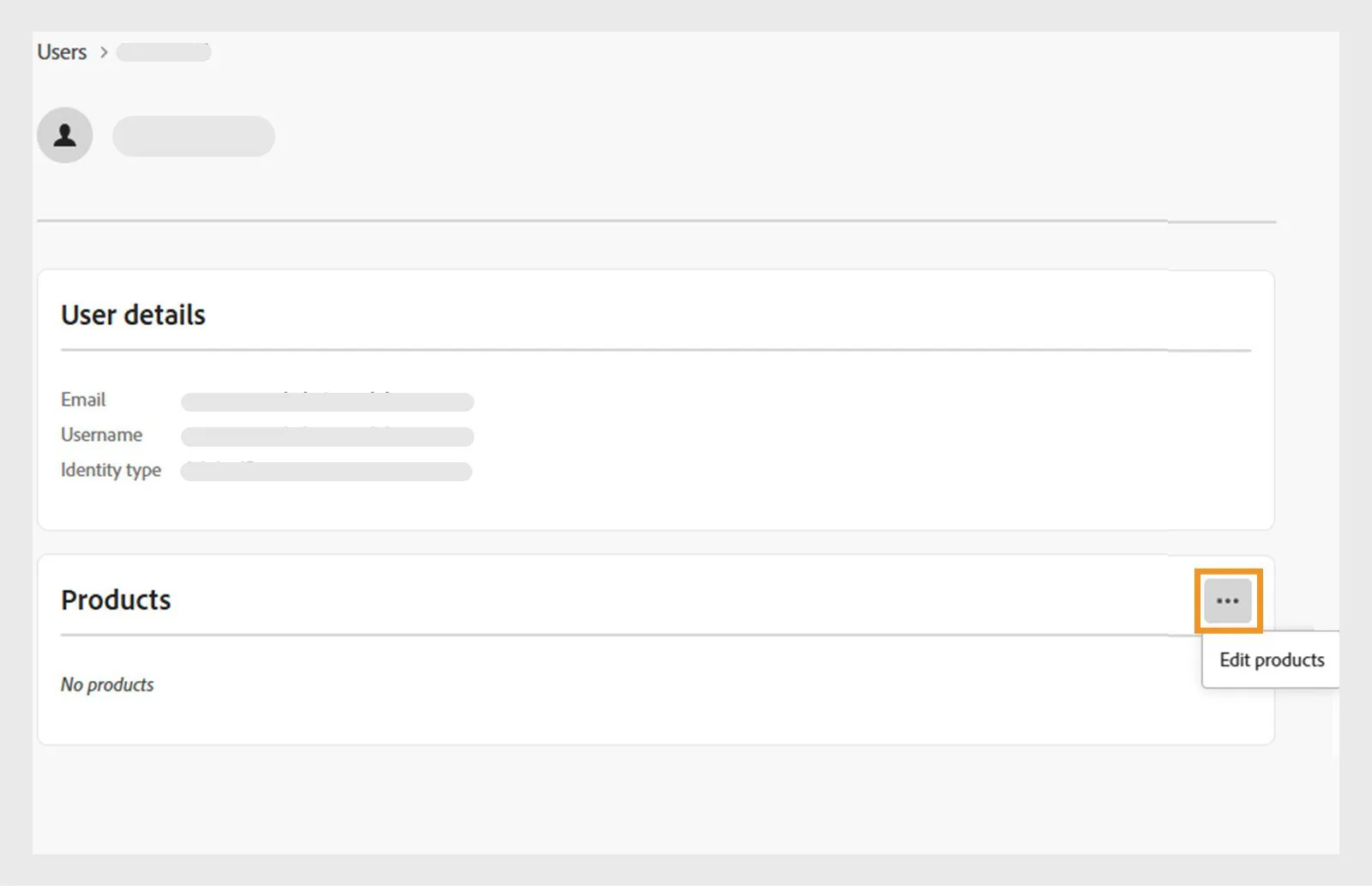
Adobe documents removing a product from one user and assigning it to another from the Admin Console, subject to current assignment limits. Source: Adobe. Interface shown as documented by Adobe and may change.
Team Libraries, Version History, and Support
Teams includes team libraries that keep current brand elements available to the people who need them. The practical benefit is fewer stale logos, colors, templates, graphics, and repeated exports—not simply another place to store files.
Adobe also advertises 180-day version history for protected creative assets. That longer recovery window can matter when a shared document is overwritten, a client returns to an older direction, or a seasonal campaign must be reconstructed.
Business plans add advanced 24/7 chat support. Creative Cloud Pro and qualifying Acrobat Single App plans also include two one-to-one expert sessions per user per year under Adobe's current comparison.
Support has value only when the team uses it. A studio should assign one admin, document the escalation route, and schedule expert sessions around real workflow bottlenecks rather than treating the benefit as decorative plan copy.
The Real Break-Even Test
Translate the $360 annual Teams premium into operating time. If centralized billing, onboarding, asset recovery, library consistency, or support saves even a few administrative hours per creator each year, the difference may pay for itself.
A two-person partnership with stable roles and local project storage may not recover that cost. Two individual plans are simpler, and shared project folders can handle many small workflows.
A five-person agency has a $1,800 annual Teams premium at the regular prices above. One lost cloud-document handoff, one untraceable personal subscription, or repeated brand-version mistakes can cost more than that, but the business should quantify the risk rather than buying from fear.
Teams does not replace a digital asset manager, backup system, password manager, onboarding process, or written ownership agreement. It improves the Adobe layer of those operations.
Who Should Choose Each Plan?
Choose Individual when:
- One person creates and owns the files.
- You want the lowest regular price for the all-apps plan.
- Billing and account recovery are already simple.
- Local or separately managed storage is the source of truth.
Choose Teams when:
- The company needs to own business profiles and supported cloud assets.
- An administrator must assign and remove licenses.
- Team libraries and consistent brand assets reduce rework.
- Staff or contractors join and leave often enough to create continuity risk.
- Central billing, purchase orders, or business support matters.
Adobe positions Teams for small businesses, generally 1 to 10 licenses, and enterprise for larger organizations. Identity, security, legal, or procurement requirements can move the enterprise conversation earlier.
How to Move from Individual Plans Safely
Inventory every subscription, renewal date, Adobe identity, cloud document, Library, Lightroom catalog, Portfolio site, published document, and client-owned asset before changing plans. Decide which material belongs to the organization and which remains personal.
Use Adobe's documented upgrade flow, then confirm that each user signs into the correct business profile. A person can see separate personal and business profiles under one email address, so careless profile selection can make files appear missing.
After migration, test access to representative Photoshop, Illustrator, Premiere, Express, Library, and cloud-document projects. Do not cancel old memberships or delete source files until the team has verified the new profile and an independent backup.
Finally, write the offboarding process while everyone is still present: remove licenses, reclaim supported assets, transfer project ownership, export excluded data, rotate shared credentials, and archive final deliverables.
Official Sources
- Adobe Creative Cloud plans and regular individual pricing
- Adobe Creative Cloud for teams plans
- Adobe individual-to-teams upgrade guide
- Adobe teams license assignment guide
- Adobe asset-reclamation guide
Frequently Asked Questions
What is the main difference between Creative Cloud Teams and Individual?
The desktop apps are broadly the same. Teams adds centralized license and billing management, business-owned cloud assets, team libraries, longer version history, and business support. Individual is simpler and less expensive for one person who owns and manages the account.
How much does Creative Cloud for teams cost?
Adobe listed Creative Cloud Pro for teams at US$99.99 per license per month on an annual contract billed monthly when this guide was checked on July 31, 2026. Local taxes, regions, promotions, and contract terms can change the checkout total.
How much does Creative Cloud Pro for individuals cost?
Adobe listed the regular US individual price at US$69.99 per month on an annual plan billed monthly on July 31, 2026. Temporary introductory offers should not be used for a long-term budget comparison.
Can a freelancer buy Creative Cloud for teams?
Yes. Adobe positions the teams tier for small businesses and departments, and one person can buy a business plan. The extra cost is worthwhile only if company ownership, administration, support, or planned hiring solves a real operating problem.
Can I reassign an Adobe teams license?
Yes, an administrator can remove a product from one user and assign it to another. Adobe now applies monthly assignment limits, so Teams should not be treated as an unlimited floating-seat system.
Does Creative Cloud for teams include different apps?
Adobe says Teams Single App and Creative Cloud Pro plans offer the same core apps as the corresponding individual plans. The meaningful differences are the business administration, asset control, collaboration, history, and support features around those apps.
Who owns Creative Cloud files on a teams plan?
With Adobe storage for business, the organization owns the business profiles and associated content. Admins can reclaim supported cloud assets when a user leaves, although Adobe documents exclusions such as some Lightroom files, published documents, and deleted assets.
Is Teams better for two people?
Not automatically. Two individual subscriptions cost less at regular US list prices. Teams becomes compelling when centralized billing, seat reassignment, shared libraries, company asset ownership, or offboarding protection is worth more than the price difference.
When should a company consider Creative Cloud enterprise?
Adobe's business comparison recommends Teams for roughly 1 to 10 licenses and enterprise for 11 or more. Security, identity, procurement, compliance, and support requirements can justify enterprise sooner, so larger organizations should request current Adobe guidance.
Can I move from individual plans to Teams later?
Yes. Adobe documents an upgrade and asset-migration path. Plan the move carefully, choose the correct business profile, confirm which cloud assets transfer, and avoid deleting individual data until the migrated workspace has been verified.

About the Author
Joseph Nilo has been working professionally in all aspects of audio and video production for over twenty years. His day-to-day work finds him working as a video editor, 2D and 3D motion graphics designer, voiceover artist and audio engineer, and colorist for corporate projects and feature films.