

Quick answer: WeVideo is useful for social marketing when you want a browser-based editor, reusable projects, stock media, three common aspect ratios, and captions without building a complicated post-production setup. It will not decide what your audience cares about or replace platform-native analytics.
Checked August 10, 2026. Features and export limits can depend on the plan. I am describing a practical workflow, not promising that every WeVideo tool is included in every account.
The fastest way to make forgettable social video is to open an editor before you know what the post is supposed to do.
I start with one audience, one idea, and one next action. Then the editor has a clear job: make that idea easy to understand on a phone, even when the sound is off.
Disclosure: This guide contains sponsored WeVideo affiliate links. If you subscribe through one, I may earn a commission at no extra cost to you.
Check the current WeVideo offer
Quick take: WeVideo is best for creators, classrooms, nonprofits, and small teams that want a browser-based editor with screen/webcam recording, stock assets, green screen, collaboration, and simple publishing workflows.
Plans and promotions change often, so check WeVideo's current offer before choosing a subscription.
This page may include affiliate links. I only recommend tools when they fit the use case I am writing about.
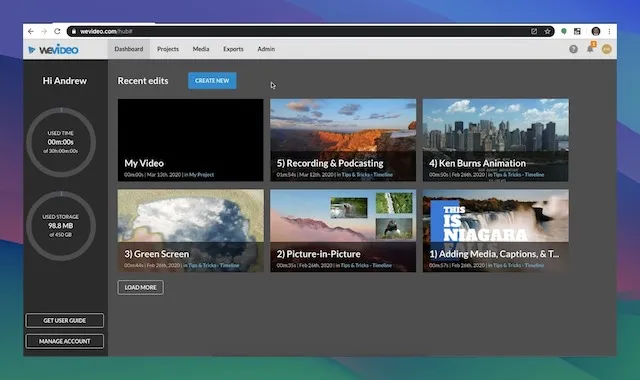
Plan the post before the edit
Write a tiny brief before uploading media:
- Audience: who should stop and watch?
- Single idea: what should they understand?
- Proof: what clip, demonstration, quote, or result makes it believable?
- Action: what should they do next?
- Placement: where will this version be published?
A social video does not need a three-act screenplay, but it does need a reason to exist. I usually build the opening around the result, problem, or surprising detail—not a logo animation.
Build one repeatable WeVideo project
Create a clean project with folders for originals, selects, music, graphics, captions, exports, and approvals. Keep an untouched copy of each source clip. A cloud editor makes it easy to reuse media, which also makes it easy to lose track of the real master.
WeVideo's current Essentials library documents more than one million royalty-free video, image, and audio assets for eligible paid accounts. Stock is useful for a missing establishing shot or texture. I would not use it to fake customers, results, offices, or events.
See which WeVideo plan fits the workflow
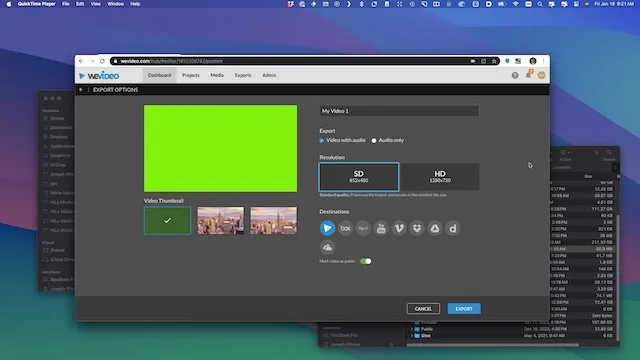
Make a separate version for each placement
WeVideo's export and sharing guide documents horizontal 16:9, vertical 9:16, and square 1:1 projects. Its Copy & Change workflow can duplicate an edit before changing format, which is exactly what I want for social versions.
| Format | Common fit | Framing check |
|---|---|---|
| 9:16 vertical | Short-form mobile feeds and stories | Keep faces, text, and products away from interface edges |
| 1:1 square | Flexible feed post | Recompose horizontal footage instead of shrinking it |
| 16:9 horizontal | YouTube, websites, some feed placements | Do not assume the vertical crop will work automatically |
Platform specifications change, so I check the destination's current upload help before a campaign. I also upload the file natively when possible instead of relying on a public editor link. That gives the platform its normal processing, captions, thumbnail, analytics, and accessibility controls.
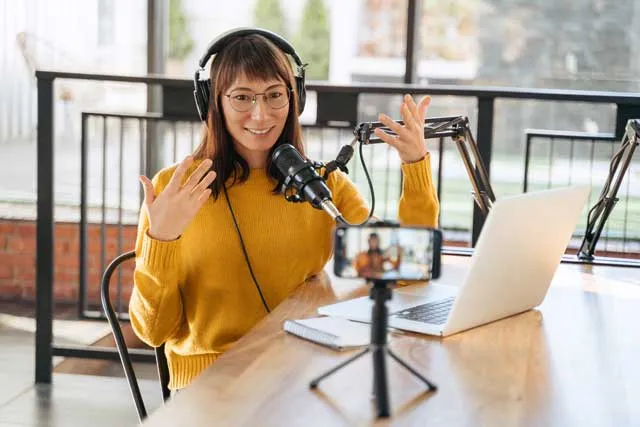
Edit for comprehension, not constant motion
My first pass is ruthless: remove the throat-clearing, repeated points, weak takes, and pauses that do not add meaning. Then I watch once without sound and once without looking at the picture. The idea should survive both tests.
- Open on the result, question, or specific problem.
- Show proof early: the product, screen, person, or outcome.
- Use on-screen text to clarify, not transcribe every word twice.
- Change the visual when the idea changes, not on an arbitrary timer.
- End with one concrete next action.
WeVideo's current caption workflow can generate, edit, translate, download, or burn captions into an export, depending on the plan. Automatic captions still need a human review for names, products, numbers, and brand terms.
Check WeVideo's current editing tools
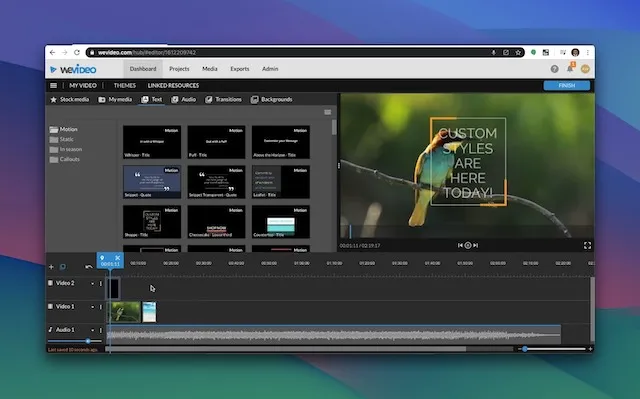
Keep the brand system small
Consistency comes from a few repeatable decisions: typeface, text size, color, logo placement, caption treatment, music level, and end card. I would create two or three useful project templates, not a different visual identity for every post.
Before export, check:
- the first frame makes sense without autoplay;
- important text is readable on a phone;
- the logo is present only when it helps;
- music does not cover speech;
- captions match the final cut;
- claims, names, URLs, prices, and dates are accurate;
- every person and asset has the required permission; and
- the call to action matches the destination.
Compare WeVideo for a repeatable brand workflow
Use a simple approval loop
I label exports with the campaign, format, version, and date. One person owns consolidated notes, and reviewers comment against timecodes. “Make it pop” is not actionable; “the product name is too small at 00:04” is.
Review WeVideo's current collaboration options
Treat user-generated content like licensed production material
User-generated content can be specific and believable because it shows a real person using or discussing something. It is not automatically free to reuse. Get clear permission for the channels, edit, duration, paid usage, territory, and any music or third-party material before publishing.
Keep the original, permission record, approved edit, caption file, and final exports together. Do not edit a testimonial so tightly that it changes the person's meaning. If the post is sponsored, gifted, or otherwise needs a disclosure, follow the platform and applicable advertising rules.
WeVideo can help clean up the edit, resize it, add captions, and combine several submissions. The trust comes from the real experience and honest context, not from the software.
Use WeVideo to edit approved social footage
Publish, measure, and make the next version smarter
WeVideo makes the file; the social platform tells you what happened. I record the hook, topic, length, format, audience, placement, and call to action, then compare useful metrics:
- three-second or opening retention;
- average watch time and completion;
- saves, shares, and qualified comments;
- profile or landing-page visits;
- leads, sales, or other intended actions; and
- cost per useful result for paid distribution.
Do not turn one post into a universal rule. Recut a weak opening before throwing away a useful topic. If a video brings the right visitors but no action, inspect the offer and landing page as well as the edit.

WeVideo social media FAQ
Is WeVideo good for social media marketing?
It can be. The browser-based editor, stock library, common aspect ratios, captions, and reusable projects fit small teams that need regular versions without a complex desktop setup.
Which aspect ratios can WeVideo create?
WeVideo currently documents horizontal 16:9, vertical 9:16, and square 1:1 projects. Check the destination platform's current specifications before publishing.
Can WeVideo add captions?
Yes. Current support documentation covers automatic generation, editing, translation, separate caption files, and burned-in captions, with availability depending on the plan.
Does WeVideo publish directly to social platforms?
Its sharing documentation includes public links and some direct destinations. I still prefer downloading a reviewed master and uploading natively so I can use each platform's current captions, thumbnail, privacy, scheduling, and analytics controls.
Does WeVideo include stock media?
Eligible paid accounts can use the Essentials library. WeVideo currently describes it as more than one million royalty-free videos, images, and audio files with no attribution required for paid users.
Can I make 4K social videos?
WeVideo's current export limits allow up to 4K for Creator, Teams, and Enterprise plans. Most social posts do not need 4K; clean source media, framing, captions, and platform-native processing usually matter more.
How should I measure a video?
Match the metric to the goal. Watch time matters for attention, while clicks, qualified leads, sales, saves, or shares may be closer to the business result.
My bottom line
WeVideo is a practical production tool for marketers who need to turn one approved idea into several clean social versions. The winning part is the workflow: clear brief, good source material, careful captions, platform-specific framing, one useful call to action, and honest measurement.

About the Author
Joseph Nilo has been working professionally in all aspects of audio and video production for over twenty years. His day-to-day work finds him working as a video editor, 2D and 3D motion graphics designer, voiceover artist and audio engineer, and colorist for corporate projects and feature films.
WeVideo Related Posts
Surprising WeVideo Reviews: What the Experts Really Think!
Affordable Video Editing: WeVideo Pricing and Plans Explained
WeVideo Editing Tips: A Beginner's Guide to Mastering the Platform
Step-by-Step Tutorial: Creating Your First Video on WeVideo
Advanced WeVideo Features: Unlocking Creative Potential for Professionals
WeVideo vs. Other Editing Software: A Comprehensive Comparison
Maximizing School Projects with WeVideo: A Teacher's Perspective
WeVideo for Business: Enhancing Your Company's Digital Marketing
WeVideo Mobile App Review: Editing on the Go
Integrating WeVideo in E-Learning: Tips and Tricks
WeVideo for YouTube Creators: Elevating Your Channel
WeVideo Updates and Feature Improvements
WeVideo for Nonprofits: Storytelling and Advocacy Through Video
WeVideo and Social Media Marketing: Strategies for Success
WeVideo’s Cloud-Based Editing: Advantages for Remote Work
WeVideo Related Posts
Surprising WeVideo Reviews: What the Experts Really Think!
Affordable Video Editing: WeVideo Pricing and Plans Explained
WeVideo Editing Tips: A Beginner's Guide to Mastering the Platform
Step-by-Step Tutorial: Creating Your First Video on WeVideo
Advanced WeVideo Features: Unlocking Creative Potential for Professionals
WeVideo vs. Other Editing Software: A Comprehensive Comparison
Maximizing School Projects with WeVideo: A Teacher's Perspective
WeVideo for Business: Enhancing Your Company's Digital Marketing
WeVideo Mobile App Review: Editing on the Go
Integrating WeVideo in E-Learning: Tips and Tricks
WeVideo for YouTube Creators: Elevating Your Channel
WeVideo Updates and Feature Improvements
WeVideo for Nonprofits: Storytelling and Advocacy Through Video
WeVideo and Social Media Marketing: Strategies for Success
WeVideo’s Cloud-Based Editing: Advantages for Remote Work