
Adobe's cancellation fee depends on the contract type, not simply whether the account is billed every month. An annual plan paid monthly can carry an early termination fee even though the card is charged monthly.
This guide summarizes Adobe's U.S. individual subscription terms checked August 1, 2026. It is practical billing guidance, not legal advice. The amount and rules shown inside your Adobe account are the final account-specific checkpoint.
Quick answer
| Annual, paid monthly | After the initial 14-day refund window, Adobe's U.S. terms say the early termination fee is 50% of the remaining contract balance. |
|---|---|
| Annual, prepaid | After 14 days, no refund is available; service continues through the contracted term. |
| Month-to-month | No annual early termination formula, but the current monthly term is not refunded after the initial window. |
| Before confirming | Read the exact plan name, renewal date, displayed fee, cloud-storage status, and any files or libraries that need a backup. |
This page may include affiliate links.
I only recommend software I would seriously evaluate for real creator or production workflows.
⭐⭐⭐⭐⭐
I pay for Adobe Creative Cloud and have used it every day in my 20-year career as a video editor, producer, and colorist.
Use the Adobe link below to check the current Creative Cloud offer. It can support this site and helps me keep these guides updated. Check current Adobe Creative Cloud offer.
Get Adobe Creative Cloud Now!First, Identify the Contract—Not the Payment Frequency
Open the plan card in your Adobe account and read the full commitment label. “Annual plan, paid monthly” and “month-to-month” both create monthly card charges, but they are different contracts.
An annual plan trades flexibility for a lower effective rate and a one-year commitment. Monthly billing spreads that annual obligation across the year; it does not turn the agreement into twelve independent one-month subscriptions.
Also check whether the purchase came directly from Adobe, an app store, a reseller, a school, or an employer. Third-party billing and business agreements can follow different steps and terms.
The Initial 14-Day Refund Window
Adobe's current U.S. individual terms say an initial purchase can generally be canceled within 14 days for a full refund. That window is the cleanest time to correct a mistaken plan, duplicate subscription, or product that does not fit the workflow.
Do not assume every account event restarts the clock. Renewals, plan changes, trials, promotions, and third-party purchases may display different dates or rules. Start the cancellation flow far enough to see the account-specific terms without confirming the final action.
Save a copy of the displayed plan name, renewal date, and amount for your records. Do not post account screenshots publicly if they contain an email address, order number, payment detail, or private offer.
Annual Plan, Paid Monthly: The Early Termination Fee
For U.S. annual plans paid monthly, Adobe states that cancellation after 14 days triggers an early termination fee equal to 50% of the remaining balance of the contract.
The formula is straightforward: count the unpaid months in the annual term, multiply by the monthly contract price, then take half. If the plan has three months remaining, the example fee is half of those three monthly charges.
Your real number can differ from a published example because the plan, promotion, tax, regional price, renewal date, or recent plan change may differ. Use the amount Adobe displays before the final confirmation rather than calculating from memory.
A fee is not automatically evidence of an error. The key test is whether the plan card says annual paid monthly and whether the cancellation screen matches Adobe's current terms for that account.
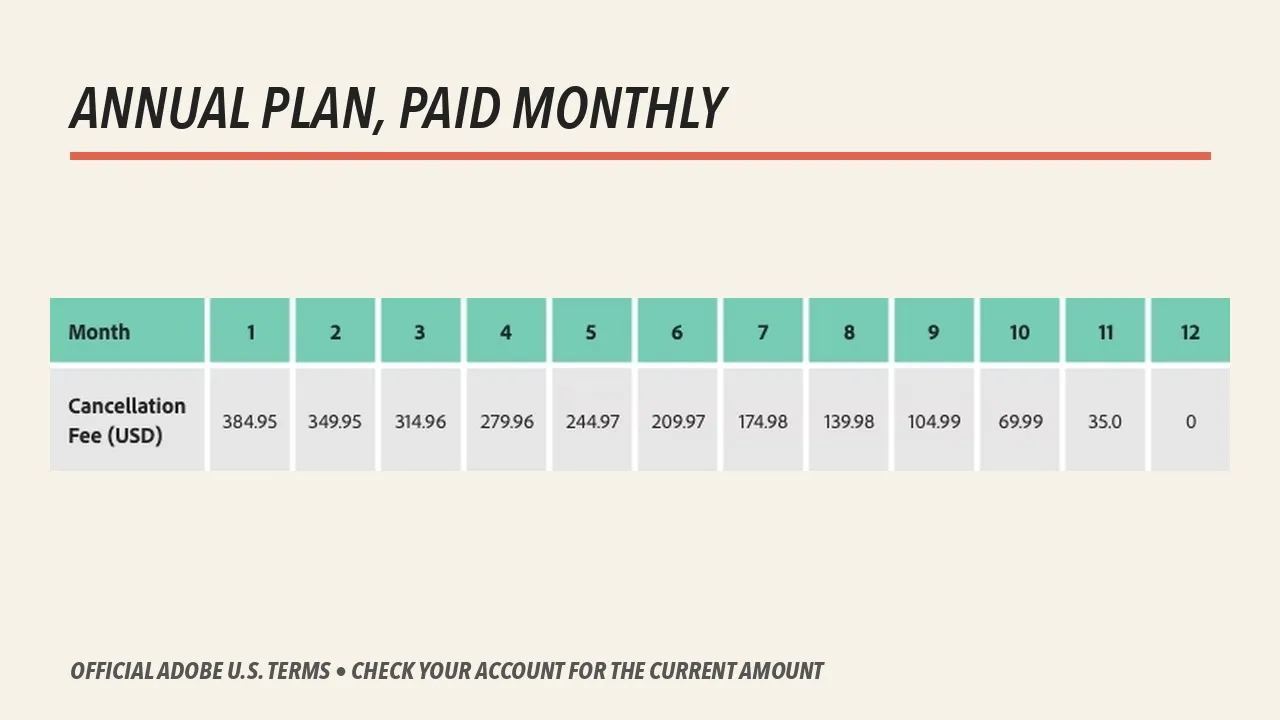
Adobe's example shows the early termination amount falling as fewer months remain. Your account total can differ by plan, price, taxes, region, and timing. Source: Adobe. Interface shown as documented by Adobe and may change.
Annual Plan, Prepaid
An annual prepaid plan collects the full contract price at the beginning of the term. Adobe's U.S. terms show a full refund when the initial purchase is canceled within 14 days.
After that window, Adobe says no refund is available and service continues until the contracted term ends. There is no separate monthly early termination calculation because the annual price has already been paid.
If the goal is simply to stop the next renewal, confirm that auto-renewal is disabled and record the service end date. Continue using the apps during the paid period while preparing files and alternative tools deliberately.
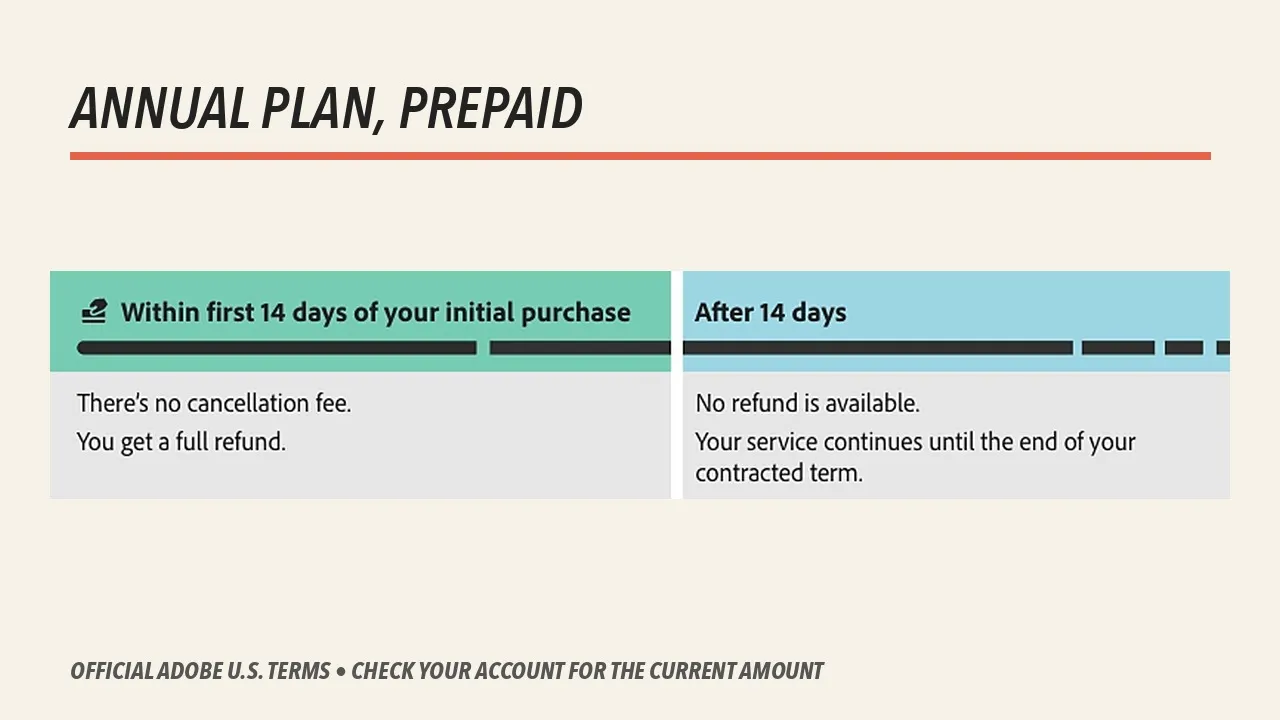
For the U.S. annual prepaid example, Adobe shows a full refund inside the initial 14-day window and no refund afterward. Source: Adobe. Interface shown as documented by Adobe and may change.
Month-to-Month Plan
A true month-to-month plan is the flexible option. Adobe's U.S. terms do not apply the annual-plan 50% remaining-balance formula to this contract.
After the initial refund window, the current monthly charge is not refunded and service continues through the applicable term. That makes the plan more expensive per month in many cases, but the exit cost is easier to predict.
Month-to-month is sensible for a short contract, a temporary production surge, or a careful trial beyond the refund window. An annual plan is usually better value only when you expect to keep using it through the entire commitment.
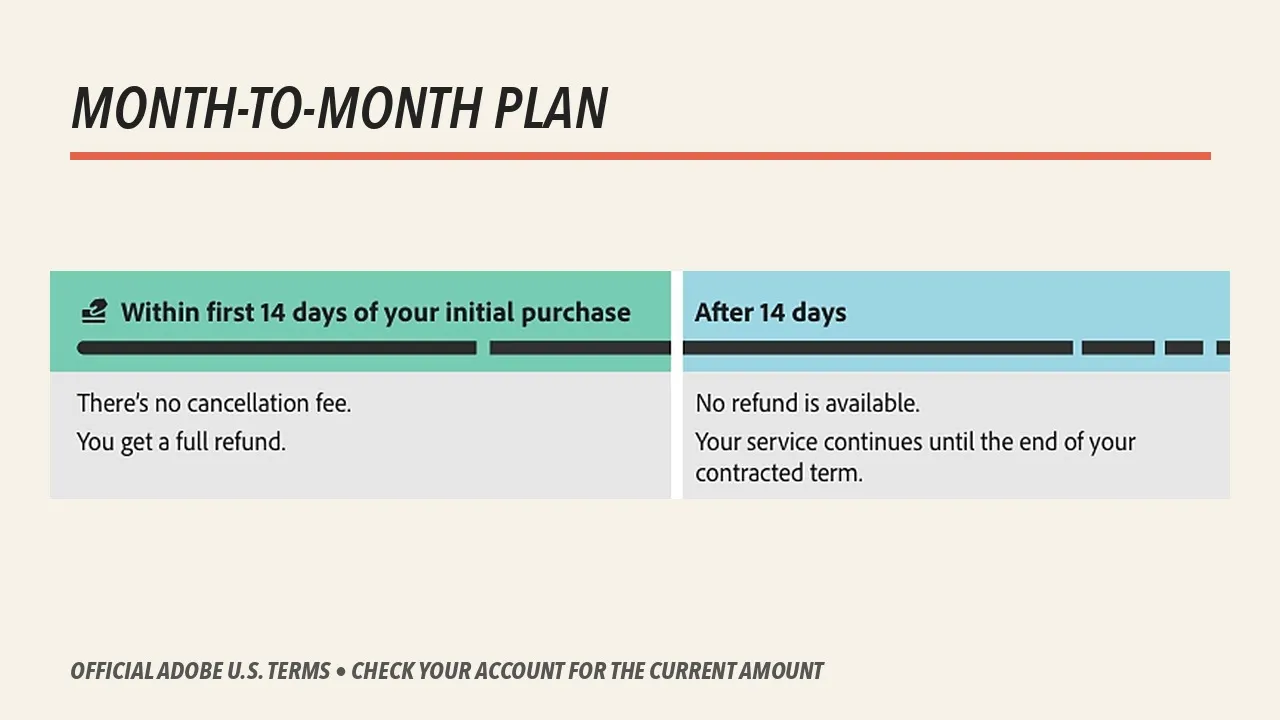
Month-to-month avoids the annual-plan early termination formula, but Adobe does not refund the current term after the initial refund window. Source: Adobe. Interface shown as documented by Adobe and may change.
What to Do Before You Confirm Cancellation
- Read the exact plan type. Distinguish annual paid monthly, annual prepaid, and month-to-month.
- Record the renewal date. A calendar reminder is more reliable than remembering an email.
- Review the displayed amount. Compare it with the contract and Adobe's current U.S. terms.
- Check every Adobe profile. Personal and business profiles can contain different files, libraries, and storage.
- Export or sync local work. Confirm that project files, linked media, fonts, presets, libraries, cloud documents, and Portfolio or Behance assets are where you expect.
- Open important projects. Collect files and render masters while the required applications and plug-ins still run.
- Choose the replacement. Moving away from one app without a tested workflow can cost more than the subscription saved.
- Keep confirmation. Save the cancellation date, service end date, and final amount without exposing private account information.
What Happens to Creative Cloud Files?
Adobe says a canceled account converts to a free Creative Cloud membership. Most paid applications and services stop when the subscription ends, while supported free or starter access remains.
Locally stored project files remain on the computer, but opening or editing them may require the paid application. Dynamic links, fonts, Stock licenses, cloud documents, libraries, and shared review workflows deserve separate checks.
Adobe currently states that free membership includes a 5GB cloud-storage limit. If the account is above that limit when canceled, Adobe advises moving files within 30 days. Verify the current account screen and do not treat cloud sync as a backup.
For a team or business plan, asset ownership and administrator controls are different. Read the Teams vs Individual guide before changing a company-owned subscription.
How to Avoid the Next Subscription Surprise
Choose an annual plan only when the app solves recurring work for the full year. Put the renewal date and the end of the refund window on the calendar immediately after purchase.
Evaluate the regular price, not only the first promotional months. Check whether one single-app plan, the Photography plan, Premiere, Acrobat, or Creative Cloud Pro actually matches the work instead of keeping an oversized bundle out of habit.
Use the Creative Cloud pricing and plans guide for the broader comparison, the Adobe discount guide for legitimate savings, and the cloud-storage guide before changing a plan tied to stored assets.
If a displayed fee looks wrong, stop before the final confirmation and contact Adobe support with the plan name, purchase date, renewal date, and the non-sensitive details needed to explain the discrepancy.
Official Sources
- Adobe U.S. subscription terms and refund policies
- Adobe plan cancellation instructions
- Creative Cloud free membership benefits
Frequently Asked Questions
Does Adobe charge a cancellation fee?
For U.S. annual plans paid monthly, Adobe says cancellation after the first 14 days can trigger an early termination fee equal to 50% of the remaining contract balance. Other plan types have different refund rules, and regional terms may differ.
Can I cancel Adobe within 14 days for a refund?
Adobe's current U.S. subscription-terms page says the initial purchase can generally be canceled within 14 days for a full refund. Confirm the dates and terms shown in your account because renewals, plan changes, regional rules, and third-party purchases may be handled differently.
How is the Adobe early termination fee calculated?
Adobe describes it as 50% of the remaining balance on an annual plan paid monthly. If several months remain, calculate the unpaid monthly charges first, then take half—but use the exact amount shown by Adobe before confirming cancellation.
What happens if I cancel an annual prepaid Adobe plan?
Adobe's U.S. terms say an annual prepaid plan is fully refundable within the initial 14-day window. After that period, no refund is available and service continues until the contracted term ends.
Is there a fee for canceling a month-to-month Adobe plan?
Adobe's U.S. month-to-month terms do not describe an early termination fee. After the refund window, the current monthly payment is not refunded and service continues through the applicable monthly term.
Will I lose my Adobe files after canceling?
Adobe says the account converts to a free Creative Cloud membership. Locally stored files remain yours, while cloud access becomes subject to the free storage limit. Adobe currently advises customers over that limit to move files within 30 days.
Can Adobe waive a cancellation fee?
Only Adobe can confirm an account-specific adjustment. Review the cancellation screen, renewal date, and plan-change options, then contact Adobe support if the displayed amount appears inconsistent with your plan or recent purchase history.
Should I choose monthly or annual Adobe billing?
Choose month-to-month when flexibility matters more than the discount. Choose annual billing only when you expect to use the apps for the full term and understand the cancellation rules. Annual prepaid reduces monthly administration but usually offers the least refund flexibility after the initial window.

About the Author
Joseph Nilo has been working professionally in all aspects of audio and video production for over twenty years. His day-to-day work finds him working as a video editor, 2D and 3D motion graphics designer, voiceover artist and audio engineer, and colorist for corporate projects and feature films.