
Updated August 3, 2026
Frame.io is a cloud workspace for organizing creative assets, collecting frame-accurate feedback, managing versions, sharing work with clients, and moving media from production toward approval. Adobe owns Frame.io, but the useful part is not the acquisition story: it is replacing scattered upload links, timecode emails, and mystery file versions with one review trail.
The current Frame.io V4 experience extends beyond video. It can display and review video, audio, images, PDFs, design files, and common office documents, while metadata and Collections make it more credible as a workflow layer for campaigns and production teams. It is still not an editor, an archive by itself, or a substitute for clear ownership of approvals.
Quick answer
Use Frame.io when several people need to review changing media. Editors can keep versions together, reviewers can leave comments on the actual frame, and producers can send controlled Shares without giving every client full project access.
Skip it when the workflow is only one person and one handoff. A small solo project may be simpler in the storage or editing system already in use. Frame.io earns its place when review friction, version confusion, or slow set-to-post transfer costs more than another tool.
This page may include affiliate links.
I only recommend software I would seriously evaluate for real creator or production workflows.
Use the Adobe link below to check the current Adobe offer. It can support this site and helps me keep these guides updated. Check current Adobe offer.
Check Current Adobe OfferWhat Frame.io is—and what it is not
Frame.io sits between capture, editing, client review, and delivery. A team uploads or receives assets, organizes them in a Project, invites internal collaborators, and creates Shares for people who should review without entering the working project. Comments, annotations, status fields, ratings, versions, and activity stay attached to the media instead of being scattered across email and chat.
That makes Frame.io most valuable as a coordination system. It does not replace Premiere Pro, Final Cut Pro, DaVinci Resolve, After Effects, Photoshop, or the camera originals. It helps the people using those tools agree on which asset is current, what must change, and whether the work is approved.
V4 terminology matters because many older tutorials still show the legacy V3 interface. In V4, Workspaces contain Projects; Projects contain assets and folders; metadata can describe the work; Collections create saved views; and Shares provide an external review surface. If an old tutorial mentions Review Links, Presentation Links, Teams, or the legacy Premiere panel, verify that the instruction matches the account version before following it.
Projects, metadata, and Collections
A useful Frame.io setup starts with fewer, clearer Projects rather than one Project for every export. Build the Project around a production, client, campaign, or repeatable operating boundary. Inside it, use folders for stable structure and metadata for attributes that need to be filtered across that structure—status, channel, deliverable type, owner, due date, language, or rating.
Collections are V4's saved views. Frame.io's current documentation describes them as dynamic groups based on filters and metadata. A producer could create a Collection for five-star selects, vertical deliverables awaiting approval, or assets assigned to a particular launch date without moving the underlying files out of their folders.
This is useful only if the fields are maintained. A beautiful metadata system with inconsistent values becomes another source of doubt. Start with three or four fields that change real decisions, agree who updates them, and remove anything nobody uses after two projects.
For a small team, a practical pattern is Status, Owner, Deliverable, and Due date. Collections can then surface “client review,” “needs revision,” or “approved for delivery” without duplicating media.
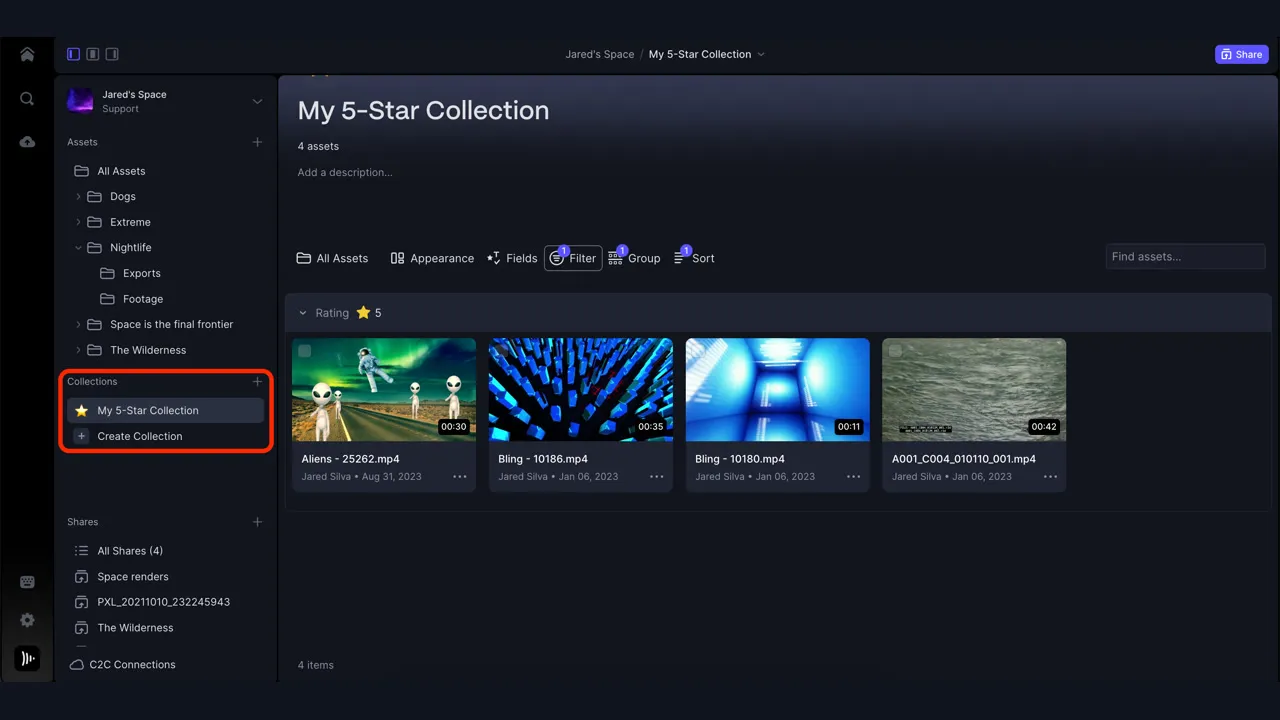
Frame.io's current V4 guide shows Collections as saved, filtered views of project media. Interface details can change as V4 evolves. Source: Adobe. Interface shown as documented by Adobe and may change.
Review, comments, and Shares
The core Frame.io review advantage is context. A reviewer can comment at a specific timecode, draw an annotation on the frame, reply in a thread, and resolve the note when the change is complete. Range-based comments help when a problem lasts across several seconds rather than one frame.
Good review practice still matters. “Make it pop” is not actionable. A stronger note identifies the goal, the exact moment, and the acceptable result: “At 00:17, hold the product close-up two seconds longer so the label can be read.” Assign one person to reconcile conflicting feedback before it reaches the editor.
V4 Shares are external links for selected media. Frame.io documents Grid, List, and Reel layouts, plus options that can include comments, downloads, version visibility, transcriptions, passphrases, expiration, and branding depending on the plan. Use the narrowest permissions that still let the reviewer do the job.
A Share is not the same as Project membership. Clients who only need to review should not automatically receive edit access to the working structure. Before sending a link, open it in a private browser window and confirm the visible files, download setting, comment setting, expiration, and whether older versions are exposed.
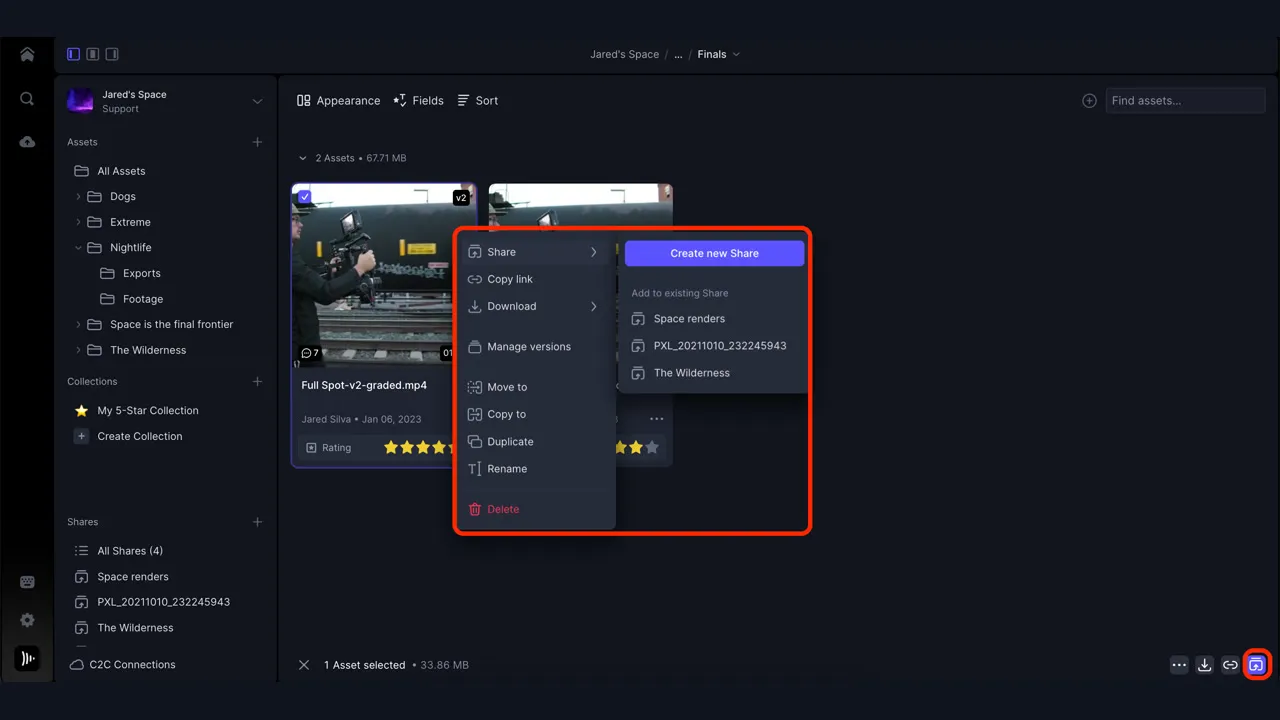
Frame.io's V4 Shares workflow turns selected assets into an external review link with configurable presentation and access options. Source: Adobe. Interface shown as documented by Adobe and may change.
Version stacks and the Comparison Viewer
Version stacks keep successive exports together. Instead of filenames such as final-v7-really-final-2 appearing as unrelated assets, the team can open one asset and move through its versions. Reviewers see a clearer history, and the editor can separate old notes from the version currently under discussion.
The current V4 Comparison Viewer can place two supported assets side by side with linked playback or zoom controls. Frame.io documents comparison across video, image, audio, PDF, and Microsoft Office formats, while static assets can also use overlay and pixel-difference views when the files meet the requirements.
Comparison is excellent for spotting a grade change, retouch, title adjustment, alternate mix, or packaging revision. It is not approval by itself. Define who can mark work approved, what that status means, and whether a later version automatically invalidates the earlier approval.
Keep version stacks conceptually clean. A 16:9 master and a 9:16 social cut are related deliverables, not necessarily two versions of the same output. Stack like with like, and use metadata or Collections to connect the wider campaign.
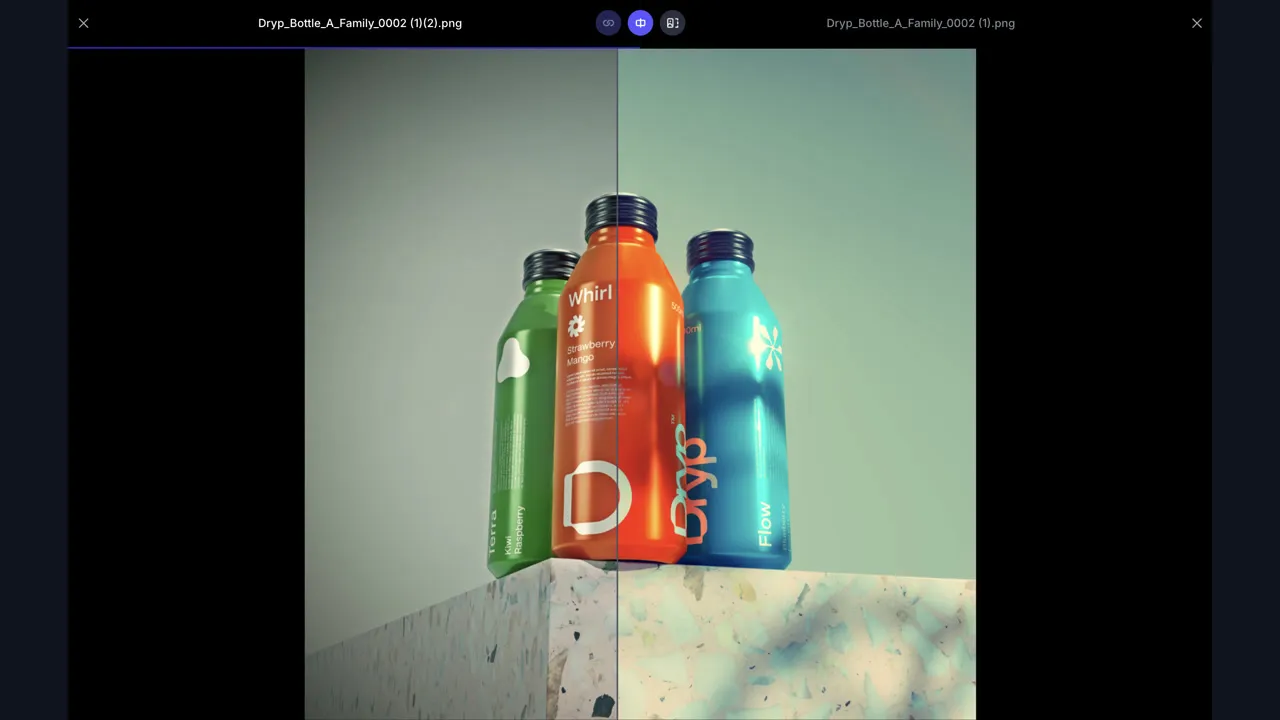
Frame.io's current Comparison Viewer can compare supported assets side by side; the official example shows two image versions. Source: Adobe. Interface shown as documented by Adobe and may change.
Camera to Cloud: what changes on set
Frame.io Camera to Cloud, usually shortened to C2C, lets supported cameras, recorders, encoders, audio devices, and apps upload assets into a paired Frame.io Project during or shortly after capture. The current Frame.io guide says each connected device or app is a C2C Connection and that uploaded material is organized under the Project's Cloud_Devices structure.
The practical win is earlier access. An editor can start with proxies while production continues, a remote producer can review a take, and audio or camera reports can arrive alongside picture. Some native camera integrations can upload originals; other workflows use an external recorder or encoder to create and upload smaller proxies.
C2C does not remove the need for media management. Test clip names, timecode, frame rate, audio channel mapping, proxy relinking, network recovery, and checksum or backup responsibilities before the paid shoot. A file reaching the cloud quickly does not prove the camera original is safely backed up.
All current Frame.io plans list Camera to Cloud access, but the hardware, app, cellular data, network, and storage requirements remain separate. Use the official compatibility guide for the exact device and firmware rather than assuming every camera with Wi-Fi can connect.
Frame.io and Premiere Pro integration
Frame.io can reduce the upload-download loop around Premiere Pro, but current version boundaries matter. Adobe's March 2026 support guidance says Premiere Pro 25.6 and later exposes a dedicated Frame.io V4 panel from Window > Frame.io > Frame.io V4. The older Review with Frame.io panel is now labeled Legacy, and Adobe says V4 accounts are not compatible with that legacy panel.
That distinction explains many “missing project” and sign-in problems. First confirm whether the account is V4, then open the matching panel. Adobe also documents Frame.io as built into Premiere and describes signing in with an Adobe ID for eligible Creative Cloud access.
A sensible edit-review cycle is upload a named review export, stack it as the next version, send or update the Share, collect one reconciled round of notes, and mark resolved changes before uploading again. Do not publish every autosave or internal experiment as a client version.
Frame.io also works outside Adobe. Teams using Final Cut Pro, DaVinci Resolve, Avid, or other tools can still use the web, desktop transfer tools, integrations, and Shares. Buy it for the collaboration system, not only because it appears inside Premiere.
Frame.io pricing and Creative Cloud access
Frame.io currently offers Free, Pro, Team, and Enterprise paths, with different limits for members, projects, storage, branding, security, administration, and workflow features. Prices and limits change, so use my current Frame.io pricing guide for the detailed comparison and verify the final checkout screen before subscribing.
Adobe's April 2026 Creative Cloud FAQ says eligible Creative Cloud customers who sign up with an Adobe ID receive an enhanced free Frame.io plan with 100GB of dedicated storage, up to five Projects, collaboration with one other user, and Camera to Cloud. Adobe notes exclusions and separate billing for paid Frame.io upgrades, so an Adobe subscription is not the same as an unlimited Frame.io Team plan.
Start free with a real review cycle. Measure the number of active collaborators, storage growth, review links, security requirements, and projects that must remain accessible. Upgrade when a specific limit blocks the workflow—not because a pricing table makes the next tier look professional.
For client work, include storage ownership and offboarding in the decision. Decide who owns the Workspace, who pays for extra seats, what happens when a contractor leaves, and where final masters and camera originals live outside Frame.io.
Frame.io alternatives
Dropbox Replay fits teams already centered on Dropbox and looking for a lighter media-review layer. Vimeo review tools can be convenient when review and hosted delivery are closely connected. Wipster and Filestage focus on structured review and approval across creative teams. Blackmagic Cloud is more compelling when the collaborative center is a DaVinci Resolve project rather than external client review.
The best alternative is sometimes the existing storage platform plus a disciplined approval document. For occasional two-person jobs, a timestamped note list and clearly named exports can be enough. Do not add Frame.io merely to imitate a larger studio.
Compare alternatives on the workflow that usually fails: guest access, timecoded notes, version history, mobile review, upload speed, security controls, storage, editor integration, final approval, and account offboarding. A polished player matters less than getting a clear answer from the right person.
Who should use Frame.io?
Frame.io is a strong fit for editors, agencies, production companies, in-house marketing teams, photographers, animation teams, and client-service businesses where media moves through repeated review. It is especially useful when collaborators are remote, feedback arrives from several roles, or Camera to Cloud can shorten the gap between capture and post.
It is less compelling for a solo creator with infrequent reviews, a team that already has a working approval system, or an organization unable to define where cloud media may be stored. Enterprise security features do not replace the need to configure access correctly.
My recommendation: run one representative project before standardizing. Upload two versions, invite an internal collaborator, create a restricted client Share, leave and resolve three timecoded notes, test a download-disabled link, and export the approved master to its permanent home. If that removes real coordination work, Frame.io has earned the subscription.
Official sources
Frequently Asked Questions
What is Frame.io used for?
Frame.io is used to organize creative assets, collect precise feedback, manage versions, create review Shares, and coordinate work from capture through approval. It supports more than video, but media review remains its strongest use case.
Is Frame.io included with Adobe Creative Cloud?
Adobe currently offers eligible Creative Cloud customers an enhanced free Frame.io plan when they sign up with an Adobe ID. Adobe's April 2026 FAQ lists 100GB of storage, up to five Projects, one other collaborator, and Camera to Cloud; exclusions and account conditions apply.
Is Frame.io free?
Frame.io has a Free plan, and eligible Adobe customers can receive a different enhanced free entitlement. Paid Pro, Team, and Enterprise paths add capacity or workflow, branding, administration, and security features. Verify current limits before relying on a specific entitlement.
Does Frame.io work with Premiere Pro?
Yes. Adobe says Premiere Pro 25.6 and later includes a Frame.io V4 panel. The separate Legacy panel is for older Frame.io accounts and is not compatible with V4 accounts, so open the panel that matches the account version.
Can clients review Frame.io files without joining a Project?
Yes. V4 Shares are designed for external review. Depending on the plan and settings, the sender can control presentation, comments, downloads, version visibility, passphrases, and expiration. Test the link before sending it.
What is Frame.io Camera to Cloud?
Camera to Cloud connects supported cameras, recorders, encoders, audio devices, and apps to a Frame.io Project so they can upload media or proxies during or shortly after capture. It accelerates access but does not replace on-set backup and media verification.
Is Frame.io only for video?
No. Current V4 documentation covers review of video, images, audio, PDFs, design files, and common office documents. The platform is strongest when those assets need versioned creative feedback and approval.
Is Frame.io secure enough for client work?
Frame.io offers access, sharing, and enterprise security controls, but safety depends on the plan and configuration. Use the narrowest permissions, verify Shares in a private window, remove former collaborators, and follow the client's storage and retention rules.