
Frame.io has four main plan paths: Free, Pro, Team, and Enterprise. The right choice depends on paid members, active storage, project count, client-share controls, internal collaboration, and security—not simply the number of videos you produce.
This guide separates the current plan limits from the practical buying decision. If you first need the broader product overview, start with what Frame.io is and how video review works.
Quick answer
| Free | Best for testing review, captions, annotations, and Camera to Cloud with two members, two projects, 2 GB of Standard Storage, and 2 GB of Mounted Storage. |
|---|---|
| Pro | Best for a freelancer or small working team that needs unlimited projects, more storage, branded shares, passphrases, expiration, and download controls. |
| Team | Best when internal comments, restricted projects and folders, more storage, and a larger member limit are operational requirements. |
| Enterprise | Best for multiple workspaces, custom scale, SSO, lifecycle controls, and advanced administration or security. |
| Main cost trap | Paid prices are per member. Model the full team and active storage need instead of budgeting from the single-member plan card. |
This page may include affiliate links.
I only recommend software I would seriously evaluate for real creator or production workflows.
⭐⭐⭐⭐⭐
I pay for Adobe Creative Cloud and have used it every day in my 20-year career as a video editor, producer, and colorist.
Use the Adobe link below to check the current Creative Cloud offer. It can support this site and helps me keep these guides updated. Check current Adobe Creative Cloud offer.
Get Adobe Creative Cloud Now!Frame.io Pricing at a Glance
Frame.io's public pricing page showed the following monthly plan structure when checked on July 28, 2026. Prices and limits can change, and taxes or negotiated enterprise terms may affect the final total.
| Plan | Listed monthly price | Members | Standard Storage | Mounted Storage | Projects | Practical fit |
|---|---|---|---|---|---|---|
| Free | $0 | Up to 2 | 2 GB | 2 GB | Up to 2 | A workflow test, tiny active project, or Camera to Cloud proof of concept. |
| Pro | $15 per member/month plus tax | Up to 5 | 2 TB plus 2 TB per additional member | 250 GB | Unlimited | Freelancers and small teams that need professional sharing and more active media. |
| Team | $25 per member/month plus tax | Up to 15 | 3 TB plus 2 TB per additional member | 500 GB | Unlimited | Teams that need restricted work, internal comments, and a larger member limit. |
| Enterprise | Custom | Custom | Custom | 2 TB | Unlimited | Departments or client organizations with advanced administration and security. |
The single-member number is only a starting point. A five-person Pro workspace has a different budget from one freelance seat, and active storage or enterprise requirements can change the total.
Check the current Frame.io pricing page before checkout.
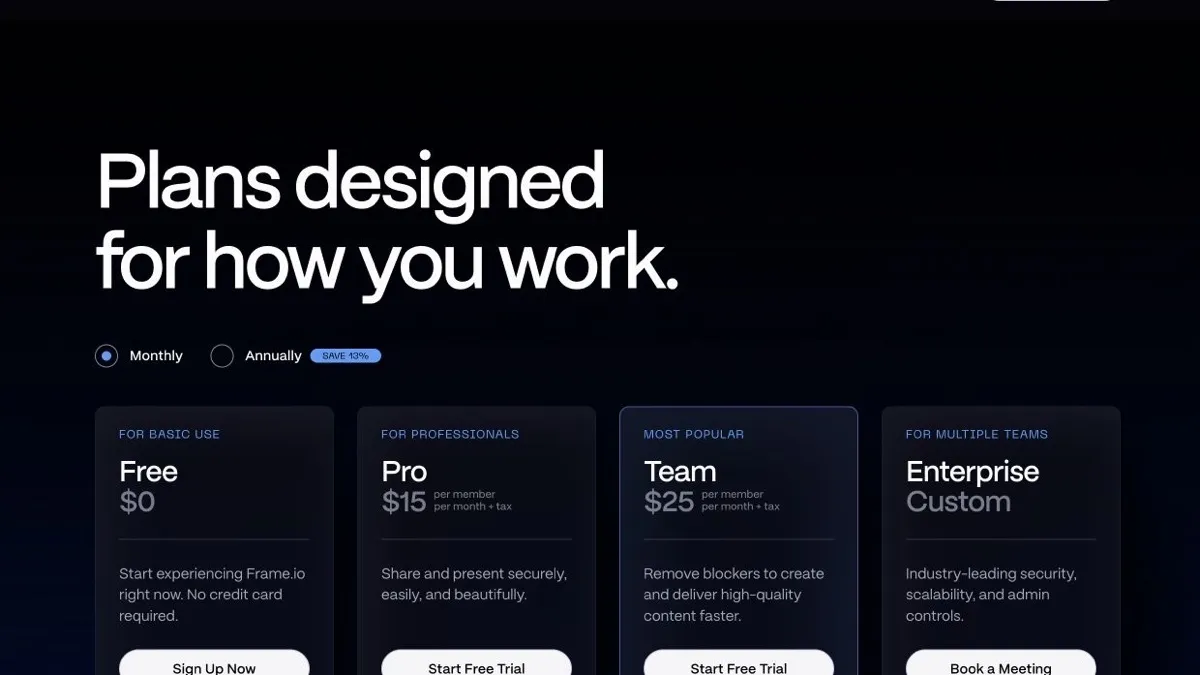
Frame.io's public Free, Pro, Team, and Enterprise plan cards, checked on July 28, 2026. Source: Frame.io.
What You Get on the Free Plan
Frame.io Free includes the core review workflow rather than functioning only as a timed demo. The current plan supports two members, two projects, 2 GB of Standard Storage plus 2 GB of Mounted Storage, frame-accurate comments and annotations, version comparison, transcription and captions, Camera to Cloud, and supported integrations.
The main constraint is storage. Two gigabytes disappears quickly when a project contains camera originals, mezzanine exports, audio, graphics, or several review versions. Free works best with compressed review media and a disciplined cleanup habit.
That still makes it a useful test environment. Try one representative job, invite the people who normally collect notes, and observe whether feedback becomes clearer than email, chat, or timecoded spreadsheets.
If the review process works but the storage and project limits do not, you have evidence for upgrading. If the process does not reduce confusion, paying for a larger account will not fix the underlying workflow.
Frame.io Pro vs Team
Pro is the natural step for a freelance editor or compact production team that has outgrown Free. It currently supports up to five members, unlimited projects, substantially more storage, branded shares, passphrase protection, link expiration, download and comment controls, comment attachments, and a static watermark template.
Those features matter when Frame.io becomes the client-facing approval surface. A protected, expiring share reduces the risk of an old or unrestricted link circulating. Hiding prior versions also helps keep the review focused on the current cut.
Team supports up to fifteen members and adds capabilities such as restricted projects and folders and internal comments. Internal comments let editors and producers discuss a client note, legal concern, or alternate version without placing that conversation in the external review thread.
Choose Team for the collaboration boundary, not merely because its name sounds more professional. If every member can see every project and internal-only discussion is rare, Pro may remain the cleaner value. If one account serves several clients or departments, Team's access separation can justify the difference.
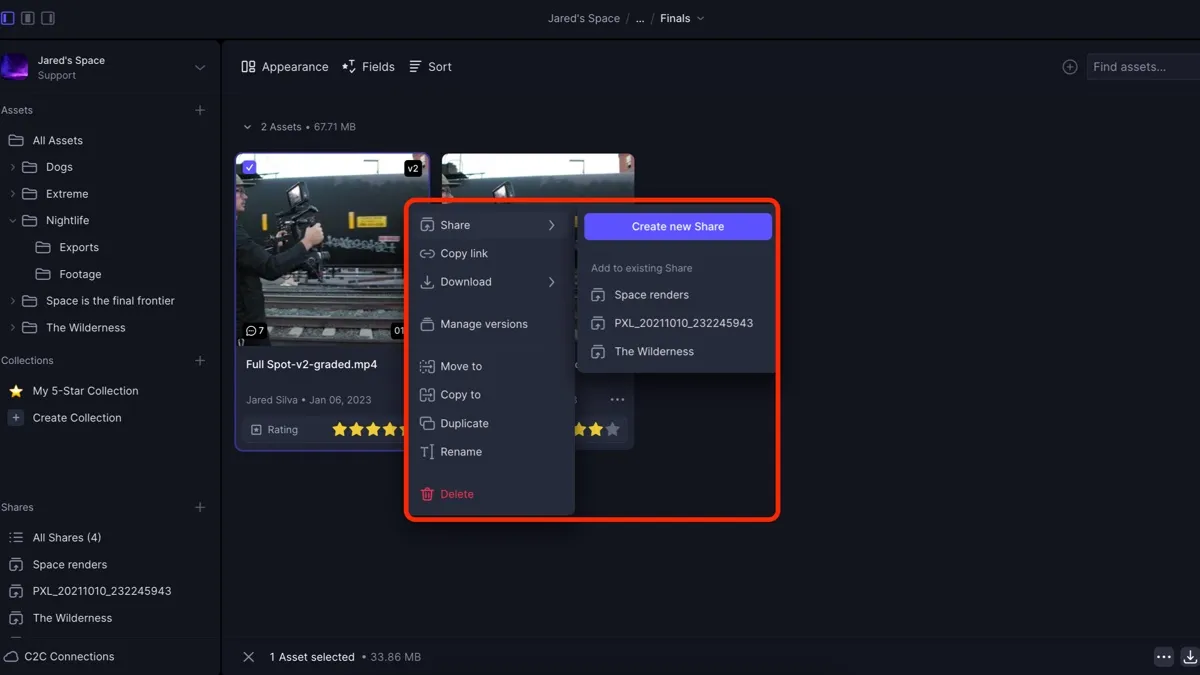
Frame.io V4 lets editors create controlled client shares directly from selected assets. Source: Frame.io.
What Enterprise Adds
Enterprise is a sales-assisted plan for organizations that need custom scale and governance. Frame.io highlights multiple workspaces, single sign-on, custom member and storage arrangements, lifecycle management, package-dependent secure sharing, and additional support or administrative options.
This is not simply a larger Team account. Its value appears when several departments, brands, vendors, or long-running media libraries need consistent access rules and centralized oversight.
Frame.io currently separates Enterprise Select and Prime packaging. Prime adds Secure Sharing, Storage Connect, session-based watermarking, forensic watermarking, and digital-rights-management controls. Session-based watermarking is also available as a paid add-on to Select. Confirm the exact package because an Enterprise label alone does not promise every security feature.
If the buying conversation includes SSO, retention policy, watermarking, custom invoicing, data governance, or a formal offboarding process, request a scoped quote. A public per-seat comparison cannot model those requirements reliably.
Is Camera to Cloud Included?
Yes. Frame.io's current Camera to Cloud documentation says C2C is included with every Frame.io plan, including Free.
Camera to Cloud connects supported cameras, recorders, audio devices, or apps to a Frame.io project during or shortly after capture. A remote editor, producer, or client can begin organizing or reviewing uploaded material while production is still underway.
The Frame.io subscription is only one part of that workflow. Budget for compatible hardware or software, reliable on-set connectivity, cellular data when applicable, proxy settings, naming and metadata rules, and someone responsible for confirming that transfers completed.
All plans can upload 4K files, but the current C2C FAQ limits 4K playback to Pro, Team, and Enterprise. Free is still a sensible way to test a short proxy workflow before relying on C2C for an active production.
Storage, Mounted Storage, and Frame.io Drive
Storage should be estimated separately from member count. Include proxies or originals, audio, graphics, review exports, version history, deliverables awaiting approval, and the overlap between simultaneous projects.
Frame.io's pricing table separates Standard Storage from Mounted Storage. Standard Storage is the default project-storage type. Mounted Storage is a separate project type and quota that additionally enables on-demand desktop access through Frame.io Drive; mounted projects remain accessible in the web app. A large Standard Storage allowance does not automatically increase the mounted amount.
Frame.io Drive is the desktop connection to that mounted-storage workflow. Current Help Center guidance describes mounted projects that can be connected and accessed through the desktop app, allowing teams to work with cloud assets without treating every file as a browser-only object.
Mounted storage does not erase the need for a retention plan. Active review media, working production storage, and long-term archive are different jobs. Decide when a project leaves the active workspace, where the master assets live, and who confirms that archival copies are complete.
If enabled projects exceed the Mounted Storage quota, Frame.io currently places the account in a grace period and blocks new projects from being mounted until the overage is resolved. Existing media remains available in the web app. Treat that as an operational limit and recheck the current policy before a large upload.
For many small teams, Frame.io is justified by fewer version mistakes and faster approvals rather than by replacing every other storage system. Price it as workflow infrastructure, then keep archival decisions explicit.
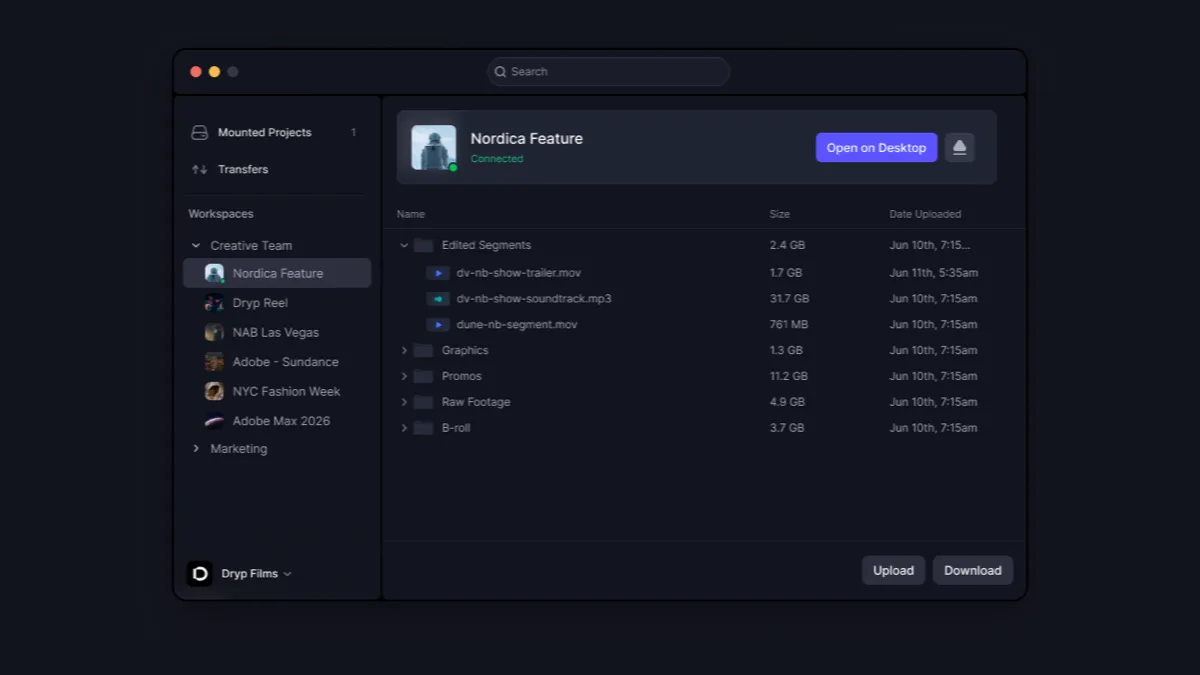
Frame.io Drive exposes connected mounted projects through its desktop app. Source: Frame.io.
Monthly vs Annual Billing
Frame.io currently advertises a 13% discount for annual billing. The pricing FAQ says monthly plans are charged monthly until cancelled, while annual plans are paid up front and renew annually until cancelled.
Monthly billing makes sense while testing a workflow, during a short production window, when member count may change, or before the real storage pattern is known. The flexibility can be worth more than the discount.
Annual billing makes more sense once Frame.io is used on every project, seats are stable, the renewal date is documented, and the discount exceeds the value of flexibility. Assign an account owner so renewal and inactive seats are reviewed instead of forgotten.
Always inspect the final checkout. Taxes, members, storage, add-ons, and enterprise packaging can change the effective cost.
Frame.io for Freelancers and Production Teams
A freelance editor should start by asking whether clients need a polished approval experience or only a download link. Free can validate the idea. Pro becomes easier to justify when unlimited projects, protected or expiring links, branded presentations, download controls, and enough space for several cuts are recurring needs.
The strongest benefit is usually version clarity. Frame-accurate notes tied to a named version are easier to act on than feedback split across email, messages, meetings, and annotated documents.
A production team should map the approval chain before buying: who uploads and organizes media, who can see internal comments, who sends external shares, who approves the final version, which projects must be restricted, how long assets remain active, and what happens when a staff member or contractor leaves.
If internal and external separation is routine, Team is the clearer boundary. If the answers include several workspaces, SSO, formal retention, or custom security, move the evaluation to Enterprise.
How to Calculate the Real Frame.io Cost
Begin with persistent members: editors, producers, project managers, and administrators who need workspace access. Clients reviewing a Share do not currently need to sign up or log in, so do not automatically budget every reviewer as a paid member.
Next, estimate peak active storage rather than average storage. A production may temporarily hold proxies, camera media, audio, graphics, several versions, and final exports at the same time. Multiply that pattern across overlapping projects.
Finally, assign a value to the problem Frame.io is expected to solve. Useful measures include hours spent collecting notes, duplicated or contradictory feedback, exports reviewed in the wrong order, delayed approvals, and the time from capture to a usable edit.
The most economical plan is the smallest one that removes a measured bottleneck. Paying for unused governance is wasteful, but choosing too little storage or access control can recreate the same approval friction in a different tool.
A Practical One-Project Trial
- Choose a real project with a normal client and at least two review rounds.
- Upload review-sized media and use a clear version-naming convention.
- Create one Share with the controls you would use in production.
- Ask reviewers to place comments directly on the relevant frames.
- Resolve or respond to notes instead of copying them into another system.
- Record approval time, duplicate notes, version errors, storage use, and administrative effort.
Use Free for the test if its project and storage limits are sufficient. If a paid feature is essential, use the shortest practical billing commitment and document what that feature must improve.
At the end, compare the result with your prior process. Upgrade only when the workflow saves enough time or risk to justify the recurring member cost.
How Frame.io Fits an Adobe Video Workflow
Frame.io is part of Adobe's broader video ecosystem, but it performs a different job from an editor. Premiere Pro builds and finishes the sequence; Frame.io organizes review, collaboration, transfer, and approval around that work.
That distinction also helps when comparing Creative Cloud tools for video editing. Adobe ownership and integration do not guarantee that every paid Frame.io capability is bundled into every Creative Cloud plan. Verify the entitlements shown in the actual accounts.
Frame.io is also editor-agnostic enough to support teams outside Premiere. The buying question is whether a centralized review layer improves the production process, not whether every participant uses the same editing application.
My recommendation is simple: test Free with one representative job, move to Pro when client-facing controls and active storage are proven needs, choose Team when internal separation is operationally important, and evaluate Enterprise when governance becomes the project.
Official Sources and Update Notes
- Frame.io pricing and plan FAQ
- Frame.io Camera to Cloud FAQ
- Getting started with Camera to Cloud
- Shares in Frame.io V4
- Frame.io Drive and mounted storage
Plan pricing, limits, and product behavior were checked against these official sources on July 28, 2026. Recheck the live plan page before making a long-term purchase.
Frequently Asked Questions
Is Frame.io free?
Yes. Frame.io has a Free plan with up to two members, two projects, 2 GB of Standard Storage plus 2 GB of Mounted Storage, review tools, transcription and captions, and Camera to Cloud at the time of this update.
How much is Frame.io Pro?
Frame.io listed Pro at $15 per member per month plus tax when checked on July 28, 2026. Prices, promotions, storage, and limits can change, so confirm the current plan page before checkout.
How much is the Frame.io Team plan?
Frame.io listed Team at $25 per member per month plus tax when checked on July 28, 2026. The plan currently supports up to fifteen members and adds internal comments and restricted projects and folders.
Do clients need a paid Frame.io seat?
Clients can review a Share without signing up or logging in. Reserve paid member access for people who need persistent workspace, project, or administrative access, then confirm current roles before adding seats.
Is Camera to Cloud included with Frame.io?
Frame.io currently includes Camera to Cloud with all plans, including Free. Compatible hardware, connectivity, cellular data, and related production services may cost extra.
Can Frame.io upload and play 4K video?
All plans can upload 4K files. Frame.io's current Camera to Cloud FAQ says 4K playback is available on Pro, Team, and Enterprise, so Free users should check playback needs before relying on it.
Is Frame.io included with Adobe Creative Cloud?
Adobe ownership and app integrations do not mean that every paid Frame.io feature is included with every Creative Cloud plan. Check the entitlements shown in both accounts before relying on bundled access.
Is annual Frame.io billing cheaper?
Frame.io advertised a 13% annual discount when checked on July 28, 2026. Annual billing reduces the effective monthly cost but is paid up front and renews annually under the current FAQ.
Is Frame.io worth it for a freelance editor?
It can be when protected shares, version clarity, frame-accurate feedback, and faster approvals save more time than the member cost. Test one real project and measure approval time before committing annually.
What is the difference between Standard and Mounted Storage?
Standard Storage is the default project-storage type. Mounted Storage is a separate project type and plan allowance that also enables on-demand desktop access through Frame.io Drive. Mounted projects remain accessible in the web app, and one quota does not replace the other.

About the Author
Joseph Nilo has been working professionally in all aspects of audio and video production for over twenty years. His day-to-day work finds him working as a video editor, 2D and 3D motion graphics designer, voiceover artist and audio engineer, and colorist for corporate projects and feature films.