
Adobe Firefly Boards is an infinite visual workspace for collecting references, generating images and video, remixing directions, organizing artboards, and presenting a creative idea before detailed production begins.
This is an official-feature assessment checked July 31, 2026. Boards is unusually relevant to designers and video teams because it connects moodboarding with Adobe Stock, Firefly and partner models, real-time collaboration, and handoff to Creative Cloud apps.
Quick verdict
| Best for | Creative direction, moodboards, storyboards, campaign exploration, visual research, client presentations, and teams comparing generated directions. |
|---|---|
| Main advantage | References, Stock search, generation, remixing, artboards, and collaboration live on one canvas instead of being copied among several apps. |
| Main caution | Model availability, credit cost, output rights, and connected features vary. Boards organizes ideation; it does not replace specialist finishing or an asset-governance process. |
| My recommendation | Use it to make decisions visible and test directions quickly, then move approved assets into Photoshop, Express, Premiere, or After Effects for production. |
This page may include affiliate links.
I only recommend software I would seriously evaluate for real creator or production workflows.
⭐⭐⭐⭐⭐
I pay for Adobe Creative Cloud and have used it every day in my 20-year career as a video editor, producer, and colorist.
Use the Adobe link below to check the current Creative Cloud offer. It can support this site and helps me keep these guides updated. Check current Adobe Creative Cloud offer.
Get Adobe Creative Cloud Now!What Adobe Firefly Boards Actually Is
Boards is the visual planning layer of the Firefly web app. A project can hold imported images and video, generated variations, Adobe Stock references, shapes, text, and multiple artboards on one large canvas.
That makes it different from a conventional prompt box. The useful unit is not one generated image; it is a visible field of references, rejected ideas, comparisons, notes, and selected directions.
Adobe positions the product for moodboards, storyboards, vision boards, brand development, remote design sprints, and client presentations. Those are decision-making tasks that normally happen before a Photoshop document or Premiere timeline becomes the main project.
The Infinite Canvas, Artboards, and References
You can import an image, search Adobe Stock, generate a new asset, or add shapes and text without leaving the board. Visual elements can be moved freely while artboards provide structured frames for a direction, sequence, or presentation.
Multi-select actions include rows, columns, mosaic arrangement, alignment, distribution, and collecting items into an artboard. This matters when a board grows beyond inspiration and must become legible to someone who did not build it.
For video work, use separate artboards for the overall look, locations, wardrobe, lighting, key shots, transitions, and a rough sequence. Keep rejected directions outside the presentation artboards so the reasoning remains available without confusing the client view.
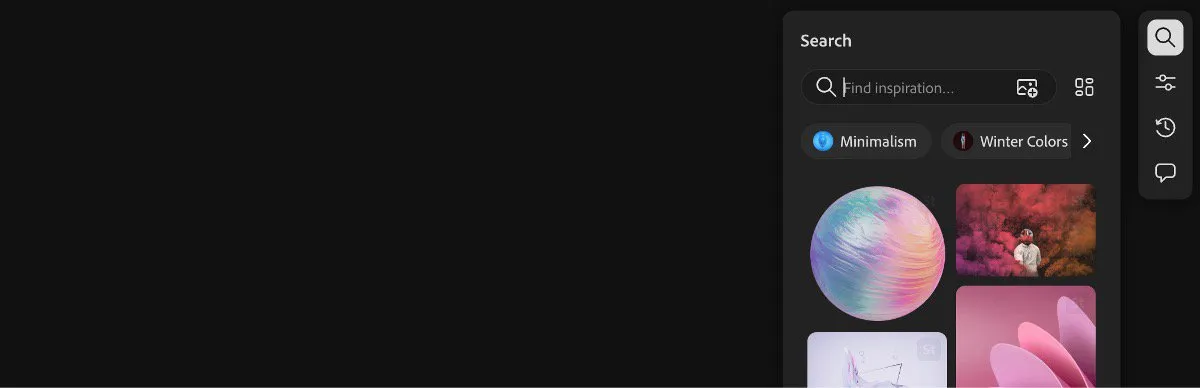
Boards can search Adobe Stock from the canvas, reducing the gap between reference gathering and visual direction. Source: Adobe. Interface shown as documented by Adobe and may change.
Generation, Sampling, Remixing, and Editing
Boards can generate images from a prompt and place the variations into a filmstrip before they are added to the canvas. A reference already on the board can be described, used for style or composition, or broken into suggested sub-prompts.
Once an image is selected, Adobe documents Vary, Generative Fill, Generative Expand, background removal, crop, text editing in an image, and partner-model refinement. An image can also become a starting frame for video or be converted into a 3D element where supported.
Remix is the more distinctive group operation. Select several images and Boards can use their combined visual direction to create new variations, which is faster than manually translating every color, texture, pose, and composition into one long prompt.
Use those tools to explore, not to erase judgment. A remix can inherit accidental similarities, weak typography, implausible details, or rights issues from the references.
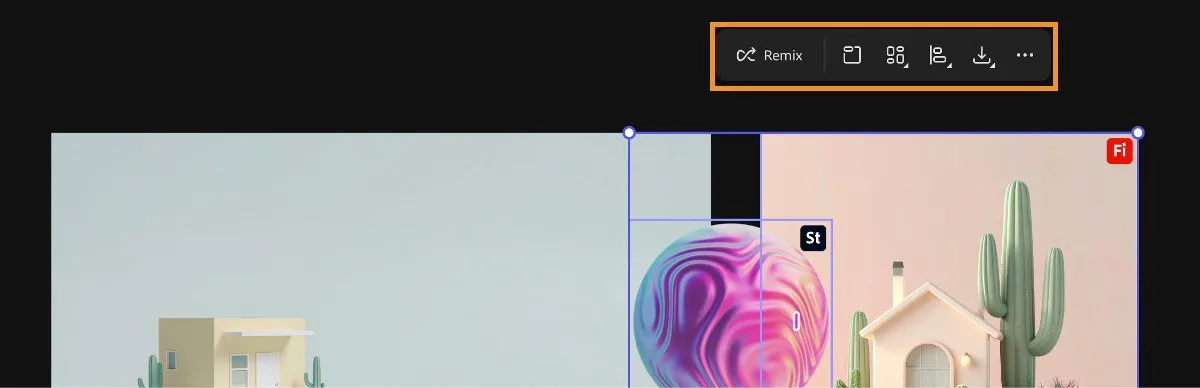
Selecting multiple canvas images exposes Remix, arrangement, alignment, and artboard actions rather than forcing each reference into a separate tool. Source: Adobe. Interface shown as documented by Adobe and may change.
Adobe and Partner Models, Plans, and Credits
Adobe currently lists Firefly alongside partner models from several major AI companies inside Boards. The exact roster is a moving target, and image, video, audio, or 3D operations can expose different controls.
Choose a model for the job rather than treating the longest menu as a quality ranking. Compare prompt adherence, style control, reference handling, consistency, speed, credit cost, output terms, and whether the project requires Adobe's Firefly commercial-safety positioning.
Adobe says Boards is free to try, but generation limits and credit consumption depend on the current plan and model. My Firefly pricing and generative credits guide covers the broader plan decision; confirm the live cost indicator before a large batch.
Adobe says it does not train its generative AI models on customer content. Partner-model terms and data handling still require their own review, especially for confidential client references.
Collaboration, Comments, and Presentation
A board owner can invite collaborators and grant edit or comment permission. Adobe also supports copied links subject to the project's access settings and notifies invited collaborators through email and Creative Cloud.
Real-time collaboration is valuable when the work is genuinely visual. A director can point to the exact frame, texture, or layout under discussion instead of translating it into a paragraph that each person interprets differently.
Presentation mode separates the client-facing direction from the sprawling workbench. Before presenting, place selected material into clearly named artboards, add brief rationale, remove duplicate variations, and decide which feedback is open versus already resolved.
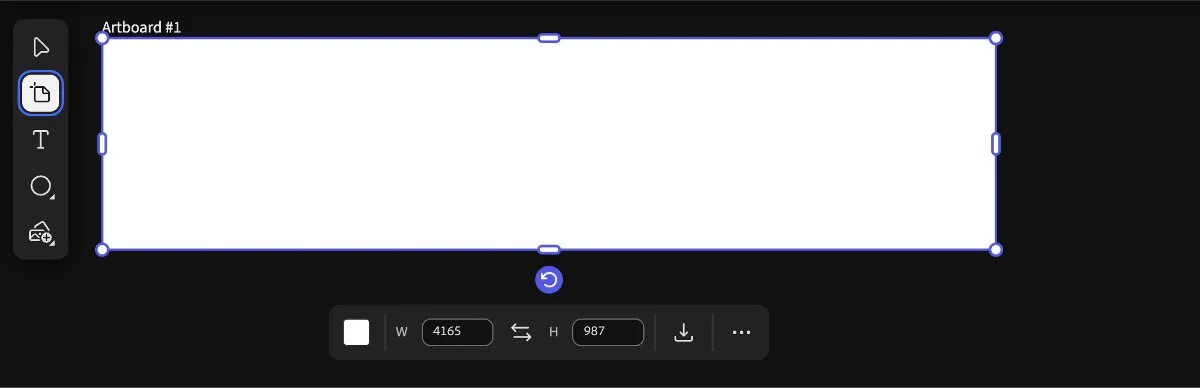
Artboards turn loose exploration into presentable directions without removing the surrounding references from the infinite canvas. Source: Adobe. Interface shown as documented by Adobe and may change.
Creative Cloud Handoff
Adobe documents opening a copy of a selected image in Photoshop or Adobe Express. The broader product page also positions Boards as a starting point for work that continues in Premiere, After Effects, or Photoshop.
Treat that as an asset handoff, not an assumption that every board relationship becomes an editable native project. Download or open the approved images and video, preserve the board link and prompt context, then build the production file in the specialist app.
For a video campaign, a sensible path is Boards for visual direction, Firefly for missing assets, Premiere for timing and editorial decisions, After Effects for motion design, Audition or Adobe Podcast for speech cleanup, and Frame.io for review.
A Practical Firefly Boards Workflow
- Write the decision. Define the audience, deliverable, emotional direction, brand constraints, and what the board must help the team approve.
- Collect before generating. Add owned references, client material, and licensed Stock examples so the first direction is grounded in real project context.
- Separate directions. Give each concept its own area or artboard rather than mixing unrelated styles into one visual soup.
- Generate against a gap. Use AI when the board lacks a shot, environment, texture, transition idea, or composition—not simply because a Generate button is available.
- Remix selectively. Combine a small number of strong references and check what the output borrowed from each.
- Curate hard. Remove near-duplicates, label uncertainties, and keep only the options that support a decision.
- Present and record. Use artboards and permissions for review, then document the approved direction and model or source of important assets.
- Finish elsewhere. Move approved material into the production app and keep the board as the visual brief.
Current Limits and Risks
An infinite canvas can become an infinite junk drawer. Performance, clarity, and client confidence suffer when every generation remains visible, so archive or group experiments and keep presentation artboards disciplined.
Model rosters, credit costs, regional availability, and preview features change quickly. Date-stamp important boards, record the selected model, and avoid promising a client that one experimental workflow will remain identical.
Generated text, logos, products, people, and architecture need close inspection. A visually persuasive moodboard can hide spelling errors, trademark conflicts, continuity problems, and impossible production details.
Collaboration permissions are not a substitute for rights management. Confirm that every imported reference can be shared with the invited group and that generated output is appropriate for the intended commercial use.
Firefly Boards vs Milanote, Miro, and a Folder
| Need | Best starting point | Why |
|---|---|---|
| AI-first creative exploration | Firefly Boards | Generation, remixing, Stock, and Adobe handoff are built into the canvas. |
| Traditional visual research and notes | Milanote | Strong freeform organization without centering the workflow on generation. |
| Workshops, diagrams, and cross-functional planning | Miro | Broader facilitation and business collaboration patterns. |
| Small solo reference collection | Folder or presentation | Lowest complexity when collaboration and generation are unnecessary. |
Boards is not automatically the universal winner. It is the strongest choice when visual AI and Creative Cloud continuity are the reason the board exists.
Official Sources
- Adobe Firefly Boards product overview
- Adobe guide to creating Boards
- Adobe Boards collaboration guide
- Adobe Firefly workspace overview
Frequently Asked Questions
What is Adobe Firefly Boards?
Firefly Boards is an infinite visual canvas for collecting references, generating and editing images or video, arranging artboards, and collaborating on creative direction before production.
Is Firefly Boards still in beta?
Adobe's current product and HelpX pages present Boards as an available Firefly feature and no longer apply one blanket beta label to the product. Individual models or connected features can still be previews, limited, or changed independently.
Is Firefly Boards free?
Adobe says Boards is free to try. Generation and partner-model use can consume credits, and available limits depend on the current Firefly plan and model, so check the live account screen before estimating production cost.
Can Firefly Boards make moodboards and storyboards?
Yes. Adobe explicitly positions Boards for moodboards, storyboards, vision boards, brand direction, campaign ideation, and client presentations on one large canvas.
Can I upload my own images and video?
Yes. Boards can combine imported images and video with Adobe Stock results, generated assets, shapes, text, and references sampled from the canvas.
Which AI models work in Firefly Boards?
Adobe currently offers its own Firefly models plus a changing selection of partner and custom models. Because the roster, controls, terms, and credit costs can change, choose the model inside the live project rather than relying on an old list.
Can collaborators edit a Firefly Board?
Yes. Owners can invite people and set edit or comment permissions, or copy a share link subject to the board's access settings. Adobe also provides presentation mode for client-facing review.
Can Firefly Boards open work in Photoshop or Adobe Express?
Adobe documents commands to open a copy of an image in Photoshop or Adobe Express. Boards is best treated as the direction and exploration layer, with specialist apps handling detailed finishing.
Does Adobe train Firefly on my Board content?
Adobe says it does not train its generative AI models on customer content. That statement does not replace the need to review the terms for any partner model selected inside Firefly.
Is Firefly Boards better than Milanote or Miro?
Boards is strongest when generation, remixing, Adobe Stock search, and Creative Cloud handoff are central. Milanote or Miro may still be better when a team primarily needs general research organization, workshops, diagrams, or broader project collaboration.

About the Author
Joseph Nilo has been working professionally in all aspects of audio and video production for over twenty years. His day-to-day work finds him working as a video editor, 2D and 3D motion graphics designer, voiceover artist and audio engineer, and colorist for corporate projects and feature films.