
Checked August 3, 2026
Adobe Firefly can now generate sound effects from text, use a voice performance as timing guidance, return multiple variations, and place a selected result into a Firefly Video Editor timeline. Adobe also exposes sound-effect generation in the mobile app.
This is useful for editorial sounds that are easy to imagine but slow to search: a custom whoosh shaped to an animation, a stylized mechanism, an ambience transition, or a precise sequence of impacts. The model does not replace a sound editor. It moves the first custom option closer to the picture.
Quick answer
Describe the sound source and action, add voice timing when rhythm matters, generate the four documented variations, audition them against picture, and edit the selected result in the timeline. Current Adobe documentation lists variations up to 30 seconds and English prompts in the Video Editor beta.
Use a curated library or field recording when you need a known source, rich metadata, exact alternate takes, isolated stems, or defensible recording provenance.
This page may include affiliate links.
I only recommend software I would seriously evaluate for real creator or production workflows.
⭐⭐⭐⭐⭐
I pay for Adobe Creative Cloud and have used it every day in my 20-year career as a video editor, producer, and colorist.
Use the Adobe link below to check the current Creative Cloud offer. It can support this site and helps me keep these guides updated. Check current Adobe Creative Cloud offer.
Get Adobe Creative Cloud Now!How Firefly Generate Sound Effects works
In Adobe's current Firefly Video Editor documentation, the editor opens Generate Sound Effects, writes a description, optionally records or uploads voice timing, sets the desired duration, and generates four variations. Each candidate can run up to 30 seconds. A selected variation can be added to the timeline for further editing.
The two inputs solve different problems. Text identifies what the sound should be: material, action, space, size, intensity, and style. Voice timing tells the model when events should happen and how their energy should rise or fall. You might say "whoom—tick—shhhh" to shape a transition while the text requests a heavy mechanical logo reveal with a soft air tail.
Adobe currently describes the Video Editor feature as beta and lists English prompts. Beta matters in production: controls, access, credits, quality, and limits can change. Export approved results and keep the project notes instead of assuming the same generation will remain available later.
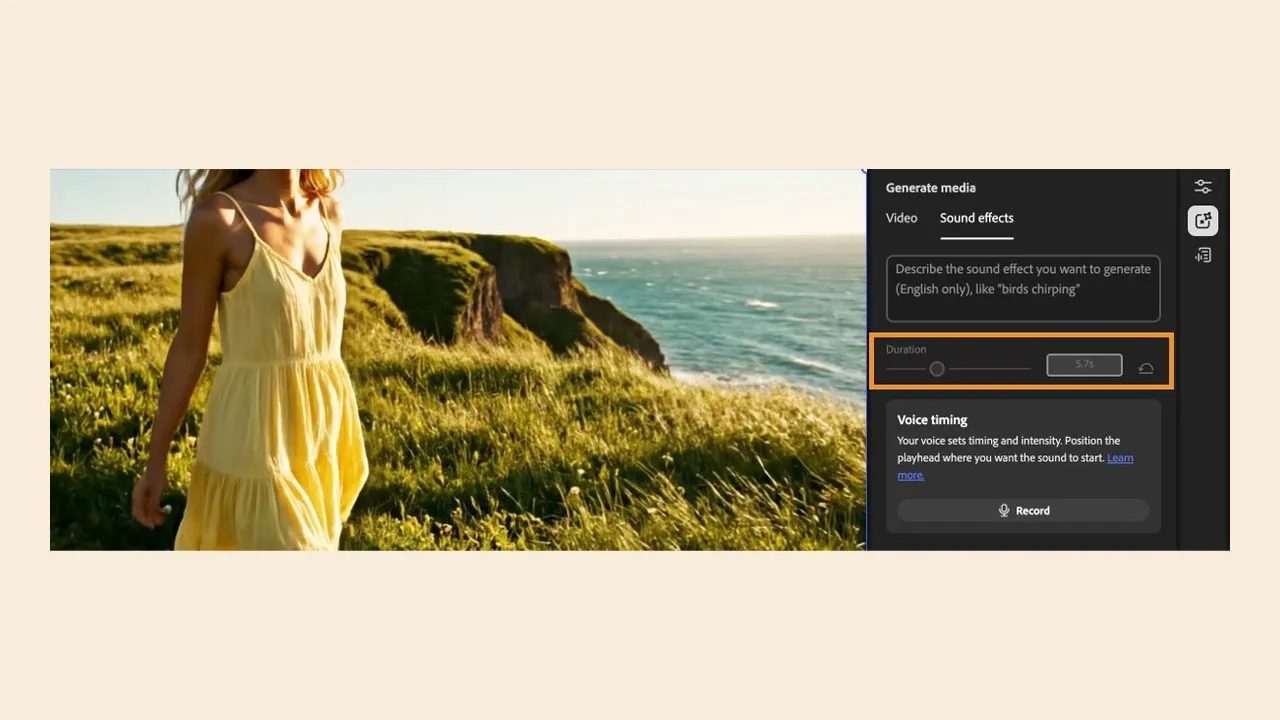
Adobe's Firefly Video Editor documentation shows text-led sound generation inside the editing workspace. Source: Adobe. Interface shown as documented by Adobe and may change.
How to write better sound-effect prompts
A useful prompt has a source, action, environment, scale, and finish. "Door sound" leaves nearly everything open. "Small steel equipment case closes once in a quiet studio, firm latch click, short hollow ring, no footsteps, no music" gives the model production constraints.
Add perspective when it changes the result: close microphone, across a warehouse, underwater, inside a helmet, behind a wall, or passing from left to right. Add emotional style only after the physical sound is clear. "Cinematic" by itself often makes a result louder and broader without making it more editable.
Describe exclusions explicitly when the first pass adds unwanted content: no voice, no crowd, no music, no reverb tail, no animal sound, or no second impact. Generate several narrow prompts rather than one paragraph asking for a complete soundscape. Layers are easier to replace, time, and mix.
Keep a prompt log beside the sequence. Name each export with the cue, version, and role—such as logo-rise-v03-mid.wav—instead of leaving a folder of anonymous downloads. Good file hygiene is part of making generative audio repeatable.
Use voice timing when rhythm matters
Voice timing is the most production-specific part of the tool. Perform the timing and contour, not an impression of the final recording. A short "tch-tch-WHOOM" can communicate two small ticks followed by a large hit more precisely than several sentences.
Record in a quiet place and keep the performance below clipping. Exaggerate spacing enough for the model to read the events, but match the picture's actual cue points. If the animation lasts 2.3 seconds, perform against that duration rather than creating a six-second idea and trimming away its internal shape.
Adobe's mobile voice-timing help lists MP4, MP3, MOV, WAV, and AAC uploads up to 30 seconds. The timing track is guidance, so do not upload a confidential voice recording or copyrighted performance you are not authorized to use. A neutral mouth sound or hand-performed rhythm is usually sufficient.
Compare a text-only pass with the timed pass. Voice timing is valuable when it improves synchronization, not simply because the control exists. For a continuous ambience, text plus duration may be cleaner.
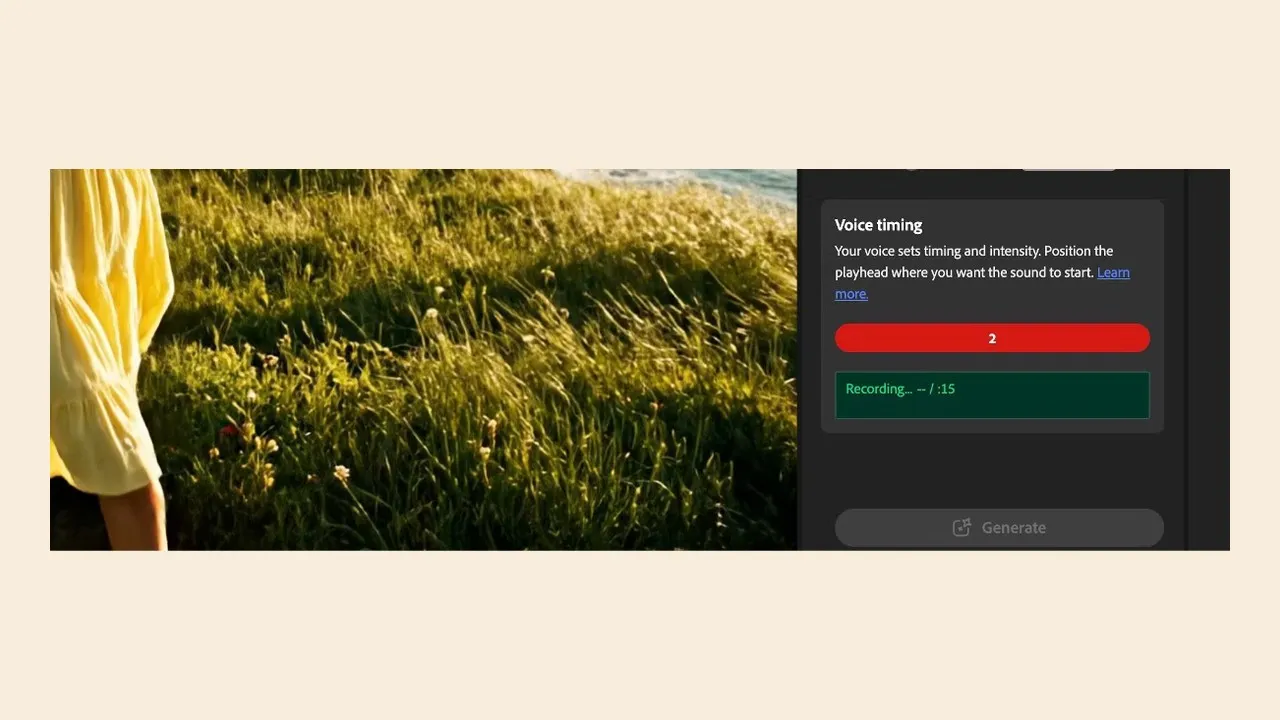
Voice timing lets an editor perform the rhythm or contour while text defines the sound source. Source: Adobe. Interface shown as documented by Adobe and may change.
Build the effect inside Firefly Video Editor
The Video Editor workflow keeps the picture visible while the sound is generated. Place the playhead near the cue, define the duration from the actual shot, generate the variations, and audition each one in context. A sound that is impressive alone can fight dialogue, music, or the visual rhythm.
Add the best candidate to the timeline, then trim the start, adjust the end, and compare level against neighboring clips. Leave handles when possible. If the effect needs three layers—a transient, a body, and a tail—generate or source them separately so the mix can be shaped.
Firefly Video Editor is still a developing surface. For a final project, move the selected audio into Premiere Pro, Audition, Pro Tools, Resolve, or the application's established audio pipeline. My Firefly Video Editor guide covers the larger timeline workflow, while Firefly for video editors looks at where generated media fits a conventional edit.
Generate sound effects on Firefly mobile
Firefly mobile exposes sound-effect generation as a compact task. Adobe's documentation shows a prompt box, suggested sound ideas, an upload path for video in supported flows, short-sound and timed-sound choices, and a result that can be added to a timeline.
The mobile app is useful for capturing an idea while reviewing a cut away from the edit system. Load a low-risk reference, describe the cue, create a candidate, and send the result back to the project. Avoid turning a phone into the only storage location or the final approval monitor.
Use headphones, then recheck the file on the main system. Confirm sample rate, channel layout, duration, file format, peak level, noise, and the absence of unexpected speech or music. The broader Adobe Firefly mobile app guide covers images, video, credits, exports, and mobile-to-desktop handoff.
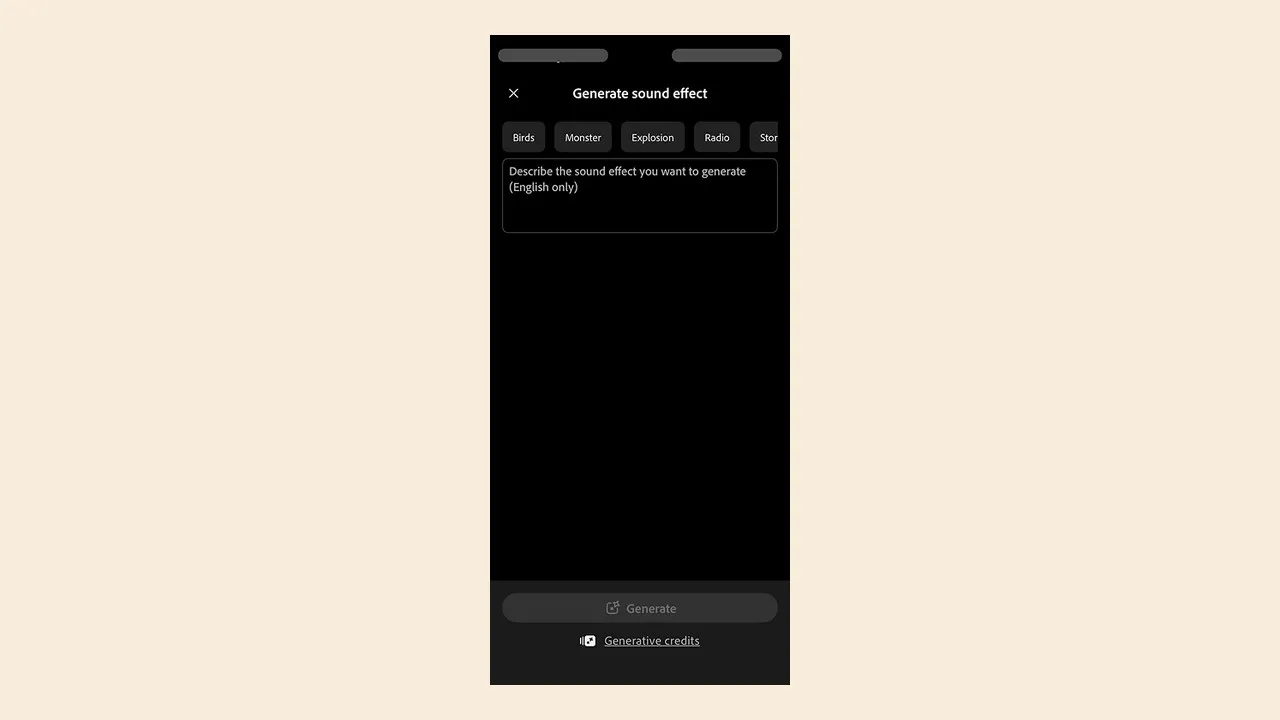
The mobile workflow provides a prompt field, idea starters, generation controls, and access to the resulting sounds. Source: Adobe. Interface shown as documented by Adobe and may change.
Edit and mix a generated sound effect
Start by trimming silence and creating short fades to prevent clicks. Align the main transient to the visible action, then decide whether the tail should end naturally, crossfade into ambience, or be cut by the next event. Do not normalize every effect to maximum level.
Use EQ to remove rumble or harshness, dynamics to control peaks, and automation to fit dialogue and music. Layer a real recording underneath when the generated sound lacks physical detail. Check mono compatibility and listen at both low and normal volume; an effect that works only when loud may be carrying too much of the scene.
For web and social delivery, test on a phone speaker after the studio review. For broadcast or client masters, follow the required loudness and peak specification. Keep a dry original plus the processed version so the mix can be revised without another generation.
Generated audio is still audio production. The final value comes from selection, timing, layering, level, and story—not from the number of variations.
Commercial-use and provenance checks
Adobe positions Firefly as a commercially oriented creative system, but you remain responsible for the plan, product terms, prompts, source uploads, and final use. Verify current terms for the account and feature at the time of delivery. A beta label is a reason to document more, not less.
Avoid asking for a recognizable living person's voice, a protected character, a famous franchise sound, or a confusing imitation of a brand mnemonic. Do not upload confidential client media without permission. Keep the prompt, date, selected result, source timing performance, edits, and final approval with the project.
If provenance must establish a specific physical recording—wildlife, machinery, journalism, evidence, archival work, or a named location—use a documented library or commissioned field recording. A generated effect can be creatively useful without being an appropriate factual source.
Firefly versus a stock sound library
Use Firefly when timing is unusual, the sound is stylized, and the cost of searching exceeds the cost of describing and reviewing. It is especially good for transitions, interface textures, abstract mechanisms, magical accents, and layered editorial support.
Use a curated library when you need searchable metadata, known microphones and locations, multiple perspectives, isolated stems, a family of related recordings, or a precise real-world source. Libraries are also better when a client expects conventional cue-sheet or license documentation tied to a recording.
The best workflow is often hybrid. Start with a real recording for physical credibility, generate a tailored layer for timing or style, and mix them under human control. Check the credit cost against Firefly usage before scaling. See Firefly pricing and generative credits for the account-level decision.
Official sources
Frequently Asked Questions
Can Adobe Firefly generate sound effects?
Yes. Adobe documents Generate Sound Effects in Firefly on the web, in the Firefly Video Editor beta, and in the mobile app. You can describe a sound in text and, in supported workflows, guide its timing with a voice recording or uploaded timing reference.
How long can a Firefly sound effect be?
Adobe's current Video Editor documentation says generated variations can be up to 30 seconds. Mobile voice-timing guidance also documents recordings or uploads up to 30 seconds. Check the interface because limits can change by surface or plan.
Can I use my voice to time a sound effect?
Yes. The voice-timing control lets you perform the rhythm or contour of the desired sound while text describes what it should become. Treat the recording as timing guidance, not as a finished voice track.
How many variations does Firefly generate?
Adobe's current Firefly Video Editor help page says the Generate Sound Effects workflow returns four variations. Audition all of them against picture because the most literal result is not always the best editorial choice.
What audio files can I upload for voice timing?
Adobe's mobile documentation lists MP4, MP3, MOV, WAV, and AAC for a timing guide, with a 30-second maximum. Supported formats and upload limits can change, so use the current interface as the authority.
Can I edit generated Firefly sound effects?
Yes. In Firefly Video Editor, a selected result can be added to the timeline and edited with the rest of the sequence. For a final mix, you may still want a dedicated audio editor for fades, EQ, dynamics, layering, loudness, and delivery stems.
Are Firefly sound effects safe for commercial work?
Adobe positions Firefly for commercial creative workflows, but you remain responsible for the current product terms, plan eligibility, prompts, source material, and the final use. Save generation records and avoid asking for protected characters, recognizable voices, or confusing brand imitation.
When should I use a stock sound library instead?
Use a curated library when you need a known recording, extensive metadata, repeatable alternate takes, isolated stems, or a documented field-recording source. Firefly is strongest when an unusual timing or transition is faster to describe than to search for.

About the Author
Joseph Nilo has been working professionally in all aspects of audio and video production for over twenty years. His day-to-day work finds him working as a video editor, 2D and 3D motion graphics designer, voiceover artist and audio engineer, and colorist for corporate projects and feature films.