
A camera offers H.264, HEVC, and ProRes.
An export window offers the same names.
The largest file is not always the best choice. The smallest file is not always the most efficient workflow.
H.264 and HEVC are usually built to deliver good pictures with less data. ProRes is built to preserve quality and remain responsive through production and post.
The right codec depends on the stage.
Quick answer
Use H.264 when broad compatibility, web delivery, client review, or a familiar MP4 workflow matters most.
Use HEVC/H.265 when you need better compression efficiency, smaller high-quality files, 10-bit/HDR delivery, or modern-device playback—and you have verified compatibility and hardware support.
Use Apple ProRes for professional capture, smooth editing, intermediate renders, high-quality masters, multigeneration work, and alpha-channel graphics.
Do not choose one codec for every step.
A common professional chain is:
camera original → native edit or ProRes intermediate → ProRes master → H.264 or HEVC delivery copy
At a glance
| Codec family | Main strength | Typical weakness | Strong fit |
|---|---|---|---|
| H.264/AVC | Broad compatibility and efficient delivery | Long-GOP variants can be demanding to edit; limited modern efficiency | Web, review, social, general playback |
| HEVC/H.265 | Better compression efficiency and strong 10-bit/HDR support | Older-device support, licensing, and decode requirements | Modern delivery, HDR, space-limited recording |
| Apple ProRes | High quality, frame-independent editing, strong generations | Large files and higher storage bandwidth | Capture, editing, VFX exchange, mastering |
Codec and container are not the same thing
A codec defines how video is encoded and decoded.
A container holds video, audio, timecode, captions, and metadata.
Common containers include:
- MP4;
- MOV/QuickTime;
- MXF;
- MKV; and
- WebM.
A .mov file is not automatically ProRes.
It may contain H.264, HEVC, ProRes, Animation, DNx, uncompressed video, or another codec.
An .mp4 file may contain H.264, HEVC, AV1, or other supported streams.
When diagnosing a file, inspect both:
- container;
- codec;
- profile;
- level;
- pixel format;
- bit depth;
- chroma sampling;
- bitrate;
- frame rate; and
- color tags.
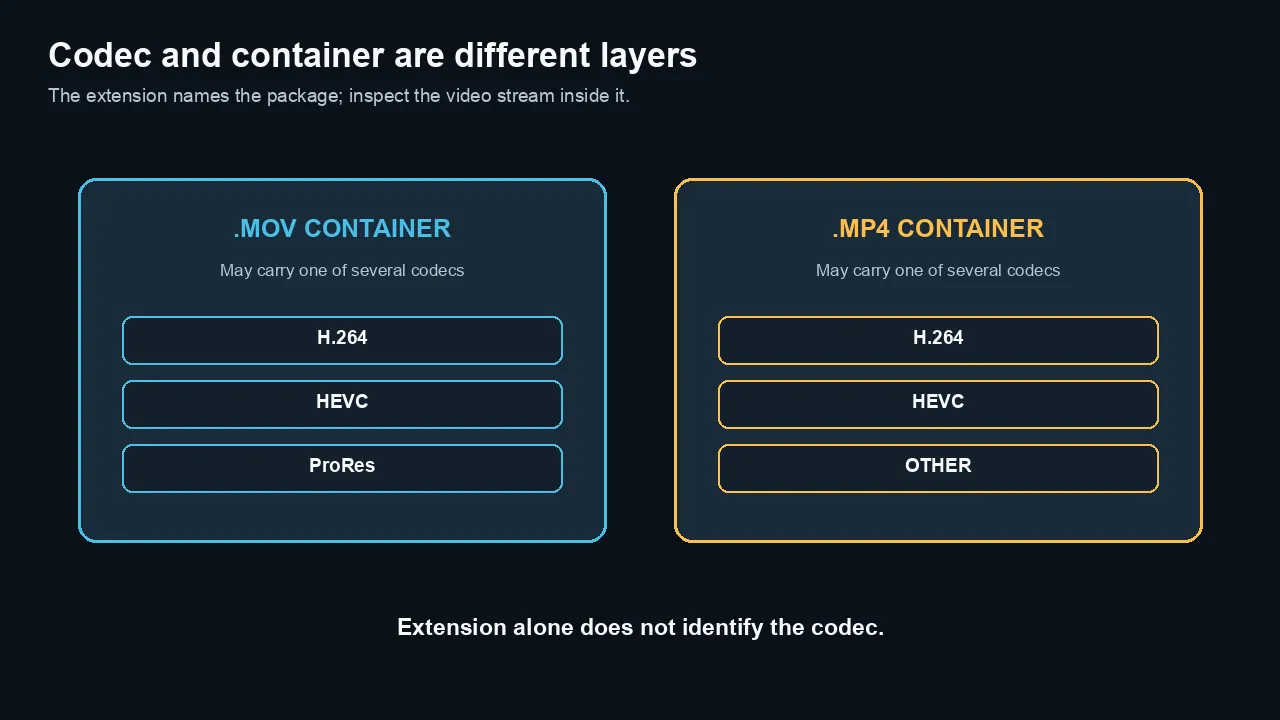
A container packages media streams; the file extension alone does not identify the video codec inside it.
H.264: compatibility first
H.264 is also called AVC.
It remains one of the safest delivery codecs because phones, browsers, televisions, editing systems, and hardware decoders support it widely.
Where H.264 works well
- YouTube and social uploads
- Client review files
- Website video
- Screen recordings
- Conference and training delivery
- Broad device compatibility
- Moderate file sizes
Why H.264 can be hard to edit
Many H.264 files use interframe compression.
Instead of storing every frame independently, the codec stores complete reference frames and describes changes across a group of pictures.
That is efficient for storage.
It can force the editor to decode several related frames to display one timeline frame.
Scrubbing, reverse playback, multicam, effects, and random access can therefore demand more computation than the file size suggests.
Hardware decoders can hide much of this cost.
Without matching hardware support, a small H.264 file may play worse than a much larger ProRes file.
H.264 profiles matter
H.264 includes profiles and levels.
A profile can change supported bit depth, chroma sampling, and coding tools.
For example, Adobe’s current Premiere export documentation identifies High 10 as an H.264 profile supporting 10-bit decoding.
Do not assume every H.264 file is 8-bit 4:2:0.
Do not assume every device supports every advanced profile.
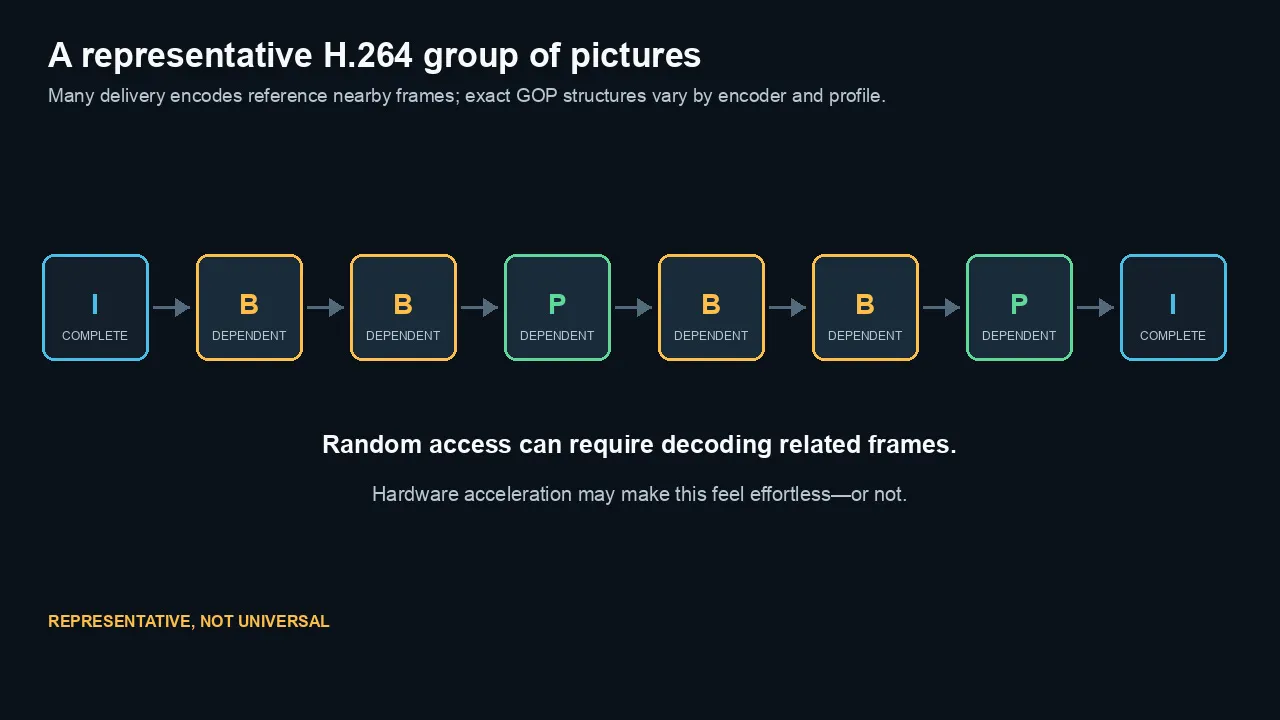
This representative GOP illustrates why random access can require decoding related frames; exact H.264 structures vary by encoder and profile.
HEVC: efficiency with conditions
HEVC is also called H.265.
It was designed to improve compression efficiency beyond H.264.
Apple describes HEVC as providing better compression than H.264 while preserving the same visual quality, which can reduce storage requirements on supported devices.
Where HEVC works well
- 4K and higher-resolution delivery
- 10-bit video
- HDR delivery
- Modern phone and camera recording
- Smaller files for comparable visual quality
- Space-limited acquisition
- Streaming to known compatible devices
Compatibility is not binary
A device may support one HEVC profile but not another.
Support can depend on:
- bit depth;
- chroma sampling;
- frame size;
- frame rate;
- profile and level;
- container;
- operating system;
- application; and
- hardware generation.
Older hardware may play 1080p HEVC but struggle with 4K60, 10-bit, or 4:2:2.
A software decoder may work but consume more CPU and battery.
HEVC can be efficient and difficult at the same time
Compression efficiency and edit responsiveness are different goals.
A 10-bit HEVC Long-GOP file may be small and visually strong.
It may also be demanding to scrub on a machine without the right media engine.
That does not make HEVC bad.
It means the capture format and editing hardware must be evaluated together.
HEVC licensing and delivery
HEVC support can involve licensing and platform decisions that do not affect an editor using built-in system codecs directly but can affect software distribution, web deployment, and customer compatibility.
For public delivery, test the exact browser and device matrix.
Do not assume a file that plays on your Mac will play everywhere a client opens it.
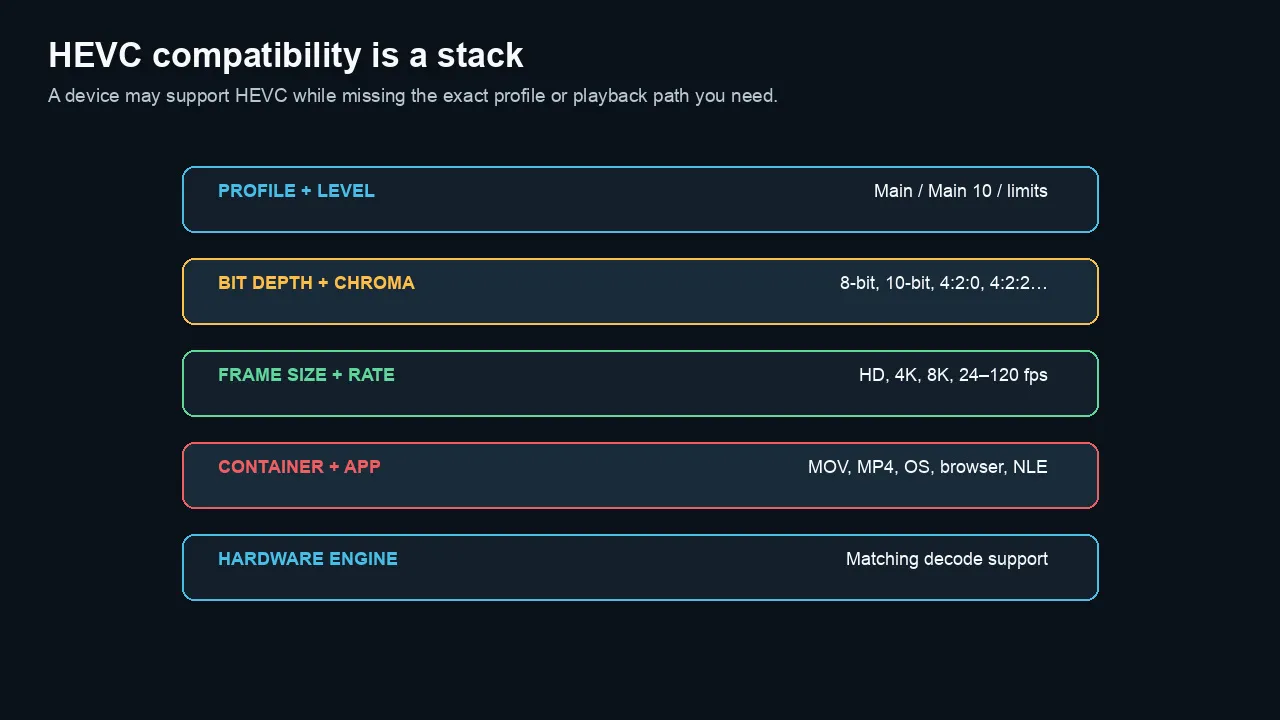
HEVC support depends on the complete playback stack, not merely whether a device claims H.265 compatibility.
ProRes: a codec family for production
Apple ProRes is not one codec setting.
It is a family of profiles designed for professional production and post-production.
Common profiles include:
- ProRes 422 Proxy
- ProRes 422 LT
- ProRes 422
- ProRes 422 HQ
- ProRes 4444
- ProRes 4444 XQ
Why ProRes edits well
ProRes is frame-independent.
Each frame can be decoded without rebuilding a long chain of surrounding frames.
That improves:
- scrubbing;
- frame stepping;
- trimming;
- reverse playback;
- multicam;
- compositing;
- repeated renders; and
- predictable post performance.
The tradeoff is data rate.
ProRes stores much more information per second than a typical delivery encode.
ProRes 422 profiles
The ProRes 422 family uses 10-bit 4:2:2 processing but offers several target data rates.
The word 422 does not make Proxy equal to HQ.
Choose the profile based on:
- source quality;
- generation count;
- delivery needs;
- storage;
- network bandwidth; and
- whether the profile is capture, proxy, intermediate, or master media.
ProRes 4444 and alpha
ProRes 4444 preserves full-resolution chroma and can carry an alpha channel.
It is useful for:
- motion graphics;
- titles with transparency;
- keyed elements;
- VFX plates;
- high-end intermediates; and
- full-chroma masters.
ProRes 4444 is compressed.
Its alpha channel can be mathematically lossless, but the image channels should not be described as generic mathematically lossless video.
ProRes RAW is different
ProRes RAW applies ProRes compression technology to sensor-oriented RAW data.
It is not simply a higher ProRes 4444 profile.
RAW retains a different stage of the image pipeline and requires RAW development.
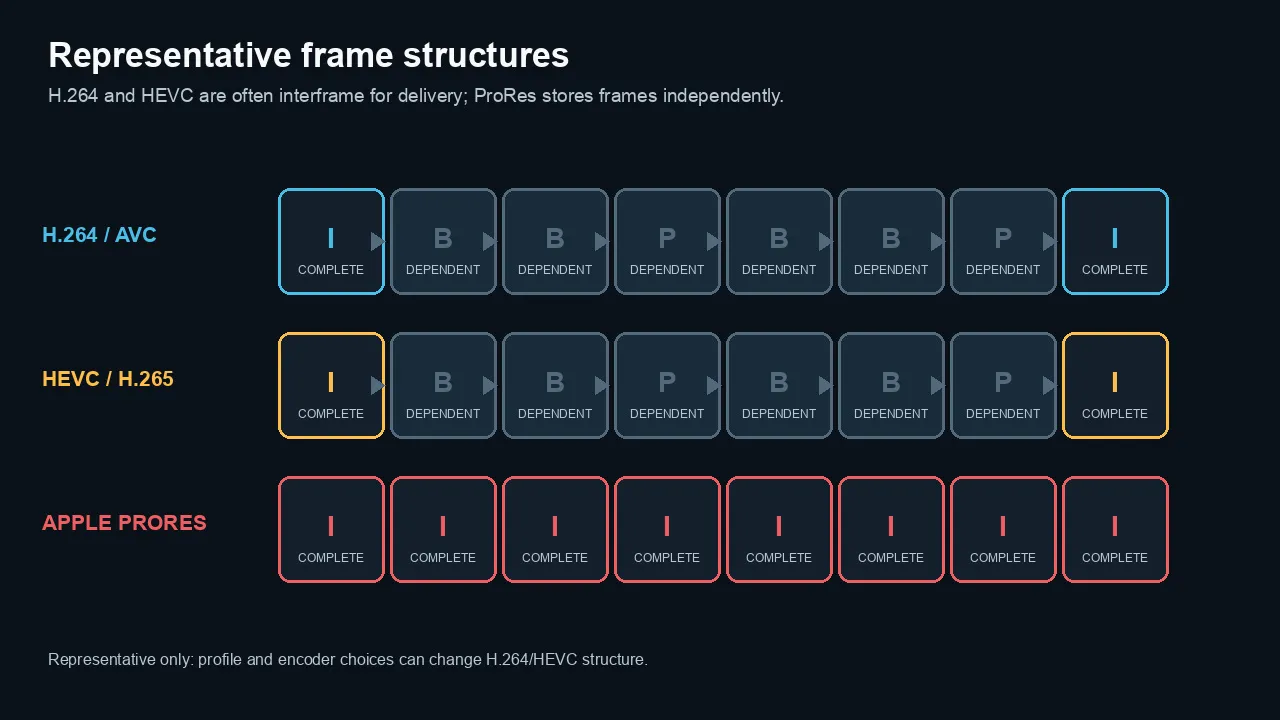
H.264 and HEVC delivery encodes are often interframe, while ProRes stores frames independently; H.264 and HEVC profiles can vary.
Why file size and editing speed do not track together
Editors often assume smaller files are easier to play.
That is not reliable.
Playback depends on:
- codec complexity;
- interframe structure;
- hardware acceleration;
- bit depth;
- chroma profile;
- resolution;
- frame rate;
- storage speed;
- effect load; and
- number of simultaneous streams.
A common comparison
A 4K HEVC file may use a fraction of the storage of a 4K ProRes file.
The HEVC file can require more decode work.
The ProRes file can require much more disk throughput but less complex frame reconstruction.
On a fast SSD and supported Mac, ProRes may feel smoother.
On a slow drive, its data rate can become the bottleneck.
Hardware support changes the answer
Apple silicon includes media engines for several common codecs and profiles.
Other CPUs and GPUs have their own decode matrices.
Do not evaluate a format from the codec name alone.
Test:
- the exact profile;
- resolution and frame rate;
- number of camera angles;
- effects and color processing;
- storage location; and
- target editing machine.
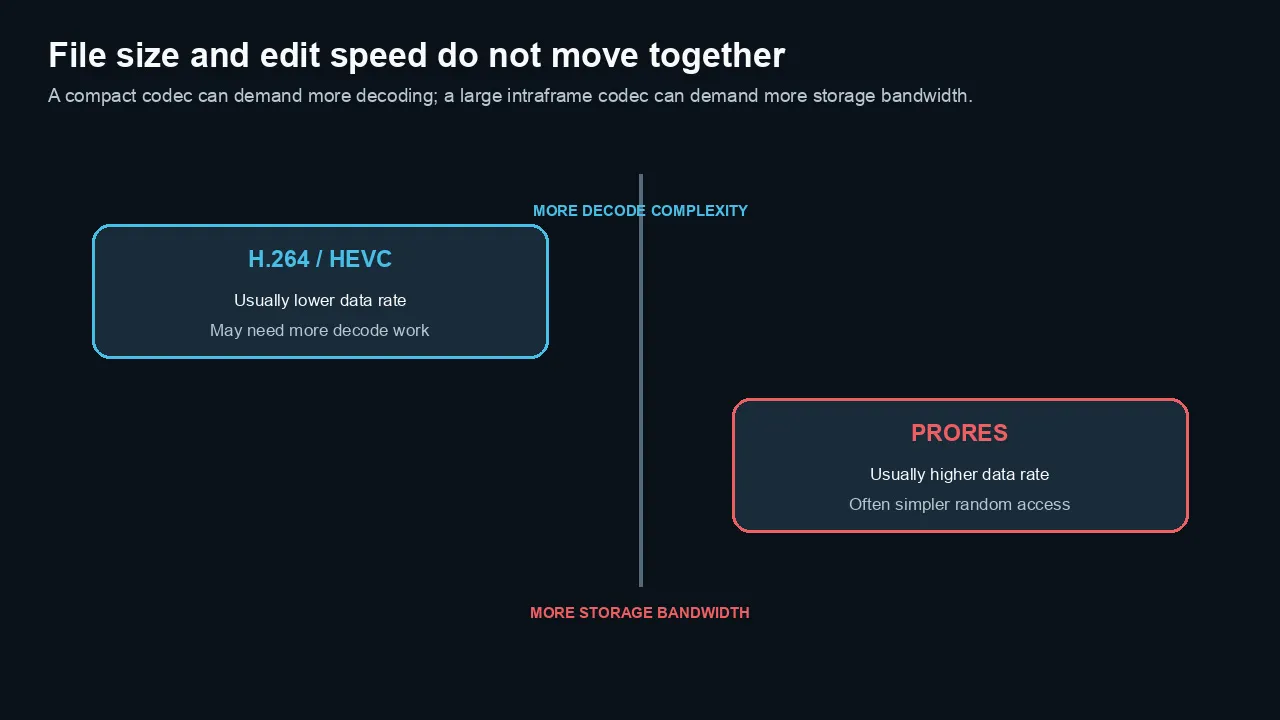
Smaller files are not automatically easier to edit: compact codecs may need more decoding while ProRes needs more storage bandwidth.
Bit depth, chroma, and alpha
Codec family and pixel format are related but not identical.
H.264
Common delivery H.264 is often 8-bit 4:2:0.
Advanced profiles can support more, but compatibility narrows.
HEVC
HEVC is widely used for 10-bit and HDR.
It can support 4:2:0 and, in some products, 4:2:2 or 4:4:4 profiles.
Hardware support varies significantly.
ProRes 422
Designed for 10-bit 4:2:2 workflows.
Encoding an 8-bit 4:2:0 source into ProRes 422 does not recreate missing bit depth or chroma samples.
It can prevent another fragile delivery generation and improve edit performance.
ProRes 4444
Supports full chroma and alpha.
Use it when the source and downstream work benefit from those properties.
Do not create a 4444 master merely because the number is larger.
Alpha delivery
H.264 and normal HEVC delivery workflows do not generally replace a dedicated production codec with alpha.
For transparent graphics exchange, ProRes 4444, image sequences, or another specified alpha-capable format is usually more appropriate.
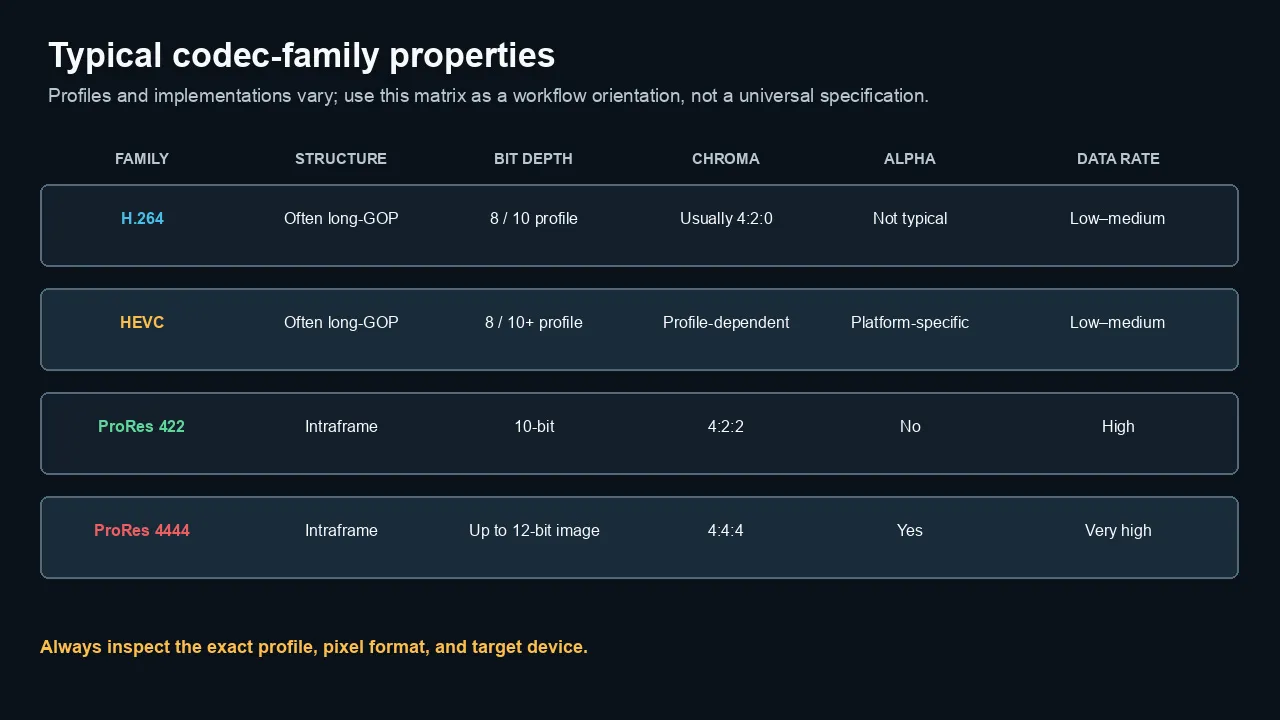
Typical family properties help orient a workflow, but the exact profile, pixel format, implementation, and destination still control compatibility.
Which codec should you use at each stage?
Capture
Choose H.264 when:
- compatibility and recording time matter;
- the camera’s implementation is reliable;
- post demands are moderate; and
- storage must remain manageable.
Choose HEVC when:
- the camera offers better quality or 10-bit/HDR at a manageable data rate;
- the edit system has matching hardware support;
- long recording time matters; and
- the workflow has been tested.
Choose ProRes when:
- the camera or recorder supports it reliably;
- the project needs smooth post performance;
- strong grading, keying, or VFX is expected;
- storage and media management can support the data rate; and
- the format avoids a weak in-camera codec compromise.
Editing
Edit original H.264 or HEVC when playback is smooth and the workflow is stable.
Use proxies when you need responsiveness without duplicating full-resolution media at ProRes data rates.
Transcode to ProRes when:
- long-GOP originals are slow;
- several applications exchange files;
- the project will render many generations;
- collaboration needs a robust common format; or
- source compatibility is inconsistent.
Intermediate renders
Use ProRes 422 or 4444 based on chroma, alpha, and quality requirements.
Avoid H.264 or HEVC as repeated intermediate formats when the sequence will be decoded, altered, and re-encoded several times.
Mastering
A high-quality ProRes profile is a strong practical master for many live-action projects.
Use:
- ProRes 422 for efficient high-quality masters;
- ProRes 422 HQ when the source and delivery justify the higher data rate;
- ProRes 4444 for full-chroma graphics or VFX;
- ProRes 4444/4444 XQ when alpha or the specified high-end pipeline requires it.
Keep the camera originals and project data as well.
A master file is not the entire archive.
Delivery
Use H.264 when broad compatibility is the priority.
Use HEVC when smaller files, 10-bit, HDR, or modern high-resolution delivery matters and the audience supports it.
Do not send ProRes as the only client playback file unless the client specifically requests it.
ProRes may be the master; H.264 or HEVC may be the viewing copy.
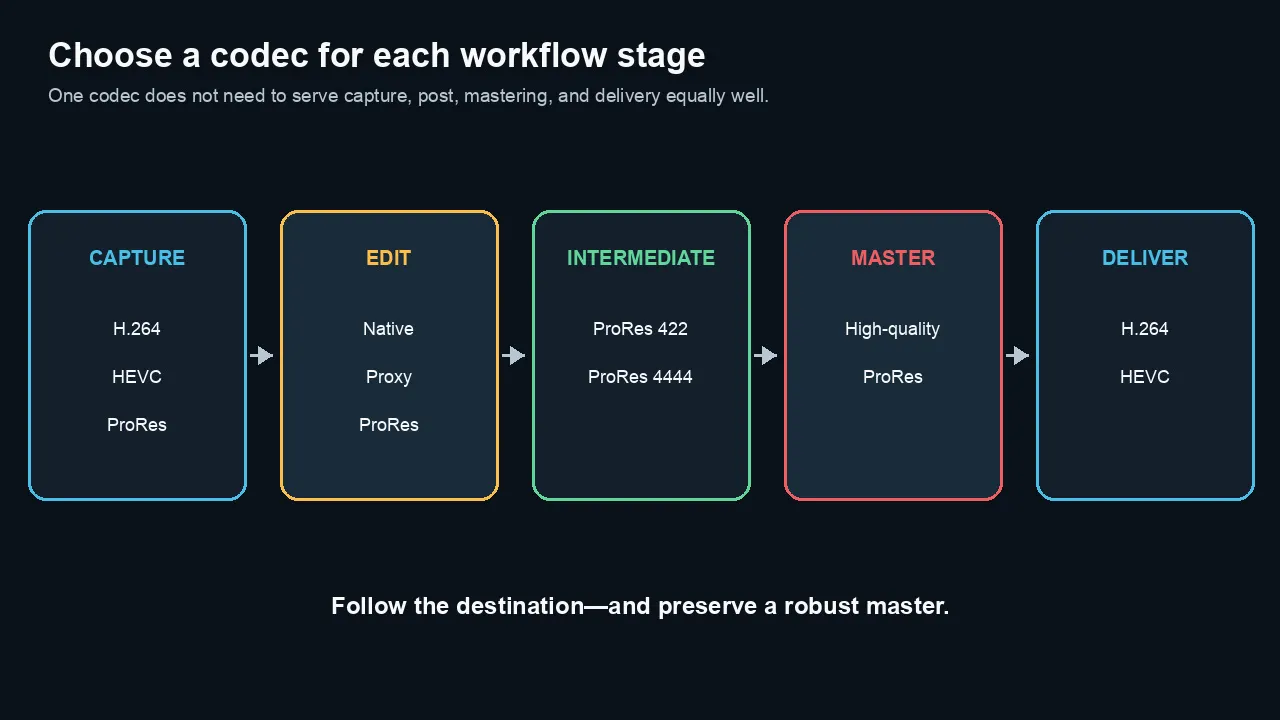
A staged workflow can use efficient camera media, responsive post formats, a robust master, and a compatible delivery copy.
Practical project recommendations
YouTube and social video
Keep a high-quality master.
Create a platform-compatible H.264 or HEVC upload according to current platform guidance.
Do not repeatedly export social revisions from a previous H.264 social file.
Return to the timeline or master.
Software tutorials
Capture screen material in a high-quality RGB/full-chroma path when practical.
Edit in the original or a responsive intermediate.
Use H.264 for broad client and web review.
Test small text after final platform encoding.
Corporate and training video
H.264 remains the safe general delivery choice.
HEVC can reduce size for known modern environments.
Keep a ProRes master for future revisions and alternate deliverables.
iPhone recording
Apple devices may record HEVC for efficiency or H.264 for compatibility, with ProRes available on supported Pro models and settings.
ProRes files can be dramatically larger than HEVC.
Use ProRes when the project needs the post-production benefits and the storage path can support it.
Motion graphics
Render transparent elements as ProRes 4444 or another specified alpha-capable format.
Do not flatten alpha prematurely into H.264.
Long-form documentary
HEVC or H.264 camera originals can save storage.
Test multicam and long-form timeline performance early.
Use proxies rather than automatically converting every original to full-resolution ProRes.
Client archive
Preserve:
- camera originals;
- audio originals;
- project files;
- graphics sources;
- fonts and licenses where permitted;
- a high-quality master; and
- documented delivery files.
Do not treat one H.264 upload file as the archive.
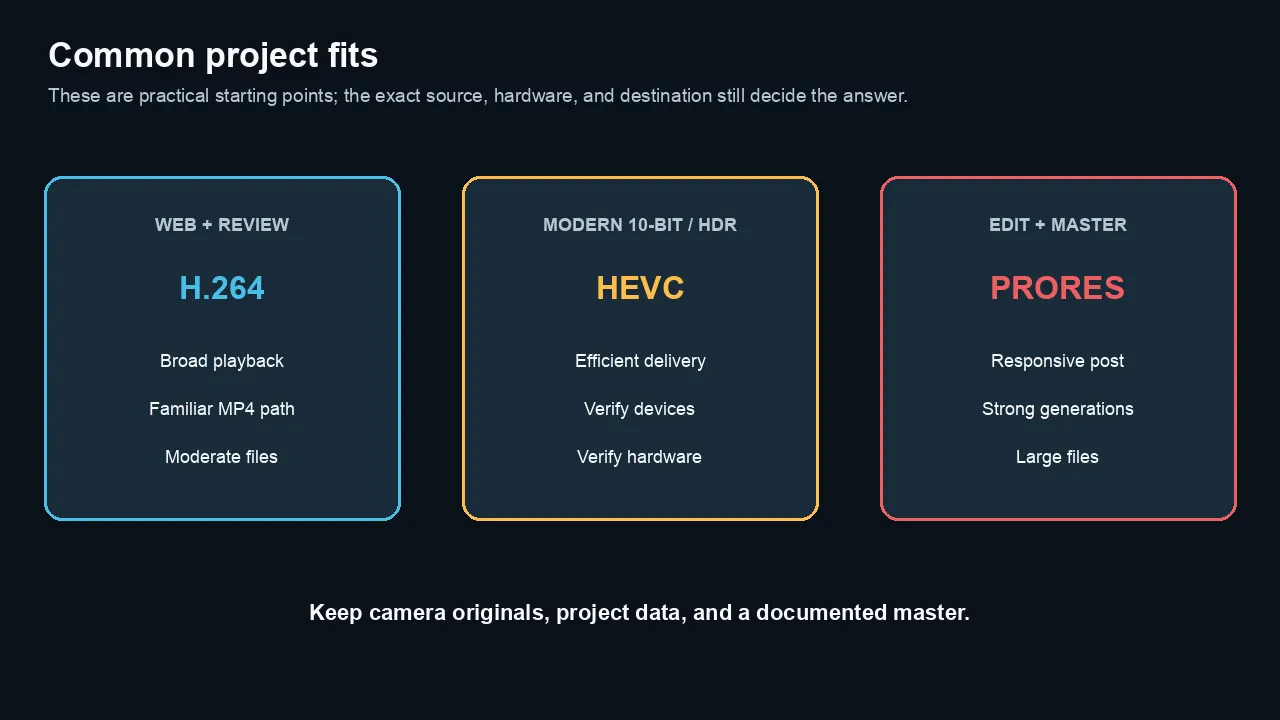
H.264 is a strong compatibility default, HEVC fits verified modern delivery, and ProRes fits editing and mastering when storage allows.
How to inspect a file
Use MediaInfo or ffprobe.
Example:
ffprobe -v error \

  -select_streams v:0 \

  -show_entries stream=codec_name,profile,level,pix_fmt,width,height,r_frame_rate,avg_frame_rate,bit_rate,color_space,color_transfer,color_primaries,color_range \

  -of default=noprint_wrappers=1 \

  "input.mov"
Look beyond codec_name.
Record:
- profile;
- pixel format;
- bit depth;
- chroma sampling;
- frame rate;
- bitrate;
- color tags; and
- container.
A file called master.mov tells you almost nothing by itself.
How to run a fair codec test
Use one high-quality source and change one variable at a time.
Keep constant
- frame size;
- frame rate;
- duration;
- color space;
- bit depth where supported;
- chroma sampling where supported;
- range;
- scaling;
- audio; and
- test machine.
Measure separately
- encode time;
- decode CPU/GPU use;
- dropped frames;
- scrub response;
- file size;
- peak and average bitrate;
- visible artifacts;
- generation loss; and
- device compatibility.
Do not compare unrelated presets
A low-bitrate 8-bit H.264 export and a high-bitrate 10-bit ProRes 422 HQ file differ in codec, bitrate, bit depth, chroma, frame structure, and target use.
That comparison can demonstrate a workflow difference.
It cannot isolate codec efficiency.
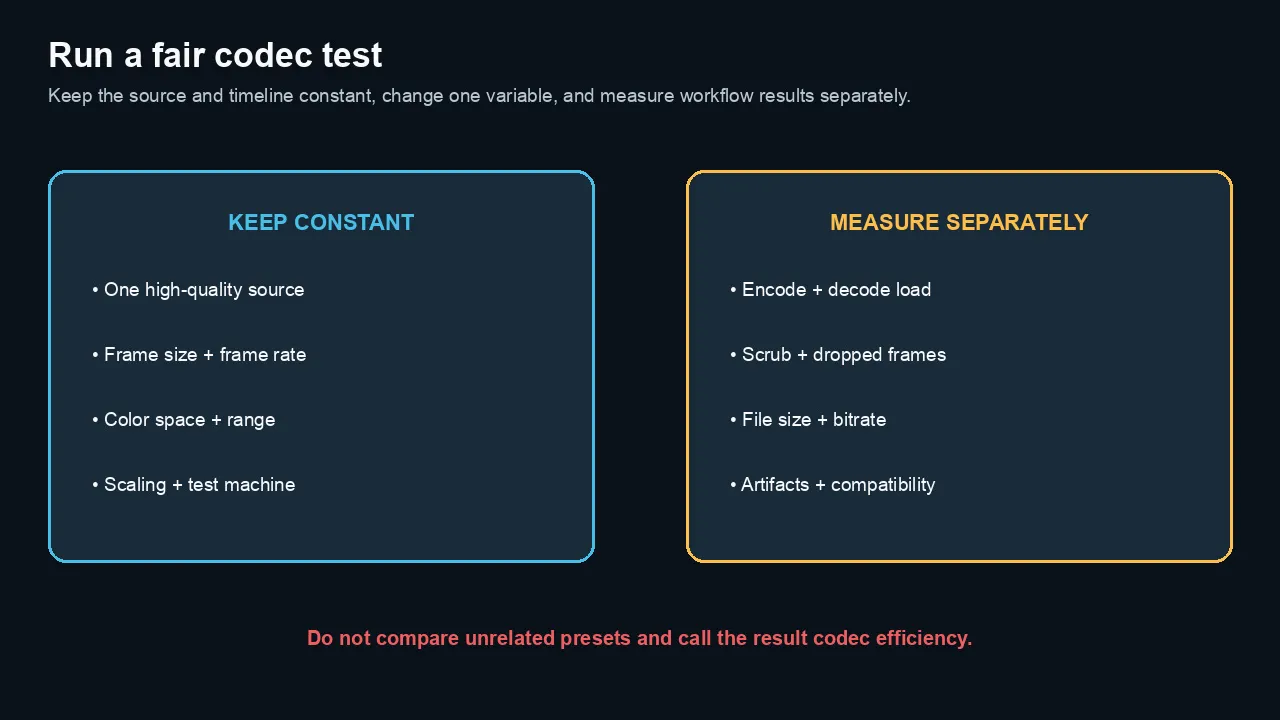
A fair codec test holds the source and timeline constant, changes one variable, and measures workflow results separately.
Common myths
Myth 1: ProRes is always visually better
No.
A ProRes transcode cannot restore information missing from the source. A poorly created ProRes file can look worse than a strong camera original.
Myth 2: HEVC is always half the size of H.264
No.
Efficiency depends on encoder, settings, content, profile, quality target, and implementation. Avoid universal file-size ratios.
Myth 3: Smaller files are easier to edit
No.
A small long-GOP file may require more decoding than a large intraframe file.
Myth 4: MOV means ProRes
No.
MOV is a container.
Myth 5: MP4 means H.264
No.
MP4 can carry H.264, HEVC, and other streams.
Myth 6: Converting H.264 to ProRes improves captured quality
No.
It can create a robust editing format and prevent additional weak generations. It cannot recreate lost source detail.
Myth 7: HEVC is unsuitable for professional work
No.
HEVC can be an excellent acquisition or delivery codec. Its suitability depends on profile, quality, hardware, compatibility, and workflow.
Myth 8: ProRes is uncompressed
No.
ProRes is compressed and designed for high visual fidelity and post-production performance.
The practical bottom line
H.264 is the compatibility choice.
HEVC is the efficiency choice when the ecosystem supports it.
ProRes is the production and post-production choice when quality, generations, and edit responsiveness justify the data rate.
Keep stages separate.
Capture what the project needs. Edit in a responsive format. Master in a robust high-quality codec. Deliver what the audience can play.
Frequently asked questions
Is ProRes better quality than H.264?
ProRes is designed for high-quality production and multigeneration post, while H.264 is commonly optimized for efficient delivery. A ProRes transcode cannot improve missing source information, but it can preserve quality better through later work.
Is HEVC better than H.264?
HEVC generally offers better compression efficiency, especially for high resolution, 10-bit, and HDR. H.264 remains more broadly compatible. The best choice depends on devices, software, hardware decoding, and delivery requirements.
Why is ProRes easier to edit?
ProRes is frame-independent, so the editor can decode individual frames without reconstructing a long group of surrounding pictures. It uses more storage bandwidth but often provides smoother scrubbing and multigeneration performance.
Should I convert all H.264 footage to ProRes?
No. Edit the original when it performs well. Use proxies for lightweight editing or transcode to ProRes when decode performance, compatibility, repeated renders, or collaboration justify the extra storage.
Is HEVC good for editing?
It can be, especially on hardware that accelerates the exact HEVC profile. Ten-bit 4:2:2 HEVC and high-frame-rate files may be demanding on systems without matching hardware support.
Which codec should I upload to YouTube?
Follow YouTube’s current supported-format and encoding guidance. H.264 remains a common broadly compatible upload choice. A high-quality source and correct settings matter more than choosing the largest codec available.
Is ProRes 4444 lossless?
ProRes 4444 is compressed and designed for very high visual fidelity. It can carry a mathematically lossless alpha channel, but the image channels should not be described as general mathematically lossless compression.
Can H.264 or HEVC carry 10-bit video?
Yes, supported profiles can carry 10-bit video. Compatibility and hardware decoding depend on the profile, chroma sampling, level, resolution, and device.
Does HEVC always make a smaller file?
Not automatically. File size is controlled by bitrate or quality mode, duration, encoder decisions, and content. HEVC can reach comparable quality at lower data rates than H.264 in many workflows, but there is no fixed ratio.
What is the best master codec?
For many Mac-centered live-action workflows, a high-quality ProRes 422 profile is a practical master. Use ProRes 4444 when full chroma or alpha is required, and follow any formal delivery specification.
Official sources checked
- Apple ProRes White Paper
https://www.apple.com/final-cut-pro/docs/Apple_ProRes.pdf
- Apple Final Cut Pro ecosystem and white-paper index
https://support.apple.com/en-us/125519
- Apple: Use HEIF or HEVC media on Apple devices
https://support.apple.com/116944
- Apple: About Apple ProRes on iPhone
https://support.apple.com/109041
- Apple: ProRes and ProRes RAW authorized products
https://support.apple.com/118584
- Adobe Premiere video encoding settings
https://helpx.adobe.com/premiere/desktop/render-and-export/export-files/video-encoding-settings.html
-
Sony FX3 specifications: All-Intra and Long-GOP examples
-
YouTube recommended upload settings
https://support.google.com/youtube/answer/1722171

About the Author
Joseph Nilo has been working professionally in all aspects of audio and video production for over twenty years. His day-to-day work finds him working as a video editor, 2D and 3D motion graphics designer, voiceover artist and audio engineer, and colorist for corporate projects and feature films.