
Your camera offers 10-bit 4:2:2.
Your phone records 4:2:0.
Your export menu includes ProRes 4444.
The numbers look like a code. They describe one specific part of image quality: how much spatial color detail the video stores.
They do not tell you the whole quality story.
A 4:4:4 file can still be compressed. A 4:2:0 file can still be 10-bit. A high-bitrate 4:2:2 file can look better than a poorly encoded 4:4:4 file. RAW is a different kind of image data.
Once you separate those ideas, chroma subsampling becomes much easier to use.
Quick answer
4:4:4 keeps full-resolution color information.
4:2:2 keeps full luma detail but cuts horizontal chroma resolution in half.
4:2:0 keeps full luma detail but cuts chroma resolution in half horizontally and vertically.
For most finished web video, 4:2:0 is normal.
For serious camera capture and post-production, 10-bit 4:2:2 is often the best balance.
For demanding chroma keys, visual effects, motion graphics, and alpha channels, 4:4:4, 4:4:4:4, or a suitable RAW workflow may be worth the extra data.
No format fixes weak exposure, missed focus, clipped highlights, heavy noise, or a poor codec implementation.
4:2:0 vs 4:2:2 vs 4:4:4 at a glance
| Format | Luma detail | Chroma detail | Stored samples in a 2×2 group | Strong fit |
|---|---|---|---|---|
| 4:4:4 | Full | Full horizontally and vertically | 4 Y + 4 Cb + 4 Cr = 12 | VFX, graphics, demanding keys, high-end intermediates |
| 4:2:2 | Full | Half horizontal, full vertical | 4 Y + 2 Cb + 2 Cr = 8 | Professional capture, grading, broadcast, general post |
| 4:2:0 | Full | Half horizontal and half vertical | 4 Y + 1 Cb + 1 Cr = 6 | Streaming, web delivery, phones, consumer recording |
The sample-count column assumes the same frame size and bit depth before normal codec compression.
It does not predict the exact file-size difference between two real compressed files.
What chroma subsampling changes
Digital video often separates an image into three components.
Y′ is the luma channel. It carries the brightness-like structure that defines most fine image detail.
Cb and Cr are color-difference channels. They describe how the image shifts toward blue or red relative to luma.
You will often see this family of signals called YUV in software and casual discussion. For digital video, Y′CbCr is usually the more precise term.
Video systems can store the chroma channels at a lower spatial resolution than the luma channel.
That is chroma subsampling.
The image keeps full luma resolution, so edges defined mainly by brightness can remain sharp. The color components are stored on a coarser grid and reconstructed during playback.
This works well because losing some fine color-position detail is often less distracting than losing the same amount of luma detail.
The key word is often.
Fine colored text, saturated graphics, chroma-key edges, and hard color boundaries can expose the reduction.
Every displayed pixel still has color
A common 4:2:0 diagram shows chroma samples on one row and none on the next.
That diagram describes stored sample positions. It does not mean every second row is shown without color.
The decoder reconstructs full-size chroma planes from the stored samples. Every displayed pixel receives a color value after that reconstruction.
What is missing is the original fine chroma detail between the stored samples.
The quality of the reconstruction can vary with:
- sample positioning;
- filtering;
- scaling;
- codec rules;
- software;
- hardware; and
- the next conversion in the chain.
That is one reason two players or devices can render the same subsampled source a little differently.
What the three numbers mean
The notation is historical, and 4:2:0 is not as literal as it first appears.
For practical production work, focus on the resulting chroma resolution.
4:4:4
- Full luma resolution
- Full horizontal chroma resolution
- Full vertical chroma resolution
- One Cb and one Cr sample for each luma sample
4:2:2
- Full luma resolution
- Half horizontal chroma resolution
- Full vertical chroma resolution
- Each chroma plane has half as many samples as the luma plane
4:2:0
- Full luma resolution
- Half horizontal chroma resolution
- Half vertical chroma resolution
- Each chroma plane has one-quarter as many samples as the luma plane
In a 3840×2160 4:2:0 image, the luma plane remains 3840×2160.
Each chroma plane is typically 1920×1080.
That does not make the whole video “quarter resolution.” The full-resolution luma plane remains the main carrier of visible detail.
The shorthand does not describe every implementation detail
There are multiple ways to position chroma samples within the luma grid.
MPEG-family formats, JPEG-family formats, interlaced video, and different conversion systems can use different chroma siting.
The labels 4:2:0, 4:2:2, and 4:4:4 describe the sampling relationship. They do not fully describe sample location, filtering, color matrix, bit depth, range, or codec.
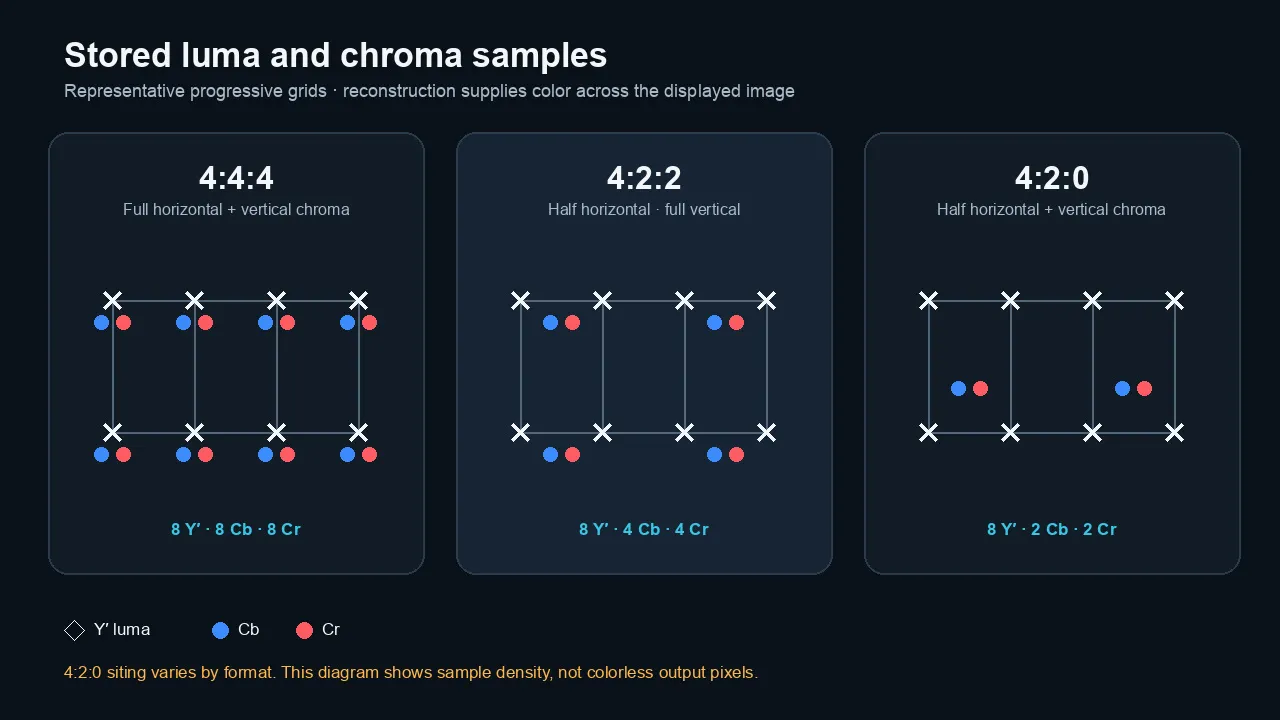
All three formats keep the same luma grid. The chroma grid is full resolution in 4:4:4, half horizontal resolution in 4:2:2, and half resolution in both directions in 4:2:0.
4:4:4: full chroma resolution
4:4:4 has no chroma downsampling.
The chroma planes have the same spatial dimensions as the luma plane.
This helps preserve:
- colored edges;
- fine graphics;
- saturated text;
- product labels;
- VFX mattes;
- secondary color selections;
- repeated compositing; and
- difficult green- or blue-screen edges.
It also carries more data.
4:4:4 does not mean uncompressed
This is one of the most common errors in chroma-subsampling guides.
4:4:4 describes sampling, not compression.
Apple ProRes 4444 is a compressed codec. It is designed to preserve full-resolution 4:4:4 color and support an alpha channel while using far less data than uncompressed 4:4:4 video.
Other 4:4:4 codecs can be lossy, visually lossless, mathematically lossless, or uncompressed.
You need the codec, profile, bit depth, and bitrate to understand the rest of the file.
What does 4:4:4:4 mean?
The fourth number refers to an alpha channel.
Alpha stores transparency or opacity.
ProRes 4444 and ProRes 4444 XQ can carry full-resolution color plus alpha, which makes them useful for:
- motion-graphics renders;
- lower thirds;
- keyed elements;
- titles with transparency;
- VFX plates; and
- intermediate files that must preserve an alpha channel.
A file can be 4:4:4 without alpha.
The extra fourth value appears when the format carries that additional channel.
4:2:2: the production sweet spot
4:2:2 halves horizontal chroma resolution but keeps full vertical chroma resolution.
Each chroma plane contains twice as many samples as a 4:2:0 chroma plane at the same frame size.
That extra color detail can improve:
- chroma-key edges;
- fine colored text;
- secondary color corrections;
- saturated product colors;
- skin isolation;
- graphics; and
- multigeneration post-production.
Adobe describes 4:2:2 as carrying twice the color detail of 4:2:0 and points to grading, keying, and text as practical benefits.
For many professional camera workflows, 10-bit 4:2:2 is the useful middle ground.
It preserves more spatial color detail than 4:2:0 without the storage and bandwidth cost of 4:4:4.
ProRes 422 is not one quality level
The ProRes 422 family includes several data-rate levels.
They share the 4:2:2 sampling structure, but they do not share the same compression ratio or target data rate.
That means:
- ProRes 422 Proxy is not equal to ProRes 422 HQ;
- the word 422 does not tell you the complete quality level; and
- a high-quality source does not stay high quality if you choose an overly compressed profile.
Sampling is one line in the specification, not the whole specification.
4:2:2 is not automatically hard to edit
Editing performance depends on the complete codec and the hardware decoder.
A frame-independent codec such as ProRes 422 can be easy to scrub even at a high data rate.
A long-GOP H.264 or HEVC 4:2:2 file may be more demanding on a system without matching hardware acceleration.
Do not blame chroma sampling alone for slow playback.
4:2:0: the delivery standard
4:2:0 halves chroma resolution horizontally and vertically.
For each 2×2 group of luma samples, the stored chroma planes contain one Cb and one Cr sample.
This is efficient.
It is widely used for:
- H.264 delivery;
- HEVC delivery;
- streaming;
- phones;
- consumer cameras;
- web video;
- video calls; and
- many hardware playback systems.
YouTube’s current H.264 upload recommendations specify 4:2:0 chroma subsampling.
That does not mean 4:2:0 is the best format for every stage before upload.
It means 4:2:0 is a practical delivery target with broad compatibility.
4:2:0 is not “bad color”
Most natural footage survives 4:2:0 surprisingly well.
Faces, landscapes, interviews, and ordinary motion often contain enough luma structure and gradual color variation that the loss is hard to spot at normal size.
The weakness appears when color position is doing important work.
Examples include:
- one-pixel colored lines;
- saturated red text;
- blue interface elements;
- hair against a green screen;
- a bright logo on a dark background;
- animated vector graphics;
- sharp product packaging; and
- repeated rescaling and re-encoding.
A clean 10-bit 4:2:0 camera file can still be a very good source.
It simply preserves less spatial chroma detail than 4:2:2 or 4:4:4.
Where the difference becomes visible
The difference is not equally visible in every image.
1. Green screen and blue screen
A chroma key uses color to separate the foreground from the background.
When chroma resolution is reduced, fine color boundaries contain less original spatial information.
That can make it harder to isolate:
- hair;
- motion blur;
- translucent fabric;
- reflective edges;
- smoke;
- glass; and
- small foreground detail.
4:2:0 footage can still produce a usable key.
Good lighting, clean exposure, low noise, sharp focus, sufficient subject separation, and a controlled shutter can matter more than one specification.
For demanding key work, 10-bit 4:2:2 is a stronger starting point. Full-chroma or RAW capture can provide more room when the production supports it.
2. Software tutorials and screen recordings
Screen content is a hard case.
Small text and interface lines often use saturated colors with abrupt edges.
The luma channel may remain crisp while the chroma edge spreads across neighboring pixels. The result can look like:
- colored halos;
- soft red or blue text;
- smeared icons;
- fuzzy code;
- unstable thin lines; or
- weak separation between neighboring colors.
Capture screen content in RGB or full chroma when practical.
Then design for the final 4:2:0 delivery path:
- use larger text;
- increase luma contrast;
- avoid tiny saturated text on another saturated color;
- capture at the native display resolution;
- scale once; and
- review the encoded delivery file at 100 percent.
3. Saturated graphics and logos
Subsampling is easiest to see where two strong colors meet without much brightness difference.
Red against blue is a classic stress case.
The shapes may retain their luma edge while the color boundary softens.
A black-and-white version of the same design can look sharper because the edge is carried mainly in luma.
4. Secondary color work
A broad primary correction can look fine on 4:2:0 footage.
Narrow selections are less forgiving.
If you isolate one hue, pull a detailed HSL key, or make a strong local correction, coarse chroma sampling can reveal:
- jagged masks;
- noisy boundaries;
- color contamination;
- block-shaped selections; and
- less stable tracking.
Higher chroma resolution gives the tool more original color-position data.
Bit depth and noise still matter.
5. Motion graphics and repeated generations
Graphics can move through several stages:
- rendered from After Effects or Motion;
- imported into an editor;
- scaled or repositioned;
- rendered into a master;
- encoded for delivery; and
- re-encoded by a platform.
Starting with full chroma does not prevent all loss.
It gives the pipeline a cleaner source before those conversions.
For graphics with transparency, ProRes 4444 is a common intermediate because it can preserve full chroma and alpha.
6. Natural camera footage
This is where lower chroma sampling is least dramatic.
The image contains texture, gradients, motion, lens softness, noise, and complex luma detail.
At a normal viewing distance, the difference between a strong 4:2:0 file and a strong 4:2:2 file may be subtle.
That does not make the specifications meaningless.
It means content and workflow determine whether the extra chroma samples earn their cost.
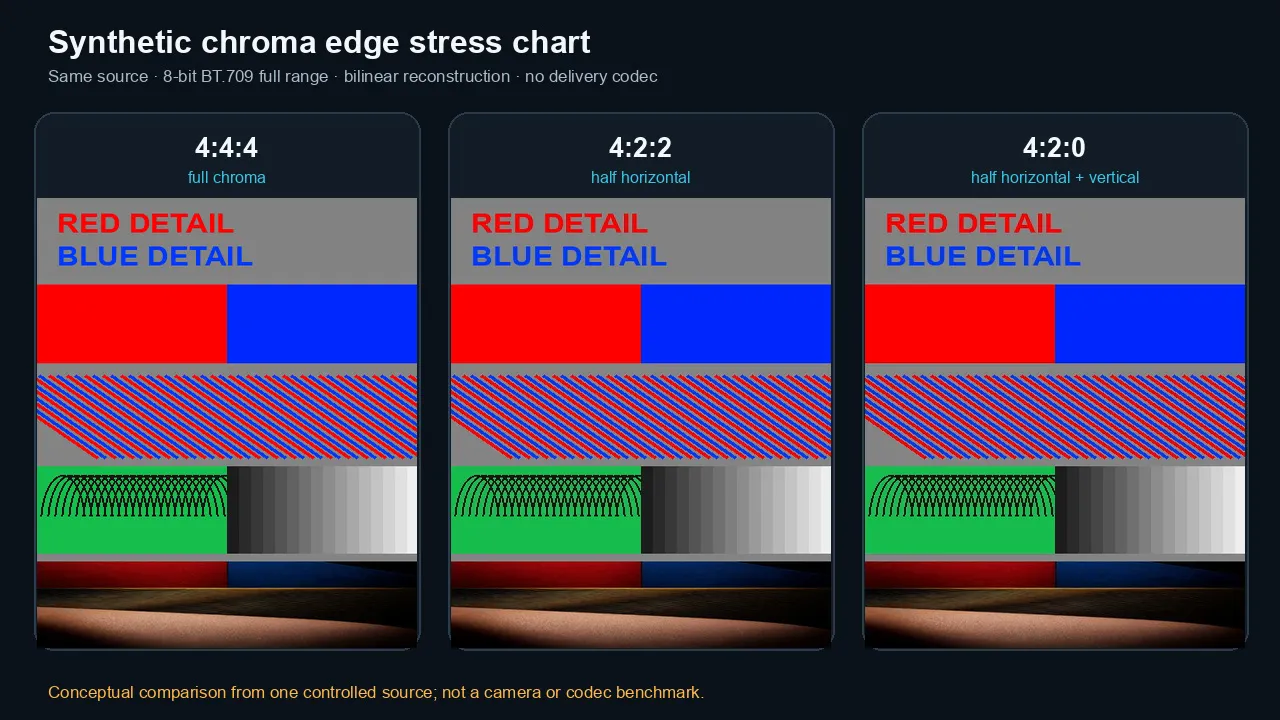
Fine saturated edges reveal chroma subsampling more readily than most natural footage. This synthetic chart uses one documented conversion and is not a camera or codec benchmark.
Chroma subsampling vs bit depth
Chroma subsampling and bit depth solve different problems.
Chroma subsampling controls spatial color resolution.
Bit depth controls how many code values each stored sample can represent.
An 8-bit channel has 256 possible code values.
A 10-bit channel has 1,024.
That extra precision can help with:
- smooth gradients;
- Log footage;
- HDR;
- strong corrections;
- keying;
- skies;
- shadows; and
- reducing visible banding.
10-bit 4:2:0 vs 8-bit 4:2:2
There is no universal winner.
10-bit 4:2:0 stores more tonal precision but less spatial chroma detail.
8-bit 4:2:2 stores more spatial chroma detail but fewer code values per sample.
The better choice depends on what will stress the image.
| Workflow pressure | More useful property |
|---|---|
| Smooth gradients and heavy tonal changes | Higher bit depth |
| Fine chroma-key edges | Higher chroma resolution and bit depth |
| Small colored text and UI | Higher chroma resolution |
| Log capture and strong grading | Higher bit depth, ideally with 4:2:2 |
| General web delivery | Platform-compatible 4:2:0 |
| Motion graphics and compositing | 4:4:4, often at high bit depth |
| HDR mastering | High bit depth is essential; sampling depends on workflow |
For serious acquisition, 10-bit 4:2:2 combines both advantages at a practical data level.
Do not treat that phrase as a guarantee of image quality. Sensor performance, processing, codec, bitrate, exposure, noise, and lens detail still matter.
4:4:4 does not mean 12-bit
Sampling and bit depth are independent.
A file can be:
- 8-bit 4:4:4;
- 10-bit 4:4:4;
- 12-bit 4:4:4;
- 10-bit 4:2:2;
- 12-bit 4:2:2;
- 8-bit 4:2:0; or
- 10-bit 4:2:0.
The format must state both properties.
Chroma subsampling vs codec, bitrate, and gamut
A file’s label can include several independent choices.
| Property | What it controls |
|---|---|
| Chroma sampling | Spatial resolution of color-difference channels |
| Bit depth | Number of code values per stored sample |
| Codec | How the image is represented and compressed |
| Bitrate | Amount of encoded data over time |
| Frame size | Number of luma pixel positions |
| Frame rate | Number of frames per second |
| Color primaries/gamut | Range and definition of reproducible colors |
| Transfer function | Relationship between encoded values and light |
| Range | Full/data range versus video/legal range |
| RAW status | Whether sensor data is retained before normal image processing |
A higher bitrate does not restore missing chroma
A high-bitrate 4:2:0 encode can preserve the 4:2:0 signal very well.
It still does not contain the original chroma samples that were removed before or during conversion to 4:2:0.
Likewise, converting a 4:2:0 file to ProRes 422 can prevent another heavily compressed delivery generation.
It does not turn the source into native 4:2:2 capture.
4:4:4 is not always better than 4:2:2
A low-quality 4:4:4 encode can look worse than a well-encoded 4:2:2 file.
If the source was already 4:2:0, exporting 4:4:4 cannot recreate the missing chroma.
The final image depends on the full chain.
Color gamut is separate
4:4:4 does not mean wider color gamut.
A 4:2:0 file can be Rec. 709, Display P3, or Rec. 2020.
A 4:4:4 file can use those spaces too.
Sampling changes the spatial resolution of chroma. It does not define the gamut.
Full range is separate
4:4:4 does not mean full range.
4:2:0 does not mean limited range.
Range tells the system how code values map to black, white, and headroom. Chroma sampling tells it how often color-difference samples are stored across the image.
A wrong range interpretation can make an image look washed out or crushed.
That is a different problem.
RAW is not 4:4:4
RAW and chroma subsampling describe different stages.
Most single-sensor cameras use a color filter array.
A Bayer-pattern sensor records one primary color value at each photosite location. Software or camera processing later reconstructs a conventional RGB image through demosaicing.
Apple’s ProRes RAW documentation makes this distinction clear: ProRes RAW encodes Bayer-pattern sensor data, while conventional ProRes encodes processed image pixels.
A RAW file is not simply “better 4:4:4.”
It may preserve:
- sensor values;
- white-balance flexibility;
- demosaicing choices;
- highlight handling;
- camera metadata; and
- more control over image processing.
After RAW development, the image can be converted into RGB or Y′CbCr at a chosen bit depth and chroma format.
Treat RAW as its own workflow decision.
Which format should you choose?
Choose by stage, not by one universal ranking.
Capture
Use 10-bit 4:2:2 when:
- the camera supports it without unacceptable compromises;
- you expect serious color work;
- you are shooting green screen;
- product colors matter;
- the footage may pass through several post stages; or
- the storage and workflow can support it.
Use 10-bit 4:2:0 when:
- the camera’s 4:2:2 mode imposes a major crop, frame-rate limit, heat limit, or storage burden;
- the project is natural live-action footage;
- the grade will be controlled;
- no difficult key is planned; and
- portability matters.
Use 4:4:4 or RAW when:
- the key or composite is demanding;
- the production needs full-chroma plates;
- VFX will stretch the image;
- the camera and recorder support a reliable workflow; and
- the added storage and processing are justified.
Editing
Keep the original media when it performs well.
Transcode to a high-quality intraframe intermediate when:
- long-GOP media is slow;
- the system lacks hardware support;
- collaboration needs a stable common format;
- the source is fragile;
- you expect many render generations; or
- the timeline combines several camera formats.
A ProRes 422 intermediate can be useful even when the source is 4:2:0.
The benefit is editing stability and avoiding another weak delivery encode. It is not recovery of missing chroma detail.
Mastering
For most live-action masters, a high-quality 4:2:2 intermediate is a sensible default.
Use 4:4:4 or 4:4:4:4 when:
- the source and pipeline contain full chroma;
- the master includes alpha;
- motion graphics need full color resolution;
- VFX exchange requires it; or
- a delivery specification calls for it.
Do not make a 4:4:4 master merely because the number is larger.
Match the master to the source, effects, downstream use, and storage budget.
Delivery
Follow the destination.
Web platforms, phones, consumer playback, and streaming systems commonly favor 4:2:0 for compatibility and efficiency.
YouTube’s current recommended H.264 upload settings specify:
- progressive scan;
- High Profile;
- variable bitrate;
- source frame rate; and
- 4:2:0 chroma subsampling.
A 4:2:2 camera original can still improve the work that happens before that delivery encode.
The final YouTube stream should not be expected to preserve the source’s 4:2:2 sampling.
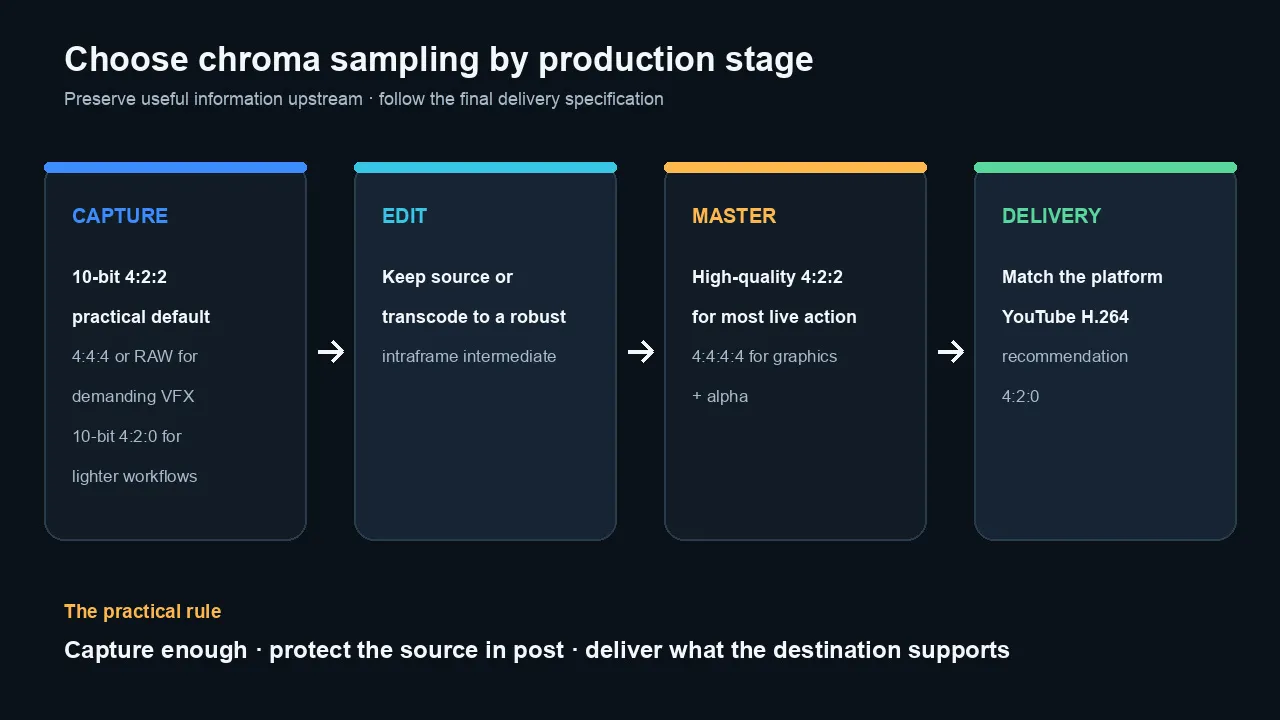
Choose chroma sampling by production stage. Preserve more information during capture and post, then follow the final delivery specification.
Practical recommendations by project
Interviews and ordinary corporate video
A clean 10-bit 4:2:0 source can work very well.
Choose 10-bit 4:2:2 when it is available without harming the rest of the camera setup. It gives color correction and skin isolation more room.
Lighting, exposure, white balance, and noise control remain more important than the difference between two otherwise weak files.
Green-screen production
Prefer 10-bit 4:2:2 or better.
Use 4:4:4 or RAW when the key must survive:
- fine hair;
- translucent material;
- heavy motion blur;
- reflective surfaces;
- high-end compositing; or
- large finishing changes.
Do not use the format as an excuse to accept an uneven screen.
A well-lit 4:2:2 key can beat a noisy, underexposed 4:4:4 key.
Software tutorials
Capture in RGB or 4:4:4 when practical.
Keep the screen at native resolution.
Use larger interface text and strong luma contrast.
Avoid tiny red or blue type on a similar-brightness background.
Export a clean master, then check the 4:2:0 delivery encode for colored edge softness.
YouTube videos
Do not obsess over uploading 4:4:4.
Preserve quality upstream:
- capture a strong source;
- edit at high internal precision;
- avoid unnecessary re-encodes;
- keep graphics clean;
- scale once;
- export at the source frame rate; and
- use the platform’s recommended delivery format.
For YouTube, current H.264 guidance specifies 4:2:0.
Motion graphics and titles
Use 4:4:4 when fine color edges must survive.
Use 4:4:4:4 when transparency is required.
ProRes 4444 is a common choice for exchanging motion graphics with alpha.
For the final web encode, inspect small colored details after conversion to 4:2:0.
Color grading
Higher chroma resolution helps with narrow color selections and edge detail.
Higher bit depth helps with gradients and strong tonal moves.
For serious camera work, 10-bit 4:2:2 is a strong practical target when the equipment supports it.
A clean 10-bit 4:2:0 source can still grade well. Work within what it recorded rather than expecting a transcode to upgrade it.
Camera buying
Do not buy a camera because one line says 4:2:2.
Also check:
- bit depth;
- internal and external recording options;
- codec;
- bitrate;
- frame-rate restrictions;
- crop;
- rolling shutter;
- dynamic range;
- overheating;
- storage cost;
- autofocus;
- monitoring;
- time limits; and
- hardware decode support in your editor.
A camera with a good 10-bit 4:2:0 implementation can be a better tool than a camera with a compromised 4:2:2 mode.
How to check a file’s chroma format
Do not rely on the filename.
A .mov file can contain 4:2:0, 4:2:2, 4:4:4, RGB, or RAW media.
An .mp4 file can also contain several codec profiles and bit depths.
Use MediaInfo
MediaInfo often reports fields such as:
- Chroma subsampling
- Bit depth
- Color space
- Codec profile
- Color primaries
- Transfer characteristics
- Matrix coefficients
- Range
Read the full tree or text view.
A simplified app view may hide the pixel format.
For a broader export workflow, inspect and build repeatable export presets.
Use ffprobe
Run:
ffprobe -v error \

  -select_streams v:0 \

  -show_entries stream=codec_name,profile,pix_fmt,bits_per_raw_sample,color_space,color_transfer,color_primaries,color_range \

  -of default=noprint_wrappers=1 \

  "input.mov"
Common pixel-format labels include:
| ffprobe pixel format | Meaning |
|---|---|
yuv420p | 8-bit planar 4:2:0 |
yuv420p10le | 10-bit planar 4:2:0 |
yuv422p | 8-bit planar 4:2:2 |
yuv422p10le | 10-bit planar 4:2:2 |
yuv444p | 8-bit planar 4:4:4 |
yuv444p10le | 10-bit planar 4:4:4 |
gbrp | Planar RGB |
gbrp10le | 10-bit planar RGB |
Metadata can be incomplete.
Some formats carry the relevant information in the codec profile rather than a populated bits_per_raw_sample field.
Check more than one field when the result looks inconsistent.
Your timeline may use higher internal precision
An NLE can process effects, transforms, and color at a higher internal precision than the source file.
That helps prevent new rounding damage.
It does not restore chroma samples that the camera never stored.
How to run a fair comparison
A fair chroma test changes one property at a time.
Use a controlled chart
Include:
- small saturated red text;
- blue text on gray;
- red and blue one-pixel lines;
- diagonal colored lines;
- a smooth skin-tone patch;
- a green-screen hair edge;
- a natural photograph; and
- a neutral grayscale area.
Keep these constant
- frame size;
- frame rate;
- bit depth;
- color matrix;
- range;
- transfer function;
- scaling;
- codec quality; and
- player.
Change only the chroma format.
Inspect at two sizes
First inspect at normal viewing size.
Then inspect a 200–400 percent crop.
The enlarged view reveals what the format changed. The normal view reveals whether the change matters to the audience.
Do not compare unrelated presets
A low-bitrate H.264 4:2:0 file and a high-bitrate ProRes 4444 file differ in far more than chroma sampling.
That comparison can show a quality difference.
It cannot tell you how much of the difference came from subsampling.
Document the reconstruction method
A technical demonstration should state:
- how RGB was converted to Y′CbCr;
- which color matrix was used;
- how chroma was filtered;
- where chroma samples were positioned;
- how chroma was upsampled;
- whether a codec was involved; and
- whether the result was scaled.
The notation alone does not define every one of those choices.
Common chroma-subsampling myths
Myth 1: 4:4:4 is uncompressed
No.
4:4:4 means the chroma planes retain full spatial resolution.
The file can still use lossy compression, visually lossless compression, mathematical lossless compression, or no compression.
Myth 2: 4:2:0 removes color from half the displayed rows
No.
It stores lower-resolution chroma planes. The decoder reconstructs chroma for the full output image.
Every displayed pixel receives a color value.
Myth 3: Converting 4:2:0 to 4:2:2 improves the source
It changes the storage format.
It cannot recover original chroma samples that are no longer present.
The transcode may still be useful as a robust editing intermediate.
Myth 4: 4:2:2 always looks visibly better
Not on every shot.
Natural footage may show little visible difference at normal viewing size.
The advantage becomes clearer in keys, graphics, saturated edges, small text, and aggressive secondary corrections.
Myth 5: 4:4:4 means wider gamut or higher bit depth
No.
Sampling, gamut, and bit depth are independent specifications.
Myth 6: RAW is the same as 4:4:4
No.
RAW stores sensor-oriented data before normal demosaicing and image processing.
4:4:4 describes full chroma resolution in a conventional processed image representation.
Myth 7: A bigger chroma number fixes a weak camera image
No.
Chroma sampling cannot fix clipped exposure, poor focus, motion blur, noise, oversharpening, weak optics, or bad processing.
The practical bottom line
Use the least destructive format that makes sense for the stage.
Capture more than you need when the project will use it.
Edit and master in a format that protects the source.
Deliver what the platform supports.
For many professional camera projects, 10-bit 4:2:2 is the strongest practical balance.
For demanding VFX, motion graphics, alpha, and keys, 4:4:4 or RAW may be justified.
For finished streaming and web delivery, 4:2:0 is normal.
The numbers matter most when you know where in the pipeline they apply.
Frequently asked questions
What is chroma subsampling?
Chroma subsampling reduces the spatial resolution of the color-difference channels while keeping the luma channel at full resolution. It lowers data requirements with a smaller visible penalty on many kinds of natural video.
Is 4:2:2 better than 4:2:0?
4:2:2 preserves twice as many chroma samples as 4:2:0 at the same frame size. It is a stronger source for keying, fine colored detail, secondary grading, and post-production. The difference may be subtle in ordinary natural footage.
Can you see the difference between 4:2:0 and 4:2:2?
Yes, but it depends on the content and viewing conditions. Small colored text, saturated edges, green-screen detail, graphics, and enlarged crops reveal the difference more clearly than most normal camera footage.
Is 10-bit 4:2:0 better than 8-bit 4:2:2?
Neither wins every comparison. Ten-bit 4:2:0 has more tonal precision, while 8-bit 4:2:2 has more spatial chroma detail. For serious work, 10-bit 4:2:2 combines both benefits when available.
Does YouTube use 4:2:0?
YouTube’s current recommended H.264 upload settings specify 4:2:0 chroma subsampling. YouTube re-encodes uploads, so a higher-chroma source should not be expected to remain 4:2:2 or 4:4:4 in the delivered stream.
Can I convert 4:2:0 footage to 4:2:2?
Yes, but the conversion only upsamples the existing chroma. It does not restore missing original detail. The new 4:2:2 file can still be useful as an editing intermediate that avoids another fragile delivery encode.
Is ProRes 422 always 10-bit?
The Apple ProRes 422 family is designed for 10-bit 4:2:2 video. Encoding an 8-bit source into ProRes 422 does not create original tonal information that was never captured.
Is ProRes 4444 lossless?
ProRes 4444 is compressed and designed for very high visual fidelity and strong multigeneration performance. Its alpha channel can be mathematically lossless. The RGB or Y′CbCr image channels are not described as general-purpose mathematically lossless image compression.
Does chroma subsampling change color gamut?
No. Chroma subsampling changes spatial color resolution. Color gamut is defined separately by the color primaries and color-management system.
Is 4:2:0 enough for green screen?
It can work when the screen is clean, the subject is well lit, focus is sharp, and noise is low. For demanding hair, motion blur, transparency, or high-end compositing, 10-bit 4:2:2 or better is a safer source.
Official sources checked
- Microsoft Learn: Recommended 8-Bit YUV Formats for Video Rendering — definitions of 4:4:4, 4:2:2, and 4:2:0; sample relationships; Y, U/Cb, and V/Cr
- Apple Developer: Converting Chroma-Subsampled Images — 4:2:0 plane dimensions and one Cb/Cr sample per four luma samples
- Apple ProRes White Paper — ProRes 422, ProRes 4444, 4:4:4:4, alpha, data rates, and frame-independent editing
- Adobe Media Encoder Feature Summary, June 2025 Release — Adobe’s current description of 4:2:2 color detail, grading, keying, text, and GPU playback support
- YouTube Recommended Upload Encoding Settings — current H.264 4:2:0 recommendation, progressive scan, VBR, and source frame rate
- Apple ProRes RAW White Paper — Bayer sensor data, demosaicing, and the distinction between RAW and conventional processed video
- NVIDIA NVDEC Video Decoder API Programming Guide — current codec/profile support and evidence that hardware support varies by format/profile
- ITU-R BT.601 — in-force studio digital-video encoding recommendation associated with standard 4:2:2 component video

About the Author
Joseph Nilo has been working professionally in all aspects of audio and video production for over twenty years. His day-to-day work finds him working as a video editor, 2D and 3D motion graphics designer, voiceover artist and audio engineer, and colorist for corporate projects and feature films.