
Premiere Elements is the easier way to finish uncomplicated personal and creator videos. Premiere Pro is the better system for professional control, repeatable workflows, collaboration, and growth.
This comparison uses Adobe's U.S. product and plan pages checked August 1, 2026. The prices are useful for understanding the model, but the better purchase depends on how often you edit, how complex the work becomes, and whether the project must connect to other Adobe apps.
Quick answer
| Choose Elements | You want guided editing, family or hobby projects, straightforward social videos, and a three-year license instead of a continuing subscription. |
|---|---|
| Choose Pro | You need deep timeline control, professional formats, desktop-and-iPhone continuity, Frame.io, Express Premium, plug-ins, and room for the workflow to grow. |
| Cost model | Elements uses a three-year term license; Premiere Pro uses a subscription. Neither should be described as a lifetime purchase. |
| My rule | Buy for the hardest recurring project you genuinely expect—not the easiest first project or a feature you may never use. |
This page may include affiliate links.
I only recommend software I would seriously evaluate for real creator or production workflows.
⭐⭐⭐⭐⭐
I pay for Adobe Creative Cloud and have used it every day in my 20-year career as a video editor, producer, and colorist.
Use the Adobe link below to check the current Creative Cloud offer. It can support this site and helps me keep these guides updated. Check current Adobe Creative Cloud offer.
Get Adobe Creative Cloud Now!The Core Difference Is the Editing System
Premiere Elements is designed to reduce decisions. Quick, Guided, and Advanced modes expose more control as the user becomes comfortable, while automation, templates, organization, and visual guidance keep common jobs approachable.
Premiere Pro is designed to preserve control. Its timeline, media management, effects, color, sound, graphics, captions, collaboration, and delivery tools support projects that may pass through several people and several Adobe applications.
That difference matters more than a checklist. A beginner can learn Premiere Pro, and an experienced editor can work quickly in Elements. The real question is whether the software should simplify a known set of tasks or remain flexible when the project becomes more demanding.

Premiere Elements 2026 keeps Quick, Guided, and Advanced modes visible so beginners can increase control without changing applications. Source: Adobe. Interface shown as documented by Adobe and may change.
Pricing, License Term, and Long-Term Cost
Adobe listed Premiere Elements 2026 at $99.99 in the U.S. for a three-year term license, with an eligible upgrade at $79.99. The Photoshop Elements and Premiere Elements bundle was listed at $149.99. The application expires after the three-year term, so this is not a perpetual license.
Adobe listed Premiere Pro at $22.99 per month on an annual plan billed monthly. That subscription included Premiere on desktop and iPhone, Adobe Express Premium, Frame.io, 100GB of cloud storage, and 25 monthly generative credits when checked.
Elements has the lower predictable entry cost for someone who wants one editor on one computer. Pro costs more over three years, but the comparison changes when mobile editing, review, plug-ins, professional codecs, other Adobe apps, or paid editing time have real value.
Do not compare a temporary introductory offer with a three-year Elements term. Use regular prices, the full commitment period, expected upgrade behavior, and any broader Creative Cloud plan you already need.
Timeline Depth, Color, Audio, Graphics, and Delivery
Elements covers the work most personal editors need: trimming, resizing, titles, music, effects, transitions, color adjustments, organization, templates, stop motion, slideshows, and straightforward exports.
Premiere Pro is better when the sequence grows dense. Track targeting, multicamera work, proxies, professional color control, Essential Sound, captions, advanced effects, interchange, team review, multiple delivery versions, and keyboard-driven editing all reduce friction on larger jobs.
Pro also offers a more natural route into After Effects, Audition, Photoshop, and Frame.io. If the video needs custom motion graphics, detailed dialogue repair, layered graphics, or organized review, the value is in the connected workflow rather than one isolated feature.
Elements can absolutely produce a polished video. It becomes limiting when the editor repeatedly works around the interface, exports intermediate files between apps, or cannot reproduce the same setup across many projects.
What Premiere Elements 2026 Adds
The 2026 release adds 360-degree and VR editing, more text styles, freehand crop, Adobe Stock access, color fonts and emojis, delete-all-gaps control, new motion-title templates, and richer visual tooltips.
Those features fit the product's purpose. Freehand Crop makes reframing visible on the Program Monitor. Stock media can be browsed from the editor. Guided modes and tooltips reduce the amount of interface knowledge required before a user gets a result.
Automation also helps with trimming, resizing, music remixing, artistic effects, tagging, curation, and face recognition. These tools reduce repetitive work and help you finish the video.
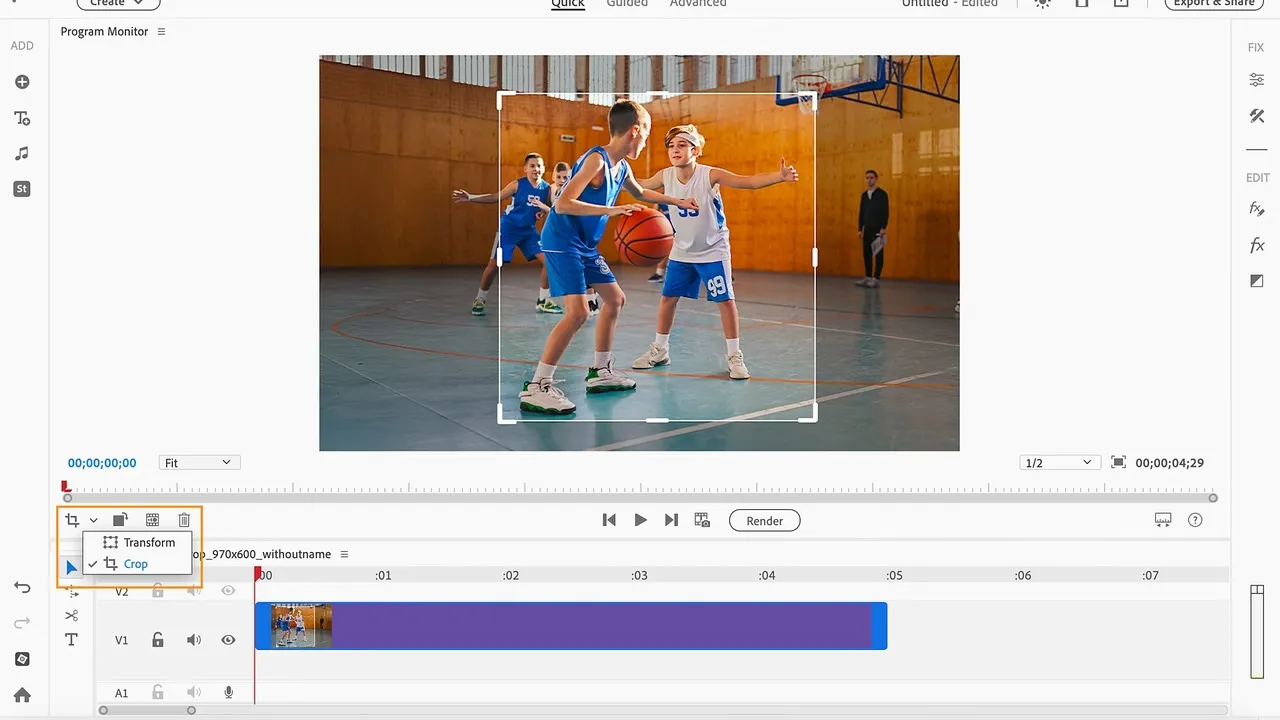
Freehand Crop is an example of Elements' direct, visible approach to common editing tasks. Source: Adobe. Interface shown as documented by Adobe and may change.
What the Premiere Pro Ecosystem Adds
The current Premiere plan spans desktop and iPhone, making it possible to begin with phone footage and continue in the full desktop editor. Frame.io supports review, Adobe Express Premium covers fast derivative graphics and social assets, and Creative Cloud services support fonts, libraries, and storage.
Premiere Pro is also the better investment in transferable editing knowledge. Timeline concepts, media organization, color, audio, captions, keyframes, and delivery practices carry into professional collaboration and other nonlinear editors.
If you already use After Effects or Audition, choosing Elements can create extra exports and project boundaries. If you never use those apps, never collaborate, and mainly make family or hobby videos, that ecosystem may be unnecessary overhead.
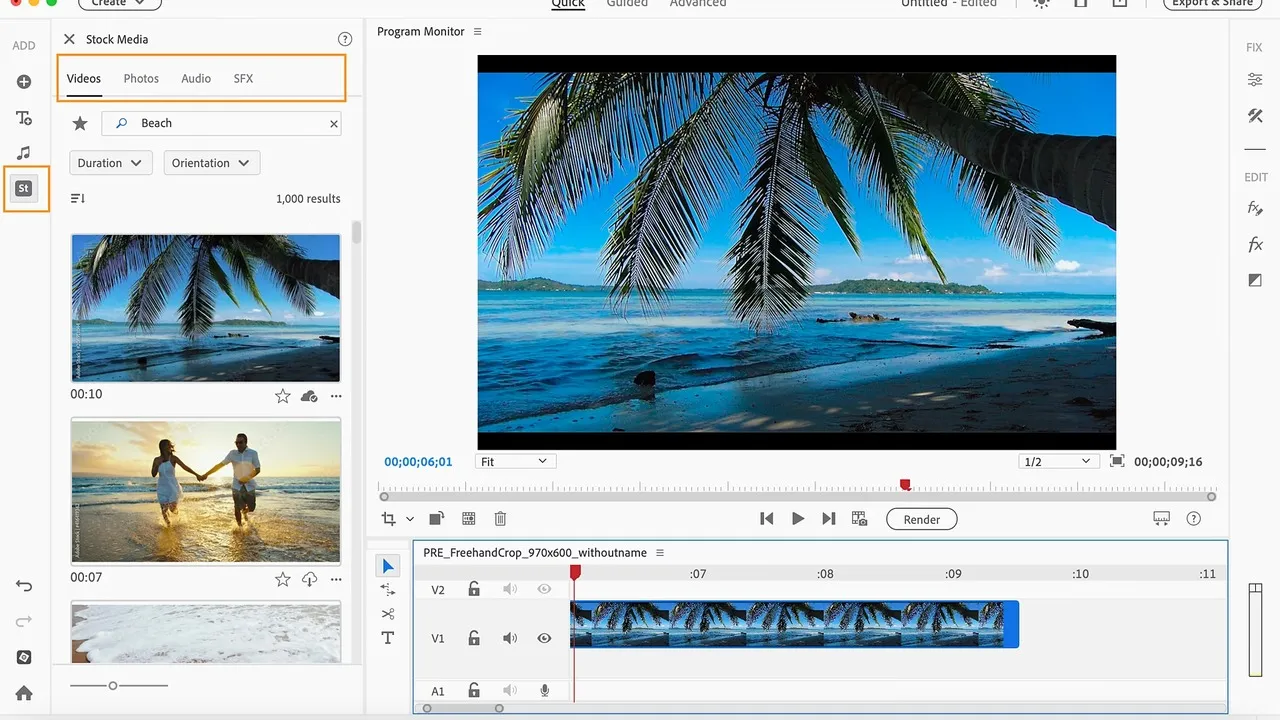
Premiere Elements 2026 can browse free Adobe Stock photos, video, audio, and sound effects from the editing workspace. Source: Adobe. Interface shown as documented by Adobe and may change.
Performance, Storage, and Project Scale
Elements is usually easier to operate because the projects and interface are simpler, but source media still determines performance. High-resolution long-GOP video, phone HDR, 360 footage, large photo collections, and limited disk space can challenge either application.
Premiere Pro provides more ways to manage demanding media, including proxy workflows and deeper sequence control. Those options require setup, but they are valuable when waiting for playback or exports costs money.
Before choosing, test the trial with footage from your real camera and phone. Import enough material to resemble a full project, add the graphics and audio you normally use, then export the actual delivery format.
Who Should Buy Premiere Elements?
Choose Elements for family videos, school projects, travel edits, slideshows, straightforward YouTube videos, hobby work, and creators who prefer visible guidance over a professional control surface.
It is especially sensible when editing happens occasionally and a subscription would sit unused for months. The three-year term should still be placed on a calendar so expiration is not a surprise.
Who Should Buy Premiere Pro?
Choose Pro for client work, a growing YouTube channel, repeated branded content, documentary or interview projects, complex audio, multiple cameras, motion graphics, team review, professional delivery, and any workflow that already uses other Adobe video tools.
It is also the safer choice for a beginner deliberately learning professional editing. My practical Premiere Pro beginner guide and first-project workflow show the learning path without pretending the interface is effortless.
A Practical Decision Framework
- List the next five projects. Use real durations, cameras, collaborators, graphics, audio, and delivery requirements.
- Mark the hardest repeated task. One unusual project should not determine the purchase, but a recurring limitation should.
- Price the full term. Compare the three-year Elements license with the regular Premiere subscription or the Creative Cloud plan you would actually keep.
- Count connected tools. Add the value of iPhone editing, Frame.io, Express, After Effects, Audition, Stock, fonts, and Libraries only if they solve real work.
- Test native footage. A trial with generic sample media does not reveal codec, HDR, storage, and performance friction.
- Choose the simpler adequate system. Elements wins when it finishes the work cleanly. Pro wins when control and continuity remove repeated compromises.
Read the existing Premiere Elements overview for a feature-focused introduction, or check the current Premiere Pro pricing guide before comparing plan commitments.
Official Sources
- Premiere Elements 2026 product and pricing page
- What's new in Premiere Elements 2026
- Adobe Premiere plan comparison
Frequently Asked Questions
What is the biggest difference between Premiere Pro and Premiere Elements?
Premiere Pro is a continuously updated professional editing system built for deep control, collaboration, broad format support, and connected Adobe services. Premiere Elements is a simpler desktop editor centered on automation, Guided Edits, templates, organization, and an easier learning curve.
Is Premiere Elements a subscription?
Adobe listed Premiere Elements 2026 as a three-year term license when this comparison was checked on August 1, 2026. It is not a perpetual license: the application expires at the end of the term unless you obtain a new license.
How much does Premiere Elements 2026 cost?
Adobe listed the U.S. price at $99.99 for a three-year term license and $79.99 for an eligible upgrade on August 1, 2026. Pricing, eligibility, taxes, promotions, and regional offers can change, so verify the checkout page before buying.
How much does Premiere Pro cost?
Adobe listed Premiere at $22.99 per month on an annual plan billed monthly in the U.S. on August 1, 2026. The plan includes Premiere on desktop and iPhone, Adobe Express Premium, Frame.io, cloud storage, and a monthly generative-credit allocation; current offers may change the displayed checkout price.
Is Premiere Elements good for YouTube?
It works well for straightforward talking-head videos, family projects, tutorials, slideshows, and social clips. Choose Premiere Pro when the channel needs repeatable professional templates, detailed color and sound, collaboration, multiple delivery versions, or a workflow shared with After Effects and Audition.
Can Premiere Elements open Premiere Pro projects?
Do not build a purchasing decision around cross-opening projects. The applications use different workflows and feature sets. Export finished media or test a representative project before committing to a migration.
Does Premiere Elements include AI tools?
Yes. Adobe emphasizes AI and automation for tasks such as trimming, resizing, music remixing, effects, organization, and guided creation. The focus is assisted editing rather than the broader professional and generative workflow found across Premiere Pro and Creative Cloud.
Which editor is better for a complete beginner?
Premiere Elements is easier when the goal is to finish uncomplicated videos quickly with guidance. Premiere Pro is the better long-term starting point when the beginner intends to become a professional editor, collaborate with teams, or use the wider Adobe video ecosystem.

About the Author
Joseph Nilo has been working professionally in all aspects of audio and video production for over twenty years. His day-to-day work finds him working as a video editor, 2D and 3D motion graphics designer, voiceover artist and audio engineer, and colorist for corporate projects and feature films.