
A phone recording starts in sync.
Twenty minutes later, the voice is a few frames ahead of the picture.
A screen recording plays correctly in one app but stutters in the editor. Captions land late. Multicam cuts slowly drift apart.
Variable frame rate often gets blamed. Sometimes it is the problem. Sometimes it is only the first clue.
The real issue is timing.
Quick answer
Constant frame rate, or CFR, uses evenly spaced video frames. A 30 fps CFR timeline expects one frame every 1/30 second.
Variable frame rate, or VFR, allows the time between frames to change. Each frame carries a presentation timestamp so playback can preserve real elapsed time.
VFR is common in phones, screen recorders, webcams, conferencing tools, and game capture because the device can reduce or vary frame output when the image is static, light is low, or system load changes.
A properly timestamped VFR file can play correctly.
Trouble begins when an editor, plug-in, caption tool, audio process, or export path treats those frames as evenly spaced—or when the capture itself contains broken timestamps, dropped frames, or clock drift.
For precise editorial work, convert troublesome VFR media to a known CFR format while preserving duration.
VFR vs CFR at a glance
| Property | Constant frame rate | Variable frame rate |
|---|---|---|
| Frame timing | Regular intervals | Frame durations may vary |
| Playback timing | Derived from fixed cadence | Preserved by timestamps |
| Editing compatibility | Most predictable | Depends on software and timestamps |
| Storage efficiency | Records at chosen cadence | Can reduce frames during static or constrained periods |
| Common sources | Cinema cameras, broadcast, conventional exports | Phones, screens, webcams, meetings, game capture |
| Best use | Editing, interchange, delivery specs | Adaptive capture and playback when supported |
What constant frame rate means
A CFR file uses a regular frame cadence.
At true 30 fps, each frame occupies 1/30 second.
At 30000/1001 fps—commonly called 29.97—each frame occupies 1001/30000 second.
The count and duration remain predictable throughout the recording.
That makes CFR a strong fit for:
- frame-accurate editing;
- broadcast and delivery specifications;
- multicam;
- external audio;
- captions;
- visual effects;
- timecode workflows;
- interchange; and
- long-form projects.
CFR does not guarantee perfect capture
A file can be labeled CFR and still contain problems.
The recorder may duplicate frames when the system cannot capture a new one. It may drop content while maintaining the nominal timeline. Audio may come from a drifting hardware clock.
CFR describes the output cadence.
It does not prove that every captured moment is unique or that every device clock remained locked.
What variable frame rate means
VFR stores frames with changing durations.
One frame might remain on screen for 33 milliseconds. Another may remain for 50. A later section may approach 60 fps.
The player follows presentation timestamps rather than assuming one fixed interval.
Average frame rate is not the full story
A one-minute VFR clip can average 29.97 fps without containing a steady 29.97 cadence.
The average tells you:
total decoded frames ÷ total duration
It does not reveal how individual frame durations vary.
A file inspector may report:
- minimum frame rate;
- maximum frame rate;
- average frame rate;
- nominal frame rate; and
- frame-rate mode.
Those fields are useful, but timestamps are the authoritative evidence.
Every frame still has a place in time
VFR does not mean random playback speed.
A correctly authored file tells the player when each frame should appear.
The clip can remain the correct real-time duration even though the number of frames captured per second changes.
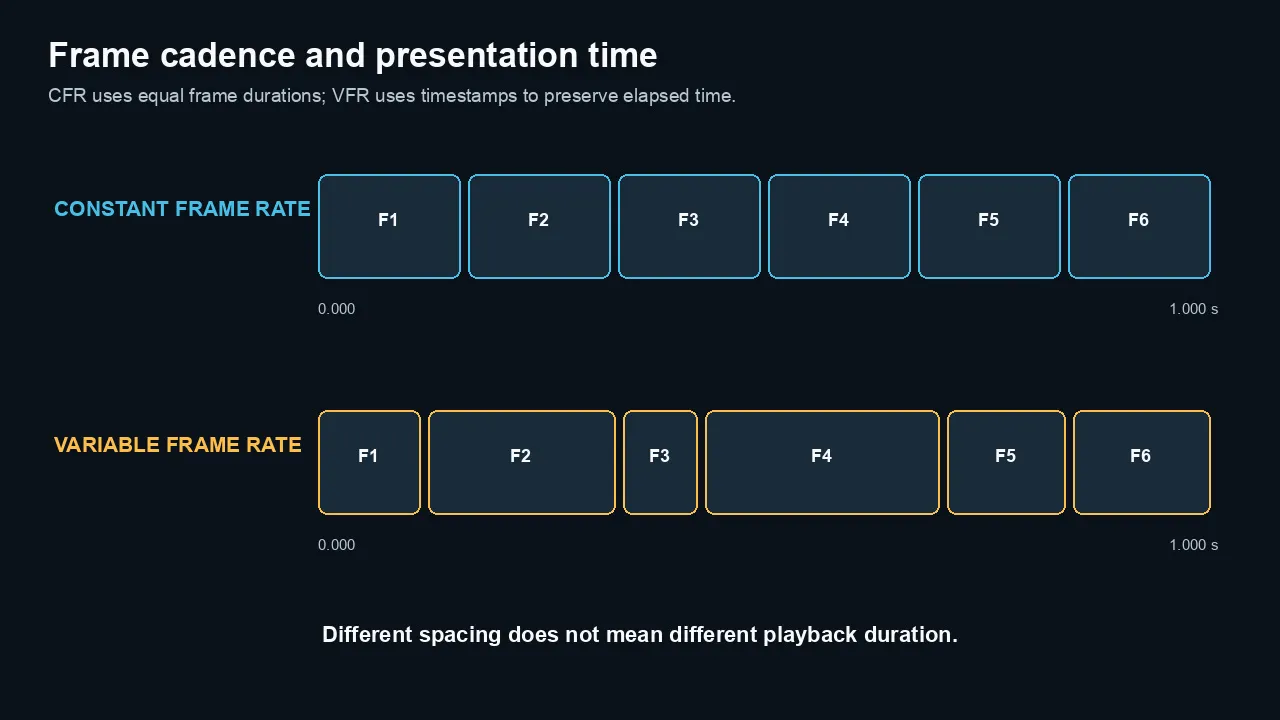
CFR uses equal frame durations. VFR can use unequal durations while timestamps preserve the same real playback time.
Why devices record VFR
VFR lets a recorder adapt.
Phones
A phone may change frame timing to balance:
- exposure in low light;
- heat;
- battery use;
- storage;
- stabilization;
- processing load; and
- camera features.
Do not assume every phone clip is VFR. Inspect the actual file.
Screen recording
A static desktop does not need the same temporal detail as a fast-scrolling page or game.
A screen recorder may emit fewer frames while nothing changes, then increase cadence during motion.
System load can also interrupt capture timing.
Webcams and meetings
Network conditions, camera drivers, CPU load, and conferencing software can create variable frame timing or timestamp irregularities.
The recorded file may combine:
- camera frames;
- screen shares;
- network-received media;
- local audio; and
- server-side processing.
Game capture
Game frame rate and recording frame rate are separate.
If the game or capture pipeline cannot sustain the target, the recorder may vary timestamps, repeat frames, or drop frames.
Security and low-bandwidth recording
Some systems deliberately reduce the frame count when a scene is static.
That can save storage without changing real elapsed time.
Why VFR can cause editing problems
NLE support has improved.
Many modern editors can import and play VFR media.
That does not make every downstream tool VFR-aware.
Frame-based tools expect a grid
Editing operations often rely on a regular sequence timebase.
Examples include:
- frame-number references;
- captions;
- markers;
- motion tracking;
- stabilization;
- multicam sync;
- audio waveform caching;
- frame interpolation;
- plug-ins;
- XML/AAF exchange; and
- external review notes.
A VFR clip must be mapped onto that regular project grid.
The application can repeat, skip, or resample frames while preserving duration.
Different applications may make different choices.
Seeking can become less predictable
Interframe compression already requires neighboring frames for decoding.
Variable timestamps add another timing layer.
The combination can produce:
- slow scrubbing;
- inaccurate thumbnail positions;
- delayed seeking;
- mismatched proxy timing;
- cache problems; or
- inconsistent frame references.
Transcription and caption tools
A transcript may be timed against media timestamps, a nominal frame rate, or an exported audio file.
If the handoff changes the timing model, captions can drift even when the words remain in order.
For long-form transcription, normalize the media path before final caption timing.
Why audio drifts out of sync
VFR is one possible cause.
It is not the only cause.
1. Software assumes CFR
If software ignores per-frame timestamps and lays the frames onto a nominal cadence, video duration can change slightly.
Audio continues at its original duration.
The difference accumulates.
2. Broken or imprecise timestamps
A capture may contain timestamp gaps, overlaps, discontinuities, or rounding errors.
The source player may conceal them better than the NLE.
3. Separate hardware clocks
A camera and external audio recorder do not share a perfect clock unless they are synchronized or genlocked appropriately.
Even two files labeled 48 kHz can drift because their physical clocks run slightly fast or slow.
That is not a VFR problem.
4. Wrong audio sample-rate interpretation
Audio recorded or interpreted at the wrong sample rate can change duration.
For video, 48 kHz is the standard practical target.
A 44.1 kHz source can be used, but it should be resampled correctly rather than relabeled.
5. Dropped capture frames
A recorder can lose video frames under load while audio continues.
Depending on timestamp handling, the file may remain real-time with repeated images or become shorter than the audio.
6. Speed interpretation
Changing a clip’s interpreted frame rate changes playback speed.
Interpreting a 30 fps clip as 24 fps produces slow motion. It does not perform a duration-preserving CFR conversion.
Do not use Interpret Footage as a general VFR repair.
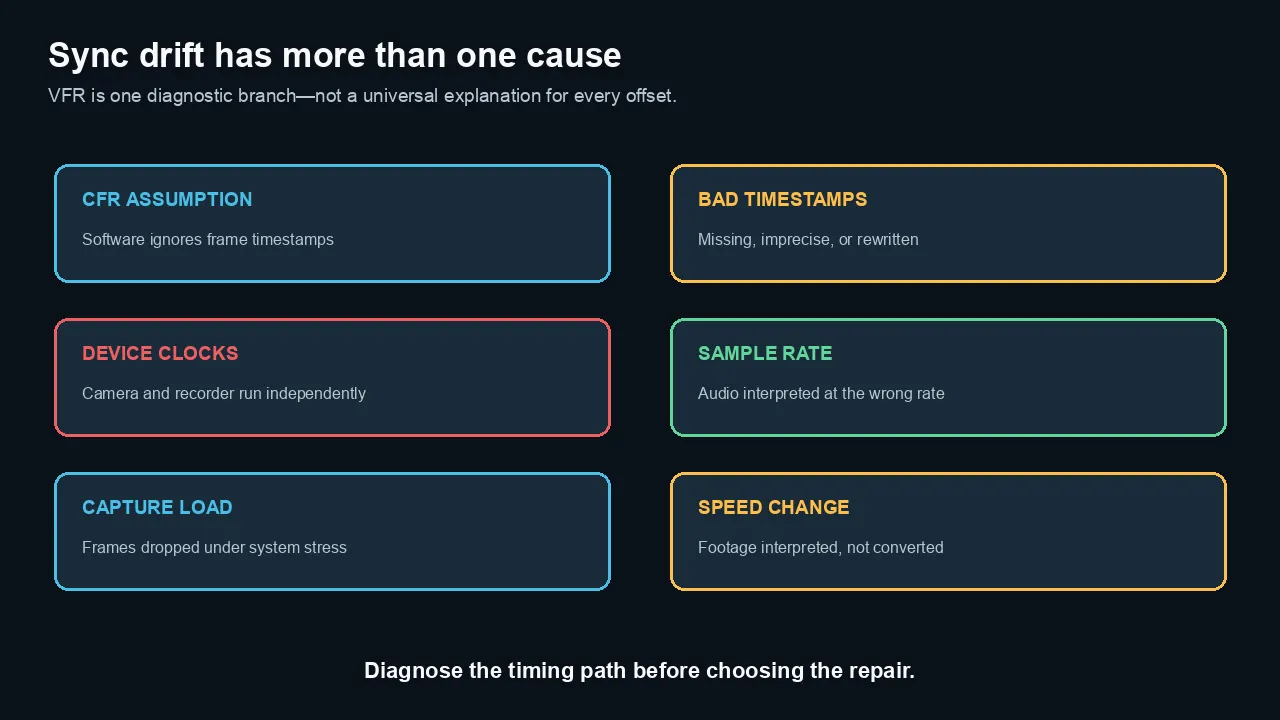
VFR is one branch of sync diagnosis. Bad timestamps, independent clocks, sample-rate errors, capture load, and speed changes can look similar.
How to tell whether a file is VFR
Use MediaInfo
Open the text or tree view.
Look for:
- Frame rate mode
- Frame rate
- Minimum frame rate
- Maximum frame rate
- Original frame rate
- Duration
A result of Variable is useful evidence.
A result of Constant does not rule out bad timestamps or repeated frames.
Use ffprobe summary fields
ffprobe -v error \

  -select_streams v:0 \

  -show_entries stream=codec_name,r_frame_rate,avg_frame_rate,time_base,duration,nb_frames \

  -of default=noprint_wrappers=1 \

  "input.mp4"
Compare r_frame_rate and avg_frame_rate, but do not treat a mismatch as definitive proof by itself.
Container and demuxer reporting can vary.
Inspect frame timestamps
ffprobe -v error \

  -select_streams v:0 \

  -show_entries frame=best_effort_timestamp_time,pkt_duration_time \

  -of csv=p=0 \

  "input.mp4"
If frame timestamps or durations vary, the stream uses variable timing or contains irregular timestamps.
For a long file, write the output to a text file and analyze the deltas programmatically.
Compare audio and video duration
ffprobe -v error \

  -show_entries stream=index,codec_type,time_base,start_time,duration \

  -of table \

  "input.mp4"
A small duration difference can be normal because streams may begin or end on different sample boundaries.
A growing sync error needs deeper analysis.
How to diagnose the real sync problem
Step 1: play the untouched source
Use the original capture application and one independent player.
Ask:
- Is sync already wrong?
- Does the error stay constant?
- Does it grow over time?
- Does it jump at one point?
A constant offset and progressive drift are different problems.
Step 2: identify the pattern
| Symptom | Likely area |
|---|---|
| Same offset from beginning to end | Slate/sync point, latency, edit placement |
| Drift grows steadily | Clock mismatch, wrong timing assumption, sample-rate issue |
| Sudden jump | Dropped frames, timestamp discontinuity, edit gap |
| Stutter without long-term drift | Frame duplication/drop, decode load, bad cadence |
| Only one application is wrong | Application interpretation or cache |
| Proxy differs from original | Proxy-generation or relink timing failure |
Step 3: inspect timestamps and sample rate
Record:
- frame-rate mode;
- average/minimum/maximum rate;
- time base;
- video and audio start times;
- stream durations;
- audio sample rate; and
- source clock arrangement.
Step 4: make a short CFR conversion
Convert a representative section to the intended project rate.
If sync and editing behavior improve, use the same controlled process on the full clip.
If drift remains, investigate audio clock and capture integrity.
How to convert VFR to CFR safely
The goal is usually:
preserve the clip’s real-time duration while placing video frames on a regular cadence
That requires duplication, dropping, or interpolation.
Duplication and dropping
Current FFmpeg documentation defines CFR mode as duplicating and dropping frames to achieve the requested constant rate.
This is the safest general conversion for documentary, meeting, phone, and screen recordings because it preserves real time without inventing blended motion.
Frame interpolation
Optical flow can create new frames.
Use it only when motion smoothness justifies the risk of artifacts around hands, hair, screens, cuts, and occlusions.
It is not required for normal VFR repair.
FFmpeg ProRes editing conversion
Choose the target rate based on the project. This example uses 30000/1001:
ffmpeg -i "input.mp4" \

  -map 0:v:0 -map 0:a? \

  -vf "fps=30000/1001" \

  -c:v prores_ks -profile:v 2 -pix_fmt yuv422p10le \

  -c:a pcm_s24le -ar 48000 \

  "output_CFR_2997_ProRes422.mov"
The fps filter creates the regular video cadence. Audio is resampled and stored at 48 kHz without being relabeled.
Encoding an 8-bit 4:2:0 source into 10-bit 4:2:2 ProRes does not restore missing source precision or chroma detail.
It creates a robust editing file.
FFmpeg H.264 conversion
ffmpeg -i "input.mp4" \

  -map 0:v:0 -map 0:a? \

  -vf "fps=30000/1001" \

  -c:v libx264 -preset slow -crf 17 -pix_fmt yuv420p \

  -c:a aac -b:a 320k -ar 48000 \

  -movflags +faststart \

  "output_CFR_2997.mp4"
Use a high-quality intermediate rather than H.264 when the file will undergo heavy editing or several renders.
Verify the result
Check:
- duration;
- sync at the start, middle, and end;
- frame-rate mode;
- repeated/dropped-frame cadence;
- audio sample rate;
- color tags;
- orientation metadata;
- resolution; and
- pixel format.
Do not delete the original.
Choosing the target frame rate
Use the rate that matches the final project and dominant source.
Common targets
- 24000/1001 for 23.976 projects
- 24 for true 24 fps workflows
- 25 for PAL-region and 50 Hz workflows
- 30000/1001 for 29.97 projects
- 30 for true 30 fps delivery
- 50 or 60000/1001 for high-frame-rate motion
- 60 for true 60 fps workflows
Do not casually replace 29.97 with 30 or 23.976 with 24.
The difference is small per second and significant over long durations.
Use the timeline rate, not the average VFR number
A VFR file might report 28.73 fps.
That is not a useful delivery standard.
If the recording was intended as a 30 fps source, convert to 29.97 or 30 based on the capture and project standard.
Preserve motion honestly
Converting a source that sometimes falls to 15 fps into 30 fps does not create 30 unique motion samples.
It produces a 30 fps timeline with repeated or generated frames.
Recommendations by source type
iPhone and phone video
Inspect every clip.
For short simple edits, modern NLEs may handle the originals well.
For long-form, external audio, multicam, or caption-critical work, normalize troublesome VFR sources first.
Screen recordings
Convert to the delivery or sequence rate before detailed zooms, callouts, captions, and sound sync.
Preserve native pixel dimensions and avoid unnecessary scaling in the transcode.
Zoom and meeting recordings
Test sync at the end of the longest file.
If the capture includes server-side composites or changing participants, expect timestamp irregularities and resolution changes.
Create a stable CFR mezzanine before editorial lock. Adobe Media Encoder is one practical way to manage repeatable transcodes.
OBS and game capture
Configure a sustainable recording rate and encoder load.
A nominal CFR setting cannot recover frames the system fails to capture.
Monitor dropped and skipped frames during recording.
External audio
VFR conversion will not fix independent recorder clock drift.
After the video is normalized, measure the remaining audio drift and apply a controlled time stretch if necessary.
Social downloads
Platform-downloaded files may have been remuxed or transcoded.
Treat them as delivery media. Normalize before precision editorial work.
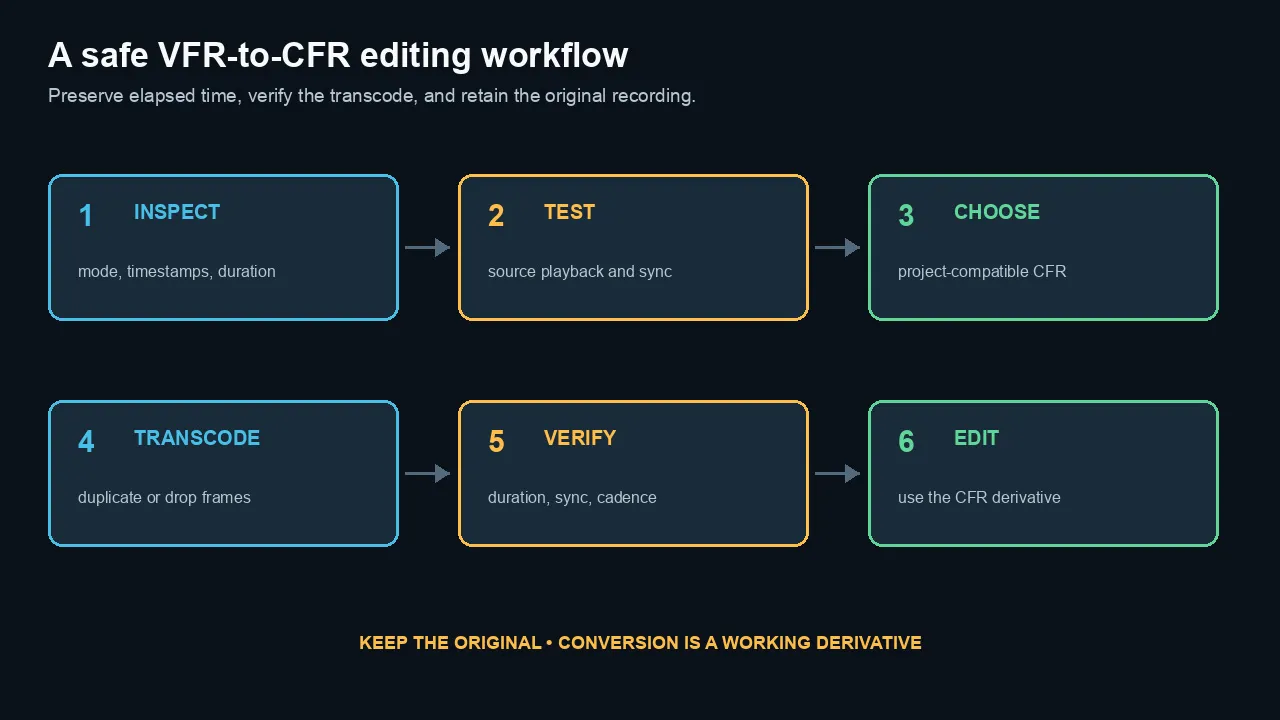
A safe conversion preserves elapsed time, verifies duration and sync, and keeps the original recording as the source of truth.
Common myths
Myth 1: VFR always causes audio drift
No.
A correctly timestamped VFR file can remain perfectly synchronized in compatible software.
Myth 2: The average frame rate tells me the real cadence
No.
It summarizes total frames over duration. It does not show individual frame intervals.
Myth 3: Interpret Footage converts VFR to CFR
No.
Frame-rate interpretation changes playback speed. A CFR conversion preserves duration by mapping frames to a regular timeline.
Myth 4: A file labeled CFR cannot contain dropped frames
No.
The recorder can repeat or omit visual moments while maintaining a constant output cadence.
Myth 5: Converting to 60 fps creates smooth 60 fps motion
No.
Without interpolation, it repeats existing frames. With interpolation, it invents frames and may create artifacts.
Myth 6: Audio drift is always a video problem
No.
Separate recorder clocks, sample-rate errors, and capture discontinuities can cause drift.
Myth 7: Transcoding automatically fixes every timestamp problem
No.
A controlled transcode can normalize timing, but broken source timestamps may require repair decisions and manual validation.
The practical bottom line
Use VFR for adaptive capture when the recording system and playback path support it.
Use CFR for predictable editing, interchange, captions, external audio, and delivery specifications.
When a phone or screen recording causes trouble, inspect timestamps first.
Convert to a known CFR editing format while preserving duration. Then verify sync at the beginning, middle, and end.
If drift remains, investigate clocks and audio timing rather than blaming frame rate alone.
Frequently asked questions
What is the difference between variable and constant frame rate?
CFR places frames at regular intervals. VFR allows frame durations to change and uses timestamps to preserve playback timing. CFR is more predictable for editing; VFR can be efficient for adaptive capture.
Does variable frame rate cause audio sync problems?
It can when software assumes a fixed cadence or timestamps are damaged. A correctly timestamped VFR file can remain in sync. Clock drift, sample-rate errors, and dropped capture frames can cause similar symptoms.
How do I know whether a video is VFR?
Check Frame rate mode in MediaInfo, compare average and nominal rates, and inspect per-frame timestamps with ffprobe. Timestamp deltas provide stronger evidence than one summary number.
Should I convert phone video to constant frame rate?
Convert it when the original causes stutter, sync drift, proxy mismatches, caption timing problems, or unreliable seeking. Short simple projects may work directly in a modern NLE.
What frame rate should I use when converting VFR?
Use the project’s intended standard rate and the source’s intended cadence—such as 23.976, 25, 29.97, or 59.94. Do not use an odd average VFR value as the sequence rate.
Does converting VFR to CFR reduce quality?
The timing conversion must duplicate, drop, or generate frames. The codec transcode can also introduce image loss. Use a high-quality intermediate and preserve the original.
Can HandBrake convert VFR to CFR?
HandBrake can create constant-frame-rate output when configured accordingly. Verify the resulting duration, frame-rate mode, sync, and color properties rather than relying only on the preset label.
Does Premiere Pro support variable frame rate?
Modern Premiere versions support many VFR files, but precise behavior still depends on the source timestamps, codec, plug-ins, proxies, and downstream workflow. Normalize media that remains unstable.
Why does my screen recording drift out of sync?
The recorder may use VFR, drop frames under load, write irregular timestamps, or capture audio from a different clock. Inspect both timing streams before choosing a repair.
Is 29.97 the same as 30 fps?
No. 29.97 is commonly 30000/1001 fps. The difference accumulates over time and matters for long-form timing and timecode.
Official sources checked
- FFmpeg documentation:
-fps_modeand-r
https://ffmpeg.org/ffmpeg.html
- Apple AVFoundation: nominal frame rate and minimum frame duration
https://developer.apple.com/documentation/avfoundation/avpartialasyncproperty/nominalframerate
- Adobe: Work with mixed frame rates
- Apple Final Cut Pro: conform frame sizes and rates
https://support.apple.com/en-ie/guide/final-cut-pro/ver3363b44e/mac
- MediaInfo documentation and current application behavior
https://mediaarea.net/en/MediaInfo/Support/Fields

About the Author
Joseph Nilo has been working professionally in all aspects of audio and video production for over twenty years. His day-to-day work finds him working as a video editor, 2D and 3D motion graphics designer, voiceover artist and audio engineer, and colorist for corporate projects and feature films.