
Twenty-four frames per second is called cinematic.
Thirty is called video.
Sixty is called smooth.
Those labels are useful shorthand. They are not complete answers.
Frame rate controls how often motion is sampled. The best choice depends on the subject, delivery, shutter, lighting, edit, and look.
Quick answer
Use 24 fps for narrative work, film-style motion, controlled interviews, and projects where conventional cinematic cadence matters.
Use 30 fps for tutorials, corporate video, presentations, interviews, live content, and general web work that benefits from smoother motion and simple delivery.
Use 60 fps for sports, gameplay, fast action, live events, or footage that may become half-speed slow motion in a 30 fps timeline.
For slow motion in a 24 fps project, 60 fps can conform to 40% speed.
Do not choose 60 solely because the number is larger.
It requires more frames, more light at a comparable shutter angle, more data, and a workflow that preserves the intended cadence.
At a glance
| Frame rate | Motion character | Strong fit | Main tradeoff |
|---|---|---|---|
| 24/23.976 | Lower temporal sampling, familiar cinema cadence | Narrative, controlled interviews, film-style work | Pan judder and less motion detail |
| 30/29.97 | Balanced, smoother presentation | Tutorials, corporate, web, live presentation | Less traditional cinema cadence |
| 60/59.94 | High motion clarity and immediacy | Sports, gameplay, action, HFR delivery, slow motion | More light, data, and processing |
What frame rate changes
Frame rate is the number of video frames presented per second.
It changes:
- motion sampling;
- temporal resolution;
- cadence;
- potential motion blur per frame;
- slow-motion options;
- compression demand;
- data rate requirements;
- exposure time at a chosen shutter angle; and
- compatibility with the timeline and destination.
Frame rate does not change spatial resolution
A 4K24 frame and a 4K60 frame can have the same pixel dimensions.
The 60 fps file contains more temporal samples.
Frame rate is not refresh rate
A display refresh rate describes how often the display updates.
A 60 Hz display can show 24 fps video by repeating frames in an uneven pattern unless the display changes refresh mode or uses another cadence.
A 120 Hz display can repeat each 24 fps frame five times evenly.
Display processing, motion interpolation, and variable refresh can change the result.
Capture, timeline, and delivery are separate
A camera may capture 60 fps.
The timeline may be 24 fps.
The delivery may be 24 fps with the source slowed to 40%.
Or the timeline and delivery may remain 60 fps in real time.
Record all three decisions. Then confirm whether the source is variable or constant frame rate; that is a separate timing property.
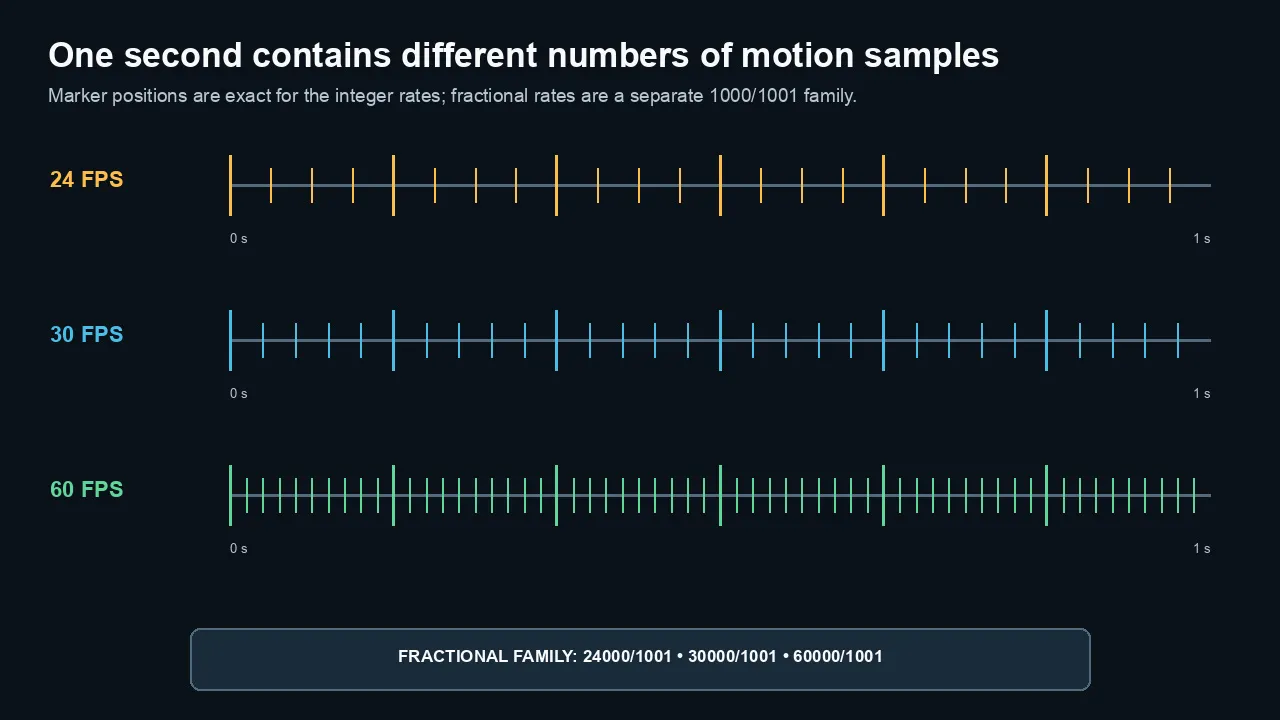
Within one second, 24, 30, and 60 fps create different sample densities. The 23.976, 29.97, and 59.94 rates belong to a separate 1000/1001 family.
24 fps and 23.976
Twenty-four frames per second became the conventional sound-film rate and remains central to cinema-style production.
Its motion character comes from a combination of:
- frame cadence;
- shutter exposure;
- camera movement;
- lens choice;
- blocking;
- lighting;
- depth of field;
- grading; and
- display behavior.
Why 24 can feel cinematic
Viewers have decades of association between 24 fps and narrative film.
The lower temporal sampling leaves more motion difference between frames than 30 or 60 fps.
With an appropriate shutter, motion blur connects those samples.
Where 24 struggles
- Fast horizontal pans
- Handheld micro-jitter
- Sports tracking
- Rapid UI motion
- Scrolling text
- Gameplay
- High-detail motion on bright displays
Judder can become more obvious on large, bright, high-refresh displays.
23.976 is not 24
The common fractional rate is:
24000/1001 ≈ 23.976023976 fps
It belongs to the 59.94/29.97 broadcast-derived family.
True 24 and 23.976 are close but not interchangeable in long programs, audio sync, timecode, and formal delivery.
Choose the rate required by the project.
30 fps and 29.97
Thirty frames per second provides more temporal samples than 24.
Motion can feel:
- smoother;
- more immediate;
- clearer in presentation; and
- easier to follow in demonstrations.
Strong uses for 30
- Software tutorials
- Corporate interviews
- Training
- Presentations
- Webinars
- News-style video
- Social video
- General YouTube production
- Talking-head content with screen inserts
Why tutorials often benefit
Cursor movement, window animation, scrolling, and hand demonstrations remain clearer at 30 than 24.
Thirty also avoids the data and lighting cost of 60.
29.97 is not 30
The common fractional rate is:
30000/1001 ≈ 29.97002997 fps
It is common in North American and Japanese video systems and in many cameras.
A 29.97 project can use drop-frame or non-drop-frame timecode numbering.
Drop-frame timecode does not drop video frames. It skips selected frame numbers so clock time remains aligned.
60 fps and 59.94
Sixty frames per second records twice as many temporal samples as 30.
That can improve:
- sports motion;
- fast camera tracking;
- gameplay;
- demonstrations;
- live events;
- action cameras;
- scrolling; and
- high-frame-rate playback.
Motion feels different
Real-time 60 fps can feel highly immediate.
Some viewers describe it as:
- smooth;
- clear;
- live;
- present; or
- less traditionally cinematic.
That is an aesthetic response, not a quality defect.
59.94 is the fractional counterpart
60000/1001 ≈ 59.94005994 fps
Use 59.94 with 29.97-family projects when required.
Sixty is useful for slow motion
In a 30 fps timeline:
- 60 fps → 50% speed
- 59.94 fps → 50% speed in a 29.97 timeline
In a 24 fps timeline:
- 60 fps → 40% speed
- 59.94 fps → 40% speed in a 23.976 timeline
This assumes the camera recorded real unique frames at the high rate and the clip is conformed rather than frame-converted in real time.
Frame rate and shutter speed
Frame rate and shutter are different.
Frame rate controls how often frames are captured.
Shutter controls how long each frame gathers light.
The 180-degree guideline
A 180-degree shutter uses an exposure time of approximately half the frame interval:
shutter speed ≈ 1 ÷ (2 × frame rate)
Examples:
| Frame rate | Approximate 180° shutter |
|---|---|
| 24 fps | 1/48 second |
| 25 fps | 1/50 second |
| 30 fps | 1/60 second |
| 50 fps | 1/100 second |
| 60 fps | 1/120 second |
Cameras may offer the closest standard shutter value.
It is a guideline, not a law
Use a shorter shutter for:
- crisp sports detail;
- VFX tracking;
- keying;
- intentional staccato motion; or
- fast action analysis.
Use a longer shutter for:
- more blur;
- low light;
- dreamlike motion; or
- deliberate smearing.
Shutter cannot exceed the available frame interval without changing the capture behavior.
The “cinematic” look is not 24 fps alone
Twenty-four fps with 1/1000 shutter looks sharp and staccato.
Sixty fps with a long shutter can look blurred.
Cadence and blur work together.
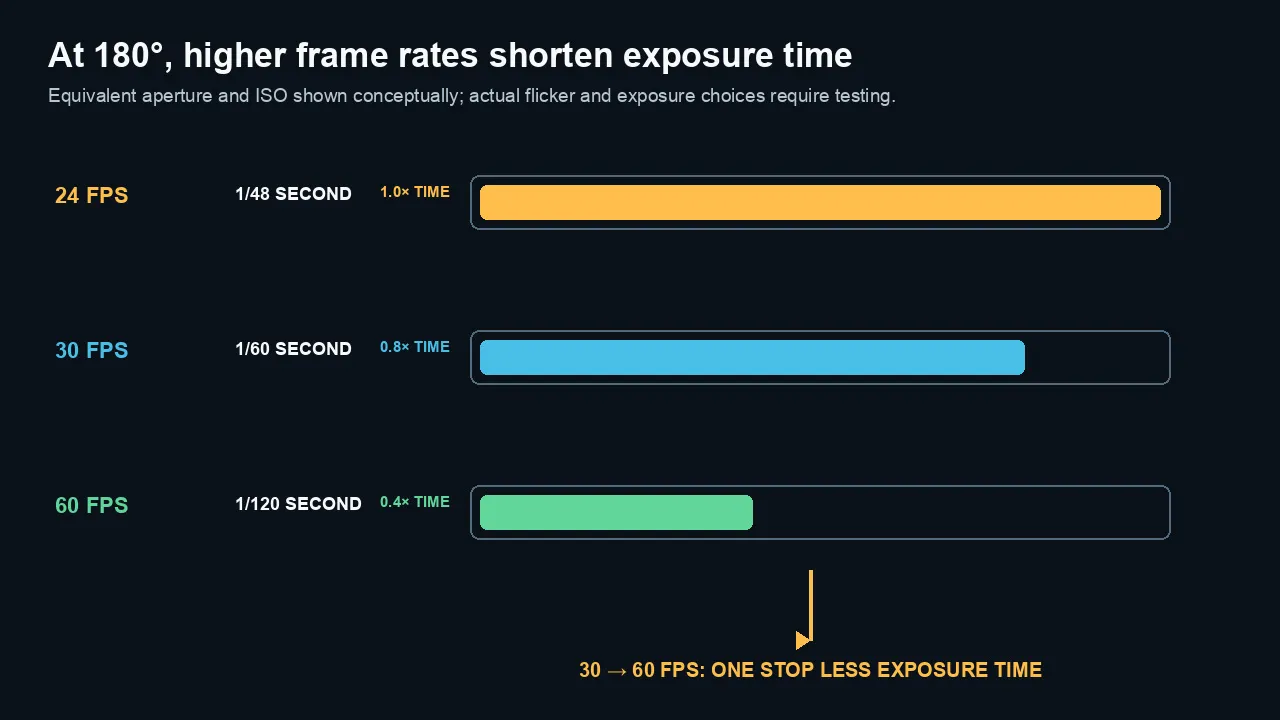
At a 180-degree shutter, 24, 30, and 60 fps use about 1/48, 1/60, and 1/120 second. Moving from 30 to 60 loses one stop of exposure time.
Frame rate and lighting
At the same shutter angle, higher frame rates use shorter exposures.
Moving from 30 fps at 1/60 to 60 fps at 1/120 loses one stop of exposure time.
You must compensate with:
- more light;
- wider aperture;
- higher ISO/gain; or
- a wider shutter angle.
Higher ISO can erase the benefit
If 60 fps forces heavy gain, noise may increase.
Noise consumes compression data and reduces apparent detail.
A clean 30 fps image may look better than a noisy 60 fps image.
Flicker
Artificial lighting can pulse with mains frequency, dimming methods, or LED drivers.
In 60 Hz regions, 30/60-family rates and compatible shutters often reduce flicker risk.
In 50 Hz regions, 25/50-family rates and shutters such as 1/50 or 1/100 are often safer.
This is not universal. Test the actual light at the intended shutter.
Frame rate and compression
More frames share the data budget.
At the same bitrate and codec budget, 60 fps provides fewer bits per frame than 30 fps.
Temporal prediction means the required bitrate does not always double exactly.
YouTube guidance
YouTube publishes separate recommended upload bitrates for:
- standard frame rates such as 24, 25, and 30; and
- high frame rates such as 48, 50, and 60.
Use the current YouTube bitrate guide rather than applying one number to every cadence, and check the YouTube compression guide when processed motion loses detail.
Motion complexity matters
Sixty frames can make motion easier to predict because each step is smaller.
It also provides twice as many frames to encode.
The net result depends on:
- codec;
- encoder;
- scene;
- shutter blur;
- noise;
- resolution; and
- bitrate.
Platform processing
Upload at the intended source/project frame rate.
Do not convert 24 to 60 merely to make the file “higher quality.”
The extra frames are repeats or interpolations unless they were captured.
Slow motion and conforming
High-frame-rate capture becomes slow motion when played at a lower timeline rate without discarding frames.
Conform speed
playback speed = timeline frame rate ÷ capture frame rate
Examples:
| Capture | Timeline | Speed |
|---|---|---|
| 60 | 30 | 50% |
| 60 | 24 | 40% |
| 120 | 30 | 25% |
| 120 | 24 | 20% |
| 50 | 25 | 50% |
Shutter for slow motion
Choose shutter based on capture rate and intended blur.
If recording 120 fps for slow motion, a 180-degree starting point is approximately 1/240 second.
That requires substantial light.
Audio
Slow-motion capture modes may not record usable audio.
If normal audio is recorded and the clip is conformed slower, the sound also slows unless separated or processed.
Plan external sound separately.
Overcranking versus real-time delivery
Shooting 60 for a 24 timeline does not force slow motion.
You can:
- conform to 40% and use every captured frame; or
- play in real time and discard/resample frames into 24.
Decide before editing.
Mixing frame rates
Mixed rates are common.
The conversion quality depends on the ratio.
Clean integer relationships
- 60 → 30 can drop every other frame.
- 50 → 25 can drop every other frame.
- 30 → 60 can repeat each frame, though it adds no motion detail.
Uneven relationships
- 30 → 24
- 24 → 30
- 25 → 24
- 60 → 24 in real time
These require an uneven cadence, blending, or interpolation.
Frame sampling
The NLE chooses the nearest source frame.
This preserves sharp frames but can create judder.
Frame blending
Neighboring frames are blended.
Motion may look smoother but can create ghosting.
Optical flow
The software estimates motion and generates new frames.
It can work well on simple motion and fail around:
- cuts;
- hands;
- hair;
- water;
- transparent objects;
- screens;
- occlusions; and
- fast motion blur.
Avoid mixed rates when you can
Choose a delivery cadence before production.
Capture special rates for a reason, not because every camera offers them.
25 and 50 fps in 50 Hz regions
A 24/30/60-only guide would be incomplete.
In countries with 50 Hz power and broadcast systems, 25 and 50 fps are common.
They align naturally with:
- 1/50 and 1/100 shutter choices;
- PAL-derived broadcast delivery;
- regional lighting; and
- 25/50 timelines.
Twenty-five as a narrative/web rate
Twenty-five is close to 24 in motion character and can be a practical standard for European and other 50 Hz-region work.
Fifty as the high-frame-rate partner
Fifty provides real-time smooth motion or clean 50% slow motion in a 25 fps timeline.
Do not convert regions casually
A 25-to-24 conversion can change cadence or speed.
Formal international mastering may use speed conversion, frame interpolation, or separate masters.
Follow the delivery specification.
Recommendations by project
Narrative film
Use 24 or 23.976 according to distribution and production requirements.
Control pans, handheld movement, and shutter.
Capture higher rates only for intended slow motion.
Software tutorials
Thirty or 29.97 is a strong default.
Use 60 when cursor motion, scrolling, animation, gameplay, or fast demonstrations benefit—and the final platform supports high frame rate.
Corporate interviews
Twenty-four, 25, or 30 can all work.
Choose based on regional standard, brand style, B-roll, lighting, and delivery.
YouTube talking head
Twenty-four provides film-style cadence.
Thirty provides smoother presentation and simple screen integration.
Consistency matters more than a universal winner.
Sports
Use 50/60 for real-time clarity.
Use 100/120 or higher for slow-motion capture when the camera, light, and storage support it.
Gameplay
Sixty fps is common because motion and input response are part of the subject.
Match capture performance and avoid overloading the game or recorder.
Weddings and events
Use 50/60 when slow-motion flexibility and live motion matter.
Use 24/25/30 for real-time ceremony coverage according to regional and delivery needs.
Avoid changing every clip’s cadence without a plan.
Social vertical video
Thirty is a safe general choice.
Sixty can help action and smooth motion.
Twenty-four works when the creative look and motion support it.
Check current platform specifications.
Podcasts and multicam conversations
Twenty-four, 25, or 30 is sufficient.
Thirty often simplifies screen clips and general web delivery.
Sixty adds data with little benefit for static conversation.
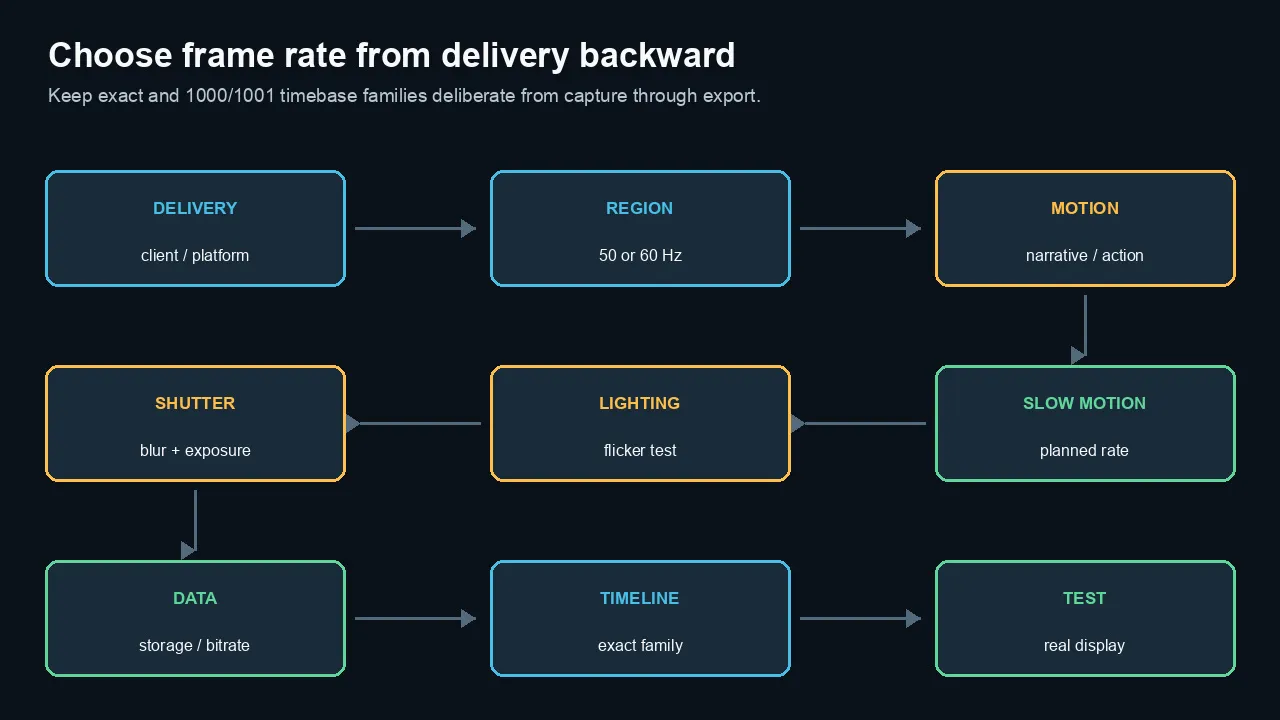
Choose the destination and region first, then motion, slow-motion needs, lighting, shutter, data budget, timeline family, and real-display test.
A practical decision workflow
1. Choose the delivery
What frame rates does the platform or client require?
2. Consider motion
- controlled/narrative;
- general presentation;
- fast action; or
- slow motion.
3. Check the lighting region
Will 25/50 reduce flicker risk?
4. Choose shutter and exposure
Can the scene support the faster shutter needed for higher frame rates?
5. Check storage and compression
Can the camera, card, editor, and upload path support the extra frames?
6. Plan special capture rates
Mark clips intended for slow motion.
7. Keep the timeline family consistent
Avoid casual mixing of exact and fractional rates.
8. Test motion on the real display
Pans and judder can look different on a 60 Hz laptop and a 120 Hz television.
Common myths
Myth 1: 24 fps is automatically cinematic
No.
Shutter, movement, lensing, lighting, production design, grade, and display also create the look.
Myth 2: 60 fps is always better quality
No.
It provides more temporal samples but needs more light, data, and processing.
Myth 3: 30 fps cannot look professional
No.
It is widely used for broadcast, corporate, tutorial, live, and web work.
Myth 4: Drop-frame timecode drops frames
No.
It skips selected timecode numbers to align 29.97-family counting with clock time.
Myth 5: 23.976 is the same as 24
No.
The rates differ and can drift in long-form workflows.
Myth 6: Converting 24 to 60 creates true 60 fps motion
No.
It repeats or generates frames. Only high-rate capture records additional temporal samples.
Myth 7: A higher frame rate always makes slow motion
No.
It becomes slow motion only when conformed or retimed to a lower playback rate.
Myth 8: Shutter speed and frame rate are the same
No.
Frame rate controls sampling frequency. Shutter controls exposure duration per frame.
The practical bottom line
Choose frame rate for motion and delivery, not because one number sounds more professional.
Use 24 for conventional narrative cadence.
Use 30 for versatile presentation and web work.
Use 60 for fast motion, high-frame-rate delivery, or planned slow motion.
In 50 Hz regions, give 25 and 50 equal consideration.
Set the timeline first, control shutter and lighting, and preserve exact frame-rate families through post.
Frequently asked questions
Is 24, 30, or 60 fps best for video?
There is no universal best. Use 24 for narrative cadence, 30 for versatile presentation and tutorials, and 60 for fast motion, gameplay, sports, or slow-motion flexibility.
Is 30 fps better than 24 fps for YouTube?
It is smoother and often works well for tutorials, presentations, and screen content. Twenty-four can provide a film-style cadence. YouTube supports both; upload at the intended source/project rate.
Is 60 fps better quality than 30 fps?
It records more temporal detail, not more spatial resolution. It requires more frames, a faster shutter for similar blur, more light, and a larger compression budget.
Why does 24 fps look cinematic?
It has a long association with motion pictures and a distinctive cadence when paired with conventional shutter blur and controlled camera movement. Frame rate alone does not create a cinematic image.
What shutter speed should I use at 24, 30, or 60 fps?
A 180-degree starting point is about 1/48 at 24, 1/60 at 30, and 1/120 at 60. Adjust for flicker, motion clarity, light, and creative intent.
Can I mix 24 and 30 fps footage?
Yes, but one rate must be conformed to the timeline through frame sampling, blending, speed change, or interpolation. Uneven cadence can create judder.
Can I slow 60 fps footage in a 24 fps timeline?
Yes. Conforming 60 fps to 24 fps produces 40% speed and uses every captured frame, assuming true 60 and 24 rates or matching fractional counterparts.
What is the difference between 29.97 and 30 fps?
29.97 is approximately 30000/1001 fps. The difference is small per second and important over long durations, timecode, sync, and formal delivery.
Does drop-frame timecode remove video frames?
No. It skips selected frame numbers in the timecode count. The video cadence remains 29.97 fps.
Should I shoot 25 or 50 fps in Europe?
Often, yes. They align with 50 Hz lighting and PAL-derived delivery systems. Follow the regional delivery requirement and test actual lights for flicker.
Official sources checked
- YouTube recommended upload encoding settings
https://support.google.com/youtube/answer/1722171
- Apple Final Cut Pro: conform frame sizes and frame rates
https://support.apple.com/en-ie/guide/final-cut-pro/ver3363b44e/mac
- Adobe Premiere: sequence settings and mixed frame rates
- SMPTE/Apple documentation for fractional frame rates and drop-frame timecode where cited
https://pub.smpte.org/pub/st12-1/st0012-1-2014.pdf
- Camera manufacturer specifications for high-frame-rate examples
https://helpguide.sony.net/pro/z300z380/v1/en/contents/shooting.html

About the Author
Joseph Nilo has been working professionally in all aspects of audio and video production for over twenty years. His day-to-day work finds him working as a video editor, 2D and 3D motion graphics designer, voiceover artist and audio engineer, and colorist for corporate projects and feature films.