
Your editor offers proxy media.
Final Cut Pro offers optimized media.
A post supervisor asks you to transcode the camera originals.
A render cache fills the drive, and someone calls that proxy media too.
These terms are related. They are not interchangeable.
A proxy is built to make editing lighter. Optimized media is built to make full-quality work easier. Transcoding is the larger process that can create either one.
Quick answer
Edit the original camera files when they play smoothly and the workflow is stable.
Create proxies when you need:
- smoother playback;
- lower storage and transfer cost;
- multicam performance;
- remote editing;
- laptop portability; or
- a lightweight offline edit.
Create optimized or full-resolution intermediate media when you need:
- easier decoding at finishing quality;
- reliable application exchange;
- several render generations;
- a stable common codec;
- full-resolution effects and color work; or
- compatibility with difficult camera originals.
Do not create every type of media by habit.
Choose the lightest workflow that protects the project.
At a glance
| Media type | Typical resolution | Main purpose | Final-quality source? |
|---|---|---|---|
| Original | Native | Preserve captured media | Yes |
| Proxy | Often reduced | Responsive editorial work | Usually no |
| Optimized/intermediate | Usually native | Easier full-quality post | Yes when properly generated |
| Render/cache | Project-dependent | Preview processed effects | Not a source replacement |
| Delivery file | Destination-dependent | Playback and distribution | Not the preferred edit source |
What transcoding means
Transcoding means decoding media and encoding it into a new representation.
The new file may change:
- codec;
- container;
- resolution;
- bitrate;
- bit depth;
- chroma sampling;
- frame rate;
- audio format;
- color metadata; or
- any combination of those properties.
A transcode can create:
- a proxy;
- optimized media;
- an intermediate render;
- a mezzanine master;
- an archival derivative;
- a review file; or
- a delivery file.
Transcoding is not copying
Copying or consolidating media moves the same encoded essence into another location or container path.
Transcoding creates new encoded video.
Transcoding is not automatically an upgrade
A ProRes transcode of an H.264 camera file can be easier to edit.
It cannot recreate:
- clipped highlights;
- missing chroma samples;
- lost bit-depth precision;
- poor focus;
- motion blur; or
- compression detail already removed by the camera.
Its value is workflow stability and protection from additional weak generations.
What proxy media is
A proxy is a linked stand-in for original or high-quality media.
It is usually designed to be:
- smaller;
- easier to decode;
- lower resolution;
- portable;
- consistent across source formats; and
- disposable after the project is safely finished.
A proxy remains connected to the source
A proper proxy workflow preserves a relationship among:
- clip identity;
- source filename or asset ID;
- timecode;
- duration;
- frame rate;
- audio channels;
- reel/camera metadata; and
- original media location.
The NLE switches representations without changing the editorial decisions.
Proxy resolution
Common proxy resolutions include:
- half;
- quarter;
- one-eighth;
- 1080p for 4K/6K/8K sources; or
- another project-defined size.
The correct size depends on:
- screen resolution;
- reframing needs;
- text and focus evaluation;
- multicam angle count;
- remote bandwidth; and
- storage.
Proxy codec
A proxy can use:
- ProRes Proxy;
- DNxHR LB;
- H.264;
- HEVC; or
- another supported editing codec.
An intraframe proxy may be larger but easier to seek.
A Long-GOP proxy can be smaller but may preserve some decode complexity.
Choose based on the editing hardware and transfer constraint.
What optimized media is
Optimized media is a high-quality, edit-friendly representation of the source.
It is usually:
- full resolution;
- high bit depth;
- intraframe;
- higher data rate than the camera original; and
- appropriate for full-quality playback and finishing.
Final Cut Pro optimized media
Apple’s current Final Cut Pro documentation defines optimized media as Apple ProRes 422.
Final Cut can create optimized media during import or later.
It can use optimized media when available and fall back to original media when optimized media does not exist.
Optimized is an NLE term
Different applications use different names.
DaVinci Resolve has both Proxy Media and Optimized Media concepts, along with render cache.
Premiere Pro uses attached proxies and can use transcoded ingest workflows, while full-resolution intermediates are often managed through project-specific transcodes rather than one universal “optimized media” label.
The important distinction is purpose:
- proxy for lightweight editorial work;
- optimized/intermediate for responsive full-quality post.
Optimized media can be much larger
A compressed 4K HEVC original may expand substantially when converted to full-resolution ProRes 422.
That can improve responsiveness while increasing:
- storage;
- transfer time;
- backup load;
- network traffic; and
- required drive throughput.
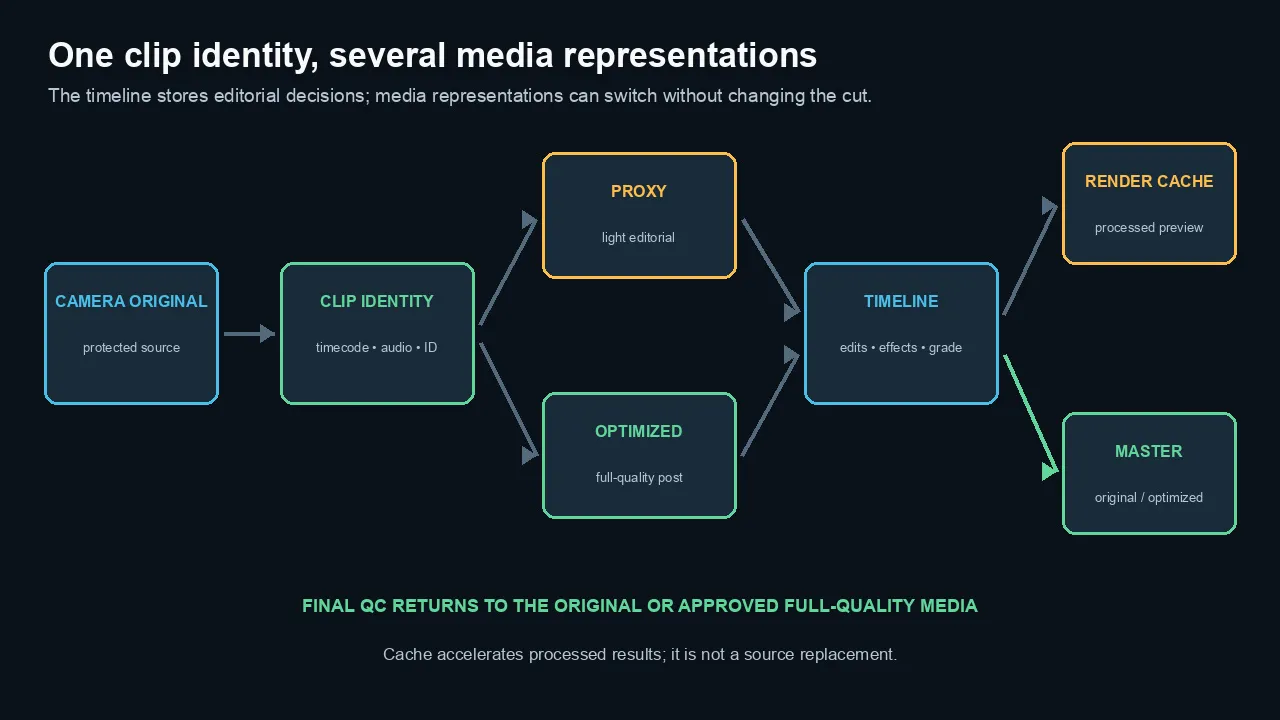
One clip identity can switch among original, proxy, and optimized representations while the timeline stores editorial decisions.
Render files and cache are different
Render and cache files store processed results.
They can include:
- color corrections;
- titles;
- effects;
- transitions;
- stabilization;
- optical flow;
- composites; and
- timeline previews.
They are not alternate source media in the same sense as proxies or optimized files.
Cache can be regenerated
A render cache is generally disposable because the application can rebuild it from source media and project instructions.
The project may become slower while it rebuilds.
Deleting proxy or optimized media has different consequences
Proxies and optimized files can also be regenerated when the originals and project links remain intact.
Regeneration may take significant time.
Do not delete them immediately before travel, remote work, or a deadline.
Generated media is not the archive
Keep:
- camera originals;
- original audio;
- project data;
- graphics sources;
- required fonts/licenses;
- high-quality masters; and
- documentation.
Proxy and cache folders are workflow assets, not a substitute for source backups.
How Final Cut, Premiere, and Resolve use the terms
Final Cut Pro
Final Cut distinguishes:
- Original/Optimized media;
- Proxy Preferred; and
- Proxy Only playback.
Optimized media is ProRes 422.
Proxy media can use supported lightweight formats and sizes chosen when generated.
For highest-quality output, verify the project is using original or optimized media rather than evaluating the final result in a proxy-only state.
Adobe Premiere Pro
Premiere can attach proxies to full-resolution clips.
Its ingest workflow can:
- copy;
- transcode;
- create proxies; or
- copy and create proxies.
Proxy presets can standardize codec, frame size, audio, and metadata behavior. Adobe Media Encoder can create and manage those repeatable transcodes.
Premiere provides a Toggle Proxies control so the editor can switch representations.
DaVinci Resolve
Resolve can use:
- Proxy Media;
- Optimized Media;
- Render Cache; and
- source media.
Proxy Media is designed for portable or lightweight editorial representations.
Optimized Media is project-managed performance media.
Render Cache stores processed timeline results.
The names overlap conceptually, but their storage locations, management, and collaboration behavior differ.
Do not assume interchange among NLEs
An application-managed optimized-media database may not transfer cleanly to another editor.
Externally generated proxies with documented names, timecode, audio, and folder structure can be easier to share across systems.
When to edit original media
Original media is the simplest workflow.
Use it when:
- playback is smooth;
- seeking is responsive;
- the format is supported;
- multicam performs adequately;
- storage is fast enough;
- remote transfer is not required;
- the color pipeline recognizes the source; and
- no application exchange requires another codec.
Native editing avoids generated-media management
You save:
- transcode time;
- duplicate storage;
- proxy relink risk;
- version confusion; and
- backup decisions.
Do not create optimized media merely because a checkbox exists.
Test the actual timeline first. For broader application-specific troubleshooting, use the Final Cut Pro performance guide.
Hardware acceleration changes the answer
A modern media engine may decode H.264, HEVC, ProRes, or other camera formats efficiently.
The same originals may be smooth on one machine and slow on another.
Check the exact codec profile, bit depth, chroma sampling, resolution, frame rate, and stream count.
When to use proxies
High-resolution media
4K, 6K, 8K, RAW, and high-frame-rate sources can exceed laptop, network, or multicam limits.
A 1080p or lower proxy can make editorial work practical.
Multicam
Several lightweight proxy streams can play where several full-resolution originals cannot.
Create every angle with matching proxy settings.
Remote and travel editing
Send proxies instead of camera originals when:
- upload speed is limited;
- the editor works on a laptop;
- the project contains terabytes of media; or
- originals must remain at the studio.
Keep a verified relink path for finishing.
Long-GOP originals
If the camera codec is difficult to decode, an intraframe proxy reduces the random-access burden.
Collaborative workflows
Standardized proxies can give every editor the same media representation.
Use stable asset IDs and avoid relying only on duplicate filenames such as C0001.mp4 from several cards.
Selective proxies
You do not need proxies for every project asset.
Generate them for:
- difficult codecs;
- high-resolution camera angles;
- multicam sources;
- remote editorial media; or
- clips used heavily.
When to use optimized media
Full-quality effects and finishing
Use optimized/full-resolution intermediates when the source decoder is the bottleneck but you still need:
- native resolution;
- reliable color work;
- focus evaluation;
- keying;
- stabilization;
- VFX;
- final compositing; and
- high-quality exports.
Application exchange
A ProRes or DNx intermediate can be safer than a camera-specific Long-GOP file when moving among:
- editor;
- color system;
- compositor;
- audio/post pipeline;
- graphics department; and
- archival master workflow.
Multigeneration work
A robust intermediate avoids repeatedly encoding into a fragile delivery codec.
It does not make lossy generations harmless.
Unsupported source formats
Transcode when a camera or screen-recording format imports incorrectly, lacks hardware support, or produces unstable timestamps.
For VFR sources, make the timing conversion deliberately and preserve duration.
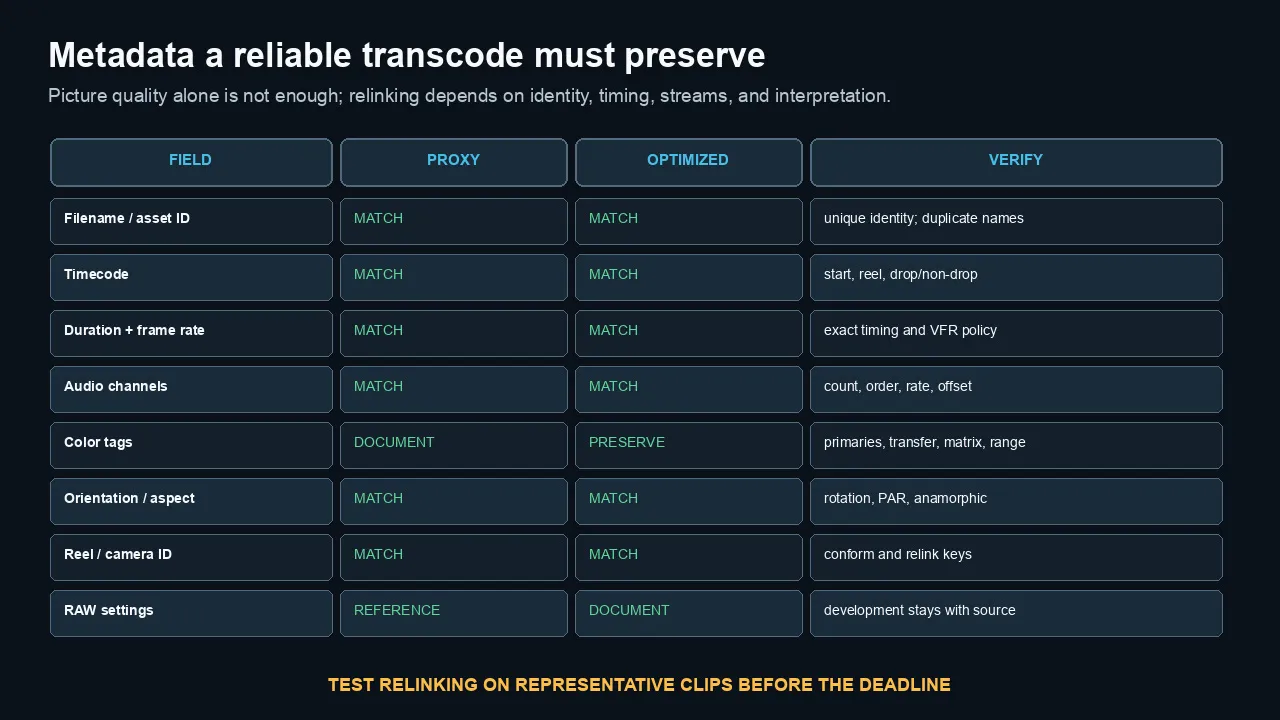
Reliable proxies and intermediates preserve or document identity, timing, streams, and color interpretation—not only picture quality.
Color, audio, timecode, and metadata
A visually clean transcode can still break the edit if metadata changes.
Timecode
Preserve:
- source start timecode;
- frame rate and drop/non-drop convention;
- reel or camera ID;
- clip duration; and
- unique asset identity.
A proxy that starts at 00:00:00:00 when the original starts at 01:14:23:10 can fail to relink or conform correctly.
Audio
Match:
- channel count;
- channel order;
- mono/stereo/adaptive layout;
- sample rate;
- duration; and
- start offset.
Do not accidentally collapse isolated microphones into a stereo mix proxy when editorial decisions depend on the channels.
Color metadata
Preserve or document:
- color primaries;
- transfer function;
- Y′CbCr matrix;
- range;
- camera Log/gamut assignment;
- RAW settings; and
- HDR metadata where required.
Proxies may be display-referred
A proxy can include a viewing transform for easier editorial review.
That can be useful, but the finishing system must know whether the transform is:
- baked into the proxy;
- metadata-driven;
- applied by the NLE; or
- only a viewer setting.
Do not grade the camera originals by matching a proxy whose transform is undocumented.
Resolution and aspect
Match:
- aspect ratio;
- pixel aspect ratio;
- rotation/orientation;
- spatial conform assumptions; and
- anamorphic metadata.
A portrait-phone proxy that loses orientation can create wrong reframing decisions.
Relinking and final export
Test relinking before the deadline.
A safe offline/online sequence
- Back up originals.
- Generate proxies with stable names and metadata.
- Verify several clips and audio channels.
- Edit with proxies.
- Return or reconnect to originals/high-quality media.
- Check speed changes, reframes, stabilization, titles, and effects.
- Render difficult sections at final resolution.
- Inspect the final export and scopes.
Look for proxy-only mistakes
- focus missed in the original but hidden by low proxy resolution;
- reframes that exceed source boundaries;
- noise or compression invisible in the proxy;
- graphics approved at proxy resolution;
- color transforms that differ between proxy and original;
- missing camera angles;
- clips linked to the wrong duplicate filename; and
- audio channels that changed.
Final Cut Pro output
Apple’s documentation recommends using Original/Optimized playback for highest-quality output and checking whether the intended media representation is available.
Do not assume a red missing-proxy warning or an offline original will resolve itself during share.
Watermark proxies
A subtle proxy watermark can prevent an accidental proxy export.
Keep it outside critical image content and ensure the workflow removes it automatically when originals are used.
Storage and performance planning
Proxy size estimate
estimated bytes = bitrate in bits per second × duration in seconds ÷ 8
Multiply by:
- number of cameras;
- number of copies/backups;
- audio and overhead; and
- expected growth.
Optimized-media size
Full-resolution intraframe media can be larger than the originals by several times.
Use the codec’s official target data rate for the actual frame size and frame rate.
Do not estimate from one unrelated preset.
Storage tiers
A practical arrangement can include:
- originals on protected high-capacity storage;
- active proxies on fast local SSD;
- optimized media only for clips or projects that need it;
- cache on fast disposable storage; and
- masters on verified archive storage.
Generate only what you will use
Creating optimized media for 20 hours of footage before testing one clip can waste time and space.
Benchmark:
- one representative camera file;
- one difficult effect section;
- expected multicam count; and
- real storage.
A practical decision workflow
Step 1: test originals
Can the intended editing machine play the real timeline smoothly?
If yes, edit originals.
Step 2: identify the bottleneck
Is it:
- decoder complexity;
- storage throughput;
- resolution;
- multicam count;
- network speed;
- VFR/timestamp instability;
- effects; or
- color processing?
Step 3: choose the lightest fix
- Lower viewer quality for temporary relief.
- Use proxies for editorial performance.
- Use optimized media for full-resolution decode relief.
- Use cache/render files for processed effects.
- Upgrade storage when data throughput is the bottleneck.
- Correct unstable source timing before proxy generation.
Step 4: verify finishing
Confirm the full-quality representation is online and correct before final review and export.
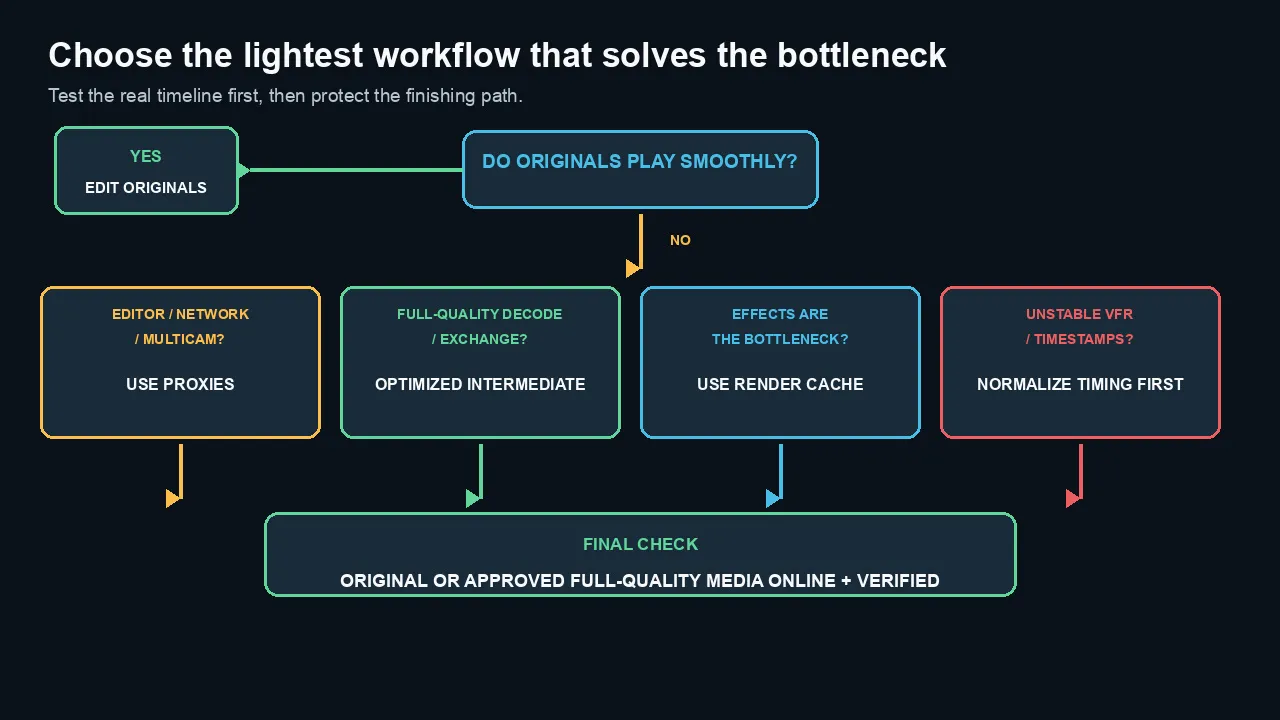
Test the originals first, solve the actual bottleneck, then verify original or approved full-quality media before final output.
Common myths
Myth 1: Proxy means low-quality final video
No.
A proper proxy workflow returns to original or high-quality media for finishing.
Myth 2: Optimized media improves the camera image
No.
It creates an edit-friendly representation. It cannot restore missing source information.
Myth 3: Every 4K project needs proxies
No.
Modern hardware may edit the originals smoothly.
Myth 4: Smaller proxies are always faster
No.
A tiny Long-GOP proxy can be harder to seek than a somewhat larger intraframe proxy.
Myth 5: Render cache is the same as optimized media
No.
Cache stores processed timeline results. Optimized media represents source clips.
Myth 6: Proxies can ignore audio and timecode
No.
Reliable relinking and editorial sync depend on matching metadata and stream structure.
Myth 7: Transcoding H.264 to ProRes restores color depth
No.
It can preserve later calculations but cannot recreate source bit depth or chroma detail.
Myth 8: The NLE will always relink automatically
No.
Duplicate names, changed timecode, altered duration, audio mismatches, and missing IDs can break the relationship.
The practical bottom line
Edit originals when they work.
Use proxies when the editor, network, or multicam load needs less media.
Use optimized or full-resolution intermediates when finishing-quality decode, compatibility, or application exchange requires them.
Keep originals protected. Preserve metadata. Test relinking early. Verify high-quality media before final export.
Frequently asked questions
What is the difference between proxy and optimized media?
Proxy media is usually lower resolution or lower data rate for lightweight editorial work. Optimized media is usually full-resolution, high-quality, and edit-friendly for finishing-quality playback.
Is optimized media the same as transcoding?
Optimized media is created through transcoding. Transcoding is the general process; optimized media is one result with a specific post-production purpose.
Does Final Cut Pro optimized media improve quality?
It converts supported media to ProRes 422 for editing. It does not restore information missing from the camera original, but it can provide stable high-quality processing.
Should I create proxies for 4K video?
Create them when 4K originals are slow, multicam is heavy, remote transfer is impractical, or the editing machine is constrained. If the originals are responsive, proxies may be unnecessary.
Can I export while proxies are enabled?
NLE behavior varies. For final quality control, explicitly return to original or optimized/full-resolution media, verify that it is online, and inspect the resulting export.
What proxy codec should I use?
Use a codec your editing hardware decodes efficiently. ProRes Proxy or DNxHR LB are common intraframe choices. H.264 or HEVC can reduce transfer size when hardware support and seeking behavior are acceptable.
Are proxies safe for color grading?
They are useful for editorial color reference but may not preserve full resolution, bit depth, chroma, RAW controls, or transforms. Perform final grading and QC against original or approved high-quality media.
Should I transcode H.264 to ProRes before editing?
Only when the original media is slow, unstable, unsupported, or moving through several full-quality post stages. Proxies may solve performance with less storage.
Can I delete proxy and optimized media?
Yes when originals and project links are protected and the media can be regenerated. Regeneration can take time, so do not delete it before remote work or a deadline.
Why will my proxies not relink?
Common causes include changed filenames, duplicate clip names, altered timecode, different durations, mismatched frame rates, audio-channel changes, or lost asset IDs.
Official sources checked
- Apple Final Cut Pro: Create optimized and proxy media
https://support.apple.com/guide/final-cut-pro/create-optimized-and-proxy-files-verb8e5f6fd/mac
- Apple Final Cut Pro: Control playback quality and media representation
https://support.apple.com/guide/final-cut-pro/control-playback-quality-ver2fd7a8b94/mac
- Adobe Premiere Pro: Proxy workflow
https://helpx.adobe.com/ie/premiere/desktop/organize-media/ingest-proxy-workflow/create-proxies.html
- Adobe Premiere Pro: Ingest and proxy workflow
- Blackmagic Design DaVinci Resolve reference manual
https://documents.blackmagicdesign.com/UserManuals/DaVinci_Resolve_21_Reference_Manual.pdf
- Apple ProRes White Paper
https://www.apple.com/final-cut-pro/docs/Apple_ProRes.pdf

About the Author
Joseph Nilo has been working professionally in all aspects of audio and video production for over twenty years. His day-to-day work finds him working as a video editor, 2D and 3D motion graphics designer, voiceover artist and audio engineer, and colorist for corporate projects and feature films.