
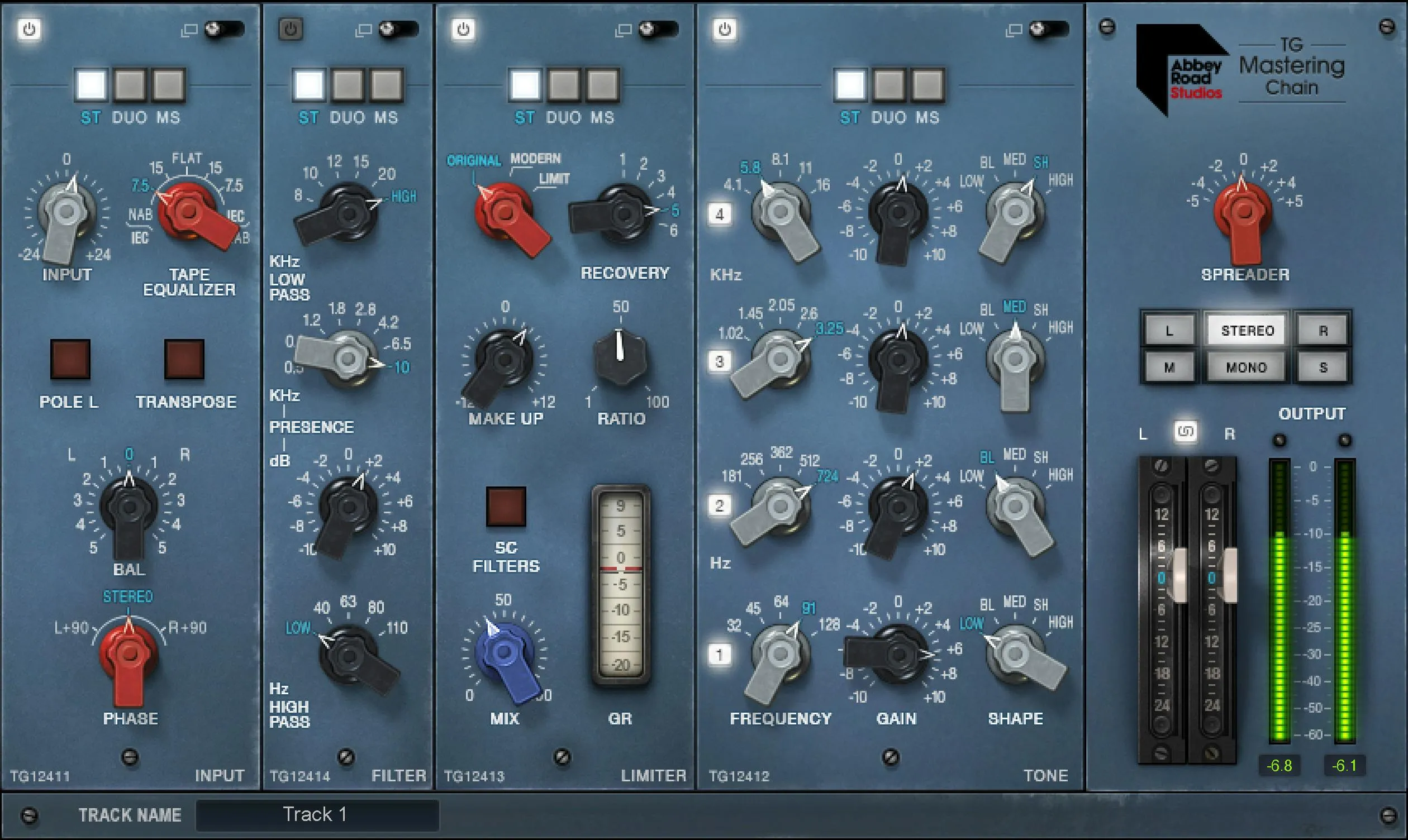
Waves Abbey Road TG Mastering Chain is a modular five-section processor modeled on the EMI TG12410 Transfer Console used at Abbey Road Studios. Its chain is Input → Tone → Limiter → Filter → Output by default, while Tone, Limiter and Filter can be reordered. Input stays at the beginning and Output stays at the end. [1][2]
The plugin is deeper than its collapsed view suggests. Stereo instances can expand modules and work in ST, Duo or MS, the Limiter has Original, Modern and Limit behaviors, and the package includes a separate TG Meter Bridge plugin. [1]
About the imagery: the cover is an editorial illustration. The plugin interface is official Waves product artwork, not a capture of a listening or compliance test.
My Short Version
Treat the five modules as separate jobs. Input handles gain, tape EQ and stereo/phase utilities. Tone is a four-band fixed-frequency EQ. Limiter is the dynamics section, with three Type choices and optional sidechain filtering. Filter supplies broad high-pass, presence and low-pass shaping. Output handles width, monitoring and final level. [1]
If you are using a stereo component, decide whether each module should process ST, Duo or MS. Expand a module when you need separate L/R or M/S values. Keep the Limiter's Type global to both sides: the manual specifically says that selector cannot be different between the two stereo channels. [1]
The Live components are not just lower-latency labels. Waves documents different internal behavior: non-Live versions use upsampling at lower sample rates and linear-phase FIR sidechain filters; Live versions remove that upsampling and use non-linear-phase IIR sidechain filters to reduce latency and CPU. [1]
Components: Mono, Stereo, Mono Live, Stereo Live
The TG Mastering Chain has four documented components: Mono, Stereo, Mono Live and Stereo Live. [1]
Waves says the two Live components are optimized for live work where low latency and low CPU matter. At lower sample rates, the non-Live components use upsampling; the Live versions remove that upsampling. In the Limiter sidechain, non-Live components use sharp linear-phase FIR filters while Live components substitute non-linear-phase IIR filters. [1]
Those are documented architecture differences. This article did not measure latency, CPU, phase response or sound between the components.
Module On/Off, expand, ST/Duo/MS and Link
Every processing module except Output has an On/Off control and can be collapsed or expanded. The manual says modules are initially off by default. It also notes that turning a module off does not reduce CPU in Live components. [1]
In the Stereo component each module can use one of three modes:
- ST: stereo-linked processing.
- Duo: left and right can be processed independently when expanded.
- MS: Mid and Side can be processed independently when expanded. [1]
The module output remains stereo regardless of mode, so one module can feed another even when their stereo modes differ. [1]
In collapsed view, paired controls are linked. Expanded view exposes a Link button. With Link on, paired controls move together; switches stay linked as well. With Link off, sides can be adjusted independently. If values have an offset when relinked, Waves says that relative offset is maintained. [1]
The interface also exposes module-navigation buttons in expanded view and a Track Name field used by the TG Meter Bridge to identify instances. DAWs that do not provide track names can be named manually. [1]
Reordering modules
The default order is Input, Tone, Limiter, Filter, Output. Tone, Limiter and Filter can be dragged into a different order; Input and Output remain fixed at the ends. [1]
That means EQ before dynamics and EQ after dynamics are both supported workflows. This article does not claim one order is universally better.
TG12411 Input module
Input
Input controls level entering the plugin over -24 to +24 dB in 0.1 dB increments. [1]
Use it to establish sensible operating level before the rest of the chain. A louder input can change how the Limiter behaves later, so it is not merely an output-volume control.
Tape Equalizer
Tape Equalizer reproduces compensation curves associated with IEC and NAB tape equalization. Options cover IEC-to-NAB at 7.5 or 15 ips, NAB-to-IEC at 7.5 or 15 ips, plus Flat, which is the documented default. [1]
Waves notes that the control is retained for its sonic character as well as its original technical purpose. No measured frequency curve is claimed beyond the official description.
Pole
Pole flips input phase by 180°. In Stereo there are separate L Pole and R Pole controls when expanded. Default is Off. [1]
Transpose
Transpose swaps the left and right channels. Default is Off. [1]
BAL
BAL changes the relative level of left and right channels. Range is -5 to +5 dB in 0.05 dB increments, default 0. [1]
Phase
Phase shifts one channel by 90° relative to the other. Options are Stereo, L +90 and R +90; default is Stereo. [1]
This is not the same as the 180° Pole switch.
TG12412 Tone module
Tone is a four-band EQ. Each band has five fixed frequency points, a gain control, five shapes, its own On/Off switch, and—in expanded view—a band-monitor/solo control. [1]
Band frequencies
- Band 1: 32, 45, 64, 91, 128 Hz.
- Band 2: 181, 256, 362, 512, 724 Hz.
- Band 3: 1.02, 1.45, 2.05, 2.6, 3.25 kHz.
- Band 4: 4.1, 5.8, 8.1, 11, 16 kHz. [1]
Gain
Each band has -10 to +10 dB of gain in 0.05 dB increments. [1]
Shape
Each band can choose one of five documented shapes:
- Low: low shelf.
- BL: Blunt, a very wide bell.
- MED: Medium Blunt, a moderately wide bell.
- SH: Sharp, a very narrow bell.
- High: high shelf. [1]
Each band can be switched on/off. In expanded view the monitor button solos that band's filtering so it can be auditioned separately. [1]
TG12413 Limiter module
Type: Original, Modern, Limit
Type has three modes. Original models the TG12413 Zener-diode compressor. Modern is a Waves/Abbey Road VCA-based design intended for modern mastering. Limit is based on the Zener limiter mode and has a harder knee than Original. [1]
Waves explicitly says Limit is not a brickwall limiter and that transients are expected to pass. Do not describe it as a mastering ceiling. [1]
Type is the one Limiter selector that cannot be different between the two stereo sides: selecting a Type on one side sets the same Type on the other. [1]
Recovery
Recovery offers states 1–6, default 3. Higher states correspond to longer attack/release behavior, but Waves says the exact times depend on Type and are difficult to express as fixed milliseconds. [1]
No exact millisecond table is therefore invented here.
Make Up
Make Up ranges from -12 to +12 dB, default 0 dB. It applies to the compressed signal only, not the direct path. That distinction matters when Mix is below fully processed. [1]
Ratio
Ratio is documented as 1–100, default 50. It controls the VCA input/output curve and should not be read as a conventional x:1 compression-ratio display. [1]
Sidechain filters
The Limiter has three sidechain filters plus a global SC Filters On/Off switch. They are off by default. [1]
Expanded controls are:
- High-pass: 25 Hz–1 kHz, 48 dB/octave.
- Bell: 100 Hz–12 kHz with -40 to +40 dB gain in 0.1 dB increments.
- Low-pass: 1 kHz–22 kHz, 48 dB/octave. [1]
Each filter has its own enable switch. Expanded view also has a sidechain monitor/listen button so the filtered detector signal can be monitored. [1]
For the regular Mono/Stereo components, Waves documents linear-phase FIR sidechain filters; Live components use non-linear-phase IIR versions. [1]
ST, Duo and MS detector behavior
In ST, the left and right sidechain channels are summed and the same dynamics action is applied to both channels. In Duo, left and right sidechains are processed separately. In MS, Mid and Side sidechains are processed separately. [1]
The guide notes that Pro Tools allows only a mono sidechain in the context described by the manual. Treat that as a host-specific documentation note, not a universal DAW rule.
Mix and GR
Mix balances compressed and uncompressed signal. The manual text defines the behavior but does not publish a formal numeric range/default table; the official interface image visibly labels the control from 0 to 100. This guide therefore records the endpoints as UI-observed and leaves the unit/default unspecified rather than guessing. [1]
GR is the gain-reduction meter. [1]
TG12414 Filter module
High Pass
The high-pass selector offers 40, 63, 80 and 110 Hz. The Low position functions as Off. [1]
Presence
Presence is a Medium-Blunt bell with fixed frequency points at 0.5, 0.8, 1.2, 1.8, 2.8, 4.2, 6.5 and 10 kHz. Gain range is -10 to +10 dB in 0.1 dB increments. [1]
Low Pass
The low-pass selector offers 20, 15, 12, 10 and 8 kHz. The High position functions as Off. [1]
TG12416 Output module
Spreader
Spreader is a stereo-width control based on a Sum/Difference matrix. It ranges from -5 to +5 dB in 0.1 dB increments, default 0. Waves describes the result as narrower or wider stereo image depending on setting. [1]
Monitoring
Output monitoring has six documented choices:
- L: left channel only, kept on the left speaker side.
- Stereo: normal stereo output; default.
- R: right channel only, kept on the right speaker side.
- M: Mid,
(L+R)/2. - Mono: summed mono.
- S: Sides,
(L-R)/2. [1]
These are monitoring choices, not exports of new channel layouts.
Output Fader and Link
Output Fader controls overall output from -24 to +12 dB in 0.1 dB increments. In expanded stereo view, Output Fader Link maintains a relative link between left and right faders. [1]
Output Meter
The Output Meter shows a peak-level reading. The manual does not document a user reset gesture for this meter. [1]
Abbey Road TG Meter Bridge
The product also includes a separate TG Meter Bridge plugin. It combines three meter types based on the Abbey Road TG12410 workflow: PPM for peak levels, VU for averaged signal level, and phase correlation. [1][2]
The Meter Bridge can monitor three points from a connected TG Mastering Chain instance: IN, GR and OUT. [1]
One Meter Bridge instance can communicate with TG Mastering Chain instances on other tracks in the same session. It monitors the same track by default when opened there; to meter another instance, choose that track in the Track Name selector. [1]
The inspected official Meter Bridge page also visibly shows a Peak Hold / Normal selector alongside its digital peak display and the IN/GR/OUT source selector. The parsed manual text does not provide a timing/range table for Peak Hold, so this guide records its visible mode names without inventing hold duration or reset behavior. [1]
WaveSystem toolbar
The shared toolbar provides save/load presets, compare, undo/redo and resizing. [1]
These are state/interface functions rather than audio-processing parameters.
A practical order of decisions
First choose the component: regular Mono/Stereo if you want the documented non-Live processing path, or Mono/Stereo Live when live-oriented latency/CPU behavior is the priority.
Set Input and any needed phase/channel utilities. Decide whether Tape Equalizer belongs in the chain. Then shape broad tone with the four Tone bands.
Choose Limiter Type deliberately, then work with Recovery, Ratio and Mix. Use the sidechain filters when you want specific frequency areas to influence the detector less or more rather than EQing the audible signal only for dynamics reasons.
Use the separate Filter module for broad output spectral cleanup, then set Spreader, monitoring mode and final Output Fader. Use TG Meter Bridge when you need its PPM/VU/phase view or want one meter surface to follow another chain instance.
That is an editorial workflow derived from the documented signal sections, not a new mastering test.
Limitations
The manual gives Recovery states rather than exact attack/release milliseconds and does not publish a formal numeric/default table for Limiter Mix. Those omissions are preserved rather than guessed. [1]
The Live and non-Live architecture differences are documented, but no latency, CPU-use, phase-response, or audible-difference measurements were performed.
The product is not a true-peak limiter and the Limit Type is explicitly not brickwall. No LUFS, true-peak, oversampling or delivery-compliance claim is made.
Related plugins
For a simpler full-band compressor reference, see the live Renaissance Compressor guide. The live F6 guide covers flexible frequency-selective dynamics rather than this fixed-module mastering chain.
The live L2 guide explains a dedicated limiter and output-ceiling workflow. The live WLM Plus guide covers programme loudness and true-peak metering; that is a separate delivery-check task, not a TG module. The Waves Audio Post Resources hub collects existing delivery and Waves-navigation references.
Bottom line
Abbey Road TG Mastering Chain has five processing jobs: fixed Input and Output sections around the reorderable Tone, Limiter and Filter modules.
Its complexity comes from stereo modes, linked/independent expanded controls, three Limiter Types and the Live/non-Live component differences—not from hidden undocumented stages. The included TG Meter Bridge is a separate metering companion and should be explained as such.
Sources
Checked September 20, 2026. No listening, mastering, CPU, latency or host test was performed.
- Waves Abbey Road TG Mastering Chain User Guide, 24 pages. Official full-chain interface p.7 and TG Meter Bridge p.23 were visually inspected.
- Waves Abbey Road TG Mastering Chain product page.
- Waves Graphic Library, Abbey Road TG Mastering Chain entry and attribution/backlink condition.
Frequently Asked Questions
Which Abbey Road TG Mastering Chain modules can be reordered?
Tone, Limiter and Filter can be reordered. Input remains at the beginning and Output remains at the end of the five-module chain.
What is the difference between the regular and Live components?
Waves documents Mono and Stereo plus Mono Live and Stereo Live. The Live components omit upsampling at lower sample rates and use IIR rather than FIR Limiter sidechain filters. This article did not measure latency, CPU or sound differences.
Is the TG Limiter's Limit mode a brickwall limiter?
No. Waves explicitly says the Limit type has a harder knee than Original but is not brickwall; transients may pass. Do not treat it as a guaranteed final output ceiling.
Does Recovery state 3 mean a specific attack or release time?
No. Recovery has states 1–6, with 3 as the documented default, but exact attack and release times depend on Limiter Type. Waves does not provide a fixed millisecond mapping for each state.
How do ST, Duo and MS differ in the stereo component?
ST uses linked stereo processing, Duo allows independent left and right processing, and MS allows independent Mid and Side processing when expanded. The module output remains stereo in all modes.
Is TG Meter Bridge part of the same plugin interface?
No. TG Meter Bridge is a separate companion plugin with PPM, VU and phase-correlation views. It can monitor IN, gain reduction or OUT from a connected TG Mastering Chain instance.

About the Author
Joseph Nilo has been working professionally in all aspects of audio and video production for over twenty years. His day-to-day work finds him working as a video editor, 2D and 3D motion graphics designer, voiceover artist and audio engineer, and colorist for corporate projects and feature films.