

Waves Magma StressBox is a simplified dynamics processor built around one continuous Main Knob: turn right for progressively stronger compression, turn left for expansion, and leave it centered for no dynamics processing. Input Gain changes how hard the signal hits the dynamics engine, Output Gain sets the post-processing level, and Mix provides a true dry/wet parallel blend after the internal processing. [1][2]
Its simplicity hides several important details. The main control is continuous rather than stepped, Waves applies internal makeup compensation where possible, the Mix crossfade occurs after Input and Output gain, and the meter is intentionally not calibrated in dB. [1]
About the imagery: the cover is an AI-generated editorial illustration, not the plugin interface or evidence of an audio test. The interface image is official Waves Graphic Library artwork used with its product backlink.
My Short Version
Start with the Main Knob at center, where Waves says the plugin applies no dynamics processing. Turn right when you want compression and more room/ambience brought forward; turn left when you want expansion, stronger transient separation and shorter apparent tails. Those sound descriptions come from Waves' documentation/product positioning, not from a listening test performed for this article. [1][2]
Use Input Gain if the source is not driving the dynamics engine as much—or as little—as you want. Use Output Gain afterward for final level. Then use Mix when you want parallel dynamics instead of 100% processed output. [1]
Use On/Off when you want the full processing engine bypassed. This is different from Mix at 0%: both can produce an effectively dry result, but Waves documents On/Off as full bypass and says Mix is ignored when the processor is Off. [1]
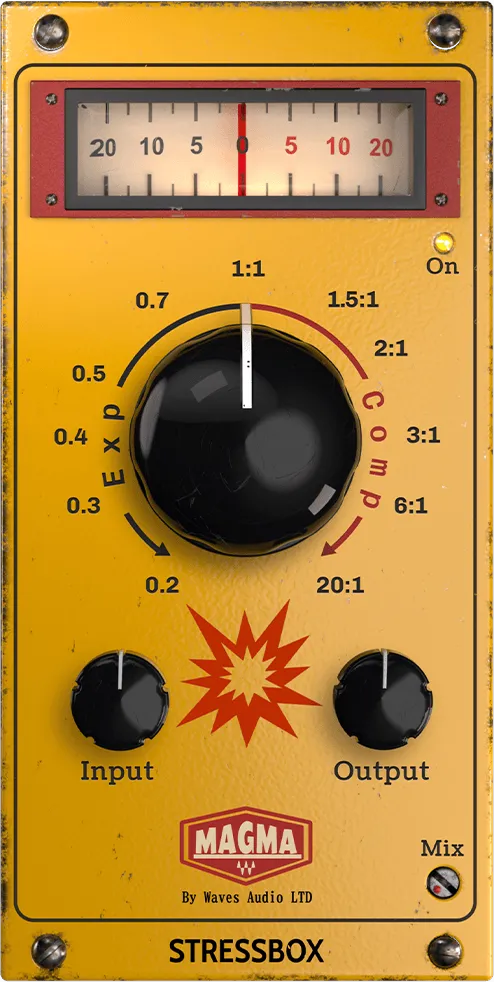
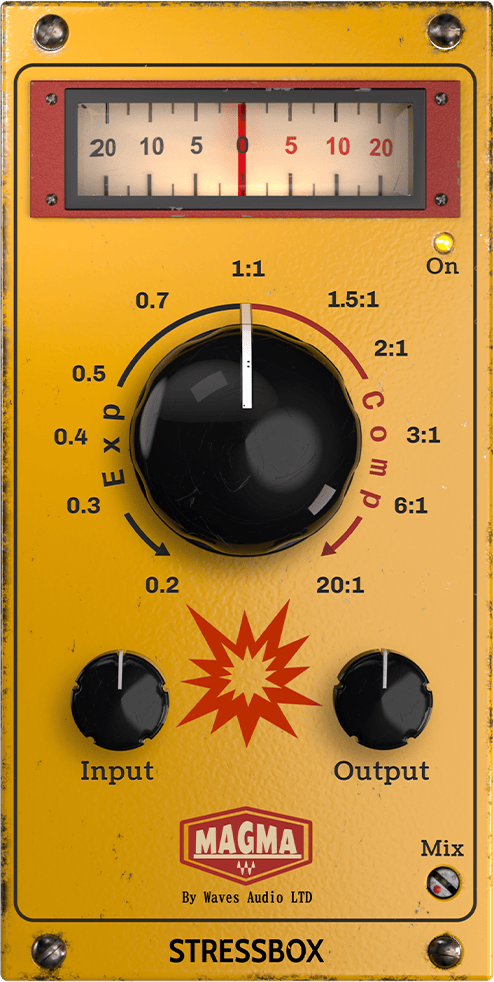
Main Knob
The Main Knob is the center of StressBox. Waves describes it as a smooth, continuous control without stepping or switching. [1]
- Center: no dynamics processing; Waves describes the plugin as transparent at this position.
- Clockwise/right: progressively more compression.
- Counter-clockwise/left: expansion. [1]
The official interface visibly marks the expansion side with values 0.2, 0.3, 0.4, 0.5 and 0.7, center as 1:1, and the compression side with 1.5:1, 2:1, 3:1, 6:1 and 20:1. [1]
Those markings look ratio-like, but the current manual does not formally define them as exact fixed compressor/expander ratios, nor does it say the continuous knob steps discretely through those values. Because the same manual explicitly says the control is smooth and continuous, this article treats the markings as the official scale labels rather than claiming a measured ratio curve.
What changes as the knob moves
Waves says StressBox moves internally through dynamics behaviors that would otherwise require combinations of threshold, ratio, attack, release and makeup-gain settings. Those underlying parameters are not exposed as user controls. [1]
On the compression side, Waves describes the result as progressively flattening dynamics and bringing ambience/room information forward. On the expansion side, it describes increased transient emphasis and less sustained room/reverb information. [1][2]
That is vendor-described behavior. This article did not measure attack/release times, transfer curves, thresholds or exact expansion ratios, and the current documentation does not publish them.
Internal gain compensation
Waves says output level is kept relatively consistent across most of the Main Knob's range, and the manual notes that makeup gain is internally compensated as much as possible. [1]
It is not presented as a user-adjustable Auto Gain switch. At extreme settings, Waves says manual level correction may still be necessary. [1]
So treat the internal compensation as an aid, not proof that every Main Knob position is perfectly loudness matched.
Input Gain
Input Gain changes level before the dynamics engine. Range: ±18 dB. [1]
Raising it drives the dynamics processing harder; reducing it lowers the level entering the processor. Waves' quick-start specifically suggests increasing Input for low-level sources when stronger compression is wanted. [1]
The current manual does not publish a factory-default value, so none is inferred from the knob artwork.
Output Gain
Output Gain changes level after dynamics processing. Range: ±18 dB. [1]
Use it to match or intentionally offset the final processed level, especially when the internal makeup compensation is not enough at extreme settings. [1]
The current manual does not publish a factory-default value.
Mix: true dry/wet parallel blend
Mix blends dry and processed signals from 0% to 100%. [1]
- 0%: completely dry; Waves says the plugin has no audible effect regardless of the other control settings.
- 100%: fully wet processing. [1]
The manual specifies that this is a true parallel blend placed after all internal processing, including Input and Output gain, and calls the crossfade phase-accurate and transparent. [1]
That routing detail matters. Because the Mix crossfade is after the internal path—including the gain controls—the dry side of this blend is not documented as simply an arbitrary pre-plugin tap that ignores the plugin's internal gain architecture.
Waves' quick-start suggests roughly 30–50% as a starting area for parallel thickening while preserving transients. That is a vendor recommendation, not a tested optimum from this article. [1]
On/Off
On/Off toggles the entire processing engine. When Off, Waves says StressBox is in full bypass and the Mix knob is ignored. [1]
That gives you two different ways to reach a dry result for different purposes:
- Mix at 0% = the processor remains on but the blend is fully dry.
- Off = the processing engine is bypassed and Mix no longer matters. [1]
The manual does not document a special click-reset, fade time or bypass-tail behavior, so none is claimed.
Visual Feedback Meter
The needle-style Visual Feedback Meter shows how the processor is reacting:
- needle right = compression
- needle left = expansion
- needle centered = no processing [1]
Waves explicitly says this meter is not calibrated in dB. It represents compression/expansion energy as immediate visual feedback rather than a numerical gain-reduction measurement. [1]
Do not read the printed face markings as a dB reduction scale or treat the meter as a measurement instrument unless Waves documents that behavior in a later revision.
Mono and Stereo components
Waves' current product technical data lists Mono and Stereo components. It does not list mid/side, surround or dedicated mono-to-stereo variants for StressBox. [2]
The current user guide presents one control set; it does not document different algorithms or control ranges between the mono and stereo components.
The product page also publishes sample-latency values that vary with sample rate. Those are vendor technical specifications and were not independently host-tested for this article. [2]
Why there are no threshold, attack or release knobs
StressBox is intentionally not a conventional compressor interface. Waves says the Main Knob moves through behaviors that would normally require separate threshold, ratio, attack, release and makeup-gain controls. [1]
Because those parameters are internal and undocumented numerically, this article does not assign hidden values to any knob position. If you need exact attack/release times, explicit threshold, a known knee shape or a measured ratio, a conventional compressor exposes more direct control.
A practical setup order
Start with Main at center and Mix at 100% so the direction and amount of the dynamics change are easy to identify. Turn right for compression or left for expansion until the broad behavior is where you want it.
If the dynamics engine is reacting too little or too much for the source level, adjust Input Gain. Then set Output Gain so level does not distract from the decision. Finally lower Mix if you want parallel processing rather than the fully processed signal.
Use the qualitative meter to confirm whether StressBox is acting primarily in compression or expansion, but do not read it as a dB gain-reduction meter. This setup order is editorial guidance derived from the documented routing; no listening test was performed.
Compression-side uses
Waves positions the clockwise side for increasing punch, urgency, density and audible room/ambience. The product page specifically describes aggressive compression as pulling room sound forward. [1][2]
That can make StressBox a candidate for drums, vocals, instruments or buses when the goal is a broad dynamics/energy change without setting conventional compressor parameters. Those are use cases suggested by Waves, not performance rankings.
Expansion-side uses
Waves positions the counter-clockwise side for tighter, more intimate dynamics, stronger transient definition and reduced prominence of reverb tails/room information. [1][2]
That makes the expansion side a candidate when a source feels too washed out or sustained and you want a simpler macro control than a traditional expander. The current documentation does not provide threshold or release values, so exact gating-style behavior should not be inferred.
Best for / skip if
StressBox is a strong fit when you want to shape dynamic feel quickly with one continuous macro, then refine drive, final level and parallel blend with Input, Output and Mix. [1][2]
Skip it when the job requires explicit threshold, attack, release, knee, sidechain/filter controls, calibrated gain-reduction readouts or independently specified ratio values. Those parameters are intentionally abstracted behind the Main Knob.
Related guides and plugins
For explicit conventional compression controls, see the live Renaissance Compressor guide. For a different simplified dynamics concept, the live MV2 guide explains separate low-level and high-level dynamics controls.
For more elaborate frequency-dependent dynamics, the live F6 guide covers dynamic EQ. The Waves Audio Post Resources hub collects the site's existing Waves guides and licensing references.
Bottom line
Magma StressBox reduces a large dynamics parameter set to one direction-and-amount control: right compresses, left expands, center leaves dynamics untouched. Input and Output gain determine level around the engine, Mix provides post-processing parallel blend, On/Off gives full bypass, and the meter shows the direction/energy of the dynamics action without pretending to be a calibrated dB meter.
Every material visible control is documented by the current manual. What remains deliberately unknown are the internal threshold/attack/release/knee mappings and exact meaning of the Main Knob's ratio-like scale labels beyond their visible UI markings; those values are not reverse-engineered or invented here.
Sources
Checked September 20, 2026. No listening, host, latency, CPU or automation test was performed.
- Waves Magma StressBox User Guide, especially pp. 2–5. The official interface/control page 4 was directly screenshot-inspected.
- Waves Magma StressBox product page, including current component/latency technical data and vendor-described use cases.
- Waves Graphic Library, current Magma StressBox entry and attribution/backlink requirement.
Frequently Asked Questions
What does the Magma StressBox Main Knob do?
Turn it right for progressively more compression and left for expansion. The center position applies no dynamics processing, and the control moves continuously rather than in steps.
What is the difference between Input Gain and Output Gain in StressBox?
Input Gain changes the level before the dynamics engine, so it changes how hard the signal drives the processing. Output Gain changes level after processing and is used to set the final result; both controls have a ±18 dB range.
Is setting Mix to 0% the same as switching StressBox off?
Both produce an effectively dry output, but the documented states are different. Mix at 0% leaves the engine on with a fully dry blend, while Off fully bypasses the engine and ignores the Mix control.
Is the StressBox meter calibrated in decibels?
No. The needle moves right for compression, left for expansion, and stays centered for no processing, but Waves describes it as qualitative energy feedback rather than a dB measurement.
Does StressBox expose threshold, attack, or release controls?
No separate threshold, attack, release, ratio, or makeup-gain controls are exposed. Waves says the Main Knob moves through internal dynamics behaviors that would normally require those parameters, but it does not publish their hidden values.
Does StressBox keep every setting perfectly level matched?
No such guarantee is documented. Waves says the output stays relatively consistent across most of the Main Knob range and that internal makeup compensation is applied where possible, but extreme settings may need manual adjustment.

About the Author
Joseph Nilo has been working professionally in all aspects of audio and video production for over twenty years. His day-to-day work finds him working as a video editor, 2D and 3D motion graphics designer, voiceover artist and audio engineer, and colorist for corporate projects and feature films.