
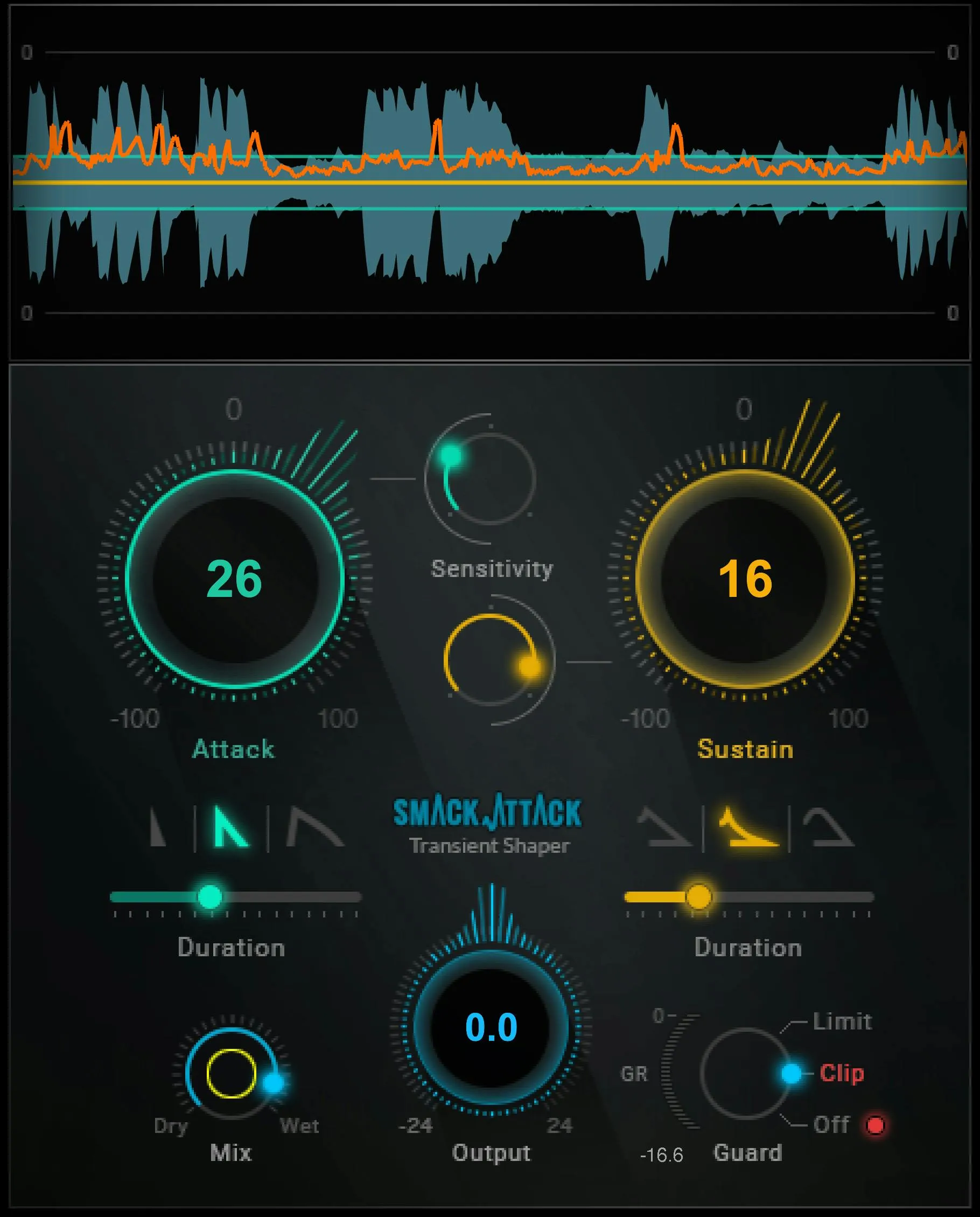
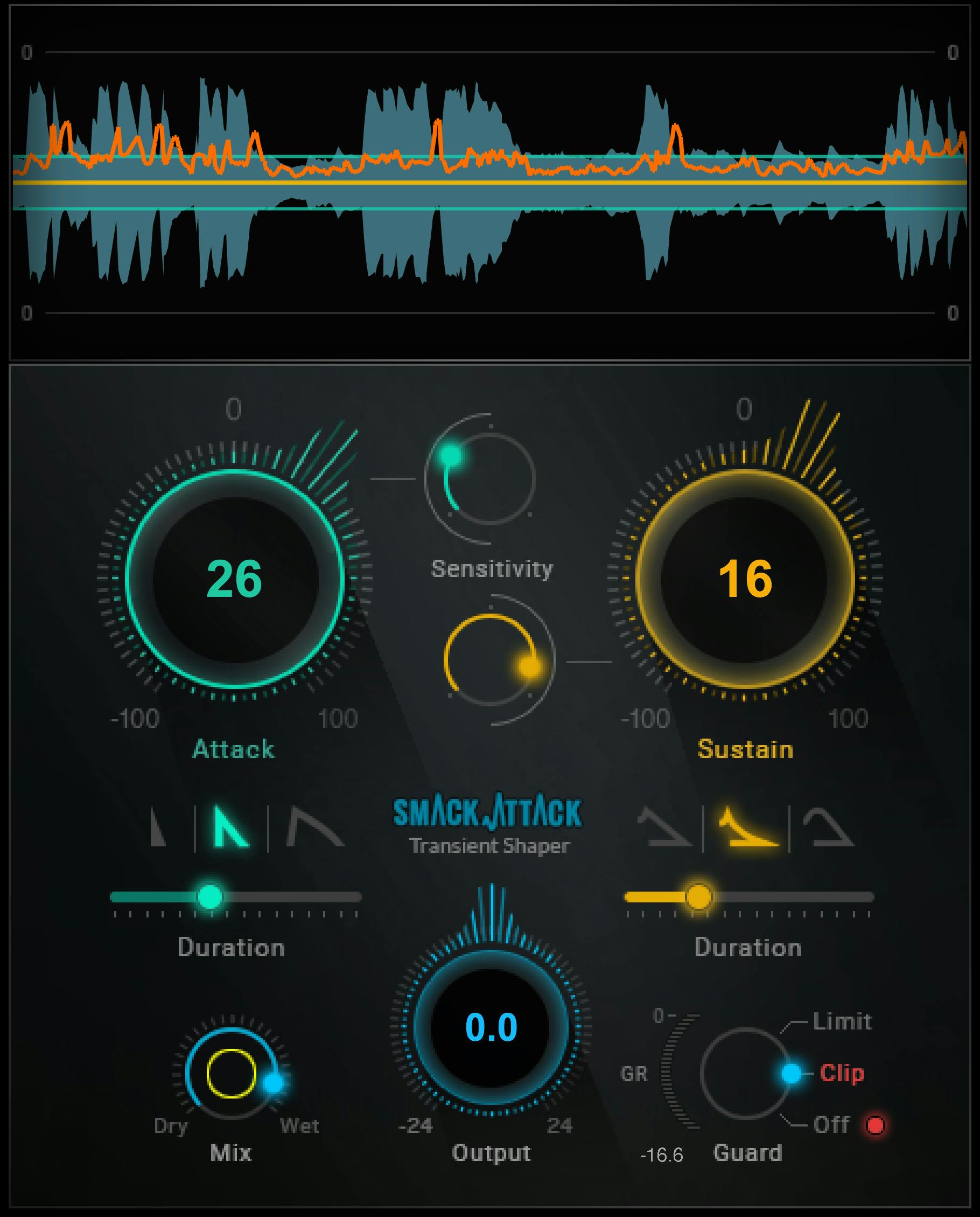
Waves Smack Attack is a transient shaper that detects fast changes in amplitude, then lets you process the attack and sustain parts separately. Each side has its own Level and Sensitivity controls, plus a shape and duration. A four-color graph shows the input, the two sensitivity boundaries and the resulting gain change. [1][2]
The important distinction is that Smack Attack does not detect a transient from one fixed absolute peak threshold. Waves says detection is based on rapid amplitude change, so the processor can identify transients in both quieter and louder signals. The amount of processing is also related to the transient's rate of change. [1, p.2]
About the imagery: the cover is an editorial illustration. The plugin interface is official Waves product artwork, not a capture of a listening or compliance test.
My Short Version
Use the big Attack control when you want the front edge of detected transients harder or softer. Use Sustain when you want the body/tail longer or more restrained.
Then use each Sensitivity control to decide which detected transients actually get processed. At very low Attack Sensitivity, the green graph boundaries are farther apart and only the strongest transients qualify. Higher settings bring the boundaries closer so smaller transients can be included. Sustain uses the same threshold-display concept. [1]
Shape and Duration decide how the gain change unfolds. Finish with Mix, Output and Guard. Guard can be Off, Clip or Limit; Output sits before Guard, so pushing Output changes how hard Clip or Limit is driven. [1]
How Smack Attack detects transients
Waves defines a transient here as a short, impulsive change in sound. Smack Attack identifies transients from fast changes in amplitude rather than absolute peak level. [1, p.2]
That matters because the Sensitivity controls are not ordinary static level gates. They define which identified attack or sustain events are acted on after transient detection.
Smack Attack processes two regions separately: attack, which concerns the initial transient edge, and sustain, which concerns the following portion. Level, Sensitivity, Shape and Duration can all be different between those two regions. [1]
The manual also states that processing amount is proportional to transient rate of change: faster changes can provoke more action. [1]
Attack Level
Attack Level controls the amount of gain increase or decrease applied to detected transients that meet the Attack Sensitivity condition. Its documented range is -100 to +100, with the value shown in the center of the control. [1, p.6]
Positive settings exaggerate the attack. Negative settings soften it. Waves describes reduced Attack Level as usually creating a warmer transient, but that is manufacturer guidance rather than a new listening result from this article.
A setting of zero produces no attack gain change. If Sustain is also zero, the orange gain-change graph is flat. [1, p.8]
Attack Sensitivity
Attack Sensitivity determines which detected attack transients are processed. Its range is 0–100, and the numeric value appears while the control is touched. [1, pp.6–7]
In the Audio Graph, the Attack Sensitivity boundaries are green. At very low Sensitivity the lines are far apart, indicating that only the strongest transients are processed. As Sensitivity rises, the lines move closer together so smaller detected transients can be included. [1]
This is why Sensitivity should be set after you decide what kind of attack change you want. A large positive Attack Level with a narrow qualifying set behaves differently from the same Level applied to many smaller transients.
Sustain Level
Sustain Level increases or decreases the processed sustain portion of a transient. The documented range is -100 to +100, with the value displayed in the center of the control. [1, p.6]
Waves notes that higher Sustain settings tend to add more apparent air. Lower settings reduce the sustain contribution. That description is source guidance, not a newly tested mix recommendation.
Attack and Sustain processing interact. The manual explicitly warns that changing one can affect how the others are perceived, so treat them as a system rather than two isolated knobs. [1, p.7]
Sustain Sensitivity
Sustain Sensitivity sets the threshold at which sustain processing begins. Its range is 0–100, and its value is shown when touched. [1, p.7]
The Sustain threshold appears as yellow boundaries in the graph. The guide says its threshold-indicator function is the same basic concept as Attack Sensitivity. [1]
Because Sustain Level and Sustain Sensitivity are highly interactive, set the level change and threshold together instead of assuming a Sensitivity number has one fixed audible effect.
The Audio Graph
The graph uses four documented colors. [1, pp.5,7–8]
Blue is the input peak waveform. It shows the relative size of incoming transients.
Green is the Attack Sensitivity threshold display.
Yellow is the Sustain Sensitivity threshold display.
Orange is the gain change created by Smack Attack.
When Attack and Sustain are both zero, the orange trace is flat because no transient gain change is being applied. Positive Attack Level pushes the corresponding gain-change display upward; negative attack processing appears downward. Sustain changes tend to extend over a longer portion of the graph. [1]
This is a processing display, not an output loudness meter. The separate Output Level Indicator next to Guard has different behavior explained below.
Attack shapes
Smack Attack provides three attack shapes. The guide says the rise is always faster than the fall; the shapes mainly differ in how sharp the gain-change envelope is and how quickly it falls away. [1, pp.9–10]
Needle
Needle has a very sharp rise and fall. Waves describes it as a tight shape particularly suited to hard, crisp drums. [1]
It is the most pointed of the documented attack choices.
Nail
Nail also has a very sharp rise, but its fall is slower and more sloped than Needle. Waves describes it as somewhat softer while still being well suited to drums. [1]
Needle and Nail both begin with an instantaneous rise once the attack is sensed. [1, p.10]
Blunt
Blunt has a milder rise and a noticeably slower fall. Waves positions it for all kinds of instruments, not only drums, while also noting that it can be used creatively on drums. [1]
Unlike Needle and Nail, Blunt's rise is slower. [1]
These source descriptions are useful starting points, but the article does not claim one shape is objectively better for a source.
Attack Duration
Attack Duration sets how long attack processing lasts from the initial rise. Its documented range is 0.5–500 ms, with the value displayed when the control is touched. [1, p.10]
The manual describes longer durations as producing warmer transients and shorter durations as producing a spikier result. Again, that is Waves' qualitative guidance rather than a new listening test here.
Shape and Duration work together. Shape controls the envelope character; Duration controls how long that attack processing takes to return.
Sustain shapes
The sustain side also provides three shapes: Linear, Non-Linear and Soft Linear. [1, pp.10–11]
Linear
Linear decays at a linear rate, producing an even return to unity. Waves says it is intended for drums. [1]
Non-Linear
Non-Linear changes its curve according to Sustain Level. The manual says it can produce a rapid or gentle curve and is intended primarily for drums. [1]
Because its shape depends on Sustain Level, do not treat the icon as one fixed envelope independent of the level setting.
Soft Linear
Soft Linear has a softer peak and linear fall. Waves says it shifts the attack sound toward the tail of the transient and is suited to drums but ideally to other instruments. [1, p.11]
The manual also notes that the drum-oriented shapes can produce creative results on other sources; this article preserves that as manufacturer guidance rather than guaranteeing a particular outcome.
Sustain Duration
Sustain Duration is the time it takes the gain to return to unity after the attack gain begins to fall. Its documented range is 30–1000 ms, and the value appears when the control is touched. [1, p.11]
Longer settings let sustain processing extend farther after the transient. Shorter settings make it recover sooner.
Mix
Mix sets the percentage of dry, unprocessed signal versus wet, processed signal. Its documented range is 0–100%, with the value displayed when touched. [1, p.11]
This is true parallel mixing inside the plugin. You can use a strong transient treatment and then reduce its contribution with Mix rather than weakening every attack/sustain setting individually.
That can be useful when the shape is right but the overall processing is too obvious. It is an editorial workflow suggestion, not a test result.
Output
Output adjusts final plugin level over ±24 dB, with the value shown in the center of the control. [1, p.12]
Output comes after Mix and before Guard. The documented signal flow is:
Mix → Output Level → Guard. [1]
That order is important. Raising Output can drive more signal into Clip or Limit; lowering Output can reduce how much Guard activity occurs without changing the transient detection itself.
Guard: Off, Clip and Limit
Guard determines how over-level output is treated. It has three modes. [1, p.12]
Limit
Limit uses a fast limiter and holds the level to a -0.1 dBFS ceiling. [1]
In Limit mode, the adjacent Output Level Indicator becomes a gain-reduction meter with a documented range of 0 to -40 dB. [1]
This is a protection/output mode after transient shaping, not a replacement for the Attack or Sustain controls.
Clip
Clip clips signal above 0 dBFS without the dynamic behavior of the limiter. Waves describes this as saturating over-level spikes and changing their character, with level limited to a -0.1 dBFS ceiling. [1]
In Clip mode, the Output Level Indicator also reports gain reduction from 0 to -40 dB. [1]
The manual's word saturates is preserved as its description of clipping; this article does not extrapolate a hardware-style saturation model.
Off
With Guard Off, Smack Attack applies no output limiting or clipping. A red indicator shows when the output is over level. [1]
Waves notes that internal clipping is unlikely even when that light is illuminated, but also tells users to consider the rest of the processing chain and D/A path. [1]
In Off mode, the Output Level Indicator changes function: it displays output level above 0 dBFS, with a range of 0–40 dB. [1]
The manual does not document a click-to-reset gesture for the red over indicator, so this guide does not invent one.
Two components
Smack Attack has two documented components: Mono, which is mono-in to mono-out, and Stereo, which is stereo-in to stereo-out. [1, p.3]
There is no mono-to-stereo component listed in the manual. Choose the component that matches the channel format you are actually processing.
WaveSystem toolbar
The common toolbar is documented for save/load presets, compare settings, undo/redo and plugin resizing. [1, p.3]
These are host/plugin-state actions rather than transient-shaping controls. A/B comparison should be treated as comparing two settings, not automatically as a level-matched bypass test.
The current product page also advertises broader workflow features such as MIDI control, but the retrieved Smack Attack user guide does not provide a MIDI assignment/control map. This article therefore does not invent MIDI behavior or shortcuts. [2]
A practical order of decisions
Start with Attack Level. Push it positive or negative enough that the effect is easy to identify, then set Attack Sensitivity so only the transient population you care about is being changed.
Choose an Attack Shape and Duration for the envelope behavior, then reduce the Level toward a useful amount.
Set Sustain Level and Sustain Sensitivity the same way, then choose a sustain shape and duration. Watch the orange gain-change line so you can distinguish the processor's action from the blue input waveform.
Use Mix if the processing envelope is right but its contribution is too strong. Then set Output. Choose Guard deliberately: Off for no Guard processing, Clip for clipped/saturated over-level spikes, or Limit for fast limiting.
These are editorial evaluation steps based on the documented control relationships. No new listening test or preferred preset was created.
Limitations and documentation boundaries
Smack Attack can be used on individual instruments, groups or the master bus according to Waves. That does not mean the same settings are appropriate for all three. [1]
The product page currently states zero latency and live operation, which is also documented in the user guide. This article does not turn that into a broader host/system compatibility claim. [1][2]
The current product page mentions MIDI control, but because the retrieved manual does not explain its mapping or scope, the article does not provide undocumented MIDI instructions.
No CPU, true-peak, oversampling, host automation or sonic-comparison test was performed for this manuscript.
Related plugins
For frequency-selective dynamics, the live F6 guide covers a different approach to changing level by frequency. For straightforward peak limiting after transient work, the live L2 guide explains a dedicated limiter rather than a transient shaper.
MV2 is another already-live dynamics reference, but its low/high-level compression workflow is different from Smack Attack's transient detection.
The Waves Audio Post Resources hub collects the site's existing Waves workflow and licensing references.
Bottom line
Smack Attack is easiest to use when you separate four decisions: which transients qualify, how much their attack/sustain changes, what shape that gain change takes, and how the result exits the plugin.
Sensitivity selects the transient population. Level sets positive or negative change. Shape and Duration define the envelope. Mix, Output and Guard decide how the processed result is blended and contained.
Use the graph to confirm what the processor is acting on, and remember that the Guard meter changes meaning depending on whether Guard is Off or in Clip/Limit mode.
Sources
Checked September 20, 2026. No new listening, CPU, host-automation or compatibility test.
- Waves Smack Attack Transient Shaper User Guide, detection/components pp.2–3, quick start pp.4–5, sensitivity/graph pp.6–8, shapes/duration pp.9–11, output/Guard pp.11–12. Official screenshots of interface and output pages were visually inspected in this run.
- Waves Smack Attack Transient Shaper product page.
- Waves Graphic Library, attribution/backlink condition and exact
Smack Attackproduct-art entry.
Frequently Asked Questions
Does Smack Attack detect transients from one fixed peak threshold?
No. Waves says Smack Attack detects fast changes in amplitude rather than a fixed absolute peak level, allowing it to identify transients in both quieter and louder material.
What is the difference between Attack Level and Attack Sensitivity?
Attack Level sets how much a qualifying attack transient is increased or reduced, from -100 to +100. Attack Sensitivity sets which detected attack transients qualify for that processing, from 0 to 100.
What do the Smack Attack graph colors mean?
Blue shows the input peak waveform, green shows Attack Sensitivity boundaries, yellow shows Sustain Sensitivity boundaries, and orange shows the gain change applied by the processor. The graph is not an output loudness meter.
What is the order of Mix, Output and Guard in Smack Attack?
Waves documents the order as Mix, then Output Level, then Guard. Raising Output can therefore drive more signal into Guard's Clip or Limit mode.
How do Smack Attack's Guard modes differ?
Limit uses a fast limiter, Clip clips over-level signal, and Off applies neither. Waves specifies a -0.1 dBFS ceiling for Limit and Clip; Guard Off displays a red over-level indicator instead of containing the output.
Is the Guard Output Level Indicator always a gain-reduction meter?
No. In Limit and Clip it displays gain reduction from 0 to -40 dB. With Guard Off it instead shows output level above 0 dBFS, from 0 to 40 dB.

About the Author
Joseph Nilo has been working professionally in all aspects of audio and video production for over twenty years. His day-to-day work finds him working as a video editor, 2D and 3D motion graphics designer, voiceover artist and audio engineer, and colorist for corporate projects and feature films.