
Waves Vocal Bender changes a voice's pitch and formant character without changing its duration. It can also flatten the voice to one selected note and modulate Pitch, Formant, Mix and other controls. Its four modulation sources provide repeating patterns or movement derived from the incoming voice. [1][2]
Pitch and formant are separate decisions. One changes the musical pitch; the other changes resonant character without choosing different sung notes.
About the imagery: the cover is an editorial illustration. The plugin interface is official Waves product artwork, not a capture of a listening or compliance test.
My Short Version
Use Vocal Bender for deliberate voice effects: doubling, altered character, monotone effects or moving pitch/formant patterns.
Start with the main controls, then add one modulation assignment at a time. A complicated modulation network can hide a simple wrong base setting.
This is designed around a single voice at a time, not a choir or a finished polyphonic mix. The guide explains documented behavior and proposed uses; it does not claim a new sound test.
What it is—and is not
Vocal Bender is a creative pitch/formant processor. It does not provide the key, scale and legal-note correction grid found in Waves Tune Real-Time. Flatten forces a single note; it is not automatic correction to a song's changing melody. [1]
A clean, isolated source gives you a clearer effect decision. Feeding a full mix into a processor designed for one voice can produce unwanted results; it does not become a stem separator because the effect is voice-oriented.
For ordinary spoken-word delivery, decide whether changing the speaker's character is appropriate. This is not a default step for improving intelligibility.
The main controls
Pitch
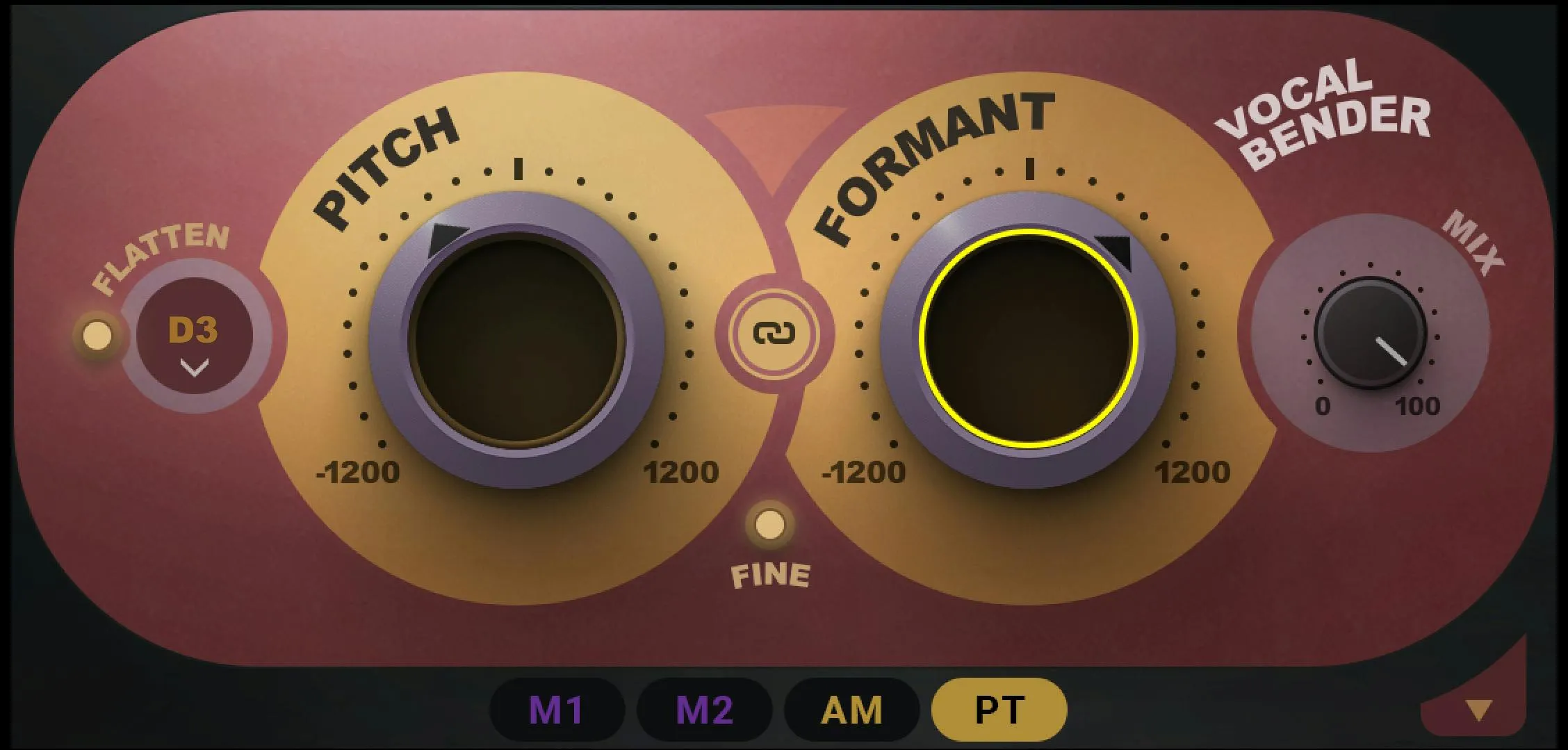
Pitch transposes the fundamental and its harmonics while preserving duration. Regular resolution spans -12 to +12 semitones. [1, p.4]
An octave change is obvious, but smaller offsets can be useful in a deliberate doubling effect. Judge the blend and its timing relationship rather than treating a wider sound as automatically better.
Pitch does not select the right note from a musical scale. It offsets the material you feed it.
Formant
Formant changes vocal resonance character without changing the musical note. It uses the same regular -12 to +12 shift scale. [1, p.4]
Use it independently from Pitch when the desired effect is a change in apparent vocal character rather than melody.
Do not treat a formant shift as evidence about a real person's age, identity or physiology. It is an audio effect.
Fine
Fine switches both main controls into -1200 to +1200 cents resolution. It changes how precisely the shift is adjusted, not the overall octave range. [1, p.4]
This is useful for smaller offsets. The finer display is not a higher-quality algorithm setting.
Pitch/Formant Link
The small control between Pitch and Formant adjusts them together while preserving their offset. Movement is limited by the two controls' endpoints. [1, p.5]
A linked move does not make the values equal. Inspect the starting offset before assuming that the same turn changes both by the same absolute final amount.
Flatten and selected note
Flatten forces the voice toward one selected pitch, with choices from C2 to B3. The switch enables the effect and the note selector establishes its target. [1, p.4]
That can provide a deliberately monotone starting point for modulation. It is not a tool for deciding whether the singer intended a different note on each syllable.
Mix
Mix blends direct and processed signal from 0% dry to100% wet. [1, p.5]
Compare the full effect first so you understand what is being added. Then choose the blend. A dry contribution combines with the processed result; it does not undo an excessive setting.
The manual does not publish a complete factory-default table for these main controls. The example interface values are not treated as defaults here.
Assigning and removing modulation
The four sources are M1, M2, AM and PT. Drag a source label onto an available control, or use the control's modulation-slot menu. Up to four modulation assignments can affect a control. [1, pp.6–7]
Drag vertically on a populated slot to change its depth. The colored arc shows the assigned depth; the moving marker shows the resulting movement around the control. The base knob setting remains a separate part of the result.
Right-click an assignment and choose None to remove it. This is different from setting the source's overall Level to zero, which stops that source's contribution wherever it is used.
The manual excludes Smooth and PT Offset from modulation targets. Modulators can otherwise affect permitted controls in other modulator sections, so a surprising result may come from more than the destination's visible main setting.
M1 and M2: repeating or stepped movement
M1 and M2 share the same controls. Each can use LFO or SEQ; they are two independent sources, not a stereo pair by definition. [1, pp.8–10]
LFO / SEQ
In LFO mode, Rate governs one full curve cycle. In SEQ mode, Rate governs one step, not the whole pattern. [1, p.8]
That distinction explains why switching modes can change the apparent pattern length even when the rate display seems familiar.
Steps and step values
The sequencer permits 2–16 steps. Drag each step to set its value; the manual specifies whole-number values from -24 to +24. [1, p.8]
Those are modulation-pattern values. The actual destination movement still depends on assignment depth and the destination's own range.
Draw, Erase and Browse
The pencil draws the LFO shape or sequence. Erase clears the current shape to None. Browse opens factory curves or patterns; choosing one replaces the current shape. Use the plugin's Undo/Redo to undo that replacement. [1, p.8]
A smooth-looking curve is not automatically an inaudible modulation. Its rate and depth matter too.
Shape Save and Delete
The shape browser reveals Save and Delete. Save stores a user shape in an available library cell. Delete removes a selected user shape; factory shapes cannot be deleted through that control. [1, p.9]
This library is separate from the whole-plugin preset. Saving a shape does not save every Pitch, Mix or assignment setting around it.
Rate and Rate Sync
Free Rate spans 0.06–30Hz. Sync changes to musical durations from 1/64 bar to8bars, calculated from the host tempo. [1, p.10]
Recheck a synchronized effect after a tempo change. In SEQ mode, remember that the selected rate describes each step.
Phase
Phase selects the starting point of the modulation curve. [1, p.10]
Use it to change which part of a cycle occurs first. The manual does not supply a complete independent trigger-mode control set or a formal Phase endpoint/default table; this guide does not invent one.
Warp
Warp redistributes the speed through the cycle without changing its overall duration. Its range is 0.01–100, with1representing linear movement. Below1starts more slowly and accelerates; above1starts faster and slows. [1, p.10]
Think of this as the shape of motion through time, not a second Rate control.
Smooth
Smooth rounds abrupt changes in the modulation curve, over 1–1000. [1, p.10]
It can reduce abrupt onsets, but a very high value can also reduce the movement you intended. Compare the character of the transition rather than assuming maximum smoothness is always desirable.
M1/M2 Level
Each source Level scales its overall modulation over 0–1. At zero, that source contributes no movement. [1, p.10]
Use this for a source-wide comparison. Per-destination depth remains the separate way to change only one assignment.
AM: movement driven by voice level
AM follows the input's amplitude envelope. It is a modulation source, not an automatic compressor inserted into the voice path. [1, p.11]
Attack,0.1–1000ms, sets how quickly that source rises with incoming level. Release,also0.1–1000ms, controls its return. Level,0–2, scales the resulting modulation; zero stops it.
You could use the envelope to make an effect react more strongly to emphasized syllables. That is a suggested creative use, not a tested preset. Judge the destination's movement as well as the follower's curve.
PT: movement driven by detected pitch
PT derives a modulation signal from the incoming voice's pitch. [1, p.12]
Smooth,1–1000, sets how quickly it follows pitch changes. Offset,-1to1, moves its reference. Level,0–2, scales its contribution, with zero stopping it.
PT is not another automatic scale-correction mode. It uses the detected pitch to move assigned controls.
A noisy or polyphonic input can complicate that detection. Do not infer that a moving graph proves the intended note was tracked correctly.
Displays, expanded panel and toolbar
The modulation graph, colored depth arcs and moving markers show settings and activity; they are not loudness or true-peak meters. The lower-panel arrow shows or hides modulation detail without implying those assignments have been removed. [1, pp.3,6–12]
WaveSystem supplies About, Undo/Redo, preset load/save, Previous/Next, Setup A/B, Copy A/B, sizing and help. Current preset browsing adds search, Factory/User/Favorite views, favorites, Copy/Paste, Reset to Default and Detach. [3][4]
A/B compares two setups inside Vocal Bender. Check all four modulation sources before deciding that a difference comes from one main knob.
A practical starting workflow
Use a single isolated voice and choose the intended character change. Set Pitch and Formant first, with modulation inactive.
Compare at a sensible level and establish Mix. Then add one source to one destination at a limited depth.
For a rhythmic effect, choose LFO or SEQ deliberately and account for its different rate meaning. For a voice-responsive effect, set the AM or PT response against the actual phrase.
Keep a simpler version available. These are proposed decisions, not evidence that the effect improved a particular recording.
Related plugins
Waves Tune Real-Time uses key, scale and target-note rules for correction. It is a different task from a fixed shift or Flatten effect.
Waves Harmony is the relevant next reference when generating several musical voices is the goal.
Vocal Rider controls vocal level, not pitch or formants. Sibilance addresses a separate high-frequency vocal problem.
Use the Waves hub for the wider toolkit and licensing guides.
Bottom line
Set the voice transformation before adding motion. Then use each modulation source for a clear purpose and keep its overall level separate from its destination depth.
The result can be subtle or deliberately artificial. Neither direction is automatically an improvement over the original voice.
Sources
Checked September19,2026. No new audio or latency test.
- Vocal Bender User Guide, complete control and modulation sectionsp.3–12.
- Waves Vocal Bender.
- WaveSystem guide.
- Waves preset instructions.
- Waves Graphic Library.
Frequently Asked Questions
What is the difference between Pitch and Formant in Vocal Bender?
Pitch changes the musical note. Formant changes resonant vocal character without itself choosing a different sung note. The Link control can tie their movement together when that is the intended effect.
Does Vocal Bender's Flatten control provide scale-based pitch correction?
No. Flatten moves the voice toward one selected note. For key, scale and allowed-note rules, Waves Tune Real-Time is the distinct Waves product described in the related-plugin section.
What do M1 and M2 do in Vocal Bender?
M1 and M2 are modulation sources that can produce repeating or stepped movement. Assign a source to a destination control, then set the destination depth and the source's own level separately.
How is AM different from PT modulation in Vocal Bender?
AM follows the incoming voice's level, with Attack and Release shaping its response. PT follows detected pitch, with Smooth and Offset shaping that movement. They respond to different aspects of the input.
Does Vocal Bender change the duration of a voice when changing pitch?
Its documented pitch and formant transformations do not change the audio's duration. That does not imply a measured latency or a particular sound quality in every host and source recording.
What does Mix control in Vocal Bender?
Mix balances the processed effect with the unprocessed input. It is separate from the depth of an assigned modulation source and from that source's Level control.

About the Author
Joseph Nilo has been working professionally in all aspects of audio and video production for over twenty years. His day-to-day work finds him working as a video editor, 2D and 3D motion graphics designer, voiceover artist and audio engineer, and colorist for corporate projects and feature films.