
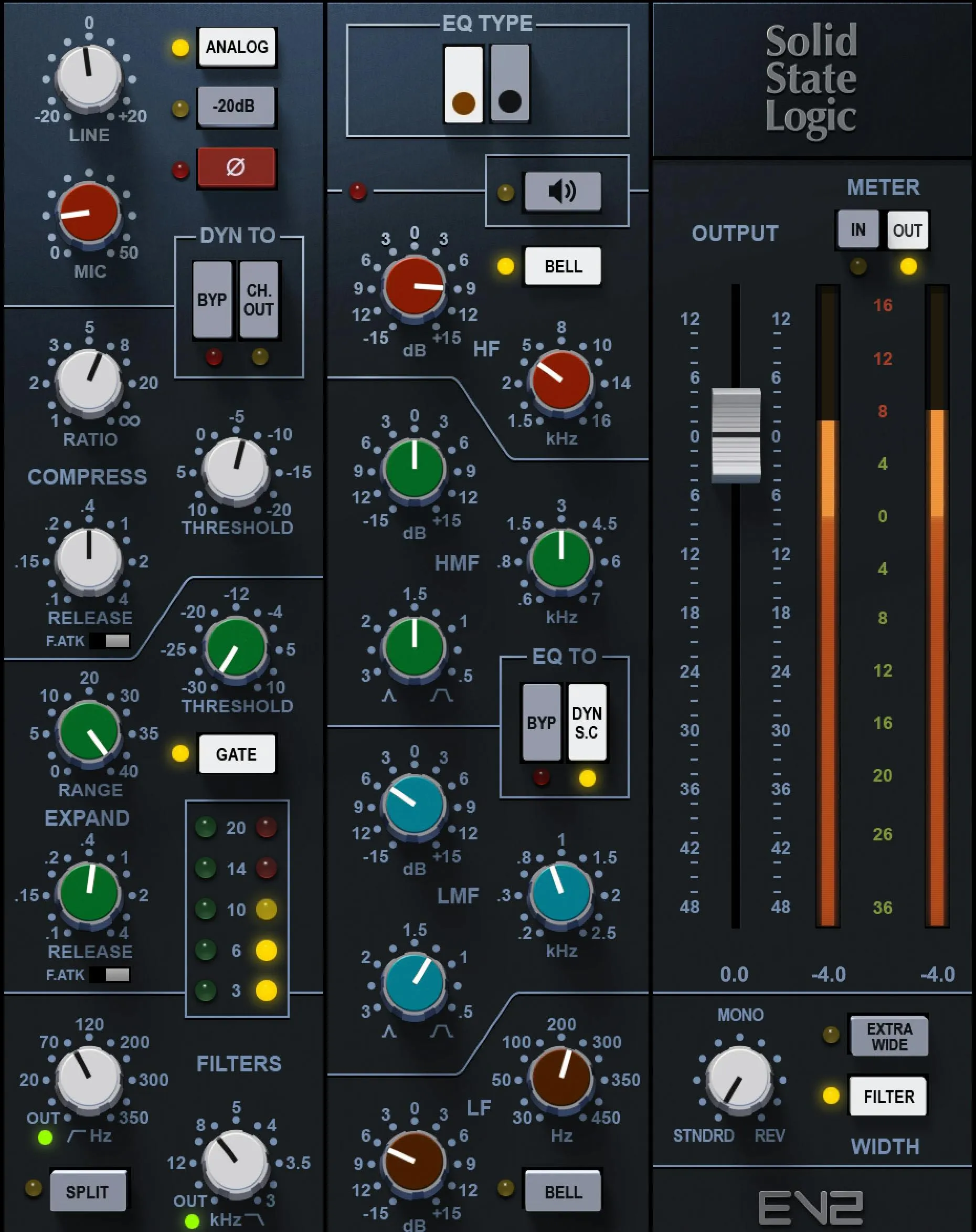
Waves SSL EV2 combines modeled input drive, a compressor, an expander/gate, filters, four-band EQ and output imaging in one channel strip. Its Black and Brown EQ choices change the entire EQ behavior, while routing switches determine which sections process the audio or feed the dynamics detector. [1][2]
The lower number of plugin windows does not mean fewer decisions. Signal order matters as much as the knob settings.
About the imagery: the cover is an editorial illustration. The plugin interface is official Waves product artwork, not a capture of a listening or compliance test.
My Short Version
Start with a clear task: input color, broad tone shaping, dynamic control or low-level cleanup.
Use only the sections needed, and check the routing before diagnosing an unexpected result. An EQ placed in the sidechain changes what triggers dynamics rather than directly applying that curve to the output.
Match the final level before judging a model or drive change. This is a documentary guide, not a new comparison with hardware or another SSL plugin.
Input controls
Line and Mic
Line adjusts input level over -20 to +20 dB. Mic provides 0 to +50 dB of additional modeled input gain. With Analog enabled, higher drive also changes harmonic distortion. [1, p.5]
Do not think of Mic as an instruction to switch the DAW's physical microphone input. It is part of the modeled channel's gain structure.
A large drive setting followed by a lower output can retain coloration. Equal output level does not mean equal internal processing.
Analog
Analog switches the modeled harmonic-distortion behavior in the input and output stages. The manual says disabling it leaves Line and Mic acting as clean gain controls. [1, p.5]
That makes this switch different from a tape plugin's added-noise control. Judge the actual feature described here rather than assuming every Waves Analog label means the same thing.
-20 dB Pad and Ø
The Pad reduces the input by20dB. Ø reverses input polarity. [1, p.5]
Use a pad to manage level when necessary, not as a sound-quality mode. Polarity is a relationship to other signals; it is not a general fix for a track that sounds wrong on its own.
Compressor controls
Ratio
Ratio ranges from 1:1 to limiting. It works with Threshold and the documented automatic makeup behavior. [1, p.6]
Choose how strongly peaks should be restrained, then compare at a useful level. A larger ratio does not automatically mean greater consistency or intelligibility.
Compressor Threshold
Threshold ranges from -20 to +10 dB on the documented scale. Lowering it brings more of the signal into compression. [1, p.6]
Inspect the compressor's own reduction indicator rather than confusing it with the nearby gate reading. Automatic makeup can also make a stronger setting louder; do not let that decide the comparison.
Compressor F.ATK
F.ATK selects a 1ms fast attack. With it off, the slower response is program-dependent. [1, p.6]
There is no continuously variable attack knob here. Choose the available behavior against the front edge of the sound, not an assumed setting copied from another compressor.
Compressor Release
Release spans 0.1–4 seconds. [1, p.6]
Listen to what follows the strong word or hit. A setting that contains the peak can still alter the next part of the phrase if recovery remains active.
Expander and gate controls
Gate Threshold
The green section's Threshold ranges from -30 to +10 dB. It determines when low-level reduction engages, rather than controlling the compressor threshold above it. [1, p.7]
Use a passage with quiet endings and wanted breaths. A threshold that creates quiet pauses may also remove part of the performance.
Range
Range limits this section's reduction, over 0–40 dB. [1, p.7]
A modest permitted reduction can be more useful than attempting complete silence. It leaves room for transitions that a hard cut would make conspicuous.
Gate F.ATK and Release
Gate F.ATK chooses1ms or the program-dependent slower response. Gate Release runs0.1–4seconds. [1, p.7]
These control the low-level section, not the white compressor controls. Recheck the first consonant and the decay of a phrase after a timing change.
Gate switch
The switch changes the default expander behavior into a gate. [1, p.7]
Choose the behavior from the source. A stronger closing action is not a requirement for a professional voice track.
Reduction indicators and Dyn To
The green LED meter reports gate reduction; the yellow meter reports compressor reduction. Dynamics Bypass removes the whole dynamics section. Ch Out moves it after the EQ instead of the default pre-EQ location. [1, pp.6–7]
That routing change alters what reaches the detector. An EQ boost before compression can trigger a different response even when no compressor knob moves.
The four-band EQ
Black and Brown
The buttons choose Black or Brown EQ behavior, default Black. The selection affects the whole EQ section, not only the low-frequency knob whose color identifies it. [1, p.8]
Treat the modes as different responses to evaluate. The manufacturer's suggested source categories are not an independent ranking for your recording.
Low and high shelves: LF and HF
LF has Frequency and Gain, plus a Bell switch changing its shelf to a bell. HF has the same control types at the upper end. LF covers 30–450Hz; HF 1.5–16kHz. [1, pp.9–10]
In Brown, the documented boost/cut reaches about15dB. Black offers about18dB in bell mode and15dB as a shelf. The bell shapes vary with the amount of gain; they are not fixed-width parametric bells with a separate Q knob.
Use a shelf for a broad balance and a bell for a more localized shape. Neither choice means the whole source needs to become brighter or heavier.
LMF and HMF
Each middle band provides Frequency, Gain and Q. LMF covers 200Hz–2.5kHz and HMF 600Hz–7kHz. Their Q controls span 0.1–3.5. [1, pp.9–10]
The gain range depends on Q and EQ type. The manual specifies up to about15dB in Brown or18dB in Black at the indicated narrow setting, with less at the other end. Do not assume a fixed boost limit independent of Q.
Frequency chooses the region, Q its width and Gain the adjustment. Change them with a defined problem in mind rather than drawing a curve because the interface has four bands.
Filters and detector routing
High Pass and Low Pass
High Pass covers 16–350Hz; Low Pass 3–22kHz. Turning the relevant knob fully left bypasses the filter. Low Pass uses12dB/octave in both EQ types; High Pass is12dB/octave in Brown and18dB/octave in Black. [1, p.9]
These are separate from LF/HF EQ. A filter removes a region progressively, while the shelf can make a broad boost or cut.
Split
Split places the high-pass and low-pass filters ahead of the dynamics rather than leaving them with the EQ section. [1, pp.4,8–9]
This can change what reaches the dynamics without moving the entire four-band EQ. Use the routing diagram to understand the combination with Ch Out.
EQ To: Bypass and Dyn S-C
EQ Bypass removes that section. Dyn S-C routes the EQ and filters into the dynamics detector. With Split also selected, the filters remain in the audible pre-dynamics path while the EQ serves the sidechain. [1, pp.4,10]
Do not expect an audible equalization curve when it is only shaping detection. It can still change the output indirectly by changing the gain reduction.
External SC
The toolbar's SC button enables an externally routed key. The host must supply that signal; the button does not create a bus or choose the right source by itself. [1, p.10]
Detector routing is not a second audible input mix. Keep the trigger and processed channel separate in your notes.
EQ Solo and headroom indicator
With EQ Solo active, touching a Frequency or Q control isolates the band being adjusted. The red light beside Solo is an EQ-headroom warning triggered around -3dBFS at that section's output. [1, p.11]
Return from audition mode before judging or exporting the complete channel. The warning is not the same indicator as final output clipping.
Output, meter and stereo image
In/Out chooses the meter source. The VU reference is -18dBFS at0VU. A red clip warning can be cleared by clicking the meter. The Output fader sets the final channel level. [1, p.11]
The manual does not publish a separate complete numeric output-fader range/default table; its illustration is not treated as that specification here. The VU display is not a LUFS or true-peak compliance meter.
Width moves from normal stereo through mono to reversed stereo. Extra Wide extends the image through phase-dependent processing. Filter applies a roughly200Hz low-frequency shelf before the width treatment to help retain the center. [1]
Use imaging only for a clear stereo task, and check the mono result. Extra width can reduce central content; it is not an automatic enhancement for dialogue.
Components and shared toolbar
Mono and stereo host components must be chosen for the actual source. The manual's separate M/S and DUO example uses a rack and two instances; it does not document a native EV2 button that turns one ordinary channel into independently processed mid and side paths. [1, p.12]
That historical rack example is not a requirement to install or change software for this guide.
The common toolbar provides About, Undo/Redo, preset load/save, Previous/Next, Setup A/B, Copy A/B, sizing and help, alongside the documented SC control. The current preset browser adds search, Factory/User/Favorite views, favorites, Copy/Paste, Reset to Default and Detach. [3][4]
A/B compares two settings, not necessarily against full bypass. Presets can carry routing choices, so inspect those before trying to recreate a sound by knob position alone.
A practical order of decisions
Decide whether input coloration belongs in the task. Establish a sensible level and turn off unneeded sections.
Choose EQ for a tonal problem and dynamics for a level-response problem. If their interaction is not helpful, inspect order and detector routing before adding more processing.
Evaluate low-level cleanup against quiet syllables. Then compare the final output at a similar level and leave stereo imaging alone unless it serves a separate goal.
These are evaluation suggestions, not a newly tested SSL chain or a universal vocal preset.
Related plugins
SSL E-Channel is the older related Waves channel model. Its existence does not make its parameter behavior identical to EV2.
RComp is a focused compressor reference when a full channel strip is unnecessary.
F6 provides a different, frequency-dependent dynamics approach for specific tonal events. Sibilance concentrates on a narrower vocal problem.
The Waves resource hub connects the wider workflow and licensing guides.
Bottom line
Read the routing before chasing a setting. EV2 can place filters and EQ in different parts of the audio and detector paths, which changes what the same knob positions accomplish.
Use the sections that solve a clear problem. A complete channel strip does not require a completely processed track.
Sources
Checked September19,2026. No new sonic, CPU or compatibility test.
- SSL EV2 User Guide, routingp.4, controlsp.5–11, historical rack examplep.12.
- Waves SSL EV2 product page.
- WaveSystem guide.
- Waves preset instructions.
- Waves Graphic Library.
Frequently Asked Questions
What is the difference between SSL EV2's Black and Brown EQ?
Black and Brown select different EQ behaviors across the strip, not merely different panel colors. Check which mode is selected before transferring a setting from another session.
What does the Analog control do in SSL EV2?
Analog adds the modeled analog-circuit contribution to the input stage. It is separate from the Line and Mic drive choices and is not a substitute for checking input level.
What does Split change in SSL EV2?
Split changes where the high-pass and low-pass filters sit relative to the other processing sections. That routing choice can change what reaches the dynamics section even if the filter knob positions stay the same.
Can SSL EV2 use its EQ as the dynamics sidechain?
Yes. EQ To includes a Dyn S-C route, which sends the EQ-shaped signal to the dynamics detector rather than treating the EQ only as an ordinary output-path tone control.
What is the difference between compressor and gate Range in SSL EV2?
The compressor uses Ratio and Threshold to control gain reduction above its threshold. The expander/gate uses its own Threshold and Range to limit how much quieter below-threshold material can become.
Does SSL EV2's Width control always preserve mono compatibility?
No. Width can move toward mono or reversed stereo, and Extra Wide uses phase-dependent processing. Check the result in mono when that compatibility matters to the delivery.

About the Author
Joseph Nilo has been working professionally in all aspects of audio and video production for over twenty years. His day-to-day work finds him working as a video editor, 2D and 3D motion graphics designer, voiceover artist and audio engineer, and colorist for corporate projects and feature films.