

Waves Abbey Road Reel ADT is a tape-based doubling effect that lets a generated double move before, around or after the source while independently controlling the source and doubled signals. Its defining controls are the movable ADT Position, manual Varispeed, optional LFO modulation, and separate pan, drive, phase, mute and level controls for the source and double. [1][2]
Waves says the plugin models the Abbey Road Artificial Double Tracking process developed in the 1960s, including modeled tape-machine behavior and the changing timing/pitch relationship created by Varispeed. That historical/modeling description comes from Waves and the Abbey Road user guide; this article did not independently test the emulation. [1][2]
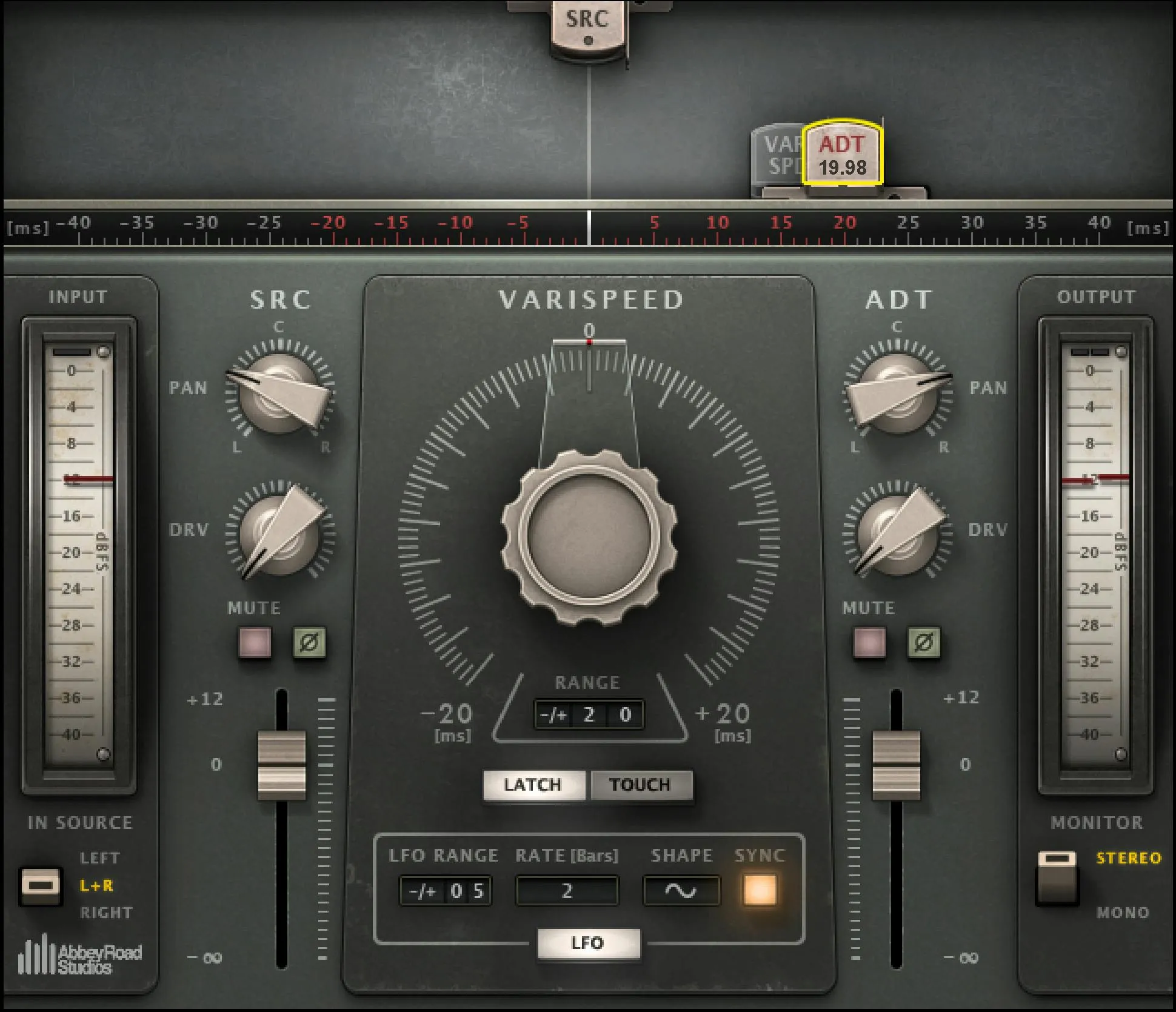
About the imagery: the cover is an AI-generated editorial illustration, not the plugin interface or evidence of an audio test. The interface image is official Waves Graphic Library artwork used with its product backlink.
My Short Version
For a basic double, start with ADT Position and Varispeed. Position establishes where the doubled signal sits in time relative to the source; Varispeed moves it inside a selectable timing range. The regular components can place the ADT signal before or after the source. The Live components are delay-only: they do not advance the double ahead of the source. [1]
Turn on the LFO when you want that timing relationship to move automatically. Set the movement range, choose a shape—including random if desired—and either set the rate in Hz or synchronize it to musical bars. [1]
Then balance the two tape paths with SRC and ADT pan, drive, phase, mute and level. Use a 2V component when you want a second independently controlled ADT signal. [1]
ADT Position
ADT Position determines where the doubled signal can sit relative to the source and bounds the playing range available to Varispeed. In the regular components, the ADT can be before, around or after the source. You move the position by dragging the ADT tape head in the display. [1]
The Live components are different: the ADT signal can play only after the source. That limitation is how the low-latency Live design avoids the look-ahead/advance behavior used by the regular version. [1][2]
The current manual does not publish one fixed numeric range for the Position control itself. It instead documents the relationship between Position and the variable Varispeed range, so this article does not invent a Position minimum, maximum or default.
Input Source
On stereo-capable components, Input Source selects which source feeds the ADT process: Left, Right, or L+R. [1]
When L+R is selected, Waves says the two stereo channels are summed to mono and divided by two to maintain perceived loudness. [1]
Monitor
Monitor lets you hear the plugin output in mono. Waves specifically describes this as a way to track phasing introduced by the ADT process. [1]
It is a monitoring aid rather than a separate processing path documented with its own range or level control.
Varispeed
Varispeed controls the time movement of the doubled signal. Waves relates it to the voltage-controlled oscillator in the original ADT setup, where changing tape speed shifts the timing—and therefore the pitch relationship—of the double. [1]
Its selectable movement range is ±1 ms through ±20 ms, in 1 ms range increments. The manual also states that Varispeed can be assigned to MIDI through the host. [1]
This is not the same thing as a conventional fixed delay-time knob. ADT Position establishes the timing area and Varispeed moves within the chosen range.
Varispeed Mode: Latch vs. Touch
Latch leaves Varispeed at the value where you release the control. Touch returns Varispeed to 0 when you release it. [1]
Touch is therefore useful when you want a temporary manual movement and an automatic return to center, while Latch is appropriate when you want the new position to remain. That use distinction is editorial guidance derived directly from the documented behavior; no performance test was run.
LFO On/Off
Turning the LFO on makes it automatically modulate Varispeed delay time. Turning it off leaves Varispeed under its non-LFO control. [1]
LFO Range
LFO Range sets the upper and lower limits of the modulation cycle. Like the manual Varispeed range, it is variable from ±1 ms to ±20 ms in 1 ms increments. [1]
For example, selecting 3 limits a cycle to ±3 ms around its operating point. That example comes from the manual rather than from a new measurement. [1]
LFO Shape
The available LFO shapes are:
- sine
- triangular
- reverse sine
- reverse triangular
- random [1]
The current guide names those shapes but does not publish mathematical curve definitions, probability behavior for Random, or waveform-resolution details. None are inferred here.
LFO Rate: Hz, Bars and Sync
With Sync off, LFO Rate (Hz) sets how quickly the LFO completes its selected range. The manual describes the function but does not publish a numeric Hz minimum, maximum or default. [1]
With LFO Sync on, Rate is selected in bars. The documented choices are 1/4, 1/2, 1, 1 1/2, 2, 2 1/2, 3, 3 1/2, 4, 6, 8, 9, 12 and 16 bars. Waves says the plugin derives the actual LFO rate from the host session tempo, measure/resolution and selected bar value. [1]
SRC controls
The SRC section controls the untreated/source tape path.
SRC Pan
SRC Pan positions the source from 100L to 100R. [1]
SRC Drive
SRC Drive sets the amount of modeled tape saturation, with a documented range of 0–30. [1]
The manual does not attach a physical unit to that 0–30 scale, so this article treats it as the plugin's own control scale rather than dB or percent.
SRC Mute
SRC Mute removes the source signal from the output. [1]
SRC Phase
SRC Phase inverts the phase of the source signal. [1]
SRC Level
SRC Level runs continuously from +12 dB to -Inf dB with 0.1 dB resolution. [1]
ADT controls
The first doubled path has the same core channel controls as the source.
ADT Pan
ADT Pan ranges from 100L to 100R. [1]
ADT Drive
ADT Drive controls modeled tape saturation from 0–30. [1]
ADT Mute
ADT Mute removes the first doubled signal from the output. [1]
ADT Phase
ADT Phase inverts the doubled signal's phase. Waves specifically notes that phase inversion can be used for a phasing effect when the two signals are very close—roughly 0 to 5 ms apart. [1]
That is vendor-documented usage, not a listening result from this article.
ADT Level
ADT Level ranges continuously from +12 dB to -Inf dB, in 0.1 dB increments. [1]
Waves notes that ADT output is normalized to help maintain constant gain when source and ADT channels are hard-panned left and right. [1]
ADT 2 controls in 2V components
The 2V components add a second independently controllable ADT signal. Waves describes this as a second modulation of the source that can be controlled separately from the first double. [1]
Its channel controls are:
- ADT 2 Pan: 100L–100R
- ADT 2 Drive: 0–30
- ADT 2 Mute: mutes the second ADT output
- ADT 2 Phase: inverts the second ADT signal
- ADT 2 Level: +12 dB to -Inf dB, continuous at 0.1 dB resolution [1]
The current guide does not document a different Drive algorithm or level scale for ADT 2; it uses the same documented ranges as the first double.
The ten Reel ADT components
The manual documents ten components:
- ADT Mono
- ADT Mono-to-Stereo
- ADT Stereo
- ADT 2V Mono-to-Stereo
- ADT 2V Stereo
- ADT Live Mono
- ADT Live Mono-to-Stereo
- ADT Live Stereo
- ADT Live 2V Mono-to-Stereo
- ADT Live 2V Stereo [1]
The two meaningful feature splits are 2V versus standard and Live versus regular. 2V adds the second independently controlled double. Live removes the ability to place the ADT signal ahead of the source in exchange for especially low latency. [1]
Waves' current technical table reports the regular and Live versions separately and labels the Live version low-latency; this manuscript did not measure host latency. [2]
Regular vs. Live preset behavior
Because regular presets can contain negative/advanced ADT values that a Live component cannot reproduce, Waves says the Live component automatically translates negative ADT values to positive values when presets are shared. [1]
That is an important recall difference: a preset can load across the component families without the Live version moving the double ahead of the source.
Output normalization
The manual states that ADT output is normalized to maintain constant gain when the source and ADT channels are panned hard left and hard right. [1]
This is a documented implementation behavior, not a claim that every combination of drive, timing, phase and panning is loudness-matched.
WaveSystem toolbar
The top WaveSystem toolbar supports preset save/load, comparison, undo/redo and interface resizing. [1]
Those functions are part of the shared Waves shell rather than Reel ADT's tape-processing controls, but they matter when comparing settings or recalling a working state.
A practical setup order
Start with a regular Mono-to-Stereo or Stereo component unless you specifically need the second 2V double or the Live timing restriction. Set ADT Position and move Varispeed until the double occupies the intended timing relationship.
If you want continuous movement, enable the LFO, choose its range and shape, then choose either free Hz rate or host-synced bar timing. After the movement is established, balance SRC and ADT levels and pan positions; add Drive only if you want the modeled tape saturation contribution.
Check Monitor in mono when the relative timing and phase are especially close. Use Phase deliberately rather than treating it as a generic tone switch. This workflow is editorial guidance assembled from the documented control relationships; it is not a claimed listening test.
Waves' own quick-start suggests trying static timing around 10–15 ms before or after the source and, for LFO movement, a 3–8 ms range with Random as a preferred starting shape. Those are vendor recommendations, not factory defaults and not new recommendations derived from testing here. [1]
Best for / skip if
Reel ADT is a strong fit when you want a moving tape-style double with separate source/double saturation, timing and stereo placement, rather than a simple fixed delay or pitch-shift duplicate. The 2V components extend that to two independently managed doubled signals. [1][2]
Skip it when you need a conventional chorus with explicitly calibrated modulation-depth/rate specifications, a modern multi-voice harmonizer with independent musical intervals, or a Live component capable of advancing the double ahead of the source. Those are different workflows or outside the documented Live design.
Related guides and plugins
For another current Waves tape model, see the official Abbey Road J37 Tape product page. For a more conventional delay workflow, see the official H-Delay Hybrid Delay page. Those continuation articles are not linked publicly here because they are not yet live.
The live Vocal Rider guide covers automatic vocal level riding rather than doubling, and the Waves Audio Post Resources hub collects the site's already-live Waves references and licensing resources.
Bottom line
Reel ADT is more than a one-knob doubler: ADT Position and Varispeed establish the timing relationship, the LFO can animate it, and separate source/double channel controls shape width, saturation, phase and level. Choose 2V for a second double and Live when low-latency operation matters more than the ability to advance the ADT signal.
The current manual documents the processing controls and ranges in detail. It does not publish a numeric Hz range/default for the free LFO rate or factory defaults for most controls, so those values are left unspecified rather than inferred from artwork.
Sources
Checked September 20, 2026. No listening, host, latency, CPU, automation or MIDI test was performed.
- Waves / Abbey Road Reel ADT User Guide, especially pp. 7–13. Manual control pages 11–12 were visually inspected. The dedicated full-interface PDF page repeatedly failed screenshot rendering in this writing runtime; no successful inspection of that page is claimed.
- Waves Abbey Road Reel ADT product page, including the current component/latency technical data.
- Waves Graphic Library, current Abbey Road Reel ADT entry and attribution/backlink requirement.
Frequently Asked Questions
What is the difference between regular Reel ADT and Reel ADT Live?
Regular components can place the doubled signal before or after the source. Live components reduce latency by allowing the double only after the source, and they translate negative ADT preset values to positive values.
What does the 2V version of Reel ADT add?
A 2V component adds a second modulated ADT signal. Its pan, drive, mute, phase, and level can be controlled independently from the first double.
How are ADT Position and Varispeed different?
ADT Position sets the timing area where the doubled signal can sit and bounds the Varispeed range. Varispeed then moves the double within that range, with selectable limits from ±1 ms to ±20 ms.
What is the difference between Latch and Touch for Reel ADT Varispeed?
Latch leaves Varispeed at the value where you release it. Touch returns the control to 0 when you let go.
Can the Reel ADT LFO follow the session tempo?
Yes. With LFO Sync on, the rate is selected in bars and the plugin calculates the actual rate from the session tempo, measure, resolution, and chosen bar value.
How can you check Reel ADT for phase interaction in mono?
Use the Monitor control to hear the plugin output in mono. Waves documents it as a way to track phasing introduced by the ADT process.

About the Author
Joseph Nilo has been working professionally in all aspects of audio and video production for over twenty years. His day-to-day work finds him working as a video editor, 2D and 3D motion graphics designer, voiceover artist and audio engineer, and colorist for corporate projects and feature films.