

Waves Aphex Vintage Aural Exciter is a modeled exciter with four operating modes—BP, MIX1, MIX2 and AX—and a small set of level, blend, metering and analog-model controls. The important distinction is that MIX1/MIX2 are insert workflows, while AX is intended for send/return use. Even BP is not a pure digital bypass: Waves says it models the original hardware's BP-mode behavior. [1]
The plugin is also level dependent. Waves explicitly notes that input level can significantly affect the result, so the Input control is not merely a housekeeping trim. [1]
About the imagery: the cover is an AI-generated editorial illustration, not the plugin interface or evidence of an audio test. The interface image is official Waves Graphic Library artwork used with its product backlink.
My Short Version
For an insert, start with MIX1 or MIX2, set Input so the processor is driven appropriately, use AX Mix to blend in the excitation, then set Output for the final level. MIX1 is the manual's default mode. [1]
For an aux/send-return workflow, choose AX and control the effect amount primarily with the send/return routing rather than AX Mix. The manual says AX Mix is functional in Mix mode only. [1]
Keep an eye on the VU meter and clip indicator. The clip LED lights when the signal exceeds 0 dBFS and can be clicked to reset. The small screw below the meter changes VU calibration; the default is 18 dB of headroom, meaning 0 dBVU corresponds to -18 dBFS. [1]
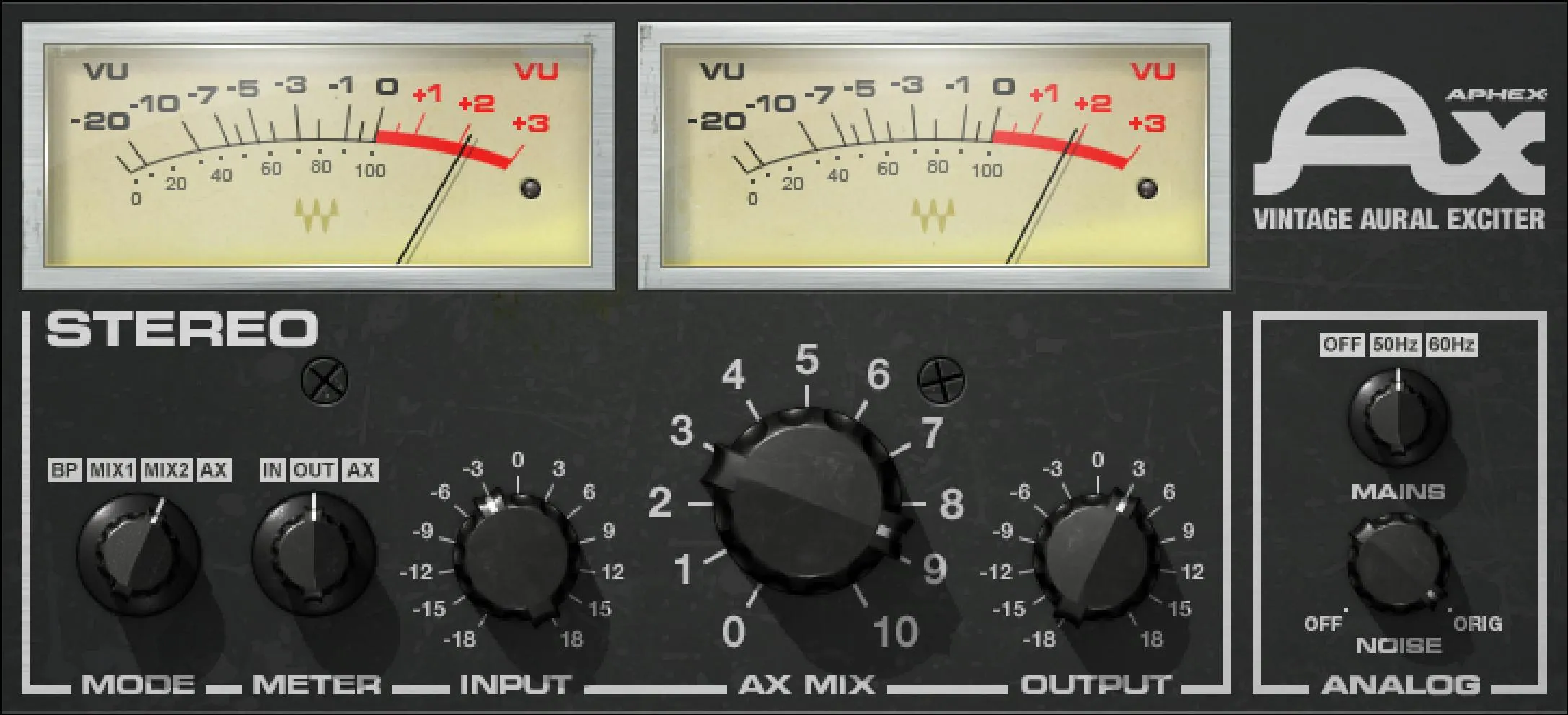
MODE: BP, MIX1, MIX2 and AX
The MODE switch has four positions: BP, MIX1, MIX2 and AX. The factory default documented by Waves is MIX1. [1]
BP
BP is the modeled hardware bypass mode, not a pure digital bypass. Waves calls this out explicitly. [1]
That distinction matters when evaluating the processor: selecting BP is not documented as identical to removing the plugin or using a host-level bypass.
MIX1
MIX1 is designed for insert use and recreates the sound of using the original hardware's AX send/return mode while inserted on the track. [1]
This is the documented default operating mode.
MIX2
MIX2 is also an insert mode, but it recreates the original hardware's MIX-mode insert behavior. [1]
The manual says the original processor's phase behavior can produce frequency-response changes as AX Mix is moved in MIX2. It describes 1–4.5 as subtle, 4.5–7.2 as producing a frequency dip, and 7.2–10 as a much stronger effect. [1]
Those bands are vendor-documented behavior, not a response curve measured for this article.
AX
AX mode is intended for a send/return auxiliary setup. Insert the plugin on an aux return, send signal to it, then use the send/return level to determine how much processed signal is combined with the dry track. [1]
Because AX Mix is documented as functional in Mix mode only, do not treat it as the primary wet/dry control in AX mode. [1]
METER: Input, Output or AX
The METER switch determines what the VU meter displays: Input, Output or AX. The documented default is Out. [1]
This selector changes the metered signal; it does not change the audio routing documented for MODE.
VU meter and clip reset
The VU meter displays the selected signal level in dBVU. A separate clip LED lights when level exceeds 0 dBFS. Waves documents a click-to-reset action for that clip indicator. [1]
The stereo component has two meters, but Waves says the calibration screw on the left controls calibration for both. [1]
VU Calibration
The VU Calibration control is the small unlabeled screw directly below the meter. It sets the meter's headroom reference. [1]
The manual prints its range as 24–8 dB (16 dB) and documents a default of 18 dB headroom, where 0 dBVU = -18 dBFS. The exact punctuation/order is preserved from the current manual rather than rewritten into an unsupported alternate range convention. [1]
Waves says the 18 dB default should suit most users. That is a vendor recommendation, not a new calibration recommendation from testing here. [1]
INPUT
INPUT controls gain before the modeled processor. Range: -18 dB to +18 dB. Default: 0 dB. [1]
Waves specifically warns that input level has a significant impact on the plugin's sound and recommends experimenting to find the appropriate drive level. [1]
That makes Input part of the tone/behavior setup, not just a final level-matching trim.
AX MIX
AX MIX controls how much aural-exciter signal is added to the original signal in Mix operation. Range: 0–10. Default: 7.87. [1]
The control is documented as functional in Mix mode only. In AX send/return mode, the external send/return level provides the practical blend. [1]
In MIX2 specifically, Waves documents the phase-related behavior described above, so moving AX Mix can alter more than simple perceived effect amount. [1]
OUTPUT
OUTPUT controls post-processing output gain. Range: -18 dB to +18 dB. Default: -2.5 dB. [1]
Use it to set the final output level after Input, Mode and AX Mix are established. That setup order is editorial guidance based on the documented signal controls; it is not a level-matched listening test.
NOISE
NOISE sets the level of the modeled analog noise. The manual documents a range of 0 to -49 and a default of -49 (off). [1]
The current guide does not attach a dB unit to this control's printed scale, so this article does not relabel it as dB.
MAINS: Off, 50 Hz and 60 Hz
MAINS controls modeled analog characteristics associated with power-supply hum. Its positions are Off, 50 Hz and 60 Hz, with Off as the documented default. [1]
This is an analog-model switch, not a mains-frequency setting for the host computer or session sample rate.
Mono and Stereo components
The manual documents two components:
- Aphex Mono
- Aphex Stereo [1]
The processing controls are the same. The visible difference is metering/channel presentation; the Stereo component uses two VU meters, and the left calibration screw adjusts both meters. [1]
Waves' current product technical data also reports mono and stereo components and lists 0 samples of native latency at the displayed native sample rates. That is a current vendor specification, not a host measurement performed for this article. [2]
Presets, compare, undo/redo and resize
The shared WaveSystem toolbar can save/load presets, compare settings, undo/redo and resize the interface. [1]
Waves' current support documentation also lists Aphex Vintage Aural Exciter as supporting Lock Input on Preset Load through the shared plugin menu. That lets Input remain fixed while browsing presets rather than changing with each preset. [4]
Because Input is level-dependent and can change the modeled behavior, preserving it while auditioning presets can make comparisons more controlled. That last sentence is editorial guidance; no listening test was performed.
A practical insert workflow
Start with MIX1 if you want the documented default insert behavior. Set Input first because Waves says it materially affects the sound. Then move AX Mix to establish the amount of excitement and use Output to restore or intentionally change final level.
If MIX1 is not giving the character you want, try MIX2, but remember that the manual documents phase-related frequency-response changes across the AX Mix range in that mode. Check the VU meter selection and clip indicator as you adjust levels.
This order is editorial guidance based on documented control relationships, not a claim that one mode is universally preferable.
A practical send/return workflow
For parallel aux processing, use AX mode on the return and control the wet contribution from the send/return routing. Waves' quick-start describes AX this way and says to adjust Input and Output as needed. [1]
If modeled hum/noise is not part of the goal, the defaults already leave NOISE at its off position and MAINS Off. [1]
What MIX1 and MIX2 are not
MIX1 and MIX2 are not just two arbitrary tone presets. Waves ties them to two different ways the original hardware was used: MIX1 recreates the AX send/return sound in an insert configuration, while MIX2 recreates the hardware MIX-mode insert sound. [1]
That distinction explains why MIX2 can have a stronger phase/frequency interaction as AX Mix changes.
Best for / skip if
The Aphex Vintage Aural Exciter is a good fit when you want the specific modeled exciter workflow and its insert-versus-send routing choices, with input drive and analog noise/hum options included. Waves positions it as a way to add brightness/clarity without relying on conventional EQ gain. [2]
Skip it when you specifically need a transparent host bypass inside the Mode control, a conventional static high-shelf EQ with directly specified frequency/Q/gain, or a wet/dry control that behaves identically in every mode. Those are not how this plugin's documented controls are organized.
Related guides and plugins
For conventional dynamic control after or before an exciter workflow, the live Renaissance Compressor guide explains broadband compression. The live F6 guide covers explicit frequency-selective EQ/dynamics control rather than harmonic excitation.
Waves also documents related uses with its own Renaissance Compressor and H-Comp Hybrid Compressor product pages. The Waves Audio Post Resources hub collects the site's existing Waves references and licensing material.
Bottom line
The Aphex Vintage Aural Exciter is simple on the surface but its mode routing matters. MIX1 and MIX2 are two insert behaviors, AX is for send/return use, and BP is modeled hardware bypass rather than pure bypass. Input drives the modeled response; AX Mix blends the effect in Mix modes; Output sets the result; the VU system, Noise and Mains controls cover metering and analog-model details.
The current manual documents every visible processing control, range and default. Its VU-calibration range is reproduced conservatively because the manual's printed 24–8 dB (16 dB) notation is unusual; no alternate interpretation is invented.
Sources
Checked September 20, 2026. No listening, host, latency, CPU or automation test was performed.
- Waves Aphex Vintage Aural Exciter User Manual, especially pp. 4–10. Interface/control pages 8–10 were directly screenshot-inspected.
- Waves Aphex Vintage Aural Exciter product page, including current component/latency technical data.
- Waves Graphic Library, current Aphex Vintage Aural Exciter entry and attribution/backlink requirement.
- Waves: How to Lock Input and Mix Values on Preset Load, current support matrix listing Aphex under Lock Input.
Frequently Asked Questions
Should the Aphex Vintage Aural Exciter be used as an insert or on an aux?
Use MIX1 or MIX2 when the plugin is inserted directly on a track. Use AX mode for a send-and-return aux setup, with the send or return level controlling the practical blend.
Is BP mode a pure bypass?
No. Waves says BP models the original hardware's bypass-mode behavior, so it is not the same as a pure host-level bypass.
What is the difference between MIX1 and MIX2?
MIX1 recreates the original unit's AX send-and-return sound while the plugin is used as an insert. MIX2 recreates the hardware's MIX-mode insert sound and has documented phase-related frequency-response changes as AX MIX is adjusted.
Why does the Input control matter on the Aphex exciter?
Input level has a significant effect on the sound of the modeled processor. The control ranges from -18 dB to +18 dB, so it can change how hard the signal drives the effect before Output sets the final level.
Does AX MIX work in every mode?
No. The manual says AX MIX is functional in Mix mode, where it controls how much excited signal is added to the original; AX mode is designed for external send-and-return blending.
What do the Aphex VU meter and clip light measure?
The meter can display Input, Output, or AX level in dBVU. The clip light turns on above 0 dBFS and can be clicked to reset, while the small screw below the meter sets its headroom calibration.

About the Author
Joseph Nilo has been working professionally in all aspects of audio and video production for over twenty years. His day-to-day work finds him working as a video editor, 2D and 3D motion graphics designer, voiceover artist and audio engineer, and colorist for corporate projects and feature films.