
Waves Renaissance Bass, or RBass, adds harmonics derived from low-frequency material to make the bass more perceptible. Frequency selects the source region, Intensity adjusts the added harmonics, and Original Bass decides whether the original low-frequency content stays in the mix. [1][2]
That is different from turning up a low shelf. The aim is not necessarily more deep-bass energy; it is a more useful perception of the bass through the playback system.
This guide explains the documented controls and a way to evaluate them. It does not claim a new RBass listening test.
About the imagery: the cover is an editorial illustration. The plugin interface is official Waves product artwork, not a capture of a listening or compliance test.
My Short Version
Try RBass when a bass part loses its identity on smaller speakers, not merely because its waveform looks small.
Use a restrained amount of Intensity. Compare Original Bass in and out, then match the output level before deciding whether the part is easier to hear.
A setting that suits one small speaker is not automatically a better master for every system. Check a second playback reference when the work will be heard in different places.
What RBass is for
The relevant idea is the missing fundamental: harmonics can convey a sense of a lower pitch even when the speaker does not reproduce that lowest frequency well. Waves uses that idea in RBass and identifies MaxxBass as the related earlier technology. [1][2]
For a bass instrument, the question is whether its notes become easier to follow without overwhelming the arrangement. On a whole mix, ask what else is being altered in the chosen region.
For spoken-word work, this is an effect or tonal choice—not a default repair step. A voice that is muddy or difficult to understand does not automatically need more generated bass harmonics.
The interface
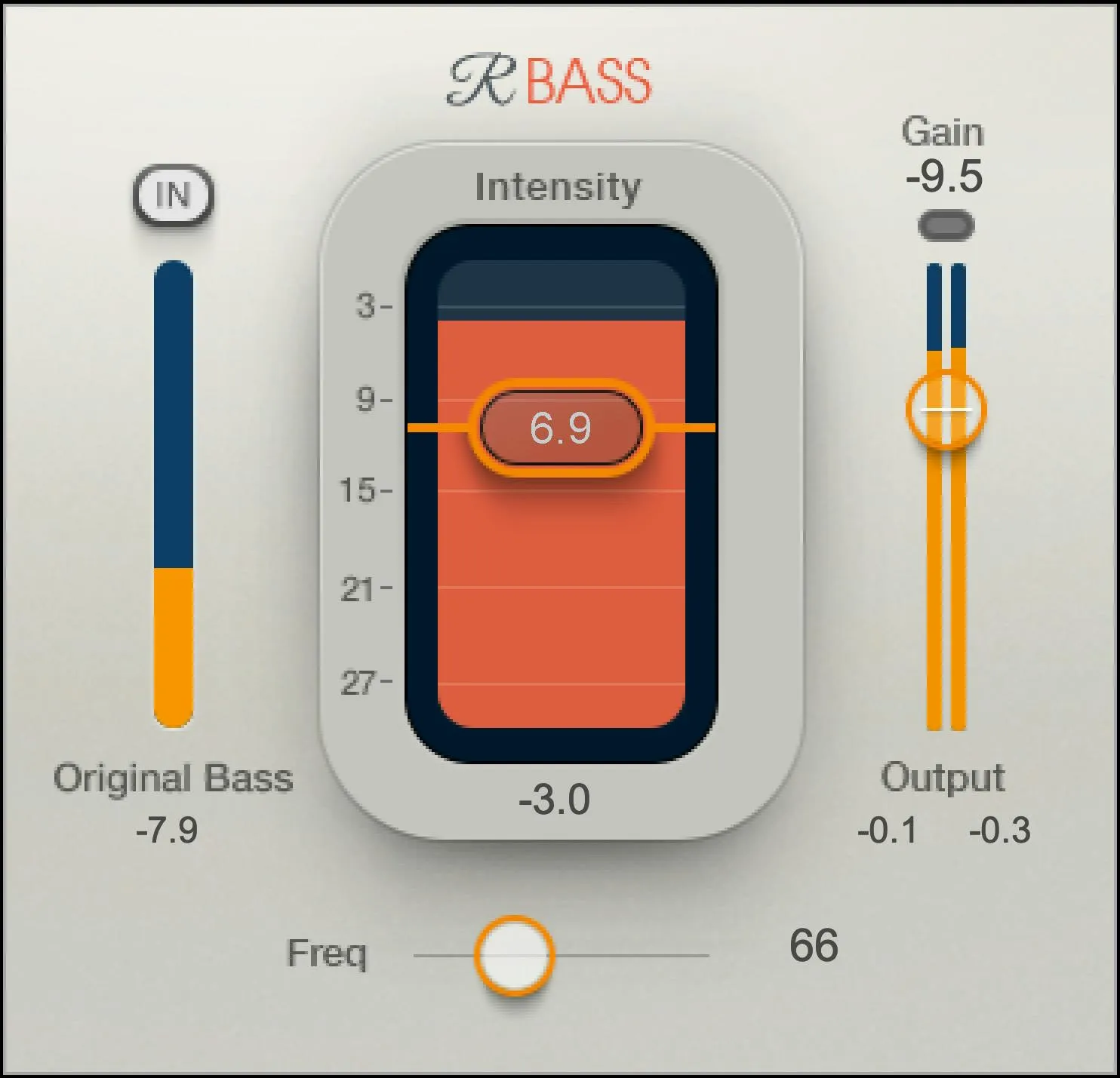
The control tour covers Frequency, Original Bass In/Out, Intensity and Gain, followed by the original-bass, created-harmonics and output displays. Light, Dark and Legacy skins present the same parameter values. [1, pp.3,7–9]
The interface image is official product artwork. It is not Joseph's tested setting, and the numbers shown in it are not presented as factory defaults.
Every control
Freq / Frequency
Frequency defines the low-frequency material from which harmonics are generated. Material above that region remains part of the signal; the Original Bass switch determines whether the low-frequency source is also included. [1, pp.4,7]
Choose the region from the part you want to emphasize. Setting it too broadly can change more of the source than intended; choosing a region with little useful source energy may accomplish little.
The manual's range line mixes units, printing “32 dB to 256 Hz.” Frequency is not a dB parameter. This is a documentation inconsistency; the article does not silently certify a corrected lower endpoint or a default from that line. Check the actual version's displayed bounds when an exact limit matters.
The screenshot's 80 value is an illustrated setting, not evidence of a universal starting frequency.
Original Bass: In or Out
This switch decides whether the input's original bass below Frequency is combined with the generated harmonics. Out removes that low-frequency contribution; it does not mean every other part of the input disappears. [1, pp.4,8]
Compare both states on the intended playback system. Removing genuine low-end content can be useful in a deliberately constrained application, but it is not a choice to make casually for a master that must translate widely.
The manual does not state a dependable universal default for this switch. Inspect its visible state rather than assuming it from a previous preset.
Intensity
Intensity sets the level of the generated-harmonics contribution over a documented -24 to +24 dB range. It works with Frequency; it is not a volume fader for the untouched bass instrument. [1, p.8]
Start with a small contribution and compare the musical line. If the part becomes more obvious but loses the tone you wanted, more Intensity is not necessarily the answer.
For an entire mix, listen to the kick and other low-frequency sources as well as the bass. A whole-bus effect does not know which instrument motivated your choice.
Gain
Gain is the final output adjustment, with a documented range of negative infinity to 0 dB. [1, p.8]
Use it to establish a fair comparison after the harmonic contribution changes the level. A louder version can seem more complete even when the tonal change is not helping.
This is not a ceiling limiter. Check the output readings and any downstream processing rather than assuming the enhancement is automatically peak-safe.
Every meter and reset
Original Bass meter
This shows the low-frequency input contribution below Frequency. It is an activity display, not a second bass-gain control. [1, p.7]
If its activity changes as Frequency moves, that helps explain why the same Intensity setting no longer creates the same impression. You changed the material feeding the process.
Created Harmonics meter
The central display reflects the processed contribution described by the manual, influenced by Frequency and Intensity. Its documented range is -24 to +24 dB. [1, p.8]
Do not read it as a measured increase in perceived bass or a rating of speaker performance. Use it to understand activity while making the actual listening decision.
The manual does not define a separate held-maximum reset for this display. Do not borrow the output-meter reset behavior without documentation.
Output meters, peak values and clip light
The output meters show the final signal. The held numerical peaks beneath them can be cleared by clicking in the meters; the clip light has its own click reset. [1, p.8]
Reset before checking another section, especially after changing Intensity. A stored peak from an earlier passage can otherwise look like the result of your new setting.
The readings are not integrated LUFS or a measurement of how much bass a speaker can reproduce. The delivery-loudness guide covers that separate final-file check.
Skins and shared controls
The Skins selector provides Light, Dark and Legacy. The manual says the selected skin can become the view for new instances; changing it does not change the audio parameter values. [1, p.3]
The WaveSystem toolbar provides About, Undo/Redo, preset loading and saving, Previous/Next, Setup A/B, Copy A/B, sizing and help. A/B compares settings within the processor, not necessarily against bypass. [3]
The newer preset browser also supplies search, Factory/User/Favorite views, favorites, Copy/Paste, Reset to Default and Detach. These manage settings and the window, not an extra harmonic-generation stage. [4]
The product guide does not provide a detailed component-specific differences table. Match the available mono or stereo host component to your source rather than inventing an extra stereo-width parameter.
A useful first evaluation
Identify the problem first: perhaps the bass line disappears on the small speaker that matters for the project.
Set Frequency around the relevant source region and bring Intensity up cautiously. Compare with bypass at a similar level. Then investigate Original Bass rather than assuming the original low end must always remain or always be removed.
Return to a fuller-range reference before committing to a general-purpose mix. Listen for a crowded lower midrange, changes in the kick and any loss of the original part's character.
These are proposed listening checks, not a report of new results. No fixed Frequency or Intensity value is claimed to suit every instrument.
Related plugins
MaxxBass is the related Waves harmonic-bass product with a different control layout. Its extra options deserve their own explanation rather than being assumed identical to RBass.
Submarine addresses subharmonic generation, a different direction from making bass perceptible through upper harmonics. Confirm the actual job before treating them as substitutes.
F6 is useful to understand when the issue is frequency balance or dynamic control rather than harmonic generation.
Use the Waves resource hub for related workflow guides, and subscription versus perpetual for the licensing decision.
Bottom line
RBass changes the harmonic picture, not just the amount of deep bass. Frequency, Intensity and Original Bass determine that relationship; Gain keeps the comparison honest.
Judge whether the part communicates better in the mix and on its intended playback systems. More low-end activity alone is not a useful definition of success.
Sources
Official sources checked September 19, 2026. No new audio test.
- Renaissance Bass User Guide, pp.3–9; mixed-unit Frequency line retained as a limitation.
- Waves Renaissance Bass.
- WaveSystem User Guide.
- Current Waves preset instructions.
- Waves Graphic Library.
Frequently Asked Questions
What does Waves Renaissance Bass do?
RBass generates harmonics from low-frequency material so the bass can remain perceptible on playback systems that do not reproduce the deepest frequencies well. It is a harmonic-bass processor, not simply a low-shelf EQ boost.
What does the Frequency control set in RBass?
Frequency selects the low-frequency region used to generate harmonics; the Original Bass switch determines whether the original material below that setting is retained. The manual prints the range as “32 dB to 256 Hz,” which mixes units, so it does not reliably document the exact lower frequency bound.
What happens when Original Bass is set to Out?
Out removes the original bass contribution below the Frequency setting from the processed output, leaving the generated-harmonic treatment for that region. It does not mean that unrelated signal above the selected bass region disappears.
How are Intensity and Gain different in RBass?
Intensity changes the level of the generated harmonics and is documented from -24 to +24 dB. Gain is the final output adjustment, documented from negative infinity to 0 dB, and can be used to make a fairer input/output comparison.
What do the RBass meters show, and how do I reset the output peak?
Original Bass shows low-frequency input activity below the Frequency setting; Created Harmonics reflects the processed contribution influenced by Frequency and Intensity. Click the output meters to clear their held peak values, and click the clip light separately to reset it.
Can one RBass setting be trusted on every speaker system?
No. Waves' guide says settings optimized for a specific playback system may need adjustment on another system. Check the intended small-speaker result, then return to a fuller-range reference before committing the change to a general-purpose mix or master.

About the Author
Joseph Nilo has been working professionally in all aspects of audio and video production for over twenty years. His day-to-day work finds him working as a video editor, 2D and 3D motion graphics designer, voiceover artist and audio engineer, and colorist for corporate projects and feature films.