

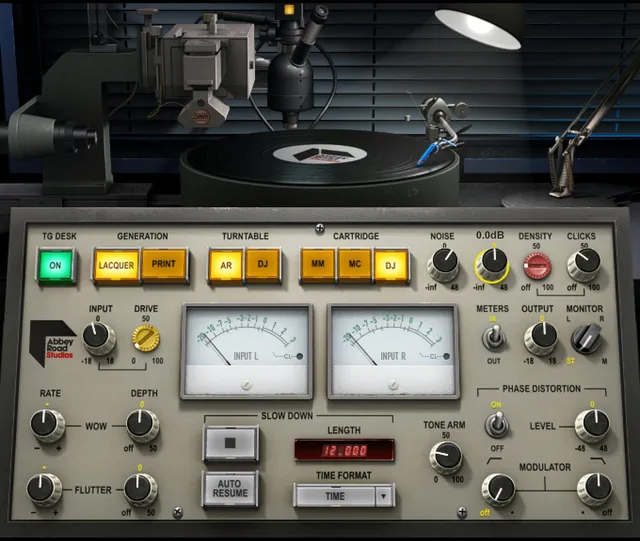
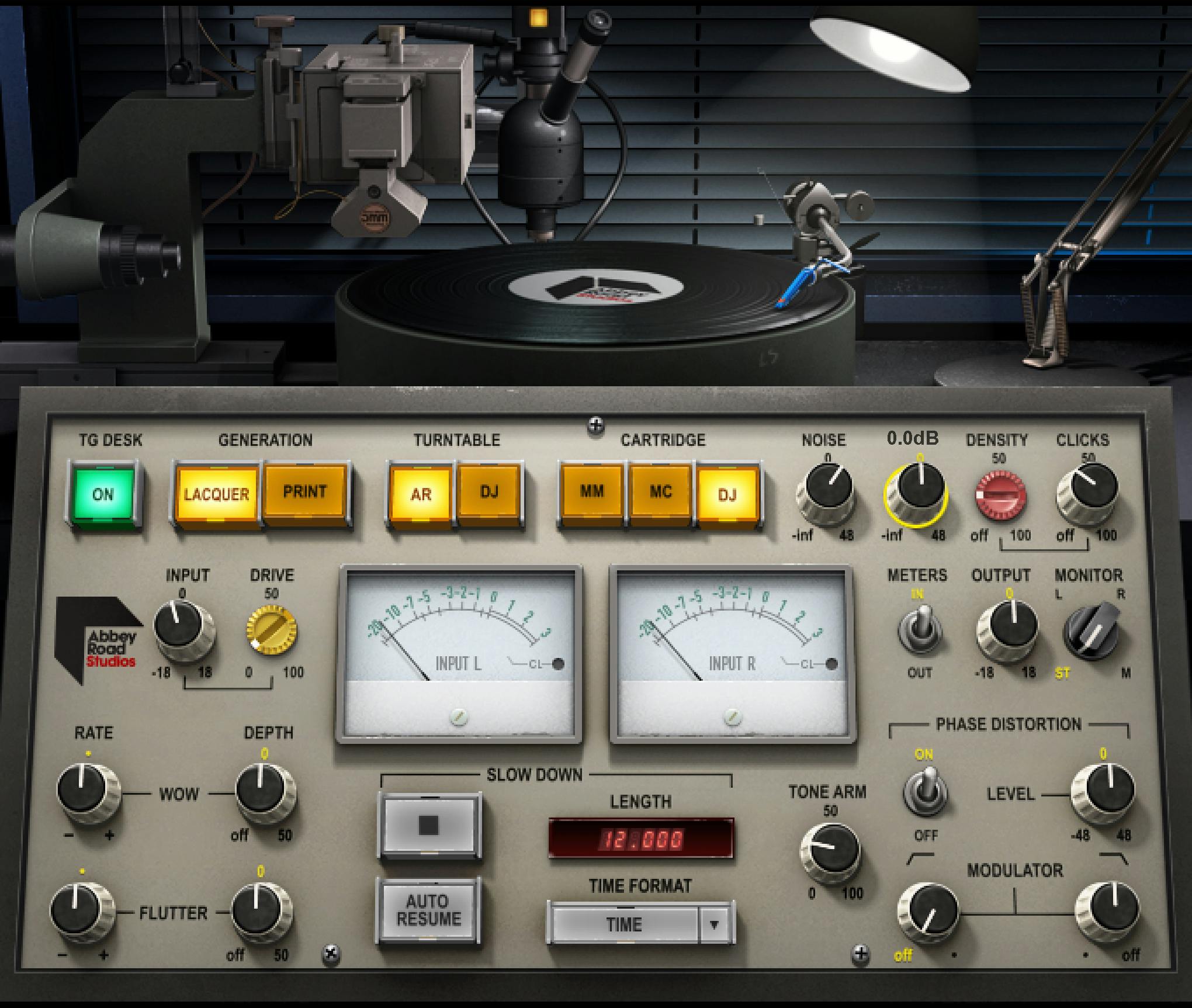
Waves Abbey Road Vinyl is a vinyl-chain modeling and creative-effects plugin built around selectable record generation, turntable and cartridge setups, Abbey Road's TG12410 transfer-desk character, record noise/wear, tone-arm position, wow/flutter, phase distortion, input drive, and a timed turntable slowdown. [1][2]
It comes in full and Lite components. The full version models the sonic attributes of the selected generation/turntable/cartridge setup and exposes Tone Arm, Wow, Flutter and Phase Distortion. Lite keeps the noise/crackle setup and slowdown controls but omits those modeled sonic attributes and several advanced controls to reduce CPU use. [1]
My Short Version
For a subtle starting point, choose the Generation/Turntable/Cartridge combination first, decide whether the TG Desk modeling belongs in the sound, keep Noise/Crackle/Clicks conservative, and use Input Drive only when you actually want more harmonic distortion. [1]
Use Tone Arm to move from the outer-record behavior toward the inner-groove behavior, Wow/Flutter for pitch/amplitude modulation, and Phase Distortion for the more specific stylus/groove-style phase effect. The Slow Down controls are a separate creative stop/restart system that can run in seconds or tempo-synced bars. [1]
The controls are documented here as Waves describes them. I did not compare the plugin with a physical record, lathe, cartridge, TG desk, or turntable.
Full and Lite components
Abbey Road Vinyl has four components: [1]
- Abbey Road Vinyl Mono — mono to mono.
- Abbey Road Vinyl Stereo — stereo to stereo.
- Abbey Road Vinyl Mono Lite — mono to mono.
- Abbey Road Vinyl Stereo Lite — stereo to stereo. [1]
The Lite components can add Noise and Crackle using the selected Generation/Turntable/Cartridge setup, adjust their level and crackle density, and use Slow Down. They do not include the full components' modeled sonic attributes for Generation/Turntable/Cartridge and do not expose Tone Arm, Wow, Flutter or Phase Distortion. [1]
That is a component difference, not simply a smaller visual skin. [1]
Waves lists latency in samples for the two components: Vinyl is 117 samples at 44.1 and 48 kHz and 66 samples at 88.2 and 96 kHz; Vinyl Light is 101 samples at 44.1 and 48 kHz and 33 samples at 88.2 and 96 kHz. These are vendor specifications, not measurements of a particular installation or host. [2]
Input Level
Input Level sets the signal level entering the plugin. [1]
- Range: -18 dB to +18 dB
- Default/reset: 0 dB [1]
This is separate from Input Drive. Use Input Level for gain staging; use Drive when you specifically want the nonlinear effect described below.
Input Drive
Input Drive raises the level into the modeled chain while inversely reducing output to help maintain similar loudness. [1]
- Range: 0 to 100
- Default/reset: 0 [1]
Waves says higher Drive increases harmonic distortion. At sufficiently high values the signal can clip depending on the source, and the guide notes that perceived loudness can then fall despite the compensation. [1]
This article does not claim perfect loudness matching or measured distortion percentages.
Generation: Lacquer or Print
Generation selects the vinyl-production stage being modeled: [1]
- Lacquer — the acetate/lacquer disc cut on the Abbey Road lathe.
- Print — the pressed vinyl result.
- Default/reset: Lacquer. [1]
This selection also influences setup-dependent noise/modulation values elsewhere in the plugin.
Turntable
Turntable chooses the playback setup: [1]
- Abbey Road — the turntable built into the Abbey Road lathe; default/reset.
- DJ — a direct-drive DJ-style turntable. [1]
Changing the turntable is one of the setup changes that can alter Noise, Crackle, Click and modulation-related values.
Cartridge
Cartridge provides three choices: [1]
- MM — Moving Magnet; default/reset.
- MC — Moving Coil.
- DJ. [1]
The current product page gives qualitative descriptions for these cartridge types, but this article does not translate those marketing descriptions into measured frequency/noise specifications that the guide does not publish. [2]
TG Desk
TG Desk switches the modeled Abbey Road TG12410 mastering/transfer-desk character on or off. [1]
- Range: Off / On
- Default/reset: On [1]
Waves describes this modeling as including frequency-response, harmonic-distortion and noise characteristics. No independent measurement of those characteristics was performed here.
Noise Level
Noise Level adjusts added noise. Its behavior changes with the selected Generation/Turntable/Cartridge setup. [1]
- Range: -INF to +48 dB
- Default/reset: 0 dB [1]
Noise is an intentional modeled effect in this plugin, not a meter of the input's existing noise floor.
Crackle Level
Crackle Level controls the level of the continuous granular crackle effect. [1]
- Range: -INF to +48 dB
- Default/reset: 0 dB [1]
Like Noise, it changes with the selected playback/production setup.
Clicks Level
Clicks Level controls short click events. [1]
- Range: Off to 100
- Default: Off
- Reset: 50 [1]
The guide explicitly gives a different factory/default state and reset value. That difference is preserved here rather than “corrected” to make them match.
Clicks Density
Clicks Density changes how often clicks occur. [1]
- Range: Off to 100
- Default/reset: 20
- At the lowest active setting: approximately one random click every 5–10 seconds.
- At the highest setting: up to about 2 clicks per second. [1]
Those rates are Waves' approximate descriptions, not measurements made for this article.
Tone Arm Position
In the full component, Tone Arm Position can be adjusted with the knob or by moving the graphical tone arm. [1]
- Range: 0 to 100
- 0 = beginning/outer area of the record.
- 100 = end/inner groove.
- Default/reset: 0. [1]
Waves says moving inward changes the high-frequency response and increases harmonic distortion. The guide specifically suggests automation when you want the virtual stylus position to change over time. [1]
Slow Down Length
Length sets how long the turntable slowdown takes. [1]
- Time range: 0.001 to 30.000 seconds.
- Bars mode: from 1 Beat to the tempo-dependent number of bars that fit within 30 seconds.
- Default/reset: 12 seconds. [1]
The field supports text entry, dragging and keyboard-arrow adjustment.
Time Format
Time Format switches the Length display/control between Time and Bars. [1]
Bars mode follows session tempo; with tempo changes, the time represented by the bar/beat value changes accordingly.
Stop / Play
The Stop/Play control manually starts the slowdown for the current Length. When the stop completes, playback remains stopped until Play is pressed unless Auto Resume is enabled. [1]
The guide also documents the left side of the record graphic as an alternate way to stop the record. [1]
Auto Resume
Auto Resume restarts playback immediately after the slowdown reaches a stop. [1]
- Range: Off / On
- Default/reset: Off [1]
With Auto Resume off, no sound passes after the slowdown completes until Play is triggered again.
Phase Distortion On/Off
In the full component, Phase Distortion On/Off enables or bypasses the phase-distortion section. [1]
- Range: Off / On
- Default/reset: On [1]
Waves describes this effect as combining an unaffected signal with a modulated duplicate; the HP/LP controls define the modulated signal's bandwidth. [1]
Phase Distortion Level
Phase Distortion Level sets the amount of that effect. [1]
- Range: -48 dB to +48 dB
- Default/reset: 0 dB [1]
Its audible result depends on the bandwidth selected by the HP/LP modulators and the current Generation/Turntable/Cartridge setup.
Phase Distortion HP / LP modulators
The HP and LP controls shape the frequency region feeding the phase-modulation path. [1]
- Range: 0.1 (16 Hz) to 100 (20 kHz)
- Default: setup dependent
- Reset: setup dependent [1]
The guide explicitly says these values change with the selected Generation/Turntable/Cartridge combination. Do not replace them with one invented universal default.
Wow Rate and Depth
Wow Rate controls the rate of frequency modulation. [1]
- Range: Off (-) to 100
- Default/reset: 50 [1]
Wow Depth controls the modulation amount: [1]
- Range: -50 (off) to +50
- Default/reset: 0 [1]
The actual setup behavior changes with Generation/Turntable/Cartridge selection.
Flutter Rate and Depth
Flutter Rate controls the rate of the plugin's documented amplitude-modulation flutter process. [1]
- Range: Off (-) to 100
- Default/reset: 50 [1]
Flutter Depth controls its amount: [1]
- Range: -50 (off) to +50
- Default/reset: 0 [1]
As with Wow, setup selection can change the values/behavior.
Meter selector
The meter selector switches the VU display between In and Out. [1]
- Range: In / Out
- Default/reset: In [1]
This changes what the meter reports; it does not alter the processing path.
Output Level
Output Level controls total plugin output. [1]
- Range: -18 dB to +18 dB
- Default/reset: 0 dB [1]
Use it for final level matching after Drive and the modeled/effect sections.
Monitor selector
The monitoring selector offers: [1]
- Stereo
- Mono
- Left
- Right
- Default/reset: Stereo [1]
This is a monitoring choice. It should not be described as a separate processing model.
VU calibration
The unlabeled screw beneath the meter sets VU headroom calibration. [1]
- Range: 8 dB to 24 dB
- Default/reset: 18 dB [1]
On the stereo component, the left screw calibrates both meters. [1]
WaveSystem toolbar
The shared WaveSystem toolbar provides preset save/load, compare, undo/redo and resize. [1]
It is accounted for here but is not part of the vinyl-modeling signal path.
A practical workflow
Choose the basic setup first: Lacquer or Print, Abbey Road or DJ turntable, and the cartridge. Decide whether TG Desk should be active. Then adjust Input/Drive and only the wear effects you actually want. [1]
For subtle aging, keep Click/Crackle/Noise restrained and use Tone Arm and modulation sparingly. For an obvious production effect, the Slow Down section is deliberately more dramatic and can be automated or synced to the session.
If phase distortion is the goal, set its Level and HP/LP bandwidth intentionally rather than assuming it is simply another “warmth” knob.
Those are editorial workflow suggestions based on the documented control roles; no listening test was run.
Best for / skip if
Abbey Road Vinyl is useful when you want vinyl-chain coloration plus controllable imperfections and stop effects in one plugin. [1][2]
Skip the full component if you only need simple crackle/noise plus slowdown and the Lite component gives you enough. Skip the plugin entirely when you need transparent gain/EQ rather than modeled vinyl character.
Limitations and evidence boundary
This is a documentary reference. No physical-vinyl, turntable, cartridge, lathe or TG-desk comparison was performed. No wow/flutter measurement, phase-response measurement, noise-spectrum measurement, CPU benchmark or listening review was performed.
The guide intentionally uses setup-dependent defaults for the phase-distortion filter controls and notes that several noise/modulation values change with Generation/Turntable/Cartridge selection. Those are preserved as setup-dependent rather than replaced with one universal number.
Related guides
Browse the Waves plugin catalog for related processors.
Bottom line
Abbey Road Vinyl is both a modeled vinyl-production/playback chain and a creative effects processor. It lets you choose record generation, turntable and cartridge, add the TG desk, drive the chain, layer noise/click/crackle, move the tone arm, control wow/flutter and phase distortion, and perform a timed turntable stop. [1][2]
The full and Lite components are materially different, so choose the component based on whether you need the complete modeled chain or just the lighter noise/slowdown toolset. [1]
Sources
Checked October 17, 2026. No listening, physical-vinyl, native-host or measurement test was performed.
- Waves Abbey Road Vinyl User Guide, especially printed pp.4–17.
- Waves Abbey Road Vinyl product page, including its separate Vinyl and Vinyl Light latency specifications.
- Waves Graphic Library, product-reference imagery with the relevant product backlink required.
FAQ
What is the difference between Abbey Road Vinyl and Abbey Road Vinyl Lite?
Waves lists Mono and Stereo components for both. The guide says Lite keeps Noise/Crackle and Slow Down controls but omits the modeled Generation/Turntable/Cartridge attributes and Tone Arm, Wow, Flutter and Phase Distortion controls; it requires less CPU than the full components. [1]
What do the Generation, Turntable and Cartridge choices change?
They select documented vinyl-production/playback setups: Lacquer or Print; Abbey Road or DJ turntable; and MM, MC or DJ cartridge. The guide says several Noise, Crackle and modulation values change with the selected setup. Its qualitative cartridge descriptions are not measured frequency or noise specifications. [1]
What Clicks Level Default and Reset values does the guide list?
The guide explicitly lists Default as Off and Reset as 50 for Clicks Level. Clicks Density has a separate default/reset value of 20. [1]
How does the Tone Arm Position control work?
The documented range is 0–100, from the beginning of the record to the end groove. The guide says moving inward changes the high-frequency response and harmonic distortion; the graphic tone arm can also be moved, and the control may be automated. [1]
What is the difference between Wow and Flutter in this guide?
Waves documents Wow as frequency modulation (FM) and Flutter as amplitude modulation (AM). Their rates and depths are separate controls, and the guide says values change with Generation/Turntable/Cartridge setup. [1]
How does Phase Distortion use its HP and LP controls?
The guide describes combining an unaffected signal with a modulated duplicate. HP/LP shape the modulated signal's bandwidth; their range is 0.1 (16 Hz) to 100 (20 kHz), with default and reset setup-dependent. [1]
How can Slow Down be set in bars, and what does Auto Resume do?
Length can be shown as time or tempo-synced bars; the guide says tempo changes adjust the bar/beat duration. After the slowdown ends, playback remains stopped unless Play is pressed or Auto Resume is enabled; Auto Resume restarts immediately at completion. [1]
What latency does Waves list for Abbey Road Vinyl?
The current product-page table gives samples, not a measurement: Vinyl is 117 samples at 44.1/48 kHz and 66 at 88.2/96 kHz; Vinyl Light is 101 at 44.1/48 kHz and 33 at 88.2/96 kHz. These figures are vendor-published specifications and do not prove latency in a particular installation or host. [2]

About the Author
Joseph Nilo has been working professionally in all aspects of audio and video production for over twenty years. His day-to-day work finds him working as a video editor, 2D and 3D motion graphics designer, voiceover artist and audio engineer, and colorist for corporate projects and feature films.