
Atlas Reverb is an algorithmic reverb built around programs, with separate Damp, Space, Ducker and EQ pages. It generates spaces with algorithms and includes controls for reverb timing, blend and output.
The important distinction is that the controls do not act identically in every program. Decay may govern a feedback tail in one space but have little effect in a short or chorus-like program.
I read the complete 18-page guide and current official sources and inspected the genuine interface and critical control pages. I have not auditioned Atlas or measured its decay, CPU use, latency or dynamics.
Cover image: AI-generated editorial illustration.
My Short Version
Choose a program before fine-tuning its space. Category and program arrows are the starting point, not extra effect components.
Damp and EQ solve different problems. Damp shapes how frequencies fade; EQ shapes the final reverb tone.
Space is program-dependent. Size, Density and Depth can affect reflections, taps, feedback or modulation differently.
Keep important timing choices while browsing. Waves’ October 5 update lets you lock Decay and Pre Delay while auditioning other programs.
Best for and when to use something else
Atlas suits a program-first workflow: choose a room, hall, plate or less literal space, then adjust its timing, motion and tonal placement.
It is not a documented impulse-response loader or a replacement for a measurement-based room-correction system. Its program names describe musical spaces, not verified reconstructions of a particular room.
For another reverb workflow, the Abbey Road Chambers guide covers a separate processor. Frequency-selective dynamics after an effect is a different task from Atlas's input-driven ducker; the F6 guide explains that distinction in another tool.
Components, categories and browsing
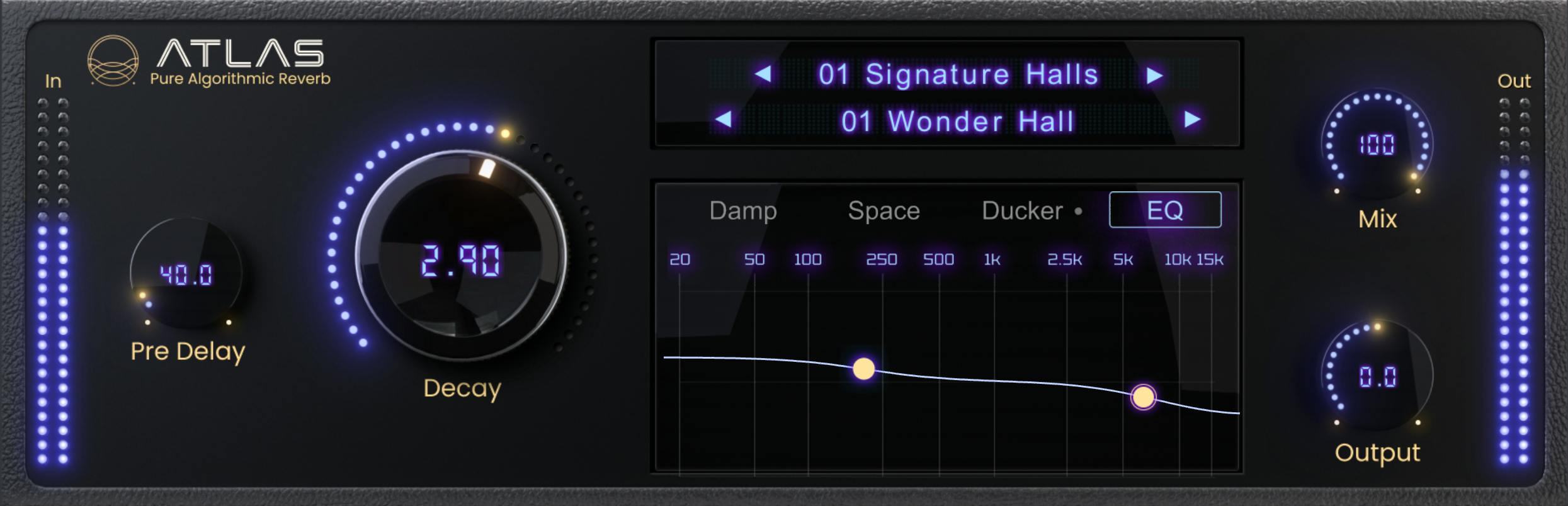
The current product lists Stereo and Mono-to-Stereo components. Mono-to-Stereo is not raw Mid/Side processing.
The top display shows a category and a program name, each with browse arrows. The guide lists these twelve categories:
| Category | Guide's intended family |
|---|---|
| Signature Halls | Atlas's main hall collection |
| Classic Halls | Traditional hall-style spaces |
| Rooms | Shorter, more intimate ambience |
| Plates | Plate-style density and sustain |
| Chambers | Enclosed, reflective spaces |
| Cathedrals | Large spaces and long decay |
| DSP Legends | Classic digital-inspired spaces |
| Dreamscapes | Atmospheric or unrealistic textures |
| Architectural | Structured, geometric spaces |
| Ensemble | Modulated or chorus-like behavior |
| Spatial | Width, movement and spatial placement |
| Springs | Resonant spring-style character |
These are categories, not twelve components or a complete list of named programs. The advertised 100-plus programs are a vendor inventory claim, not an independently counted installation.
The user guide shows Pre Delay, Decay, Mix and Output alongside four pages for Damp, Space, Ducker and EQ. The October 5 update adds a Width knob, a way to lock Decay and Pre Delay while browsing programs, and access to Atlas programs from the global Waves preset system. The 18-page guide leaves Width’s range, default and component behavior unspecified.
Pre Delay and Decay
Pre Delay spans 0–500 ms. It sets the interval between the dry signal and the beginning of the reverb.
A longer initial separation and a longer tail are different choices. Pre Delay changes when the effect begins; it does not simply extend the tail.
Decay spans 0.1–40 seconds. In most programs it controls the internal feedback structure and resulting tail length.
The guide explicitly says it can have little or no effect in some short spaces, chorus-like programs or algorithms without conventional feedback. That limitation is not evidence that every program must produce the same conventional decay curve.
Factory defaults and a universal RT60 measurement specification are not supplied. Example knob positions are not used as defaults.
Mix, Output and program changes
Mix spans 0–100%: 0 is dry-only and 100 is wet-only. The guide describes blending on an insert and 100% wet for send/aux use, leaving the DAW send to determine the amount added to each source.
Output spans −24 to +24 dB and adjusts final plugin level. It is compensation, not a documented automatic loudness-matching function.
The guide explicitly says category and program changes do not change Mix or Output. It makes the same persistence statement for the Ducker's Threshold, Range and Release.
Use the October 5 timing lock if you want to retain Decay and Pre Delay while trying different Atlas programs. Waves documents this for program browsing. The sources leave the lock’s default, exact activation gesture and behavior on loading a global preset unspecified.
Damp: Low Ratio and Low Freq
Low Ratio spans 0.1–2.0. It changes how the low-frequency portion fades relative to the main decay behavior.
The guide describes lower settings as reducing low-frequency persistence and higher settings as allowing more low-end weight or bloom. It does not provide an exact universal arithmetic law for every algorithm.
Low Freq spans 16 Hz–1.6 kHz and selects the frequency area affected by Low Ratio. Lower settings concentrate that behavior in deeper bass; higher settings extend it toward the low mids.
These controls change decay behavior inside the reverb, rather than merely applying a static output EQ.
Damp: High Ratio and High Freq
High Ratio also spans 0.1–2.0. It controls the high-frequency portion's persistence relative to the main decay.
Lower values are described as making the tail darker over time; higher values preserve more high-frequency energy.
High Freq spans 1–21 kHz and defines the affected high-frequency area. Lower settings include more upper-midrange material; higher settings concentrate the change toward the top end.
The guide supplies no factory defaults for the four Damp controls. Their frequency controls are not a documented pair of output high-pass/low-pass filters.
Space: Size and the literal Density range
Size spans 1–100, without a physical distance unit. Its purpose is perceived scale, not a room dimension in meters.
Depending on the program, Size may change early reflections, feedback-loop behavior, tap structure or virtual geometry. It is not described as a simple universal time stretch.
Density literally spans 0–0.71. Both the detailed section and summary use that domain; it is not normalized here to 0–1 or a percentage.
Density can alter early reflections, tail, tap spacing or diffusion-like behavior. Sparse versus smoother/denser is the guide's qualitative distinction, not a measured reflection-count scale.
Space Depth and modulation
Depth controls the program's overall modulation amount. The underlying movement may involve sine, triangle, random-walk or input-triggered modulation.
It may affect early reflections, the tail, both, or left and right differently. No per-program modulation matrix, rate in Hz or exact depth-to-pitch conversion is published.
Ducker Threshold, Range, Release and switches
Atlas's Ducker uses the input signal as its internal sidechain. The guide describes reducing reverb while the source is present and allowing it to return when the source becomes quieter.
Threshold spans −60 to 0 dB. Lower thresholds react more readily; higher values require a louder input. The guide says dB, not dBFS.
Range sets the maximum amount of ducking. Set it with both the source and reverb playing so you can judge how much room the dry signal needs.
Release spans 1–1000 ms and sets how quickly the reverb returns after the input falls below threshold.
The yellow indicators beside Ducker and the ducking meter are On/Off switches. They are not described merely as passive status dots. Their factory state is unspecified.
Threshold, Range and Release persist across category/program changes. The guide does not explicitly extend that persistence statement to every switch or page.
EQ: final tone rather than decay
The EQ page shapes the final reverb tone. This is different from Damp, which changes how energy fades inside the algorithm.
The documented EQ gain range is −24 to +12 dB. Its low-band frequency range is 16 Hz–1.6 kHz; the high-band range is 1–21 kHz.
Two handles are visible in the guide and genuine original. However, the guide does not specify Q, a precise shelf law, slopes, individual bypass/reset controls or exact drag/modifier gestures.
Those unknowns matter when precision is the goal. The page is presented as quick tonal placement, not a fully specified surgical EQ.
Meters, defaults and utility limits
The official panel shows In and Out level bars and a ducking meter. The guide does not fully specify their calibration, scale endpoints, peak holds, reset gestures or clipping thresholds.
Output's gain range is not assigned to those displays. A pictured illuminated bar is not a measured level result from this article.
No common WaveSystem toolbar is shown in the Library panel or documented in this owner guide. Preset reset shortcuts, A/B behavior, window gestures or other generic Waves utilities are therefore not added by analogy.
The guide's example settings are program illustrations, not a universal startup or factory-default table.
A practical setup order
My suggested sequence follows the guide's program-first approach: choose the closest category and program, then separate the decisions about onset, tail length and tonal decay.
Use Pre Delay for separation and Decay where the algorithm responds to it. Consider Damp before output EQ when the problem is how a tail changes over time.
Check Size, Density and Depth after each program change. If the reverb crowds the source while it plays, try the Ducker and listen to how the tail returns between phrases.
Finally choose an insert blend or wet-only aux setup and adjust Output as needed. These are conceptual decisions, not a tested preset, listening verdict or level guarantee.
Sources and documentation limits
Checked October 19, 2026, America/New_York. The official Atlas page links the complete 18-page guide, read in full.
Pages 3–7 introduce the algorithms, workflow, categories and interface; 8–9 cover main controls; 10–11 Damp; 12–13 Space; 14–15 Ducker; 16 EQ; 17 practical suggestions; 18 the control summary.
The Graphic Library lists the EQ-page image. It shows Pre Delay, Decay, Mix and Output. The October 5 release notes document Width, the timing locks and global preset browsing.
Musical, CPU and latency benefits are vendor claims, not test results. The Waves resources hub and licensing guide cover separate reference topics.
FAQ
Is Atlas a convolution reverb, and which components are listed?
Atlas generates its spaces algorithmically rather than loading sampled-room impulse responses. The current product lists Stereo and Mono-to-Stereo components. Its twelve categories organize programs; they are not twelve components or an independently verified complete list of the advertised 100-plus programs.
Why can Decay have little effect in some programs?
The guide gives Decay a 0.1 to 40 second range but explains that short, chorus-like or non-feedback programs may respond little or not at all. Program structures differ. Size, Density and Depth can also affect different internal elements, so identical knob values are not guaranteed to create identical structures.
What changes persist when I choose another category or program?
The user guide says Mix, Output and the Ducker’s Threshold, Range and Release persist when you switch categories or programs. Waves’ October 5 update also lets you lock Decay and Pre Delay when browsing programs. The release notes leave the lock’s default state and behavior during a global preset load unspecified.
How does Damp differ from EQ?
Damp changes how low and high frequencies decay inside the algorithm. Low and High Ratio each span 0.1 to 2.0; their frequency areas are 16 Hz to 1.6 kHz and 1 to 21 kHz. EQ shapes final reverb tone, with minus 24 to plus 12 dB gain and corresponding low/high frequency ranges. No exact EQ gesture, Q or shelf law is supplied.
What do Size, Density and Depth change?
Size changes the perceived scale of the selected space. Density changes how sparse or smooth it feels. Depth changes the modulation amount. Depending on the program, that can affect early reflections, the tail or both.
What does Atlas Ducker Range control?
Range sets the maximum amount by which the Ducker reduces reverb while the input is active. The separate On/Off switches enable or disable ducking.
What are the other Ducker controls and its sidechain source?
The input signal is the internal sidechain source. Threshold spans minus 60 to 0 dB, with lower thresholds reacting more readily; the guide does not label it dBFS. Release spans 1 to 1000 ms and governs the reverb's return after input falls below threshold. No external-sidechain selector or universal default is documented.
How do Mix, Output and the meters differ?
Mix spans 0 to 100 percent, from dry-only to wet-only; the guide recommends 100 percent on an aux return. Output spans minus 24 to plus 24 dB. The visible input, output and ducking meters have no complete calibration, peak/reset or clipping-threshold specification in the guide, so Output's range is not assigned to them.

About the Author
Joseph Nilo has been working professionally in all aspects of audio and video production for over twenty years. His day-to-day work finds him working as a video editor, 2D and 3D motion graphics designer, voiceover artist and audio engineer, and colorist for corporate projects and feature films.