
Waves BSS DPR-402 combines compressor, de-esser and peak-limiter functions in one processor. Its Mode, Jumper Setting, and stereo controls change which functions are active, so a control name by itself does not describe every operating mode.
This is a guide to Waves’ published documentation, not an auditioned review. I have not run the plug-in or tested it in a host. The current product page lists Mono and Stereo components; that listing does not establish installation or behavior on a particular system.
My Short Version
Start by distinguishing the DPR-402’s three main dynamic jobs: compression, de-essing and peak limiting.
Threshold, Ratio, Attack and Release govern the dynamic process selected by Mode and Jumper Setting. De-essing has dedicated De-Ess and Freq controls, while the peak limiter has its own threshold and Fast/Slow response. Some combinations make controls inactive: De-Ess Wide/HF and external sidechain each have documented restrictions, and the limiter cannot be used in De-Ess HF mode.
Use the Below TH and Gain Reduction meters to see the manual-described threshold and reduction indications, and switch the level meter between input and output when comparing levels. These are documentation descriptions, not a test or calibration.
Out Gain is before the Peak Limiter: the manual explicitly says changing it affects output level, not peak-limiter level.
For stereo processing, Stereo links left/right controls, Duo allows independent channel settings, and MS processes Mid and Sides separately.
Monitor selects a listening source; its Mono option sums left and right and is trimmed down 6 dB per the guide. The product page’s Mono/Stereo component names are not the same thing as these internal Stereo-mode choices.
What the DPR-402 combines
Waves presents the plug-in as a software model of the BSS DPR-402 hardware. Its manual describes a broadband compressor, a variable-filter de-esser and a peak limiter. It also describes a high-frequency-only compressor option and several additional jumper configurations. These are vendor descriptions; this guide does not claim a listening comparison with the original hardware or measured performance.
The manual names two host components, BSS DPR-402 Mono and BSS DPR-402 Stereo. Inside the Stereo component, the Stereo Mode selector offers Stereo, Duo and M/S processing. Those are settings within a component, not extra product-page channel formats.
Input and de-esser controls
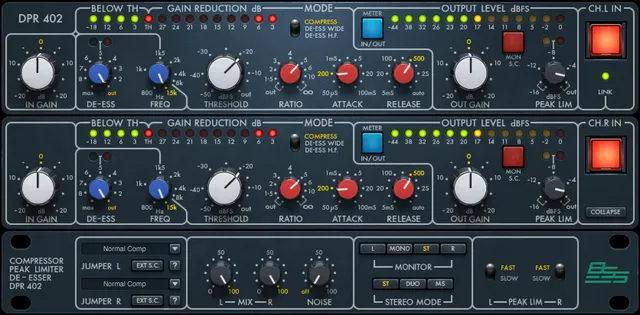
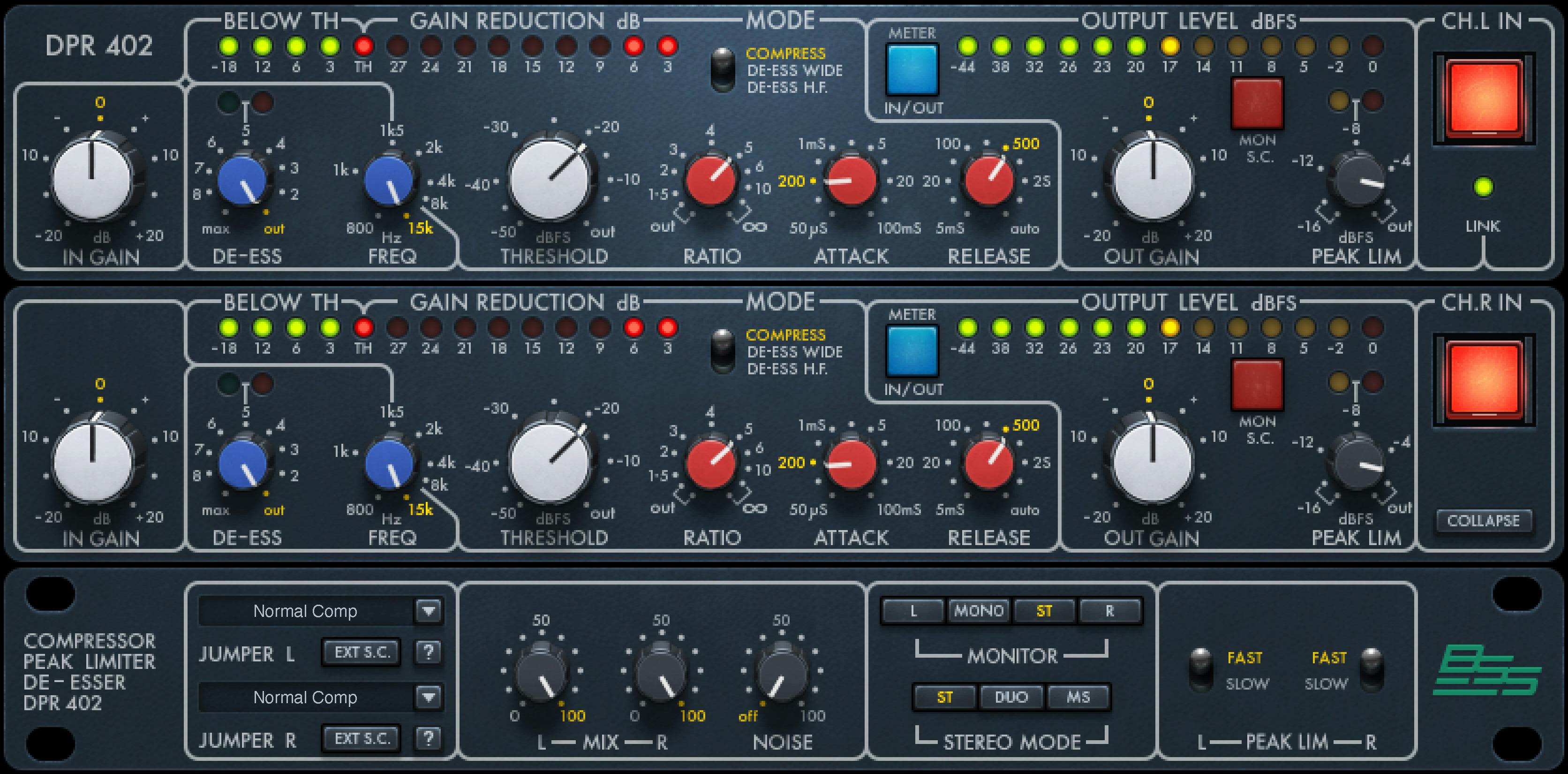
IN GAIN sets the input level from −20 to +20 dB in 0.1 dB increments; default and reset are 0 dB.
DE-ESS is 0 dB (Out) through 9 dB of gain reduction, in 0.1 dB increments; default and reset are Out.
FREQ sets the frequency that triggers frequency-dependent processes, from 800 Hz to 15 kHz in 0.01 kHz increments; default/reset is 15 kHz.
The De-Esser Meter has three described states: Off when the de-esser is not active, Green when gain reduction is active (even at values below 1 dB), and Orange at approximately 15 dB of gain reduction. This is the manual’s color description, not an independently calibrated scale.
THRESHOLD ranges from Out (0.0 dB) to −50 dB in 0.1 dB increments; default/reset is Out.
RATIO spans Out (1:1) to infinity:1 in 0.1:1 increments; default is 4:1 and reset is Out (1:1).
MODE selects Compress, De-Ess Wide or De-Ess HF. In De-Ess Wide, the dedicated DE-ESS control is inactive. In De-Ess HF, the dedicated de-ess and peak-limiter controls are inactive. The manual describes the Wide mode as applying broadband attenuation based on high-frequency detection; HF mode isolates the sibilant portion for processing. Those descriptions explain the modes, not a listening result.
Timing, metering and output
ATTACK is a selector with 11 predetermined states between 50 µs and 100 ms. The guide gives the endpoints but does not enumerate every intermediate state. Its default is 1 ms and reset is 50 µs.
RELEASE offers 5 ms to 4 seconds or Auto; default is 100 ms and reset is 5 ms. In Auto, timing is described as program-dependent and Attack is inactive.
The Below TH Meter indicates how far the signal is below threshold, with a scale from −18 dB to threshold; the TH light indicates threshold reached.
Gain Reduction Meter indicates reduction from −3 to −27 dB.
METER IN/OUT switches level metering between Input and Output; default/reset is Output. The Input/Output Level Meter is shown from −44 dB to 0 dB.
Out Gain ranges −20 to +20 dB in 0.1 dB increments, default/reset 0 dB.
Mon S.C. switches monitoring between Audio and S.C.; default/reset Audio. This monitors the sidechain signal that triggers the VCA process.
PEAK LIM ranges from Out (0 dB) to −16 dB in 0.1 dB increments, default/reset Out. Its ratio is fixed at 20:1. The manual locates peak limiting after Output Gain, so changing Out Gain changes output level, not peak-limiter level. The limiter meter is described as yellow when limiting begins and red for heavy limiting.
PEAK LIM FAST/SLOW sets its attack/release response, default/reset Fast. Waves generally prefers Fast but says to try Slow if Fast causes audible artifacts; that is manufacturer advice, not my listening test.
Channel, modes and lower-panel controls
CH IN is the selected channel’s internal bypass: On (illuminated) is active, Off bypasses; default/reset On. The LINK LED lights green when the two channels are linked as a stereo pair.
COLLAPSE/EXPAND hides or reveals the bottom panel; the plug-in loads Expanded and displays “Collapse,” and default/reset is Expanded.
JUMPER SETTING L/R selects one of 11 hardware-modeled configurations; default/reset is 1, Normal Comp. The manual’s p.18 names and short descriptions are:
- Normal Comp — compression occurs equally across frequencies.
- HF Re-Emph Comp — higher compression at low frequencies; the guide says low-frequency-triggered compression modulates high frequencies and that this setting removes low frequencies from the sidechain.
- HF Re-Emph Comp + — much higher low-frequency compression; the guide says it lessens heavy low frequencies’ modulation of treble.
- LF Re-Emph Comp — higher compression at high frequencies, described as useful for controlling harsh/shrill components.
- LF Re-Emph Comp + — much higher high-frequency compression, likewise described for harsh/shrill components.
- Wide LF Cntrl Comp — whole spectrum compressed based on frequencies below the FREQ setting; low-frequency modulation of highs may be a desired effect.
- Narrow LF Cntrl Comp — only frequencies below FREQ are compressed; Peak Limiter and De-Ess controls are inactive.
- Expander Wide — expansion when input exceeds threshold; De-Ess is inactive.
- Expander LF Only — expansion only below FREQ; De-Ess is inactive.
- Expander LF Cntrl — expansion across the full bandwidth under low- or high-frequency control; Mode switch is fixed at Compress.
- Expander HF Cntrl — expansion across the full bandwidth under the FREQ-set high-frequency control; Mode switch is fixed at De-Ess Wide.
These are the guide’s descriptions; do not extend them beyond its table.
EXT S.C. assigns an external key input to the VCA and must be On for external sidechain triggering. It defaults/resets Off. In this mode, De-Ess, Peak Limiter and Jumper menu controls are inactive.
MIX L/R balances processed and unprocessed signal from 0% to 100% in 0.1% increments, default/reset 100%.
NOISE controls modeled noise and hum from Off to 100, default/reset Off. The manual does not label Mix or Noise stereo-only.
On the Stereo component, MONITOR offers Left, Mono, Stereo or Right, default/reset Stereo. Left and Right select the corresponding monitor; in M/S mode they monitor Mid and Sides. Mono sums left and right and is trimmed down 6 dB.
STEREO MODE offers Stereo, Duo or M/S, default Stereo. Stereo links L/R controls; Duo permits independent settings; M/S applies an encoding matrix and lets left controls affect Mid and right controls affect Sides. The manual notes that automation in Stereo is stored for the selected channel while affecting both, and different Duo values may need one channel's automation removed before returning to Stereo to avoid conflicts.
The shared WaveSystem toolbar provides preset save/load, compare, undo, redo, resize and the Guide. The manual does not describe a separate global reset control.
A careful way to approach the controls
The manual’s mode restrictions are more useful than assuming every knob is active all the time. Select a mode and jumper configuration, check which controls the guide says are inactive, then use the displayed input/output and reduction meters as indicators. Compare input and output with METER IN/OUT; remember the manual places Peak Limiting after Out Gain. That is a reading of the documentation, not a tested preset or recommendation for a particular source.
Related Waves guides
For dedicated de-essing, the live Waves Sibilance guide covers a separate processor. The Waves F6 guide explains dynamic EQ, while the Renaissance Compressor guide covers a different compressor control set. The Waves Audio Post Resources hub links to the site's current Waves guides. These pages address adjacent tasks, not comparative listening tests.
Sources and documentation limits
Checked October 19, 2026 (America/New_York). The current BSS DPR-402 product page lists V9–V17 and Mono/Stereo components. It links the 19-page BSS DPR-402 User Guide, read in full. Manual controls, diagrams and vendor descriptions are attributed to that guide; the product listing does not verify the installed version or behavior on a particular machine. The Waves Graphic Library requires attribution and a product-page backlink for any image used. Its UI image is vendor artwork, not a running instance or proof of defaults. No plugin, host or audio test was performed.
FAQ
What does the BSS DPR-402 do?
Its guide documents compressor, de-esser and peak-limiter functions, plus selectable modes and hardware-modeled jumper configurations. No sound or hardware comparison was tested here.
What are the DPR-402’s Mono, Stereo, Duo and M/S options?
The product page/manual list Mono and Stereo components. Inside the Stereo component, Stereo links left/right controls, Duo permits independent settings, and M/S processes Mid and Sides separately. These are not extra product components.
What range does Attack cover?
The manual describes 11 predetermined Attack states between 50 µs and 100 ms, but does not list every value. It gives 1 ms as the default and 50 µs as reset.
What happens in De-Ess Wide and De-Ess HF modes?
The guide describes De-Ess Wide as high-frequency detection with broadband processing, and De-Ess HF as processing the sibilant portion separately. De-Ess HF makes the dedicated De-Ess and Peak Limiter controls inactive; De-Ess Wide makes the dedicated DE-ESS control inactive.
How does the external sidechain affect the controls?
EXT S.C. must be On to assign an external key to the VCA; it defaults Off. The guide says this mode makes De-Ess controls, Peak Limiter controls and the Jumper menu inactive.
What does the Peak Limiter control, and where is it in the signal path?
Its threshold spans Out (0 dB) to −16 dB and its ratio is fixed at 20:1. The guide places it after Out Gain, so changing Out Gain changes output level rather than peak-limiter level. This is documented behavior, not a measured test.
What do Mix and Noise do?
Mix balances processed/unprocessed signal from 0% to 100% and defaults to 100%. Noise controls modeled noise/hum from Off to 100 and defaults Off. The guide does not mark either control as stereo-only.
What does the toolbar provide?
The WaveSystem toolbar provides preset save/load, Compare, Undo, Redo, Resize and access to the Guide. The manual does not describe a separate global reset button.

About the Author
Joseph Nilo has been working professionally in all aspects of audio and video production for over twenty years. His day-to-day work finds him working as a video editor, 2D and 3D motion graphics designer, voiceover artist and audio engineer, and colorist for corporate projects and feature films.