

Waves CLA Vocals is a simplified vocal multi-effect chain built around six processing faders: Bass, Treble, Compress, Reverb, Delay and Pitch. Each processing section also has a color selector that changes the internal character of that section, while Input Sensitivity and Output handle gain staging around the chain. [1][2]
The interface looks simple, but one detail matters immediately: zero does not mean the same thing for every fader. Waves says the EQ faders do nothing at zero, while the other effect faders are still active at their default setup when at zero. Even with all Colors set to Clear, some fixed processing designed into the plugin remains active. [1]
About the imagery: the cover is an editorial illustration. The plugin interface is official Waves product artwork, not a capture of a listening or compliance test.
My Short Version
Set Input Sensitivity first, using the loudest section of the vocal and the sensitivity LED as a starting point. Then choose the Bass, Treble and Compress Colors before deciding how much of each section you want.
Use Reverb, Delay and Pitch as effect-level controls. Their Color buttons choose among three fixed characters, while Clear mutes those effect sections. Delay follows session tempo in its colored modes. [1]
Do not treat a fader value of zero as bypass. Bass and Treble are neutral at zero, but Waves explicitly says the other faders remain active at their default setup at zero. If you need a section off, use its Clear state where the manual documents bypass or mute. [1]
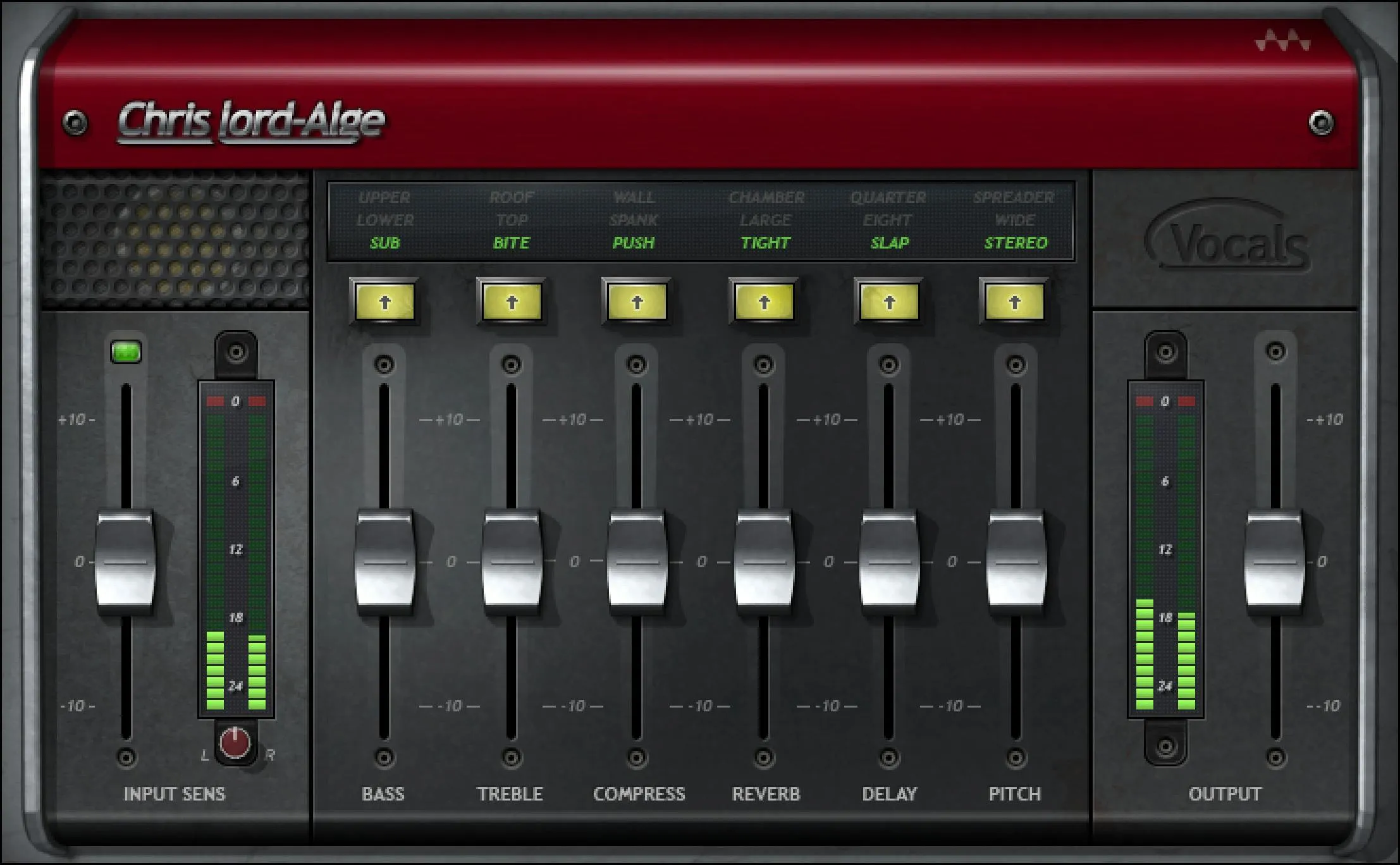
Input Sensitivity
Input Sensitivity sets the level presented to CLA Vocals' internal processing. The documented range is -10 to +10 in 0.1 steps, with a default of 0. Waves does not label this control in dB, so this guide does not add a unit the manual does not provide. [1]
Waves recommends adjusting Sensitivity near the beginning of the workflow, using the part of the song with the highest peaks. The adjacent LED gives four states: off = too low, green = good, yellow = optimal, red = very hot. Waves also cautions that the LED is guidance rather than an absolute requirement for a useful result. [1]
That makes Sensitivity a setup control, not a tone control in the same sense as Bass or Treble.
Input meter and clip reset
The Input Meter shows peak level from -26 to 0 dBFS. The clip indicator lights when the level exceeds 0 dBFS. Click inside the meter area to reset the clip indication. [1]
This is an important operational detail because the red indication can remain after the overload event. Resetting it lets you see whether a later gain change has stopped new clipping.
Balance in the stereo component
The Balance control exists in the stereo component and adjusts the offset between left and right signals. Its documented range is -6 to +6 dB in 0.1 dB steps, default 0. [1]
Do not expect this control in every component. CLA Vocals is available as Mono-to-Stereo and Stereo; the manual specifically identifies Balance as a stereo-component control. [1]
Bass
Bass controls the amount of low-frequency processing. Its range is -10 to +10 in 0.1 steps, default 0. The manual does not assign a dB unit to the fader. [1]
At zero, changing Bass Color has no audible EQ effect according to Waves because EQ adjustment begins once the EQ fader is moved. That behavior is different from the non-EQ effect faders. [1]
Bass Color
Bass Color selects among three low-frequency filter characters plus bypass:
- Clear — Bypass
- Green — Sub; default
- Blue — Lower
- Red — Upper [1]
The current product page describes Bass generally as a way to add depth or reduce proximity-effect problems, but the retrieved manual does not publish exact center frequencies, slopes or curves for Sub, Lower and Upper. Those values should not be invented. [1][2]
Treble
Treble controls the amount of high-frequency processing. Its range is -10 to +10 in 0.1 steps, default 0. As with Bass, the manual does not specify dB for this fader. [1]
Waves' current product page describes Treble as useful for brightness, articulation, sheen, warming or taming stridency depending on direction. Those are vendor-described uses, not listening findings from this article. [2]
Treble Color
Treble Color selects among three high-frequency filter characters plus bypass:
- Clear — Bypass
- Green — Bite; default
- Blue — Top
- Red — Roof [1]
The official documentation names these curves but does not publish exact frequencies or filter shapes. Treat Bite, Top and Roof as fixed voicings rather than pretending they are conventional parametric-EQ bands with known numerical settings.
Compress
Compress controls the amount of the plugin's internal dynamic-range processing. Its range is -10 to +10 in 0.1 steps, default 0. Waves does not document that scale as threshold, ratio, gain reduction in dB, or a standard wet/dry percentage, so it should be described simply as the Compress amount. [1]
The product page characterizes the three compression Colors as progressively different CLA-style choices, but no threshold, ratio, attack or release values are published in the retrieved guide. [1][2]
Compress Color
Compress Color offers:
- Clear — Bypass
- Green — Push; default
- Blue — Spank
- Red — Wall [1]
Waves' current product copy describes Push as the lighter/punch-oriented option, Spank as a harder treatment, and Wall as the most aggressive of the three. This guide keeps those as vendor descriptions rather than translating them into undocumented compressor settings. [2]
Reverb
Reverb controls the wet mix of the internal reverb. Its range is -10 to +10 in 0.1 steps, default 0. [1]
The wording matters: the fader is documented as a wet-mix control, but its scale is not documented as a 0–100% wet percentage. Do not relabel it as one.
Reverb Color
Reverb Color provides:
- Clear — Mute
- Green — Tight; default
- Blue — Large
- Red — Chamber [1]
These are fixed internal environments. The retrieved manual does not expose decay time, predelay, damping or room-size values for them, so this article does not manufacture those parameters.
Delay
Delay controls the wet mix of the internal delay. Its range is -10 to +10 in 0.1 steps, default 0. [1]
Delay Color chooses the delay timing. Waves states that the delay syncs to the session BPM. [1]
Delay Color
- Clear — Mute
- Green — Slap, 1/16 note; default
- Blue — Eight, 1/8 note
- Red — Quarter, 1/4 note [1]
Because the timing is note-based, the actual delay time in milliseconds changes with session tempo. There is no independent feedback, filtering or free-millisecond delay control documented in CLA Vocals; users needing those controls are looking for a more dedicated delay processor.
Pitch
Pitch controls the wet mix of the internal pitch-modulation effect. Its range is -10 to +10 in 0.1 steps, default 0. [1]
This is an effect amount, not corrective vocal tuning. The current product page describes the section as stereo/chorusing-style vocal widening and doubling. [2]
Pitch Color
Pitch Color offers:
- Clear — Mute
- Green — Stereo; default
- Blue — Wide
- Red — Spreader [1]
The guide does not publish pitch offsets, delay offsets, modulation rates or stereo-width percentages for these three characters. Keep them as named fixed algorithms.
Output
Output changes CLA Vocals' final output level. The documented range is -10 to +10 in 0.1 steps, default 0. Again, the manual does not attach a dB unit to this fader's scale, so this article does not assume one. [1]
Use Output for practical level matching after the processing choices have been made. No listening comparison was performed.
Output meter and clip reset
The Output Meter shows peak level from -26 to 0 dBFS. Its clip LED indicates levels above 0 dBFS, and clicking inside the meter area resets the clip indication. [1]
Input and Output meters therefore give separate places to identify overload before and after the chain.
What zero and Clear actually mean
CLA Vocals is unusual enough that this distinction deserves its own section.
Waves says:
- Bass and Treble at zero: moving through their Color choices has no effect until the EQ fader moves away from zero.
- Other faders at zero: the internal section is active at Chris Lord-Alge's default setup.
- All Colors set Clear: some fixed processing designed into the plugin is still active. [1]
So neither a zero fader nor setting every Color to Clear should be described as equivalent to bypassing the entire plugin. Use the host/plugin bypass when you need to compare the whole inserted processor against the unprocessed path.
Components
The manual documents two CLA Vocals components:
- CLA Vocals Mono-to-Stereo — mono input, stereo output
- CLA Vocals Stereo — stereo input, stereo output [1]
The component choice matters especially for the stereo effects created by Reverb, Delay and Pitch, and for the Stereo component's Balance control.
WaveSystem toolbar
The shared WaveSystem toolbar provides preset save/load, settings comparison, undo/redo and plugin resizing. [1]
A/B comparison stores two plugin states; it is not inherently a loudness-matched listening test.
A practical setup order
Start with Input Sensitivity and the loudest useful section of the vocal. Aim for sensible input level before deciding whether a processing Color is helping.
Next choose Bass and Treble Colors and move their faders only if the vocal needs those tone changes. Then choose among Push, Spank and Wall for the compression character and adjust Compress by intent rather than treating its scale as a hidden threshold or ratio.
Add Reverb, Delay and Pitch only to the degree the mix needs. Delay's note-value options follow session tempo, while the reverb and pitch choices are fixed named characters rather than editable algorithms.
Finish with Output and check the output clip indicator. This sequence is editorial workflow guidance derived from the documented control relationships; it is not a tested preferred preset.
Best for / skip if
CLA Vocals is a sensible candidate when you want one compact vocal chain with fixed, named EQ, compression, ambience, delay and pitch characters instead of building those processors individually. That positioning matches Waves' current product description. [2]
Skip it when you specifically need precise compressor timing/ratio controls, parametric EQ frequencies and Q, editable reverb decay/predelay, free delay feedback/filtering, or corrective pitch tuning. CLA Vocals intentionally hides those deeper parameters.
Related guides
The official Waves CLA-76 product page describes a dedicated compressor when you need explicit attack, release and ratio behavior rather than CLA Vocals' Push/Spank/Wall macro choices. The live Vocal Rider guide covers automatic vocal-level riding rather than tone/effects processing.
The live Sibilance guide and Renaissance Compressor guide cover dedicated processing categories that CLA Vocals compresses into simpler macro choices. The Waves Audio Post Resources hub collects the site's existing Waves workflow and licensing references.
Bottom line
CLA Vocals is intentionally a macro processor: set the input correctly, pick one of three characters for each section, then decide how much Bass, Treble, compression, ambience, delay and pitch treatment you want.
Its simplicity is also the limitation. The plugin exposes named characters rather than the internal compressor, filter, reverb, delay and modulation parameters. Treat those hidden settings as undocumented, not as an invitation to infer conventional values.
Sources
Checked September 20, 2026. No listening, host, latency, CPU or automation test was performed.
- Waves CLA Vocals User Guide, especially pp. 4–13. The official interface image on p. 7 was visually inspected.
- Waves CLA Vocals product page.
- Waves Graphic Library, current CLA Vocals entry and attribution/backlink requirement.
Frequently Asked Questions
Does setting every CLA Vocals fader to zero bypass the plugin?
No. Waves says Bass and Treble have no EQ effect at zero, but the other effect sections remain active at their default setup. Even setting every Color to Clear leaves some fixed processing active; use the host or plugin bypass to compare the entire chain against an unprocessed path.
What does the Input Sensitivity LED tell me?
It gives four level hints: off is too low, green is good, yellow is optimal and red is very hot. Waves recommends setting Input Sensitivity using a loud section of the vocal, while treating the LED as guidance rather than an absolute rule.
What is the difference between CLA Vocals' Push, Spank and Wall settings?
They are the three named Compress Colors. Waves describes Push as lighter and punch-oriented, Spank as harder treatment and Wall as the most aggressive. The guide does not publish their internal threshold, ratio, attack or release settings.
Can CLA Vocals delay run at a freely entered millisecond time?
The documented Delay Colors are Slap at a 1/16 note, Eight at a 1/8 note and Quarter at a 1/4 note, synchronized to the session BPM. The manual does not document an independent free-millisecond or feedback control in this plugin.
Is the Pitch section vocal tuning?
No. CLA Vocals' Pitch section controls a wet pitch-modulation effect with Stereo, Wide and Spreader Colors. Waves presents these as stereo or chorusing-style treatments, not corrective note tuning.
Why can't I find the Balance control in every CLA Vocals component?
Waves documents Balance for the Stereo component, where it offsets the left and right levels by up to 6 dB. The plugin also has a Mono-to-Stereo component; the guide does not identify Balance as a control there.

About the Author
Joseph Nilo has been working professionally in all aspects of audio and video production for over twenty years. His day-to-day work finds him working as a video editor, 2D and 3D motion graphics designer, voiceover artist and audio engineer, and colorist for corporate projects and feature films.