

Waves Clarix LB reduces ambience around voice and vocals using neural-network processing aimed at live broadcast workflows. Its main decisions are processing strength, stereo analysis mode, stereo width and whether the network history needs resetting.
A small panel does not make those controls interchangeable. Analysis changes how a stereo input is examined; Width changes its image; Reset clears processing history rather than restoring knob defaults.
This guide follows the complete product-linked manual and authentic official interface image. I have not run the plug-in, tested a server or auditioned its noise reduction. Performance and latency descriptions below are Waves' documentation, not measured results.
My Short Version
Start by understanding the Main Control Knob, then treat Single/Double Analysis as a separate stereo decision.
Single shares analysis data; it is not a mono-output button. Width has that separate image-control role.
Reset clears network history without losing settings. It is useful to understand when the source changes abruptly, not as a replacement for a preset reset.
The guide's 100 starting point is a quick-start recommendation. It is not an explicitly documented startup default or proof of a complete 0–100 range.
Best for and when to choose another approach
Best for: a voice-centered live or broadcast workflow where a compact control set is preferable to extensive spectral editing.
Choose a different approach when: the task needs manual frequency-by-frequency repair, independent threshold bands or a separately calibrated loudness meter. Those controls are not documented in this panel.
The manual names SoundGrid-oriented workflows and other live racks. That context does not prove that a particular host, server, license or installed version is ready to use.
Components and panel scope
The captured product metadata lists Mono and Stereo. The guide specifically limits Analysis and Width to the stereo component, without separately enumerating its complete component inventory.
That stereo-only wording does not establish a Mid/Side component or mean that every visible control exists in Mono.
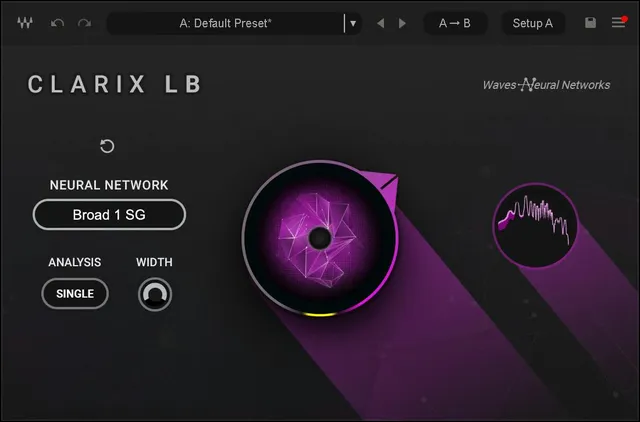
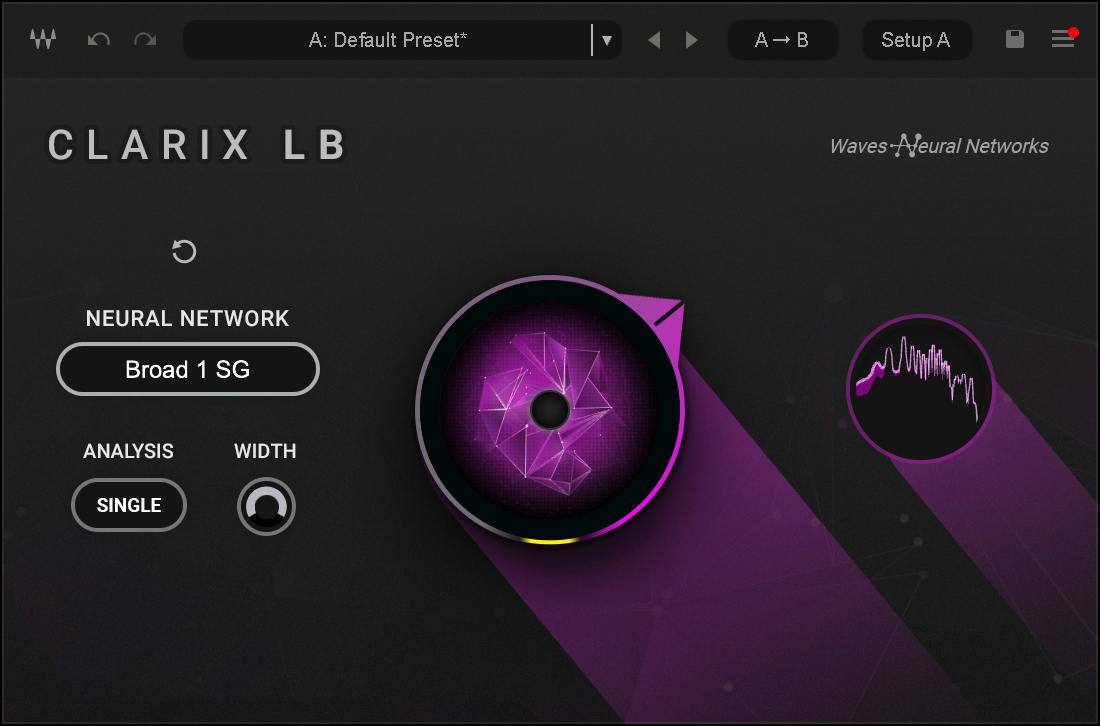
The authentic Library image shows the stereo-related controls, the Broad 1 SG network label, Reset, the main knob and FFT display. Its static selections are not default-state evidence.
Main Control Knob: strength, not a level fader
Turning the Main Control Knob clockwise increases processing strength and reduces ambience from the voice in the guide's description.
The quick start suggests beginning at the maximum position, where the value box reads 100, then backing off if some ambience or vocal edge should remain.
The source's claim that the maximum removes all noise is vendor guidance, not an unconditional result demonstrated here. More processing should not be treated as automatically better for every source.
The guide does not publish a full numerical range, a lower endpoint, or an initial/reset value. It also does not define this knob as output gain or a wet/dry percentage.
Neural Network: a name display
Neural Network displays the name of the SoundGrid-optimized network being used.
The actual original reads Broad 1 SG. The manual does not describe a model-selection menu, list alternative networks or establish that displayed model as a startup default.
There is no basis here for turning the label into an undocumented quality selector or assigning a separate algorithm to each knob position.
Single and Double Analysis
Analysis is stereo-only. It controls the analysis stage before neural-network processing.
Single sums the left and right input channels for analysis. Both channels are then processed using the same analysis data.
That is different from saying the final output is summed to mono. Width is a separate control.
Double analyzes left and right independently and processes them separately. The guide recommends considering it when the two channels contain significantly different ambience or voices.
Waves describes Single as using considerably less CPU. It describes Double as potentially more precise for dissimilar channels, at substantially greater CPU cost.
These are source descriptions, not benchmarks. The guide itself warns that the difference in voice/ambience separation is content-dependent, and it does not state a default Analysis mode.
Stereo Width
Width controls the size of the stereo image. The documented endpoints are 100 = original stereo width and 0 = mono.
It is available only in the stereo component. No default or transfer curve is published, and the range is not labeled as a percentage in the guide.
Width does not replace Analysis, balance the left/right levels or set the overall amount of noise reduction.
A practical way to avoid confusing decisions is to settle the analysis approach before changing the image. That is a conceptual workflow suggestion, not a tested setting.
Reset and changing source conditions
Reset clears the neural network's history cache without losing the settings.
The manual gives examples of situations that can disturb the network's focus: an abrupt noise-profile change, a different speaker or a sudden loud sound.
Reset is therefore distinct from returning every control to a default or loading a fresh preset.
Waves says the cache also resets when playback stops, but not when the DAW loops a segment. A loop boundary is not documented as a guaranteed fresh analysis start.
No cache operation, reset timing or recovery result was independently tested for this article.
FFT display and toolbar
The Waveform FFT display shows the input signal in white and reduction in pink.
The guide suggests using it to understand how much ambience is being separated. It does not provide calibrated axes, numerical attenuation readings or a guarantee that the trace represents an independently measurable quantity of removed noise.
No separate output-gain control, output meter scale or clip-light/reset behavior is documented for this panel.
The WaveSystem toolbar provides preset save/load, comparison, undo/redo, resizing and access to the WaveSystem Guide through the upper-right icon. Previous/next preset arrows are visible in its official illustration.
These shared setting utilities are separate from the network Reset button. Their presence does not establish a factory processing-strength default.
Reported latency and the scoped Titan note
The manual reports:
- 44.1/48 kHz: 2191 samples, paired respectively with 49.7/45.7 ms.
- 88.2/96 kHz: 4384 samples, paired respectively with 49.7/45.7 ms.
Those are the literal vendor figures, not a latency measurement from a host or an estimate of complete live-system round-trip delay.
For SuperRack SoundGrid and LV1 users, its note specifies the Titan SoundGrid Server, says all Clarix LB instances should be assigned to the same Titan, and calls for at least 50% of its processing power to remain available for Clarix LB.
That note has a specific platform context. It should not be converted into a universal server requirement for every host named elsewhere in the guide, or a guarantee that a particular session will fit.
A conservative evaluation workflow
Begin with suitable source material and a manageable monitoring level. Adjust processing strength to the actual voice/ambience task rather than assuming maximum is always the target.
For stereo material, compare the analysis choices as one decision and the image width as another. Keep their roles distinct.
If the source changes abruptly, the manual's Reset description helps explain what can be cleared without changing the current settings. The FFT display offers context, not a measured quality score.
This is a suggested evaluation sequence, not a server configuration procedure, tested preset or promise of usable results from every recording.
Related Waves guides
The F6 guide explains an independently controlled filtering/dynamic-EQ workflow. It does not turn Clarix LB into a frequency-band editor.
The WLM Plus guide covers separate level and loudness metering, rather than treating Clarix's FFT traces as delivery measurements.
More live guides are collected in the Waves Audio Post Resources hub. Licensing is a separate topic in subscription versus perpetual licensing.
Sources and documentation limits
Checked October 19, 2026, America/New_York. The official Clarix LB product page links the complete five-page user guide, read in full.
Pages 3–4 cover the panel and processing decisions; page 5 covers the FFT, toolbar, reported latency and platform-scoped server note.
The authentic Graphic Library original corresponds to those controls. Its model label and selections are illustrative, not proof of initialized settings.
No full knob range, default analysis mode, selectable-network inventory, exact processing law or installed compatibility result is supplied by this evidence.
FAQ
What does Clarix LB do?
Clarix LB is a voice and vocal noise-reduction plug-in aimed at live broadcast workflows. Its Main Control Knob sets processing strength. The guide describes its neural-network processing and supported workflow context; this article does not establish a measured separation result, installed compatibility or a guarantee that every noise can be removed.
Is 100 the default Main Control Knob setting?
The manual recommends starting at the maximum position, whose value box reads 100. That is quick-start advice, not an explicit startup or reset default. The guide does not supply a complete numerical range or establish its lower endpoint. Turning clockwise increases the processing strength.
How do Single and Double Analysis differ?
For the stereo component, Single sums the left and right inputs for analysis and uses the same analysis data to process both channels. Double analyzes and processes the channels independently. Waves describes Single as using less CPU and Double as potentially more precise for dissimilar channels, with content-dependent results. Single is not described as an output-mono switch.
What does Width change?
Width controls the stereo image, with the documented endpoints 100 for the original width and 0 for mono. It is available only in the stereo component. No startup default is stated, and the guide does not describe Width as a balance, output-gain or processing-strength control.
When should the network Reset be used?
The guide suggests Reset when an abrupt noise-profile change, new speaker or sudden loud noise has disrupted the network's focus. It clears the neural-network history cache without losing settings. Waves also says the cache resets on playback stop but not while the DAW loops a segment. No reset operation was tested for this article.
Can I choose a different neural network from the name display?
The guide defines Neural Network as a display of the SoundGrid-optimized network in use. The official image shows Broad 1 SG, but the text does not establish a selectable network menu, other model choices or a default model. A visible name must not be turned into an undocumented selector.
What are the white and pink FFT traces?
The guide identifies white as the input signal and pink as reduction. The display provides visual context for the processing; the guide does not publish a calibrated scale or guarantee that a particular trace corresponds to a measured amount of removed ambience. It is not a substitute for independent output metering.
What latency and Titan requirements does the guide state?
Waves reports 2191 samples at 44.1 or 48 kHz, paired with 49.7 or 45.7 ms, and 4384 samples at 88.2 or 96 kHz, paired with the same millisecond figures. Its SuperRack SoundGrid and LV1 note specifies Titan, all Clarix LB instances on the same Titan, and at least 50% processing power available. These are vendor-stated, platform-scoped figures, not measured results or a universal requirement for every host.

About the Author
Joseph Nilo has been working professionally in all aspects of audio and video production for over twenty years. His day-to-day work finds him working as a video editor, 2D and 3D motion graphics designer, voiceover artist and audio engineer, and colorist for corporate projects and feature films.