
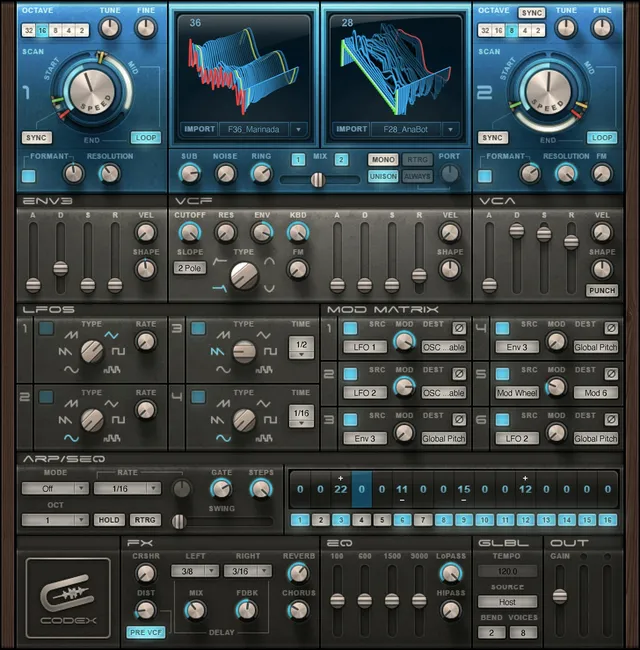
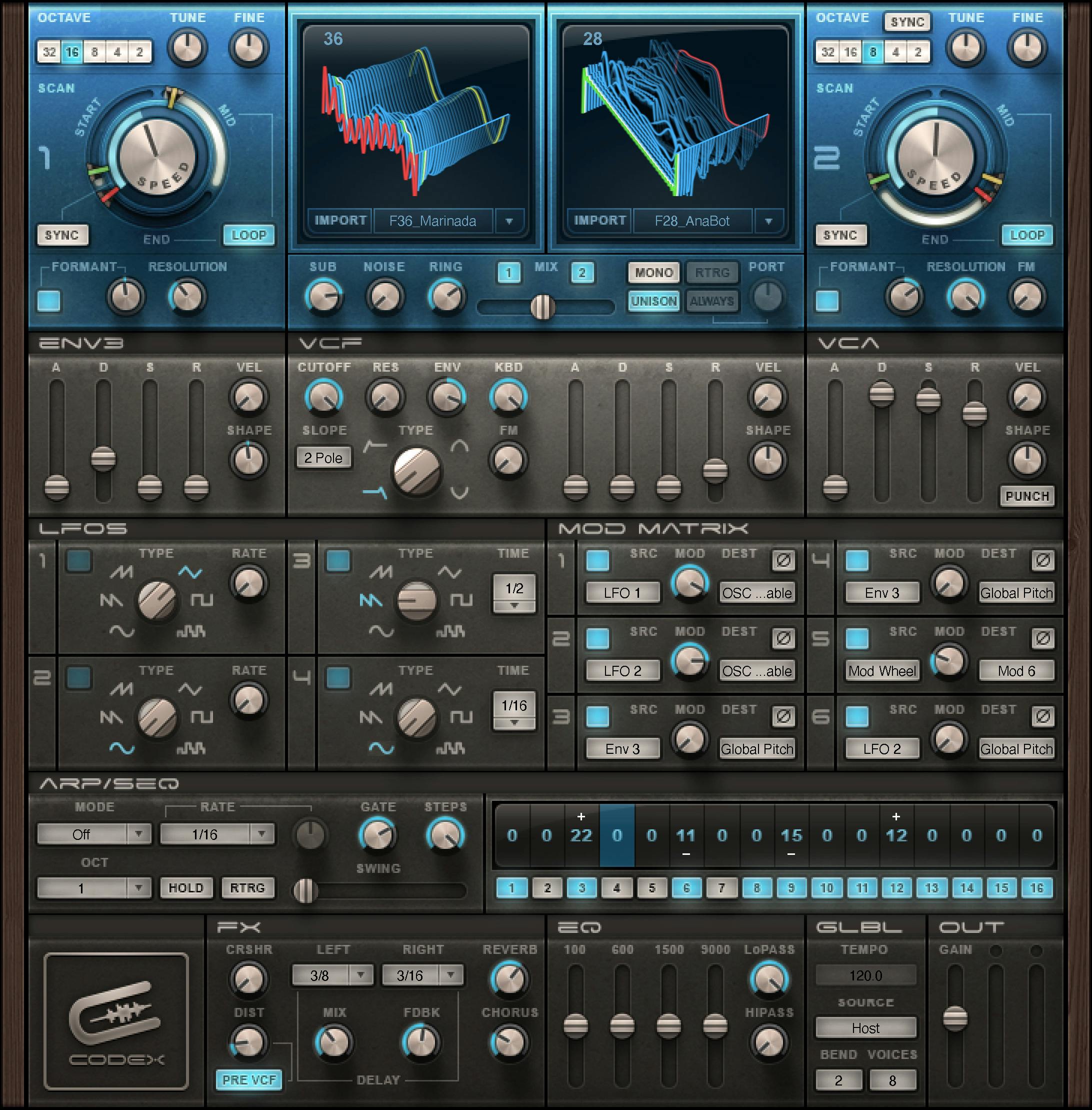
Waves Codex is a stereo virtual instrument built around two scanning wavetable oscillators and a subtractive filter/VCA section. It adds four LFOs, a third assignable envelope, modulation matrix, arpeggiator/16-step sequencer, effects, EQ and output controls.
Codex can also turn user WAV files into wavetables. [1][2]
Waves describes Codex as a granular/wavetable synth powered by its Virtual Voltage approach. The practical point is simpler: you can choose or import a wavetable, scan through it over time, shape its formant/resolution/pitch, combine two oscillators plus sub/noise/ring sources, then route modulation from envelopes, LFOs and the sequencer to many documented destinations. [1][2]
My Short Version
For a first patch, choose a Table, use Wave or the Start/Mid/End scan controls to find useful timbres, then set Speed and Scan Sync if you want the wavetable to evolve over time. Balance Oscillator 1 and 2, add the sub/noise/ring sources only as needed, and shape the result with the VCF and VCA envelopes. [1]
Use the modulation matrix for motion rather than trying to automate everything by hand. The four LFOs, Envelope 3, keyboard/velocity/aftertouch, bender and sequencer are all documented modulation sources. Finish with the onboard distortion/Crusher, chorus/delay/reverb and EQ only when they serve the patch. [1]
I did not audition presets, import audio, measure CPU/RAM, or play Codex from a controller for this article. Control descriptions and ranges come from Waves’ current manual.
Component and operating modes
The current manual documents one plugin component: CODEX Stereo. It appears as a virtual instrument in supported DAW hosts and also runs as a standalone application. The standalone app uses ASIO on Windows or Core Audio on macOS and accepts MIDI for notes/control changes. [1]
Codex also supports MIDI Learn through the documented right-click → Learn → controller-move workflow. [1]
Oscillators: Octave, Tune, Fine and Resolution
Codex has two wavetable oscillators, labeled 1 and 2. [1]
For each oscillator:
- Octave: 32, 16, 8, 4, 2, from lowest to highest pitch.
- Tune: -12 to +12 semitones.
- Fine: -100 to +100 cents.
- Resolution: 0–100. [1]
Resolution is documented as the oscillator-resolution control. Waves does not publish a more technical transfer function in the current manual, so this article does not invent one.
Table and Wave
Table selects one of 64 internal or imported wavetables. Wave selects a specific section of the wavetable.
- Table: 1–64.
- Wave: 0–10. [1]
Wave is the immediate position/timbre selection. For animated movement through the table, use the Start/Mid/End and Speed scan controls below.
Formant and Formant Correction
Formant changes spectral-peak placement without simply being another oscillator Tune control.
- Range: -100 to +100. [1]
FC enables Codex’s formant-correction algorithm; when enabled, the Formant/FRMNT control is available for the documented correction behavior. [1]
Wavetable scan: Start, Mid, End, Speed, Sync and Loop
Codex can scan through a wavetable using three points:
- Start: 1–64.
- Mid: 1–64.
- End: 1–64. [1]
Speed controls scan speed:
- free-running range: 0–100;
- synchronized values: 4/1 through 1/32 as exposed by the control. [1]
Scan Sync determines whether scan timing follows the host clock. Loop makes scanning repeat continuously between Mid and End. [1]
This lets a single held note evolve through different sections of a wavetable instead of staying at one static Wave position.
Importing your own WAV files
Import converts a user-selected WAV file into a Codex wavetable. The manual says imported wavetables are saved with presets and that Codex accepts WAV files of any length, bit depth and sample rate; it recommends roughly 1–5 seconds for optimal results. [1]
That recommendation is vendor guidance, not a test from this article. Because imported audio becomes source material for a synth patch, keep rights/ownership of third-party samples separate from the plugin’s own licensing.
Oscillator Sync and FM
OSC SYNC synchronizes Oscillator 2 waveform triggering to Oscillator 1. When enabled, Oscillator 2 pitch controls affect its timbre rather than its output pitch.
- Range: On/Off. [1]
FM controls how much Oscillator 1 frequency-modulates Oscillator 2.
- Range: 0–100. [1]
Sub, Noise and Ring
The additional-source/mix section adds three sound generators:
- SUB: triangle wave one octave below Oscillator 1, 0–100.
- NOISE: white noise, 0–100.
- RING: ring modulation between Oscillator 1 and 2, 0–100. [1]
OSC 1 / OSC 2 switches each main oscillator In/Out. MIX balances the two main oscillators from -50 to +50. [1]
Mono, Retrigger, Unison and Portamento
MONO switches between monophonic and polyphonic operation.
- On = mono; Off = polyphonic. [1]
RTRG re-triggers envelopes on every new note in Mono mode. UNISON enables the documented doubling/richer-voice behavior. Both are On/Off controls. [1]
PORT sets glide time. The manual prints 0.5–2500 ms and also gives 0–2.5 seconds parenthetically. The printed lower endpoints differ; neither was tested here. ALWAYS/LEGATO determines whether glide occurs on every interval or only when the previous note remains held. [1]
VCF filter type and slope
The voltage-controlled filter provides four modes:
- High Pass
- Low Pass
- Band Pass
- Band Reject [1]
Slope switches between 2-pole / 12 dB per octave and 4-pole / 24 dB per octave behavior. [1]
VCF Cutoff, Resonance, Envelope, Keyboard and FM
- Cutoff: 0–100, documented as mapping from 20 Hz to 20 kHz.
- RES: 0–100.
- ENV: -100 to +100, controlling filter-envelope modulation depth.
- KBD: 0–100, keyboard tracking referenced to C3.
- FM: 0–100, modulation of filter cutoff by Oscillator 1. [1]
Negative VCF ENV values allow the envelope to move cutoff in the opposite direction from positive settings.
VCF envelope
The filter envelope has ADSR timing plus velocity and curvature controls:
- Attack: 1–10,000 = 1 ms–10 s.
- Decay: 1–10,000 = 1 ms–10 s.
- Sustain: 0–100%.
- Release: 1–10,000 = 1 ms–10 s.
- Velocity: 0–100.
- Shape: -50 to +50. [1]
Waves describes Shape 0 as linear, positive values as more concave/punchier and negative values as more convex/smoother.
VCA envelope and Punch
The amplifier envelope uses the same documented ADSR domains:
- Attack: 1–10,000 (1 ms–10 s)
- Decay: 1–10,000 (1 ms–10 s)
- Sustain: 0–100%
- Release: 1–10,000 (1 ms–10 s)
- Velocity: 0–100
- Shape: -50 to +50 [1]
PUNCH enables Codex’s dynamic transient enhancer for a snappier attack.
- Range: On/Off. [1]
Four LFOs
Codex has four LFOs: two free-running and two synchronized/voice-triggered according to the manual. [1]
Type choices:
- Sine
- Saw Down
- Saw Up
- Triangle
- Pulse
- S&H (random) [1]
Free Rate: 0.1–100 Hz. [1]
Synced Time choices: 4/1, 3/1, 2/1, 1/1, 1/2, 3/8, 1/3, 1/4, 3/16, 1/6, 1/8, 3/32, 1/12, 1/16, 3/64, 1/24, 1/32. The LFO LED pulses at the LFO rate. [1]
Envelope 3
Envelope 3 is a freely assignable modulation envelope. Its documented controls are:
- Attack: 1–10,000 (1 ms–10 s)
- Decay: 1–10,000 (1 ms–10 s)
- Sustain: 0–100%
- Release: 1–10,000 (1 ms–10 s)
- Velocity: 0–100
- Shape: -50 to +50 [1]
Use it for movements that should not be tied directly to the VCF or VCA envelopes.
Modulation Matrix
Each matrix assignment has Phase, Source, Destination and Mod depth. [1]
Phase reverses the direction of the assignment.
- Range: On/Off. [1]
Source choices are: LFO1, LFO2, LFO3, LFO4, Env3, Modwheel, Keyboard, Velocity, Aftertouch, Bender, VCF Envelope and Sequencer. [1]
Destination choices documented by Waves include Global Pitch; OSC1/2 frequency, resolution, formant, table and scan points/speed; OSC2 FM; Sub, Noise, Ring and oscillator Mix; VCF and VCA controls/envelope stages; Pan, HP, LP, Dist, Crusher, Chorus, Delay Mix/Rate, Reverb and Portamento; all four LFO rates; Envelope 3 stages/curve; Arp/Seq Rate/Gate; and Mod 1–6. [1]
Mod sets assignment depth from 0–100%. [1]
The key limitation is structural: the manual lists available destinations but does not publish an acoustic “amount” corresponding to each percentage for every destination. Treat 0–100 as modulation depth, not a universal physical unit.
Arpeggiator and 16-step sequencer
The ARP/SEQ section works as either an arpeggiator or a 16-step pitch sequence. Each sequence step has an In/Out toggle and a pitch value of ±24 semitones relative to the held note. [1]
Mode: Off, Arp Up, Arp Down, Arp Up/Down, Arp Random, Sequence. [1]
Octave: 1, 2, 3, 4. [1]
Rate:
- Free mode: 1–50 Hz;
- synced values: 1/2, 3/8, 1/3, 1/4, 3/16, 1/6, 1/8, 3/32, 1/12, 1/16, 3/64, 1/24, 1/32. [1]
Gate: 5–100% of note length. Steps: 1–16. [1]
Hold latches notes after keys are released. RTRG re-triggers the arpeggiator/sequencer when new notes arrive. Swing delays even-numbered notes/steps toward the following odd step, range 0–100. [1]
Distortion and Crusher
DIST controls per-voice distortion from 0–100%. Waves describes values below 50% as warmer/saturated and values above 50% as more aggressive/crunchy. [1]
PRE VCF chooses whether distortion occurs before or after the filter: Pre/Post. [1]
CRSHR simulates reduced sample rate/resolution.
- Range: 0–100. [1]
The manual describes the effect but does not provide a direct bit-depth/sample-rate conversion for the 0–100 number, so none is invented here.
Stereo Delay
The built-in delay provides separate left/right note values plus mix and feedback. [1]
Left and Right choices: 1/2, 3/8, 1/3, 1/4, 3/16, 1/6, 1/8, 3/32, 1/12, 1/16, 3/64, 1/24, 1/32. [1]
- Mix: 0–100.
- Feedback: 0–100. [1]
Reverb and Chorus
Reverb controls both the amount and size/time of the documented virtual plate reverb.
- Range: 0–100. [1]
Chorus controls chorus modulation amount.
- Range: 0–100. [1]
The manual describes a combined amount-and-size/time control, not a simple wet/dry percentage.
EQ
Codex provides a four-band fixed-frequency graphic EQ plus high-pass and low-pass filters. The manual notes that strong boosts can saturate differently from the Distortion module. [1]
- HiPASS: 20–20,000 Hz.
- LoPASS: 20–20,000 Hz.
- 100 Hz band: -30 to +30 dB.
- 600 Hz band: -30 to +30 dB.
- 1500 Hz band: -30 to +30 dB.
- 9000 Hz band: -30 to +30 dB. [1]
Tempo, clock source and pitch bend
Tempo displays current tempo, range 1–300. Source selects Host or Internal clock. [1]
Bend Range sets pitch-bender range from 0–12. The manual does not attach an explicit unit on that control line; context indicates pitch-bend range but this article does not invent a different unit/default. [1]
Voices, Output Gain and Meter
Voices sets maximum simultaneous polyphony from 1–32. Waves explicitly discusses this as a CPU/RAM management control. [1]
Gain sets overall output after generators and processing.
- Range: -80 to 0 dBFS. [1]
Meter shows overall output energy. [1]
The manual says Codex can be CPU- and RAM-hungry compared with some other software synthesizers, but this article did not benchmark that claim or compare voice-count performance.
Standalone application controls
The standalone Codex app adds host/application controls rather than synthesis parameters: [1]
- All Notes Off sends an all-notes-off MIDI message.
- Preferences opens audio/MIDI configuration.
- Output chooses the audio device.
- Test plays a configuration test sound.
- Active Output Channels selects device outputs.
- Sample Rate and Audio Buffer Size display/set engine values where the OS/driver permits; on Windows the manual directs those changes to the driver control panel.
- Active MIDI Inputs selects MIDI input devices.
- Standalone Tempo sets the tempo value used by tempo-aware behavior. [1]
These are standalone application preferences and configuration controls, separate from the instrument's synthesis parameters. [1]
WaveSystem toolbar
The top WaveSystem bar handles preset load/save, compare, undo/redo and resizing. [1]
These are shared preset and interface controls rather than Codex synthesis parameters.
A practical Codex workflow
Choose or import a wavetable, set Start/Mid/End and a scan Speed, and decide whether that movement should free-run or sync to tempo. Set oscillator pitch and formant/resolution, then balance Oscillator 1/2 before adding Sub, Noise or Ring. [1]
Build the basic amplitude shape with the VCA envelope and the spectral shape with the VCF/filter envelope. Use LFOs and Envelope 3 for movement, then assign them through the modulation matrix. Once the patch responds as intended, add the arpeggiator/sequencer or onboard effects rather than using those sections to compensate for an unclear source patch. [1]
If performance rises, use the Voices control as the documented polyphony/CPU tradeoff. This is conservative editorial workflow guidance derived from the manual; no performance benchmark was run.
Best for / skip if
Codex is best for animated wavetable patches where oscillator scanning and a broad modulation matrix matter more than recreating one fixed analog oscillator topology. It is particularly useful when you want to import a short WAV, convert it into a table and animate it with host-synced or free modulation. [1][2]
Skip it when a simple subtractive synth is enough, when you need a modern MPE-specific workflow not documented in the current Codex guide, or when CPU/RAM budget is very tight and the needed patch can be produced more efficiently elsewhere.
Limitations and evidence boundary
This article is documentation-led. I did not listen to factory presets, import a WAV, verify modulation depth acoustically, benchmark voice count, test MIDI Learn, measure effects, validate host compatibility or run the standalone app.
The current linked manual publishes many synthesis-control ranges but does not provide a complete factory-default table. No default is inferred from screenshot knob positions. Several controls use normalized 0–100 values whose physical/acoustic transfer functions are not specified; those remain normalized domains. The manual's modulation-matrix image shows six row squares whose function is not explained in its text, so this guide does not assign them an on/off function. [1]
Related guides
For Waves’ product overview and current product details, see the official Codex Wavetable Synth page and the Codex User Guide.
Bottom line
Codex’s core idea is movement through a wavetable, not just choosing a static oscillator waveform. Start/Mid/End/Speed define that movement, the filter/VCA shape each note, four LFOs plus Envelope 3 route modulation through the matrix to many listed destinations, and the arp/sequencer/effects complete the patch workflow. [1]
The large control set becomes manageable when you build in that order: source → scan → filter/amplitude → modulation → sequencing/effects → output.
Sources
Sources checked October 18, 2026. No listening, MIDI performance, WAV-import, native-host, CPU/RAM benchmark or audio test was performed.
- Waves Codex User Guide, current product-linked guide; see the synthesis, control and standalone sections on printed pages 7–23.
- Waves Codex product page, current product identity, positioning, current thumbnail and manual link.
- Waves Graphic Library, current Codex Wavetable Synth listing and product-image reuse rule requiring a relevant Waves product backlink.
FAQ
What does Waves Codex do?
Codex is a stereo wavetable synthesizer with two wavetable oscillators, a subtractive filter/VCA section, modulation sources and a matrix, an arpeggiator/sequencer, effects, EQ and standalone operation. This is a documentary summary, not an audition result. [1]
Can Codex turn my own WAV file into a wavetable?
The manual says Import converts a selected WAV into a wavetable and saves imported tables with presets. It says WAV files of any length, bit depth and sampling frequency are supported, and recommends one to five seconds for optimal results. That vendor statement was not independently tested here. [1]
What is the difference between Table, Wave and the scan controls?
Table selects one of 64 internal or imported wavetables. Wave selects a specific section (0–10). Start, Mid and End define scan points (each 1–64); Speed and Scan Sync control free or host-synchronized scanning, and Loop repeats between Mid and End. [1]
What does Oscillator Sync do in Codex?
OSC SYNC ties OSC 2 waveform triggering to the rate of OSC 1. When active, OSC 2 pitch controls change OSC 2 timbre rather than its pitch. Separately, OSC 1 frequency-modulates OSC 2 through the OSC 2 FM amount control (0–100). [1]
How do Codex's free and synchronized LFOs differ?
The manual describes two free LFOs with a continuous rate from 0.1–100 Hz and two synchronized, voice-triggered LFOs using host-BPM note values from 4/1 through 1/32. It lists six waveforms: Sine, Saw Down, Saw Up, Triangle, Pulse and S&H (random). [1]
What can the Codex Modulation Matrix route?
The guide lists LFOs, Envelope 3, Modwheel, Keyboard, Velocity, Aftertouch, Bender, VCF Envelope and Sequencer as sources. Destinations span Global Pitch, oscillator and scan controls, Sub/Noise/Ring/Mix, VCF/VCA, stereo/effects, LFO/Envelope 3 and ARP/SEQ controls, and Mod 1–6. The 0–100% depth has no universal physical meaning across all destinations. [1]
What Portamento range does the Codex manual give?
It prints 0.5–2500 ms and also parenthetically 0–2.5 seconds. The starting values do not agree, so the conflict should remain visible rather than be silently corrected. [1]
What does the Codex output Gain control show?
The guide says Gain sets overall output volume after generators and processors and prints a range of −80 to 0 dBFS. It says the Meter displays overall output energy. These are documented specifications, not measurements from an installed instrument. [1]

About the Author
Joseph Nilo has been working professionally in all aspects of audio and video production for over twenty years. His day-to-day work finds him working as a video editor, 2D and 3D motion graphics designer, voiceover artist and audio engineer, and colorist for corporate projects and feature films.