
Waves DeBreath is a breath-detection and attenuation plugin for vocal and spoken-word tracks. Instead of acting only like a conventional level gate, it combines a breath-template similarity test with an energy threshold, then lets you decide how much of the detected breath to reduce. [1][2]
That two-part detection system is the central idea. An event is classified as a breath when its breath-match rating is high enough and its energy is low enough. Once detection is working, Fade Out, Fade In, Reduction and Room Tone determine what happens to the detected section. [1]
My Short Version
Start with the documented default Breath Threshold and Energy Threshold, then switch Monitor to Breath. Waves says a correct detection setting should place only breaths, with no pitched sounds, in the Breath path; if other material appears there, refine the thresholds before adjusting Reduction. [1]
Once detection is clean, use Reduction to decide how much breath remains. Use Fade Out/Fade In to avoid abrupt edits, and enable Room Tone when heavy attenuation creates obvious holes in the background. [1]
I did not process a vocal for this article. Those steps follow Waves' documentation.
How DeBreath detects a breath
DeBreath uses two conditions at the same time. [1]
- The signal must score above the Breath Threshold against Waves' breath-template model.
- The signal energy must be below the Energy Threshold. [1]
If an event is loud enough to sit above the Energy Threshold, DeBreath will not classify it as a breath even if the breath-rating graph is high. This helps separate low-energy inhalations from nearby vocal content. [1]
Breath Graph
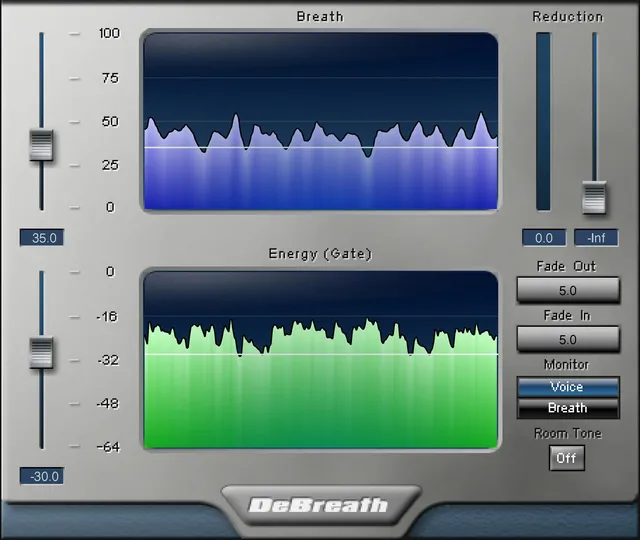
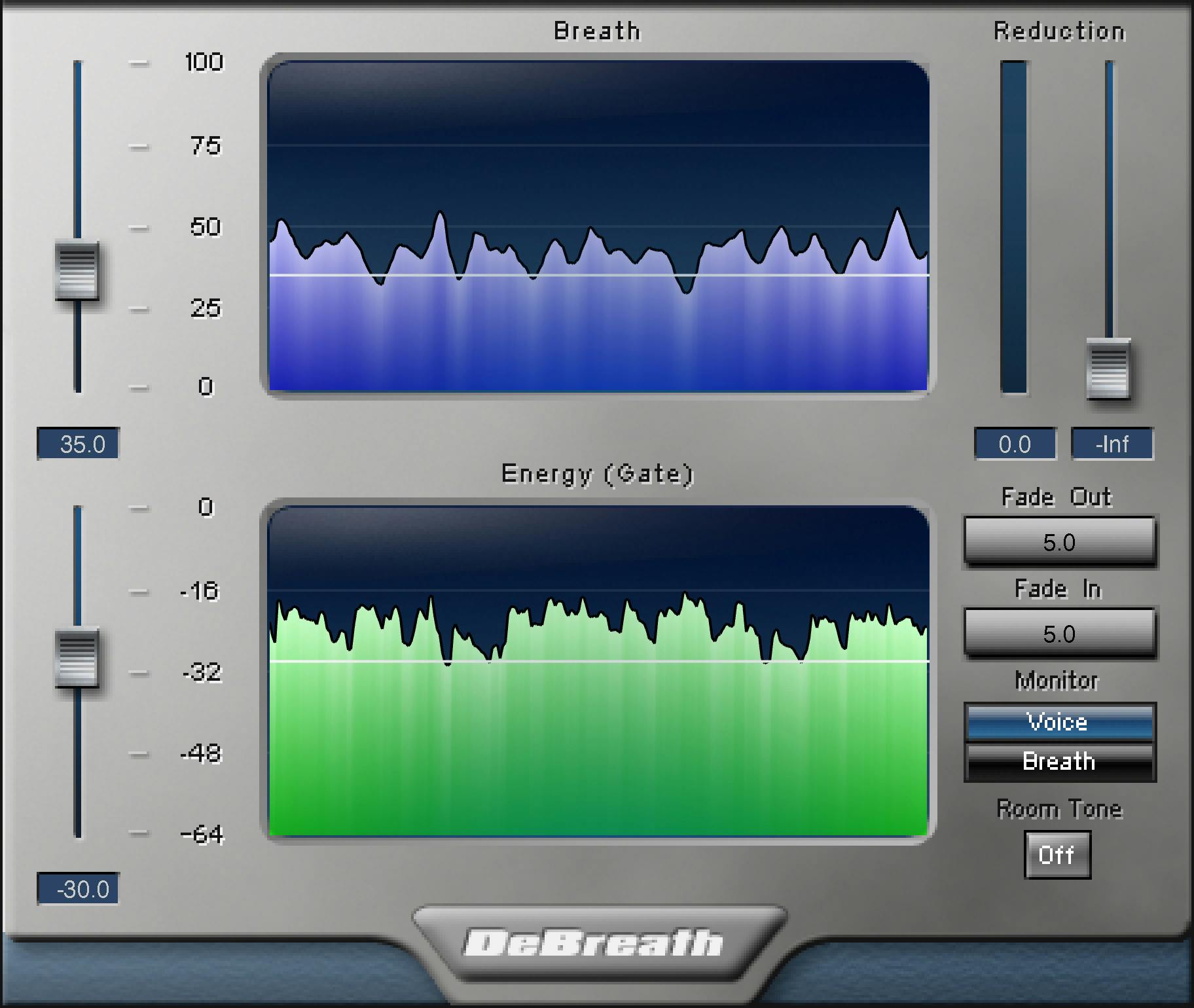
The Breath Graph shows a five-second history of the Breath rating factor—the similarity between incoming audio and the plugin's breath descriptions/templates. [1]
The graph shares its scale with Breath Threshold. It is a readout, not an independent processor control.
Breath Threshold
Breath Threshold sets how strong the template match must be before an event can qualify as a breath. [1]
- Range: 0–100%
- Default: 50% [1]
A higher threshold demands a stronger template match. A lower threshold allows more events to qualify, which can catch difficult breaths but can also increase the chance that non-breath material enters the detected path. The Energy Threshold must still be satisfied. [1]
The manual recommends starting with the default and using a problematic breath segment to fine-tune the setting while monitoring the Breath path. [1]
Energy Graph
The Energy Graph shows a five-second history of the incoming signal's summed energy. [1]
It shares its scale with Energy Threshold and is useful for comparing typical vocal energy with breath energy. It is a visual aid rather than an adjustable control.
Energy Threshold
Energy Threshold is the level boundary used by the second part of breath detection. [1]
- Documented range: 0 to -64 dBFS
- Default: -30 dB [1]
The manual prints the range in descending order. This article preserves the documented endpoints rather than silently rewriting the source notation.
Events above the Energy Threshold are not treated as breaths, even when their Breath rating is above the Breath Threshold. Waves suggests -30 dB as a useful general starting point and notes that louder material/heavier breaths may call for a higher threshold such as around -25 to -20 dB. Those are vendor starting suggestions, not universal settings. [1]
Fade Out
Fade Out controls how quickly a detected breath leaves the Voice path. The same transition is the breath's fade into the Breath path. [1]
- Range: 0.1–200 ms
- Default: 5 ms [1]
A longer value makes the handoff more gradual. It does not change whether the event is detected; it changes the transition after detection.
Fade In
Fade In controls how quickly the Voice path returns to unity after DeBreath stops detecting a breath. The corresponding Breath path fades out over the same duration. [1]
- Range: 0.1–200 ms
- Default: 5 ms [1]
Fade In and Fade Out are therefore transition controls, not detection thresholds.
Reduction
Reduction sets how much gain reduction is applied to the detected breath. [1]
- Range: 0 dB to -∞
- Default: -∞ [1]
At 0 dB, the breath is not attenuated. At -∞, DeBreath removes it from the monitored Voice path. Intermediate values leave some breath in place.
The manual also suggests that total removal is not always necessary: substantial attenuation can separate breaths from later vocal compression without creating the same degree of room-tone discontinuity. That is a documented workflow suggestion, not a listening result from this article. [1]
Reduction Meter and graph markers
The orange Reduction Meter shows gain reduction applied to detected breaths. [1]
When a breath is reduced or removed, DeBreath also draws an orange line on both the Energy and Breath graphs. These are activity indicators, not additional controls. [1]
Room Tone
Room Tone is an On/Off control that adds very low-level white noise where breath attenuation occurs. [1]
- States: On / Off
- Maximum white-noise level: -80 dB
- The actual added level is scaled by the amount of breath attenuation.
- The noise follows the same fade behavior as the breath reduction. [1]
The purpose is continuity: if removing a breath exposes a sudden gap in the recording's background, Room Tone can make that transition less abrupt. It is generated white noise, not captured room ambience from the recording. The guide does not specify a Room Tone default state. [1]
Monitor: Voice / Breath
Monitor chooses which DeBreath path you hear. [1]
- Voice — the original signal after detected breaths have been reduced/removed.
- Breath — the material DeBreath has reduced or removed from the Voice path. [1]
The manual says the Voice and Breath paths sum back to the original source. This makes Breath monitoring the most useful diagnostic for detection: if clear vocal content appears there, adjust detection before committing to aggressive reduction. [1]
A more advanced routing workflow is to duplicate the source track, use Voice on one path and Breath on another, and process them differently. That is a documented routing concept; this writing pass did not test host-specific routing behavior. [1]
A practical DeBreath workflow
First, insert DeBreath and leave Reduction secondary to detection. Set Monitor to Breath and listen to what the detector is classifying. [1]
Use Breath Threshold to control how closely an event must match the breath model, and Energy Threshold to keep loud vocal events out of the breath class. Recheck several breath types rather than tuning around one isolated inhale. [1]
Once the Breath path contains the material you intend to reduce, set Reduction. If edits sound abrupt, lengthen Fade Out/Fade In. If strong attenuation reveals obvious gaps in the background, try Room Tone. [1]
That sequence is documentation-led. No claim is made here that the defaults are correct for every singer, narrator, mic distance or room.
DeBreath versus a gate
A conventional gate decides mainly from level. DeBreath adds a template-match test so low-energy audio is not automatically assumed to be breath. [1]
That does not make DeBreath a general noise remover or dialogue restoration system. It is specialized around breath detection and attenuation. For steady background-noise problems, a dedicated noise-suppression tool is a different category.
Best for / skip if
DeBreath is best for breath-heavy vocals, voiceovers and spoken-word tracks where manually editing every inhale would be tedious and where you want control over how much breath remains. Its separate Breath monitor is particularly useful when detection quality matters more than simply muting everything quiet. [1][2]
Skip it when the breaths are already musically appropriate, when the problem is broader noise/reverb rather than breaths, or when manual editing is preferable for a small number of highly specific events.
Limitations and evidence boundary
This is a documentation-led article. I did not test detection accuracy, compare DeBreath with manual editing or a gate, measure latency, or process any voice audio.
The manual's latency paragraph is labeled “Tune's latency” and lists 32,384 samples at 44.1/48 kHz and 64,768 at 88.2/96 kHz, so that paragraph remains an apparent attribution error. Separately, Waves' current DeBreath product page lists latency of 32,384 samples at 44.1 kHz, 35,248 at 48 kHz, 64,768 at 88.2 kHz, and 70,496 at 96 kHz. These are vendor-published specifications, not measurements made for this article; check Waves' product page for current platform qualifications. [1][2]
The User Guide describes the Breath/Energy graphs, thresholds, fades, Reduction, Room Tone and Monitor controls on printed pages 4–6. [1]
Related guides
For adjacent but different vocal-cleanup tasks, Waves describes NS1 as single-control noise suppression for voice, Sibilance as a vocal de-esser, and Vocal Rider for vocal-level riding. These address different jobs, not direct substitutes for DeBreath.
Bottom line
DeBreath works in two stages: Breath Threshold and Energy Threshold decide what qualifies as a breath; Fade Out, Fade In, Reduction and Room Tone decide how that detected breath is treated. [1]
The most important habit is to audition the Breath monitor first. Detection quality matters more than aggressive Reduction.
Sources
Source review: October 16, 2026. No listening or native-host test was performed.
- Waves DeBreath User Guide, current product-linked guide; detection/removal-control pages visually inspected.
- Waves DeBreath product page, current product identity and intended use.
- Waves Graphic Library, current DeBreath listing and reuse rule for images on that page with a backlink to the relevant Waves product page.
FAQ
How does DeBreath decide whether an event is a breath?
Both detection conditions must be met: the Breath rating must exceed the Breath Threshold, and the event's energy must be below the Energy Threshold. An event above the Energy Threshold is not treated as a breath even if its Breath rating is high. [1]
What is the default Breath Threshold?
The guide lists a 0–100% range and a 50% default. It recommends starting from the default and checking detection in the Breath path. [1]
What does the Energy Threshold do?
It sets the energy condition for detection: events above the threshold are not treated as breaths. The guide prints the range as “0 - -64dBfs,” gives a default of “-30dB,” and describes −30 dB as a general starting point. [1]
What do Fade Out and Fade In control?
Each ranges from 0.1 to 200 ms and defaults to 5 ms. Fade Out sets the transition from Voice to Breath; Fade In sets the return to unity in Voice when detection stops. The corresponding Breath-path fade uses the same duration. [1]
Does DeBreath have to remove a breath completely?
No. Reduction ranges from 0 dB to −∞, with −∞ as the documented default. The guide discusses both total removal and partial reduction; it notes that reducing breaths by 20–40 dB can be enough for a vocal compressor not to respond to them as strongly. [1]
What does Room Tone add?
When enabled, it replaces silenced or attenuated breath regions with low-level white noise. Its maximum level is −80 dB; the amount is scaled by breath attenuation and follows the same fades. The guide does not specify a default state. [1]
What is the difference between Monitor: Voice and Monitor: Breath?
Voice monitors the original after detected breaths have been reduced or removed. Breath monitors what was reduced or removed. The guide says the two paths sum to the original source and recommends auditioning the Breath path to check detection. [1]
What latency does Waves currently list for DeBreath?
Waves’ current product page lists vendor specifications of 32,384 samples at 44.1 kHz, 35,248 at 48 kHz, 64,768 at 88.2 kHz, and 70,496 at 96 kHz. These are published specifications, not measurements made for this article. The manual separately has a paragraph labeled “Tune’s latency” with different paired-rate figures, so that manual wording remains an apparent attribution error; consult the product page for its current table and platform qualifications. [2][1]

About the Author
Joseph Nilo has been working professionally in all aspects of audio and video production for over twenty years. His day-to-day work finds him working as a video editor, 2D and 3D motion graphics designer, voiceover artist and audio engineer, and colorist for corporate projects and feature films.