
Waves Dorrough Stereo displays peak and average level together. Use that relationship to see whether a passage has brief peaks above a quieter average or holds a steadier level throughout. Its stereo modes let you change what the two meters represent.
This guide is based on Waves’ documentation. I did not audition the plug-in. The cover is an AI-generated editorial illustration.
My Short Version
Begin in Left/Right and play a passage with both strong attacks and sustained sound. Compare peak and average readings. Use Hold to retain a peak or Sum/Diff to look at the relationship between the two channels.
Read peak and average together
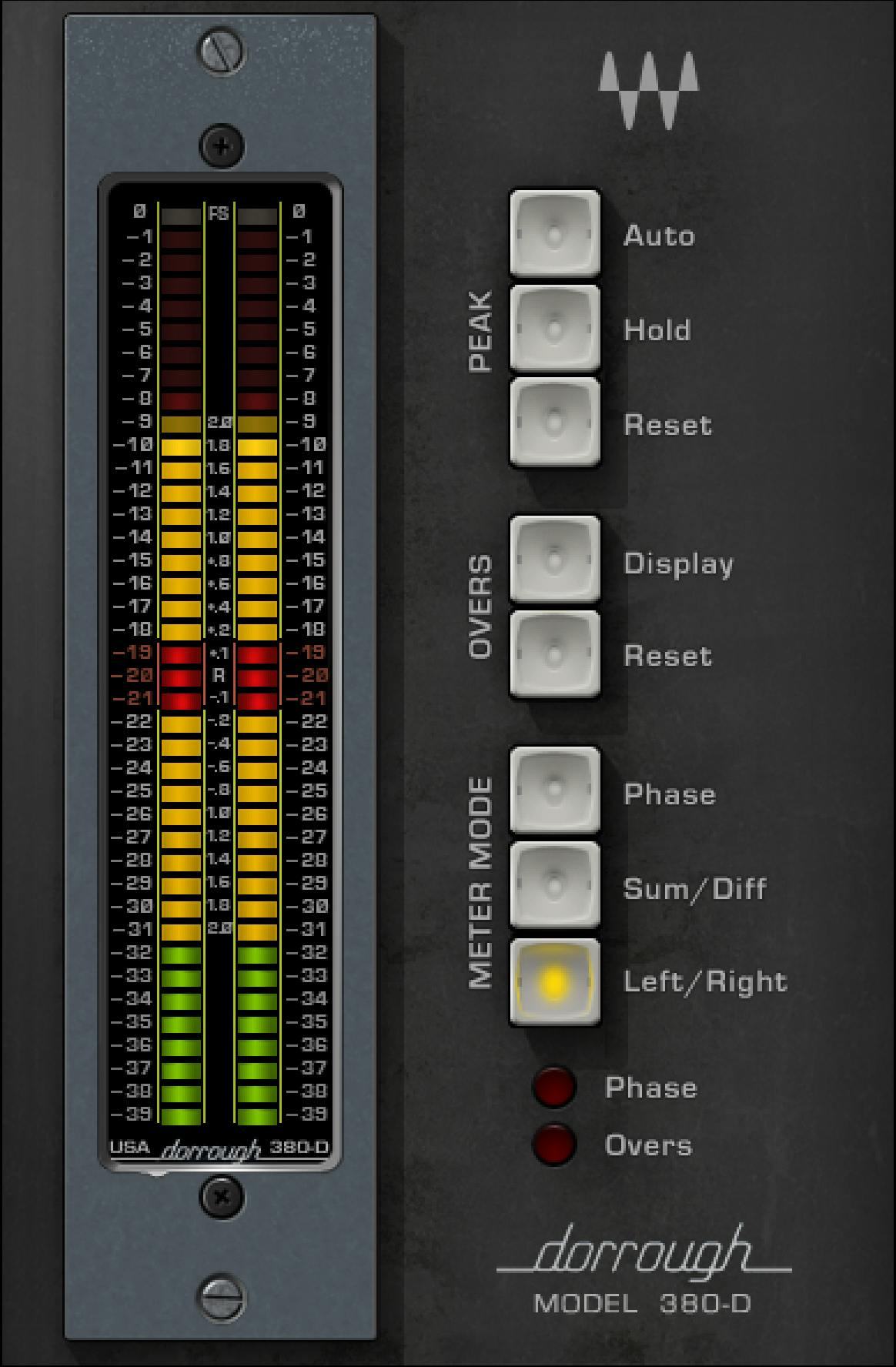

The peak indication follows short changes in level. The average indication gives you a steadier view over time. Watch both across a representative passage before drawing a conclusion from a single reading. For example, listen for the attacks of a drum pattern while you watch how far its peaks rise above the average indication.
Choose a peak display behavior
The Peak buttons change the display. Auto holds a peak for three seconds. Hold retains the peak, and Reset clears it. If neither Auto nor Hold is selected, the manual says the peak display refreshes continuously.
Use Auto for a brief glance at a peak during playback. Use Hold and Reset to compare two passes from a known starting point.
Compare Left/Right and Sum/Diff
Use Left/Right to look at the channels separately. Use Sum/Diff when you want to compare the combined left-plus-right signal with the difference between channels.
Try both views on the same excerpt. Start in Left/Right to check the channel balance, then use Sum/Diff to inspect how much the channels differ.
Pick a readable meter layout
Choose a documented vertical, horizontal or arc style and a size you can read while the mix plays. Keep the same style and observation window when comparing two adjustments. Put the meter at the point in your session where you want to observe the signal.
Related Waves guides
Waves Renaissance Compressor explains a processor that can change the relationship between peaks and average level. Waves WLM Plus covers a dedicated loudness-meter workflow.
Sources
See the Dorrough Meter Collection user guide and the official Dorrough Stereo product page. The interface example comes from the Waves Graphic Library.
Frequently Asked Questions
What does Dorrough Stereo display?
It shows peak and average level simultaneously.
What is the difference between Auto and Hold?
Auto retains a peak for three seconds. Hold retains a peak for inspection until you clear it.
What does Peak Reset clear?
It clears the held peak indication.
When should I use Left/Right?
Use it when you want to compare the two channels separately.
What does Sum/Diff show?
It shows the sum of the two channels and their difference.

About the Author
Joseph Nilo has been working professionally in all aspects of audio and video production for over twenty years. His day-to-day work finds him working as a video editor, 2D and 3D motion graphics designer, voiceover artist and audio engineer, and colorist for corporate projects and feature films.