
Waves Doubler builds two or four pitch-shifted copies of an input. Each voice has its own level, pan, delay and pitch controls. In the four-voice component, you can start with one pair of voices and bring in the others when you want a denser effect.
This guide is based on Waves’ documentation. I did not audition the plug-in. The cover is an AI-generated editorial illustration.
My Short Version
Start with two active voices in Doubler 4. Pan them apart, detune one slightly up and the other slightly down, and set different short delays. Keep the copies lower than the direct signal. Then audition what the third and fourth voices add.
Two- and four-voice components
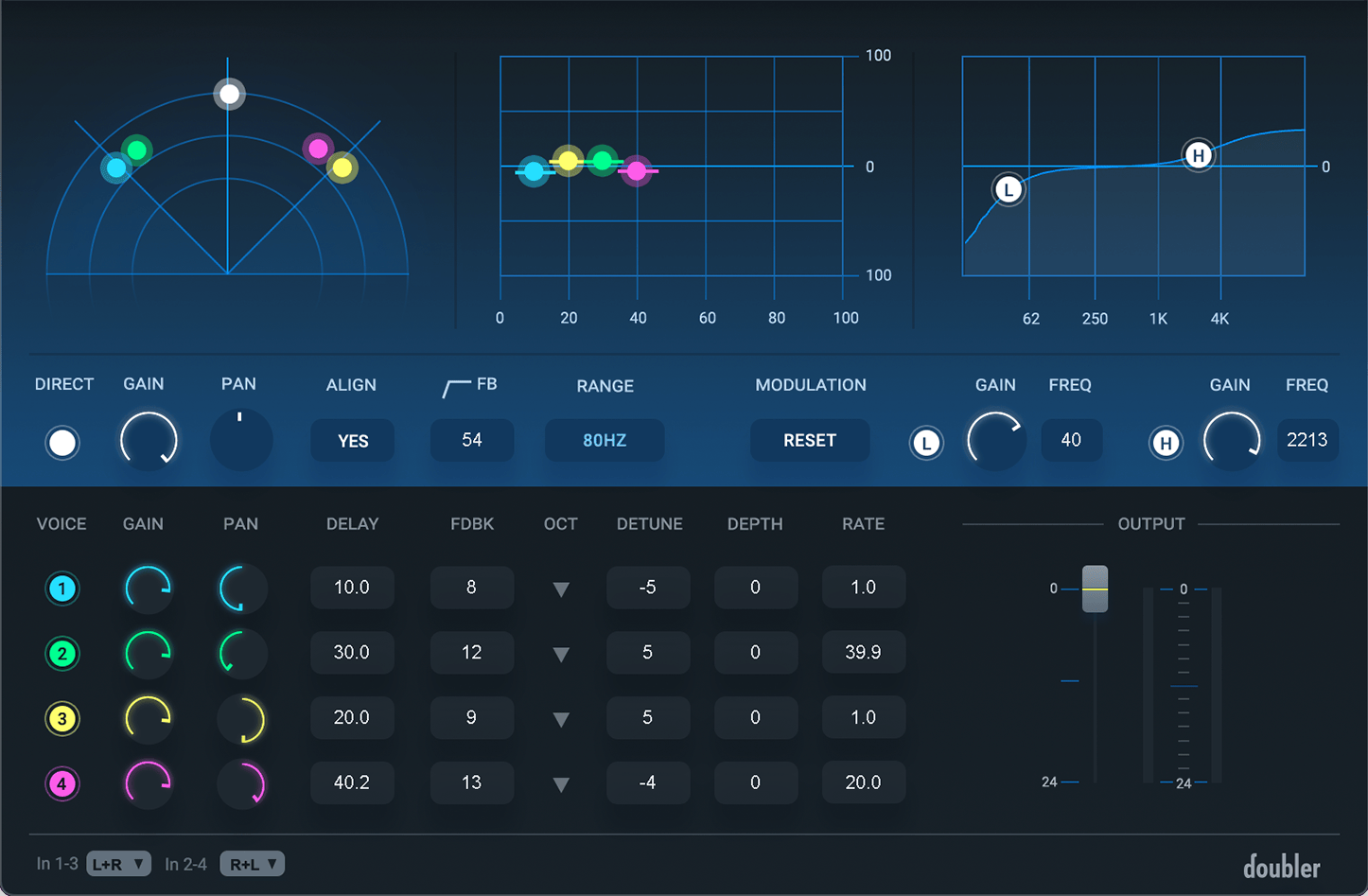

Waves documents two- and four-voice versions in Mono-to-Mono, Mono-to-Stereo and Stereo-to-Stereo formats. The figure shows the four-voice layout. For widening a mono source, the manual recommends the Mono-to-Stereo component.
Voice level, pan and delay
Switch individual voices on or off as you build the effect. Gain sets level per voice and Pan sets position. In the stereo component, Routing determines how the stereo input feeds the voices.
Delay offsets each voice in time. Start with unequal short delays and adjust them against the direct sound. The practical minimum depends on Align Direct and Range.
Pitch, modulation and voice feedback
Detune sets the pitch offset from the source. The manual documents −100 to +100 cents per voice. One hundred cents is a semitone. Octaver shifts that voice down one octave.
Modulation Depth adds pitch movement around the detune setting, and Modulation Rate sets how fast it cycles. Modulation Reset restarts the voice modulators together.
The manual describes per-voice Feedback as sending a portion of that voice back to the input. Waves warns that high feedback can create runaway levels.
Direct signal and Range
Use the direct path’s On/Off, Gain and Pan controls to balance the source against the voices. For a wet-only auxiliary setup, turn the direct signal off. Align Direct can delay the direct path to align it with the generated voices.
Range selects 20 Hz or 80 Hz. The manual recommends 20 Hz for bass or full-range material if you can accept higher latency, and 80 Hz when the source does not need deep-bass detuning and lower latency matters.
Equalize the generated voices and watch output
The Low Shelf and High Shelf filters affect the generated voices. The direct signal retains its own tone. Use the shelves to keep the doubles from competing with the source.
The Output Meters show level. Use Master Output Gain to bring down the combined signal if the Clip light comes on.
Related Waves guides
The Vocal Bender guide covers direct pitch and formant changes. The Abbey Road Reel ADT guide covers an automatic double-tracking effect.
Sources
Waves documentation reviewed November 25, 2026. See the Waves user guide, the official product page and the Waves Graphic Library.
Frequently Asked Questions
What does Waves Doubler do?
Doubler creates pitch-shifted copies of the input with independently adjustable level, pan, delay and detune.
What is the difference between Doubler 2 and Doubler 4?
Doubler 2 generates two voices. Doubler 4 generates four and lets you enable each voice independently.
What does Align Direct do?
Align Direct delays the direct path to line it up with the generated voices.
Do the shelf filters affect the direct signal?
The shelf filters shape the generated voices. The direct signal keeps its own tone.
What does Modulation Reset do?
It restarts the voice modulators together so their cycles begin from the same position.

About the Author
Joseph Nilo has been working professionally in all aspects of audio and video production for over twenty years. His day-to-day work finds him working as a video editor, 2D and 3D motion graphics designer, voiceover artist and audio engineer, and colorist for corporate projects and feature films.