

Eddie Kramer Bass Channel combines a two-Type bass treatment with Sensitivity, Bass, Treble, Compress and Output controls. Bass1 is described as the more dynamic, less compressed starting point; Bass2 uses more aggressive compression.
The Type selector is more consequential than an ordinary character toggle: changing Type resets all controls to their initial values. Its different defaults also mean the same knob position is not a complete comparison between the two treatments.
This guide follows the complete current Bass Channel manual and genuine official interface. I have not auditioned the plugin or tested its sound, latency or installation.
My Short Version
Choose Bass1 or Bass2 before detailed adjustments. A Type change resets every control, not only Compress.
Sensitivity sets the incoming level. Its LED is a qualitative guide, not a published numerical clip threshold.
Tone and compression controls are broad adjustments. They do not expose EQ frequency, Q, ratio, attack or release values.
Output2 is documented. Its initial value is 19.7, but the guide does not identify the Output scale's unit as dB.
Best for and when to choose another tool
Best for: a bass-track workflow built around a dynamic or more compressed starting character, then a small set of tone and intensity choices.
Those character descriptions come from Eddie Kramer's comments and Waves' product documentation. They are not listening conclusions from this article or a promise to reproduce a specific recording.
Choose another tool when: the task needs exact filter frequencies, separate timing/ratio controls, detailed gain-reduction measurement or independent stereo-channel treatment. Those functions are not established by this owner's guide.
The Renaissance Compressor guide covers a different, independently adjustable compressor interface. The F6 guide covers frequency-specific EQ decisions rather than these broad Bass/Treble controls.
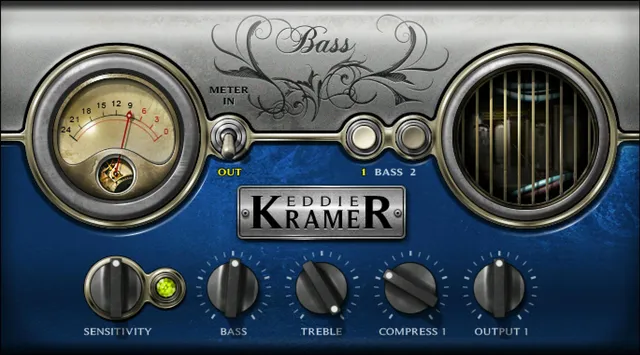
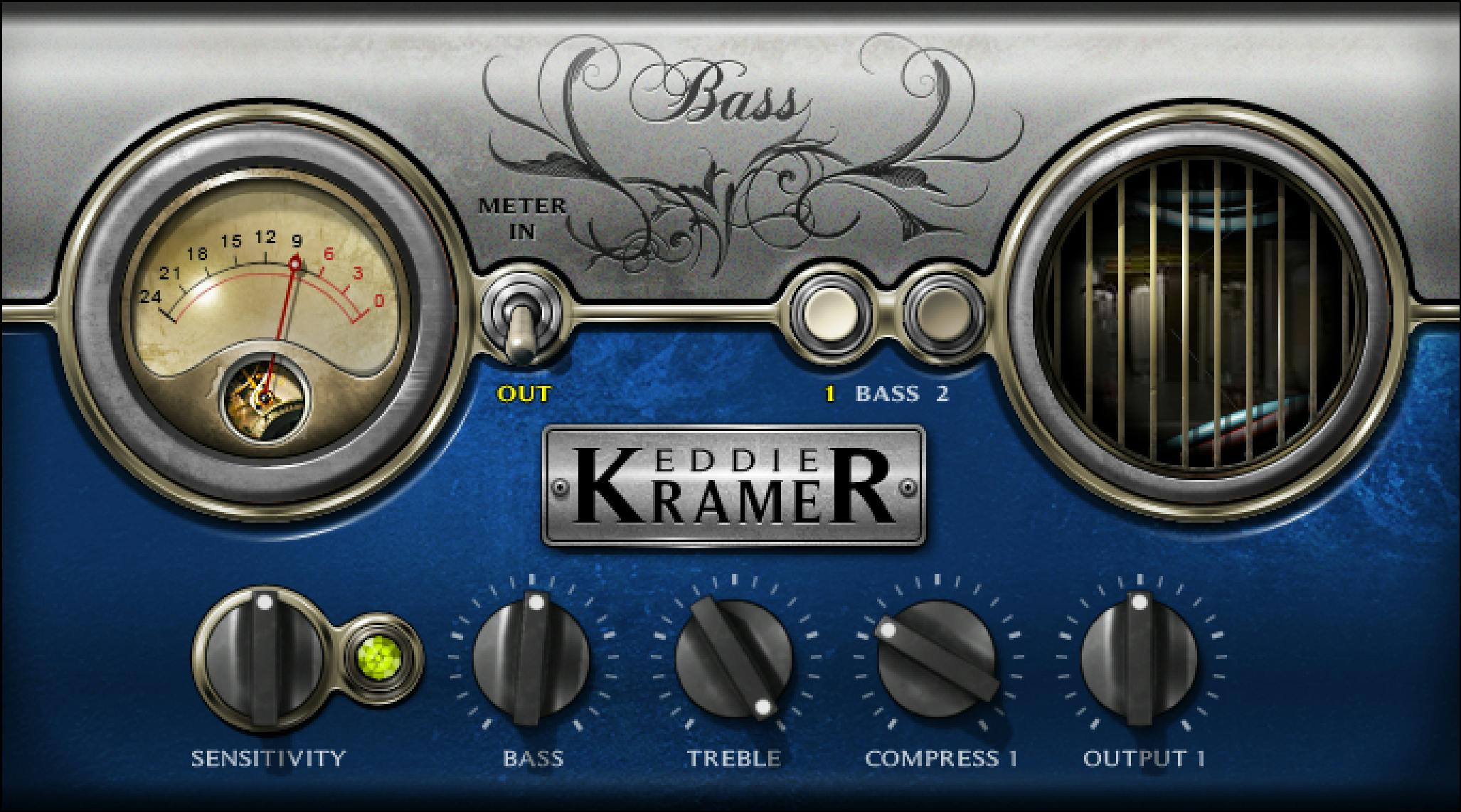
Bass1 and Bass2: choose before tweaking
Type toggles between Bass1 and Bass2. The manual characterizes Bass1 as less compressed and more dynamic, and Bass2 as the more aggressive compression treatment.
Changing Type resets all controls to their initial values. The source does not describe a preserve-settings option, a morph between Types or a change limited to the compressor.
A practical recommendation is to save a useful setup before changing Type. Otherwise, the tonal, level and compression adjustments are not documented as surviving the change.
The guide does not separately state a universal startup Type. Bass1 in the official image is one displayed state, not proof of every initial load.
Sensitivity and its three-color LED
Sensitivity controls input level, over ±50 in 0.1 steps. The reference does not attach a unit to that range.
Its stated default is 0 for Bass1 and −23.1 for Bass2. Neither value should be converted to dB or dBFS merely because a separate meter uses dBFS.
The LED uses green for good, yellow for optimal and red for very hot. If it remains off during playback, the guide says the input is too low.
The documented setup uses the song section with the highest peaks when adjusting Sensitivity. It also recommends rechecking after changing other controls, since those changes can alter the LED state.
Yellow is guidance, not a mandatory target for every creative result. This Bass guide explicitly says green or red may suit the material.
No numerical LED boundaries, guaranteed clip indication or fixed amount of saturation at each color is published. A red Sensitivity LED is therefore not interchangeable with a separately specified digital-overload test.
Bass and Treble
Bass controls low frequencies over 0–100 in 0.1 steps. Its default is 52 in Bass1 and 69 in Bass2.
Treble controls high frequencies, also 0–100 in 0.1 steps. Its default is Max/100 in Bass1 and 76 in Bass2.
These are the controls' own scales. They are not documented percentages of dry/wet signal, decibels of EQ gain or particular cutoff frequencies.
The manual does not supply filter frequencies, Q, slopes or a frequency-response graph. The sensible comparison is a broad tonal change, not a claimed exact shelf boost at a guessed frequency.
Compress1 and Compress2
Compress controls compressor intensity. The displayed label and default depend on the selected Type.
Compress1 spans 0–100 in 0.1 steps, default 30. Compress2 has the same published range and step, default 40.
This is one conditional intensity control, not two compressors with independently exposed settings on the same panel.
The guide does not give user controls for threshold, ratio, attack, release, knee, detector mode or makeup gain. A setting of 40 does not mean a particular ratio or forty decibels of gain reduction.
The words dynamic and aggressive describe the documented Type choices. No exact transfer curve, timing difference or measured loudness change is supplied here.
Output1 and Output2
Output controls the output level, over ±50 in 0.1 steps for each Type.
Output1 defaults to 0. Output2 defaults to 19.7. Both are explicitly documented in this current Bass guide.
The unit is not specified. In particular, Output2's default 19.7 is not stated as +19.7 dB, and the ±50 scale should not be relabeled dBFS from the meter.
Output is distinct from Sensitivity: one adjusts outgoing level and the other incoming level. The source does not publish a linked gain relationship, automatic loudness compensation or an output-ceiling/limiter function.
Conditional values at a glance
The following are explicit owner-specific reference values, not inferred pointer positions:
| Control | Published range / step | Bass1 default | Bass2 default |
|---|---|---|---|
| Sensitivity | ±50; 0.1 steps; unit unspecified | 0 | −23.1 |
| Bass | 0–100; 0.1 steps | 52 | 69 |
| Treble | 0–100; 0.1 steps | Max/100 | 76 |
| Compress | 0–100; 0.1 steps | 30 | 40 |
| Output | ±50; 0.1 steps; unit unspecified | 0 | 19.7 |
Meter defaults to Output, and Analog Noise defaults to Off. The guide does not establish every switch or GUI state from the example images.
Meter selector and level display
The Meter switch selects Input or Output. Its documented default is Output.
The meter's range is −24 to 0 dBFS. That unit applies to the meter, not automatically to the numerical scales of Sensitivity or Output.
No gain-reduction meter position, numerical compression readout, peak-hold duration, separate clip-reset behavior or loudness standard is specified for this owner.
The decorative equipment graphic on the other side of the panel is not a documented second analytical meter.
Analog Noise
The upper-right toolbar menu provides Analog Noise On/Off, with a stated default of Off.
The manual explains that the model includes a small amount of analog noise, and that the processing can be used without that noise. It describes the noise-free result as slightly different; that is source characterization, not an audition result here.
Turning Analog Noise off is not documented as disabling the entire processing model, compressor, EQ or every form of coloration. It is also not the same operation as host bypass.
There is no published noise-level amount, noise-spectrum selector or user-adjustable saturation curve.
Components, presets and toolbar
The guide lists EKramer BA mono, which is mono-in/mono-out, and EKramer BA stereo, which is stereo-in/stereo-out.
There is no documented mono-to-stereo configuration, Mid/Side mode, separate left/right controls or stereo-link law. Other Eddie Kramer collection members' Types and components are not this Bass plugin's inventory.
The shared WaveSystem toolbar handles preset save/load, settings comparison, undo/redo and resizing; its upper-right icon provides access to the WaveSystem Guide.
The actual page 11 menu figure also shows GUI sizes 75%, 100%, 125%, 150% and 200%, Apply as Default to All, User Manual and Waves System Guide, alongside Analog Noise. Its pictured 100% checkmark is an example, not a universal startup-size specification.
The generic toolbar strip on that page is labeled CLA Classic Compressors. It illustrates shared utilities rather than changing this owner's identity or proving the exact current Bass toolbar appearance.
A practical order for adjustments
My suggested order follows the guide: insert the appropriate Bass component, choose a Type, set Sensitivity using a peak-heavy passage, then make tonal and compression adjustments.
Recheck the LED after those changes and use the Input/Output meter selection for the corresponding level view. Adjust Output as needed for comparison without assuming it is automatic makeup gain.
Save a useful setting before trying the other Type, because the all-control reset makes it a fresh starting point.
This is a conceptual workflow, not a tested preset or an assertion of an internal EQ/compressor processing order.
The Waves resources hub links other published guides. Subscription versus perpetual licensing is a separate decision from these controls.
Sources and documentation limits
Checked October 19, 2026, America/New_York. The official Eddie Kramer Bass Channel page links the complete 11-page v16-update Bass guide, read in full.
Pages 3–4 explain Sensitivity, Type character and components; page 5 supplies the quick start; page 6 shows the interface; page 7 specifies Type reset and meter; pages 8–9 cover Bass1; pages 10–11 cover Bass2, Output2, Analog Noise and toolbar.
The genuine Graphic Library Bass1 panel and actual conditional-control pages were inspected. Sensitivity/Output units, tone frequencies, compression laws, numerical LED boundaries and stereo-link behavior remain unspecified. No Drum Channel details or unrelated Output hold are transferred.
FAQ
What is the difference between Bass1 and Bass2?
The guide describes Bass1 as the more dynamic, less compressed treatment and Bass2 as more aggressive compression. These are two application Types inside the Bass plugin, not its channel components. Their character descriptions are manufacturer statements rather than listening findings from this article.
What happens when I change Type?
The manual explicitly says changing Type resets all controls to their initial values. It does not document preserving tone or level settings, resetting only Compress or morphing between Types. Save a useful setup before changing Type if you want to retain a separate comparison.
How should I interpret Sensitivity and its LED?
Sensitivity adjusts input level over plus or minus 50 in 0.1 steps, without a specified unit. Its defaults are 0 for Bass1 and minus 23.1 for Bass2. The LED describes green as good, yellow as optimal and red as very hot; the Bass guide allows green or red to suit the material and supplies no numerical clip boundaries.
What are the Bass and Treble ranges and defaults?
Both use a 0 to 100 scale in 0.1 steps. Bass defaults to 52 for Bass1 and 69 for Bass2. Treble defaults to Max, or 100, for Bass1 and 76 for Bass2. The guide does not map these values to decibels, exact frequencies, slopes or Q.
Can Compress set attack, release or ratio separately?
No separate controls for those parameters are documented. Compress1 and Compress2 adjust intensity over 0 to 100 in 0.1 steps, defaulting to 30 and 40 respectively. They are conditional versions of the Type's intensity control, not a published mapping to specific ratios, thresholds or gain-reduction amounts.
Is Output2's default really 19.7 dB?
The current Bass guide explicitly gives Output2 a default of 19.7, but it does not specify the unit as dB. Both Output controls span plus or minus 50 in 0.1 steps; Output1 defaults to 0. The separate meter's dBFS scale does not establish an Output-control unit or automatic makeup law.
What does the Meter switch show?
It selects Input or Output, with Output as the documented default. The meter spans minus 24 to 0 dBFS. The guide does not establish a gain-reduction mode, loudness standard, peak-hold duration or separate clip-reset behavior, and the decorative panel graphic is not a documented second meter.
Does Analog Noise Off bypass the plugin, and which components exist?
Analog Noise is a toolbar-menu On/Off choice with default Off. It removes the modeled noise contribution, not every processing element or the whole plugin. The guide lists EKramer BA mono for mono in/out and EKramer BA stereo for stereo in/out; no mono-to-stereo or Mid/Side mode or detailed stereo-link law is established.

About the Author
Joseph Nilo has been working professionally in all aspects of audio and video production for over twenty years. His day-to-day work finds him working as a video editor, 2D and 3D motion graphics designer, voiceover artist and audio engineer, and colorist for corporate projects and feature films.