

Waves Eddie Kramer Drum Channel is a drum-oriented processor with six source Types and different control sets for each. Its main workflow decision is the Type, not the first compression or tone adjustment.
That matters because changing Type resets all controls to their initial values. A kick setup and an overhead setup are not merely the same panel with a different label.
This guide follows the complete official manual and authentic interface image. I have not auditioned the processor or measured its response. Artist descriptions and modeled-sound claims are source context, not listening results from this article.
My Short Version
Choose Type first. A later Type change resets the controls, so it can undo a detailed setup.
Sensitivity is input level; Output is output level. The meter can show either, but its dBFS scale does not establish dB units for the knobs.
FX is a send amount, not a documented global wet/dry control.
Not every Type has compression, a gate or FX. Work from the selected Type's controls, rather than expecting a full channel-strip layout everywhere.
Best for and when to choose another approach
Best for: a drum workflow that favors a compact, source-oriented set of decisions over separately configuring every dynamics and EQ parameter.
Choose another approach when: you need a specified compression ratio, attack/release times, gate timing, EQ frequencies or exact boost values. The guide does not expose those as independent settings here.
The Type names make a useful starting point. They do not guarantee a particular artist's drum sound or turn a source preset into an objective match for every recording.
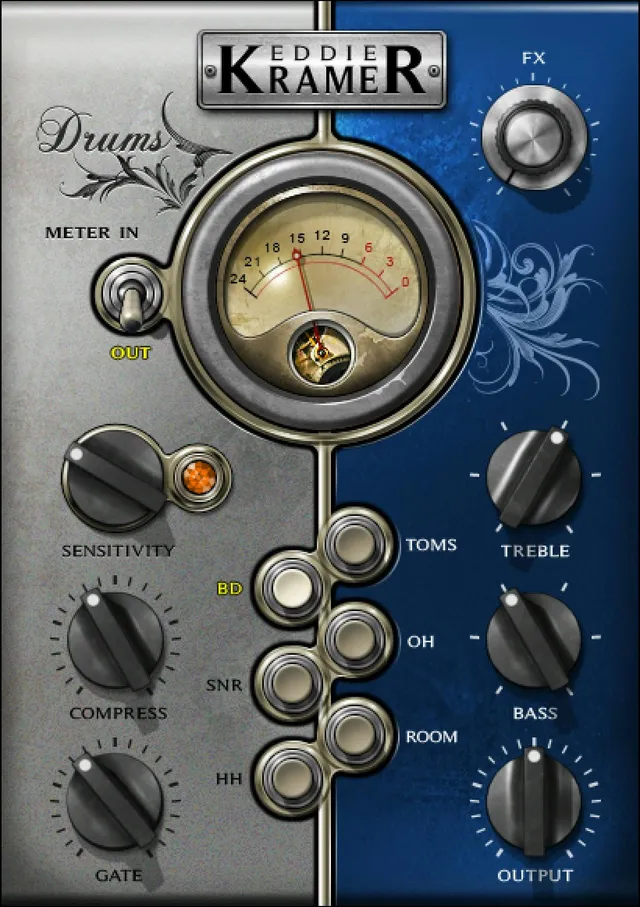
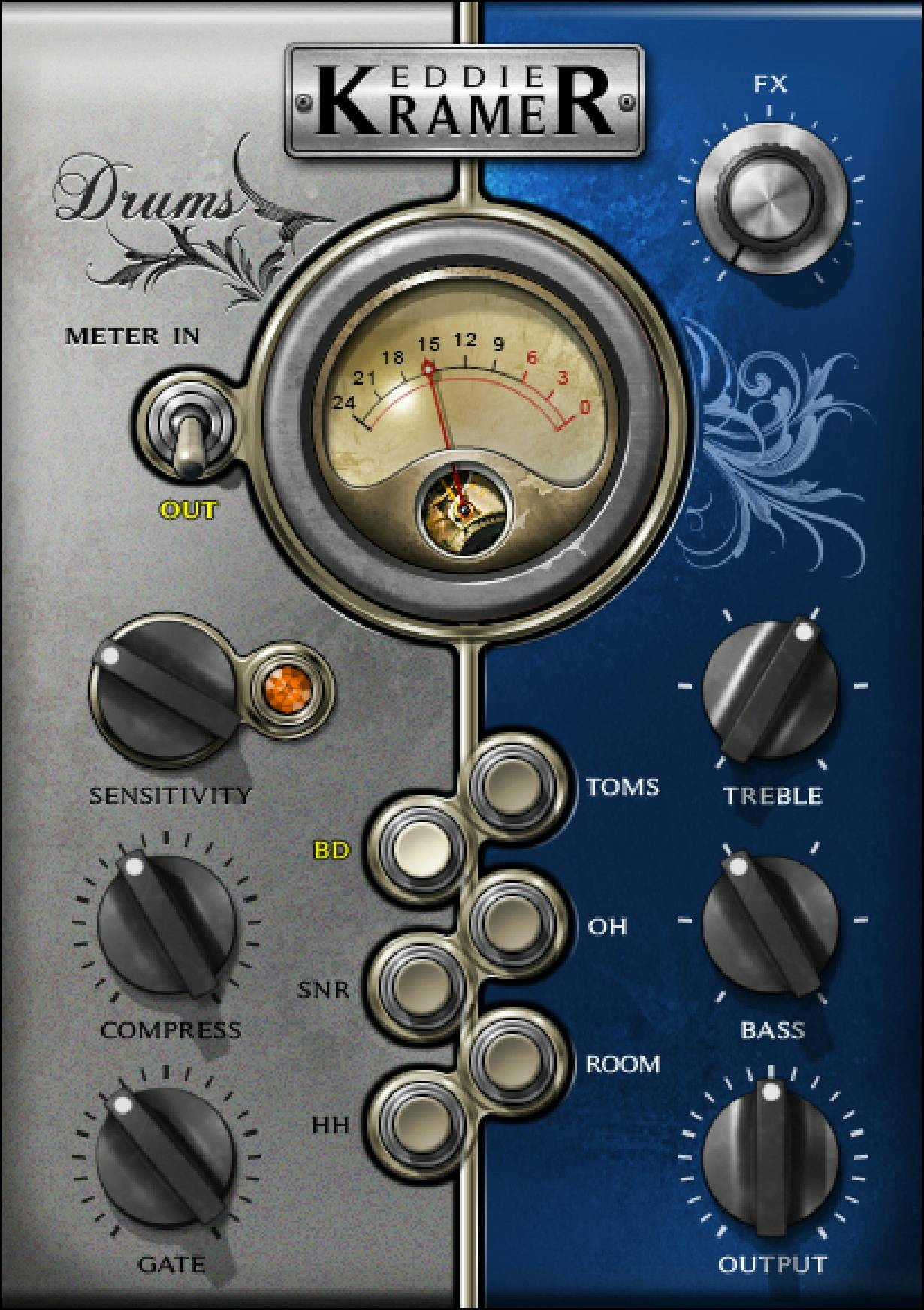
Six Types, two components
The components are EKramer DR mono, with mono input/output, and EKramer DR stereo, with stereo input/output.
The six Types are BD, SNR, HH, Toms, OH and Room. They are source-processing choices within the plug-in, not six additional mono/stereo formats.
Changing Type resets all controls to their initial values. Choose it before fine adjustment. If comparing a different Type, preserve the current setup through the available setting utilities first.
The authentic image shows BD selected, with Compress, Gate and FX visible. It is not evidence that those controls belong to every other Type.
Sensitivity and its LED
Sensitivity controls input level. Every Type lists a range of −50 to +50 in 0.1 steps, with a default of 0.
The source does not label this range in dB. Those displayed numbers should not be converted into an assumed gain calibration.
The LED labels are green = good, yellow = optimal and red = very hot. If it stays off during playback, the guide describes the input as too low and suggests increasing Sensitivity.
Waves recommends checking the section with the highest peaks. It also expressly notes that a useful result can occur without yellow: green or even very hot may suit particular material in its intended processing context.
That does not make red a safe-level guarantee. Numerical LED thresholds and a separate clipping indication are not specified.
Other adjustments can change the LED state. Revisit the input indication after changing the processing rather than assuming the first setting remains appropriate.
Compress, Gate and FX are different decisions
Compress controls the track's dynamics where provided. Its range is 0–100 in 0.1 steps, but its default differs by Type.
The guide does not supply a compression ratio, threshold law, attack, release, knee or amount-to-gain-reduction conversion. A setting of 50 is not established as 50% compression.
Gate is defined as a gate-threshold control and is listed for BD. Its range is −50 to +50 in 0.1 steps, default −12.7. The text supplies no dB unit, hold time or release timing.
FX controls the amount of signal sent to the effect, compared in the guide to a DAW send. Its range is 0–100 in 0.1 steps, with different BD, SNR and Toms defaults.
Do not turn FX into an undocumented global wet/dry mix or an independent reverb/delay editor. No separate effect-type selector or algorithm parameters are defined in this manual.
Treble, Bass and Output
Treble adjusts high frequencies and Bass adjusts low frequencies. Where listed, each runs 0–5 in integer steps.
The source does not give their frequencies, Q values, boost/cut amounts or a neutral/bypass meaning for zero. A displayed value of 3 is a control position, not 3 dB.
Output controls output level on every Type. The range is −50 to +50 in 0.1 steps, with a default of 0.
Its range is not explicitly labeled in dB. Output is also distinct from the meter's Input/Output selector.
A practical way to keep decisions separate is to adjust processing first, then reassess output level for the intended comparison. That is workflow advice, not a claim of automatic gain compensation.
Type-by-Type controls and defaults
Sensitivity and Output are present on all six Types, each defaulting to 0 with the ranges described above.
The table records the other documented controls and defaults. “Not listed” means the guide does not list that control for the Type; it is not a zero setting or proof of a hidden control.
| Type | Compress | Gate | FX send | Treble | Bass |
|---|---|---|---|---|---|
| BD | 40.5 | −12.7 | 0 | 3 | 2 |
| SNR | 44.5 | Not listed | 30 | 2 | 1 |
| HH | Not listed | Not listed | Not listed | 1 | 3 |
| Toms | 85.3 | Not listed | 55 | 1 | 2 |
| OH | Not listed | Not listed | Not listed | 2 | Not listed |
| Room | 21.5 | Not listed | Not listed | 1 | 1 |
BD is the most extensive documented layout: Sensitivity, Compress, Gate, FX, Treble, Bass and Output.
SNR has Compress and FX but no Gate entry. Toms also has Compress and FX, with its own starting values.
HH is limited in the guide to Sensitivity, Treble, Bass and Output. OH is narrower still: Sensitivity, Treble and Output.
Room provides Compress, Treble and Bass alongside Sensitivity and Output, but no Gate or FX entry.
These differences are useful workflow boundaries. They are not a reason to transfer a control from the BD image into a Type where the manual does not list it.
Input/Output meter
The Meter switch selects Input or Output, with Output as the default.
The documented display range is −24 to 0 dBFS. This meter can help distinguish a changed input indication from a changed output indication.
The guide does not publish ballistics, peak-hold duration, a click-to-reset action, an output ceiling or a dedicated clip-light specification.
The meter's dBFS scale does not fill in the missing unit on Sensitivity, Gate or Output control ranges. Meter readings and knob positions are different kinds of information.
Analog Noise and toolbar
Analog Noise is an On/Off menu choice, with a default of Off.
The guide places it in the toolbar menu at the upper right. Waves describes noise as part of its modeling of elements in an analog signal flow; that is an attributed design description, not an independent evaluation of noise character.
The WaveSystem toolbar handles saving/loading presets, comparing settings, undo/redo, resizing and access to its guide. Previous/next preset arrows appear in the shared toolbar illustration.
The original Library image is a panel crop without that toolbar. Its BD control layout is genuine; its crop does not show or remove the noise-menu function.
A conservative drum workflow
Start with the intended Type, remembering that this resets the controls. Then set Sensitivity using representative peaks and the guide's LED context.
Adjust only the processing controls documented for that Type. Keep the roles distinct: dynamics, a BD gate threshold where available, FX send and tonal controls.
After processing changes, check the input indication again and reassess Output. Compare at sensible playback levels rather than treating a stronger indication as an automatic improvement.
This is a conceptual evaluation sequence, not a tested preset, reproduced artist sound or promise that one Type will suit every recording.
Related Waves guides
The Renaissance Compressor guide explains a separately controlled compression workflow when explicit dynamics parameters are the task.
The F6 guide covers a different, independently adjustable filtering and dynamic-EQ workflow. It does not supply missing frequencies for Drum Channel's Bass or Treble controls.
More verified live articles are in the Waves Audio Post Resources hub. For licensing context, see subscription versus perpetual licensing.
Sources and documentation limits
Checked October 19, 2026, America/New_York. The official Eddie Kramer Drum Channel product page links the complete 18-page guide, read in full.
Pages 3–4 define Sensitivity, FX and components; page 7 covers Type reset and metering; pages 8–18 enumerate the conditional control sets and defaults. Page 18 describes Analog Noise and the toolbar.
The actual Graphic Library original corresponds to the BD panel. Its static positions are not default-state or runtime evidence.
Unlisted units, dynamics laws, EQ frequencies, effect algorithms and meter behavior remain unspecified. The linked filename's V16 label and newer product version listing alone do not establish a malfunction or a measured version difference.
FAQ
What is Eddie Kramer Drum Channel?
Eddie Kramer Drum Channel is a source-oriented drum processor with six Types: BD, SNR, HH, Toms, OH and Room. Each Type exposes a documented set of controls for that task. The plug-in has separate mono-in/mono-out and stereo-in/stereo-out components; the six Types are not six channel-format components.
Does changing Drum Type preserve my settings?
No. The manual explicitly says changing Types resets all controls to their initial values. Choose the Type before making detailed adjustments, or preserve the current setup separately before exploring another Type. The guide does not describe Type changes as retaining a shared set of knob positions.
Does the Sensitivity LED always need to be yellow?
The guide calls green good, yellow optimal and red very hot, and recommends setting Sensitivity using the section with the highest peaks. It also explicitly says useful results can occur without yellow, depending on the material. Other control changes can alter the indication. The colors are not published numerical thresholds or a clipping guarantee.
Which Types have Compress, Gate and FX?
The guide lists Compress for BD, SNR, Toms and Room; Gate for BD; and FX for BD, SNR and Toms. HH lists Sensitivity, Treble, Bass and Output. OH lists Sensitivity, Treble and Output. Do not treat an omitted control as a hidden zero-valued parameter available on every Type.
Is the FX knob a global wet/dry mix?
The manual defines FX as the amount of signal sent to the effect, similar to a DAW send. It lists FX for BD, SNR and Toms, with different defaults. It does not establish a global wet/dry blend, an effect algorithm selector or independently adjustable delay and reverb settings.
Are the control ranges measured in dB or percent?
The guide prints Sensitivity, Gate and Output as −50 to +50, Compress and FX as 0 to 100, and Treble and Bass as 0 to 5. It does not give dB or percent units for those control ranges. Their displayed numbers should not be converted into an invented EQ boost, compression ratio, threshold calibration or effect percentage.
How do the meter and Output control differ?
The meter switch selects input or output level, defaults to Output, and the guide specifies a −24 to 0 dBFS meter range. Output changes the output level and is documented separately as −50 to +50 in 0.1 steps, default 0. The meter's dBFS unit does not supply a missing unit for the Output knob.
Can I turn off modeled Analog Noise?
Yes. The manual places Analog Noise On/Off in the upper-right toolbar menu and states a default of Off. This is separate from the six Drum Types and from the FX send. The official Library panel crop does not show that menu, so its operation is documented from the guide rather than inferred from the picture.

About the Author
Joseph Nilo has been working professionally in all aspects of audio and video production for over twenty years. His day-to-day work finds him working as a video editor, 2D and 3D motion graphics designer, voiceover artist and audio engineer, and colorist for corporate projects and feature films.