
Eddie Kramer Effects Channel combines tape-style slap delay and plate reverb in two starting treatments: Z-Slap and H-Slap. Direct In/Out determines whether the original signal reaches the output, making the same effect usable as an insert or a send return.
The two Types have different delay and delay-mix defaults. Changing Type also resets all controls, so it is a fresh starting point rather than a label change over your existing settings.
This guide follows the complete 13-page manual and genuine official panel. I have not auditioned the plugin or measured its delay, reverb or levels.
My Short Version
Choose the Type first. H-Slap is described as the shorter tape-style treatment; Z-Slap as the longer one.
Set Direct for the routing. The guide specifies In for an insert and Out for a send return.
Sensitivity uses its own 0–100 scale. It is not another Kramer channel's ±50 control.
Separate timing, feeds and level. DLY, DLY Mix, Verb Mix and Output do different jobs; none is a documented universal loudness target.
Best for and when to choose separate effects
Best for: a compact slap-and-plate workflow on a vocal, guitar or another source that suits the intended effect.
The guide describes H-Slap as emulating 15 ips tape with a medium plate setting, and Z-Slap as a longer 7.5 ips-style delay with some feedback and a longer plate. These are manufacturer characterizations, not measured tape-speed or room-response findings.
Choose separate processors when: you need an exact feedback amount, explicit delay synchronization, detailed reverb decay in seconds or a full EQ/filter reference. Those are not independent controls documented here.
For a separately controlled reverb workflow, the Abbey Road Chambers guide covers a different tool. It is not a claim of equivalent sound.
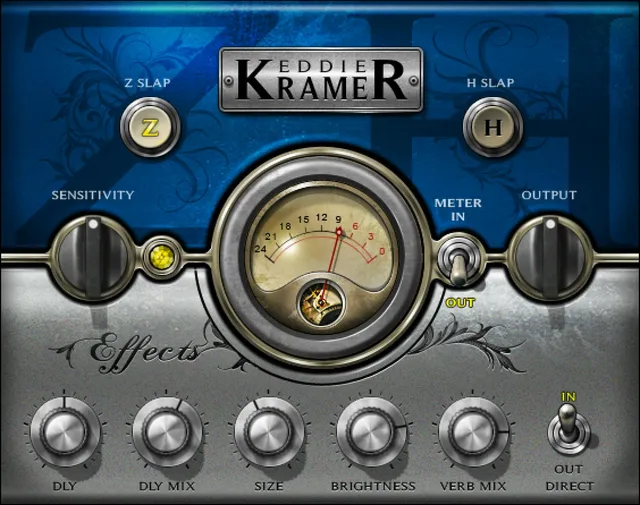
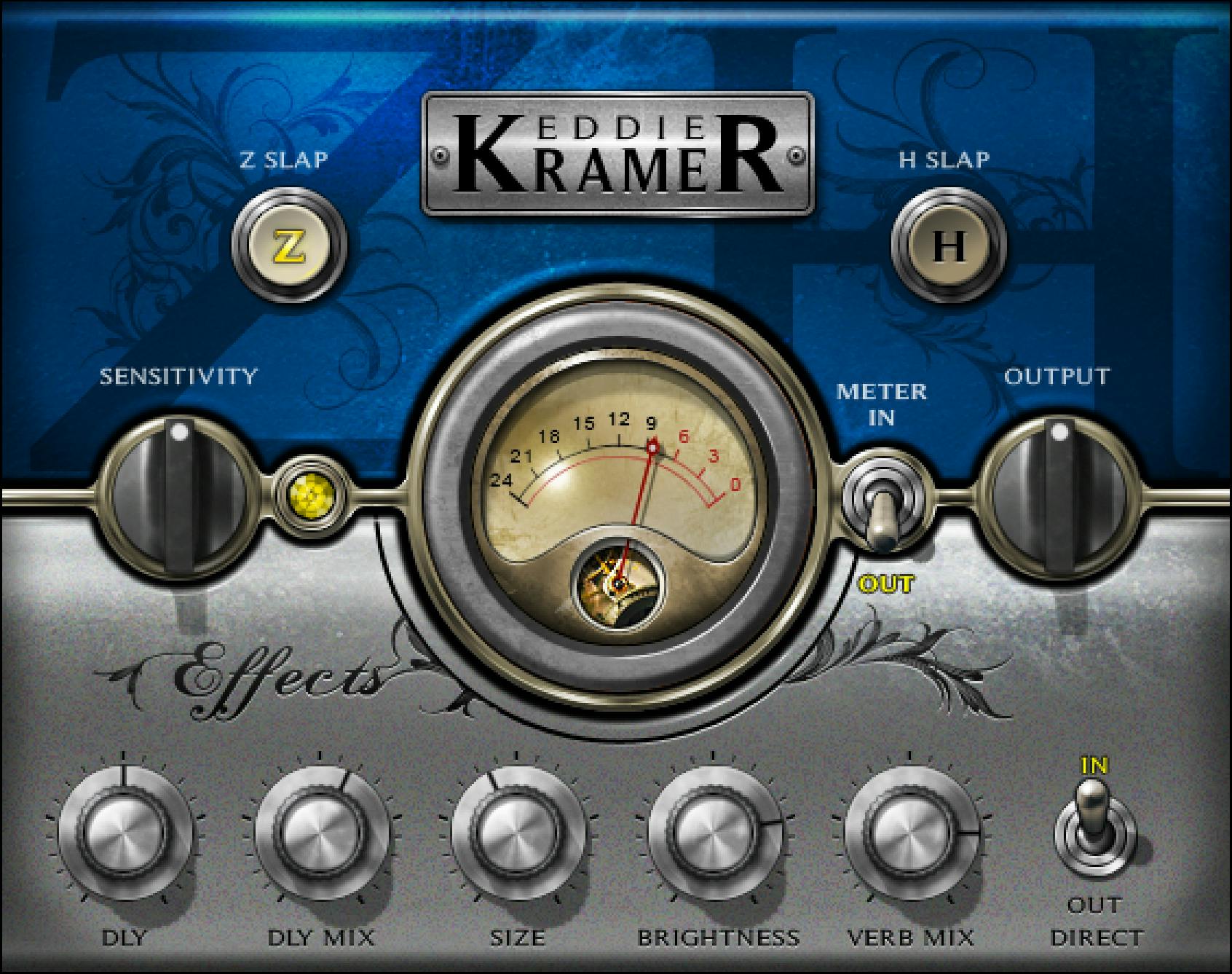
Type and the all-control reset
The choices are Z-Slap and H-Slap, with Z-Slap the documented default.
The manual explicitly says switching Types resets all controls to their initial values. Save a useful setup before changing Type if you want a separate comparison.
The reference's H-Slap section repeats the available choices and reset rule; it does not override the stated Z-Slap initial Type.
Direct In/Out: insert or return
Direct determines whether the direct signal is fed to the output. Its choices are In and Out, default In.
The documented use is Direct In for an insert and Direct Out for a send return. This is the control that distinguishes inclusion of the original signal from an effects-only return setup.
The older full-panel figure on page 6 omits Direct, but page 7 explicitly defines it and the current official original shows it at bottom right. The missing older illustration is not evidence that the control is undocumented or absent.
The source does not supply a detailed internal delay/reverb routing diagram or a global mix-law formula.
Sensitivity and the LED
Sensitivity adjusts input level over 0–100 in 0.1 steps, default 50 in both Types.
No physical unit is attached to that control scale. The meter's dBFS units do not turn Sensitivity into a decibel adjustment.
The LED describes green as good, yellow as optimal and red as very hot. An unlit LED during playback indicates low input in the guide's setup advice.
The manual recommends setting Sensitivity against the section with the highest peaks, then checking it again after other changes. It also allows green or red to suit the material; yellow is not a mandatory numerical clip boundary.
Exact LED thresholds and a level-to-color formula are not supplied.
DLY and DLY Mix
DLY controls slap-delay timing. Its published range is 50–500 in steps of 1.
The stated default is 272 for Z-Slap and 138 for H-Slap. The reference does not print a time unit beside the range, so those values are retained as the control's scale rather than labeled milliseconds.
DLY Mix controls the mix or direct send to the slap delay, over 0–100 in 0.1 steps. Its defaults are 58 for Z-Slap and 72 for H-Slap.
It is separate from Direct In/Out and Verb Mix. The source does not define exact dry/wet percentages, a feedback knob or a host-tempo synchronization control.
Size, Brightness and Verb Mix
Size changes reverb size and time, over 0–100 in 0.1 steps, default 41 for both Types. Its scale is not a published decay-time range in seconds.
Brightness changes the reverb's high-frequency character, over ±50 in 0.1 steps, default 26.7 for both Types. Its unit, exact cutoff frequencies and filter curve are not specified.
Verb Mix changes how much reverb is mixed with the input, over 0–100 in 0.1 steps, default 80 for both Types.
These controls refine the plate treatment without exposing a full reverb parameter set. No algorithm, decay formula or exact frequency response is established.
Output, meter and defaults
Output controls outgoing level, over ±50 in 0.1 steps, default 0. The guide does not assign the scale a physical unit or identify a limiter.
The Meter switch selects Input or Output, default Output. The meter itself spans −24 to 0 dBFS.
No gain-reduction position, peak-hold timing or click-to-clear clip behavior is specified for this owner.
| Control | Range / step | Z-Slap default | H-Slap default |
|---|---|---|---|
| Sensitivity | 0–100 / 0.1 | 50 | 50 |
| DLY | 50–500 / 1; unit not printed | 272 | 138 |
| DLY Mix | 0–100 / 0.1 | 58 | 72 |
| Size | 0–100 / 0.1 | 41 | 41 |
| Brightness | ±50 / 0.1; unit unspecified | 26.7 | 26.7 |
| Verb Mix | 0–100 / 0.1 | 80 | 80 |
| Output | ±50 / 0.1; unit unspecified | 0 | 0 |
Direct defaults to In and the Type to Z-Slap. These are explicit reference values, not defaults inferred from pictured pointers.
Components and toolbar
The guide lists EKramer FX m>s, mono-in/stereo-out, and EKramer FX stereo, stereo-in/stereo-out. Here m>s means mono to stereo, not Mid/Side.
The shared WaveSystem toolbar supplies preset save/load, comparison, undo/redo, resizing and access to its guide through the upper-right icon.
This owner's guide does not document the Analog Noise menu described in newer Kramer Guitar or Vocal guides. It also does not define separate stereo-channel controls, a link law or a universal GUI-size default.
A practical adjustment order
My suggested order follows the guide's dependencies: choose an input/output component and routing, set Direct accordingly, choose the Type, then establish Sensitivity before adjusting the effect.
Change DLY and DLY Mix for the slap contribution, then Size, Brightness and Verb Mix for the plate. Recheck Sensitivity and output level after larger changes.
This is a conceptual workflow, not a tested preset or listening result. The WLM Plus guide covers a separate level-metering task; other published guides are in the Waves resources hub. Licensing choices are separate from effect setup.
Sources and documentation limits
Checked October 19, 2026, America/New_York. The official Effects Channel page links the complete 13-page guide, read in full.
Pages 3–5 cover gain guidance, Type character, components and quick start; page 7 defines Direct and the meter; pages 8–10 cover Z-Slap; pages 11–13 cover H-Slap and toolbar.
The genuine Graphic Library original and actual Direct reference were inspected. Page 6's omission of Direct remains an illustration difference. DLY time units, bare-number level/brightness units and undocumented processor internals are not supplied from another channel.
FAQ
What is the difference between Z-Slap and H-Slap?
The guide describes H-Slap as a shorter 15 ips tape-style delay with a medium plate, and Z-Slap as a longer 7.5 ips-style delay with some feedback and a longer plate. These are vendor characterizations rather than measured results here. Z-Slap is the documented default Type.
Does changing Type preserve my settings?
No. The guide explicitly says a Type change resets all controls to their initial values. Save a useful setup before switching if you want to retain it as a separate comparison. The two Types have different DLY and DLY Mix defaults.
How should Direct In/Out be used?
Direct controls whether the direct signal reaches the output. The guide specifies In for an insert and Out for a send return, with In as the default. Page 7 and the current original document this switch even though the older page 6 full-panel figure omits it.
What is the Sensitivity range and LED meaning?
Sensitivity uses 0 to 100 in 0.1 steps, default 50 in both Types, without a stated physical unit. Green means good, yellow optimal and red very hot in the guide's qualitative setup advice. Use peak-heavy material and recheck after changes; numerical LED or clipping thresholds are not supplied.
Are the DLY values milliseconds?
The retained control reference specifies 50 to 500 in steps of 1 but does not print a time unit. Its defaults are 272 for Z-Slap and 138 for H-Slap. This article does not silently append milliseconds or invent tempo synchronization or a separate feedback control.
How do DLY Mix, Size, Brightness and Verb Mix differ?
DLY Mix controls the slap contribution, defaulting to 58 for Z-Slap and 72 for H-Slap. Size controls reverb size/time over 0 to 100, default 41. Brightness controls reverb high-frequency character over plus or minus 50, default 26.7. Verb Mix controls reverb contribution over 0 to 100, default 80. All use 0.1 steps.
What does the meter show, and is Output measured in dBFS?
The meter selects Input or Output, defaults to Output and spans minus 24 to 0 dBFS. Output itself is specified as plus or minus 50 in 0.1 steps, default 0, without a printed unit. The meter does not establish the Output scale, a limiter or a gain-reduction display.
Which components and toolbar functions are documented?
EKramer FX m>s is mono-in/stereo-out and EKramer FX stereo is stereo-in/stereo-out; m>s is not Mid/Side. The toolbar provides presets, comparison, undo/redo, resizing and its guide. This Effects manual does not document an Analog Noise menu, separate channel controls or a stereo-link law.

About the Author
Joseph Nilo has been working professionally in all aspects of audio and video production for over twenty years. His day-to-day work finds him working as a video editor, 2D and 3D motion graphics designer, voiceover artist and audio engineer, and colorist for corporate projects and feature films.