

Eddie Kramer Guitar Channel combines tone, compression and spatial effects in three application Types: Rhythm1, Rhythm2 and Lead. Their controls are not identical: Rhythm1 uses stepped tone choices, Rhythm2 uses continuous tone scales, and Lead adds flange depth and mix.
A Type change resets all controls. The reference also contains a narrow Lead Treble illustration discrepancy, so the written Lead values below are attributed to that section rather than presented as verified runtime behavior.
This guide follows the complete current 17-page Guitar manual and genuine official interface. I have not auditioned the plugin or tested an installation.
My Short Version
Choose Type before editing. Switching it resets the entire setup.
Do not transfer Rhythm1's 1–5 tone scale to Lead. The written Lead reference gives a continuous Treble range, despite a contradictory small label image.
FX is the effects send. Verb Mix, DLY Mix and Flange Mix shape separate contributions rather than replacing FX.
Depth and Flange Mix are Lead-only in the documented control inventory. Their greyed Rhythm1 appearance is not an additional active rhythm mode.
Best for and when to choose separate processors
Best for: a compact guitar-track treatment built from two rhythm starting points or a Lead starting point, with broad tone/dynamics changes and integrated space.
The manufacturer associates the Types with its signature rock-guitar workflow. Those claims are not this article's listening comparisons or a promise to reproduce a particular record.
Choose separate processors when: the job needs exact EQ frequency/Q, compressor threshold/ratio/timing or explicit delay synchronization. Those details are not exposed by the documented Guitar controls.
For different control needs, the F6 guide covers frequency-specific EQ and the Renaissance Compressor guide covers a conventional compressor interface.
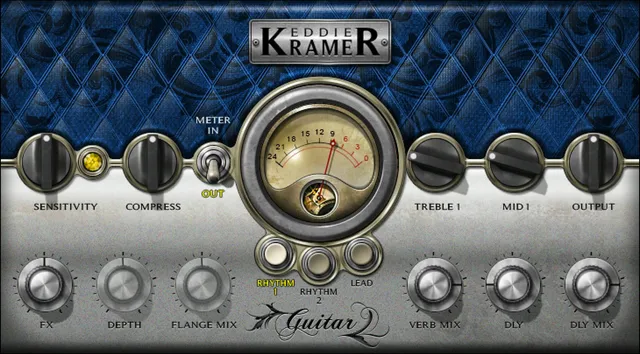
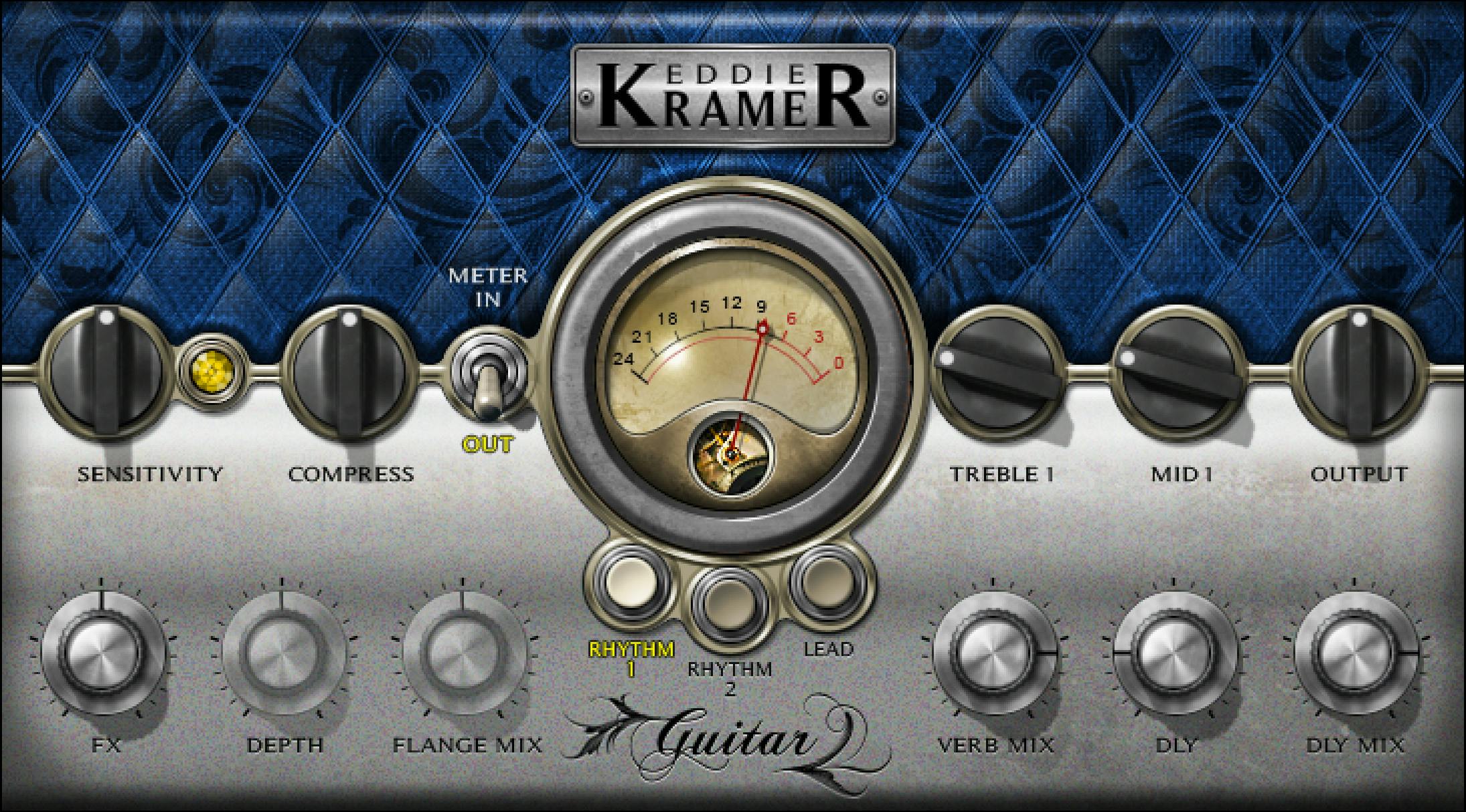
Three Types, reset and components
The choices are Rhythm1, Rhythm2 and Lead. No universal initial Type is stated.
Changing Type resets all controls to their initial values. Saving a useful setup before switching is a practical precaution, not a documented preserve-settings feature.
The two components are EKramer GT m>s, mono-in/stereo-out, and EKramer GT stereo, stereo-in/stereo-out. m>s means mono to stereo, not Mid/Side.
The source does not establish a mono-in/mono-out variant, separate left/right controls or a stereo-link law.
Sensitivity and the LED
Sensitivity controls input level over ±50 in 0.1 steps, with no physical unit stated.
Its defaults are 0 for both Rhythm Types and −4.2 for Lead.
The guide's LED descriptions are green: good; yellow: optimal; red: very hot. An unlit LED during playback suggests insufficient input.
Set Sensitivity using the passage with the highest peaks, and recheck it after changing other controls. The manual explicitly allows green or red to be musically appropriate; it does not supply numerical clipping thresholds.
The meter's dBFS scale does not assign dB units to Sensitivity.
Compress
Compress controls dynamics intensity, over 0–100 in 0.1 steps for each Type.
The defaults are 50 for Rhythm1, 32.7 for Rhythm2 and 50 for Lead.
The guide does not provide separate threshold, ratio, attack, release, knee or makeup-gain controls. A Compress value is not a stated compression ratio or decibels of gain reduction.
No exact internal EQ/compression/effects ordering is established by the list of processing elements.
Mid and Treble: the scales change with Type
Rhythm1 uses Treble1 and Mid1, each 1–5 in steps of 1, default 2. These are discrete control positions, not a published Hz or dB scale.
Rhythm2 uses Treble2 and Mid2, each 0–100 in 0.1 steps. Their defaults are 33.3 for Treble2 and 22.2 for Mid2.
The written Lead reference gives Treble2 at 0–100 in 0.1 steps, default 38.9, and Mid2 at 0–100 in 0.1 steps, default 22.2.
There is a specific illustration problem: page 14's small Treble crop says Treble1, while its written heading says Treble2; the full Lead panel on page 6 also says Treble2.
Those observations do not establish a correction to the software. The continuous Lead values here come from the written Lead reference; Rhythm1's stepped range/default is not substituted for them.
No exact EQ frequencies, gain-in-dB mapping, Q, slope or current runtime-label confirmation is supplied.
Output and FX
Output controls outgoing level, over ±50, default 0 for all three Types.
The owner reference does not specify an Output step size or physical unit. A 0.1 step used by neighboring controls is not automatically an Output specification.
FX controls the signal sent to the effects, over 0–100 in 0.1 steps. Its defaults are 50 for Rhythm1 and Rhythm2, and 60.5 for Lead.
FX is not documented as a universal dry/wet mix for every processing element. Output and FX therefore answer different questions: overall level versus effects feed.
No automatic loudness matching or limiter behavior is established.
Delay and reverb
For all three Types, DLY has the published range 50–500 in steps of 1, default 138. The guide calls it delay characteristics but does not print a time unit.
DLY Mix controls audible delay over 0–100 in 0.1 steps, default 80 for each Type.
Verb Mix controls the relative reverb amount/effects contribution over 0–100 in 0.1 steps. Defaults are 80 for both Rhythm Types and Max/100 for Lead.
The source does not expose reverb time/size, feedback, exact effect-routing coefficients or a tempo-sync control.
Lead-only Depth and Flange Mix
The Lead reference documents Depth, controlling flange depth, over 0–100 in 0.1 steps, default 16.2.
Flange Mix has the same 0–100/0.1 range and step, default 59.3.
The actual current original shows these controls greyed in Rhythm1. The guide does not list them as active controls in either Rhythm Type.
No flange rate, feedback, phase range or physical depth unit is supplied. Their numerical values should not be converted into milliseconds or percentages of a measured modulation cycle.
Conditional defaults at a glance
| Control | Rhythm1 | Rhythm2 | Lead |
|---|---|---|---|
| Sensitivity | 0 | 0 | −4.2 |
| Compress | 50 | 32.7 | 50 |
| Treble | Treble1: 2; stepped 1–5 | Treble2: 33.3; 0–100 | Written Treble2: 38.9; 0–100, illustration caveat |
| Mid | Mid1: 2; stepped 1–5 | Mid2: 22.2; 0–100 | Mid2: 22.2; 0–100 |
| Output | 0 | 0 | 0 |
| FX | 50 | 50 | 60.5 |
| Verb Mix | 80 | 80 | 100 |
| DLY | 138 | 138 | 138 |
| DLY Mix | 80 | 80 | 80 |
| Depth / Flange Mix | Not documented as active | Not documented as active | 16.2 / 59.3 |
These are source reference defaults, not a tested factory-preset census or universal startup Type.
Meter and Analog Noise
The Meter switch selects Input or Output, default Output. The meter spans −24 to 0 dBFS.
A gain-reduction mode, peak-hold time and click-to-clear clip behavior are not specified. The LED remains a separate qualitative input guide.
Analog Noise, in the upper-right toolbar menu, is On/Off, default Off. It controls the modeled noise contribution, not a documented bypass of the entire processor or every modeled characteristic.
Toolbar and a useful adjustment order
The WaveSystem toolbar provides presets, comparison, undo/redo and resizing, with access to its guide from the upper-right icon.
The page 17 menu figure also lists 75%, 100%, 125%, 150%, 200%, Apply as Default to All, User Manual and Waves System Guide. A pictured 100% check is not a universal startup default. The generic CLA-labeled toolbar strip is a shared-utility example, not a Guitar runtime capture.
My suggested order: choose a Type/component, establish Sensitivity, set FX, adjust tone and Compress, then refine the active effects and compare output level. Recheck Sensitivity after the changes.
This follows the manual's conceptual workflow, not an audition result. Other published guides are in the Waves resources hub; licensing choices are separate.
Sources and documentation limits
Checked October 19, 2026, America/New_York. The official Guitar page links the complete 17-page v16-update guide, read in full.
Pages 3–5 cover concepts/components and setup; page 7 specifies Type reset/meter; pages 8–10 cover Rhythm1; pages 11–13 Rhythm2; pages 14–16 Lead; page 17 Analog Noise/toolbar. Depth is on page 15 and Flange Mix on page 16.
The actual full Lead image/page 14 crop and genuine Graphic Library Rhythm1 original were inspected. The Treble label discrepancy remains explicit. Bare units, Output steps, Type default and exact tone/dynamics laws are not borrowed from another owner.
FAQ
What are the three Guitar Types, and does switching preserve my edits?
The choices are Rhythm1, Rhythm2 and Lead. Changing Type resets all controls to their initial values, and no universal initial Type is stated. Save a useful setup before switching if you want to retain it as a separate comparison; the guide does not provide a preserve-settings mode.
Which channel components are documented?
EKramer GT m>s accepts mono and outputs stereo; EKramer GT stereo accepts and outputs stereo. The m>s label means mono to stereo, not Mid/Side. The source does not establish a mono-in/mono-out variant, independent stereo-channel controls or a stereo-link law.
How do Sensitivity and Compress differ?
Sensitivity adjusts incoming level over plus or minus 50 in 0.1 steps, default 0 for both Rhythm Types and minus 4.2 for Lead; its physical unit is unstated. Compress sets dynamics intensity over 0 to 100 in 0.1 steps, with defaults 50, 32.7 and 50. Numerical LED thresholds and compressor ratio/timing laws are not supplied.
Why are the Mid and Treble controls different between Types?
Rhythm1 uses Mid1 and Treble1 at 1 to 5 in steps of 1, default 2. Rhythm2 uses 0 to 100 controls, defaulting to Mid2 at 22.2 and Treble2 at 33.3. The written Lead reference gives Mid2 at 22.2 and Treble2 at 38.9 on continuous 0 to 100 scales, with a separate illustration-label qualification.
What is the Lead Treble illustration discrepancy?
Page 14's written Lead heading says Treble2 and specifies 0 to 100 in 0.1 steps, default 38.9, while its small crop says Treble1. The page 6 full Lead panel says Treble2. This article attributes the continuous values to the written reference, does not borrow Rhythm1's stepped range and does not claim to have verified a corrected runtime label.
Are FX, Output and the effect Mix knobs interchangeable?
No. FX controls the effects send, with defaults 50, 50 and 60.5; Output controls overall level over plus or minus 50, default 0, without a specified step or unit. DLY Mix, Verb Mix and Lead's Flange Mix control different effect contributions. No global dry/wet law, automatic level matching or limiter is established.
Which delay, reverb and flange values are documented?
All Types list DLY 50 to 500 in steps of 1, default 138, without a time unit, and DLY Mix 0 to 100 in 0.1 steps, default 80. Verb Mix defaults to 80 for Rhythm and 100 for Lead. Lead alone documents Depth 0 to 100, default 16.2, and Flange Mix 0 to 100, default 59.3, both in 0.1 steps.
What do the meter and Analog Noise menu provide?
The meter selects Input or Output, defaults to Output and spans minus 24 to 0 dBFS. Analog Noise is an On/Off toolbar-menu option, default Off; it does not bypass the whole processor. The shared toolbar provides presets, comparison, undo/redo and resize, while pictured menu size selections are not universal startup defaults.

About the Author
Joseph Nilo has been working professionally in all aspects of audio and video production for over twenty years. His day-to-day work finds him working as a video editor, 2D and 3D motion graphics designer, voiceover artist and audio engineer, and colorist for corporate projects and feature films.