
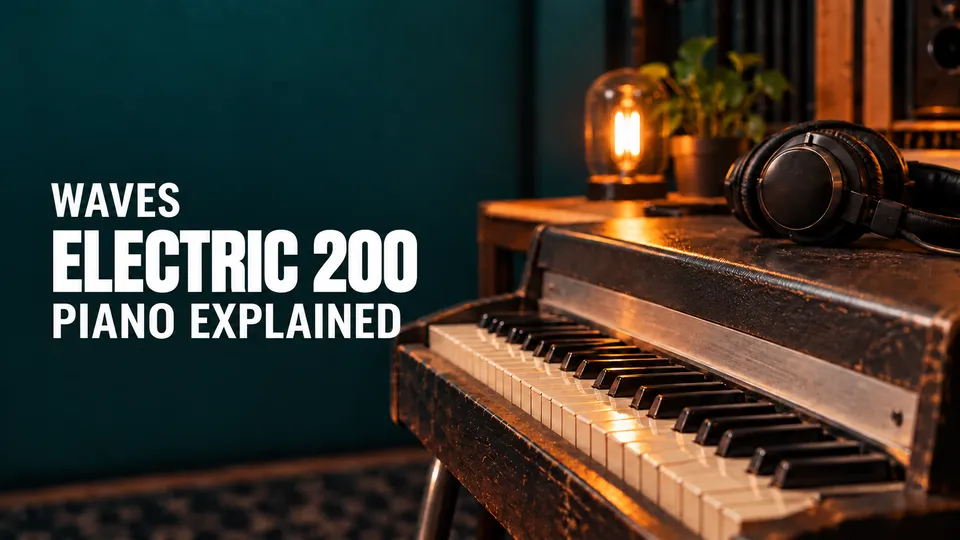
Waves Electric 200 Piano is a stereo virtual electric-piano instrument with separate sample-level controls, an amplifier section, tone shaping and built-in effects. The guide’s block diagram shows that its Main Keys selector chooses “1 or 2”; it does not identify the sonic character of each choice or state which is the initial setting.
This is a guide to the published controls, not a sound review. I have not run the instrument or processed audio. The current product page lists the Stereo component; that does not verify installation or behavior in a particular system.
My Short Version
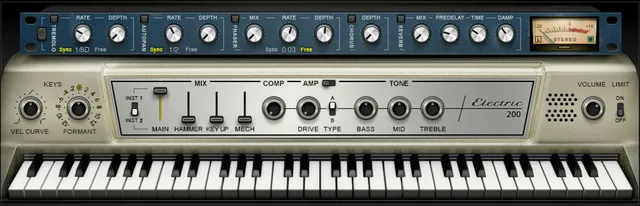
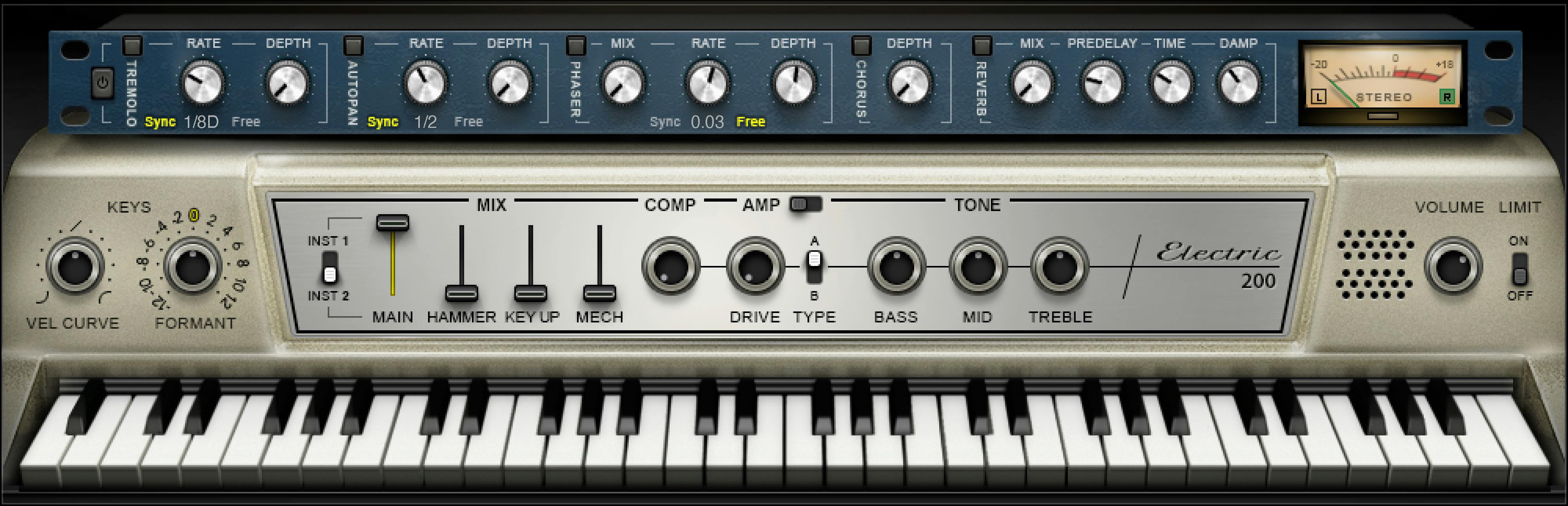
Think of the instrument as a set of sampled layers feeding processing. The manual names Main, Key Up, Hammer and Mechanics levels, plus an internal Comp control. Its diagram shows Sampler Engine 1 as “Main Keys 1 or 2,” and the interface labels the selector INST1/INST2. The sources do not say which key set corresponds to which sampled piano, nor which option loads by default.
The amp section has Amp On/Off, Drive and a Type A/B switch. The guide says A/B chooses between Condenser and Dynamic microphone options but does not map either label to a letter. Bass, Mid and Treble each have printed −50 to +50 control scales and are described as up to ±18 dB at fixed filter frequencies; the manual does not explain the mapping between those two scales.
The upper effects section contains Tremolo, AutoPan, Phaser, Chorus and Reverb. Their sync/free rate controls have different documented ranges and initial/reset values; notably, Phaser’s initial Free rate and reset Free rate differ. The meter is described as −30 to 0 dB peak with a VU scale calibrated for 18 dB headroom—Waves’ published scale description, not a measurement I made.
The instrument and its sample layers
Waves says the instrument was built from two distinct vintage electric pianos and runs on the Waves Sampler Engine. The p.6 flow diagram names four engines: Engine 1 for “Main Keys 1 or 2,” Engine 2 for Key Up keys, Engine 3 for Reeds keys, and Engine 4 for Mechanics keys. In the interface, INST1/INST2 appears with the Main control. Together, these sources support describing it as a selector for Main-key sample set 1 or 2. They do not identify which historic piano or sonic identity belongs to each option, or tell us the starting/default selection.
The Main slider sets the main piano sample level without mechanics or release-key sounds: 0–100%, initial/reset 100%.
Key Up controls the sound of keys on release: 0–100%, initial25%, reset0.
Mechanics controls the mechanics/thump samples without Main and Key Up: 0–100%, initial25%, reset0.
Hammer controls sampled mechanical hammer hits. Its guide line says “Range: 0,” then gives initial0 and reset0 while calling it continuous; it is shown as a slider. The numeric bounds are not fully documented, so “0” should not be treated as the only valid value or expanded into a guessed 0–100 range.
The bottom virtual keyboard can preview a note when no keyboard controller is available. The manual says it cannot be automated but follows MIDI input.
Vel Curve reshapes velocity response from logarithmic to exponential, with 0 described as linear; its range is −50% to +50%, initial/reset0.
Formant changes sound character without changing pitch; each step is a semitone, with −12 to +12 in 25 discrete steps, initial/reset0.
Compression, amplifier and tone controls
Comp controls the mix of the internal compressor, and turning it clockwise increases the level: 0–100%, initial50%, reset0. The manual does not provide a separate compressor timing or ratio panel here.
Amp On/Off toggles the amp section and has initial On. The guide says Alt-click does not change its current mode; it does not list a reset value.
Drive controls amplifier overdrive from 0–100, initial/reset0.
Type offers A or B and has initial/reset A. The text says there are Condenser and Dynamic microphone options but does not identify whether A is Condenser or Dynamic, so this guide does not assign them.
Bass is a low shelf at 203 Hz; Mid is a bell at 900 Hz; Treble is a high shelf at 1.875 kHz. Each has a printed −50 to +50 range and initial/reset0. The manual describes each as capable of ±18 dB, but gives no conversion between its control scale and that gain figure. Keep those two descriptions separate rather than claiming, for example, that ±50 equals ±18 dB.
The post-processing Volume control is 0–10, with initial7.5 and reset7; the distinct values should not be collapsed.
Limit toggles an output brickwall limiter. The guide gives no numeric ceiling or initial/reset state for Limit, so the interface illustration cannot fill those gaps.
Modulation and reverb effects
The global FX In/Out switch toggles all effects sections. When the module is turned back on, each section returns to its previous state. The manual does not specify an initial state for this global switch.
For Tremolo, AutoPan and Phaser, the shared printed Sync choices are 1/32T, 1/32, 1/32D, 1/16T, 1/16, 1/16D, 1/8T, 1/8, 1/8D, 1/4T, 1/4, 1/4D, 1/2, 1/2D, 1 and 2/1. The manual describes 2/1 as one cycle in two bars.
At the rate knob’s 12 o’clock position, Free starts at its slowest value. Turning clockwise increases the Free rate; below 12 o’clock the knob selects host-related durations. Free-rate bounds and initial/reset values differ by section below.
The Tremolo, AutoPan, Phaser and Chorus On/Off switches have no reset value: the manual says Alt-click leaves their current states unchanged.
Tremolo On/Off has initial On and no reset value. Its Rate uses the same knob for host-synced notes (1/32T through 2/1) or Free 0.25–28 Hz; the sync list’s 2/1 is described as one cycle in two bars. Initial/reset is 1/16D sync.
Depth controls amplitude level, 0–100, initial60/reset0.
AutoPan On/Off has initial On and no reset value.
Rate offers the same sync list and Free 0.25–28 Hz, with initial/reset 1/2 sync.
Pan Depth sets how far the movement extends from center, 0–100, initial33/reset0.
Phaser On/Off has initial On and no reset value.
Mix is 0–100%, initial25/reset0.
Rate offers sync 1/32T–2/1 or Free 0.01–22 Hz; initial is 0.03 Hz Free and reset is 0.07 Hz Free.
Depth controls feedback, 0–100, initial53.5/reset0.
Chorus On/Off has initial On and no reset value. Its Depth affects the dry/wet mix into the chorus and how much the oscillator affects delay; the manual says the engine contains four delays and four oscillators. Depth is 0–100, initial25/reset0.
Reverb Mix balances dry and wet from 0% to 100%; the manual calls 30% the default and 0 dry the reset value.
Predelay is 20–180 ms, initial/reset55 ms.
Time is 0.4–6 seconds, default/reset2 seconds.
Damp is 0.1–2.0, default/reset0.8; the manual describes it as increasing high-frequency level during decay as a factor of reverb time. Preserve the guide’s use of “Default” versus “Initial” rather than assuming those labels mean the same thing.
Meter and standalone application
The meter section says the peak scale is −30 dB to 0 dB, showing a VU scale “calibrated for 18 dB of headroom” with 0 dBVU = −18 dBFS. Separate indicators identify left in black and right in green. This is the manual’s specification; I did not calibrate or test the meter.
The standalone application uses ASIO on Windows or Core Audio on macOS, according to the manual. Its Audio Settings illustration includes output-device selection and Test, active output channels, sample rate, buffer size, active MIDI inputs, and tempo; Windows sample rate and buffer are changed through the driver’s control panel. These are documented setup controls, not steps verified on a live system.
Reset Device is pictured in that settings window, but the guide does not explain its action. A visible label alone is not a tested device-recovery procedure.
Presets and the toolbar
The WaveSystem toolbar at the top manages presets. The guide explicitly describes Next/Previous arrows for scrolling through them and Load for revealing all presets.
Page 7 refers to a Chapter 5 for further preset instructions, but the linked 21-page guide ends with standalone settings and supplies no such chapter. This article does not invent piano-specific save, reset or preset-inclusion behavior from that missing cross-reference.
A practical way to read the controls
The guide provides level controls for several distinct sampled components, followed by an amp, tone section and effects rack. That separation can help you reason about which documented layer or processing section a control addresses. If using the instrument, compare changes in your own setup and check its output with your host; this article makes no claim about how a setting sounds or what gain it produces.
Related Waves guides
For focused tonal and frequency-dependent control, the live Waves F6 guide explains a different dynamic equalizer. The Renaissance Compressor guide covers a separate compressor plug-in, rather than the Electric 200’s internal Comp mix. The Waves Audio Post Resources hub links to other live Waves guides. These are adjacent references, not sound comparisons.
Sources and documentation limits
Checked October 19, 2026 (America/New_York). The official Electric 200 Piano product page lists V9–V17 and the Stereo component. It links the 21-page Electric 200 Piano User Guide, read in full. The manual and current product page describe the listed controls and components; neither establishes installation or behavior on a particular device. Unspecified INST1/INST2 identity/default, Hammer bounds, Type letter mapping and limiter state remain unspecified. The Waves Graphic Library requires image attribution and a backlink to the relevant product page. Its interface art is not a running instance or proof of default values. No plugin, host or audio test was performed.
FAQ
What do INST1 and INST2 select?
The interface labels an INST1/INST2 selector beside Main. The manual’s diagram calls Sampler Engine 1 “Main Keys 1 or 2,” and the overview says two vintage pianos were sampled. This supports describing the selector as choosing Main-key sample set 1 or 2, but the sources do not identify either sound or name a default selection.
What is the difference between Main, Key Up, Hammer and Mechanics?
Main is the piano sample without mechanics or release keys; Key Up is the sound of released keys; Hammer is sampled mechanical hammer hits; Mechanics is the mechanics/thump layer without Main and Key Up. Their separate levels are documented, but the Hammer numeric bounds are not fully printed.
What is the Hammer control’s range?
The manual literally prints “Range: 0,” then says the control is continuous and gives initial/reset values of 0. The range line does not fully specify numeric bounds, so this guide does not treat 0 as the only valid value or infer a 0–100 range.
Does the manual say which microphone is Type A or Type B?
No. It says the amp has Condenser and Dynamic microphone options, with a Type switch labeled A/B and initial/reset A, but does not map either letter to a microphone type.
What do Bass, Mid and Treble change?
Bass is a low shelf at 203 Hz, Mid a bell at 900 Hz, and Treble a high shelf at 1.875 kHz. Each control is printed −50 to +50 and described as ±18 dB, but no mapping between those scales is given.
What is the difference between Volume’s initial and reset values?
The guide lists Volume from 0 to 10, with initial value 7.5 and reset value 7. Those are different manual entries and should not be merged into one presumed default.
How do the sync and Free effect rates work?
Tremolo and AutoPan use sync 1/32T–2/1 or Free 0.25–28 Hz. Phaser uses sync 1/32T–2/1 or Free 0.01–22 Hz. The same rate knob selects the mode; the manual lists different initial/reset values by section.
What does the meter calibration mean?
The guide describes a −30 to 0 dB peak scale and a VU scale calibrated for 18 dB headroom, with 0 dBVU = −18 dBFS. This is the vendor’s published description, not an independent calibration or a runtime measurement.

About the Author
Joseph Nilo has been working professionally in all aspects of audio and video production for over twenty years. His day-to-day work finds him working as a video editor, 2D and 3D motion graphics designer, voiceover artist and audio engineer, and colorist for corporate projects and feature films.