
Waves Electric 88 Piano is a sampled electric-piano instrument with separate control over its main, tine, key-release and mechanical-noise sample layers, followed by compression, amp and cabinet simulation, tone controls and built-in effects. It is documented as one plugin component, Electric 88 Piano Stereo, and a separate standalone application. [1][2]
The manual's functional block diagram shows Velocity Curve and Formant feeding the Main, Key Up and Tines sampler layers. Those three layer levels feed the Vintage Compressor, Amp Simulator (Drive), Cabinet Simulator (Mic), Bass/Mid/Treble controls, then Tremolo, AutoPan, Phaser and Chorus. Mechanics has a separate path that joins immediately before Reverb; the signal then proceeds through Master Volume and the Brickwall Limiter. This is the vendor's diagrammed signal flow, not an independently measured routing test. [1]
The useful distinction is between the sampled piano itself and the processing around it. Velocity Curve changes the response to MIDI velocity; Formant changes sound character without changing pitch; the four Mix controls set sample-layer levels. The compressor, amp/cabinet, tone and effect modules shape the resulting instrument signal. [1]
My Short Version
Start with the piano before the effects. Set Velocity Curve, then balance Main, Tines, Up Key and Mechanics until the instrument responds and speaks the way you want.
Use Formant when you want to change the apparent size/character of the sampled instrument without transposing its musical pitch. Use the amp and three tone controls for color, then add compression only if it serves the performance. [1]
Treat Tremolo, AutoPan, Phaser, Chorus and Reverb as separate creative modules. The global FX In/Out switch is useful for comparing that whole effects layer without erasing the individual module states. [1]
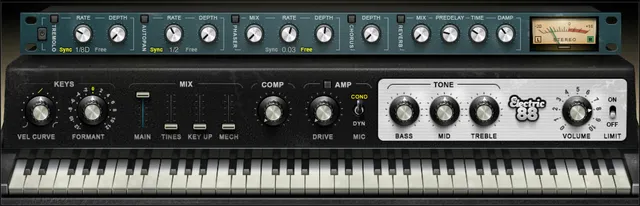
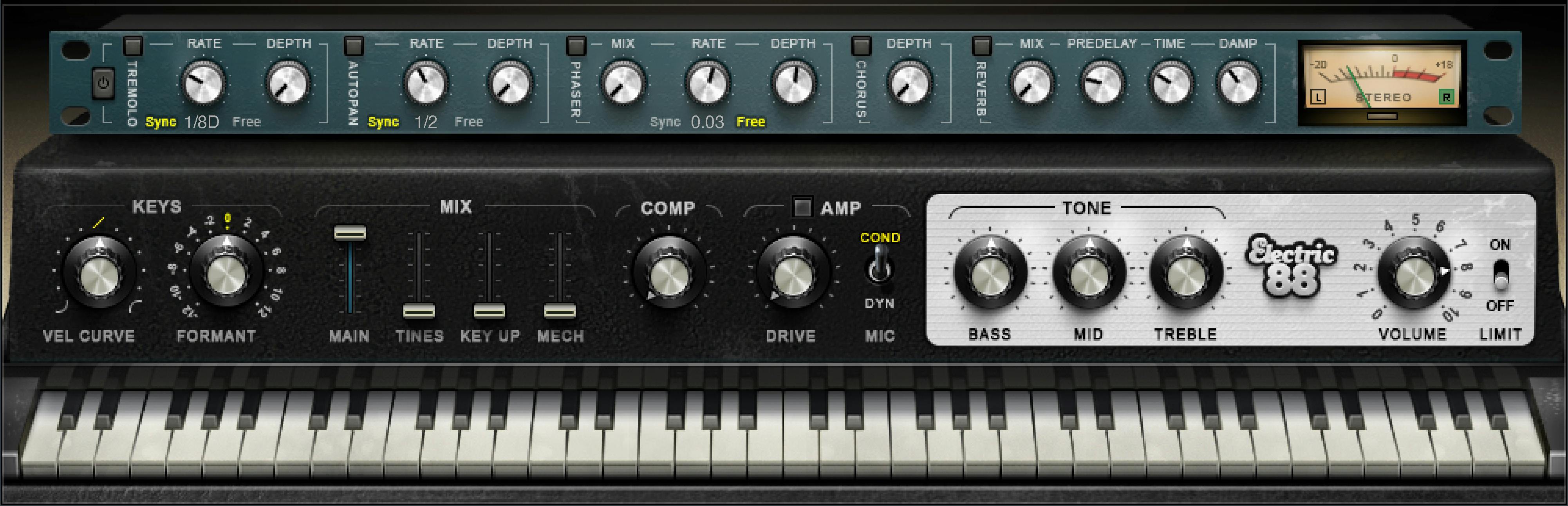
The instrument layer
Virtual keyboard
The on-screen keyboard previews notes with a mouse or similar input device and follows incoming MIDI. The manual explicitly says this control cannot be automated. [1]
Use it to confirm the instrument is receiving note input. It is not a substitute for the MIDI-note data in the host or controller.
Velocity Curve
Vel Curve changes how incoming MIDI velocity is translated into the instrument's response. The documented range is -50% to +50%, with 0 as the initial and reset value. [1]
This changes the relationship between how hard you play and how the sampled instrument responds; it does not transpose notes or add compression after the sound has been generated.
The manual also says the curve is linear at 50%, while listing the control range as -50% to +50% and its initial/reset value as 0. The manual does not explain how its 50% linear setting maps to the control's -50% to +50% range. [1]
Formant
Formant changes the sampled piano's character without changing the played pitch. It runs from -12 to +12 in 25 discrete positions, each representing a half-tone character step, with initial/reset value 0. At -12 the manual describes a character one octave lower, not a pitch transposition. [1]
Lower and higher settings change the apparent character of the instrument while the MIDI note remains the note you played. Treat this as a timbral control, not a tuning or transpose control.
Main, Tines, Up Key and Mechanics
Electric 88 lets you balance four elements of the sampled instrument. [1]
Main
Main sets the level of the primary piano sample layer from 0–100%. Its documented initial/reset value is 100%. [1]
Lower it only when the supporting noises or tine contribution should become relatively more prominent. It is not the final plugin Output control.
Tines
Tines sets the contribution of the tine sound from 0–100%. The documented initial value is 35% and reset value is 0%. [1]
This is part of the instrument's sampled character, not a high-frequency EQ control. A brighter result from more Tines is not equivalent to raising Treble.
Up Key
Key Up (key-release sound) runs from 0–100%. The documented initial value is 25% and reset value is 0%. [1]
Because it follows note release behavior, judge it in phrases with actual note endings rather than while holding one sustained note.
Mechanics
Mechanics controls sampled mechanical noise from 0–100%. The documented initial value is 25% and reset value is 0%. [1]
This is an intentionally modeled performance detail. More mechanical noise is not automatically more realistic in every mix; use it as a character decision.
Compression and amp section
Comp
Comp controls the mix of the internal compressor from 0–100%. Turning it clockwise increases level, according to the manual. The documented initial value is 50% and reset value is 0%. [1]
Use it to manage the instrument's dynamic presentation after choosing an appropriate Velocity Curve. Those two controls solve different problems: Velocity Curve changes how MIDI input maps to the instrument, while Comp changes the generated audio.
Amp On/Off
Amp enables or bypasses the modeled amplifier section. The documented initial state is On. The manual specifically notes that this switch does not use the normal Alt/Option-click reset behavior. [1]
Use the switch to decide whether the amplifier character belongs in the sound before adjusting Drive.
Drive
Drive controls how hard the modeled amp stage is driven, from 0–100. Initial/reset value is 0. [1]
Drive is a coloration control, not merely another output-gain fader. Turning Output down after adding Drive can level-match a comparison, but it does not undo the changed processing.
Mic
Mic selects Condenser or Dynamic for the modeled amp/microphone character. The documented initial/reset choice is Condenser. [1]
This is a modeled tonal choice inside the instrument. It does not switch a physical microphone connected to your interface.
Tone controls
Electric 88 supplies three fixed-frequency tone controls. Their UI scale is -50 to +50, with a documented gain span of ±18 dB, with initial/reset value 0. [1]
Bass
Bass is a low-shelf control centered around 203 Hz. [1]
Use it for broad low-frequency weight. It is different from changing the Main/Tines layer balance or extending reverb low-frequency decay.
Mid
Mid is a bell control centered around 900 Hz. [1]
It changes a broad middle region of the processed instrument rather than choosing a different sample or amp microphone.
Treble
Treble is a high-shelf control centered around 1.875 kHz. [1]
Use it for broad brightness after establishing the tine balance. Tines and Treble can both affect perceived brightness, but one changes the sampled component balance and the other applies EQ.
Output and limiting
Output Volume
Output Volume sets final instrument level on a 0–10 scale. The manual gives 8 as the initial value and 7 as the reset value. [1]
Use it to establish sensible final level after amp, effects and compression. The difference between initial and reset values is a documented behavior; do not assume reset restores the factory startup value.
Limit
Limit switches the instrument's brickwall output limiter on or off. [1]
The guide documents the limiter function but does not state its initial switch position. Do not assume a default from the artwork, or treat the limiter as a substitute for sensible gain staging.
Global FX In/Out
FX In/Out enables or bypasses the built-in effects section as a whole. When the effects are switched back in, the individual effect modules return to their previous states. [1]
That makes it useful for comparing the complete modulation/reverb layer without losing the per-module choices. It does not bypass the sampled-instrument, amp, tone or main output controls described above.
Tremolo
Tremolo On/Off
Tremolo has its own section enable, initially On. Alt-click does not reset this switch. [1]
Tremolo Rate
Rate can run free from 0.25–28 Hz or sync to the host using documented musical values from 1/32T through 2/1. The documented initial/reset setting is 1/16D with sync. [1]
Free Hz and synchronized note values are two display/control modes for the same timing decision. Do not treat a note value as a fixed millisecond duration independent of tempo.
The synchronized choices shared by Tremolo, AutoPan and Phaser are 1/32T, 1/32, 1/32D, 1/16T, 1/16, 1/16D, 1/8T, 1/8, 1/8D, 1/4T, 1/4, 1/4D, 1/2, 1/2D, 1 and 2/1; 2/1 equals one cycle in two bars. [1]
Tremolo Depth
Depth runs 0–100, with initial 60 and reset 0. [1]
Use it to choose how strongly the level modulation is heard after setting its rate.
AutoPan
AutoPan On/Off
AutoPan has its own enable, initially On. Alt-click does not reset this switch. [1]
AutoPan Rate
Rate uses the same documented sync range (1/32T through 2/1) or free range (0.25–28 Hz). The initial/reset setting is 1/2 with sync. [1]
Pan Depth
Pan Depth runs 0–100, initial 33, reset 0. [1]
This is stereo-position movement, not ordinary level tremolo. Compare it on the actual stereo output rather than assuming the two effects are interchangeable.
Phaser
Phaser On/Off
The Phaser section has an independent enable, initially On. Alt-click does not reset this switch. [1]
Phaser Mix
Mix runs 0–100, initial 25, reset 0. [1]
It controls the balance of the phaser effect rather than overall plugin dry/wet.
Phaser Rate
Rate can sync from 1/32T through 2/1 or run free from 0.01–22 Hz. The manual gives an initial free value of 0.03 Hz and reset free value of 0.07 Hz. [1]
The reset value therefore differs from the initial state; preserve that distinction rather than assuming reset always means factory startup.
Phaser Depth
The control labeled Depth is described by the manual as affecting the phaser's feedback behavior. Range 0–100, initial 53.5, reset 0. [1]
Use the documented function rather than assuming “Depth” means the same internal parameter as Tremolo or AutoPan Depth.
Chorus
Chorus On/Off
Chorus has its own section enable. The manual does not state its initial position, and Alt-click does not reset the switch. [1]
Chorus Depth
Depth runs 0–100, initial 25, reset 0. The manual describes the chorus as using four delays and four oscillators, with Depth affecting both wet/dry contribution and modulation influence. [1]
Treat it as the chorus's main intensity control rather than converting it into an undocumented delay time or modulation-rate value.
Reverb
Reverb Mix
Mix runs 0–100%, with documented default 30% and reset 0%. [1]
Use it for the amount of reverberant effect inside the instrument. It is separate from the Main sample Mix and final Output Volume.
PreDelay
PreDelay spans 20–180 ms, with initial/reset 55 ms. [1]
It separates the dry instrument onset from the start of the reverb.
Time
Time spans 0.4–6 seconds, with documented default and reset value of 2 seconds. [1]
This is the reverb-duration control; it is not the same as Predelay.
Damp
Damp increases the level of high frequencies during the decay, according to the manual. Its range is 0.1–2.0 and its reset value is 0.8; the guide does not state an independent initial value. [1]
Meters
Electric 88 provides a peak meter showing a VU scale. The manual gives a peak range of -30 to 0 dB. The VU calibration uses 18 dB of headroom, with 0 VU corresponding to -18 dBFS. [1]
The split meter uses black for left and green for right, according to the manual. These meters describe level; they are not integrated-loudness or true-peak delivery meters.
Sample-library and WaveSystem controls
The WaveSystem toolbar manages presets and sample folders, compares settings, undoes/redoes steps and resizes the plugin; its upper-right icon opens the separate WaveSystem Guide. Electric 88 also has instrument-specific library/global controls. [1]
Samples
Samples lets the user locate another valid Waves sampled-instrument library. The chosen library becomes the default until changed; the selected folder must contain the expected Waves sampled-instrument files. [1]
This is a library-location function. It does not create or resample the Electric 88 library.
Global Tune
Global Tune spans -100 to +100 cents, with initial/reset 0. [1]
Use it for fine tuning of the instrument as a whole. Unlike Formant, it changes pitch reference.
Vel preset checkbox
The Vel checkbox determines whether a loaded preset changes the Velocity Curve setting. With it checked, the preset's Velocity setting applies; with it unchecked, the current velocity setting is retained. [1]
This is a preset-behavior switch, not a second velocity curve.
Standalone preferences
Electric 88 can also run as a standalone application, using an ASIO driver on Windows or Core Audio on macOS. Its application controls include All Notes Off and preferences for output device, test output, active output channels, sample rate, buffer size, MIDI inputs and tempo. These are standalone application settings, not plugin processing parameters. All Notes Off sends an All-Notes-Off MIDI command for stuck sustaining notes. Tempo sets the tempo for relevant Waves plugins; the manual says tempo-based plugins listen for tempo by default and fix to this value. [1]
On Windows, the Preferences panel cannot change sample rate or buffer size. The manual says to close Electric 88, change those settings in the audio driver's control panel, and relaunch the application. This is documented setup guidance, not a compatibility or device test. [1]
A practical setup order
Start with Velocity Curve and the four sample-layer Mix controls. Play both soft and strong notes and include releases so the Up Key and Mechanics balance can be judged in context.
Use Formant only if the core sampled character needs to change. Then decide whether the Amp is part of the intended sound and add Drive, Mic and the three Tone controls as separate decisions.
Set compression and final level before adding effects. Build Tremolo, AutoPan, Phaser, Chorus and Reverb one section at a time, then use FX In/Out to compare the complete effects layer against the same instrument setup.
This is a suggested order for making decisions, not the internal processing order. The manual's signal-flow diagram is described above. No preferred preset or listening result is claimed.
Best for / skip if
Electric 88 is a good fit when you want a sampled electric-piano instrument with control over performance noise, amp color and an integrated effects chain in one interface. [1][2]
Skip it when you specifically need a different electric-piano model, detailed physical-model parameters, a multisampled acoustic grand, or an external effect chain you already prefer. Those are different instrument/workflow requirements, not shortcomings established by a new test.
Related plugins
Element 2.0 is a synthesized instrument rather than a sampled electric piano. Bass Fingers is another Waves sampled instrument built for a different performance role.
The live Waves Audio Post Resources hub remains the site's general Waves-navigation entry point. The official product links above provide further instrument information.
Bottom line
Electric 88 Piano becomes easier to manage when you separate instrument balance, amp/tone shaping and the effects chain. Velocity Curve and the sample-layer Mix controls define the playing response and source character; Amp, Drive, Mic, EQ and Comp shape it; the five effect modules add movement and space.
Set the core piano first, then add processing for a specific reason. That keeps a sampled instrument from turning into a stack of effects whose purpose is hard to identify.
Sources
Checked October 18, 2026. No listening, MIDI-timing, CPU, latency, host, compatibility or standalone-device test was performed.
- Waves Electric 88 Piano User Guide, current interface and instrument/effects control reference; representative interface/effects pages were visually inspected.
- Waves Electric 88 Piano, current public product page and feature description.
- Waves Graphic Library, current
Electric 88 Pianoentry and product-image backlink condition.
FAQ
What is the documented signal flow in Electric 88 Piano?
The manual's block diagram shows Main, Key Up and Tines feeding the Vintage Compressor, Amp and Cabinet simulators, tone controls, then Tremolo, AutoPan, Phaser and Chorus. Mechanics follows a separate path that joins just before Reverb; the signal then reaches Master Volume and the Brickwall Limiter. This is Waves' documented diagram, not an independently measured routing test.
Does 50% mean linear on the Velocity Curve?
The manual says 50% is linear, but lists a -50% to +50% range and an initial/reset value of 0. Those statements leave the 50% position unclear on the centered scale, so this guide preserves both facts without inferring a different scale or default.
How is Velocity Curve different from Comp?
Velocity Curve changes how incoming MIDI velocity maps to the instrument response. Comp controls the mix of the internal compressor on the generated audio. The manual lists Comp at 0–100%, initial 50% and reset 0.
Are initial and reset values always the same?
No. For example, Output Volume is initial 8 and reset 7, while Tines is initial 35% and reset 0. Treat each published initial and reset value separately; reset does not necessarily restore startup settings.
Does Formant transpose the piano?
No. Formant changes the sampled sound character without changing the played pitch. Global Tune is the documented control for fine-tuning the instrument, over a range of -100 to +100 cents.
What is the difference between Tines and Treble?
Tines changes the level of a sampled tine layer. Treble is a high-shelf tone control centered at 1.875 kHz. They can both affect perceived brightness, but they control different parts of the instrument.
Which Electric 88 effects can sync to tempo?
Tremolo, AutoPan and Phaser each offer host-synchronized note values as well as a free-rate mode. A synchronized note value follows host tempo; it is not one fixed duration in milliseconds.
Can the Windows standalone app change sample rate and buffer size in Preferences?
No. The manual says to close Electric 88, change sample rate and buffer size in the audio driver's control panel, and relaunch the app. The standalone application uses ASIO on Windows; this guide does not claim a device or compatibility test.

About the Author
Joseph Nilo has been working professionally in all aspects of audio and video production for over twenty years. His day-to-day work finds him working as a video editor, 2D and 3D motion graphics designer, voiceover artist and audio engineer, and colorist for corporate projects and feature films.