
Waves Electric Grand 80 Piano is a sampled virtual instrument based on a Yamaha CP80, with controllable sample layers, pedal resonance, tone shaping and onboard effects. Its useful decisions begin with how the instrument responds and how its mechanical details sit in the mix.
The bottom module handles the piano, sample-layer balance, compression, tone and output. The top module handles modulation effects and reverb.
This guide follows the complete official manual and authentic interface image. I have not played the instrument, auditioned its samples or tested an installation. Sound and modeling descriptions are attributed to Waves, not firsthand listening results.
My Short Version
Start with performance response before effects: Vel Curve and Formant answer different questions. Velocity changes the response to playing strength; Formant changes character without transposing the notes.
Sample noises and resonance are separate layers. Key Up, Mechanics, Pedal and Sustain Resonance are not four names for the same control.
Initial and reset values often differ. Resetting Key Up, Comp or a modulation depth can produce a different setting from the documented initial one.
VEL belongs to preset loading. In this guide, checked VEL loads a preset's Velocity Curve; unchecked preserves the current curve.
Best for and when to choose another approach
Best for: a sampled electric-grand workflow with direct control over playing response, mechanical detail, pedal resonance and a compact built-in effects chain.
Choose a different approach when: you need detailed sample editing, independently adjustable compressor timing or a fully specified limiter ceiling. Those controls are not documented here.
A practical starting point is to shape the piano layer balance before adding movement and space. That is an evaluation suggestion, not a tested preset or a claim about how it will sound in a particular song.
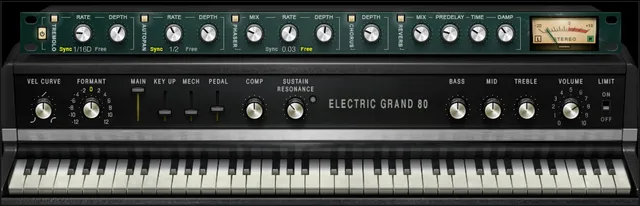
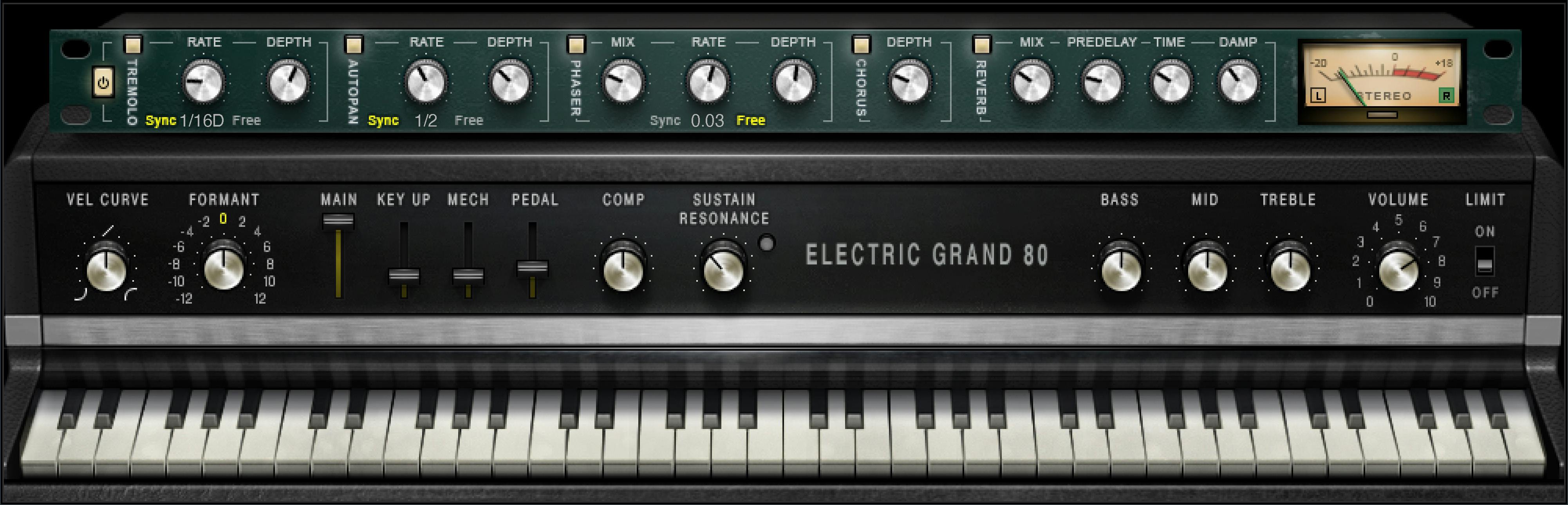
Component, keyboard and signal paths
The guide names one plug-in component: Electric Grand 80 Piano Stereo. It also describes a separate standalone application.
The virtual keyboard previews notes with a pointer when a controller is unavailable. It follows MIDI input, but the guide says the on-screen keyboard control cannot be automated.
The routing diagram shows the Main, Key Up and Mechanics paths feeding Compressor → Tone → FX → Reverb → Master Volume → Limiter.
The Main path also drives the sympathetic-resonance simulation, whose level returns to the compressor input.
Pedal samples take a different branch: their level joins before Reverb, rather than passing through the diagram's compressor, tone and modulation-FX blocks. The diagram does not show a user-reorderable chain.
Vel Curve, VEL and Formant
Vel Curve changes the velocity response from logarithmic to exponential. Its range is −50% to +50%, with initial/reset 0; zero is linear.
The VEL option in the WaveSystem toolbar controls whether that value follows a newly loaded preset. Checked changes it with the preset; unchecked keeps the current value.
That can help preserve a preferred controller response while browsing other sounds. The guide does not state an initial VEL-checkbox position.
Formant changes sound character without changing pitch. It runs −12 to +12, with 25 discrete steps and initial/reset 0.
Each step corresponds to a half-tone change in character. The guide's −12 example describes an octave-lower character while the played pitch stays unchanged; it is not a transpose control.
Main, release and mechanical layers
These controls set different parts of the sample mix. All four run 0–100%, but their initial and reset values are not identical.
| Control | What it contributes | Initial | Reset |
|---|---|---|---|
| Main | Main piano samples, without mechanics or key-release sounds | 100% | 100% |
| Key Up | Sounds of keys releasing | 25% | 0 |
| Mechanics | Mechanical thump samples | 25% | 0 |
| Pedal | Mechanical sustain-pedal press/release samples | 35% | 0 |
Main is not the master output fader. It changes the main sample-layer contribution; Volume later controls output after processing.
Likewise, Pedal is a level for the mechanical pedal samples. It is distinct from the pedal-triggered sympathetic resonance described below.
These are continuous controls. The source does not supply an exact perceptual blend law, separate sample-file chooser per layer or additional layer-pan controls.
Comp and Sustain Resonance
Comp controls the mix of the internal compressor. Turning it clockwise increases level in the guide's description.
Its range is 0–100%, with an initial value of 50% and reset value of 0. The panel does not expose independent ratio, attack, release or threshold settings.
Sustain Resonance adjusts the simulated sympathetic resonance of unplayed strings when their dampers are lifted by the sustain pedal.
Its range is 0–100%, with initial 35% and reset 0. It is heard only while the sustain pedal is pressed.
The adjacent activity LED indicates that pedal-triggered resonance has been activated. It is not described as a clip light or a meter of output level.
A useful distinction is to balance mechanical Pedal noise independently from the sustained resonance. They describe different parts of the instrument behavior.
Bass, Mid and Treble
The three tone controls share a displayed −50 to +50 range and initial/reset 0.
Their filter descriptions are different:
- Bass: low shelf at 203 Hz, described as up to ±18 dB.
- Mid: bell at 900 Hz, described as up to ±18 dB.
- Treble: high shelf at 1.875 kHz, described as up to ±18 dB.
The displayed ±50 values are not themselves ±50 dB. The manual does not publish a point-by-point display-to-gain curve or an adjustable Q for these controls.
FX In/Out and section switches
FX In/Out toggles the effects module. When it is turned back on, each section returns to its previous state.
That differs from resetting every effect parameter or enabling every section at once.
Tremolo, AutoPan and Phaser are explicitly described as initially On. Chorus has an On/Off control, but its initial/reset switch state is not supplied.
A Reverb section switch is visible in the official panel, but its initial/reset state is not separately specified. The guide also does not give every switch a reset value.
Static illuminated buttons in the Library image are not substitutes for those missing default statements.
Tremolo and AutoPan
Tremolo modulates amplitude. Its Depth range is 0–100, with initial 60 and reset 0.
Its Rate supports host-sync note values or a Free range of 0.25–28 Hz. Both initial and reset Rate are 1/16D Sync.
AutoPan changes the panning position. Pan Depth controls how far movement extends from center, over 0–100, with initial 33 and reset 0.
Its Free Rate is also 0.25–28 Hz, but its initial/reset Rate is 1/2 Sync, not the Tremolo value.
These are separate modulation tasks. An amplitude setting does not establish how wide the stereo movement is.
Phaser and Chorus
Phaser Mix sets the effect level over 0–100%, with initial 25% and reset 0.
Phaser Rate uses a 0.01–22 Hz Free range plus the shared sync choices. Its initial Rate is 0.03 Hz, while its reset Rate is 0.07 Hz.
Phaser Depth controls feedback, not a specified pitch excursion. It runs 0–100, with initial 53.5 and reset 0.
Chorus Depth affects the dry/wet mix and how much its oscillator influences delay. It runs 0–100, with initial 25 and reset 0.
The guide describes four delays and four oscillators inside the Chorus engine. That is not a set of four independently exposed user controls.
Rate-knob direction and all Sync choices
Tremolo, AutoPan and Phaser share a Rate-knob arrangement: noon is the slowest Free value, and turning clockwise increases the Free rate.
Positions below noon select host-related durations; the guide describes turning counterclockwise through the sync values to increase rate.
The exact listed choices are 1/32T, 1/32, 1/32D, 1/16T, 1/16, 1/16D, 1/8T, 1/8, 1/8D, 1/4T, 1/4, 1/4D, 1/2, 1/2D, 1 and 2/1.
At 2/1, the guide specifies one cycle in two bars. Do not add an unlisted 1/2T or assume the same initial/reset value for every Rate knob.
The Free ranges differ as noted above. Host-sync descriptions do not prove a particular host's running tempo or an installed transport test.
Reverb Mix, Predelay, Time and Damp
Reverb Mix balances dry and wet from 0% dry to 100% wet. Its documented default is 30%, with reset 0/dry.
Predelay is the interval between the dry and wet signals: 20–180 ms, initial/reset 55 ms.
Time controls the reverb duration over 0.4–6 seconds, with default/reset 2 seconds.
Damp runs 0.1–2.0, with default/reset 0.8. The guide describes it as increasing high-frequency level during the decay as a factor of reverb time.
That literal description does not establish a cutoff frequency, an absorption percentage or a general promise that turning it up will always make the result darker. No extra reverb algorithm choices are documented.
Volume, Limit and meters
Volume controls output gain after plug-in processing, over 0–10, with initial/reset 7. The guide does not label that displayed scale as dB.
Limit turns the output brickwall limiter On or Off. The source does not publish its initial/reset state, ceiling, timing or guaranteed protection from downstream overload.
The meter specification describes a −30 to 0 dB peak scale and a VU calibration reference of 0 dBVU = −18 dBFS.
The split indicators are black for Left and green for Right. These are vendor descriptions of the display, not an independently measured calibration.
A click-to-reset gesture, peak-hold duration and limiter-light behavior are not established in this guide. Do not borrow those from another Waves instrument.
Tune, sample folders and toolbar
Tune changes the tuning reference for the entire piano. The printed range is −100 to +100, with initial/reset 0.
The guide does not label the unit on that specification. It would be inappropriate to import a cents label from another instrument's manual and present it as Electric Grand's explicit documentation.
The WaveSystem toolbar manages presets, previous/next navigation, setting comparison, undo/redo, sample-folder loading, resizing and help.
This guide does not establish that a loaded sample folder remains the default forever, a particular folder-validation rule or a unit/default for every toolbar option.
The Library original is the instrument-panel crop, without the toolbar. The guide's toolbar descriptions remain separate evidence.
Standalone utilities and their limits
The separate application is documented with ASIO for Windows and Core Audio for Mac. That is source context, not confirmation that a particular machine or installed version is supported.
All Notes Off sends an all-notes-off MIDI command, described as useful for stuck sustaining notes.
Preferences covers Audio, MIDI and User Choices. Its documented fields include output device, Test, Active Output Channels, Sample Rate, Audio Buffer Size, Active MIDI Inputs and Tempo.
The guide says Windows sample-rate/buffer changes are made in the driver's control panel after closing the application, then relaunching it. The screenshot's device names, buffer figures and tempo are examples, not universal defaults.
A pictured Reset Device button is not explained as a plug-in-parameter reset. No Test, device selection, MIDI or audio action was performed for this article.
Related Waves guides
The Renaissance Compressor guide covers a separately adjustable dynamics workflow rather than assigning undocumented timing controls to the instrument's Comp knob.
The Abbey Road Chambers guide explains a separate reverb with its own controls. It does not define Electric Grand's internal algorithm.
The WLM Plus guide covers independent level/loudness metering. More live articles are in the Waves Audio Post Resources hub, with licensing discussed separately in subscription versus perpetual licensing.
Sources and documentation limits
Checked October 19, 2026, America/New_York. The official Electric Grand 80 Piano page links the complete 19-page guide, read in full.
Page 6 provides component and routing scope; pages 9–18 cover the controls; page 19 covers standalone utilities. The authentic Graphic Library panel corresponds to those modules.
The standalone chapter contains a sentence saying the Electric Grand application “loads the Clavinet instrument.” That isolated product-name slip appears inside the Electric Grand chapter and is not proof of cross-product loading or a runtime failure.
The Tune unit, several switch defaults, compressor timings, limiter ceiling and device-reset behavior remain unspecified. Initial values, reset values and artwork settings are kept distinct.
FAQ
What is Waves Electric Grand 80 Piano?
Electric Grand 80 Piano is a sampled virtual instrument based on a Yamaha CP80, with separate sample-layer levels, sympathetic-resonance simulation, tone controls and onboard effects. The guide names one Stereo plug-in component and a separate standalone application. This article explains the documentation; no instrument performance, sound or installed compatibility was tested.
What does the VEL toolbar option do?
In this instrument's guide, checked VEL means the Velocity Curve value changes when a new preset loads; unchecked VEL preserves the current curve. Vel Curve ranges from −50% to +50%, with initial and reset values of 0, where the response is linear. Those instructions concern Electric Grand's preset handling.
Does Formant transpose the notes?
No. Formant changes sound character without changing pitch. Its documented range is −12 to +12 in 25 discrete steps, with initial and reset values of 0. Each step corresponds to a half-tone change in character; the guide's −12 example describes an octave-lower character, not notes transposed down an octave.
What do Main, Key Up, Mechanics and Pedal change?
They set different sample-layer levels, each over 0–100%. Main is the main piano sound, Key Up the release-key sounds, Mechanics the mechanical thump, and Pedal the sustain-pedal press and release sounds. Their initial values are 100%, 25%, 25% and 35%; their reset values are 100%, 0, 0 and 0. Pedal's drawn signal branch joins before Reverb rather than passing through the entire main chain.
When is Sustain Resonance heard?
The guide says Sustain Resonance is heard only while the sustain pedal is pressed, simulating sympathetic resonance from undamped, unplayed strings. Its activity LED indicates pedal-triggered resonance, not clipping. The level range is 0–100%, with an initial value of 35% and a reset value of 0.
How do the modulation Rate knobs switch between Sync and Free?
For Tremolo, AutoPan and Phaser, noon is the slowest Free setting and clockwise movement increases the Free rate. Positions below noon use host-related note durations. Tremolo and AutoPan cover 0.25–28 Hz; Phaser covers 0.01–22 Hz. The guide lists 16 Sync choices, and their individual initial/reset values differ. A shared knob design does not establish a shared default.
Do FX In/Out and Limit perform the same job?
No. FX In/Out toggles the effects module and restores each section's previous state when the module is re-enabled. Limit turns the output brickwall limiter on or off. The guide does not publish an initial or reset state for Limit, a limiter ceiling, or a guarantee against every downstream overload. It also does not establish initial/reset states for every effects switch.
What are the Tune units and the standalone controls?
Tune changes the piano's tuning reference over a printed −100 to +100 range, with initial/reset 0, but this guide does not label the unit on that specification. Do not borrow cents from another instrument's manual. The standalone chapter describes All Notes Off and Audio/MIDI preferences, including output selection, buffer, sample rate, MIDI inputs and tempo. These are documented utilities, not a completed setup or audio test.

About the Author
Joseph Nilo has been working professionally in all aspects of audio and video production for over twenty years. His day-to-day work finds him working as a video editor, 2D and 3D motion graphics designer, voiceover artist and audio engineer, and colorist for corporate projects and feature films.