
Waves Element 2.0 is a two-oscillator virtual-analog synthesizer with subtractive filtering, three envelopes, four LFOs, a six-slot modulation matrix, a 16-step arpeggiator/sequencer, built-in effects/EQ and standalone operation. The current manual documents one plugin component—Element 2.0 Stereo—plus the standalone application. It also contains an Element 1 compatibility mode with documented functional differences. [1][2]
This guide groups the documented controls into four areas: voice generation/filtering, modulation, arp/sequencing, and effects/global output. The signal-design controls are explicit; the current guide usually does not give factory defaults, so this article focuses on documented ranges, modes and interactions rather than reading a preset screenshot as a specification. [1]
My Short Version
Build the raw sound with OSC 1 / OSC 2, Sub, Noise and Ring, then shape it with the VCF and the filter/VCA envelopes. Use VCO/DCO when you want to change oscillator retrigger/jitter behavior rather than waveform; use Sync, FM and PhM when OSC 2 should derive more complex timbre from OSC 1. [1]
Use the four LFOs, ENV 3 and the six modulation-matrix slots to create motion. The six-slot modulation matrix provides routing to documented destinations: LFOs, velocity, aftertouch, mod wheel, bender, filter envelope and the sequencer can be routed to pitch, pulse width, filter, amp, pan, effect and other destinations. [1]
The ARP/SEQ can arpeggiate or run a 16-step pitch sequence. Then add per-voice Distortion, Crusher, stereo delay, reverb, chorus and the fixed-frequency EQ. I did not audition any of these modes or compare Element with hardware or other synths for this article; this is documentation-led.
Component and standalone identity
The current guide documents one plugin component: Element 2.0 Stereo. It also documents a standalone application that receives MIDI and outputs through the selected Core Audio or ASIO device. [1]
For MIDI Learn, the guide describes right-clicking a control, selecting Learn, then moving a MIDI-controller knob. This workflow was not tested here. [1]
Element 1 mode is a compatibility mode within Element 2.0, rather than another plugin component. Standalone audio/MIDI preferences belong to the wrapper, not to the synth’s sound-generation path.
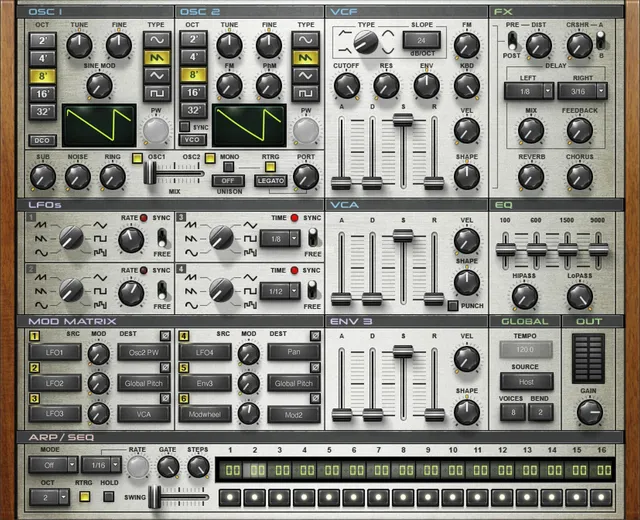
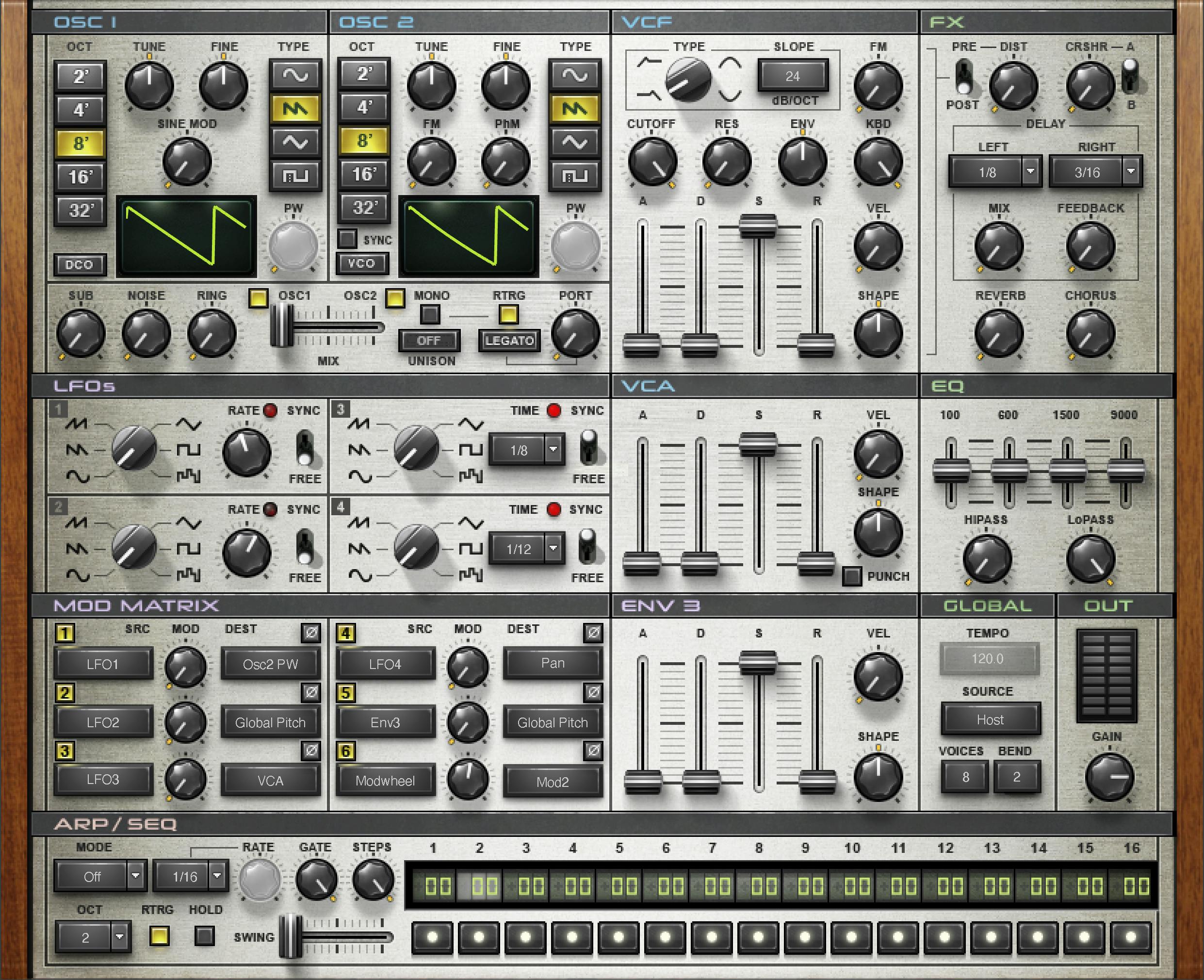
OSC 1 and OSC 2: octave, tuning and waveform
Element has two modeled analog oscillators. Both provide: [1]
- OCT:
2, 4, 8, 16, 32, from highest to lowest pitch range. - TUNE: -12 to +12 semitones.
- FINE: -100 to +100 cents.
- TYPE: Sine, Saw, Triangle, Pulse.
- PW: 0–99, active for Pulse waves. [1]
The manual does not publish factory default values for these controls in the current control text, so none are inferred.
VCO / DCO
Each oscillator’s VCO/DCO behavior changes how the virtual oscillator starts and varies. Waves describes VCO as starting at a random phase and adding contained pitch jitter; DCO starts oscillation when triggered by a note and behaves more consistently. [1]
This is not simply an “analog vs digital” quality switch. It changes modeled oscillator behavior, so choose it according to whether you want repeatable starts or more variation.
Sine Mod, FM, PhM and Sync
OSC 1 Sine Mod sets the amount of modulation from a sine oscillator, range 0–100. [1]
On OSC 2, FM controls how much OSC 1 frequency-modulates OSC 2, range 0–100. PhM controls phase modulation of OSC 2 by OSC 1, also 0–100. [1]
Sync is an On/Off switch that synchronizes OSC 2 pitch to OSC 1. With Sync active, the manual says OSC 2’s OCT/TUNE/FINE controls affect timbre rather than the resulting pitch. [1]
These controls add Sine Mod, FM, PhM and Sync options beyond the basic waveform choices. Start with small amounts if the goal is to understand what each relationship contributes rather than stacking every modulation source immediately.
Sub, Noise, Ring and oscillator Mix
The additional-source/mix section includes: [1]
- Sub: triangle wave one octave below OSC 1, 0–100.
- Noise: white-noise level, 0–100.
- Ring: ring modulation between OSC 1 and OSC 2, 0–100.
- OSC 1 / OSC 2 In/Out: enables or removes each main oscillator.
- Mix: balances OSC 1 against OSC 2, -50 to +50. [1]
Sub, Noise and Ring are separate sound sources/modifiers rather than alternate choices in the main waveform menus.
Mono, Retrigger, Unison, Portamento and Legato
Mono toggles monophonic/polyphonic behavior: On is mono, Off is polyphonic. [1]
RTRG controls envelope retriggering in Mono mode. With it on, every note restarts the envelopes. [1]
Unison options are Off, 2 Voices, 4 Voices. [1]
PORT sets glide time. The guide prints 0.5–2500 ms and parenthetically 0–2.5 seconds; the printed lower endpoints differ, and neither was tested here. LEGATO chooses whether glide happens only when the previous note is still held (Legato) or on every note transition (Always). [1]
Do not confuse this Legato switch with the synth being monophonic: Mono decides voice allocation, while Legato decides the condition under which portamento is applied.
VCF type, slope, cutoff and resonance
The voltage-controlled filter provides: [1]
- TYPE: High Pass, Low Pass, Band Pass, Band Reject.
- SLOPE: 2-pole / 12 dB/octave or 4-pole / 24 dB/octave.
- CUTOFF: 0–100, which Waves maps to 20 Hz–20 kHz.
- RES: 0–100 resonance. [1]
The filter also has dedicated envelope, keyboard and oscillator-modulation controls described below.
Filter modulation: ENV, KBD and FM
ENV controls cutoff modulation depth from the filter envelope, range -100 to +100. Negative values invert the direction of envelope influence. [1]
KBD controls keyboard tracking from 0–100, using C3 as the reference point. [1]
FM controls cutoff-frequency modulation from OSC 1, range 0–100. [1]
These are separate modulation paths. If the cutoff seems to move unexpectedly, check all three rather than assuming only the ADSR itself is responsible.
Filter envelope
The VCF envelope provides standard ADSR plus velocity and shape: [1]
- Attack: 1–10,000 ms.
- Decay: 1–10,000 ms.
- Sustain: 0–100%.
- Release: 1–10,000 ms.
- VEL: 0–100, relating cutoff-envelope behavior to Note On velocity.
- SHAPE: -50 to +50. [1]
At Shape 0, Waves describes linear time constants; positive values become more logarithmic and negative values more exponential. [1]
VCA envelope and Punch
The amplifier envelope has the same time/sustain domains: Attack 1–10,000 ms, Decay 1–10,000 ms, Sustain 0–100%, Release 1–10,000 ms. [1]
VEL is 0–100 and sets velocity influence on the envelope. SHAPE is -50 to +50, changing envelope contour. [1]
PUNCH is On/Off and enables a transient enhancer intended to make the attack snappier. [1]
Four LFOs
Element 2.0 contains four identical LFOs. The guide describes them as free-running or synced to MIDI clock and Note On commands; it does not specify the timing interaction in greater detail. [1]
TYPE choices are Sine, Saw Down, Saw Up, Triangle, Pulse and S&H (random). [1]
For free running, RATE is 0.1–100 Hz. For synced operation, TIME offers 4/1, 3/1, 2/1, 1/1, 1/2, 3/8, 1/3, 1/4, 3/16, 1/6, 1/8, 3/32, 1/12, 1/16, 3/64, 1/24 and 1/32. SYNC switches between free-running and clock-synced behavior. An LED shows LFO pulse rate. [1]
ENV 3
ENV 3 is a freely assignable third envelope for the modulation matrix. Its controls are: [1]
- Attack 1–10,000 ms
- Decay 1–10,000 ms
- Sustain 0–100%
- Release 1–10,000 ms
- Velocity 0–100
- Shape -50 to +50 [1]
Unlike the dedicated VCF/VCA envelopes, ENV 3 becomes useful wherever you route it in the matrix.
Modulation matrix
Element’s modulation matrix provides six assignments. Each assignment has PHASE, SRC, DEST and MOD. [1]
PHASE is On/Off and reverses modulation direction. MOD sets depth from 0–100%. [1]
The documented sources are: LFO1, LFO2, LFO3, LFO4, Env3, Modwheel, Keyboard, Velocity, Aftertouch, Bender, VCF Envelope and Sequencer. [1]
The documented destinations are: Global Pitch; Osc1 Pitch; Osc2 Pitch; Osc1 PW; Osc2 PW; Sine Mode; Osc FM; Osc PhM; Osc Mix; Sub; Noise; Ring; Portamento; VCF Cutoff; VCF Res; VCF Env; VCF FM; VCF Env Shape; VCA; VCA Env A/D/S/R/Shape; Pan; LFO1/2/3/4 Rate; Env3 A/D/S/R/Shape; Arp/Seq Rate; Arp/Seq Gate; Mod1–Mod6; HP; LP; Distortion; Crusher; Delay Mix; Delay Time; Reverb; Chorus. [1]
The matrix is the synth’s routing layer. Its depth percentage does not specify one universal physical amount across these destinations.
Arpeggiator / 16-step sequencer
The ARP/SEQ section can operate as an arpeggiator or a 16-step pitch sequencer. Each step has an In/Out toggle and a pitch offset of ±24 semitones from the held note. [1]
MODE options are Off, Up, Down, Up/Down, Random and Sequence. OCT is 1, 2, 3 or 4 octaves. [1]
RTRG restarts the sequence when a new note is played; HOLD lets the sequence continue after keys are released. [1]
TIME offers Free plus synced values 1/2, 3/8, 1/3, 1/4, 3/16, 1/6, 1/8, 3/32, 1/12, 1/16, 3/64, 1/24, 1/32. When Time is Free, RATE runs 1–50 Hz. [1]
GATE is 5–100%, STEPS is 1–16, and SWING is 0–100; Waves describes Swing as pushing even-numbered steps toward the following odd step. [1]
Distortion and Crusher
DIST is a per-voice distortion amount from 0–100%. Waves describes settings below 50% as warmer saturation and settings above 50% as more aggressive/crunchy. PRE/POST places the distortion before or after the VCF. [1]
CRSHR is a bit-depth/resolution-reduction effect with range 0–100. CRSHR A/B selects between two distinct crusher algorithms. The current manual does not characterize the sonic difference between algorithms A and B, so this article does not invent one. [1]
Stereo Delay
The built-in stereo delay provides separate synchronized LEFT and RIGHT times. Options for each are 1/2, 3/8, 1/3, 1/4, 3/16, 1/6, 1/8, 3/32, 1/12, 1/16, 3/64, 1/24, 1/32. [1]
MIX is 0–100 and FEEDBACK is 0–100. [1]
The manual describes note-value timing rather than a free-millisecond mode for this delay.
Reverb and Chorus
REVERB is 0–100. Waves says higher values increase both the amount and the size/time of the plate-style reverb, so this is a combined macro rather than a separate wet-level and decay-time pair. [1]
CHORUS is 0–100 and sets chorus modulation amount. [1]
EQ and high/low-pass filters
Element’s output EQ combines fixed-frequency graphic bands with high/low-pass filters: [1]
- HiPASS: 20–20,000 Hz.
- LoPASS: 10–20,000 Hz.
- 100 Hz: -30 to +30 dB.
- 600 Hz: -20 to +20 dB.
- 1500 Hz: -20 to +20 dB.
- 9000 Hz: -25 to +25 dB. [1]
The manual notes that heavy EQ boost can saturate in a different way from the Distortion module. That is vendor documentation, not a harmonic measurement made here. [1]
Global Tempo, Source, Voices, Bend and Output
The global/output section includes: [1]
- TEMPO: 1–300.
- SOURCE: Host or Internal clock.
- VOICES: 1–16 maximum simultaneous voices.
- BEND: 0–12 semitones pitch-bend range.
- GAIN: -80 to 0 dBFS final output gain.
- METER: displays overall output energy. [1]
The user guide explicitly discusses limiting the voice count as a CPU-conservation tool. That is a capacity setting, not a sound-quality measurement from this article. [1]
Element 1 mode vs Element 2 mode
The top-left Element 1/2 selector switches between the two modes. The guide says projects saved with Element 1 load in Element 1 mode; this compatibility behavior was not tested here. The current manual documents six functional differences: [1]
- Element 1 has a single Unison mode instead of selectable 2-/4-voice Unison.
- Element 1 groups its four LFOs into two pairs: LFO1/2 free-running, LFO3/4 synchronized; Element 2 lets all four be free or synced.
- Element 1 has no dedicated BEND range control.
- Element 1 has only one Crusher mode rather than Element 2’s A/B algorithms.
- Element 1 has an HD switch; Element 2 is always HD.
- Element 1 lacks the ARP/SEQ Hold and Retrigger functions. [1]
These are documented functional differences, not just a change of interface appearance.
WaveSystem toolbar and Load With Preset
The WaveSystem toolbar handles preset load/save, Compare, Undo/Redo and resizing. Element adds Load with Preset filters for MIDI, Arp/Seq and Tempo. [1]
When a box is unchecked, loading a preset leaves that current characteristic in place instead of replacing it from the preset. These filters let you preserve a MIDI mapping, sequence pattern or tempo while auditioning sounds. [1]
Standalone application
The standalone application includes All Notes Off for stuck MIDI notes plus Preferences for Output, Test, Active Output Channels, Sample Rate, Audio Buffer Size, Active MIDI Inputs and Tempo. [1]
The manual notes that on Windows sample rate and buffer size are changed through the audio driver control panel, then the application is relaunched. [1]
These controls belong to the standalone wrapper, not the synthesis signal path.
A practical Element 2.0 workflow
Begin with one or two oscillators and the VCF before touching the modulation matrix. Choose waveform/octave/tuning, set VCO/DCO and oscillator balance, then use the filter and its envelope to establish the static voice. That creates a reference for hearing what later modulation is actually doing. [1]
Next add one movement source at a time: LFO, ENV 3, velocity/aftertouch or Sequencer. Use the matrix depth and Phase control deliberately rather than assigning several destinations at full depth. Then program the ARP/SEQ if the patch needs rhythmic note generation. [1]
Finally add Distortion/Crusher and time/modulation effects, then use the EQ/output section for finishing. This is editorial workflow guidance based on the architecture, not a listening-test prescription.
Best for / skip if
Element 2.0 may suit subtractive/virtual-analog programming when you want a documented single-panel control set with flexible modulation and sequencing. [1][2]
Skip it when you specifically need wavetable/granular/sample playback as the core synthesis engine, or when another synth already provides the modulation architecture you prefer. Element’s current documentation describes modeled analog oscillators and subtractive filtering; it is not Codex or CR8 under another interface.
Limitations and evidence boundary
This article is documentation-led. I did not audition VCO versus DCO, compare filter slopes, measure oscillator drift, evaluate CPU use, characterize Crusher A versus B, inspect MIDI timing, benchmark standalone latency or compare Element with analog hardware/other synths.
The current guide publishes many numeric domains but few factory defaults. No default is inferred from the manual screenshot. Crusher A/B are documented only as distinct algorithms; their sonic difference remains intentionally undescribed here. [1]
Related guides
For product details, see the official Element 2.0 page and the Element 2.0 User Guide.
Bottom line
Element 2.0 combines two modeled oscillators, four LFOs, three envelopes, six modulation slots and a 16-step arp/sequencer. [1]
The cleanest mental model is signal first, modulation second, effects last: build the voice, route motion, then finish it.
Sources
Sources checked October 18, 2026. No listening, native-host, MIDI, preset, latency, CPU, or installed-version test was performed.
- Waves Element 2.0 User Guide, current product-linked guide; see its printed control sections and Element 1/Element 2 mode comparison.
- Waves Element 2.0 product page, current product identity, feature positioning, component thumbnail and manual link.
FAQ
What kind of synthesizer is Waves Element 2.0?
Waves describes Element 2.0 as a subtractive polyphonic virtual-analog synthesizer. Its guide covers two oscillators, filtering, modulation, sequencing, effects, EQ and standalone operation. This is a documentation summary, not an audition or sound-quality comparison. [1][2]
What is the documented difference between Element’s VCO and DCO modes?
The manual says VCO starts at a random phase and adds contained pitch jitter, while DCO starts when triggered by a note and is more consistent. It describes oscillator behavior, not a general quality ranking. [1]
Can all four LFOs sync in Element 2.0?
The Element 2.0 guide describes four identical LFOs that can be free-running or synced to MIDI clock and Note On commands. In Element 1 mode, LFO 1/2 are free-running and LFO 3/4 are synchronized. [1]
How many modulation assignments does Element 2.0 provide?
The matrix has six assignments. Each includes Phase, source, destination and modulation depth; the guide lists the available source and destination names and gives depth a 0–100% range. That percentage does not specify one universal physical amount across destinations. [1]
Can Element’s ARP/SEQ play a pitch sequence as well as arpeggiate?
Yes. The guide describes both arpeggiator modes and a 16-step Sequence mode. Each step has an In/Out control and a pitch offset of up to ±24 semitones from the held note. [1]
What do Element’s Load with Preset filters preserve?
The toolbar filters cover MIDI assignments, ARP/SEQ settings and Tempo. When an individual filter is unchecked, the guide’s examples say the current setting in that category remains while the new preset loads. [1]
What Portamento range does the Element 2.0 manual print?
It prints 0.5–2500 ms and also parenthetically 0–2.5 seconds. Those lower endpoints differ in the source; this guide does not silently choose one or report a measured range. [1]
Does the manual explain how Crusher algorithms A and B sound different?
The guide says A/B switches between distinct crushing algorithms, but it does not characterize their sonic differences. No A-versus-B sound claim is inferred here. [1]

About the Author
Joseph Nilo has been working professionally in all aspects of audio and video production for over twenty years. His day-to-day work finds him working as a video editor, 2D and 3D motion graphics designer, voiceover artist and audio engineer, and colorist for corporate projects and feature films.