
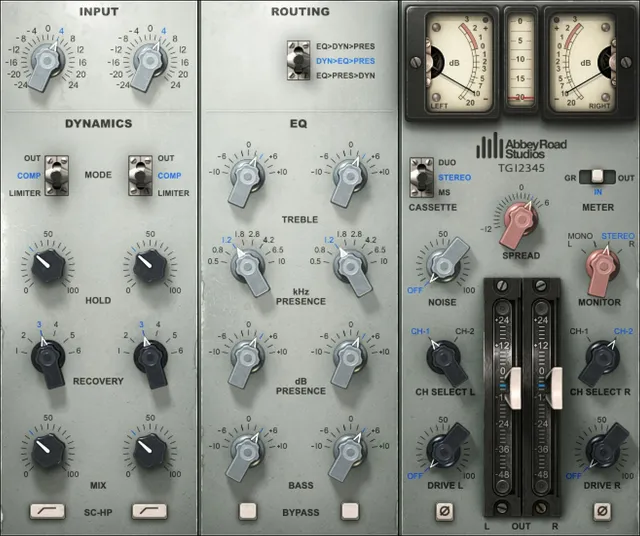
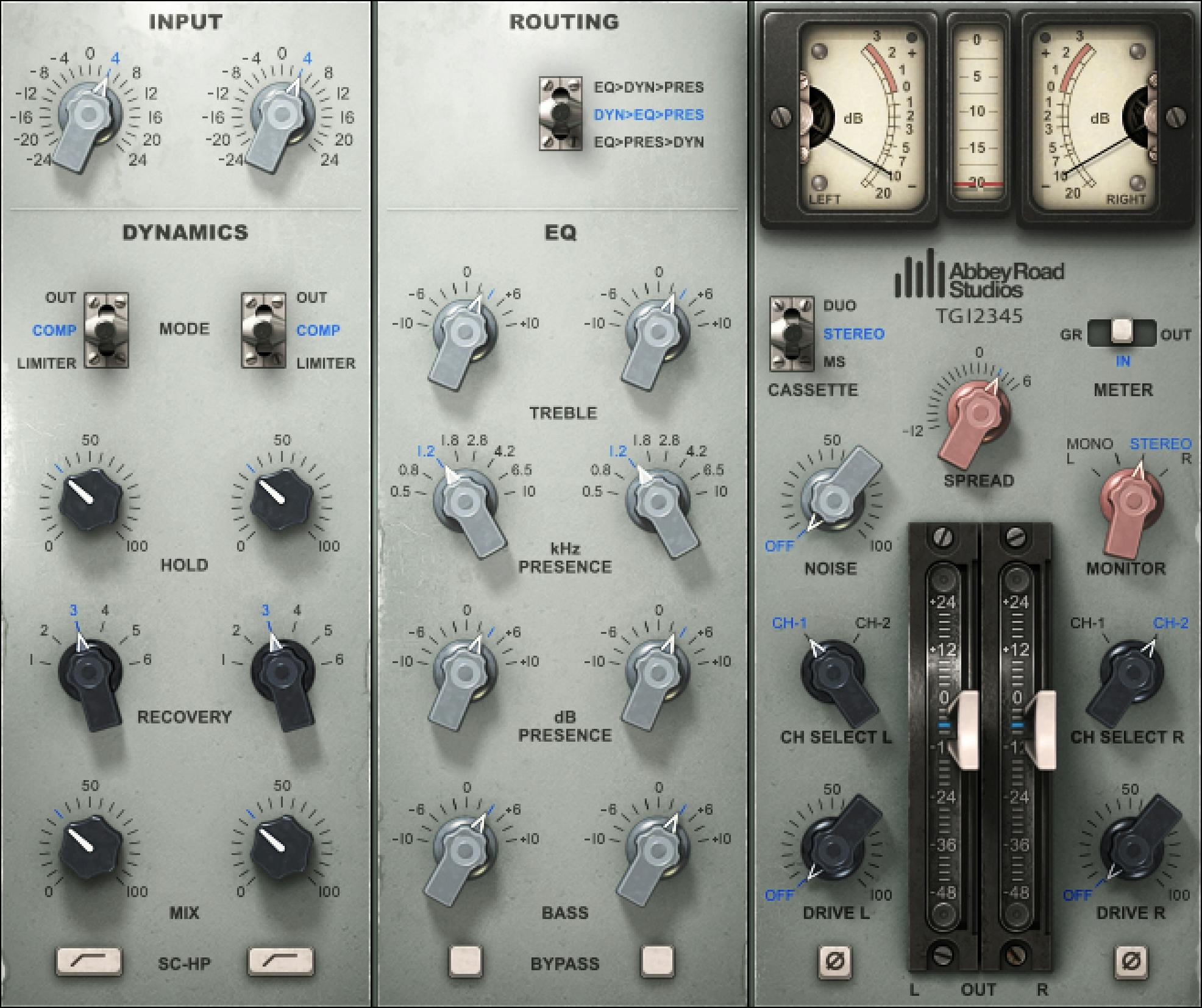
Waves Abbey Road EMI TG12345 Channel is a console-channel model that combines input staging, three configurable processing orders, fixed-ratio compressor/limiter modes, a three-band EQ, modeled channel choices, drive/noise controls, and stereo-domain options. The plugin is based on the solid-state EMI TG12345 console family associated with Abbey Road, but this article focuses on what the current Waves plugin controls actually do. [1][2]
The most useful thing to understand up front is that TG12345 is not a single fixed chain. You can move the EQ, dynamics and presence/console sections into three documented routing orders, then choose compression or limiting, set Hold’s sidechain DC voltage, and choose a Recovery release time. [1]
My Short Version
Start with Input near unity, select the routing order you actually want, then decide whether the dynamics section should be Out, Compressor or Limiter. Hold sets a constant DC voltage for the sidechain and changes the attenuation/gain-change behavior; Recovery selects the release time. Neither is a conventional threshold/attack pair. [1]
Use the three EQ bands for broad console-style tone shaping. If low frequencies are driving the dynamics too hard, enable the SC-HP sidechain high-pass filter. Use Mix if you want parallel dynamics, and treat Drive and Noise as deliberate modeled-console coloration controls rather than mandatory realism settings. [1]
For stereo material, pay attention to the Stereo / Duo / M/S cassette-mode selector, the channel-model choices, Spread, and Monitor. These change which stereo domain you are working in and how the left/right or mid/side information is auditioned. [1][3]
I did not listen to or measure EMI TG12345 for this article. These recommendations are based on Waves’ documented controls and routing.
Components
The current manual documents mono and stereo components. [1]
The stereo component exposes additional stereo-domain controls, including Spread, the expanded Monitor options and the visible Stereo/Duo/M/S operating selector. [1][3]
Input
Input adjusts the level entering the modeled channel. [1]
- Range: -24 dB to +24 dB
- Default: 0 dB [1]
Because this is a modeled nonlinear channel, changing Input can affect how hard the dynamics and modeled console stages are driven, not merely final loudness.
Routing order
The Routing selector changes the order of the major processing stages. The manual documents three arrangements: [1]
- EQ > Dyn > Pres
- Dyn > EQ > Pres
- EQ > Pres > Dyn — documented default [1]
Here, Dyn is Dynamics and Pres is Presence. Waves describes the separate EQ stage as Treble + Bass. Changing the order can change how EQ boosts/cuts feed the compressor/limiter and whether dynamics reacts before or after that tonal shaping.
This article does not claim that one routing is universally better; it is a topology choice.
Dynamics Mode: Out, Compressor and Limiter
The Dynamics Mode selector has three documented states: [1]
- Out — dynamics section bypassed; documented default
- Compressor — fixed 2:1 ratio, fixed 1 ms attack
- Limiter — fixed 7:1 ratio, fixed 1 ms attack [1]
The plugin therefore does not expose conventional Ratio or Attack knobs. Choose the dynamics character with this selector; Hold sets the sidechain’s constant DC voltage, while Recovery selects a release time. [1]
Hold
Hold is a key TG12345 dynamics control. [1]
- Range: 0 to 100
- Default: 0 [1]
The manual says Hold sets a constant DC voltage for the sidechain. Below that voltage, attenuation is fixed; above it, the simulated diode is breached and the VCA gain change varies with the VCA characteristics.
Waves describes Hold as the control for narrowing the VCA gain-change range. Its suggested workflow is to watch gain reduction, adjust Hold for the desired compression, then make up level with the output faders.
The 0–100 scale is not a threshold scale. [1]
Because this is not documented as a simple dB threshold scale, do not translate the 0–100 positions into threshold values.
Recovery
Recovery selects the gain-reduction recovery/release time. The documented positions are: [1]
- 100 ms — documented default
- 250 ms
- 500 ms
- 1 s
- 2 s
- 5 s [1]
Shorter settings select a shorter release time; longer settings select a longer release time. This describes the documented control, not which setting sounds best on a given source.
Sidechain high-pass filter
SC-HP switches in a sidechain high-pass filter at approximately 90 Hz. [1]
- States: Off / On
- Default: Off [1]
This reduces how strongly low bass content influences the dynamics detector. It does not remove that bass from the audible program path.
Dynamics Mix
Mix blends the dynamics-processed and unprocessed signal. [1]
- Range: 0% to 100%
- Resolution: 0.1%
- Default: 100% [1]
At 100%, you hear the full dynamics path. Lower values create a parallel blend without needing an external parallel bus.
Bass EQ
Bass is a fixed-frequency low-shelf EQ centered at 50 Hz. [1]
- Gain: -10 dB to +10 dB
- Default: 0 dB [1]
Use it for broad low-end changes rather than narrow resonant correction.
Presence Frequency and Gain
The Presence section is a bell EQ with independently adjustable frequency and gain. [1]
- Frequency: 500 Hz to 10 kHz, continuous
- Documented default frequency: 1.8 kHz
- Gain: -10 dB to +10 dB
- Default gain: 0 dB [1]
This is the plugin’s sweepable mid/presence band.
Treble EQ
The Treble control uses different fixed shapes for boost and cut. [1]
- Boost: bell centered at 5 kHz
- Cut: shelf centered at 10 kHz
- Gain range: -10 dB to +10 dB
- Default: 0 dB [1]
That asymmetry is intentional. A positive and negative Treble setting are not simply mirror images of the same filter shape.
EQ Bypass
EQ Bypass switches the EQ section in or out. [1]
- States: Off / On
- Default: Off [1]
The manual’s labeling means the bypass itself defaults off—that is, the EQ path is not bypassed by default.
Phase
The Phase switch is available per channel. [1]
- States: Off / On
- Default: Off [1]
Use it to invert polarity for the relevant channel/domain. This is a polarity inversion, not a continuously variable phase-alignment control.
Mode: Stereo, Duo and M/S
The current interface exposes Stereo / Duo / M/S modes. Waves’ official comparison article explains the key distinction: [3]
- Stereo — stereo operation
- Duo — independent left and right channel processing
- M/S — mid/side operation [3]
The product-linked manual does not separately publish a detailed table for the selector’s linkage/automation semantics or a documented factory default. This article therefore preserves only the operating-domain distinction supported by the official Waves material and does not invent how every control links during mode changes. [1][3]
Channel Selector
The Channel Selector chooses between modeled console channels 1 and 2. [1]
For mono, select either channel 1 or 2. In stereo, choose channel 1 or 2 for L, R, or both. The manual documents: [1]
- Left default: 1
- Right default: 2 [1]
Waves recommends using the same modeled channel on both sides when you want the stereo image to stay closer to the source rather than deliberately introducing channel-to-channel modeled differences. [1]
Drive
Drive controls modeled harmonic/nonlinear drive. [1]
- Range: Off to 100
- Default: Off [1]
Raise it only when you intentionally want more modeled console coloration. The manual does not provide a direct mapping from the 0–100 scale to a THD percentage or hardware operating level, so none is invented here.
Noise
Noise controls modeled console noise. [1]
- Range: Off to 100
- Default: Off [1]
Noise is optional. Turning it up is an aesthetic/modeling choice, not a requirement for the rest of the channel processing to work.
Spread
The stereo component’s Spread control changes side information while keeping the mid component constant. [1]
- Range: -12 dB to +6 dB
- Resolution: 0.1 dB
- Default: 0 dB [1]
Spread works in all cassette modes, not only M/S. Its 0 dB setting is the documented default; negative settings lower the sides and positive settings raise them while the mid level remains constant. Waves notes that the matrix encoding and decoding do not cancel perfectly, so 0 dB must not be treated as proof of a transparent bypass.
Monitor
The stereo component’s Monitor selector changes what you audition. [1]
Documented options include:
- Left — or Mid when operating in M/S
- Mono — sums left and right and applies a documented 6 dB trim
- Stereo — documented default
- Right — or Sides when operating in M/S [1]
Monitor is an auditioning control. It does not mean the final stereo signal is permanently converted to the selected audition mode when you return to Stereo monitoring.
Output
Output controls final plugin output level. [1]
- Range: -48 dB to +24 dB
- Default: 0 dB [1]
Use it for final level management after the modeled channel and dynamics/EQ stages.
VU meters
The VU meters can display input, output or gain reduction depending on meter mode. [1]
Published ranges:
- IN / OUT: -20 to +3 VU
- GR: -20 to +9 VU [1]
The manual lists VU and Peak Meter scales separately; retain each unit as printed rather than treating VU markings as peak-meter values.
Peak and gain-reduction meters
The digital peak/GR meter ranges are documented as: [1]
- IN / OUT: -20 dBFS to 0 dBFS
- GR: -20 dBfs to +9 dBfs, as printed in the manual [1]
A clip indicator shows peak clipping. The current manual does not document click-to-reset behavior for that indicator, so this article does not borrow reset behavior from other Waves plugins.
VU calibration
The VU calibration control sets the headroom relationship between digital level and the VU reference. [1]
- Range: 8 dB to 24 dB of headroom
- Equivalent reference notation shown by Waves: -8 to -24 dBFS
- Default: 18 dB headroom [1]
This changes meter calibration/reference, not the compressor ratio.
Meter source selector
The meter-source selector provides: [1]
- GR — gain reduction
- IN — input, documented default
- OUT — output [1]
Waves notes that the GR display does not account for every fixed amplification factor in the modeled signal path. Treat it as the plugin’s documented gain-reduction indication rather than a complete end-to-end loudness accounting. [1]
A practical workflow
Choose the signal-flow order first so you know whether your EQ is driving the dynamics section or following it. Then set Input and choose Compressor, Limiter or Out. [1]
Use Hold while watching gain reduction, then select Recovery according to how quickly you want the action to recover. If bass is dominating the detector, try SC-HP. If you want less than fully wet dynamics, reduce Mix. [1]
Shape broad tone with Bass, Presence and Treble, then decide whether modeled channel variation, Drive and Noise are useful for this source. On stereo material, use Stereo/Duo/M/S deliberately rather than changing modes without checking the monitoring domain and channel selectors. [1][3]
Finally use Output and the VU/peak meters to manage level. The WaveSystem toolbar also provides preset save/load, compare, undo/redo, resize, and access to its guide. These are editorial workflow suggestions based on documented controls, not a listening result. [1]
Best for / skip if
EMI TG12345 is best when you want a single modeled console-style channel with broad EQ, fixed-ratio dynamics, routing choices and optional modeled drive/noise, including stereo-domain controls in one interface. [1][2]
Skip it when you need fully variable compressor ratio/attack, surgical parametric EQ, or a transparent processor whose behavior is defined only by modern digital parameters. Those are not the design of this plugin.
Limitations and evidence boundary
This is documentation-led. I did not compare the plugin with an original EMI console, measure distortion/noise, verify time constants with test signals, evaluate crosstalk, benchmark CPU/latency, or run a native-host listening test.
The current official product page and product-linked manual were checked, and official full-interface/control pages were visually inspected. The visible Stereo/Duo/M/S selector is supported by Waves’ current official REDD-vs-TG12345 comparison article because the user guide does not separately provide a complete selector table. Detailed linkage behavior/default for that selector remains unspecified rather than inferred from the artwork. [1][3]
Related guides
For more context, read Waves’ Abbey Road REDD vs. EMI TG12345 comparison or visit the Waves product page.
Bottom line
Abbey Road EMI TG12345 Channel is a configurable modeled console strip: choose the processing order, select compression or limiting, shape the dynamics with Hold and Recovery, use its three-band EQ, then decide how much channel variation, drive, noise and stereo-domain processing you actually want. [1][2][3]
Its controls are unusual enough that the biggest mistake is treating it like a generic modern channel strip. Hold, fixed recovery positions, asymmetric Treble curves and the console-domain controls are the point of the design.
Sources
Checked October 18, 2026. No listening, native-host, compatibility, CPU or measurement test was performed.
- Waves Abbey Road EMI TG12345 Channel User Guide, current product-linked guide. Full-interface and control pages were visually inspected.
- Waves Abbey Road EMI TG12345 Channel product page, current product identity and use context.
- Waves: Abbey Road REDD vs. EMI TG12345 — Console Plugins Compared, official Waves comparison used only to resolve the visible Stereo/Duo/M/S mode distinction that is not separately tabulated by the current user guide.
- Waves Graphic Library, which lists Abbey Road EMI TG12345 and permits use of images on that library page when the displayed image links back to the relevant Waves product page.
FAQ
What are the TG12345 routing options?
The guide lists EQ > Dyn > Pres, Dyn > EQ > Pres, and EQ > Pres > Dyn; EQ means Treble plus Bass, and EQ > Pres > Dyn is the documented default.
What do the Compressor and Limiter modes change?
The guide documents Compressor at a fixed 2:1 ratio and Limiter at a fixed 7:1 ratio; both have a fixed 1 ms attack. Out bypasses Dynamics and is the default.
What does Hold do?
Hold sets a constant DC voltage for the sidechain. The guide describes fixed attenuation below that voltage and changing VCA gain above it; the 0–100 scale is not a threshold value.
What release times are available?
Recovery offers 100 ms, 250 ms, 500 ms, 1 s, 2 s, and 5 s; the documented default is 100 ms.
What does SC-HP do?
SC-HP applies a high-pass filter at around 90 Hz to the sidechain. It defaults Off; the guide explains that filtering low-frequency energy in the detector can result in less compression on low notes.
How do the Treble boost and cut shapes differ?
The guide specifies a fixed 5 kHz bell for boost and a fixed 10 kHz shelf for cut, with a -10 dB to +10 dB range and 0 dB default.
What is the difference between Stereo, Duo, and M/S?
Waves describes Duo as independent left/right channels and M/S as mid-side operation, alongside Stereo. The current guide and comparison do not establish detailed linkage, automation, or a factory default for the selector.
What does Spread change?
Spread changes the side level while leaving the mid level constant. The guide gives a -12 dB to +6 dB range, 0.1 dB increments, and a 0 dB default; it also notes that the matrix encode/decode do not cancel perfectly.

About the Author
Joseph Nilo has been working professionally in all aspects of audio and video production for over twenty years. His day-to-day work finds him working as a video editor, 2D and 3D motion graphics designer, voiceover artist and audio engineer, and colorist for corporate projects and feature films.