
Waves eMo Generator creates pink noise, white noise or a sine wave, with output gain and stereo routing controls. It provides a test signal; it does not analyze the resulting sound or tell you whether a system is correctly calibrated.
Its small panel is useful precisely because each decision is separate: choose the signal, choose a frequency when using Sine, set the level, then decide which stereo output should receive it.
This guide follows the complete official manual and authentic interface image. I have not generated a signal, measured a system or tested a plug-in installation. Signal descriptions below are Waves' specifications, not measurements.
My Short Version
Frequency belongs to Sine only. The knob does not turn pink or white noise into a selectable narrow frequency band.
Gain is digital output level, not acoustic SPL. A value on this panel cannot establish how loud a connected speaker will be.
Routing and Phase are stereo-only. They are separate from the choice of noise or tone.
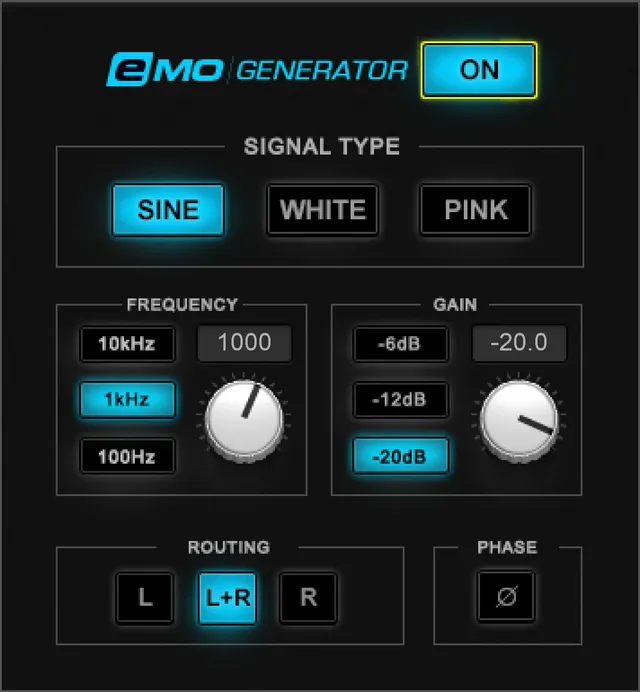
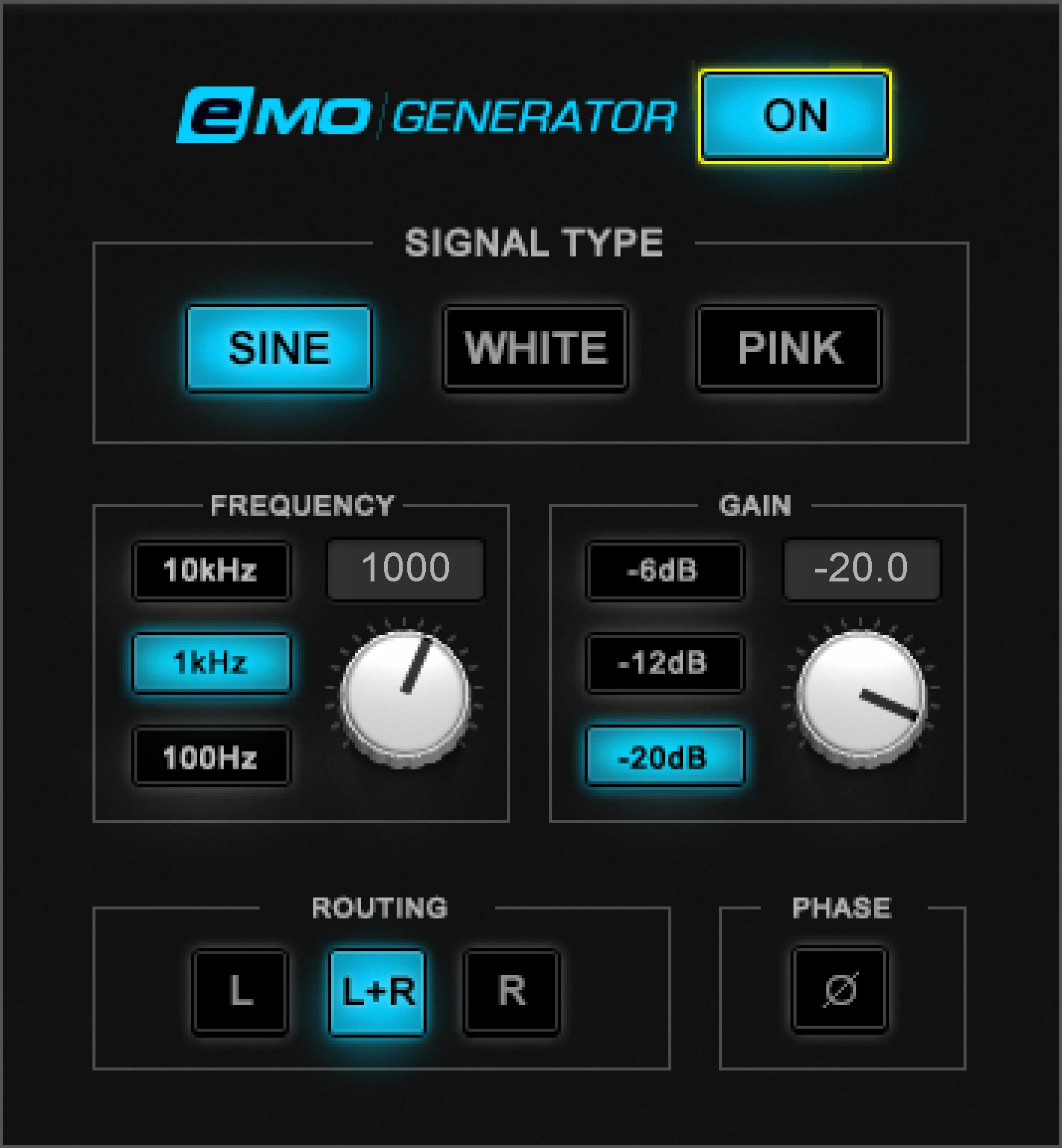
The manual's defaults are Off, Pink, 1000 Hz, −20 dB and L+R where the corresponding controls apply. The picture's On/Sine selections are examples, not different defaults.
Best for and when to choose another tool
Best for: generating a simple source for a controlled routing check, a manually selected tone or a measurement workflow that already has suitable external metering.
Choose another tool when: you need a calibrated acoustic analyzer, automated frequency-sweep sequencing, a noise-reduction processor or a loudness-compliance report. Those functions are not documented here.
Waves suggests pink noise for system testing, white noise for SPL measurements and sine tones for sweeping or tuning. Those suggested uses do not make the generator itself a measuring instrument.
Mono, Stereo and the authentic panel
The guide names eMo Generator Mono and eMo Generator Stereo.
Both offer On/Off, Signal Type, Sine Frequency and Gain. Routing and Phase appear only in Stereo. Frequency is available only while Sine is selected.
The official Library image shows the Stereo panel with On, Sine, Frequency, Gain, Routing and Phase. It is a static example, not evidence of generated audio or initialized settings.
On/Off: enable the source deliberately
The ON button turns the generator on or off. Its documented default is Off.
Keep enabling the source separate from selecting its settings. A sensible evaluation sequence is to choose the required signal and output level before turning it on.
The manual does not define an input-through path, a wet/dry mix or a special monitor-protection mechanism. Off should not be described as a tested signal-through bypass.
Signal Type: Pink, White or Sine
Pink generates noise over 20 Hz to 21 kHz, described as equal energy in all octaves.
White covers the same stated frequency span, with equal energy per hertz.
Sine produces a pure sine-wave tone in the guide's description. The Frequency control then becomes available.
Pink is the documented default. No noise-spectrum measurement was performed for this article, and the source does not supply separate noise-color, bandwidth or crest-factor controls.
A practical distinction is whether the task needs a broad stimulus or one selected tone. Do not use the Sine Frequency knob as though it were a noise filter.
Frequency and its three shortcuts
With Sine selected, Frequency runs from 20 to 21000 Hz, with a 1000 Hz default.
You can turn the knob, type the frequency, or use the 100 Hz, 1 kHz and 10 kHz shortcut buttons. The default shortcut is 1 kHz, matching 1000 Hz.
The guide calls the frequency fully sweepable and describes sweeping manually with the control.
It does not specify an automatic start/end sweep, duration, sweep curve, oscillator phase reset or a sequence of timed tones. “Sweepable” is not a reason to add those functions.
Gain and level shortcuts
Gain controls the generated signal's output level. Its documented range is −120 to 0 dB, with a −20 dB default.
Adjust it with the knob, type a value, or choose −6 dB, −12 dB or −20 dB. The default shortcut is −20 dB.
The upper endpoint is a digital control setting, not a promise of safe speaker level. Acoustic output also depends on the playback chain and monitor settings.
The panel has no documented output meter, SPL readout, clip-light reset or calibration reference. No conversion from a Gain setting to an acoustic measurement is established by this guide.
Stereo Routing
In the Stereo component, Routing selects L, L+R or R. Its default is L+R.
This lets a signal be assigned to the left output, right output or both without treating the signal-type selector as a channel selector.
For a basic channel-identification task, keep the signal and level fixed while changing only the destination. That is conceptual workflow advice, not a report that any particular wiring was tested.
Routing is not documented as a pan law, stereo-width control or input-channel processor.
Stereo Phase
Phase flips phase by 180 degrees between the left and right outputs. It is available only in Stereo.
The guide does not state a default Phase position. Nor does it define which output is the reference, a continuously variable phase angle or independent phase knobs for both channels.
This control changes a relationship between outputs. It is not an automatic speaker-alignment or room-correction function.
Toolbar and a cautious workflow
The WaveSystem toolbar provides preset save/load, setting comparison, undo/redo, resizing and access to the WaveSystem Guide. Previous/next preset arrows are visible in the guide's toolbar illustration.
The authentic Library panel crop does not include that toolbar. Its absence from the crop is not evidence that the shared utilities have been removed.
Before enabling the generator, settle signal type, level and destination. Keep physical monitoring under separate control and use appropriate independent measurement equipment for a measurement task.
No fixed digital Gain value can serve as a universal safe listening level. This guide does not prescribe an acoustic calibration procedure.
Related Waves guides
The WLM Plus guide explains separate level and loudness metering. It is not an acoustic SPL-calibration certificate for a generated signal.
Find other verified live articles in the Waves Audio Post Resources hub. Licensing is covered separately in subscription versus perpetual licensing.
Sources and documentation limits
Checked October 19, 2026, America/New_York. The official eMo Generator product page links the complete six-page user guide, read in full.
Pages 3–4 establish components and conditional controls; pages 5–6 define the options, values and toolbar. The genuine Graphic Library image corresponds to that panel.
No automatic sweep, measured spectrum, SPL calibration, Phase default, output analysis or installed compatibility result is established here.
FAQ
What does Waves eMo Generator do?
eMo Generator creates pink noise, white noise or a sine wave. It is a signal source, not a noise-removal processor or measurement meter. Waves describes uses such as system checks, instrument tuning and left/right wiring checks, but no output, acoustic calibration or measurement result was tested for this guide.
What are the documented startup defaults?
The guide states On/Off defaults to Off, Signal Type to Pink, Frequency to 1000 Hz, Gain to −20 dB and stereo Routing to L+R. Frequency is available only for Sine. No Phase default is stated. The official picture shows On and Sine, which are illustrative selections rather than evidence that the written defaults changed.
How are pink noise and white noise different?
Waves describes both noise types over 20 Hz to 21 kHz. Pink has equal energy in each octave; White has equal energy per hertz. These are the vendor's signal descriptions, not measured spectra from this article. The Frequency control is not documented as a filter for either noise type.
How do I choose a sine-wave frequency?
With Sine selected, use the Frequency knob, type a value, or choose the 100 Hz, 1 kHz and 10 kHz shortcuts. The documented range is 20 to 21000 Hz and the default is 1000 Hz. The guide describes manually sweeping the control, not a timed automatic sweep or logarithmic sweep program.
What does Gain control, and what are its shortcuts?
Gain sets the generated signal's output level. Its documented range is −120 to 0 dB, with a −20 dB default and shortcuts at −6, −12 and −20 dB. Those settings do not establish an acoustic sound-pressure level, a calibrated speaker output or a safe monitoring volume.
Which controls are stereo-only?
Routing and Phase are available only in the Stereo component. Routing selects L, L+R or R and defaults to L+R. Phase introduces a 180-degree phase difference between left and right outputs. The guide does not state a Phase default or describe independent phase controls for both channels.
Can eMo Generator measure SPL or certify a sound system?
The manual suggests white noise for SPL measurements and pink noise for system testing and tuning. Generating a stimulus is not the same as measuring it. The documented panel has no SPL meter, acoustic calibration procedure or analyzer, and this guide does not establish measurement compliance or a tested system result.
What should I check before turning the generator on?
Choose the required signal, set a conservative output level and, in Stereo, confirm the intended output routing before enabling it. Keep monitor level under separate control. This is cautious workflow advice, not a tested calibration procedure; the generator's digital Gain value alone does not determine the physical loudness at the speakers.

About the Author
Joseph Nilo has been working professionally in all aspects of audio and video production for over twenty years. His day-to-day work finds him working as a video editor, 2D and 3D motion graphics designer, voiceover artist and audio engineer, and colorist for corporate projects and feature films.