
Waves H-Comp is a compressor with parallel Mix, transient Punch, tempo-related Release and four optional Analog characters. Its output switch chooses a limiter or a clipper; turning Limiter off does not remove peak processing.
This guide follows the complete current product-linked manual, the official product page and authentic Waves imagery. I have not run or auditioned H-Comp. Sonic descriptions, gain behavior and modeled-hardware claims below are Waves' documentation, not results from listening or measurement here.
My Short Version
Set Threshold and Ratio for the compression, then use Attack and Punch for different jobs. Attack sets timing; Punch lets transients through regardless of that timing, according to the guide.
Choose whether Release should be manual in milliseconds, tied to the host tempo or tied to a manually entered BPM. Here, MS means milliseconds, not Mid/Side.
Use Mix to blend compressed and uncompressed signals. Automatic makeup aims for approximately similar levels, but the Analog options affect both wet and dry, so the dry end is not a promise of entirely untouched sound.
Finish by checking Output and the meter mode. Limiter Off selects a clipper, and neither position is documented as a universal downstream safety guarantee.
What H-Comp suits—and what it does not establish
Best for: a compressor workflow that combines conventional dynamics controls, an exposed wet/dry blend, transient pass-through and musical release timing. Waves positions it for drums, loops, buses, vocals and other sources.
That is vendor positioning, not a finding that a particular source sounds better through it.
Skip if: you need a documented transparent dry path with Analog engaged, exact automatic loudness matching, or a verified limiter/clipper ceiling and signal-order specification.
The guide documents Mono-to-Mono and Stereo-to-Stereo host components. There is no separately documented Mid/Side processing mode, stereo-link adjustment or external-sidechain panel in this guide.
Threshold, Ratio and automatic makeup
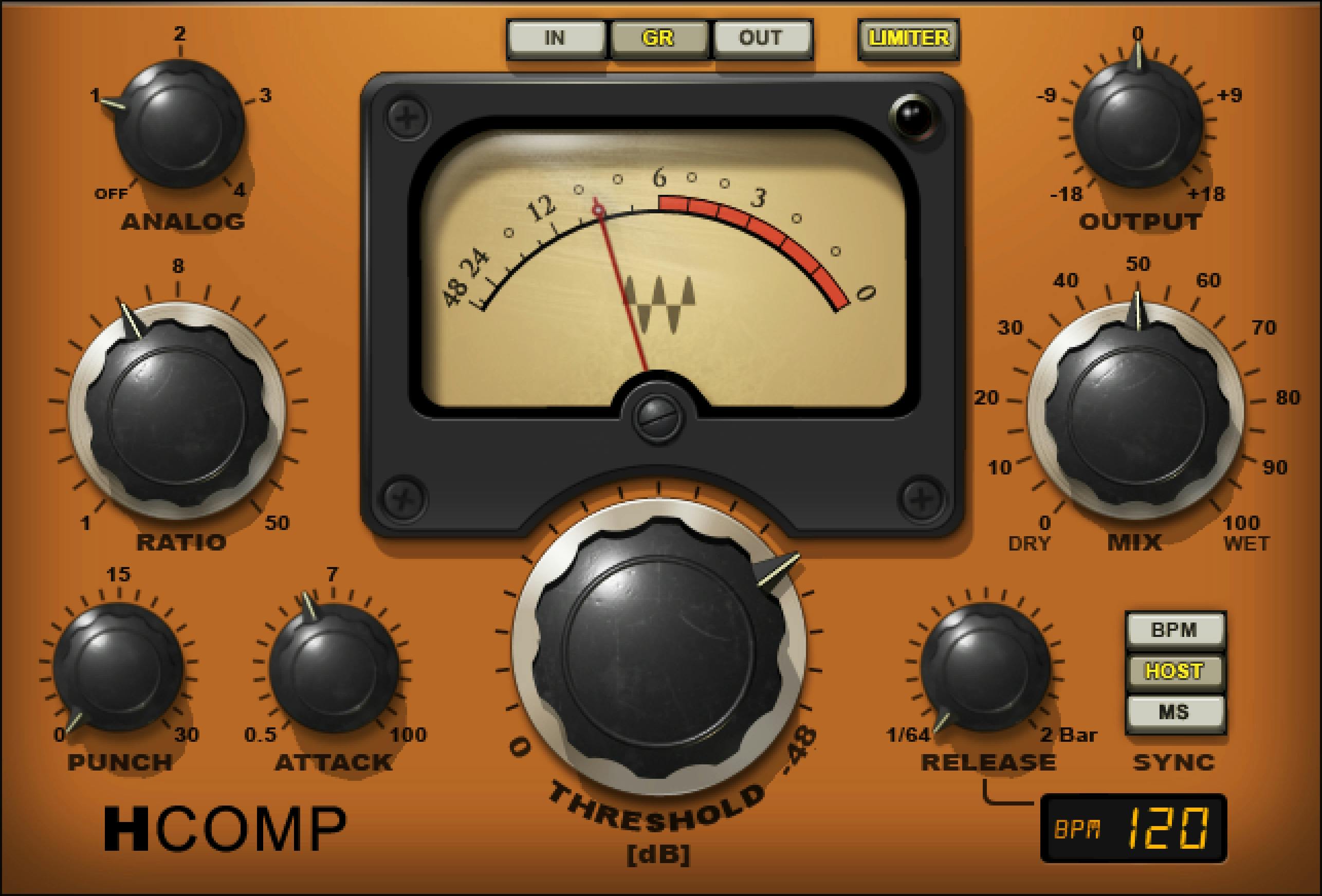
Threshold sets where compression begins. The manual prints its range as 0 to −48 dB, default −18 dB.
Ratio ranges 1–50, default 3. These are ratio values, not an additional gain control; the guide does not supply a manual Knee control or a complete numerical transfer curve.
H-Comp has automatic makeup gain. Waves says it is designed to keep the uncompressed and compressed signals at approximately the same level.
The word approximately matters. That description does not establish a perfect loudness match at every threshold, ratio, source or Mix setting.
There is no separate makeup amount or enable switch documented here. Output remains the exposed output-gain adjustment, not a manual control for the automatic makeup algorithm.
Attack and Punch are different controls
Attack, 0.5–100 ms, default 7 ms, sets how quickly compression engages.
Punch, 0–30, default 1, controls how much transient material passes through compression regardless of Attack time.
This can be useful conceptually when a fast timing choice removes an onset you intended to retain. The guide describes Punch as preserving or restoring transient behavior; that is not a measured reconstruction of a lost transient.
Punch's numerical scale is not specified in milliseconds, dB or percent. Nor does the source publish its detector law, an independent threshold or a proof that zero equals a particular bypass state.
Use it as its own transient control rather than relabeling it as a second Attack knob.
Release and its three Sync modes
Release determines how compression fades out. The documented range is 3 ms to 3 seconds, or musical BPM multiples/note values. Its stated default is 100 ms.
Sync chooses among three modes:
| Mode | Release reference |
|---|---|
| Host | The host application's BPM. |
| BPM | A manually set tempo. |
| MS | Manual release time in milliseconds. |
MS is the default mode. It does not refer to middle/sides processing.
In Host and BPM modes, Release displays musical multipliers rather than a millisecond value. The manual does not enumerate the complete note-value menu.
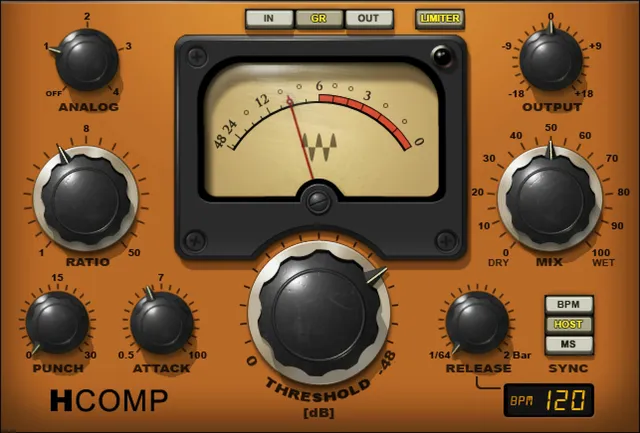
The genuine artwork shows 1/64 and 2 Bar at the Release scale's ends. Those visible labels should not be expanded into an invented complete menu, increment list or independently tested range.
A release matched to a tempo is a timing relationship, not a guarantee that it suits the groove or avoids audible pumping.
BPM display and manual entry
The BPM readout shows the host tempo in Host mode. In BPM mode, the guide says its value can be changed with the mouse or manual text entry.
Its printed range is Off, 30–300, with Off as default.
That Off entry is not explained as global compressor bypass or removal of Release processing. The sources do not supply an additional fourth Sync mode.
The original's displayed 120 BPM and the manual illustration's 123 BPM are example states. They are not conflicting factory defaults.
Mix—and why Dry is not necessarily uncolored
Mix blends 0 Dry to 100 Wet, default 100. Dry is the direct uncompressed input; Wet is the compressed contribution.
This is the documented parallel-compression blend, not an ordinary plugin bypass switch. The automatic-makeup design is intended to help balance the contributions, but does not establish exact equal loudness.
The current official H-Comp page explicitly says its four Analog options process both wet and dry signals.
That distinction is easy to miss. Turning Mix toward Dry removes compressed contribution, but it should not be described as removing all Analog color while an Analog mode remains active.
The sources do not publish the blend law or enough internal routing detail to reconstruct the entire signal graph.
Four Analog modes plus Off
Analog selects general character processing, with mode 2 as default.
| Setting | Guide's description |
|---|---|
| 1 | Transformer or tube. |
| 2 | Transistor. |
| 3 | Driven tube/transistor tone 1. |
| 4 | Driven tube/transistor tone 2, no added noise. |
| Off | No Analog processing. |
The guide's overview calls these four Analog modes. Its control section lists Off as a fifth entry. That is four active choices plus Off, not a fifth active model.
Waves describes harmonic enhancement and a small amount of noise as part of the general analog emulation, with mode 4's explicit no-added-noise qualification.
The manual also says these are not models of specific devices. References to the company's earlier SSL, API and V-Series modeling do not identify any H-Comp mode as a particular hardware unit.
No harmonic spectrum, noise floor, frequency response or subjective comparison was measured for this guide.
Limiter On, clipper Off and Output
Limiter On selects peak limiting; Off selects clipping. The stated default is Off, meaning the clipper choice.
That is materially different from a switch that bypasses all output peak processing.
The guide supplies no limiter/clipper threshold, numerical ceiling, release/lookahead parameter or exact transfer law. It also does not establish the precise order relative to Output gain.
Output, called Output Trim in the annotated interface, ranges −18 to +18 dB, default 0. These labels refer to the pictured gain control, not two independent trims.
Do not infer a guaranteed output ceiling from the switch, the nearby lamp or the knob positions. Host levels and downstream stages are separate from a vendor's broad statement about keeping output under control.
Meter selection and peak indication
IN, GR and OUT select input level, gain reduction and output level. The default is GR.
Waves explicitly says GR uses a different scale from IN/OUT and shows total attenuation taking compression, Mix position and limiter activity into account.
It is therefore not compressor-only gain reduction. A change in Mix can change the reading even when the compression settings stay put.
The guide does not separately promise how clipper activity is represented. It gives the VU meter's printed range as 0 to −48 dB, without a full per-mode calibration map.
Meter ballistics, dBVU/dBFS reference, peak hold and reset behavior are not specified.
The annotated interface identifies a Peak Indicator, also visible beside the genuine meter. Its exact trigger threshold, retention and reset behavior are not defined. It should not be promoted into a documented click-to-reset control or a clip-proof output indicator.
Presets, toolbar and a deliberate setup
The WaveSystem toolbar provides preset save/load, compare, undo/redo, resizing and Guide access. No separate global reset operation is documented by this product guide.
For a conceptual workflow, first decide what the compression should control. Set Threshold and Ratio, then adjust Attack.
If the transient behavior needs a separate change, consider Punch rather than assuming that only Attack can affect the onset. Choose Release mode before deciding whether its displayed value is time or musical notation.
Use Mix to choose the compressed contribution, and compare Analog choices with their wet-and-dry scope in mind. Revisit Output and meter selection after changes.
Those steps follow the documented relationships. They are not an auditioned preset, a recommendation of particular settings or proof that automatic makeup has matched loudness.
Related guides
The Renaissance Compressor guide covers another compressor control set. Its behavior should not be used to fill H-Comp's undocumented meter or output-stage details.
For a frequency-selective dynamics job, the F6 guide explains a different tool. H-Comp's exposed controls are not a bank of dynamic-EQ bands.
The Waves audio and post resources hub collects the existing related guides.
Sources and documentation limits
Sources checked October 19, 2026, EDT:
- Official H-Comp Hybrid Compressor page, current component listing and explicit wet-and-dry Analog statement.
- Complete H-Comp User Guide, 10 pages: concepts/components p.4; Quick Start p.5; annotated interface p.6; Threshold/Ratio/Mix/automatic makeup p.7; timing/Punch/Sync p.8; BPM/Analog/Limiter/Output p.9; meters/toolbar p.10.
- Waves Graphic Library, authentic original and attribution/product-backlink terms.
Unwritten musical-value choices, algorithms, output-stage order/ceiling, meter calibration and peak-indicator behavior remain unspecified. Current product marketing is not a substitute for measured gain matching, listening results or downstream safety proof.
FAQ
Does H-Comp's Mix control work like bypass?
No. Mix blends direct uncompressed input at 0 with compressed signal at 100, default 100. The manual describes automatic makeup as aiming for approximately similar uncompressed and compressed levels, not a perfect loudness match. The current product page also says Analog processing affects both wet and dry, so Dry is not a promise of entirely untouched audio.
Do H-Comp's Analog modes affect the dry signal too?
Yes, according to the current official product page, the four analog options process both wet and dry signals. The manual calls them general analog emulations rather than models of specific devices. Choosing more dry with Mix therefore does not necessarily remove Analog color. No harmonic or noise measurements were made for this guide.
What does Punch do when Attack is already fast?
The manual describes Punch as allowing transients through regardless of Attack time. Punch has a 0 to 30 scale, default 1, while Attack is 0.5 to 100 ms, default 7 ms. Punch is not another attack-time control, and the source does not give it a percent, dB or timing unit or a complete transfer law.
How do Host, BPM and MS release modes differ?
Host uses the host application's tempo; BPM uses a manually entered tempo; MS sets Release in milliseconds. MS means milliseconds here, not Mid/Side, and is the default mode. Release is documented as 3 ms to 3 seconds or musical note values, default 100 ms. The complete musical-value list is not enumerated in the guide.
Why does the BPM readout have Off as its default?
The manual explicitly lists the BPM readout as Off or 30 to 300, default Off. In Host mode it displays host tempo; in BPM mode the value can be changed by mouse or text entry. It does not explain Off as disabling the compressor or all release processing. The pictured 120 or 123 BPM readings are illustrative, not conflicting default specifications.
Are there four Analog modes or five?
There are four active modes plus Off. Mode 1 is described as transformer or tube, 2 as transistor, 3 as driven tube/transistor tone 1 and 4 as driven tube/transistor tone 2 with no added noise. Off means no analog processing. The stated default is 2; the guide's fifth listed entry is Off, not a fifth active model.
Does switching the Limiter off remove peak processing?
No. The guide says On selects a limiter and Off selects a clipper, with Off as default. It does not publish a limiter or clipper ceiling, threshold, timing law or exact order relative to Output gain. Neither switch position establishes a measured true-peak ceiling or a guarantee against clipping downstream.
What does H-Comp's GR meter include?
The manual says GR reflects total attenuation taking compression, Mix position and limiter activity into account, rather than compressor reduction alone. IN and OUT use a different scale from GR, and GR is the default selection. The guide gives a 0 to -48 dB meter range but no full calibration, ballistics, peak hold or reset behavior; the nearby peak indicator's exact operation is also unspecified.

About the Author
Joseph Nilo has been working professionally in all aspects of audio and video production for over twenty years. His day-to-day work finds him working as a video editor, 2D and 3D motion graphics designer, voiceover artist and audio engineer, and colorist for corporate projects and feature films.